
You write a script. It works perfectly on a test site. Then you point it at a major retailer or a social platform. Suddenly, your terminal floods with 403 Forbidden errors or infinite CAPTCHA loops.
The era of simple HTML parsing is over.
Modern web scraping requires more than just sending a GET request. Today’s websites are complex applications protected by aggressive defenses. If you want to bypass web scraping blocks, you must understand how browsers talk to servers.
Major platforms like Cloudflare, Akamai, and Datadome act as gatekeepers. They analyze every incoming connection. They check if you are a human or a script. To get past them, you need tools that mimic human behavior perfectly.
We’ll show you how to scrape dynamic websites effectively and why offloading these tasks to Decodo is the smartest move for your data pipeline.
The “Headless” Necessity: Why Simple Requests Fail

In the past, websites sent full HTML pages from the server. Your script downloaded the text, and you extracted the data.
Now, over 70% of modern e-commerce sites rely on Client-Side Rendering (CSR). When you request a URL, the server sends an empty HTML shell. The actual content—prices, inventory, descriptions—loads later via JavaScript.
If you use a standard HTTP library, you get that empty shell. You miss the data entirely.
To see the content, you need javascript rendering for scraping. This usually means running a browser like Chrome or Firefox in the background without a graphical interface. This is known as headless browser scraping.
Running headless browsers is resource-heavy. It eats up RAM and CPU. It also introduces a new problem: detection.
Cracking the Code of Anti-Bot Systems
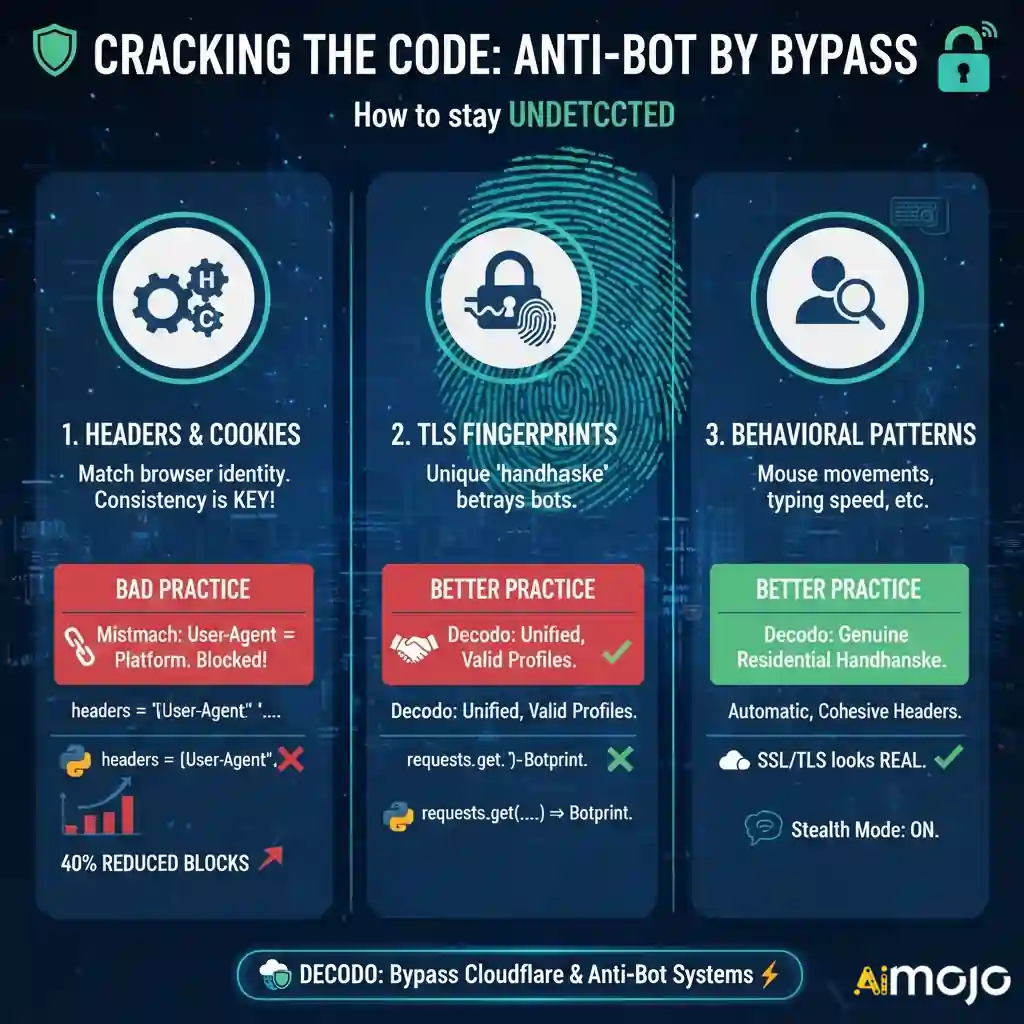
Security systems do not just look at your IP address. They inspect how your “browser” behaves.
If you use a standard automation library, it leaves traces. It might set a variable like navigator.webdriver = true. This is a dead giveaway. Anti-bot systems see this flag and block you immediately.
To bypass cloudflare scraping protections, you must manage three critical layers:
1. Why Matching Headers Matter in Web Scraping
Your request headers tell the server who you are. The most famous one is the User-Agent. However, simply changing your User-Agent string is not enough.
Headers must function as a cohesive unit. If you send a User-Agent that claims to be Chrome on Windows, but your platform headers look like Linux, you get blocked. This mismatch is a primary reason for scraping failures.
Managing request headers correctly can reduce block rates by up to 40% before you even rotate a proxy.
# This often gets blocked immediately
import requests
headers = {‘User-Agent': ‘Mozilla/5.0'}
response = requests.get(‘https://example.com', headers=headers)
Decodo automatically constructs valid, consistent header profiles. It ensures your Accept-Language, Referer, and platform hints match the browser version you are mimicking.
2. The Hidden Trap: TLS Fingerprinting
This is where most custom scrapers fail.
When your script initiates a secure HTTPS connection, it performs a “handshake” with the server. The order and parameters of this handshake create a unique fingerprint, often called a JA3 hash.
Python’s requests library has a very different handshake than a real Chrome browser. Cloudflare sees this difference instantly. Even if your headers are perfect, your tls fingerprinting bypass strategy might fail if the handshake gives you away.
Decodo handles this on the backend. It modifies the low-level SSL/TLS negotiation to look exactly like a genuine user browsing from a residential connection.
Best Tactics to Scrape Single Page Applications Safely

Single Page Applications (SPAs) are notorious for being difficult to scrape. They load data asynchronously. A scraper might trigger the page load, but if it extracts data too soon, it gets nothing.
You need to scrape spa websites by waiting for the “Network Idle” state. This means the browser waits until all background API calls are finished before grabbing the HTML.
Implementing this manually with tools like Puppeteer or Selenium is unstable. Scripts crash. Elements change ID names. Memory leaks slow down your server.
Decodo’s Web Scraping API simplifies this. You send a request, and Decodo spins up the browser, renders the JavaScript, waits for the network to settle, and returns the clean HTML.
Build Scalable, Undetectable Scraping Workflows with Decodo

Building a headless browser scraping grid is expensive. You have to patch Chrome drivers, rotate thousands of IPs, and constantly update your code when Cloudflare changes its algorithm.
Decodo offers a specialized automated browser scraping infrastructure that handles the heavy lifting.
Key Features for Evasion
The platform is built to bypass web scraping blocks by focusing on mimicry and reliability:
Quick Integration Guide: Using Decodo’s Scraping API
Here is how simple it is to switch from a blocked local script to Decodo. You don’t need to manage the browser yourself.
import requests

# Decodo API Endpoint

url = "https://api.decodo.com/v1/scrape"

payload = {

    "url": "https://difficult-site.com/products",

    "render_js": True,  # Activates Headless Browser

    "wait_for_selector": ".product-price", # Waits for dynamic content

    "country": "US" # Uses premium US residential proxies

}

headers = {

    "Authorization": "Bearer YOUR_DECODO_API_KEY",

    "Content-Type": "application/json"

}

response = requests.post(url, json=payload, headers=headers)

if response.status_code == 200:

    print("Scraping Successful!")

    print(response.json()['content'])

else:

    print("Error:", response.text)
Notice the simplicity. You aren’t importing Selenium. You aren’t downloading Chromedriver. You simply tell Decodo, “I need this URL, and please render the JavaScript.”
Choosing Between Puppeteer, Selenium, or Decodo API
Many developers start with open-source tools. It helps to understand the trade-offs of puppeteer vs selenium vs API.
Selenium: Great for testing, but slow and easily detected. It requires heavy modification to avoid anti-bot detection evasion triggers.
Puppeteer/Playwright: Faster and better for javascript rendering for scraping. However, maintaining a fleet of these instances requires significant DevOps knowledge. You still have to solve the proxy and fingerprinting issues manually.

Decodo API: The most efficient path. It provides the power of a headless browser without the maintenance. It solves the tls fingerprinting bypass and header management out of the box.
With Decodo API, teams save development time, reduce infrastructure costs, and achieve higher scraping success rates across complex modern websites.
Scrape Smarter, Not Harder: Let Decodo Handle It
The web is becoming more closed off. Anti-bot detection evasion is an arms race. If you spend your engineering time fighting Cloudflare, you aren’t spending time analyzing your data.
You do not need to build a complex infrastructure to scrape dynamic websites. By using Decodo, you gain access to enterprise-grade headless browser scraping, proper session management, and advanced fingerprint rotation.
Stop getting blocked. Let Decodo handle the browser complexities while you focus on the insights.
AiMojo Recommends:


 BONUS: Get our $200 “AI Mastery Toolkit” FREE when you sign up!