

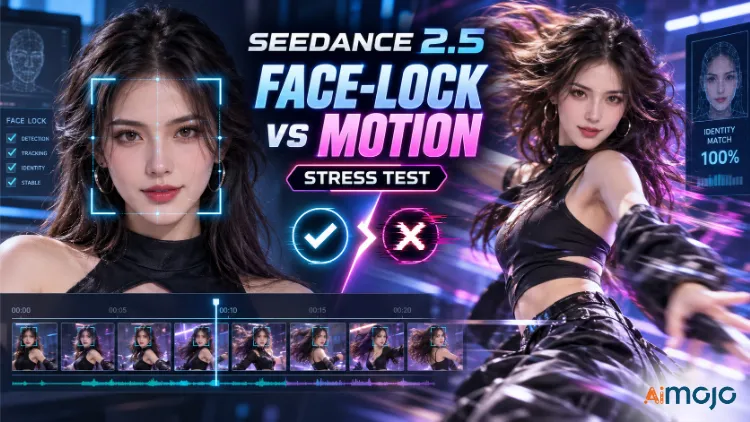
You know the exact moment I mean. Frame one, your AI character looks perfect. Then they turn their head, take two steps, open their mouth to talk — and it’s suddenly someone else’s face stitched onto the same outfit. Cheekbones shift, the nose rearranges itself, that little mole you loved has vanished.
Identity drift is the thing that quietly ruins most AI video, and it’s the reason I stopped admiring demo reels and actually sat down to test Seedance 2.5 in APOB AI myself.
The question I cared about was blunt: can Face-Lock keep a character’s identity nailed down once things move? A pretty face sitting still is trivial. A face that survives a walk cycle, a slow push-in, a head turn, and a line of dialogue without wobbling — that’s the real bar.
So I ran several generations straight from the APOB AI dashboard, watched them frame by frame, and pulled the rest of the specifics from the official product pages so this maps cleanly to what you’ll see on your own screen. Here’s exactly what happened.
Seedance 2.5 in APOB AI: What You’re Actually Working With

Quick grounding before the results. Seedance 2.5 is ByteDance’s newer video generation model, built on the same audio-video joint architecture as Seedance 2.0 but pushed toward longer storytelling, multimodal referencing, and precise timestamp-level editing.
APOB AI is the platform that wraps that model in a creator-friendly workspace — the same tool a lot of people already use to build AI influencers, virtual spokespeople, and recurring branded characters.
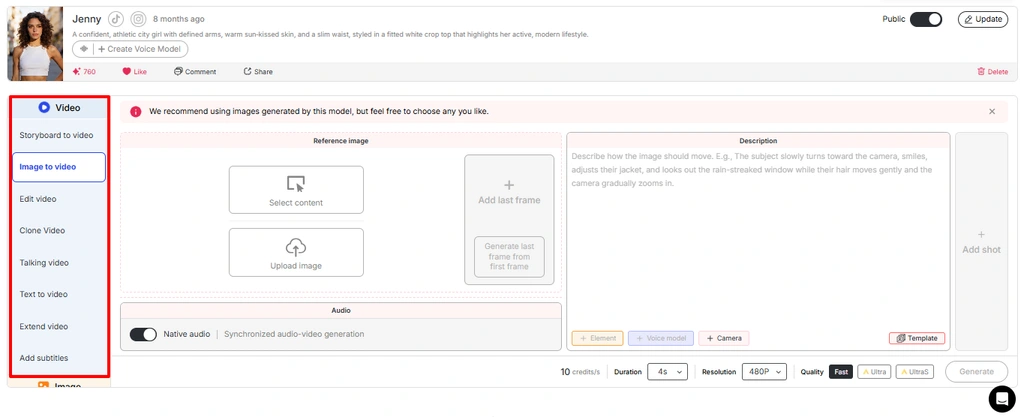
Inside the APOB AI video panel you get a full menu of modes: Text to video, Image to Video, Talking Avatar, Lip Sync, Video Face Swap, Extend Video, Add Subtitles, and Edit Video (ReVideo).
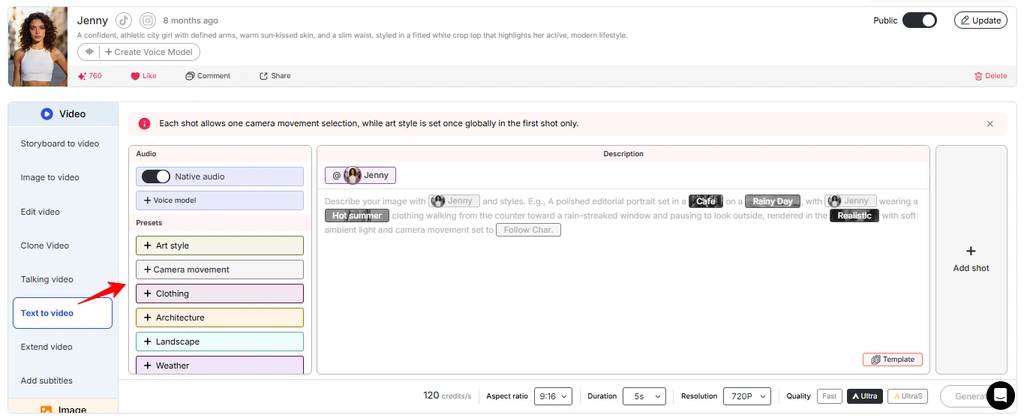
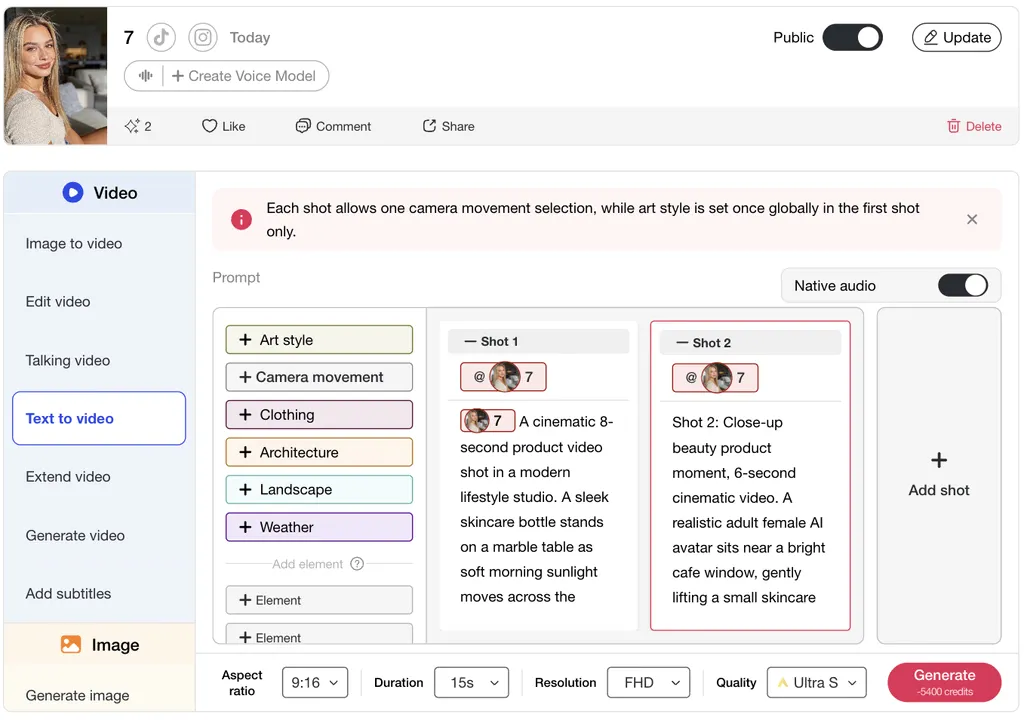
On the Seedance 2.5 workspace specifically, the build I tested ran 5-second, 720P output with Fast, Ultra, and UltraS quality tiers, a native audio toggle, and a stack of reference elements you can attach to anchor a character. That’s the environment everything below is judged against, and it’s the layer where Face-Lock lives or dies.

What Face-Lock Really Means in Seedance 2.5
APOB AI markets “Advanced Face-Lock” as a premium selling point — the ability to hold one consistent identity across hundreds of posts. Strip away the marketing and Face-Lock is the model treating your character’s identity as a fixed anchor instead of a fresh guess every frame.

When it works, the person in frame one is the same person in frame 120: same jaw, same eye spacing, same skin texture, same freckles, same everything.
Motion is what makes this genuinely hard, and it’s worth understanding why before you blame the tool. AI video models have no built-in memory of a face — they rebuild it from the reference and the prompt on every frame.
A head turn forces the model to invent angles it never saw in your source image. A camera arc reconstructs the face from fresh positions. Dialogue repaints the mouth, chin, and cheeks continuously. Each of those is a chance for the identity to drift, and drift usually shows up on the frames where the model had the least information to work from.
One field trick that saved me a lot of wasted credits: watch the small details as your early-warning system. If a logo on the shirt softens or flips mid-clip, the face is almost always wobbling too. Moles, freckles, tattoos, and asymmetric features are the canaries — stable logo, stable face, and they tend to break together. If those hold across the clip, the identity usually held with them.
My Seedance 2.5 Test: Does the Face Hold Through Motion?
I didn’t want a talking head in a chair. That’s the softball every demo uses. I wanted movement that would actually put pressure on the identity.
The setup, straight from the Text to video panel: a vertical 9:16 neon-city scene, a subject walking on wet pavement with reflections, and a slow cinematic push-in. Settings were 720P, UltraS quality, 5 seconds. It finished in roughly two minutes at the displayed cost of 1,000 credits, or 200 credits per second. I ran variations of the same brief a few times to make sure the first result wasn’t a lucky roll.
What held up genuinely surprised me. Across the walk cycle and the push-in, the subject stayed visually stable — no melt into a stranger, the silhouette kept its shape, and the identity read as one continuous person from start to finish.
The wet-ground reflections and the neon lighting tracked convincingly too, which usually signals the model understands the scene well enough to keep the subject grounded rather than floating in a soup of pixels. For a moving subject with a changing distance to camera, that’s a legitimate pass, not a participation trophy.
Where it got shaky was exactly where you’d expect. Fast rotation, occlusion (something briefly crossing in front of the face), and big expression swings are still the danger zones.
On the frames where the model had to invent an angle it never had a reference for, micro-features drifted a touch — a slightly different brow, a softened jaw for a beat before it recovered. And when I pushed dialogue through native audio, the mouth region carried the most load, which is where you’ll catch slippage first if it appears at all.
Honest verdict: Face-Lock in Seedance 2.5 on APOB AI survives ordinary motion — walking, cinematic camera moves, moderate turns — clearly better than the older AI video tools I’ve used. It is not bulletproof under aggressive rotation or long, expression-heavy dialogue. The practical stance is: trust it for most shots, spot-check the risky ones, and keep a repair tool handy for the rare miss.
Your Reference Image Decides Whether Face-Lock Survives
Almost every time Face-Lock failed for me, the reference image was the real culprit, not the model. Feed it a soft, side-angled, dimly lit selfie and you’re asking it to guess most of the face — and guessing is precisely where drift starts. As the consensus among character-consistency creators goes, the fix is an identity anchor, not better prompting alone.
The reference rules that genuinely moved my results, roughly in order of impact:
That’s the line between a hobby clip and something you’d actually park on a brand account and post daily.
Prompting Seedance 2.5 So Identity Stays Put
The prompt is the other half of the equation. Loose prompts invite the model to improvise, and improvisation is how faces drift. Tight prompts hand it a rail to run on.
The structure that consistently gave me stronger Face-Lock was this order: subject → one main action → environment → camera movement → lighting → style → audio → constraints.
That last block — constraints — is the one most people skip. Adding “no text, no logos, no dialogue” when they don’t belong in the shot strips out the random elements that destabilize a frame. If you don’t need the mouth moving, don’t invite dialogue at all; a still mouth is a stable mouth, full stop.
Keep each shot to one clear action. “She walks and turns and laughs and waves” is four separate chances to drift crammed into five seconds. “She walks toward camera, calm expression” is one clean beat the model can actually hold. Then chain those clean beats using the Add Shot control or the Extend Video tool, keeping the identical character description on every single one.
For camera work, gentle always beats flashy — a slow push-in or a steady tracking shot preserves a face far better than a fast orbit that whips it through angles the model never saw. If a hero orbit is non-negotiable, generate it, then patch the slipped frames afterward rather than hoping.
How Image-to-Video and Last-Frame Control Help Face-Lock
One feature worth its own callout: Image to Video with first-and-last-frame control. Seedance 2.5 treats the last frame less like a loose hint and more like a destination it’s required to arrive at. For identity work, that’s a quiet superpower.
The workflow I liked: generate a strong hero image first — character, outfit, background, mood all dialed in — then bring that image into Image to Video as your opening frame.
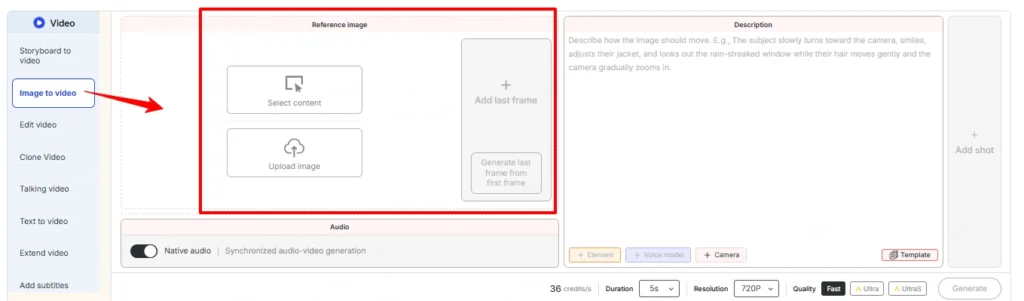
If you have a clean end pose, set it as the last frame too. Because the model is now interpolating between two fixed, identity-correct images rather than inventing an ending from scratch, there’s far less room for the face to wander in the middle.
Holding Face-Lock Across Shots and Extensions
One clip is easy mode. The real test is a sequence — the same character across five shots, or a short clip stretched into something longer, still reading as one person the whole way through.
This is where workflow discipline earns its keep. Extend Video carries a reference clip forward and, per ByteDance’s own model notes, aims to hold main-character, environment, and pacing consistency through each extension round.
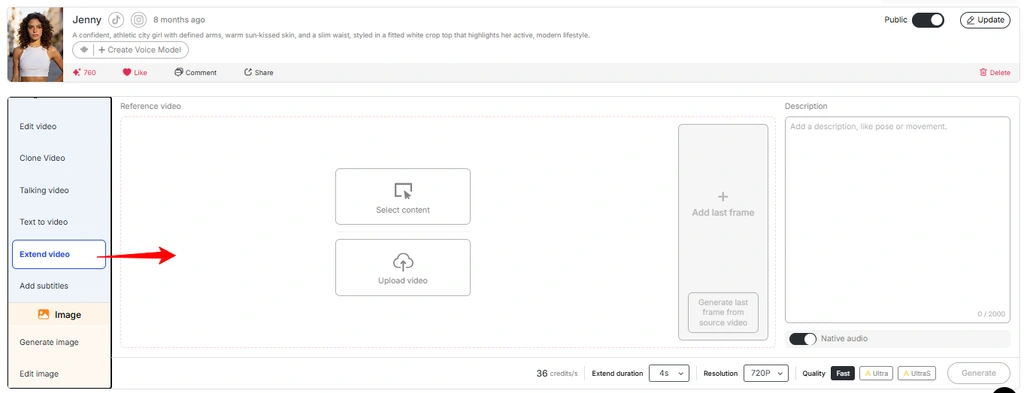
In practice, the more the description drifts between rounds, the faster the identity erodes. Treat your character sheet like a locked production asset: same words, same reference, every single time.
For multi-shot builds, structure the shot list around continuity, not variety — reuse the subject description verbatim, keep the wardrobe references attached, and change only the action and setting between shots.
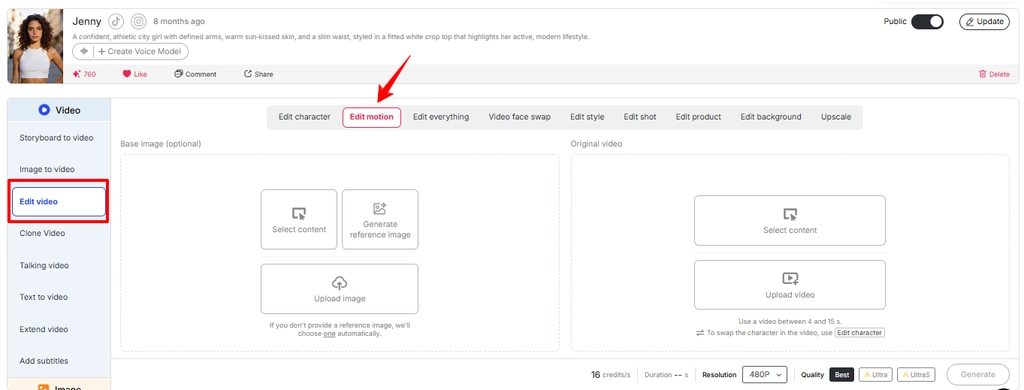
When a face does slip despite all that, Video Face Swap and Edit Video (ReVideo) let you repair specific segments instead of regenerating the whole thing and rerolling the identity dice. In the build I tested, Edit Video accepted 3–30 second uploads at 720P, so you can surgically fix a two-second wobble without touching the good footage around it.
How Seedance 2.5 Face-Lock Compares to Other AI Video Models
Context helps here, because “good” only means something against the field. In the broad 2026 comparisons, the picture shakes out roughly like this:
Veo-class models tend to lead on close-up photorealism and lip-synced audio, Kling-class models are strong on cinematic color and multi-character dialogue but often lean on stitching multiple short clips together, and Seedance 2.5 is repeatedly called out for strict character consistency and spatial coherence across a single continuous generation.
For Face-Lock specifically, that “single continuous generation” trait matters. When a model holds one character through an unbroken shot instead of asking you to stitch and pray, there are simply fewer seams for identity to break at.
That’s the practical reason Seedance 2.5 in APOB AI feels dependable for repeat-character work — the model is built to keep a subject stable through motion, and APOB AI’s reference stacking and repair tools sit right on top of that strength.
Where Seedance 2.5 in APOB AI Still Struggles
No sugarcoating — a few weak spots stuck around across my runs, and knowing them saves credits.
Multi-subject scenes are harder. When several characters share a frame, the model splits its attention and the secondary faces drift before your hero does. Aggressive physical motion — flips, rapid spins, fast choreography — still pushes physical plausibility to its limits, and faces can pay the tax on those frames.
Long dialogue with big expression swings remains the single most reliable way to surface slippage, because the mouth region is being rebuilt continuously and the surrounding features come along for the ride.
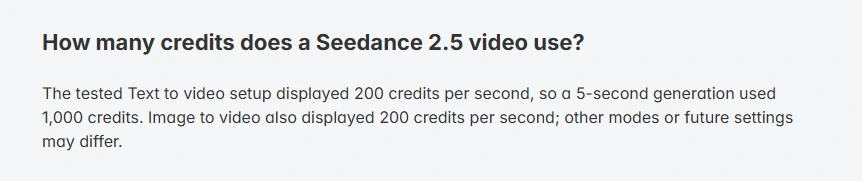
T costhen the practical stuff. Generation burns credits (200 per second on that text-to-video run), the core Seedance 2.5 modes I tested capped at 5 seconds and 720P, and every clip earns a review pass before it goes live. Interfaces, limits, and pricing shift with product updates, so treat the exact figures here as a dated snapshot rather than a permanent spec sheet.
Face-Lock by Motion Type: Quick Reference
| Motion Type | Face-Lock Reliability | Play It Smart |
|---|---|---|
| Walking / slow subject motion | Strong | Trust it, quick spot-check |
| Slow push-in / tracking shot | Strong | Ideal for hero shots |
| Moderate head turn | Good | Use a sharp frontal reference |
| First-and-last-frame I2V | Strong | Box drift in on both ends |
| Fast camera orbit | Mixed | Generate, then patch with Face Swap |
| Heavy dialogue + expression | Weaker | Keep segments short, review closely |
| Multi-character group shots | Weaker | Anchor one hero, reference the rest |
Troubleshooting Face-Lock: Fast Fixes That Worked
When a clip came back with a drifting face, these were the moves that actually turned it around, in the order I’d try them:
- Swap the reference before touching the prompt. Nine times out of ten a sharper, more frontal reference fixes it faster than any prompt tweak.
- Cut the action in half. If the subject was doing two things, drop one. One clean beat per five seconds is the sweet spot.
- Kill unneeded dialogue. If the mouth doesn’t need to move for the shot to work, remove the audio brief and watch the face steady.
- Slow the camera. Trade the orbit for a push-in and most micro-drift disappears.
- Repair, don’t regenerate. For a small localized wobble, Video Face Swap or Edit Video on just those seconds beats rerolling the whole clip and risking a worse result.
Is Seedance 2.5 in APOB AI Right for You?
If you’re building an AI influencer, a recurring virtual spokesperson, a short-form series with a consistent character, or product clips where a face has to stay on-brand across dozens of posts, this pairing sits right in the pocket.
The reference stacking, first-and-last-frame control, Extend Video flow, and edit-in-place repair tools are built for exactly that repeat-character grind — which is the whole reason Face-Lock matters in the first place.
If your work is one-off, motion-heavy action clips where nobody clocks one face versus another, Face-Lock matters far less and you can prompt looser and move faster. The entire payoff here is identity continuity, so it rewards creators who need the same person, over and over, holding together across a feed.
FAQs
Does Face-Lock in Seedance 2.5 survive fast motion?
It survives ordinary motion — walking, tracking shots, moderate turns — well. Fast rotation, occlusion, and heavy expression changes are still where identity can slip, so review those clips closely and keep a repair tool ready.
What resolution and length does Seedance 2.5 in APOB AI support?
In the build I tested, the core Text to video and Image to Video modes ran 5-second clips at 720P with Fast, Ultra, and UltraS tiers. Edit Video handled 3–30 second uploads. Settings can change as the platform updates.
How many credits does a Seedance 2.5 clip cost on APOB AI?
The tested text-to-video and image-to-video setups displayed 200 credits per second, so a 5-second clip ran 1,000 credits. Edit and extend modes showed higher per-second rates in the same check.
What makes a good reference image for Face-Lock?
A sharp, high-resolution, frontal, evenly lit face with a neutral expression. Soft, side-angled, or dim references force the model to guess, and guessing is where drift begins. Multiple consistent angles help even more.
Can I keep the same character across multiple shots and extensions?
Yes. Reuse the exact same character description on every shot, keep reference elements attached, and use Extend Video to carry identity forward. The more the wording changes between rounds, the faster identity erodes.
Does native audio affect face stability?
It can. Dialogue repaints the mouth region every frame, so long talking segments are the most common place to spot slippage. If a shot doesn’t need speech, leave it out for a cleaner lock.
How does Seedance 2.5 compare to Veo or Kling for consistency?
Broad 2026 comparisons put Veo-class models ahead on close-up realism and Kling-class ahead on multi-character cinematic work, while Seedance 2.5 is repeatedly praised for strict character consistency in a single continuous generation — which is exactly what Face-Lock benefits from.
Final Take on Seedance 2.5 in APOB AI
Face-Lock in Seedance 2.5 on APOB AI isn’t magic, but it’s genuinely good where it counts. Under the motion most creators actually shoot — walking subjects, cinematic camera moves, moderate turns — identity held up across my tests, and that neon-city clip backed it: stable subject, coherent lighting, no stranger swap halfway through.
Push into fast orbits, occlusion, and long expressive dialogue and you’ll still catch the odd wobble, so review remains part of the job.
The winning move is old-school discipline: a sharp frontal reference, a locked character description reused word-for-word, one clean action per shot, gentle camera work, first-and-last-frame control when you can use it, and Face Swap or Edit Video ready to patch the rare slip.
Do that, and you get the thing AI video kept promising for years — the same face, moving through real motion, still recognizably your character from the first frame to the last.
AiMojo Recommends:


 BONUS: Get our $200 “AI Mastery Toolkit” FREE when you sign up!





![Top 10 Hentai AI Chatbots to Experience Virtual Desire [2026]](https://aimojo.io/wp-content/uploads/2024/03/Top-Hentai-AI-Chatbot--100x100.webp)

![Top 13 AI Chat Porn Games with No Limits [2026]](https://aimojo.io/wp-content/uploads/2024/03/Best-AI-Chat-Porn-Games-100x100.webp)


