

You’re bleeding hours every single week.
Copy-pasting data. Sending follow-up emails. Updating spreadsheets that nobody reads. Meanwhile, your competitors set up systems that run while they sleep.
This AI workflow automation guide skips the theory and hands you 20 specific workflows—complete with tools, logic breakdowns, and setup complexity ratings.
What AI Workflow Automation Actually Means in 2026 (No Fluff)
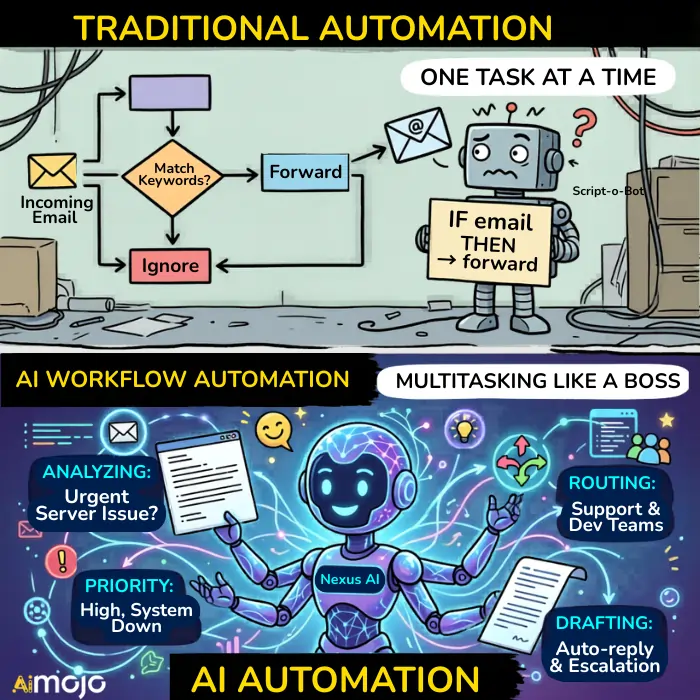
Traditional automation follows rigid rules. If X happens, do Y. Simple. Predictable. Limited.
AI-powered automation thinks differently. It reads context, adapts to patterns, and makes judgment calls that rule-based systems can’t handle.
When an email lands in your inbox, basic automation might forward it. Intelligent automation reads the content, identifies urgency, routes it to the right person, and drafts a response template—all before you finish your coffee.
Machine learning sits at the core here. These systems improve over time, learning from outcomes and adjusting their behavior without manual intervention.
Why Traditional Automation Falls Apart (And What Changed)
Static triggers break when real-world complexity kicks in:
Smart triggers changed everything. Natural language processing lets systems understand intent, not just keywords. Real-time decision making means workflows adjust mid-stream based on incoming data.
The gap between “automated” and “intelligent” is no longer theoretical—it’s practical and accessible.
The Tools Powering This Right Now
Three platforms dominate the no-code automation space:
| Platform | Best For | Strength | Tradeoff |
|---|---|---|---|
| n8n | Technical builders | Self-hosted, AI agent capabilities | Steeper learning curve |
| Zapier | Speed seekers | 8,000+ app integrations | Complex logic gets clunky |
| Make.com | Visual designers | Conditional branching, data transformation | Smaller app library |
Your choice depends on technical comfort, budget, and how complex your workflows need to be.
20 AI-Powered Workflows You Can Set Up This Week
🎯 CATEGORY A: SALES & LEAD GENERATION
#1 – Automated Lead Scoring That Actually Works
What it replaces: Sales reps manually reviewing every inbound lead, guessing who’s worth calling.
Tools needed: CRM (HubSpot, Salesforce, Pipedrive) + AI scoring layer (Clay, Clearbit, or native CRM AI features)
| Setup Complexity | Time Saved Weekly |
|---|---|
| ⭐⭐⭐ (3/5) | 6-10 hours per rep |
The system pulls behavioral data—email opens, website visits, content downloads—and demographic signals to assign scores automatically. Hot leads surface instantly. Cold ones get nurtured without human babysitting.
#2 – AI-Driven CRM Data Entry (Kill the Spreadsheet)
Every sales call generates data. Contact details, notes, next steps, deal stages. Manually logging this information kills momentum and introduces errors.

The fix: Connect your calendar and email to your CRM through Make.com or Zapier.
- Meeting ends
- Transcript gets processed
- Contact record updates automatically
- Deal stage advances based on conversation keywords
No typing required.
⚠️ Common mistake: Setting triggers too broadly. You’ll end up with garbage data flooding your CRM. Start narrow, expand carefully.
#3 – Smart Follow-Up Sequences Based on Behavior
Generic follow-up emails get ignored. Behavior-triggered sequences convert.
Build conditional workflows:
The logic branches based on real engagement, not arbitrary time delays.
#4 – Prospect Research on Autopilot
Before every sales call, someone’s spending 15-30 minutes researching the prospect. LinkedIn profiles, company news, recent funding announcements.
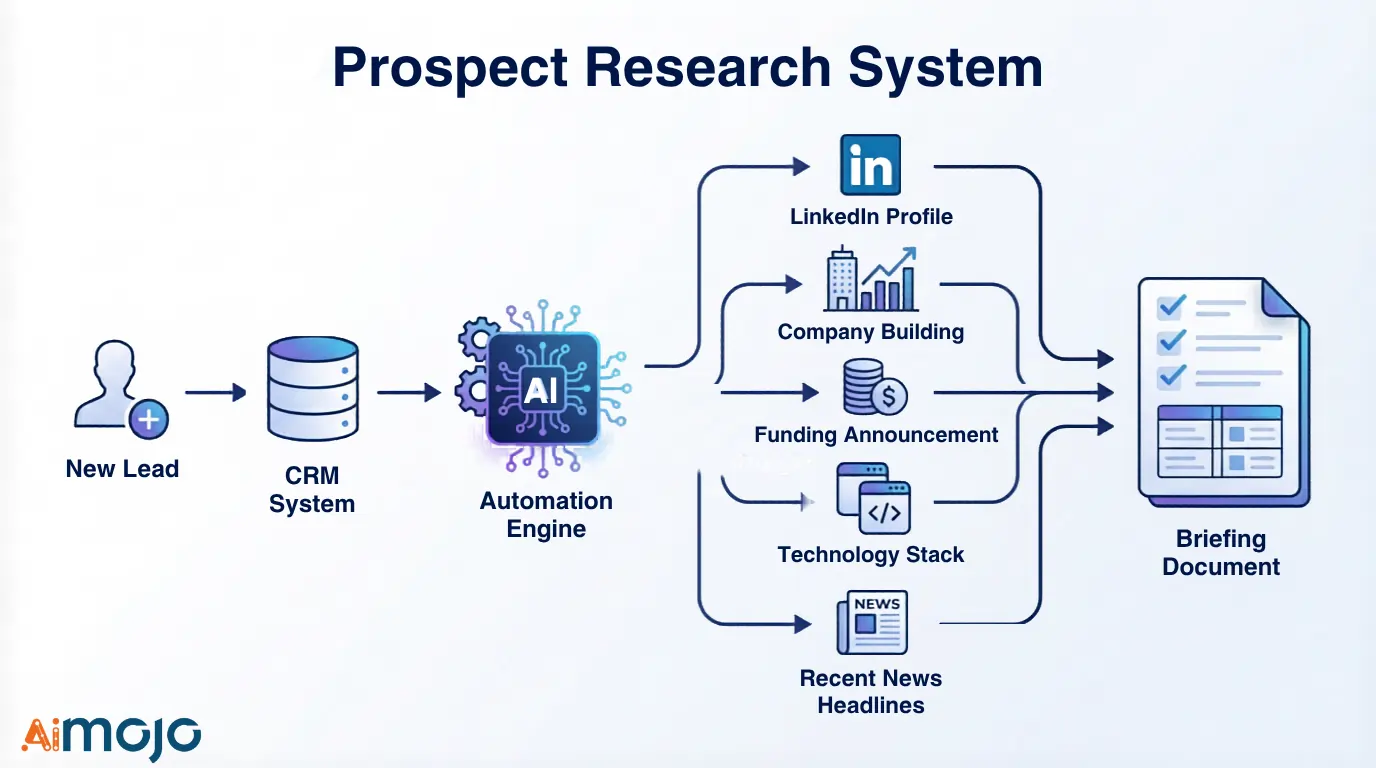
Data enrichment workflows handle this automatically:
New lead enters CRM → Triggers fire → System pulls company size, tech stack, recent headlines, social profiles → Rep gets briefing document before call starts
Zero manual effort.
💬 CATEGORY B: CUSTOMER SUPPORT & COMMUNICATION
#5 – Intelligent Ticket Routing (No More Wrong Department)
NLP-based categorization reads incoming support tickets and identifies the actual issue—not just keyword matches.
How it flows:
Incoming Ticket
     ↓
NLP Analysis (intent + sentiment)
     ↓
├── Billing issue → Billing Team
├── Technical bug → Engineering
├── General inquiry → Support Tier 1
└── Urgent + VIP customer → Priority Queue
Result: faster resolution times, happier customers, support teams that aren’t drowning in misrouted requests.
#6 – AI Chatbot + Human Handoff Workflows
Chatbots handle volume. Humans handle complexity. The magic lives in the handoff.
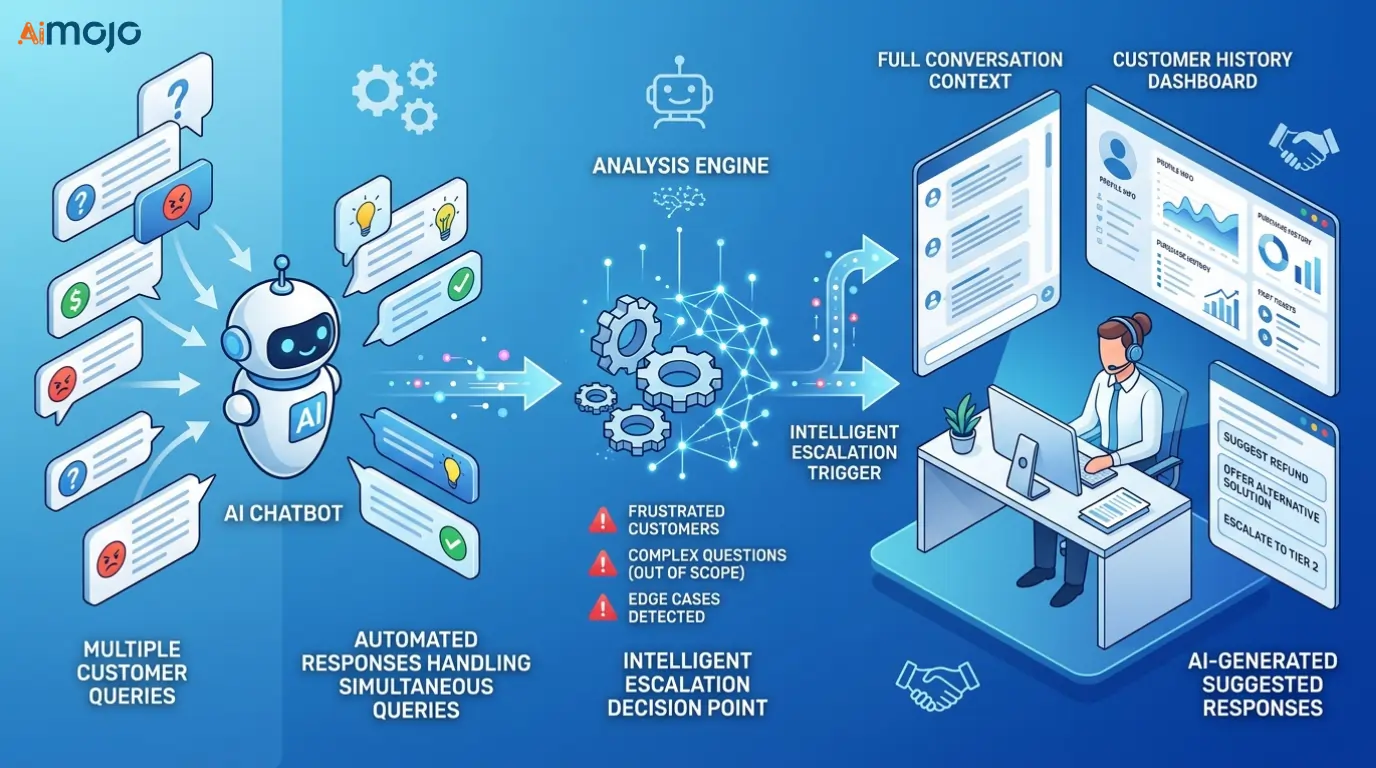
Build workflows where the bot recognizes its limits—frustrated customer, multi-part question, edge case scenario—and escalates seamlessly. The human agent receives:
No more “please repeat your issue” moments.
#7 – Automated Customer Feedback Collection & Analysis
Post-interaction surveys are standard. What happens next usually isn’t.
Connect feedback collection to sentiment analysis tools:
| Trigger | Action |
|---|---|
| Negative response detected | Immediate alert to manager |
| Pattern across 10+ responses | Weekly insight report generated |
| Product-specific feedback | Auto-categorized for product team |
Product teams get categorized feedback without manual sorting.
#8 – Multi-Channel Response Sync
Customers reach out everywhere—email, chat, social media, phone.
Unified inbox automation consolidates everything into one stream. AI-powered template selection suggests responses based on issue type and customer history. Your team responds faster with consistent messaging across every channel.
📝 CATEGORY C: CONTENT & MARKETING
#9 – Social Media Scheduling + Performance-Based Reposting
Schedule posts once. Let performance data decide what deserves a second life.
Smart republishing triggers identify content that exceeded engagement thresholds and automatically requeue it:
High-performers keep working while you focus on creating new material.
#10 – Blog Content Repurposing Pipelines
One article becomes:
Long-form Blog Post
       ↓
   ┌───┴───┬────────┬──────────┐
   ↓       ↓        ↓          ↓
Video   5 Social  Email     Podcast
Script   Posts   Newsletter  Notes
Manually? Hours of work.
Automated? Minutes.
Format adaptation workflows take your long-form content through AI summarization, tone adjustment, and platform-specific reformatting. You review and approve; the system handles the heavy lifting.
#11 – SEO Monitoring & Automated Alerts
Rank tracking tools generate data constantly. Most of it sits in dashboards nobody checks.
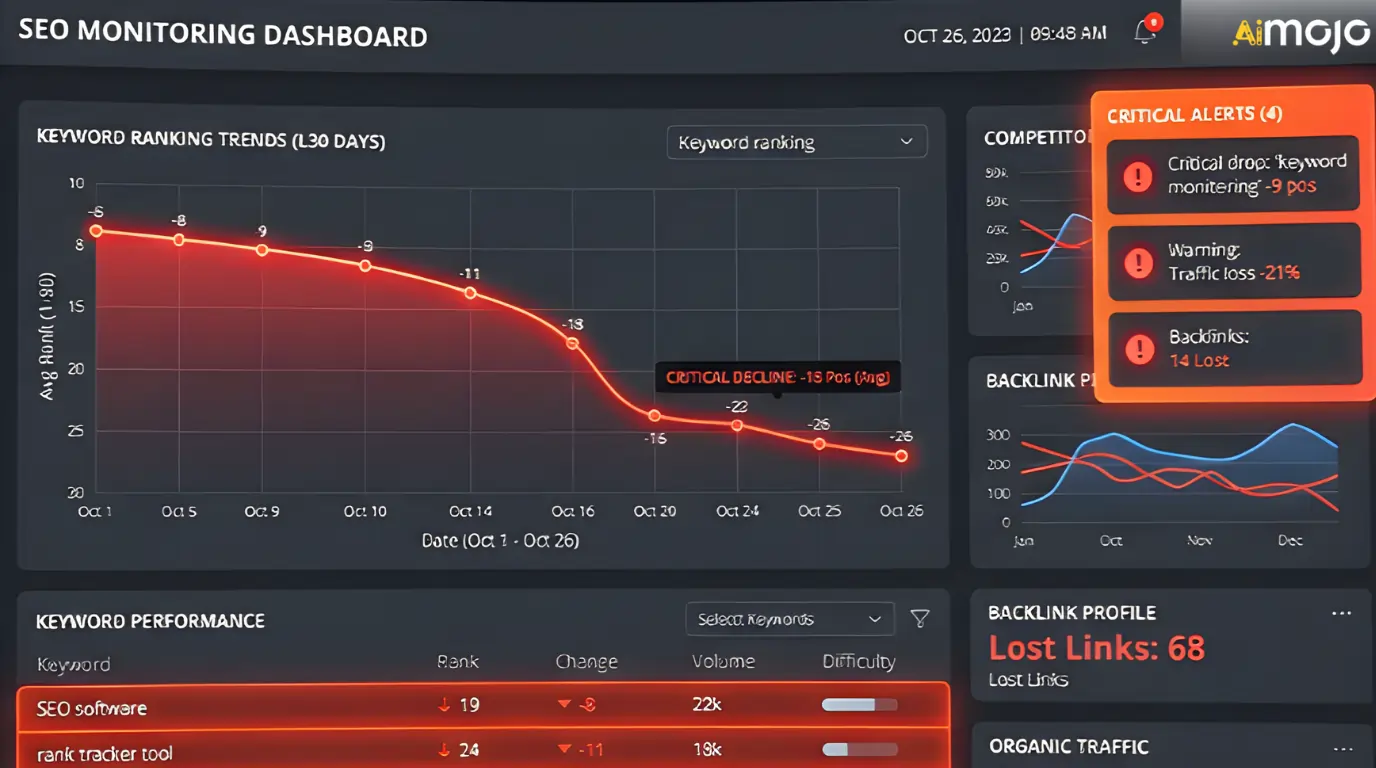
Set threshold triggers:
Alerts hit your inbox or Slack when action matters—not buried in a weekly report you’ll skim.
#12 – Email Campaign Personalization at Scale
Dynamic content insertion goes beyond “Hi [First Name].”
Behavior-based segment switching changes entire email sections based on:
The same campaign send delivers meaningfully different experiences to different subscribers—without creating 47 separate email variants manually.
💰 CATEGORY D: FINANCE & OPERATIONS
#13 – Invoice Processing Without Human Touch
Intelligent document processing workflow:

- Invoice arrives (email/upload)
- AI extracts: vendor, amount, line items, due date
- System matches against purchase orders
- Routes for approval based on amount thresholds
- Payment scheduled automatically
Humans only touch exceptions. Everything else flows through.
#14 – Expense Report Automation
| Step | What Happens |
|---|---|
| Employee snaps receipt | Image uploaded to system |
| AI reads receipt | Categorizes expense automatically |
| Policy check runs | Flags violations in real-time |
| Clean submission | Routes for approval |
No manual data entry. No “what category is this?” debates. Policy compliance checks happen before issues become audit problems.
#15 – Automated Financial Reporting
Data aggregation workflows pull numbers from:
Scheduled report distribution sends:
Finance teams analyze instead of compile.
#16 – Inventory Alerts & Reorder Triggers
Threshold-based purchasing removes guesswork from inventory management.
Stock Level Drops Below Minimum
           ↓
Purchase Order Generated
           ↓
Supplier Notification Sent
           ↓
Expected Delivery Logged
No more emergency orders. No more stockouts. No more “I thought someone was watching that.”
👥 CATEGORY E: HR & INTERNAL OPERATIONS
#17 – Employee Onboarding Sequences
New hire signed? Document collection flows kick off automatically:
Day one arrives, new employee is already set up across every system they need.
#18 – Meeting Scheduling That Handles Itself
Calendar conflict resolution and timezone-aware booking eliminate the “when are you free?” email chains.

Intelligent scheduling tools:
#19 – Internal Knowledge Base Updates
Document change detection monitors your internal wikis, SOPs, and policy docs.
When something updates:
No more “I didn’t know that changed” excuses. Stale documentation stops being invisible.
#20 – Performance Review Data Collection
| Automation | Benefit |
|---|---|
| Feedback aggregation | Pulls input from managers, peers, direct reports |
| Anonymous survey automation | Ensures honest responses |
| Data compilation | Review-ready formats before HR touches anything |
Review cycles shrink from weeks to days.
How to Pick Your First 3 Workflows (Decision Framework)
The ROI Matrix: Time Saved vs. Setup Effort
Not all automations deserve immediate attention. Plot potential workflows on two axes:
                  HIGH TIME SAVINGS
                          ↑
         ┌────────────────┼────────────────┐
         │                │                │
         │  QUICK WINS    │  HIGH-IMPACT   │
         │  (Start here)  │  PROJECTS      │
         │                │                │
LOW  ←───┼────────────────┼────────────────┼───→ HIGH
EFFORT   │                │                │    EFFORT
         │  SKIP THESE    │  MAYBE LATER   │
         │                │                │
         └────────────────┼────────────────┘
                          ↓
LOW TIME SAVINGSStart with quick wins to build momentum. Graduate to complex implementations once you’ve validated the approach.
Tool Selection Cheat Sheet
The 72-Hour Implementation Sprint
| Day | Focus | Actions |
|---|---|---|
| Day 1 | Audit + Selection | Document current manual processes. Identify three biggest time drains. Pick one. |
| Day 2 | Build + Test | Create workflow in chosen platform. Test with dummy data. Break it intentionally. Fix edge cases. |
| Day 3 | Launch + Monitor | Go live with real data. Watch first 10 runs closely. Adjust triggers based on observations. |
7 Reasons AI Automation Projects Crash (And How to Dodge Them)
#1 – Over-automating too fast
Start with one workflow. Master it. Then expand.
#2 – Ignoring edge cases
That weird exception your brain handles automatically? Your automation will choke on it. Build handling for unusual scenarios.
#3 – No human oversight checkpoints
Fully autonomous sounds great until something breaks and runs wild for a week. Insert review points for high-stakes actions.
#4 – Poor data hygiene going in
Garbage in, garbage out. Clean your data before automating processes that depend on it.
#5 – Wrong tool for the job
Zapier can’t do what n8n does. Forcing the wrong platform creates more problems than it solves.
#6 – Skipping the testing phase
Production is not your testing environment. Run scenarios before going live.
#7 – Forgetting about maintenance
APIs change. Integrations break. Build review cycles into your calendar.
The 2026 AI Automation Stack: What’s Worth Your Money
1. n8n– For the Technical Builder

✅ Self-hosted deployment (your data stays yours)
✅ AI agent capabilities (systems that reason, not just react)
✅ Open-source core with paid cloud option
✅ Maximum customization
2. Zapier – For Speed Over Complexity

✅ 8,000+ app integrations
✅ Simple interface, fast setup
✅ Reliable for straightforward workflows
3. Make.com– For Visual Workflow Designers

✅ Complex logic through intuitive visual builder
✅ Solid data transformation features
✅ Better pricing at high volume than Zapier
Bonus Tools Worth Mentioning
| Tool | Specialty |
|---|---|
| UiPath | Enterprise RPA, desktop automation, compliance features |
| Bardeen | Browser-based automation for sales/research |
| Clay | Sales-specific data enrichment and outreach |
What’s Coming Next: Autonomous AI Agents Running Full Departments
The shift from workflows to AI agents is already underway.
Current automation requires you to define every step. Agents receive goals and figure out the steps themselves.
Imagine telling a system “keep our social media engagement above X” and having it adjust posting schedules, content types, and response patterns without explicit instructions for each scenario.
How to prepare your systems now:
These position you to adopt autonomous systems when they mature.
Skills that matter going forward:
These will outvalue pure technical implementation.
Your Move: Pick One Workflow and Start Tonight
You’ve got 20 options. Most people will read this, nod, and go back to manual work tomorrow.
Don’t be most people.
Start small:
The tools have free tiers. The tutorials exist. The only barrier is deciding to start.
Every day you wait, you’re doing work a machine could handle in seconds.
Pick one. Automate it. See what happens.
AiMojo Recommends:


 BONUS: Get our $200 “AI Mastery Toolkit” FREE when you sign up!








