

Bulin AI Key Insights
What is Bulin AI?
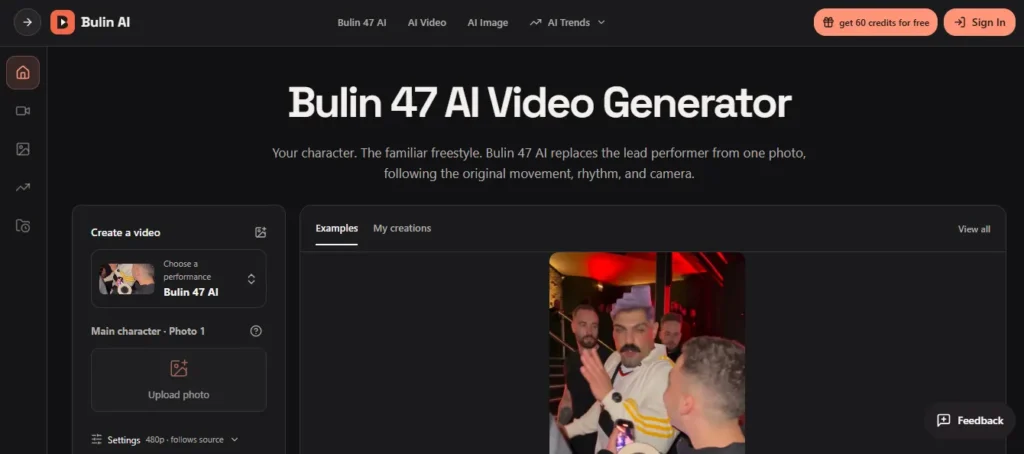
Bulin AI is a browser based AI creation platform that allows users to generate videos and images using advanced AI models including Seedance 2.5, Kling 3.0 Motion Control, GPT Image 2, and Nano Banana Pro among others. Its flagship feature places any person or character into the viral Bulin 47 street freestyle performance from a single photograph.
Built around the October 2026 viral clip featuring Dominican rapper Bulin 47 and Kevin Wai, the tool handles all motion transfer, gesture mapping, camera movement replication, and audio restoration automatically.
Beyond the Bulin 47 preset, the platform also provides a full AI image generator and a general AI video workspace with custom prompt support. It requires no app installation and runs entirely in the browser. The tool is designed for content creators, social media marketers, and casual users producing short form video for TikTok, Instagram Reels, and YouTube Shorts.
Bulin AI’s core function is replacing the lead performer in the Bulin 47 freestyle video using just one uploaded photograph. The tool reads the subject’s face, hairstyle, body shape, outfit, and visible accessories from your image and maps them onto the original performer’s movements.
This means you do not need to record yourself dancing, match camera angles, or assemble a sequence of shots. An upper body portrait with clear lighting and a visible outfit produces the strongest results. Fictional and illustrated characters are also accepted, though the AI model may reinterpret stylised details during motion.
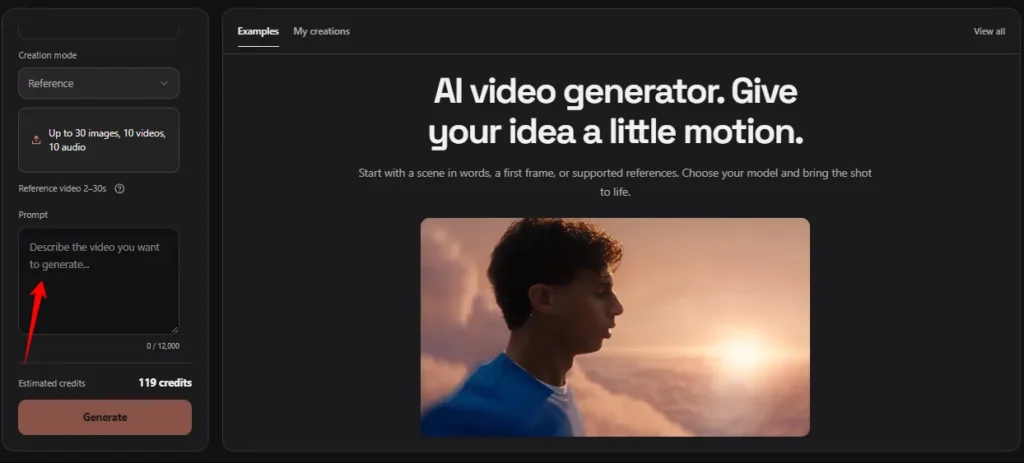
Beyond the Bulin 47 preset, Bulin AI includes a complete AI video workspace under the AI Video tab. Powered by Seedance 2.5, it supports Reference creation mode where users can upload up to 30 images, 10 videos, and 10 audio files as source material.
A prompt editor lets you describe your scene in your own words. The interface shows estimated credit cost before generation (around 119 credits for a standard clip), so there are no billing surprises. Past outputs are stored in “My creations” for easy access and re-download.
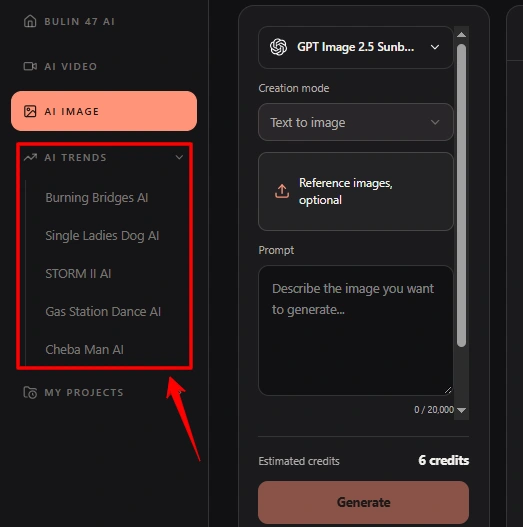
Bulin AI offers a growing library of viral trend templates through the AI Trends menu. Current options include Burning Bridges AI, Single Ladies Dog AI, STORM II AI, Gas Station Dance AI, and Cheba Man AI. Each follows the same one photo upload workflow.
Users pick a trend, upload a character image, and the platform handles everything else. This expanding library keeps the tool relevant as new viral moments emerge, and credits work across all available trends.

Unlike most AI video generators that produce silent output, Bulin AI attempts to restore the original performance audio after the visual edit is complete. This means the familiar “Dame Hombro” freestyle rhythm stays attached to the generated clip, saving users from the extra step of manually syncing audio in a separate editor.
Audio restoration is processed independently from the video generation, so a successful visual output may still be delivered even if the audio layer encounters issues. Users should always preview their finished clip before sharing, as lip movements may not perfectly match the restored soundtrack.
The Bulin 47 page on Bulin AI operates as a fully preset workflow. The source video, camera instructions, crowd retention rules, and scene composition are already locked in. There is no prompt editor visible on this page. This removes one of the biggest friction points that casual creators face with AI video tools. You simply upload a photo, confirm the resolution, and submit. For users who want more creative control, Bulin AI also offers a separate AI Video workspace at /video where custom prompts and different reference clips can be used.
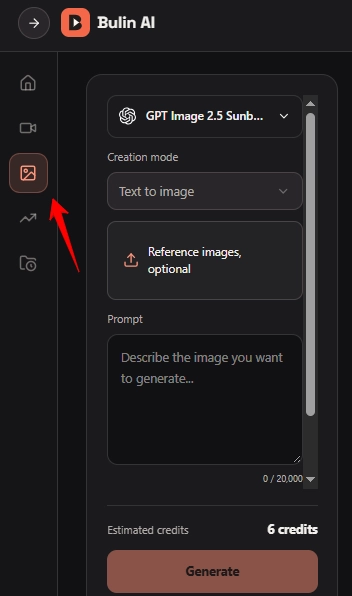
Beyond video, Bulin AI includes a dedicated AI image generator accessible at /image. This tool supports text to image creation and photo editing using models like GPT Image 2 and Nano Banana Pro. Users can generate product scenes, character designs, and visual concepts all within the same workspace and the same credit balance. This makes Bulin AI a more complete creative platform rather than a single purpose viral video tool.
Bulin AI Pricing Plans
Bulin AI offers three pricing tiers. Pay once video packs for the Bulin 47 preset, monthly and yearly subscriptions for broader platform access, and a free Basic tier.
Pay Once Video Packs
| Plan | Cost | Per Video Cost | Details |
|---|---|---|---|
| 1 Video | $9.90 | $9.90 | Bulin 47 AI at 480p, no watermark, pass never expires |
| 3 Videos | $19.90 | $6.63 | Save 33%, passes never expire |
| 5 Videos | $29.90 | $5.98 | Save 40%, passes never expire |
All pay once packs are limited time offers. Passes cover the standard Bulin 47 AI preset at 480p only. Other tools and higher resolutions use subscription credits. Credits apply after your Bulin 47 passes run out. Pass returned if generation fails.
Subscription Plans
| Plan | Cost (Yearly) | Credits/Year | Images | Videos | Key Features |
|---|---|---|---|---|---|
| Starter | $8.30/month | 2,400 | Up to 400 | Up to 133 | 4K images and HD videos, image editing, video creation and motion transfer, watermark free downloads, generation history |
| Pro | $30.0/month | 21,600 | Up to 3,600 | Up to 1,200 | 40% OFF, save $238.8. Same features as Starter with higher volume |
| Business | $49.90/month | 48,000 | Up to 8,000 | Up to 2,666 | 50% OFF, save $599.8. Same features with highest volume |
Bulin AI for Content Creators and Social Media Marketers
For TikTok creators, Instagram influencers, and social media managers, Bulin AI offers a fast way to produce trend relevant content without video production overhead. The entire workflow from photo upload to downloadable MP4 takes only a few minutes. Because the platform outputs vertical 9:16 video with restored audio, creators can post directly to TikTok, Instagram Reels, and YouTube Shorts without additional editing.
Marketers can use the tool to produce playful brand content by inserting brand mascots or product characters into the performance. The pay once pricing model also makes it budget friendly for freelancers and small teams who need just a few viral clips without committing to a monthly subscription. The yearly Pro plan at $30/month gives agencies up to 1,200 videos and 3,600 images per year, making it viable for higher volume content production.
Pros and Cons
- One photo, one click workflow.
- No prompt writing needed.
- 13+ AI video models included.
- Automatic failed render credit refunds.
- Original audio restoration included.
- Supports fictional and illustrated characters.
- 480p only on video packs.
- No custom prompt on Bulin 47 page.
- Background details may shift between frames.
- Monthly plans significantly more expensive.
Understanding Bulin AI’s Technical Limitations
Bulin AI runs on generative AI models, which means every output is a reconstruction rather than a precise frame by frame edit. Users should expect minor inconsistencies in surrounding crowd members, hand placements, and overlapping objects, particularly when people pass close to the camera in the source clip. The AI may also reinterpret illustrated or highly stylised character features during movement sequences.
Lip sync with the restored audio track is approximate rather than exact. For users who need pixel perfect consistency or full creative control over prompts, backgrounds, and crowd elements, the separate AI Video workspace at /video offers more flexibility. The Bulin 47 preset page is designed for speed and simplicity, not for granular creative direction.
Best Bulin AI Alternatives
| AI Video Generator / AI Image Generator / Photo to Video Tool | Number of Viral Trend Templates | Prompt Free Workflow |
|---|---|---|
| Dreamina | 30+ templates in Trends Studio | ❌ |
| Viddo AI | ❌ No preset trend templates | ❌ |
| Aniv AI | ❌ Focused on short drama workflows | ❌ |
| EaseMate AI | 3+ viral trend templates | ✅ |



