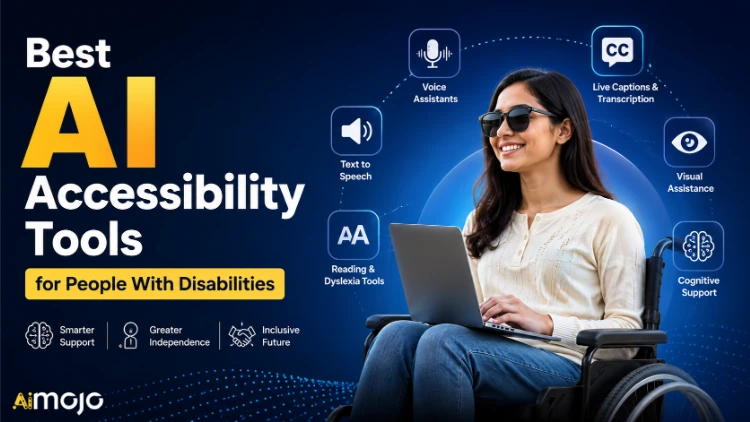
Written with input from accessibility-first language guidelines. Tool recommendations focus on user autonomy, dignity, and real-world usefulness — not pity or “inspiration.”
Most people use AI to write emails or summarize meetings. But for over 1.3 billion people worldwide living with some form of disability, AI tools are doing something far more powerful — they're closing access gaps that have existed for decades.
This isn't a tech trend. It's a real shift in how people communicate, work, learn, and move through the world.
Below are 26 AI accessibility tools — split by disability type — that are actually worth using in 2026.
What “AI Accessibility Tools” Actually Means
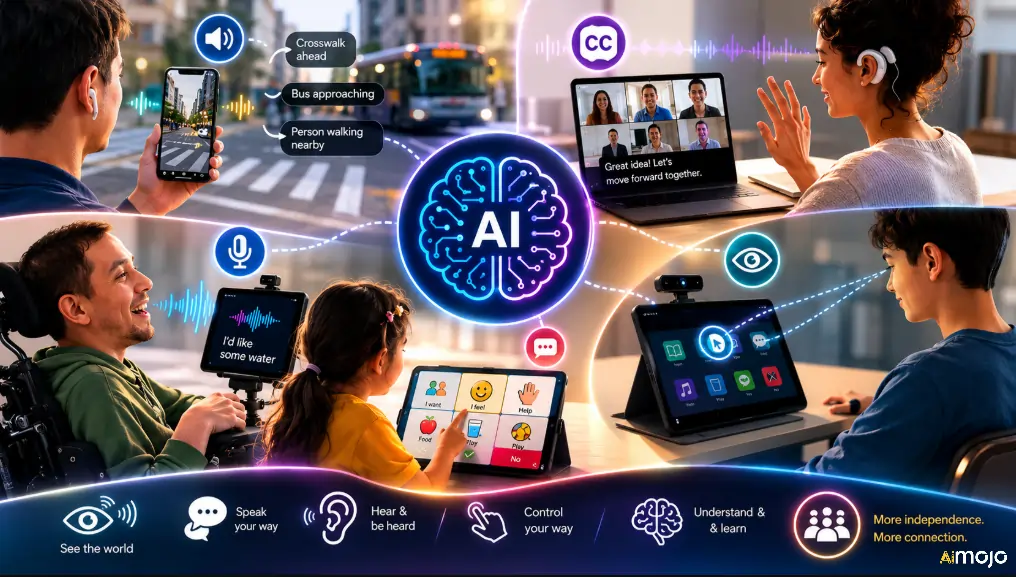
AI accessibility tools are software and hardware solutions that use artificial intelligence — including machine learning, computer vision, and natural language processing — to help people with visual, hearing, speech, motor, or cognitive disabilities perform tasks more independently.
Before getting into the list, here's the core idea. AI accessibility tools go far beyond surface-level fixes like high-contrast modes or larger fonts. These tools actively support tasks that standard interfaces don't accommodate — in real time, not in lab tests.
Here's what that looks like in practice:
That's how AI helps people with disabilities today — not in a future demo reel, but on phones, glasses, and laptops people are using right now.
Best AI Accessibility Tool for Each Disability Type
| Disability Type | Top AI Tools to Try |
|---|---|
| Blind / Low Vision | Seeing AI, Be My AI, Google Lookout, Envision Glasses, OrCam MyEye |
| Deaf / Hard of Hearing | Otter.ai, Ava, Google Live Transcribe, Notta, Apple Live Captions |
| Non-standard Speech | Voiceitt, Predictable, Tobii Dynavox |
| Motor / Mobility | Apple Voice Control, Voice Access, Smart Wheelchairs, Switch Access |
| Cognitive / Learning | Immersive Reader, Read&Write, Oportun, TouchChat, Snap Core First |
| Education | Live Caption (Chrome), PDF OCR, WEGO Writing App |
| Web Accessibility | Accessibility Copilot, Ask Microsoft Accessibility |
AI for Blind and Low Vision Users
People who are blind or have low vision have arguably seen the biggest jump in AI-powered independence over the past few years. The tools in this space have gone from basic screen readers to full environmental narrators.
Microsoft Seeing AI
One of the most feature-rich free tools available. Seeing AI uses your phone camera to:
Be My Eyes + Be My AI

Be My Eyes originally connected blind users with sighted volunteers over live video. Now, with Be My AI (powered by GPT-4 Vision), users can get instant AI-generated descriptions of anything their camera sees — no volunteer wait time required.
Google Lookout

Available on Android, Lookout identifies objects, documents, and people around you and announces them via audio. It works in food mode (reads nutrition labels), explore mode (describes rooms), and quick read mode (captures text in your environment instantly).
Envision Glasses

For users who want hands-free access, Envision Glasses integrate with smart glasses hardware and give continuous narrated feedback — reading menus, recognizing faces, identifying doors, and describing artwork in real time.
OrCam MyEye
A wearable clip-on device that attaches to glasses and reads text, recognizes faces, and identifies products — all without needing an internet connection. It's especially useful for users who want AI-powered accessibility in areas with low connectivity.
AI for Deaf and Hard-of-Hearing Users
Real-time speech-to-text used to be clunky, slow, and riddled with errors. AI has fixed most of that. These tools now work well enough in real-world conversations — not just quiet studio conditions.
Otter.ai

While originally built as a business meeting transcription tool, Otter.ai is widely used by deaf and hard-of-hearing users to get live captions during Zoom calls, in-person meetings, lectures, and interviews. It integrates directly with Google Meet, Microsoft Teams, and Zoom.
Ava
Built specifically for deaf and hard-of-hearing users, Ava captions group conversations in real time and even color-codes speakers so users can follow who's saying what. The Ava Scribe upgrade pairs AI with human captionists for critical conversations where accuracy is non-negotiable.
Google Live Transcribe
A free Android app that picks up surrounding speech and displays it as scrolling text in real time. Live Transcribe also supports over 70 languages and dialects, and it doesn't need Wi-Fi to function once set up.
Notta

Beyond transcription, Notta translates speech content into 50+ languages, makes meeting summaries, and generates AI-assisted notes. Ideal for deaf professionals working across international teams.
Apple Live Captions
Built into iPhones 11 and above natively. Live Captions runs on-device (no internet required) and generates real-time captions for calls, media, and in-person conversations. Zero setup friction for Apple users.
AI for Non-Standard Speech and Communication Disabilities
For people with conditions like ALS, cerebral palsy, Parkinson's, or speech disorders, communicating with the world around them is one of the biggest daily challenges. AI has started solving this in genuinely meaningful ways.
Voiceitt
This app uses machine learning to learn a specific user's speech patterns — however non-standard or atypical they may be. It adapts to slurred, slow, or irregular speech and converts it into clear, recognizable output that other devices and people can understand.
Predictable (by Therapy Box)
A text-to-speech communication app that builds a personalized vocabulary based on how you talk. It uses AI-powered phrase prediction to help users with ALS, cerebral palsy, or autism communicate faster with fewer taps.
Tobii Dynavox
Eye-tracking technology combined with AI-driven AAC (Augmentative and Alternative Communication) software. Users control an entire device — including speech output — purely through eye movement. New AI models in this space are making prediction faster and more accurate than ever.
AI for Motor and Mobility Disabilities
When standard touch interfaces don't fit a user's movement patterns, AI steps in with smart controls and adaptive hardware.
Voice Control (Apple) and Voice Access (Android)
These native OS-level tools let users navigate their entire phone or tablet using voice commands alone. They've become dramatically more accurate and responsive thanks to modern AI language models. No third-party app needed.
Smart Wheelchairs
Companies like Permobil and Sunrise Medical are integrating AI into power wheelchairs that respond to voice commands, facial cues, or sip-and-puff controls. AI allows the chair to learn navigation preferences and avoid obstacles autonomously.
Switch Access + AI Scanning
For users with limited motor control, AI-powered switch access systems use machine learning to speed up scanning patterns — predicting what a user wants to select before they complete the full scan cycle. This cuts communication time significantly.
AI for Cognitive and Learning Disabilities
Cognitive accessibility is one of the most overlooked areas in tech — but AI is catching up fast.
Microsoft Immersive Reader
Built into Microsoft 365 products, Immersive Reader breaks text into syllables, spaces out lines, highlights words as they're read aloud, and can remove visual clutter from the page. It's widely used by students and adults with dyslexia and ADHD.
Read&Write by Texthelp
A literacy support toolbar that uses AI to read text aloud, predict words, define vocabulary in context, and translate content. It works on websites, PDFs, and documents — and is used heavily in both education and workplace settings.
Oportun (Financial Accessibility)
An app that uses AI to analyze a user's spending patterns and automatically moves money into savings accounts. Designed partly for users with cognitive or processing disabilities who find financial management overwhelming.
AI-Powered AAC for Autism
AI-enhanced communication apps are helping non-speaking or minimally speaking autistic individuals express needs and emotions using symbol-based input, predictive phrase generation, and image recognition. Apps like TouchChat and Snap Core First now use machine learning to adapt vocabulary to the individual user.
AI in Education: What's Changing for Students With Disabilities
Schools and universities are seeing some of the biggest gains from AI accessibility tools. Here's what's actually happening in classrooms:
AI for Web Accessibility Compliance
This one matters for developers, content creators, and digital marketers:
Accessibility Copilot (GPT-based) automatically reviews website code against WCAG (Web Content Accessibility Guidelines) standards. It flags problems with color contrast, missing alt text, improper heading structure, and keyboard navigation issues.
Ask Microsoft Accessibility guides teams on how to apply accessibility features within Microsoft products and surfaces fixes for digital content.
These tools are making it faster and cheaper to build accessible websites — which is both the right thing to do ethically and increasingly a legal requirement under laws like the ADA in the US and the European Accessibility Act.
The Real-World Impact (Not Just the Features)

It's easy to list tools. The more important question is: what do they actually change?
These aren't hypothetical use cases. They're happening right now, with tools that cost anywhere from $0 to a few hundred dollars.
Limitations Worth Knowing
AI accessibility tools are genuinely impressive — but they're not perfect yet.
| Limitation | What It Means |
|---|---|
| Accent & dialect accuracy | Some speech-to-text tools still struggle with strong accents, reducing reliability |
| Internet dependency | Several tools require stable Wi-Fi, making them less usable in rural or low-connectivity areas |
| High hardware cost | Premium tools like OrCam MyEye or Tobii Dynavox carry significant price tags |
| Privacy concerns | Many tools process sensitive user data — audio, video, and facial recognition — through cloud servers |
| Training data bias | AI models trained on non-disabled users may underperform for atypical speech or movement patterns |
Understanding these gaps helps users pick the right tool for their actual environment, not just the one with the best marketing.
What to Look for When Choosing an AI Accessibility Tool
Not every tool is worth your time or money. Before committing, check these five things:
- Works offline or has low-latency response — lag or lost internet kills usefulness in real conversations
- Actively maintained and updated — AI accessibility is moving fast; stale apps fall behind quickly
- Specific to your disability type — general-purpose AI tools often underperform compared to purpose-built ones
- Has a free trial or freemium tier — most legitimate tools offer one; skip anything that doesn't
- Supported by user communities — active Reddit threads, Facebook groups, or forums indicate real-world trust
Frequently Asked Questions
How much do AI accessibility tools usually cost?
Most software-based tools are free or under $15/month, while specialized hardware like OrCam MyEye or Tobii Dynavox can range from $2,000 to $5,000.
Are AI accessibility tools safe in terms of data privacy?
It depends on the brand — apps like Apple Live Captions process data on-device, while cloud-based ones store voice and image data on remote servers, so always check the privacy policy first.
Can children with disabilities use AI accessibility tools independently?
Yes, most tools like TouchChat, Immersive Reader, and Seeing AI are designed with simple interfaces that kids as young as 5–6 can operate with minimal supervision.
Do AI accessibility tools work in languages other than English?
Many do — Google Live Transcribe supports 70+ languages, Notta covers 50+, and Voiceitt is expanding language support every quarter for non-English speakers.
Which AI accessibility tool is best for elderly users with multiple disabilities?
Apple's built-in suite (Voice Control, Live Captions, Magnifier, Personal Voice) is the most reliable all-in-one option for seniors, since it requires zero third-party setup.
Why AI Accessibility Tools Matter More Than Ever
AI is doing something for users with disabilities that decades of traditional assistive technology couldn't fully deliver: real-time, adaptive, personalized support that gets better the more it's used. The tools are here. The barrier now is mostly awareness — and that's exactly the kind of problem content like this was built to fix.
AiMojo Recommends:


 BONUS: Get our $200 “AI Mastery Toolkit” FREE when you sign up!