

Influverse AI Key Insights
What is Influverse AI?
Influverse AI is a credit based AI content creation platform that lets creators, marketers and agencies build a photorealistic virtual influencer, then produce images, talking videos, UGC ads and cinematic reels featuring that same character. It runs leading generative models from Google, ByteDance, Kling, OpenAI and Alibaba, and feeds each character's reference photos into every generation, so the face stays consistent without any training.
Each persona gets its own synthesised voice for lip synced clips. Finished assets then flow into a built in social media scheduler that publishes to Instagram, TikTok, YouTube, Facebook, X and Threads, with analytics that reveal which hooks perform. For a business, the value is simple. It swaps several productivity tools and a filming budget for one workspace, turning business automation into minutes from idea to live post.
Influverse AI Review at a Glance
Influverse AI is the most complete AI influencer platform we have assessed this year. It is not the single best video generator, nor the cheapest UGC ad engine. Its edge is that one persona travels from still image to talking reel to paid ad to scheduled post without ever leaving the dashboard. For lean marketing teams, that removes the export, upload and reformat tax that quietly eats hours every week.
| Snapshot | Our Take |
|---|---|
| Best For | Faceless creators, ecommerce brands and small agencies running AI personas |
| Not Ideal For | Video teams needing frame accurate editing, or brands living on LinkedIn |
| Standout Feature | One persistent AI character across images, video, ads and scheduling |
| Biggest Catch | Scheduler and UGC Ads only unlock on Pro at $49 per month |
| Entry Point | Free plan, or a 7 day trial with 100 credits and no card |
| AIMOJO Score | 8.5 out of 10 |
How We Evaluated Influverse AI
Every AIMOJO review of an AI influencer platform runs against the same seven gold standard criteria used by performance creative teams. We assessed Influverse against its current published specifications, plan limits, credit tables and product documentation as of September 2026, then cross checked those claims across its own pages to spot gaps.
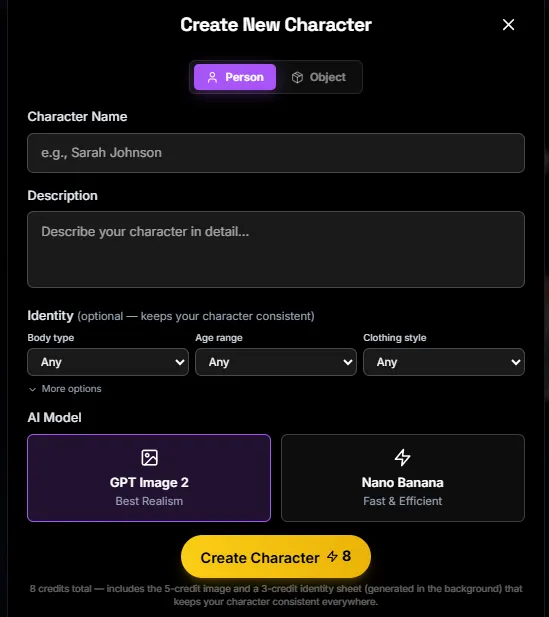
You can build an AI influencer three ways. Describe one in plain language, upload your own selfies, or adopt a ready made creator from the Creator Library, filtered by niche, language and vibe. Influverse stores each character's reference photos and a compiled identity profile, then passes both into every image and video model. There is no LoRA training queue and no waiting.
For brand teams, this fixes the oldest problem in AI creative, which is a face that drifts from post to post and quietly erodes audience trust.
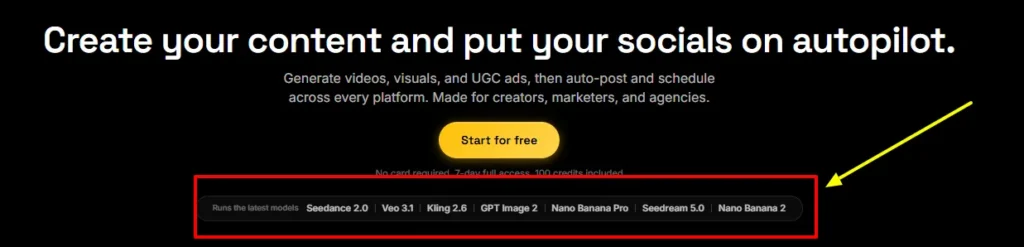
Influverse routes your prompts to twelve video models, including Seedance 2.5, Seedance 2.0, Veo 3.1, Kling O3, Kling 2.6, Alibaba's HappyHorse and Gemini Omni. You get text to video, image to video, first and last frame control, and the option to extend or edit a finished clip.
Ten of the twelve models generate native audio. Output reaches 4K on Seedance 2.0 and Veo 3.1, while Seedance 2.5 stretches single clips to 30 seconds. In practice, you pick the right engine per shot instead of paying for four separate video subscriptions.
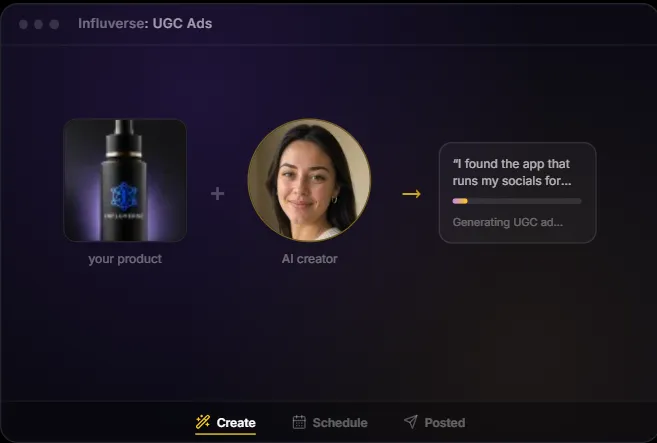
This is the performance marketer‘s module. Pick a creator, upload product photos or paste a product page URL, and choose an ad goal. The AI writes several opening hooks plus a full creator to camera script, complete with emotion tags that steer delivery.
You can edit any line before rendering. The bulk option fans out multiple creators against multiple hooks in one run, and a credit precheck caps spend before anything renders. A typical 15 second ad costs about 75 credits, roughly $3.75, which is a small fraction of a human UGC fee.
Studio turns a single written brief into a storyboard and then a finished reel of several shots. It offers Quick, Auto and Story modes, depending on how much control you want. An AI Director chat lets you steer the edit in plain language, and you can reshoot any individual shot without rebuilding the whole sequence.
Music and captions are added for you. For agencies producing narrative content for clients, this compresses a brief, storyboard and edit cycle that usually spans days into a single sitting.
Every character receives its own synthesised voice, so your persona sounds identical across UGC ads, talking clips and Studio reels. Type the line, or let the AI script it, and the platform lip syncs it to the footage. Motion Control goes further.
Upload a reference video of a dance, gesture or walk, and Kling Motion Control transfers that movement onto your AI character for up to 30 seconds. For creators chasing TikTok trends, this is how you join a trending format within hours rather than days.
Finished content moves straight into a calendar that publishes to Instagram, TikTok, Facebook, YouTube, X and Threads. Autopilot can draft posts into an approval queue, so a human still signs off before anything goes live. Analytics tracks impressions, views, likes, comments, shares and saves per post, showing which hooks and creators actually win.
Paid teams can also connect Meta ad accounts on a read only basis for spend, ROAS and pacing analysis, audits and budget suggestions. That closes the loop between creation and results, which most standalone generators never attempt.
More Influverse AI Features Worth Knowing
Influverse AI Model Roster
Model choice is the single biggest lever on both quality and cost. Here is the full current line up inside Influverse.
Image Models
| Model | Developer | Max Reference Images | Credits per Image |
|---|---|---|---|
| Nano Banana 2 | 5 | 4 at 1K, 5 at 2K, 7 at 4K | |
| Nano Banana Pro | 10 | 6 at 1K, 6 at 2K, 12 at 4K | |
| GPT Image 2 | OpenAI | 10 | 2 Fast, 3 Balanced, 5 Best |
| Seedream 5.0 Pro | ByteDance | 10 | 3 |
| Seedream 5.0 Lite | ByteDance | 10 | 2 |
| Flux 2 | Black Forest Labs | 10 | 4 (reference editing only) |
Video Models
| Model | Clip Length | Resolution | Native Audio | Credits per Clip |
|---|---|---|---|---|
| Seedance 2.5 | 4 to 30 seconds | 480p, 720p | Every clip | 21 to 540 |
| Seedance 2.0 | 4 to 15 seconds | 480p up to 4K | Every clip | 28 to 887 |
| Seedance 2.0 Mini | 4 to 15 seconds | 480p, 720p | Every clip | 7 to 89 |
| Seedance 2.0 Fast | 4 to 15 seconds | Not listed | Every clip | 23 to 138 |
| Kling Motion Control | Up to 30 seconds | Not listed | None | 14 to 80 |
| Kling O3 | 3 to 15 seconds | Not listed | Optional | 10 to 64 |
| Kling 2.6 | 5 to 10 seconds | Not listed | Optional | 14 to 54 |
| Veo 3.1 | 4 to 8 seconds | 720p, 1080p, 4K | Optional | 31 to 183 |
| Veo 3.1 Lite | 4 to 8 seconds | 720p, 1080p | Optional | 5 to 25 |
| HappyHorse (Alibaba) | 3 to 15 seconds | 720p, 1080p | Every clip | 16 to 103 |
| Gemini Omni | 3 to 10 seconds | 720p | Every clip | 15 to 50 |
| Kling 2.1 | 5 to 10 seconds | Not listed | None | 10 to 19 |
Our model playbook. Use GPT Image 2 on Fast for cheap concept drafts, then Nano Banana Pro at 4K for hero stills and thumbnails. Seedream 5.0 Lite handles high volume edits at 2 credits each.
On video, Veo 3.1 Lite is the daily workhorse at 5 to 25 credits a clip. Seedance 2.5 suits longer single takes, Kling Motion Control is your trend replication tool, and Seedance 2.0 or Veo 3.1 at 4K should be saved for flagship campaign moments.
Influverse AI Pricing Plans
| Plan Name | Cost | What You Get |
|---|---|---|
| Starter | Free | 20 one time credits, up to 720p, 3 AI reels a day, 1 generation at a time, Create and Play surfaces, community support, no scheduler |
| Creator | $19 per month, or 16permonthbilledannually(192 a year) | 380 monthly credits (418 on annual), all image and video models, up to 720p, 20 reels a day, 2 concurrent generations, email support, no scheduler |
| Pro | $49 per month, or 41permonthbilledannually(492 a year) | 980 monthly credits (1,078 on annual), up to 1080p, 60 reels a day, 3 concurrent generations, Scheduler for 3 accounts, UGC Ads, Autopilot, 3 brands, priority support |
| Max | $99 per month, or 82permonthbilledannually(984 a year) | 1,980 monthly credits (2,178 on annual), up to 4K, 150 reels a day, 5 concurrent generations, unlimited scheduler accounts, 10 brands, 3 seats, unlimited characters, premium support |
| Enterprise | From $200 per month | 5,000+ custom credits, 10 seats, unlimited reels, Batch API, dedicated account manager, custom integrations, Fanvue scheduling listed for Q4 |
| Credit Pack | $10 one time | 200 credits that never expire, available on every plan including Free |
Plans can be cancelled at any time from the billing portal. Upgrades apply immediately and downgrades take effect at the next billing cycle.
Which Influverse Plan Should You Choose?
| Your Situation | Best Plan | Why |
|---|---|---|
| Testing AI personas with zero budget | Starter | Free, no watermark and full commercial rights, but capped at 720p and 20 credits |
| Solo creator happy to post manually | Creator (annual) | Every model at the lowest credit price, but no scheduler |
| Brand or creator wanting true autopilot | Pro (annual) | Unlocks Scheduler, UGC Ads and Autopilot with 1080p output |
| Agency with several clients | Max | Unlimited social accounts, 10 brands, 3 seats and 4K output |
| Team needing API access and volume | Enterprise | Batch API, 10 seats, account manager and custom integrations |
Getting Started with Influverse AI
- Step 1: Create your free account. Sign up with an email address. Every new account starts on the 7 day trial automatically, with 100 credits and every surface unlocked, scheduling included. No card is needed.
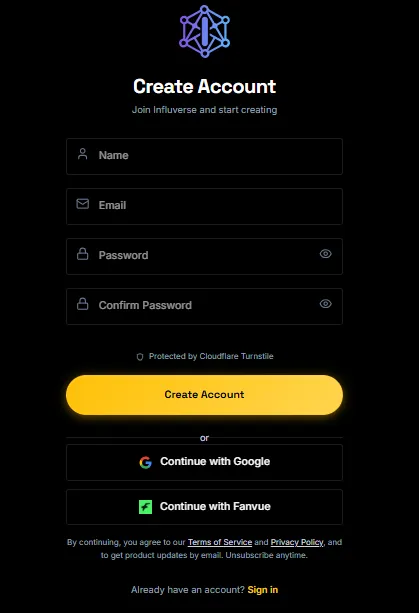
- Step 2: Build or adopt your AI character. Describe your persona, upload your own photos, or choose a creator from the library. Lock in the look early, because every later generation references this identity.
- Step 3: Generate images and videos. Choose a model from the Model pill. Attach references and the app switches into editing mode on its own. Check the exact credit cost shown before you confirm each generation.
- Step 4: Produce a UGC ad or Studio reel. Add a product, generate hooks and a script, then render. For narrative content, write a brief in Studio and refine shots with the AI Director.
- Step 5: Connect your socials and schedule. Link your accounts, drop content onto the calendar and review results in Analytics. Use the trial window to test the scheduler properly before committing to Pro.
Influverse AI Credit Economics, What Your Content Really Costs
Credit pricing is transparent but easy to misjudge. On monthly billing, one credit costs exactly $0.05. Annual billing drops that to about $0.038, which is roughly 24% cheaper per credit and the smartest move for steady publishers. Here is what common assets cost.
| Asset | Credits | Approx. Cost |
|---|---|---|
| GPT Image 2 image (Fast) | 2 | $0.10 |
| Nano Banana 2 image at 4K | 7 | $0.35 |
| Nano Banana Pro image at 4K | 12 | $0.60 |
| Veo 3.1 Lite 8 second clip with audio | 16 | $0.80 |
| Kling O3 10 second clip with audio | 43 | $2.15 |
| Typical 15 second UGC ad | about 75 | about $3.75 |
| Seedance 2.0 15 second clip at 4K | up to 887 | up to $44.35 |
The takeaway is clear. Budget models make daily posting cheap, while premium 4K clips can drain a Creator allowance in a single render.
Sample Monthly Production Budgets
To make the credit system concrete, here is what a realistic month looks like on each paid tier.
| Plan | Example Monthly Mix | Credits Used |
|---|---|---|
| Creator annual (418 credits) | 40 GPT Image 2 Balanced stills, 15 Veo 3.1 Lite 8 second clips with audio, 4 Seedance 2.0 Mini 5 second clips | 416 |
| Pro monthly (980 credits) | 30 Nano Banana 2 images at 2K, 8 UGC ads, 6 Veo 3.1 Lite clips with audio, 8 Kling 2.1 clips | 926 |
| Max monthly (1,980 credits) | 20 UGC ads plus 40 Nano Banana Pro hero images at 4K | 1,980 |
UGC ad costs use Influverse's typical estimate of 75 credits and will vary with length and model. Credits are also shared with the editor and scheduling, so leave a buffer of around 10% each month.
Influverse AI Workflow Playbook, A Weekly Content System
This is the batching rhythm we recommend for a single AI persona posting daily across three to six platforms.
- Monday, lock the brief. Pick three content pillars and generate the week's hooks inside the UGC hook generator.
- Tuesday, batch stills. Generate carousel and thumbnail images in one session with Seedream 5.0 Lite or GPT Image 2, then upscale the winners.
- Wednesday, render video. Produce talking clips in the character's voice, plus one trend reel through Motion Control.
- Thursday, schedule. Load everything onto the calendar, with Autopilot drafts parked in the approval queue for sign off.
- Friday, review and remix. Check saves, shares and views in Analytics, then Remix the top hook into three fresh variants for next week.
The AIMOJO Shakedown, Hype Versus Reality
Marketing copy and product reality line up well here, with a few gaps worth flagging before you commit budget.
Under the Hood, The Influverse Tech Stack
Influverse is built on Next.js and Firebase, with Stripe for billing, FAL AI for model access, ElevenLabs for character voices, Remotion for video rendering and the Bundle.social API for publishing. It deploys on Vercel and stores user media on Cloudflare R2. This stack explains two things.
First, new models appear quickly, because FAL exposes fresh releases fast and Influverse only needs to wire them in. Second, your uptime and output quality partly depend on those upstream providers. For most creators that trade is worth it. For enterprise buyers, it is a vendor risk question worth raising with sales.
Security, Privacy and Content Ownership
We found no public SOC 2 or ISO 27001 attestation on the site, so larger buyers should request security documentation during procurement.
AI Disclosure and Compliance Checklist
AI personas carry real brand risk if handled carelessly. Use this checklist before you publish.
- Label synthetic content. TikTok, Instagram, Facebook and YouTube all offer AI content labels for realistic synthetic media. Turn them on.
- Disclose paid promotion. An AI creator promoting your product is still advertising. Follow FTC endorsement rules in the US and ASA and CAP guidance in the UK.
- Avoid implied real experience. A virtual creator should not claim personal results it never had, such as weight loss or clearer skin. Keep claims to verifiable product facts.
- Get consent for real faces. Only build personas from your own photos or people who have given written permission.
- Keep a human in the loop. Use the Autopilot approval queue instead of blind auto posting.
- Track regional rules. EU AI Act transparency duties for deepfake style content are phasing in, so keep records of what was AI generated.
Who Should Use Influverse AI, and Who Should Skip It
Great fit for
Look elsewhere if you
Pro Tips to Stretch Your Influverse Credits
- Go annual. It cuts your effective credit price from $0.05 to about $0.038.
- Draft cheap, finish premium. Prototype with GPT Image 2 Fast or Veo 3.1 Lite, then render only the winners on premium models.
- Switch audio off when you can. On Veo 3.1 and Kling 2.6, native audio roughly doubles clip cost. Skip it when you plan to add character voice or music later.
- Use first and last frame control. Locking both ends of a clip cuts wasted rerolls.
- Invest in reference images. Upload strong, well lit references once. Better inputs mean fewer failed generations for the life of the persona.
- Buy packs for spikes. Credit packs never expire, while subscription credits reset monthly and are spent first.
- Cap bulk runs. Always review the precheck total before fanning out creators and hooks.
Pros and Cons
- One persona across every format.
- Twelve video models, one wallet.
- Native posting to six platforms.
- Exact credit cost before generating.
- No watermark on free plan.
- Full commercial rights on all plans.
- Bulk UGC hook testing built in.
- Prompts never used for training.
- Annual plans cut credit costs.
- Scheduler locked behind Pro plan.
- Premium 4K clips burn credits fast.
- Subscription credits never roll over.
- No LinkedIn or Pinterest publishing.
- Limited independent user reviews yet
The Mojo, Where Influverse Beats Arcads, Creatify and HeyGen
Arcads and Creatify are sharp UGC ad engines, and HeyGen owns presenter style avatar video. In our comparison, none of them combines one persistent AI persona across still images, organic reels, paid UGC ads and native scheduling, then reports back on what performed. Influverse does.
That single persistent identity is the real moat. A brand can build familiarity with a virtual ambassador on organic channels, then reuse the same face in paid creative where recognition supports click through rates. The shared credit wallet also lets budget flow to whichever format is working this week. For lean teams, fewer logins and one source of truth beat marginally better ad templates.
FAQs
How does Influverse AI keep an AI influencer's face consistent?
Influverse uses reference based generation rather than model training. Each character's stored reference photos and identity description are passed into every image and video request, so the same face, features and style carry across all outputs. Image models accept up to 10 reference images, and Seedance models also accept up to 3 reference videos. With no training step, a new persona is usable within minutes.
How much does an Influverse AI video cost in credits?
One credit equals $0.05. Video clips range from 5 to 887 credits depending on model, duration, resolution and audio. An 8 second Veo 3.1 Lite clip with audio costs 16 credits, while a 15 second Seedance 2.0 clip at 4K sits at the top of the range. Every generation shows its exact cost before you confirm.
What is the maximum video length and resolution on Influverse?
Single clips run from 3 to 30 seconds. Seedance 2.5 and Kling Motion Control reach 30 seconds, while most other models cap at 8 to 15 seconds. Seedance 2.0 and Veo 3.1 support 4K generation, but 4K output needs the Max or Enterprise plan. Longer videos are built by stitching clips in the editor or through Studio.
Which Influverse plan includes the social media scheduler?
The scheduler, UGC Ads and Autopilot unlock on Pro, which covers 3 social accounts and 3 brands. Max removes the account limit and supports 10 brands. Free and Creator users cannot schedule, although the 7 day trial includes scheduling so you can test it first.
What are the Create, Scale and Play surfaces in Influverse?
Create covers character, image and video generation. Scale covers the Scheduler, UGC Ads and Auto Social features. Play covers lighter formats such as Dreams and Memories. Starter and Creator include Create and Play, while Pro, Max and Enterprise add Scale.
Do unused Influverse credits roll over?
Subscription credits expire at the end of each billing cycle and do not roll over. Purchased credit packs, at 200 credits for $10, never expire. Your subscription credits are always spent first, then pack credits.
Does Influverse use my prompts or media to train AI models?
No. Influverse states that prompts and media are never used for model training. Stored data uses 256 bit AES encryption at rest, payments run through Stripe with PCI DSS compliance, and the service operates in line with GDPR, including data portability and deletion rights.
Does Influverse support teams and multiple seats?
Starter, Creator and Pro include a single seat. Max includes 3 seats with up to 10 brands, and Enterprise includes 10 seats with a dedicated account manager, Batch API access and custom integrations.
Best Influverse AI Alternatives
| AI Influencer Generator and UGC Ad Platform | Core Strength | Best Suited For |
|---|---|---|
| Arcads | High volume AI actor UGC ads for paid social | Performance teams producing ad creative at scale |
| Creatify | Turning product URLs into ad variants quickly | Ecommerce brands testing many ad angles |
| HeyGen | Presenter avatars, video translation and explainers | Corporate training, sales enablement and localisation |
| Higgsfield | Cinematic camera moves and video direction | Creators chasing a stylised, film look |
Final Verdict
Influverse AI is the rare platform that treats an AI influencer as a business asset rather than a one off render. Character creation, twelve video models, voice, UGC ads, scheduling and analytics all share one identity and one wallet, which is exactly how a content operation should run.
The honest caveats are the Pro paywall on scheduling, the credit burn of premium 4K video and thin independent reviews. Start with the 7 day trial, build one persona, run a full week of content through the scheduler, and judge it on output rather than promises. For most creators, brands and small agencies, the Pro annual plan is the sweet spot.



