


Creating talking avatar videos used to cost hundreds of dollars and require expensive software. Not anymore.
OpenArt lip-sync feature lets you turn any photo into a realistic talking character in under 5 minutes—and the best part? You can start completely free.
No video editing experience needed. No expensive subscriptions. No camera equipment or filming. Just upload a photo, add your audio, and watch AI animate your character with perfect lip-sync.
What is OpenArt Lip-Sync? (And Why Content Creators Love It)
OpenArt lip-sync is an AI-powered tool that animates still images to match audio, creating realistic talking avatar videos.
Content creators, YouTubers, and marketers use it to produce faceless video content, explainer videos, and social media ads without ever appearing on camera. The platform offers seven different AI models, each optimized for specific use cases, and includes a generous free tier with 20 bonus credits for new users.
Getting Started: OpenArt Lip-Sync Setup (Free Account)
Setting up your account takes less than 3 minutes:

- Sign up at openart.ai – No credit card required for the free plan
- Claim your 40 free credits – Automatically added to new accounts
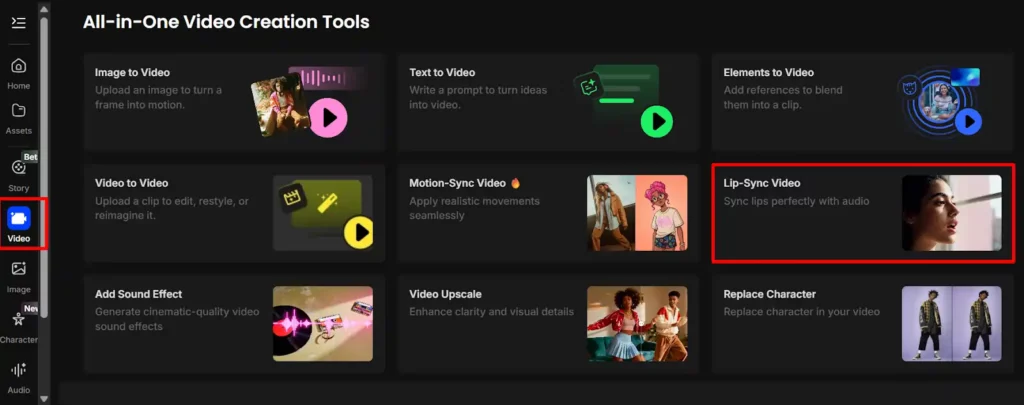
- Navigate to the Video section – Find “Lip Sync” in the main dashboard
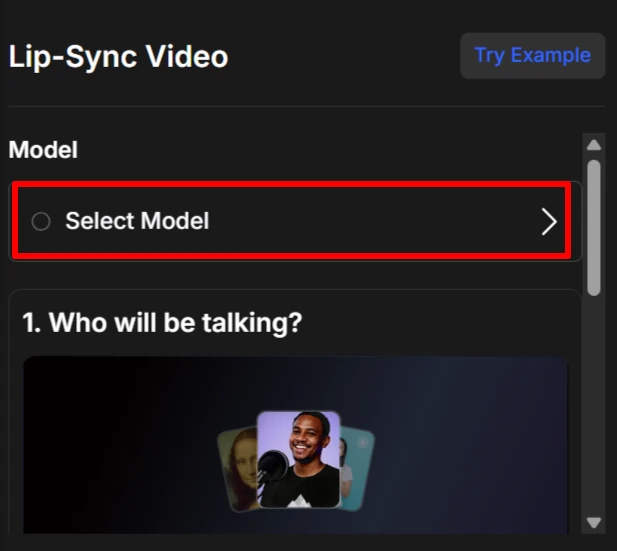
- Choose your model – Select from OmniHuman 1.5, Kling Avatar 2.0, Hedra, or Kling AI
The free plan lets you generate images up to 512×512 pixels with 25 steps on basic models. For lip-sync videos, you'll use your bonus credits or join their Discord community to earn more.
The 7 AI Lip-Sync Models on OpenArt (Compared)
Not all lip-sync models are created equal. Here's the complete breakdown:
| Model | Best For | Quality | Speed | Key Feature |
|---|---|---|---|---|
| OmniHuman 1.5 | Premium realism | Highest | Slow | Flawless lip sync |
| Kling Avatar 2.0 | Person photos | High | Medium | NEW – Multi-speaker |
| Creatify Aurora | Emotional expressions | High | Medium | Natural emotions |
| OpenArt Lipsync | Conversations | High | Medium | Multi-speaker support |
| Hedra (Fast) | Quick generation | Medium | Fastest | Dynamic shots |
| Kling Video | Cinematic style | Medium-High | Fast | Video input support |
| OmniHuman 1.0 | Lifelike videos | High | Slow | Previous version |

My recommendation:
How to Create Your First Talking Avatar Video (Step-by-Step)
Here's the exact process I use every time:
- Step 1: Upload or generate your character image
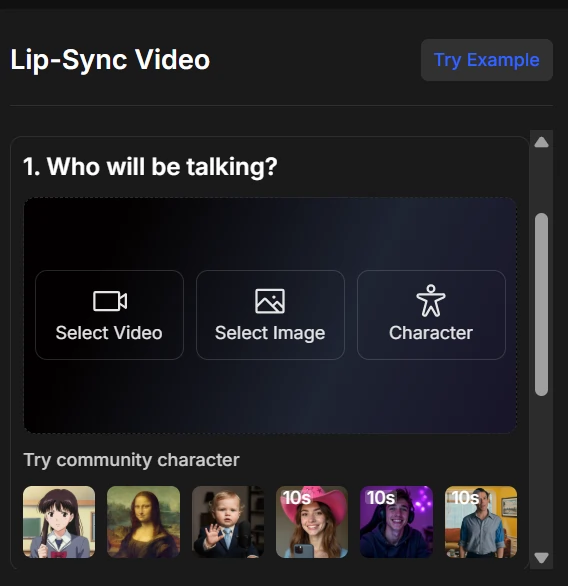
You can upload your own photo or use OpenArt's AI image generator to create a custom character. For best results, use a front-facing portrait with good lighting and minimal shadows.
- Step 2: Choose your AI lip-sync model
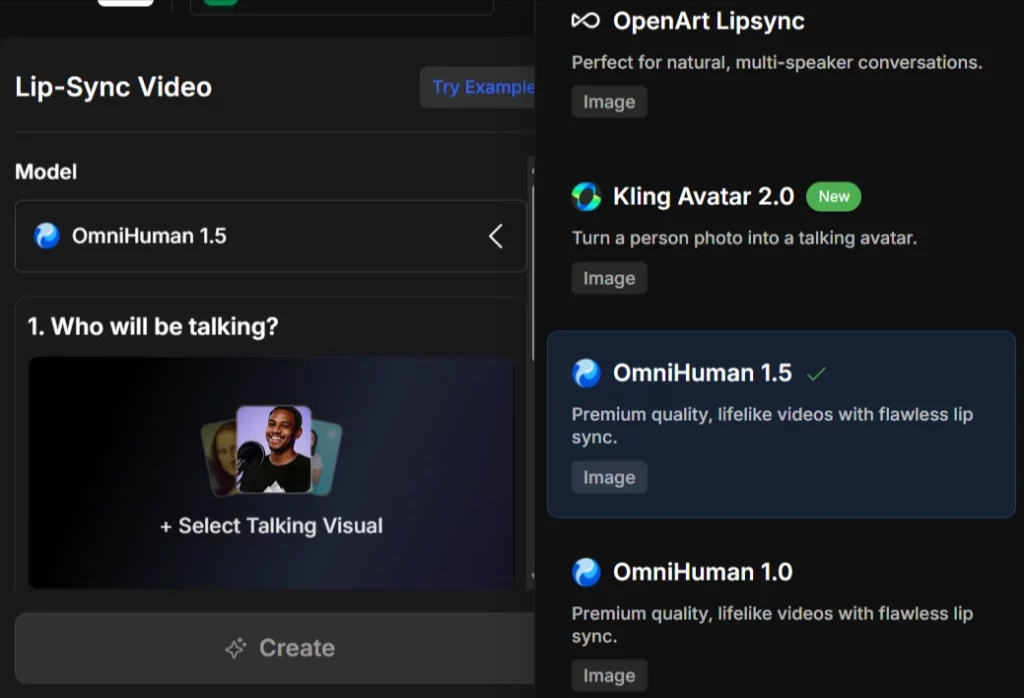
Click the model dropdown and select based on your needs. OmniHuman 1.5 gives the most lifelike facial expressions and lip movements.
- Step 3: Add audio (3 options available)
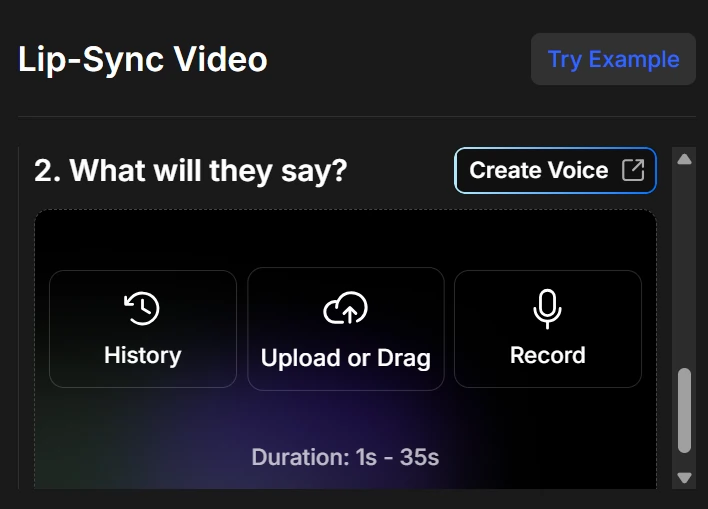
- Upload an MP3/WAV file you've already recorded
- Type text and use the built-in text-to-speech voices
- Import audio from ElevenLabs for voice cloning
- Step 4: Adjust settings (model-specific)
Some models like Creatify Aurora offer emotional expression controls. Hedra focuses on creative storytelling.
- Step 5: Generate and download your video
Hit generate and wait 30-90 seconds. Download as MP4 once processing completes.
Upload Audio for Lip-Sync: 3 Methods Explained
Method 1: Upload Pre-Recorded Audio
This gives you the most control. Record your script using any microphone, save as MP3 or WAV, and upload directly. Audio quality matters—use at least 128kbps bitrate for clean lip-sync.
Method 2: Text-to-Speech (Built-In Voices)
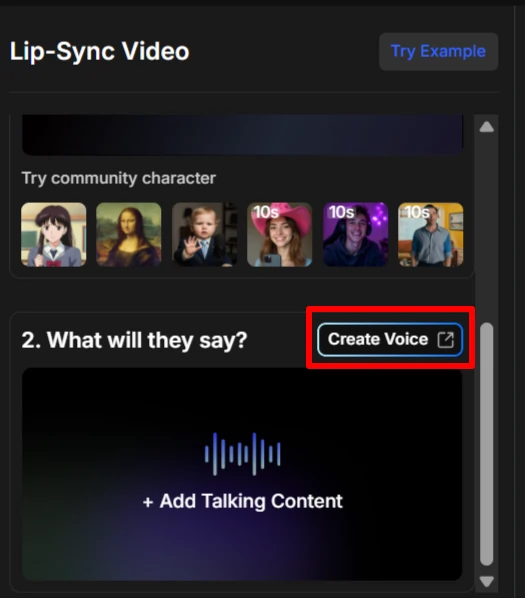
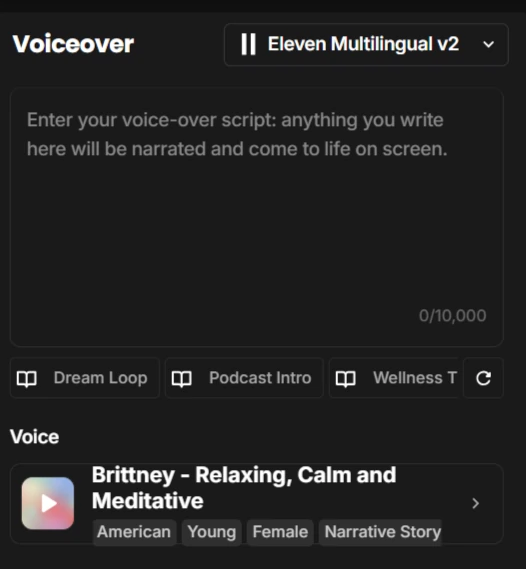
Type your script and select from OpenArt's voice library. Perfect for quick tests or when you don't want to record yourself. The voices sound natural but lack the personality of custom recordings.
Method 3: Voice Cloning Integration
Connect your ElevenLabs account or upload cloned voice samples. This creates talking avatars that sound exactly like you (or anyone you've cloned) without recording new audio every time.
Making Realistic Talking Avatars: Pro Tips & Settings
After creating 50+ talking avatars, here's what actually works:
- Image requirements matter: Use 1024×1024 or higher resolution source images. Blurry photos produce blurry talking heads.
- Face angle is critical: Front-facing or slight 3/4 angles work best. Profile shots rarely sync properly.
- Audio length sweet spot: Keep it between 15-60 seconds. Longer clips sometimes fail or cost more credits.
- Fix timing issues: If lips don't match audio, re-export your audio at 44.1kHz sample rate before uploading.
- Model selection strategy: Use OmniHuman for premium projects, Hedra for volume work, and Creatify Aurora when emotional expression matters most.
Best Use Cases: When to Use OpenArt Lip-Sync
This tool excels for specific content types:
One creator I know generates 20+ TikTok videos weekly using just OpenArt lip-sync and ChatGPT-written scripts. Zero filming required.
OpenArt vs. Competitors: How Does It Compare?
- OpenArt vs. HeyGen
- HeyGen starts at $29/month with limited video minutes. OpenArt's credit system lets you pay only for what you use. For occasional creators, OpenArt wins on price.
- OpenArt vs. D-ID
- D-ID produces slightly smoother facial animations but costs $5.90/month minimum. OpenArt's free tier and model variety make it better for testing and small projects.
- OpenArt vs. Synthesia
- Synthesia starts at $18/month (yearly) but locks you into 125+ pre-built avatars. OpenArt lets you animate ANY photo—real people, AI characters, brand mascots—total creative freedom..
Advanced Techniques: Multi-Character Scenes & Custom Animations
OpenArt Characters for consistency:

Upload one image of your character, then pose them in multiple scenes while keeping the same face. Perfect for building a recurring video host across your content series.
Combine with video-to-video tools:


Generate your lip-sync video, then run it through OpenArt's video-to-video feature to add stylistic effects, change backgrounds, or apply artistic filters.
Music video creation:

Upload music tracks to OpenArt Story feature, add lip-sync characters, and create AI music videos. Some creators are monetizing these on YouTube with 100K+ views.
Troubleshooting Common OpenArt Lip-Sync Problems
OpenArt Lip-Sync Questions Answered
Can I use OpenArt lip-sync for free?
Yes. New accounts get 40 bonus credits to test all features, including lip-sync. Join their Discord for additional free credits.
What audio formats does OpenArt support?
MP3, WAV, and M4A files up to 60 seconds. Maximum file size is 10MB.
How long can my talking avatar videos be?
Current limit is 60 seconds per generation. Create multiple clips and stitch them together for longer videos.
Can I download videos without watermarks?
All downloaded videos are watermark-free, even on the free plan. No hidden catches.
Does OpenArt work with animated or cartoon images?
Absolutely. Kling AI model works great with anime characters, cartoon drawings, and illustrated portraits.
Final Verdict: Should You Use OpenArt Lip-Sync?
The reality? OpenArt lip-sync has flaws—occasional sync issues, credit costs add up for heavy users, and OmniHuman can take 2+ minutes per video. But for creating talking avatar videos without filming equipment, expensive software, or showing your face, nothing beats the price-to-quality ratio in 2026.
Start with the free credits and test different models. You'll know within 30 minutes if this tool fits your workflow. Most creators either go all-in after the first video or realize they'd rather use HeyGen's monthly subscription model.
Grab your free account at openart.ai and create your first talking avatar today. No credit card. No commitment. Just upload a photo and audio—see what happens.
AiMojo Recommends:


 BONUS: Get our $200 “AI Mastery Toolkit” FREE when you sign up!








