


The fusion of Meta's Llama 4 models with Microsoft's AutoGen framework opens new possibilities for creating smart, efficient AI agents. These technologies, when combined, allow developers to build applications that can process natural language, understand images, reason through complex problems, and collaborate with other agents to accomplish tasks.
Llama 4 brings impressive multimodal capabilities and extensive context windows, while AutoGen provides a structured framework for orchestrating multiple agents in collaborative workflows. Together, they form a powerful toolkit for next-generation AI applications.
This guide walks through the process of building AI agents using these tools, with practical code examples and implementation strategies for developers of all skill levels.
What Makes Llama 4 and AutoGen the Perfect Match?
Meta's Llama 4 family stands out in the AI world with its native multimodal capabilities and early fusion approach. When combined with AutoGen—Microsoft's framework for building conversational multi-agent systems—developers can create AI agents that reason, collaborate, and adapt efficiently.
Llama 4 models, including Scout and Maverick variants, offer early-fusion multimodal processing that treats text, images, and video frames as a single sequence of tokens from the start. This capability, paired with AutoGen's flexible agent architecture, enables the creation of AI systems that can:
Let's build a practical multi-agent system that demonstrates these capabilities by creating a project proposal generator that analyzes client requirements and generates custom job proposals.
Building a Practical AI Agent System
Let's create a multi-agent system that helps freelancers generate tailored job proposals. Our system will:
- Collect client requirements
- Gather freelancer qualifications
- Generate professional proposals with appropriate pricing.
Step 0: Setting Up Your Environment
First, install the necessary packages:
python
pip install autogen-agentchat~=0.2
pip install ipython
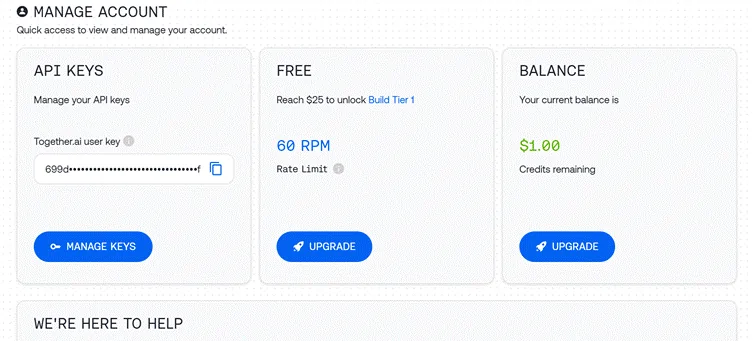
Step 1: Configuring API Access
We'll use the Together API to access Llama 4:
python

import os

import autogen

from IPython.display import display, Markdown

# Load API key from file

with open("together_ai_api.txt") as file:

    LLAMA_API_KEY = file.read().strip()

os.environ["LLAMA_API_KEY"] = LLAMA_API_KEY

# Configure LLM settings

llm_config = {

    "config_list": [

        {

            "model": "meta-llama/Llama-4-Scout",  # Use Scout for efficiency

            "api_key": os.environ.get("LLAMA_API_KEY"),

            "base_url": "https://api.together.xyz/v1",

        }

    ],

    "temperature": 0.2,  # Lower for more consistent outputs

    "timeout": 180

}
Step 2: Creating Specialized Agents
Our system requires three distinct agents with specific roles:
Client Input Agent
python

# Agent 1: Interfaces with the human user

client_agent = autogen.UserProxyAgent(

    name="Client_Input_Agent",

    human_input_mode="ALWAYS",  # Always gets input from human

    max_consecutive_auto_reply=1,

    is_termination_msg=lambda x: x.get("content", "").rstrip().endswith("TERMINATE"),

    system_message="""Act as the primary contact between the human user and other agents.

    First, collect initial project details (requirements, timeline, budget).

    When asked questions by the Scope Architect, relay user's answers about skills and experience.

    Type TERMINATE when the proposal is satisfactory or the user wants to stop."""

)
This agent serves as the bridge between the human user and the AI system, collecting information and presenting the final output.
Scope Architect Agent
python

# Agent 2: Analyzes requirements and asks qualifying questions

scope_architect_agent = autogen.AssistantAgent(

    name="Scope_Architect",

    llm_config=llm_config,

    max_consecutive_auto_reply=1,

    system_message="""You are a Scope Architect who analyzes project requirements.

    After receiving initial details from Client_Input_Agent, ask targeted questions about:

    - The freelancer's relevant past projects and experience

    - Their key skills and tools for this specific project

    - Estimated completion time for the described work

    Once you have sufficient information, create a concise summary of BOTH

    the project requirements AND freelancer qualifications for the Rate Recommender."""

)
The Scope Architect functions as the requirements analyst, gathering crucial information needed for an accurate proposal.
Rate Recommender Agent
python

# Agent 3: Creates structured proposal with pricing

rate_recommender_agent = autogen.AssistantAgent(

    name="Rate_Recommender",

    llm_config=llm_config,

    max_consecutive_auto_reply=1,

    system_message="""Generate professional project proposals based on gathered information.

    Wait for the Scope Architect's complete summary before proceeding.

    Include these sections in your proposal:

    1. Custom Introduction: Personalized greeting referencing client and project

    2. Project Scope & Timeline: Clear deliverables with timeline estimates

    3. Pricing Options: 2-3 tiers (hourly/fixed/retainer) with justification

    4. Next Steps: Brief suggestion for kickoff discussion

    Format using proper markdown. Avoid commentary - deliver only the final proposal."""

)
This agent produces the final deliverable, transforming collected information into a structured proposal.
Step 3: Creating a Helper Agent (Optional)
python

# Optional helper to initiate the conversation

user_proxy = autogen.UserProxyAgent(

    name="user_proxy",

    max_consecutive_auto_reply=1,

    llm_config=llm_config,

    system_message="Initiate the conversation between agents."

)
Step 4: Setting Up the Group Chat
Now we'll create the conversation environment where agents can collaborate:
python

# Group Chat Configuration

groupchat = autogen.GroupChat(

    agents=[client_agent, scope_architect_agent, rate_recommender_agent],

    messages=[],

    max_round=4,  # Prevent infinite loops

    speaker_selection_method="round_robin",  # Orderly participation

)

# Conversation Manager

manager = autogen.GroupChatManager(

    groupchat=groupchat,

    llm_config=llm_config,

    system_message="""Direct the conversation flow through these steps:

    1. Client_Input_Agent shares project details

    2. Scope_Architect asks qualifying questions

    3. Client_Input_Agent provides freelancer information

    4. Scope_Architect summarizes all information

    5. Rate_Recommender creates the final proposal

    End when the proposal is complete or Client_Input_Agent says TERMINATE."""

)
This setup ensures an organized conversation flow with clear roles and responsibilities.
Step 5: Starting the Conversation
Let's initiate our agent workflow:
python

# Begin the proposal generation process

print("Starting the proposal generation process...")

print("Please provide project details when prompted.")

initial_message = """

Begin the proposal creation process:

1. First collect project details from the user

2. Then gather freelancer qualifications

3. Finally generate a professional proposal

"""

user_proxy.initiate_chat(

    manager,

    message=initial_message

)
Step 6: Extracting the Final Proposal
Once the conversation completes, we'll extract and display the final proposal:
python

# Find and display the proposal

chat_history = manager.chat_messages[client_agent]

final_proposal = None

for msg in reversed(chat_history):

    if msg.get("role") == "assistant" and msg.get("name") == rate_recommender_agent.name:

        if "Introduction" in msg.get("content", ""):

            final_proposal = msg

            break

if final_proposal:

    proposal_text = final_proposal.get("content", "Proposal not found.")

    try:

        display(Markdown(proposal_text))

    except NameError:

        print("\n--- FINAL PROPOSAL ---\n")

        print(proposal_text)

else:

    print("Could not find the final proposal in the conversation.")
Enhanced Techniques for Building Better AI Agents

While our basic implementation works well, here are some advanced approaches to make your AI agents more powerful:
A.External Tool Integration
One of AutoGen's strengths is the ability to equip agents with external tools. Here's how to give your Rate Recommender market research capabilities:
python

# Define function for market research

def research_market_rates(job_type, experience_level):

    """Access external data for pricing information"""

    # This would typically connect to an API or database

    # Using simple dictionary for demonstration

    rate_data = {

        "web_development": {

            "beginner": "$30-50/hr",

            "intermediate": "$50-90/hr",

            "expert": "$90-200/hr"

        },

        "data_analysis": {

            "beginner": "$25-45/hr",

            "intermediate": "$45-85/hr",

            "expert": "$85-180/hr"

        }

    }

    # Retrieve appropriate rate range

    try:

        return rate_data[job_type][experience_level]

    except KeyError:

        return "Rate information not available for this combination"

# Configure LLM with function

rate_recommender_config = {

    **llm_config,

    "functions": [

        {

            "name": "research_market_rates",

            "description": "Find current market rates for specific job types and experience levels",

            "parameters": {

                "type": "object",

                "properties": {

                    "job_type": {

                        "type": "string",

                        "enum": ["web_development", "data_analysis", "content_writing", "graphic_design"]

                    },

                    "experience_level": {

                        "type": "string",

                        "enum": ["beginner", "intermediate", "expert"]

                    }

                },

                "required": ["job_type", "experience_level"]

            }

        }

    ]

}

# Update the Rate Recommender with function capabilities

rate_recommender_agent = autogen.AssistantAgent(

    name="Rate_Recommender",

    llm_config=rate_recommender_config,

    system_message="""Generate proposals with accurate market-based pricing.

    Use the research_market_rates function to get current pricing information."""

)

# Register the function with the agent

rate_recommender_agent.register_function(

    function_map={"research_market_rates": research_market_rates}

)
This enhancement allows the Rate Recommender to access external pricing data, making proposals more accurate and competitive.
B. Persistent Memory Implementation
Adding memory capabilities helps agents maintain context across multiple interactions:
python

# Create a simple memory system for agents

class AgentMemory:

    def __init__(self):

        self.memories = {}

    def store(self, agent_name, key, value):

        """Save information to agent memory"""

        if agent_name not in self.memories:

            self.memories[agent_name] = {}

        self.memories[agent_name][key] = value

    def retrieve(self, agent_name, key=None):

        """Get information from agent memory"""

        if agent_name not in self.memories:

            return None

        if key:

            return self.memories[agent_name].get(key)

        else:

            return self.memories[agent_name]

# Initialize memory

memory = AgentMemory()

# Example of storing client information

def process_client_input(message):

    """Extract and store client information"""

    # This would typically use more sophisticated parsing

    if "budget:" in message.lower():

        budget = message.split("budget:")[1].strip().split("\n")[0]

        memory.store("client", "budget", budget)

    if "timeline:" in message.lower():

        timeline = message.split("timeline:")[1].strip().split("\n")[0]

        memory.store("client", "timeline", timeline)

    return message

# Add memory hook to client agent

def memory_hook(recipient, messages, sender, config):

    """Process and store incoming messages"""

    if sender.name == "Client_Input_Agent" and messages:

        process_client_input(messages[0].get("content", ""))

    return False, None  # Continue normal processing

# Register the hook

client_agent.register_hook("memory_hook", memory_hook)
This memory system helps agents recall important information throughout the conversation, even when not explicitly mentioned in recent messages.
Practical Applications Beyond Proposal Generation
The architecture we've built can be adapted to many other business scenarios:
A. Content Creation Pipeline
Modify our agents to handle content production workflows:
B. SEO Analysis System
Create a specialized SEO tool with these agents:
C. Customer Support Automation
Transform the architecture into a support system:
Performance Optimization Tips
For production-ready AI agent systems:
- Smart model selection: Use lightweight models for simpler tasks (intake, routing) and reserve larger models for complex reasoning (proposal creation, pricing).
- Implement caching: Store frequent responses to reduce API calls and improve response time:
python

# Simple cache implementation

response_cache = {}

def get_cached_response(query_key, generator_function, ttl=3600):

    """Get cached response or generate new one"""

    if query_key in response_cache:

        timestamp, response = response_cache[query_key]

        if time.time() - timestamp < ttl:

            return response

    # Generate fresh response

    new_response = generator_function()

    response_cache[query_key] = (time.time(), new_response)

    return new_response
Batch processing: For independent tasks, process them in parallel rather than sequentially:
python

import asyncio

async def run_parallel_research():

    task1 = asyncio.create_task(research_agent.async_run("Research topic A"))

    task2 = asyncio.create_task(research_agent.async_run("Research topic B"))

    task3 = asyncio.create_task(research_agent.async_run("Research topic C"))

    results = await asyncio.gather(task1, task2, task3)

    return results
The Technical Edge of Llama 4 for AI Agents
Llama 4's specific features make it particularly well-suited for agent applications:
- Early fusion multimodal architecture enables agents to process text and images together naturally, unlike previous approaches that kept modalities separate.
- Mixture-of-experts design allows the model to activate only relevant parameters for each task, making responses both faster and more precise.
- Exceptional long-context handling (up to 10M tokens in Scout) lets agents maintain conversation history and reference lengthy documents without losing coherence.
- Multilingual capabilities across 12 officially supported languages make agents accessible to global users.
hes, you can create AI agents that not only understand and respond to requests but actively collaborate to solve complex problems—truly representing the next generation of AI applications.
Top FAQs
What makes Llama 4 different from other language models?
Llama 4 uses an early fusion approach for multimodal processing and a sparse Mixture of Experts architecture for efficiency. It treats text, images, and video as a single token sequence and activates only relevant “expert” sub-models for each input.
Can AutoGen work with LLMs other than Llama 4?
Yes, AutoGen is model-agnostic and can work with various LLMs including OpenAI models, Anthropic models, and other open-source models like Mistral AI or DeepSeek.
Does building AI agents require advanced programming skills?
Not necessarily. With basic Python knowledge and understanding of LLMs, you can set up and run agent workflows. AutoGen simplifies the process of creating and coordinating multiple agents.
Can these AI agents run on local hardware?
Yes, AutoGen supports integration with local LLMs through tools like Ollama, allowing you to run agents on your own hardware.
How do I handle API keys securely in production?
Store API keys in environment variables or secure vaults rather than in code. Use proper authentication and encryption for production deployments.
Can I extend the agents with custom tools and APIs?
Absolutely. AutoGen allows you to connect agents to external APIs, databases, and custom tools, enabling them to interact with various systems and services.
Recommended Readings:
Conclusion
Building AI agents with Llama 4 and AutoGen opens exciting possibilities for creating intelligent, collaborative systems that can tackle complex tasks. The combination of Llama 4's multimodal intelligence and AutoGen's flexible agent framework provides developers with powerful tools to create AI agents that can reason, collaborate, and adapt to various scenarios.
Our example project—a multi-agent proposal generator—demonstrates just one practical application of these technologies. The same principles can be applied to build AI agents for content creation, data analysis, customer service, research, project management, and many other domains.
As you build your own AI agents with Llama 4 and AutoGen, remember these key principles:


 BONUS: Get our $200 “AI Mastery Toolkit” FREE when you sign up!







