

Quick Verdict
| Review Area | Our Take |
|---|---|
| Best for | Busy professionals, founders, marketers, writers, agencies, and anyone chasing Inbox Zero |
| Main use case | AI email management, email prioritization, smart filtering, and inbox cleanup |
| Works with | Gmail, Microsoft 365, Apple iCloud, Yahoo Mail, Fastmail, IMAP, Exchange, and ActiveSync |
| Biggest win | Cleans inbox clutter without replacing your current email app |
| Biggest drawback | Needs some training before sorting feels fully accurate |
| Trial | 14-day free trial with no credit card mentioned on the main site |
| AIMOJO rating | 4.6 out of 5 |
Bottom Line Upfront: If your inbox feels like a second job, SaneBox is one of the most useful email productivity tools we’ve tested for getting closer to Inbox Zero without building endless manual filters.
It works with Gmail, Microsoft 365, Apple iCloud, Yahoo Mail, Fastmail, IMAP, Exchange, and ActiveSync, without forcing users to switch email apps or install a new mail client.
Our inbox is full of AI tool pitches, affiliate emails, newsletters, PR follow-ups, SaaS updates, receipts, and random “quick question” messages.
SaneBox helped us separate real work from background noise.
The best part is simple.
We did not have to leave Gmail, change our workflow, or teach the whole team a new email app.
SaneBox works quietly inside your current email account, creates smart folders like SaneLater and SaneNews, and learns from how you move emails over time.
That said, SaneBox is not magic.
It needs a few days of training, the interface feels more functional than flashy, and users who want a full email client may prefer Spark Mail or Superhuman.
Still, for smart email filtering, inbox cleanup, newsletter filtering, and follow up reminders, SaneBox is one of the strongest tools in its category.
What Is SaneBox?
SaneBox is an AI email management service built to reduce inbox clutter and help users focus on emails that actually need attention.
Instead of acting like a new email app, SaneBox connects to your current email account and sorts incoming messages into folders based on importance.
Important emails stay in your inbox.
Less important emails move into folders like SaneLater, SaneNews, or other SaneBox folders depending on how you set it up.
That matters a lot.
Our inbox is not just personal email.
We get AI product launch pitches, affiliate program updates, SaaS billing messages, newsletter subscriptions, sponsored post requests, partner replies, coupon updates, and cold outreach every day.
Before testing SaneBox, our Gmail inbox looked busy even when nothing urgent was happening.
After setting up SaneBox, newsletters and low-priority senders started moving away from the main inbox, while real replies and deal-related messages stayed visible.
That is exactly where SaneBox feels different from a basic Gmail inbox organizer.
Gmail filters are rule-based.
SaneBox learns from behavior.
It studies patterns such as who you reply to, which emails you open, and how quickly you respond, then uses those signals to decide what deserves inbox space.
SaneBox Review: AI Inbox Manager Worth Using Today Verified
Why Email Overload Hurts Productivity
Email overload is not just annoying.
It breaks focus.
Every random newsletter, receipt, promo, update, and CC thread creates a tiny decision.
Open it?
Ignore it?
Archive it?
Reply later?
Do that 80 times a day and your brain starts burning energy on inbox maintenance instead of real work.
SaneBox positions itself around that exact pain point, with its homepage claiming users save about 3 to 4 hours per week on email management.
We cannot treat that number as a guarantee for every user.
But in our AIMOJO workflow, the time saved came from fewer inbox checks and fewer “what is this?” moments.
For content teams, affiliate marketers, founders, and operators, that is a serious win.
Email is where deals happen.
But email is also where attention goes to die.
An email productivity tool like SaneBox works best when it protects your attention without hiding messages you still need.
That balance is the whole game.
How SaneBox Works
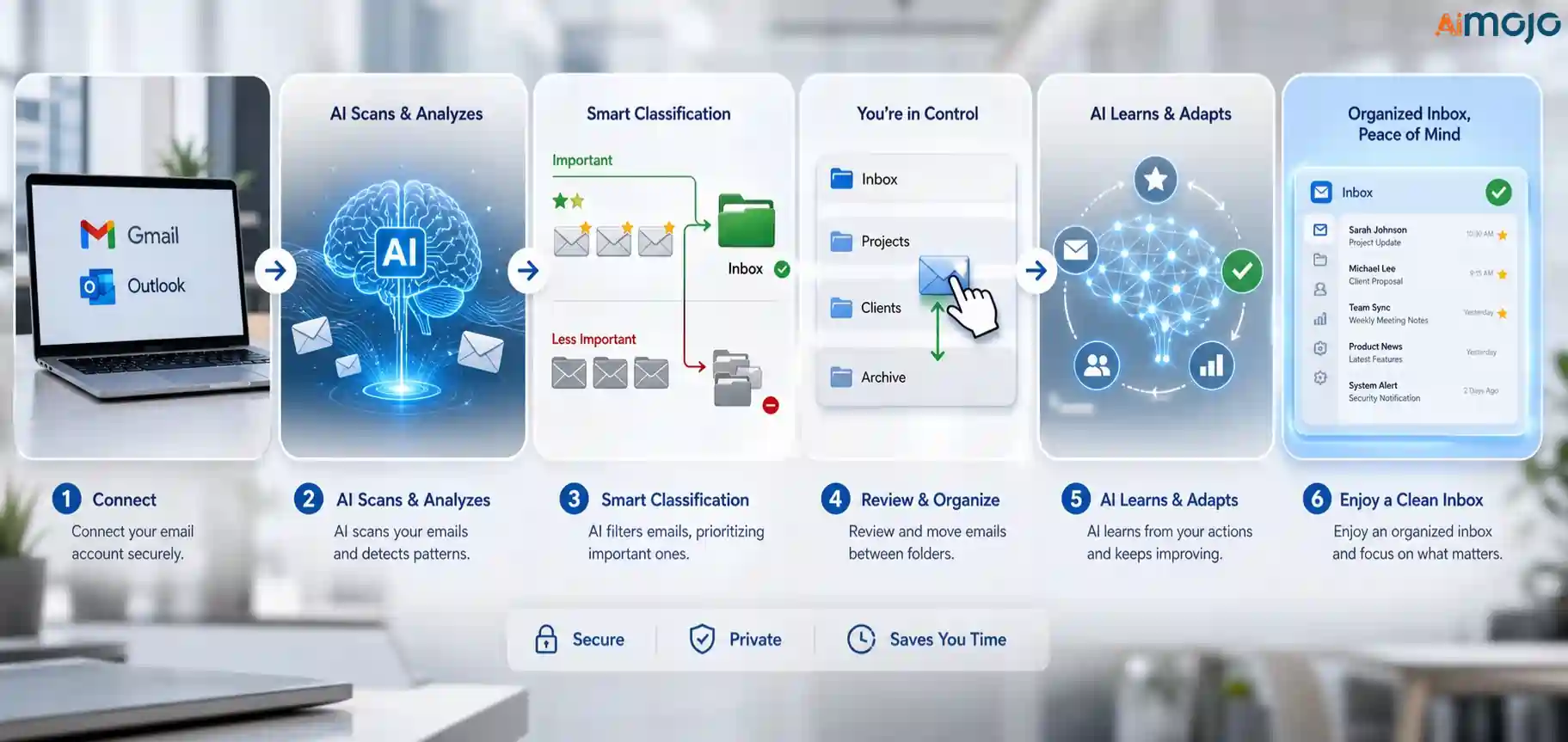
SaneBox connects to your existing email account and creates smart folders inside the mailbox you already use.
There is no new inbox to learn.
No forced app switch.
No messy migration.
You keep using Gmail, Outlook, Apple Mail, Spark, mobile mail apps, or any current email client, while SaneBox handles sorting in the background.
Here is the simple version.
That last point is important.
Training SaneBox does not feel like building automation rules.
If an email lands in SaneLater but should be important, move it back to your inbox.
If a sender keeps bothering you, send it to SaneBlackHole.
Over time, those folder movements teach SaneBox what belongs where.
For AIMOJO, we used that training for AI brand pitches, newsletter-heavy senders, affiliate dashboards, and follow-up threads.
After a few corrections, the inbox felt calmer.
Not empty.
Just less noisy.
Important SaneBox Features
| Key Feature | What It Does | What It Does |
|---|---|---|
| SaneLater | Moves less important emails out of the inbox for later review | Great for non-urgent SaaS updates, receipts, and cold pitches |
| SaneNews | Collects newsletters and mailing list emails in a separate folder | Useful for AI newsletters without flooding Gmail |
| SaneBlackHole | Removes unwanted senders from the inbox going forward | Good for sender-level cleanup when unsubscribe links are annoying |
| SaneReminders | Sends follow-up reminders when someone does not reply or when you need a future reminder | Helpful for partnerships, affiliate managers, and PR follow-ups |
| SaneSnooze | Moves emails away until a chosen future time | Good for emails that matter later, not today |
| Daily Digest | Gives a daily summary of unread lower-priority emails | Lets us scan less important mail without opening every folder |
| Do Not Disturb | Holds email during focus time and delivers later | Useful for writing, audits, and deep research blocks |
| Email Deep Clean | Scans older email and helps move selected old sender messages to Trash | Good for storage cleanup and stale sender cleanup |
| Training folders | Lets users teach SaneBox by moving emails between folders | Better than writing manual Gmail rules all day |
| Works everywhere | Runs inside existing desktop, mobile, and email clients | No team-wide app change needed |
SaneLater
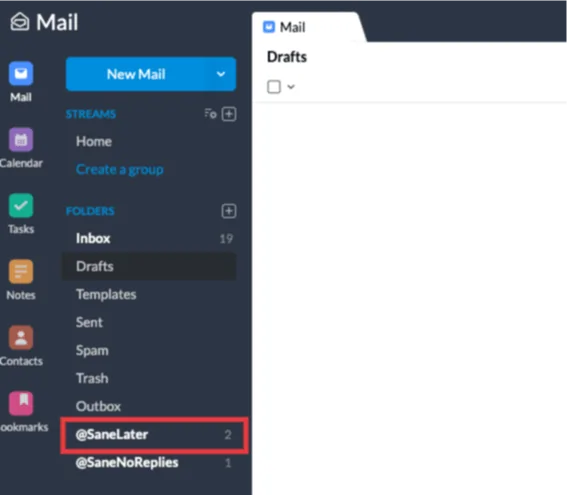
SaneLater is the feature most users will notice first.
It moves emails that are not urgent into a separate folder, leaving the main inbox for emails that deserve attention sooner.
For our testing, SaneLater became the holding area for “maybe later” messages.
AI launch announcements, non-urgent account alerts, content collaboration pitches, and general SaaS updates went there.
The win was not just fewer emails. The win was less doubt.
When we opened the inbox, we were not scanning 40 mixed messages to find the 5 that mattered.
SaneNews
SaneNews is built for newsletters and mailing lists.
For anyone in AI, marketing, SEO, or affiliate work, newsletters can be both useful and overwhelming.
We subscribe to AI tool newsletters, SEO updates, product launch emails, affiliate network announcements, and SaaS blogs.
Before SaneBox, those emails created noise throughout the day.
With SaneNews, we could review newsletters in one batch.
That felt much better than letting every newsletter interrupt the main inbox.
SaneBlackHole
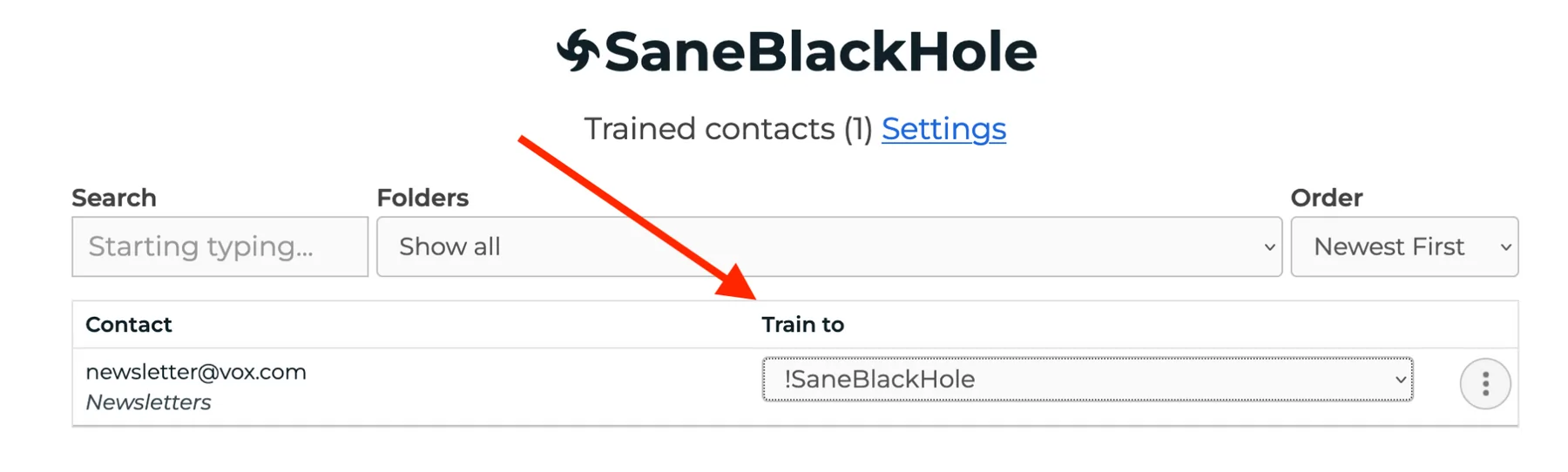
SaneBlackHole is the feature we used when unsubscribing felt like too much work.
Move a sender into SaneBlackHole, and future emails from that sender stop cluttering the inbox.
It works like an unsubscribe-style cleanup tool, though the better way to think about it is sender control.
For cold outreach lists, repeated promo senders, and low-quality campaigns, SaneBlackHole is fast.
One move.
Done.
No hunting for tiny unsubscribe links. No “please wait 10 business days” nonsense.
SaneReminders and Follow-Up Reminders
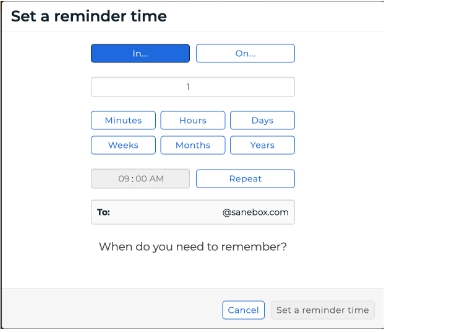
SaneReminders helps with one of the most painful email problems.
You send an important email.
Then silence.
Then you forget.
SaneBox can remind you if someone does not reply by a chosen time, and it can also send reminders to your future self.
For us, this worked well for partnerships, review access requests, guest post replies, and sponsor conversations.
A missed follow-up can mean a missed deal.
So this feature is not just inbox cleanup.
It protects revenue.
SaneSnooze
SaneSnooze moves emails out of sight until they matter again.
Think of renewal notices, review tasks, Monday follow-ups, invoices, or “check next week” emails.
Without snooze, those messages sit in the inbox and keep asking for attention.
With SaneSnooze, they disappear and return at the right time.
That is simple, but powerful.
A clean inbox is not only about deleting email.
Sometimes the right move is delaying email until your brain can actually use it.
Daily Digest
Daily Digest gives a summary of lower-priority unread emails, so users can scan less important messages without opening every folder manually.
We liked this because SaneBox can be aggressive if you train it well.
The digest acts as a safety net.
If something landed outside the inbox, we could still catch it in a quick review.
For writers and marketers, that helps build trust.
Nobody wants an email cleanup tool that hides useful opportunities.
Daily Digest makes the system feel less risky.
Do Not Disturb
Do Not Disturb is for focused work.
SaneBox can hold emails during quiet time and deliver them later.
This makes sense during content writing, SEO audits, and AI tool testing.
Email is deadly during review writing.
One tiny notification can pull you from testing a tool into checking affiliate stats, replying to a vendor, and reading a newsletter you never planned to open.
Do Not Disturb gives email a boundary.
That is rare.
And very needed.
Email Deep Clean
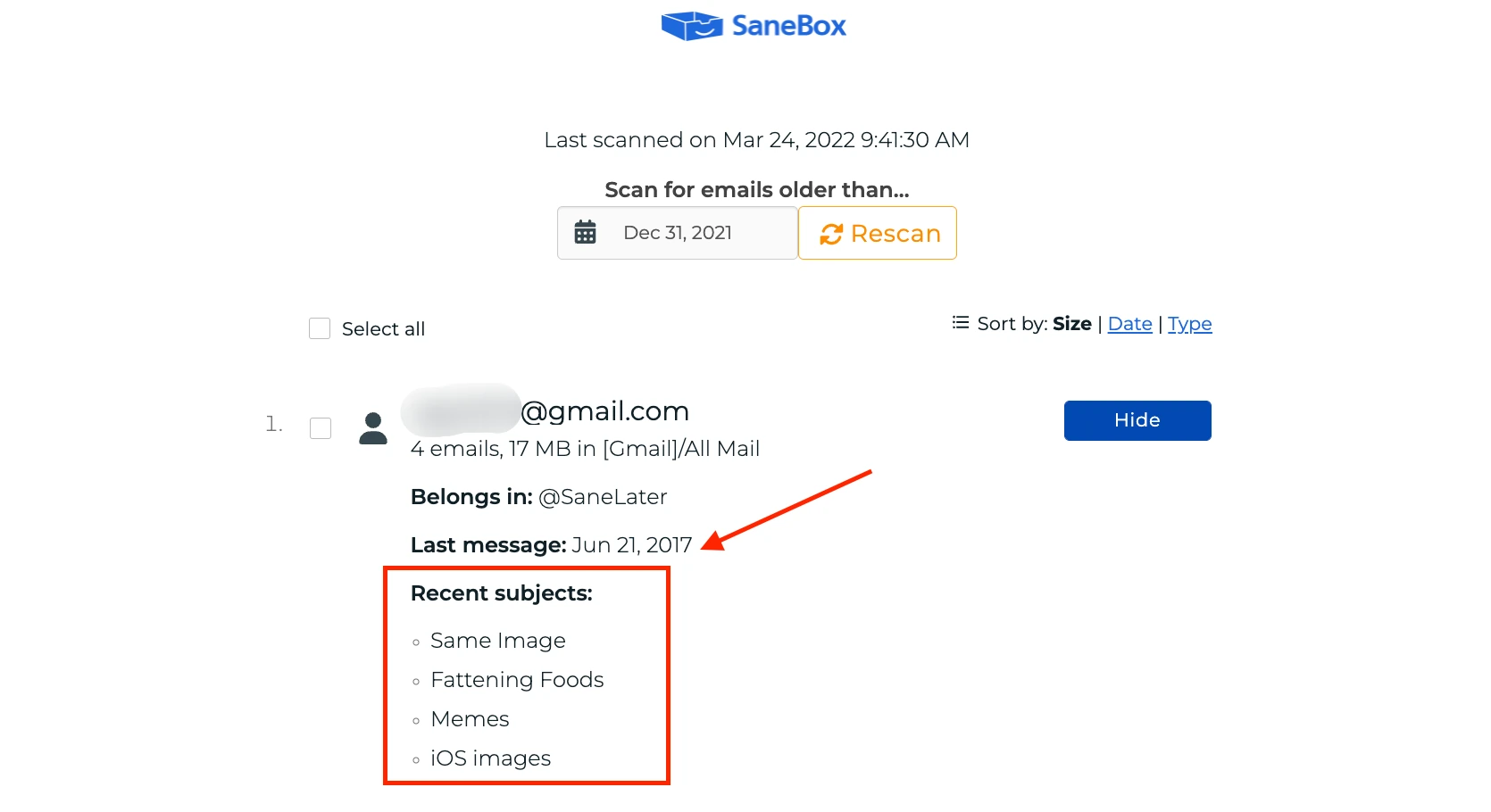
Email Deep Clean is built for old inbox mess, not just new incoming mail.
It scans older email, shows senders taking up space, and lets users choose which sender messages should move to Trash.
This is different from SaneLater or SaneNews.
Those features keep new email organized.
Email Deep Clean helps clear old clutter that has already piled up.
For anyone with years of newsletters, store receipts, download alerts, or SaaS notices, this can free up storage and make search cleaner.
SaneBox also notes that Email Deep Clean can filter by size, date, and type during cleanup.
That matters if storage is a problem.
How We Used SaneBox at AIMOJO
We tested SaneBox like a real working team would use it.
No perfect lab setup.
No fake inbox.
We used it around the kind of inbox mess content and affiliate teams know too well.
Our main use cases were:
The biggest benefit came from attention control.
We stopped treating every email as equal.
Affiliate manager replies, paid collaboration messages, and product access emails stayed easier to spot.
Newsletters and “nice to read someday” messages stopped stealing the inbox.
That is why SaneBox fits AIMOJO better than a normal email cleanup tool.
We do not only need less email.
We need better email timing.
SaneBox Pricing At a Glance
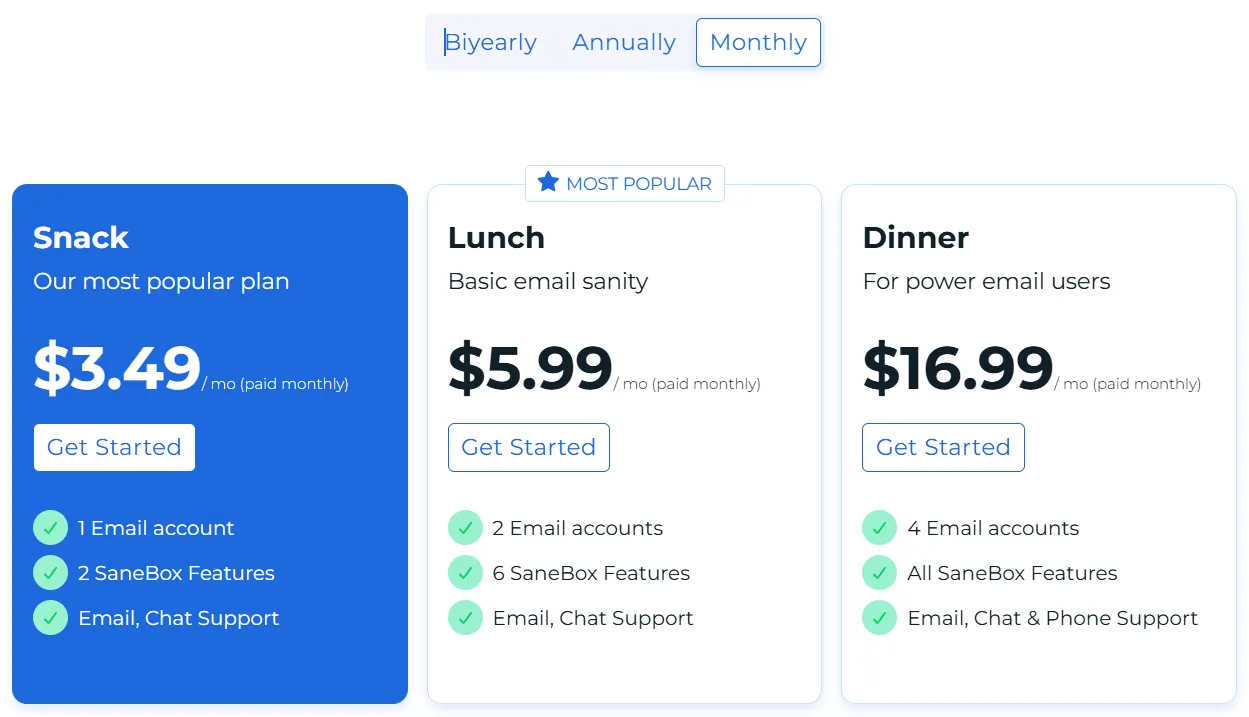
SaneBox offers three main plan levels and a 14-day free trial, with feature access and email account limits changing by plan.
SaneBox also lists educational, non-profit, and government discounts at 25% on its main site.
The entry plan starts at $3.49 per month, while higher plans are meant for users who need more features, more connected accounts, or heavier email management.
| Plan | Current Positioning | Best For | Our Take |
|---|---|---|---|
| Snack | Entry plan, starts at $3.49/month | Solo users with one main inbox | Best if you mainly want SaneLater and basic inbox cleanup |
| Lunch | Mid-tier plan with more feature room | Freelancers, creators, founders, small business users | Best balance for most professionals who need reminders, snooze, newsletters, and cleanup |
| Dinner | Highest standard plan with broader access | Heavy email users, executives, agencies, multi-inbox users | Best if email is tied directly to revenue, operations, or client work |
| Free trial | 14 days | Anyone unsure about fit | Use trial time to train folders and test real daily volume |
For solo users, Snack is enough if the main goal is smart email filtering and a cleaner inbox.
For business users, Lunch is the safer pick because SaneReminders, SaneSnooze, SaneNews, and Do Not Disturb create a better day-to-day workflow.
For heavy email users, Dinner makes more sense when multiple accounts, larger workloads, and more SaneBox features matter.
Our honest advice is simple.
Do not buy the biggest plan on day one.
Start with the trial, connect the inbox that hurts most, and check how much email actually moves out of your way.
If SaneBox saves even a few hours each month, the paid plan becomes easier to justify.
Security and Privacy
Email tools need more scrutiny than normal SaaS tools.
An inbox contains contracts, invoices, logins, personal messages, client details, partner chats, and financial alerts.
SaneBox handles that concern better than many inbox tools because it limits what it processes.
SaneBox says it looks at basics like sender, subject line, and date, and does not store full emails or attachments.
SaneBox also states that emails do not leave the user’s server for normal filtering, and that it analyzes headers to decide importance.
For privacy-focused users, that matters.
SaneBox says it does not sell or share user information.
Its security page also notes that credentials are encrypted and stored away from public internet access, with encryption keys kept in hardware security modules.
OAuth is supported where email providers allow it, so access can be granted and revoked without handing over a normal password.
SaneBox has annual Google Restricted Scopes verification, external audits by Leviathan Security Group, and ongoing testing through HackerOne.
No email tool should get blind trust.
But SaneBox gives more security detail than many email productivity tools we have seen.
For teams handling sensitive inboxes, we would still recommend using admin-approved accounts, reviewing permissions, and checking internal data rules before connecting any mailbox.
SaneBox Pros and Cons
- Works inside your current email client, so there is no new inbox to learn
- Supports Gmail, Microsoft 365, Apple iCloud, Yahoo Mail, Fastmail, IMAP, Exchange, and ActiveSync
- Strong for Inbox Zero workflows without manual filtering
- SaneLater and SaneNews quickly reduce inbox clutter
- SaneReminders are useful for sales, affiliate, PR, and client follow-ups
- SaneBlackHole gives fast sender cleanup
- Daily Digest adds a safety net for filtered emails
- Security details are clearer than many inbox tools
- First few days need training before sorting feels fully trusted
- Dashboard feels more utility-first than polished
- Not a full replacement for an email client
- Users who want a beautiful writing experience may prefer Spark Mail or Superhuman
- Cleanup depends on consistent folder corrections
- Plan choice can feel confusing if you are not sure which features matter
SaneBox vs Competitors
| Email Management Tool | Better For | Where SaneBox Wins | Where Competitor May Win |
|---|---|---|---|
| SaneBox | AI email management, smart filtering, inbox cleanup, reminders | Works with existing email apps and focuses hard on email prioritization | Not a full email client |
| Clean Email | Bulk cleanup, unsubscribe workflows, large mailbox cleaning | Stronger for ongoing AI-based importance sorting | May feel better for one-time cleanup sessions |
| Mailstrom | Manual bulk email cleanup and sender-based sorting | Better for daily automation and learning from behavior | May suit users who want hands-on bulk triage |
| Spark Mail | Modern email client experience | Better if you want cleanup without switching apps | Better if you want a polished team email app |
| Superhuman | Fast premium email client for power users | Better for users who want smart filtering inside their current inbox | Better if speed, keyboard shortcuts, and premium UI matter most |
SaneBox is not trying to be the prettiest inbox.
It is trying to make your existing inbox less annoying.
That is why SaneBox beats many tools for people who already like Gmail, Outlook, Apple Mail, or another email client.
Clean Email and Mailstrom make sense when the main job is clearing a messy old inbox.
Spark Mail and Superhuman make sense when the user wants a full email client upgrade.
SaneBox is best when the problem is daily email prioritization.
Who Should Use SaneBox?
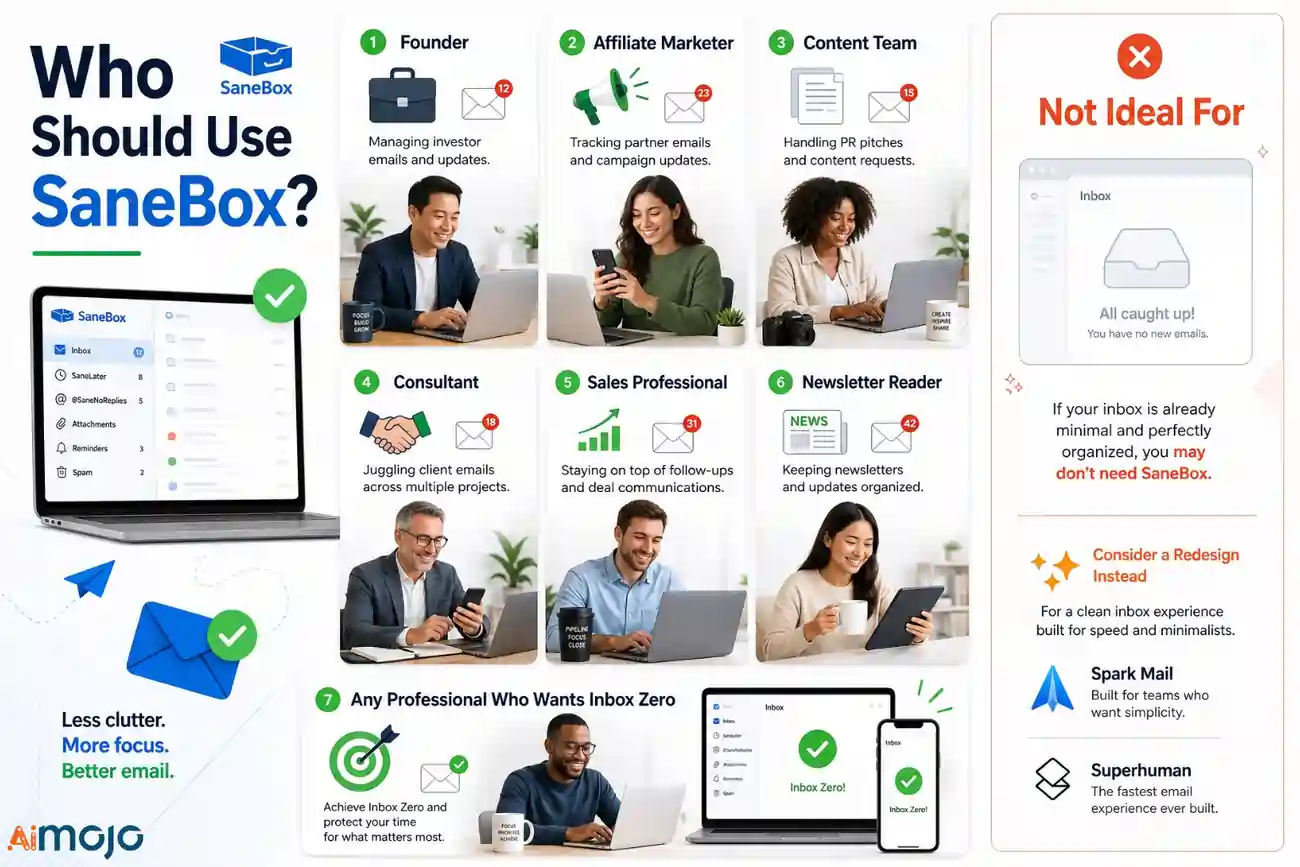
SaneBox is a strong fit for:
SaneBox is not ideal for users who barely get email.
It is also not the best choice if you want a full redesign of your email experience.
For that, Spark Mail or Superhuman may feel more exciting.
But if your current email app is fine and inbox clutter is the real enemy, SaneBox makes a lot of sense.
FAQs
Is SaneBox safe to use with Gmail and Microsoft 365?
SaneBox uses OAuth where supported, works with Gmail and Microsoft 365, and has annual Google Restricted Scopes verification. It also states that it does not store full emails or attachments and mainly checks sender, subject line, and date for filtering.
Does SaneBox read full email content?
SaneBox says normal filtering relies on email headers rather than full email bodies. Its privacy help also states that email bodies are not downloaded to its servers for features like SaneLater, SaneNews, and SaneBlackHole.
Can SaneBox help reach Inbox Zero?
Yes, SaneBox can help users move closer to Inbox Zero by sorting less important emails into folders like SaneLater and SaneNews. It works best when users train it by moving emails between folders during the first few days.
Does SaneBox work if I use Apple Mail or Outlook?
Yes, SaneBox works inside existing email accounts and does not require users to change email clients. It supports major providers and protocols including Gmail, Microsoft 365, Apple iCloud, Yahoo Mail, Fastmail, IMAP, Exchange, and ActiveSync.
What is the difference between SaneLater and SaneNews?
SaneLater is for less important emails that can wait, while SaneNews is for newsletters and mailing list emails. In daily use, SaneLater is better for mixed low-priority messages, while SaneNews is better for batch-reading newsletters.
Is SaneBlackHole the same as unsubscribing?
SaneBlackHole works like an unsubscribe-style sender cleanup by keeping unwanted senders away from the inbox. It is best for senders you no longer want to see, especially when unsubscribe links are slow, hidden, or unreliable.
Final Verdict
After testing SaneBox, our verdict is clear.
SaneBox is one of the best AI email management tools for professionals who want a cleaner inbox without changing email apps.
It is especially useful for smart email filtering, newsletter filtering, follow up reminders, inbox cleanup, and email prioritization.
We liked it most because it did not ask us to rebuild our workflow. It simply made our existing inbox less chaotic.
SaneBox is not perfect.
You need to train it. You need to check folders during the first few days.
And if you want a shiny email client, this is not that. But for people who want Inbox Zero without manual filtering, SaneBox is easy to recommend.
Start with the free trial, train it properly, and judge it after a real week of email. That is when the value becomes obvious.



