

If online meetings take up most of your workday and you need a bot to join automatically, update the CRM and analyze team conversations, choose Fireflies.ai.
If your day also mixes in conference room discussions and phone calls, and you want an audio record without a bot in the meeting, choose Plaud Note Pro.
Plaud Note Pro is a physical AI note taker for in-person meetings and phone calls, and Plaud Desktop handles online meetings.
| If my work mainly needs | I'd choose | The direct reason |
|---|---|---|
| Auto-joining, CRM updates and team analytics | Fireflies.ai | More complete software automation and integrations |
| One record for conference rooms, phone calls and online meetings | Plaud Note Pro | Hardware plus Plaud Desktop covers more entry points |
| Bot-free online meetings with an audio record | Plaud Note Pro | Plaud Desktop keeps audio you can check |
When I let the Fireflies.ai Notetaker into a meeting, I get audio or video, speaker labels, a transcript, a summary and Soundbites.
If I switch to bot-free recording in the desktop app, there's one less bot in the meeting and I still get a live transcript and summary, but the system doesn't save the audio or video, and speakers only show up as Speaker 1 and Speaker 2.
This is the trade-off I keep getting stuck on: one side gives me a full record, the other gives me no bot, but Fireflies.ai currently can't give me both in the same mode.
In a regular weekly meeting, that trade-off is easy to accept.
In customer interviews, sales negotiations or group discussions, I often need two things at once: no extra bot during the meeting, and the ability to click back to the original audio afterward to confirm who actually made a commitment.
Fireflies.ai currently struggles to meet both conditions.
So when I look for a Fireflies.ai alternative, Plaud Note Pro is the first one I consider.
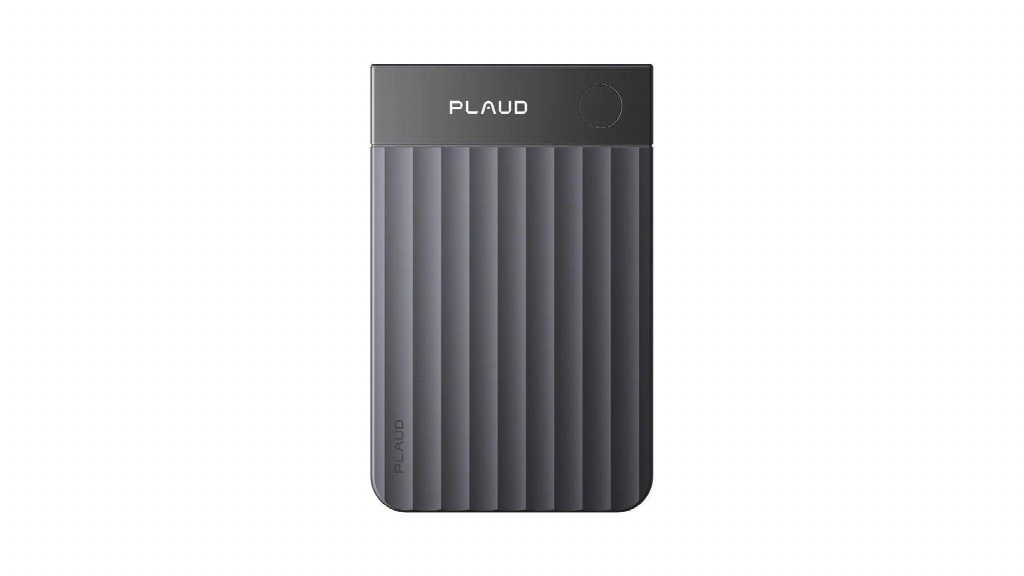
It records face-to-face meetings and phone calls, and Plaud Desktop records online meetings.
Both entry points keep an audio record, then generate transcripts, summaries and action items.
That said, auto-joining, real-time assistants, team conversation analytics and 100+ integrations are still Fireflies.ai's strengths.
If meeting records ultimately need to go into a CRM, project management and team analytics, those features may matter more than keeping the original audio.
Fireflies.ai is strongest at automated post-meeting workflows, and the summary is only the start
If a company wants to send every meeting automatically into its CRM, project management and team analytics, Fireflies.ai is more mature than a typical AI recording tool.
Fireflies Pro already includes AI Skills and unlimited integrations, so AI Skills can update the CRM and notes can go straight into the project tools the team works on.
Fireflies Business adds Conversation intelligence, Deal Intelligence and team analytics.
Managers can see members' talk-to-listen ratios, topic trends, sentiment and sales risks.
At that point, Fireflies.ai is already a sales or customer success system, and you can't casually replace it on the grounds that “Plaud Note Pro has a longer recording range.”
Bot mode and bot-free mode each miss something
The Fireflies.ai desktop app makes me choose between Notetaker and Take Notes.
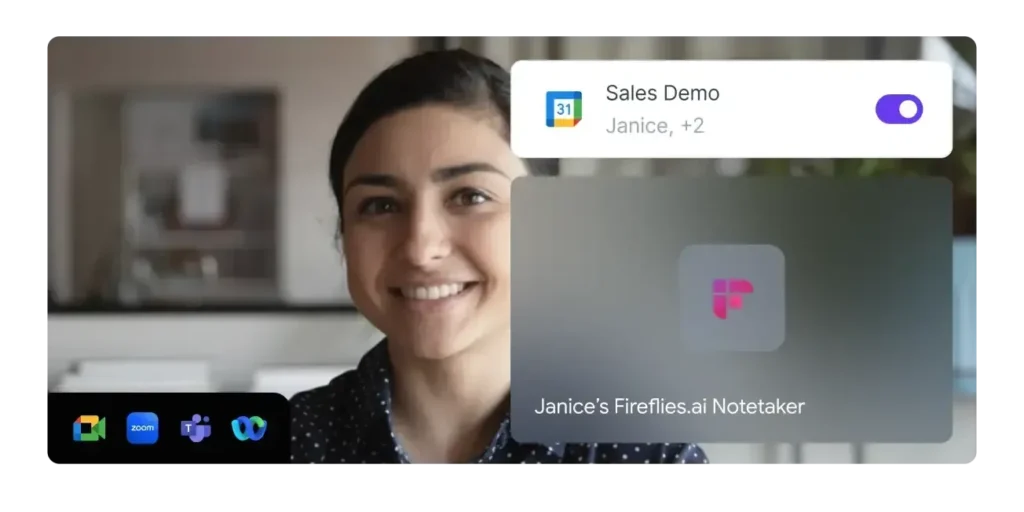
Notetaker mode has Fred join the meeting as a participant. It can save audio and video, identify speakers and run Sales Assist.
The meeting host has to let it in, and participants can see it in the attendee list. For internal standups and fixed sales processes, that transparency actually makes things easier to manage.
Take Notes mode captures the computer's system audio directly without letting a bot into the meeting.
It keeps the live transcript, Live Assist and post-meeting notes, and it works with apps such as Zoom, Google Meet, Microsoft Teams, Webex, Slack Huddle, FaceTime and WhatsApp.
That means one more decision before each meeting.
As long as the team agrees on this rule, Fireflies.ai still works well.
My problem is that many important meetings require both no bot and original audio I can check.
Fireflies.ai can leave video calls, but its recording front end still relies on phones and computers
Fireflies.ai is no longer software that can only send a bot into online meetings.
The iOS and Android apps can record face-to-face conversations directly and can also upload audio or video. After a meeting, I can check tasks, the transcript, AskFred and Soundbites on my phone.
When two or three people are chatting in a quiet office or coffee shop, this approach costs nothing in extra hardware. As the group grows, the recording depends more on where the phone sits.
When ten people are seated along both sides of a long table, the ones closest to the phone are usually easier to hear. The phone also has to deal with notifications, incoming calls and its battery at the same time.
I can add an external microphone, but that means one more device to connect and check before every meeting. Phone calls can be recorded too, but only through a computer.
Fireflies.ai then transcribes from the computer's system audio.
This works for people who already make client calls from their computer.
When I get an unexpected call while walking somewhere, or I don't want to keep my phone connected to my computer, the steps add up.
More importantly, it's still the desktop app's bot-free system audio recording, so it doesn't save an audio file and has no proper speaker labels.
Plaud Note Pro gives me an audio record I can replay
Plaud Note Pro hands the recording itself to dedicated hardware first, then lets Plaud Intelligence handle the text and follow-up tasks.
In face-to-face meetings, Plaud Note Pro uses 4 MEMS microphones and 1 VPU, with an official pickup range of up to 16.4 feet, about 5 meters.
Before the meeting starts, I long press the physical button, and the InstantView AMOLED display shows the recording mode, battery level and file status.
When the table gets longer and more people join, I don't have to rely on the phone's built-in microphone alone. When I hear a key number, an objection or a deadline, a short press on the record button adds a Highlight.
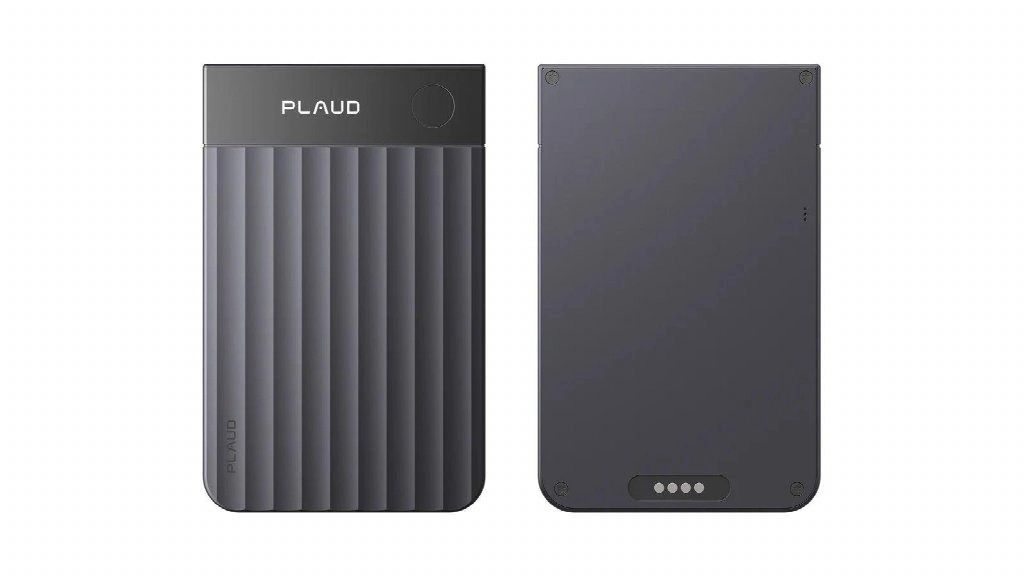
The mark stays tied to the surrounding audio, so the later summary knows which part I wanted to keep.
I still check the action items, but I don't need to keep typing during the conversation. For phone calls, Plaud Note Pro attaches to the back of the phone with a magnetic case and uses the VPU to pick up call vibrations.
Smart dual-mode recording switches automatically between face-to-face meetings and calls. Compared with routing a call to a Mac or Windows PC first, this suits client calls that come in after I've left my desk.
With 64GB of internal storage, Plaud Note Pro can save audio on the device first and sync for transcription once it's online.
The Plaud Note Pro official product page lists up to 30 hours of recording in Enhance mode and up to 50 hours in Endurance mode.
During all-day trainings, interviews or trade shows, my phone doesn't have to carry the recording load the whole time.
For online meetings, Plaud Desktop captures computer audio on Mac or Windows directly, with no bot required.
According to the Plaud Desktop official guide, the recordings go into the same Plaud account, and I can replay them in the Plaud App or Plaud Web, then review the transcript and summary.
This fills exactly the gap that Fireflies.ai's bot-free mode leaves me with: no extra participant in the meeting, and audio to check afterward.
The cost is clear too. Under Plaud's device linking requirement for Plaud Desktop, individual users need to buy and link a Plaud device first, and keep a Plaud Starter Plan or higher active, before they can use it.
The two tools' software strengths point in different directions
Fireflies.ai is better at turning team meetings into data that can be analyzed and routed automatically.
Plaud Note Pro is better at reliably capturing audio from different settings and keeping traceable audio and text. If a sales team already relies on Salesforce or HubSpot, the value of Fireflies.ai grows with team size.
Managers can review call analytics across several members, AI Skills can update the CRM, and Voice Agents can even handle screening interviews or routine calls on their own.
Plaud Note Pro currently connects with Google Calendar, Slack, Notion, Linear and others, but it shouldn't be described as a sales analytics platform on the same level.
If my material is mainly personal interviews, consulting notes, client calls and meeting minutes, the Plaud Note Pro setup fits better.
The device covers in-person settings and calls, Plaud Desktop covers online meetings, and audio, Highlights, images, text notes and summaries go into the Plaud App and Plaud Web.
What I'm looking for is a specific quote, not the whole team's sales talk trends for the month.
Neither has an obvious weakness in language count.
In the end, I'd choose based on how recording works, whether audio is kept, and whether meeting content goes into a personal knowledge base or a team business system.
| Comparison | Fireflies.ai | Plaud Note Pro |
|---|---|---|
| Main form | AI meeting software, meeting bot and team analytics platform | Card-style physical AI note taker plus Plaud Desktop |
| Auto-joining | Notetaker can join based on the calendar and record even when you're absent | Doesn't attend meetings automatically on the user's behalf |
| Bot-free online meetings | Desktop app captures system audio but doesn't save audio or video and has no proper speaker labels | Plaud Desktop captures computer audio and sends the recording to the Plaud account |
| Face-to-face meetings | Uses the iOS, Android or computer microphone | 4 MEMS microphones plus 1 VPU, with an official pickup range of up to about 5 meters |
| Phone calls | Routed to the computer through Calls from iPhone on Mac or Phone Link on Windows | Device attaches magnetically to the back of the phone and records calls through the VPU |
| Team automation | 100+ integrations, AI Skills, CRM updates, Conversation intelligence | Supports common connections and post-meeting generation, with less team sales analytics |
| Offline on site | Mobile recording capability should be verified by device and version | 64GB of internal storage saves audio first, then syncs for processing later |
| Transcription languages | 100+ languages | 112+ languages |
| Best for | Online meetings and sales teams that need auto-joining, CRM and team analytics | A mix of calls, conference rooms and online meetings that needs bot-free recording and an audio record |
Weigh the price gap against team size
Fireflies Free offers unlimited transcription, limited AI summaries, 400 minutes of storage per team and 20 AI credits.
It supports 100+ languages, live notes, AskFred, file uploads, the desktop app and the mobile apps, but it doesn't include video recording, downloads or the full set of AI Skills.
Fireflies Pro is $10 per user per month billed annually or $18 billed monthly, and includes unlimited AI summaries, 8,000 minutes of storage per seat, video recording, downloads, AI Skills and unlimited integrations.
Fireflies Business is $19 per user per month billed annually or $29 billed monthly, and adds unlimited storage, Multi-language Mode, Conversation intelligence and team analytics.
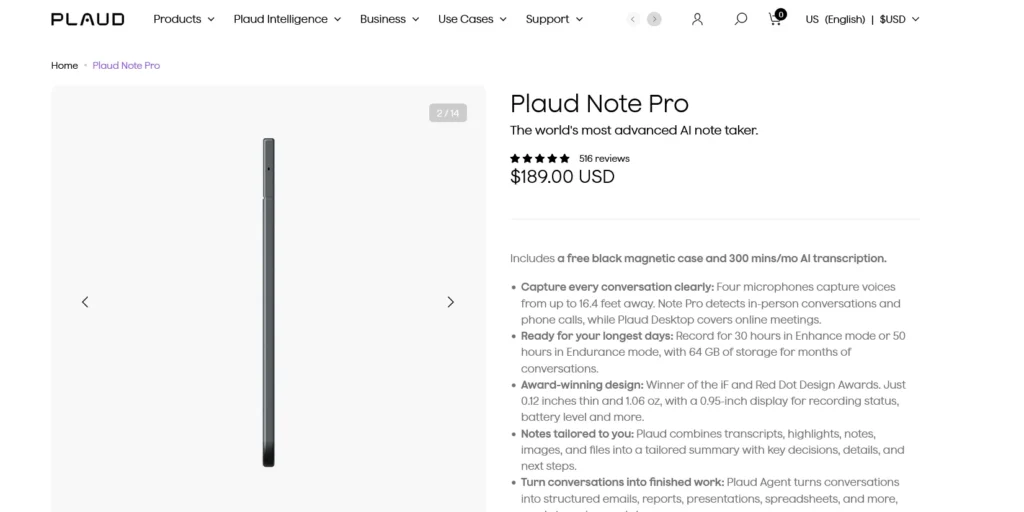
For one person who only has online meetings, Fireflies Pro costs $120 in the first year, clearly less than the $288.99 for Plaud Note Pro plus the Plaud Pro Plan.
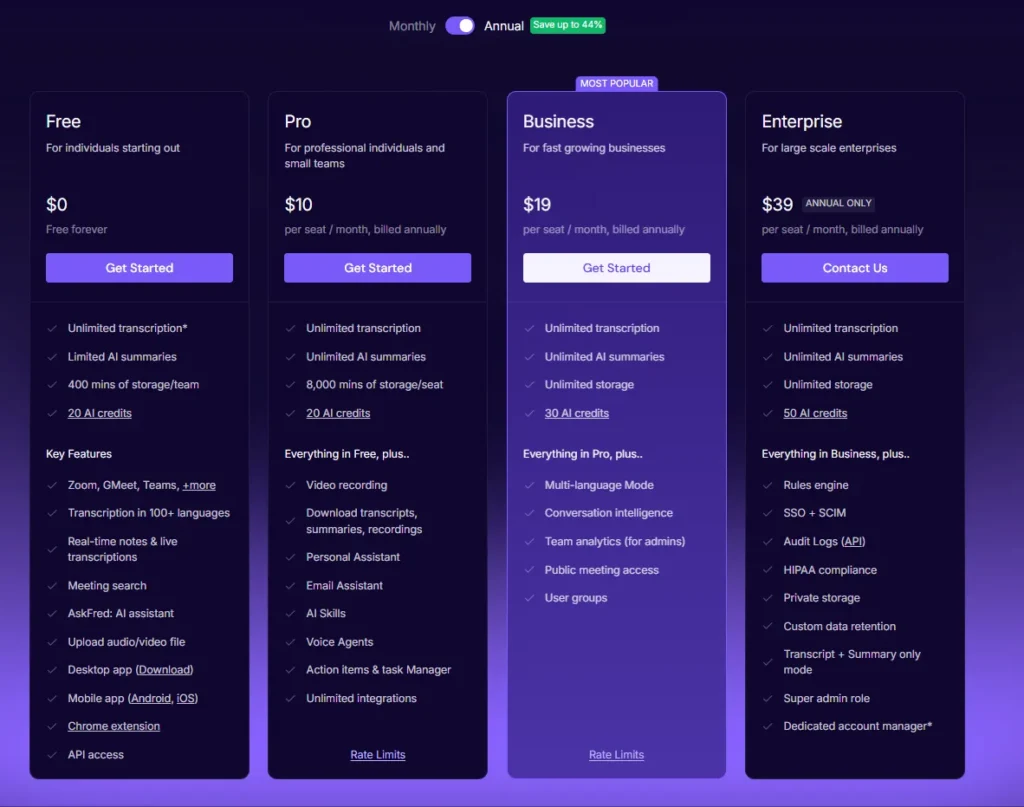
Fireflies.ai also doesn't require carrying an extra device.
| Single-user plan | Hardware price | Annual subscription | Year 1 total | 3-year total | Main limit or allowance |
|---|---|---|---|---|---|
| Fireflies.ai Free | $0 | $0 | $0 | $0 | 400 minutes of team storage and limited AI credits |
| Fireflies.ai Pro | $0 | $120 | $120 | $360 | 8,000 minutes of storage per seat |
| Fireflies.ai Business | $0 | $228 | $228 | $684 | Unlimited storage, team analytics and multi-language mode |
| Plaud Note Pro + Starter | $189 | $0 | $189 | $189 | 300 minutes a month |
| Plaud Note Pro + Pro | $189 | $99.99 | $288.99 | $488.97 | 1,200 minutes a month |
| Plaud Note Pro + Unlimited | $189 | $239.99 | $428.99 | $908.97 | Unlimited transcription |
The table assumes one user, annual billing and continuous renewal, and excludes taxes, promotions, extra AI credits and device replacement.
Fireflies.ai scales by seat, so multiply team costs by the actual headcount.
As teams grow, the two ways of calculating cost diverge.
Fireflies.ai charges per seat, so a 10-person Business team billed annually pays $190 a month and gets team-wide analytics, CRM automation and unlimited storage.
Plaud Note Pro's value is concentrated in the people who actually need a recording device, and one user's hardware and subscription cost can't simply be set against an entire team system.
So I wouldn't just look at which monthly fee is lower.
I'd first confirm whether the company is buying meeting data automation or reliable recording across mixed settings.
The former is a better fit for Fireflies.ai.
Only the latter justifies paying for Plaud Note Pro's hardware.
How do Fireflies.ai and Plaud handle meeting data?
| Privacy question | Fireflies.ai | Plaud Note Pro and Plaud Desktop |
|---|---|---|
| Original audio | Notetaker mode can save it, desktop Take Notes mode doesn't save audio or video | Both entry points can keep the audio record for replay |
| Model training | Officially says customer data isn't used to train models, and AI vendors follow zero data retention | Plaud states that it doesn't use recordings or transcripts to train AI models |
| Enterprise controls | Enterprise offers private storage, custom retention, SSO, SCIM and audit logs | Lists ISO 27001, ISO 27701, SOC 2, HIPAA, GDPR and EN 18031 |
| What users have to decide | Whether to let the bot in, whether to save audio and video, who can access team records | Which recordings to upload, how long to keep them, who can share and export |
With Fireflies.ai, the privacy outcome changes with the recording mode.
Plaud keeps original audio, which makes checking easier, and also means there's one more type of sensitive data in the account to manage.
When CRM and team automation come first, I'd keep using Fireflies.ai
When almost all of a team's communication happens on Zoom, Google Meet or Microsoft Teams, I'd keep using Fireflies.ai.
Notetaker can join automatically based on the calendar and bring back a record even when I miss a meeting at the last minute.
Plaud Desktop needs my computer to actually be in the meeting and recording, so it can't attend for me.
Sales, recruiting and customer success teams are also better suited to Fireflies.ai.
CRM updates, Deal Intelligence, candidate records, team talk-to-listen ratios and topic tracking are all built around managing ongoing meetings across many members.
Plaud Note Pro can produce clear notes for a single meeting, but there's no need to pretend it can fully replicate this management capability.
If participants are fine with a visible Notetaker, I'd also stay with Fireflies.ai.
Bot mode keeps audio, speakers and Soundbites together, which gets around exactly the limits of the desktop bot-free mode.
When the meeting platform and company policy let it join reliably, this workflow saves a lot of effort.
Finally, people on a tighter budget who want to try the software first can start with Fireflies Free.
400 minutes of team storage isn't much, but it's enough to judge whether live transcription, AskFred and post-meeting summaries suit your everyday meetings.
When checking original audio and recording across settings come first, I'd choose Plaud Note Pro
When bot-free recording and audio playback both have to be there, I'd choose Plaud Note Pro.
A client not wanting a bot in the meeting doesn't mean I can give up the original audio.
Plaud Desktop sends the recording to the Plaud account, where I can still replay and check it later.
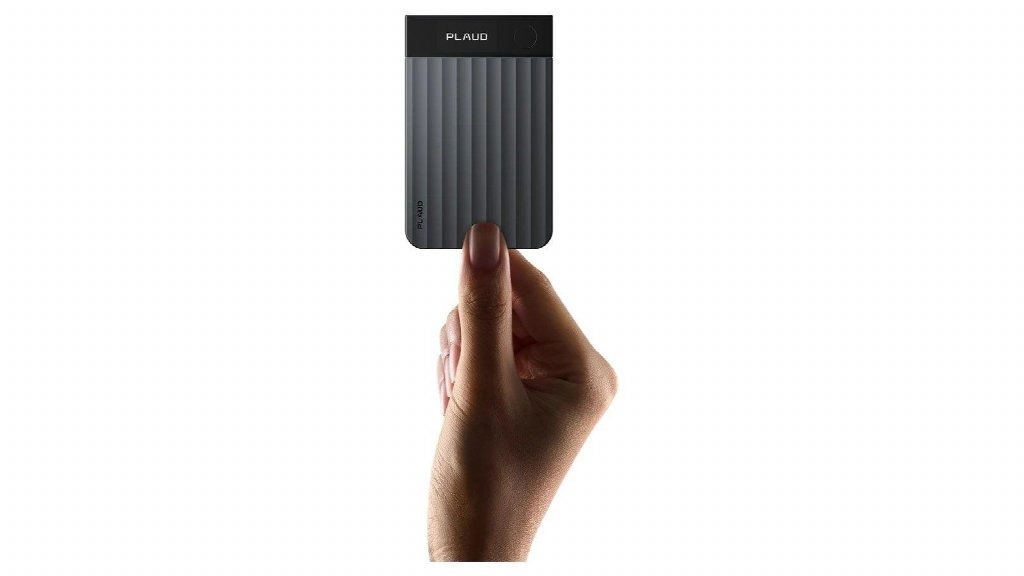
When my day includes client calls, conference room discussions and online meetings, I care more about having one consistent way to record.
I don't have to figure out first whether a call can be routed to my computer, and I don't have to put my phone in the middle of a long table during in-person meetings.
The physical device covers in-person settings and calls, Plaud Desktop covers online meetings, and everything ends up in the same account.
Interviews, consulting, legal preparation and meetings involving complex numbers make an audio record even more valuable.
Even when a transcript reads smoothly, I may still need to confirm tone, conditions attached to a statement and who was speaking.
Keeping the original audio is easier to check than a bot-free transcript with only Speaker 1 and Speaker 2.
I'd also choose Plaud Note Pro when I do a lot of offline and long on-site recording.
The 64GB of local storage and the official maximum of 50 hours of continuous recording let the device handle the most basic job of saving the audio first.
Transcription can happen once the network is back, so whether there's a connection doesn't decide whether a conversation gets recorded.
FAQ's
Can Plaud Note Pro fully replace Fireflies.ai?
Not completely. Plaud Note Pro is better for recording phone calls, face-to-face meetings and bot-free online meetings while keeping an audio record. Fireflies.ai is stronger at auto-joining meetings, CRM integrations, Conversation intelligence and team analytics.
Does Fireflies.ai still require a bot to join meetings?
No. Fireflies Desktop can capture the computer's system audio directly, and the Chrome extension can also record Google Meet without a bot. The desktop Take Notes mode doesn't save audio or video and has no proper speaker labels.
Can Fireflies.ai record phone calls?
Yes, through a computer. On Mac, you use Calls from iPhone to route iPhone calls to FaceTime. On Windows, you connect an Android phone or iPhone with Phone Link. Plaud Note Pro records phone calls directly with a magnetic case and the VPU.
Which keeps the original audio, Fireflies.ai or Plaud Note Pro?
Fireflies.ai's Notetaker mode saves the recording, but the desktop bot-free Take Notes mode doesn't save audio or video. Plaud Note Pro and Plaud Desktop save recordings in the Plaud account so you can replay them later.
Which is cheaper, Fireflies.ai or Plaud Note Pro?
You can start using Fireflies Free right away. Fireflies Pro is $10 per user per month billed annually. Plaud Note Pro requires buying the $189 hardware first, which comes with the Plaud Starter Plan's 300 minutes a month. Fireflies.ai costs less if you only have online meetings. Consider Plaud Note Pro when you need dedicated recording hardware and an audio record across settings.
AiMojo Recommends:
I'd start by asking who the material goes to after the meeting
If the material goes to an entire sales or customer success team, Fireflies.ai is the better fit.
It can join meetings automatically, analyze calls across members, update the CRM and send tasks into the software the team already uses.
As long as the company accepts Notetaker, audio, speakers and automation can all be kept together.
If I'm mainly the one reviewing the material, and conversations often move between phone calls, conference rooms and my computer, I'd choose Plaud Note Pro.
It lets me keep audio even in bot-free online meetings, and it cuts down on call routing, phone placement and scattered files.
If after the meeting I need to update the CRM automatically, analyze team conversations and send tasks into project tools, I'd keep using Fireflies.ai.
If before the meeting I care more about how to capture conference rooms, phone calls and online meetings, and replay exact words afterward, Plaud Note Pro is the better Fireflies.ai alternative.
Whether you use a meeting bot, desktop system audio or a physical device, tell participants clearly before you start recording or transcribing, and get any consent required by local law, industry rules and company policy.
Fireflies.ai offers some meeting notification settings, and with a Plaud device the user also needs to give notice themselves.


 BONUS: Get our $200 “AI Mastery Toolkit” FREE when you sign up!





![Top 10 Hentai AI Chatbots to Experience Virtual Desire [2026]](https://aimojo.io/wp-content/uploads/2024/03/Top-Hentai-AI-Chatbot--100x100.webp)

![Top 13 AI Chat Porn Games with No Limits [2026]](https://aimojo.io/wp-content/uploads/2024/03/Best-AI-Chat-Porn-Games-100x100.webp)


