8ベスト AI 2026年におけるデータベースツール(テスト済み、ランキング、価格情報)

おすすめ! AI データベースツール

最も「最高」 AI database” roundups are just old no-code tool lists with the word “AI” bolted onto the intro. Half the tools on them can barely autofill a cell, let alone build you a working system from a sentence.

これはそのリストではありません。

We spent real hours inside each of these platforms, building CRMs, running batch generation on a few hundred records, wiring up automations, and pushing the AI until it either delivered or fell over. The question that decided every ranking was simple: does the AI actually do work you would otherwise pay a person to do, or is it a glorified formula wearing a trench coat?

Eight tools cleared that bar. One of them, Teable, pulled ahead of the pack by being genuinely AI-native, open source, and priced in a way that does not punish you for using the features you came for. It sits at number one, and by the end of this piece you will understand exactly why.

What Actually Makes a Database an “AI Database”?

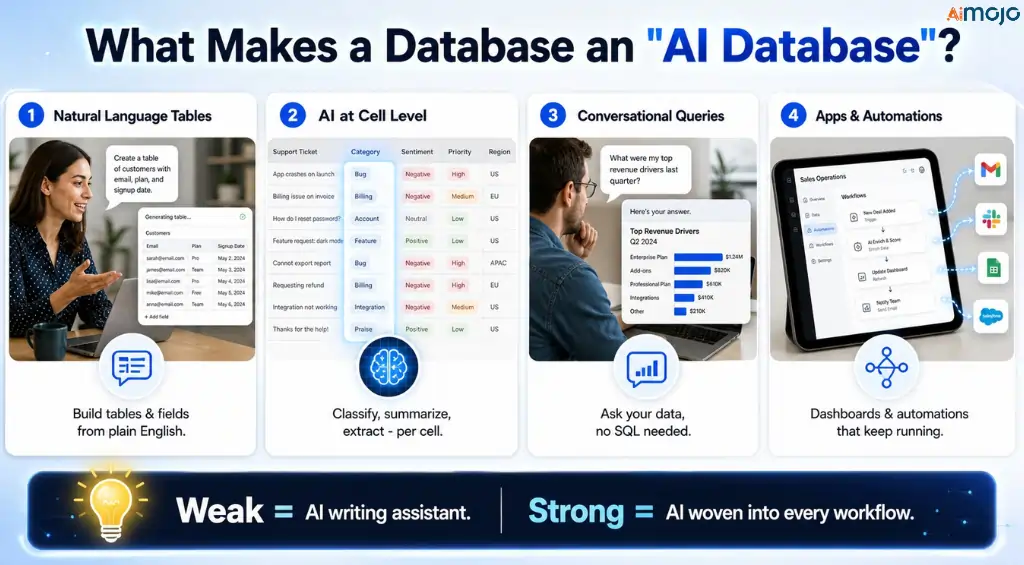
An AI database is a no-code or low-code data platform where 大規模な言語モデル are built into the core workflow, not stapled on as an afterthought. Instead of manually designing tables, tagging rows, and writing formulas, you describe what you want in plain language and the platform builds structures, enriches records, answers questions about your data, and automates the follow-up.

The strong ones share four traits. They build tables and fields from a natural language prompt. They run AI at the cell level to classify, summarize, extract, or generate. They let you query your data conversationally without touching SQL. And they turn that data into apps, dashboards, or automations that keep running after you close the tab.

The weak ones stop at “AI ライティングアシスタント” and call it a day. That distinction is the spine of this ranking.

How We Ranked These 8 AI データベースツール

We scored every platform on five things, weighted toward what a real operator cares about:

Depth of the AI. Can it build a base from scratch, or does it only autofill fields you already made? Real reasoning beats keyword matching.
Data scale. A database that chokes at 10,000 rows is a spreadsheet with anxiety. We checked where each one slows down.
Pricing honesty. Flat per-seat, usage credits, or a mix? We flagged every tool that gets expensive the moment you actually lean on the AI.
Openness and control. Self-hosting, data ownership, and the ability to bring your own AI matter more every quarter. Vendor lock-in is a real cost.
Real limitations. Every tool here has a weakness. We name it. If a review never tells you what a product is bad at, it is a brochure, not a review.

Here is where they landed.

おすすめ! AI Database Tools 2026: Quick Comparison

ツール以下のためにベストAI モデル開始価格オープンソース
ティーブルAI-native database at fair pricesMulti-model (154 LLMs)Free; Pro $10/seat/moYes (AGPL)
Airtable最も強力 AI agents, big budgetsGPT, Claude via BedrockFree; Team $20/user/moいいえ
概念AI database inside an all-in-one workspaceGPT-5.2, Claude, Gemini 3Free; Business $20/user/moいいえ
スマートスイートAI work OS for operations teamsMulti-model agentsFree; Team ~$10/user/moいいえ
スタックビーValue pick, bring your own AI keyBYO (OpenAI, Gemini, Claude)Free; Economy ~$5/user/moいいえ
ベースローオープンソース AI you can self-hostConfigurable, local OllamaFree; Premium ~€5/user/moYes (MIT)
ヒューズベースAI database plus client portalsプロプライエタリ AI エージェントTrial only, then quoteいいえ
ノコDBAI-ready UI over your existing SQL DB新興のFree self-host; Plus ~$9/seatソースコードあり

1. ティーブル: AI Database Agent That Earns the Top Spot

ティーブル

Teable is what happens when someone builds an AI database from the database up instead of gluing a chatbot onto a spreadsheet. Under the hood it runs on PostgreSQL, which means it handles millions of rows without the lag that makes tools like Notion crawl at scale. On top of that sits an AI エージェント that builds the whole thing for you. 

Type “build me a CRM with lead status and follow-up dates” and it creates the tables, fields, and relations in seconds. No template hunting, no field configuration, no learning curve.

That talk-to-build flow is the headline, but the depth is what keeps it at number one. AI fields run inside individual cells to auto-tag, classify, summarize, and enrich data as it lands, with a menu of 154 language models and 17 image models to pick from. 

AI Chat lets you interrogate your data in plain English and get charts and reports back. The app builder turns any table into a live web app, dashboard, or ランディングページ connected to real data, not a static mockup. Backed by ZhenFund and Baidu Ventures, with over 20,000 GitHub stars and both ISO 9001 and ISO 27001 certifications, it is a serious platform, not a weekend project.

主な特徴:

Talk-to-build AI agent that creates tables, fields, and relations from a prompt
AI fields with 154 language models and 17 image models for cell-level enrichment
AI チャットや AI Report for conversational queries, charts, and insights, no SQL
App builder that ships live apps, dashboards, and portals from your data
Batch generation of product images, marketing copy, and video scripts from records
Natural language automations with incoming webhooks (Stripe, Shopifyサービス, Typeform, and more)
Self-hosted Community Edition with unlimited rows, unlimited attachments, and bring-your-own AI
Grid, Kanban, Calendar, Gallery, and Form views plus formula, rollup, lookup, and link fields

🤖 Real AI or automation? Real AI, and among the most convincing here. Teable's agent reasons about your request, builds structures, and runs live models inside fields. This is not a rules engine pretending to think.

最適な用途: Founders, marketers, agencies, and data teams who want AI-native database power without Airtable's bill or vendor lock-in.
価格: 無料プランには以下が含まれます AI フィールド、 AI Chat, app generation, automations, and 1GB attachments. Pro is $10 per seat per month billed yearly (1,000 credits per seat, 250,000 rows, 10GB). Business is $20 per seat per month billed yearly (2,000 credits per seat, 1 million rows, 100GB, Authority Matrix permissions, SSO, custom app domain). Extra credits cost $5 per 500 and are billed at cost with 0 percent markup. A self-hosted edition is free under AGPL.
一つの制約: その AI runs on a credit system, and heavy app-building sessions can burn through credits faster than you expect. To Teable's credit, they shipped a 5x to 20x efficiency improvement and made automations stop consuming credits at all, which fixed the loudest complaint from early users.

Teable is the pick if you want the ceiling of an AI database and the floor of an open-source one. Nothing else on this list matches that combination at this price.


2. Airtable: The Most Powerful AI Agents, If You Can Afford Them

Airtable

Airtable spent 2024 and 2025 doing a full “AI refound,” and the result is the most capable agent stack in the category. Omni is the conversational builder: describe an app and it spins up tables, interfaces, and automations in real time, and building with it does not cost credits.

Field Agents are the workhorses, running inside every record to analyze documents, search the web, generate images, translate content, and extract insights from transcripts, automatically and at scale. For a 10,000-row research task where you need the exact same prompt applied to every entry, this is genuinely impressive.

The catch is the invoice. Airtable is per-seat, and the jump from Team to Business is a 125 percent price increase per user. On top of that, AI actions consume credits, and a heavy document analysis can eat 500 to 1,500 credits in a single run.

Founded in 2012 and now valued around $11.7 billion after its Series F, Airtable is stable and enterprise-grade. It is also the most expensive way to get AI database work done here, and the credit meter adds real budget uncertainty.

主な特徴:

Omni conversational agent builds apps, tables, and automations from 自然言語
Field Agents run research, generation, translation, and extraction across every record
Interface Designer for polished internal tools and dashboards
Enterprise model choice: 店は開いていますAI GPT and Anthropic Claude via Amazon Bedrock
Grid, Kanban, Calendar, Gallery, Gantt, and Form views with a mature template library

🤖 Real AI or automation? Real AI, and the deepest agent tooling in this roundup. Field Agents that run continuously across thousands of records are a legitimate step beyond simple autofill.

最適な用途: Well-funded teams and enterprises that need agent-level AI across large datasets and will not blink at per-seat pricing.
価格: Free plan available. Team is $20 per user per month, Business is $45 per user per month, both billed annually, and Enterprise Scale is custom. AI credits are pooled per workspace, with paid credit packs for overages.
一つの制約: Cost scales fast and unpredictably. Between the per-seat model and credit-based AI billing, a growing team can watch its Airtable spend double without warning.

3. 概念: AI Database Living Inside Your Whole Workspace

概念

概念's advantage is context. Its databases live in the same place as your docs, wikis, and projects, so its AI agents can pull from everything at once. Since Notion 3.0 in September 2025, the platform shifted from an assistant that suggests to an agent that executes, working autonomously for up to 20 minutes across hundreds of pages.

カスタムエージェント, launched in February 2026, run on schedules and triggers, so an agent can watch a database, qualify a new row, and notify your team without you lifting a finger. You can even pick your model, choosing between GPT-5.2, Claude Opus 4.5, and Gemini 3, or letting Auto decide.

For database work specifically, AI Autofill is the standout. Define a property like sentiment or category and Notion fills it for every row, including new ones, as a background process. The honest caveat is scale.

Notion databases start showing performance drag somewhere around 5,000 to 10,000 rows, which is fine for knowledge work and light operations but a problem if your data is genuinely large. It is the best AI database for teams that live in documents, and the wrong one for heavy structured data.

主な特徴:

Autonomous Notion Agent that executes multi-step work across the workspace
Custom Agents that run on schedules and triggers for hands-off automation
AI Autofill for continuous classification, summarization, and extraction in database fields
Multi-model choice: GPT-5.2, Claude Opus 4.5, Gemini 3, or Auto
Databases, docs, wikis, and projects unified in one block-based workspace

🤖 Real AI or automation? Real AI, with genuine agentic execution. The マルチモデルアクセス and 20-minute autonomous runs are well beyond cosmetic AI.

最適な用途: Document-heavy teams that want AI databases woven into an all-in-one workspace rather than a standalone data tool.
価格: Free plan gives limited AI trial. Plus is $10 per user per month billed annually but includes only basic AI writing. Full AI, including Agents and Ask Notion, requires Business at $20 per user per month. Custom Agents run on Notion credits at $10 per 1,000 credits. Enterprise is custom.
一つの制約: Performance degrades on large databases, and full agent access is locked to the Business tier, so a solo user who wants real AI pays $20 a month minimum.

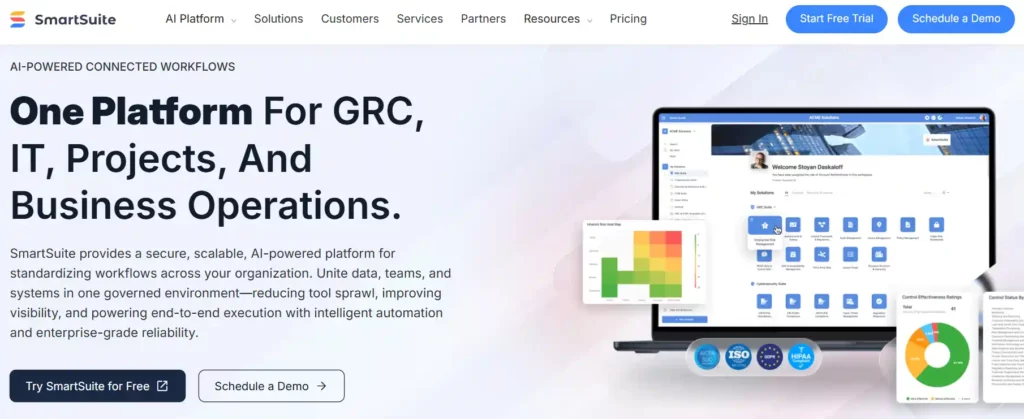
4. スマートスイート: AI Work OS Built for Operations Teams

SmartSuite calls itself an AI-native Work Operating System, and for once the label fits. It combines a relational database with workflow orchestration, automation, permissions, and reporting, then layers AI Field Agents on top that summarize records, draft content, classify requests, and score risk with a written rationale.

All of it runs through a centralized AI コントロールセンター, which is a smart touch for teams that need governance over where AI touches their data. You can build tables, fields, and views from natural language prompts, and the platform ships with more than 40 field types and nine view types including Timeline, Map, and Chart.

Where it earns its ranking is operational depth. Teams have consolidated Airtable, Asana, Smartsheet, and a pile of spreadsheets into a single SmartSuite workspace, and one enterprise reportedly cut $450,000 a year by moving 300-plus Salesforce licenses over.

It is more affordable at scale than Airtable, though it carries a three-seat minimum on paid plans and a real learning curve. This is a platform for people who run processes, not for someone who wants a quick table.

主な特徴:

AI Field Agents for summarizing, drafting, classifying, and risk scoring inside fields
AI Control Center for centralized governance of AI 使用
Natural language table, field, and view creation
Nine view types: Grid, Card, Kanban, Calendar, Timeline, Map, Chart, Dashboard, Form
Table, field, and record-level permissions plus SOC 2 and ISO 27001 coverage

🤖 Real AI or automation? Real AI. The Field Agents produce reasoned output like risk scores with explanations, which is meaningfully more than template automation.

最適な用途: Operations, GRC, and PMO teams consolidating several tools into one governed, AI-assisted work platform.
価格: Free plan for small teams with tight record limits. Team runs about $10 to $12 per user per month, Professional about $25 to $30, both billed annually with a three-seat minimum. Enterprise and a custom Signature plan sit above that.
一つの制約: The learning curve is steep and the mobile app trails the web experience. SmartSuite rewards teams willing to invest setup time, and frustrates anyone hoping for instant value.

5. スタックビー: The Value Pick That Lets You Bring Your Own AI

スタックビー

Stackby is the sensible-money choice. It looks and feels like a spreadsheet, behaves like a relational database, and layers AI fields on top where you bring your own API key from OpenAI, Gemini, or Anthropic. That last part is quietly brilliant: instead of paying a marked-up credit rate, you plug in your own model and pay providers directly at cost.

Inside a field, the AI can generate content, categorize records, summarize, and analyze documents. The other differentiator is Stackby's ノーコード APIコネクタ, which pull live data straight into columns from services like YouTube, Ahrefs, Clearbit, and Hunter.io. Very few tools do column-level API enrichment this cleanly.

Stackby is trusted by more than 100,000 companies and is actively transforming into an AI-native app builder, so the roadmap points the right way. It offers eight views, 30-plus column types, and forms with conditional logic.

It is not the deepest agent on this list, and some templates feel thin, but for the price it delivers most of what Airtable does without the sting. If your budget is real and your needs are practical, this is the smart buy.

主な特徴:

AI fields with bring-your-own-key support for OpenAI, Gemini, and Anthropic
No-code API connectors that pull live data into columns automatically
30-plus column types including formulas, lookups, attachments, and AI フィールド
Eight views: Grid, Kanban, Gallery, Calendar, Timeline, List, Map, Dashboard
Powerful forms with conditional logic and dashboards with charts and pivot tables

🤖 Real AI or automation? Real AI, powered by whichever model you connect. Because you supply the key, the intelligence is exactly as strong as the LLM you choose.

最適な用途: Budget-conscious teams and solo operators who want genuine AI fields plus live API enrichment without paying marked-up credits.
価格: Free forever plan for up to 5 users. Economy starts around $5 per user per month, Business around $8 to $10, Pro around $12.50, all billed annually with a three-seat minimum on paid tiers. Enterprise is custom.
一つの制約: その AI is field-level rather than a full 自律エージェント, and the integration library gets patchy once you stray from the big-name services.

6. ベースロー: The Open-Source AI Database You Can Actually Own

ベースロー

If data ownership is non-negotiable, Baserow is the answer. It is MIT-licensed at the core, genuinely open source, and self-hostable via Docker, Kubernetes, or a manual setup. On top of that foundation it has built a legitimate AI layer: an assistant called Kuma that helps you create structures and formulas, AI fields that run repeatable generation, summarization, classification, and analysis directly inside tables, and newer agent workflows.

The detail that separates it from every closed tool here is that self-hosted Baserow can connect directly to your own AI providers at the workspace level, including a local Ollama model for offline or air-gapped setups. Your data and your model can both stay on your infrastructure.

Baserow gives you the familiar spreadsheet grid, Excel-style formulas non-developers can actually read, and an application builder for 内部ツール and dashboards on top of your data. It is GDPR, HIPAA, and SOC 2 aligned, which matters for regulated teams.

The free self-hosted edition has no row caps. It trails Airtable on polish and ecosystem, and there is no native mobile app yet, but for open-source AI database work with real compliance posture, nothing else here comes close.

主な特徴:

くま AI assistant for building structures and formulas
AI fields for generation, summarization, classification, and analysis in-table
セルフホスト AI with direct provider connection, including local Ollama
Application builder and 自動化エンジン with AI-powered steps
MIT-licensed core, Docker and Kubernetes self-hosting, no row caps when self-hosted

🤖 Real AI or automation? Real AI, and unusually flexible about it. Because you configure the model, you can run frontier LLMs or a fully local one, which is rare in this category.

最適な用途: Privacy-first, compliance-bound, and cost-conscious teams that want AI database features without handing their data to a closed SaaS.
価格: Free cloud plan with unlimited databases (3,000 rows and 2GB per workspace) and a free self-hosted edition with no row caps. Premium is around €5 to €10 per user per month with AI 機能を使用 and more views. Advanced and Enterprise add permissions, audit logs, and higher limits.
一つの制約: No native mobile app as of early 2026, and the AI and ecosystem are less mature than Airtable's. Self-hosting also means you own the maintenance.

7. ヒューズベース: AI Database Wrapped in Client Portals

ヒューズベース

FuseBase, formerly Nimbus, took a different path to this list. It is less a raw database and more an AI-powered client collaboration platform, and that is exactly why service businesses love it.

It combines a solid table manager and knowledge base with branded client portals and, crucially, AI agents that do real work: summarizing meetings, assigning tasks, sending reminders, generating client-ready recaps, and executing workflows based on your standard operating procedures.

You can spin up an agent for Sales, Support, HR, or Finance in under a minute and deploy it inside a portal, in your browser via extension, or through an automation. It even supports the モデルコンテキストプロトコル for deeper integrations.

The rebuild added SOC 2 and HIPAA compliance, e-signatures, and transcription, and the company now serves more than 3,000 customers. The trade-off is focus. If you want a pure high-scale database, this is not it, and the AI features are still maturing according to recent reviews. But if your data problem is really a client problem, managing documents, onboarding, and communication in one branded space, FuseBase turns an AI database into a client-facing operating system.

主な特徴:

AI agents that summarize meetings, assign tasks, and run SOP-based workflows
Branded client portals with no client logins required
Table manager, knowledge base, and document management in one workspace
ブラウザの拡張機能 あなたの AI agents onto any web page
SOC 2 and HIPAA compliance, e-signatures, transcription, and MCP support

🤖 Real AI or automation? リアル AI agents, oriented toward client operations rather than data crunching. They act on your behalf, which is more than a chatbot, though the feature set is younger than the leaders here.

最適な用途: Agencies, consultants, and service firms that want AI-driven data plus client portals in a single branded platform.
価格: No permanent free plan, only a 14-day trial. Paid tiers (Solo, Essentials, Advanced) are largely quote-based, so you contact sales for exact numbers.
一つの制約: The learning curve is steeper than expected, the AI is still maturing, and the lack of a real free plan makes low-commitment testing harder.

8. ノコDB: The AI-Ready Layer Over Your Existing SQL Database

ノコDB

NocoDB earns its spot on a philosophy the others do not share. Instead of asking you to migrate into yet another silo, it points at a database you already own. Connect a MySQL, PostgreSQL, MSSQL, SQLite, or MariaDB instance and within seconds you get a spreadsheet-style interface on top of your real schema, plus an auto-generated REST and GraphQL API and webhooks for every table.

Your data never leaves your infrastructure. With over 50,000 GitHub stars and production use at companies like Google, Walmart, and American Express, it is the most battle-tested open-source option for putting a friendly UI on serious data.

Honesty check, since this is an AI list: NocoDB's AI is the thinnest here. Its strength is connectivity and data ownership, not agents, and its native AI tooling is still emerging compared to the rest of this ranking.

It also switched from AGPL to a source-available Sustainable Use License at v0.301, so self-hosting for internal use is free but reselling it as a managed service requires a license. If your data already lives in SQL and you want an AI-ready, API-first interface over it, NocoDB is the right tool. If you want the AI to build the database, look higher up this list.

主な特徴:

Connects directly to existing MySQL, PostgreSQL, MSSQL, SQLite, and MariaDB databases
Auto-generated REST and GraphQL APIs plus webhooks for every table
Grid, Kanban, Gallery, Form, Calendar, Map, and Timeline views
Seat-capped pricing (billing stops at 9 editors) that stays cheap at large team sizes
Free self-hosted Community Edition used in production at massive scale

🤖 Real AI or automation? 最軽量 AI in this roundup. NocoDB is included because it is the most popular open-source database interface and is adding AI, but today its intelligence layer trails every other tool here.

最適な用途: Developers and engineering-led teams that want a fast, API-first UI over an existing SQL database, with AI as a bonus rather than the point.
価格: Free self-hosted Community Edition and a free cloud tier (5,000 rows). Plus is around $9 to $12 per seat per month (50,000 records, billing capped at 9 seats). Business is around $24 per seat with external database connections.
一つの制約: その AI is minimal, real-time collaboration is weaker than Baserow's, and the license change means it is no longer fully open source in the traditional sense.

リアル AI vs Dressed-Up Automation: How to Tell the Difference

The word “AI” is doing a lot of heavy lifting on vendor landing pages in 2026. Here is a practical test you can run in ten minutes on any tool before you commit.

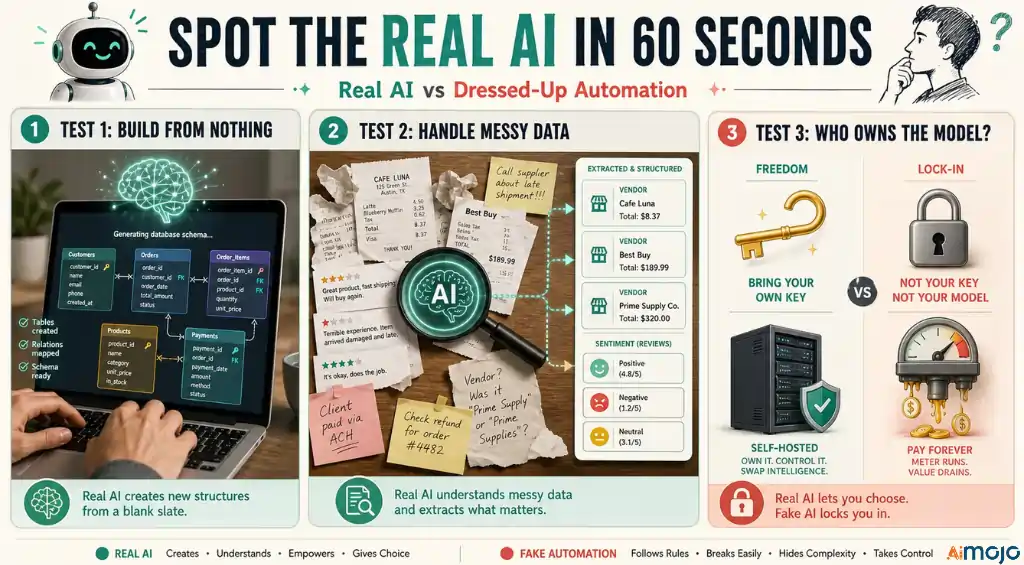
Ask it to build something from nothing. Type “create an inventory system with suppliers, stock levels, and reorder alerts” and watch what happens. A real AI database builds the tables, relations, and logic. A dressed-up automation asks you to pick a template. Teable, Airtable, Notion, and SmartSuite all pass this test convincingly. Weaker tools stall.

Then push the field-level AI. Feed it messy data, a folder of receipts or a column of raw customer feedback, and ask it to extract structured information. Genuine LLM fields will pull vendor names, totals, sentiment, and categories. Rule-based automation returns errors or empty cells the moment the input strays from the expected format.

Finally, check who owns the model. Tools that let you bring your own key (Stackby) or point at a local model (Baserow, self-hosted Teable) are giving you real, swappable intelligence. Tools that lock you into a fixed credit meter are betting you will not notice the markup. That single question separates the platforms that respect your budget from the ones that do not.

正しい選び方 AI Database for Your Team

You do not need all eight. You need the one that matches your actual constraint.

If you want the best all-round AI データベース: Teable. AI-native, open source, PostgreSQL scale, and at-cost credits. It is number one for a reason.
If budget is no object and you need agent depth: Airtable. The most powerful Field Agents in the category, priced accordingly.
If your team lives in documents: Notion. The AI database that sits inside your wiki, docs, and projects.
If you run heavy operations and need governance: SmartSuite. A true AI work OS with a Control Center.
If you want value and your own model: Stackby. Bring your own key, pay at cost, enrich columns from live APIs.
If data ownership is the whole point: Baserow for a self-hosted greenfield build, NocoDB for a UI over an existing SQLデータベース.
If your database problem is really a client problem: FuseBase. AI agents plus branded client portals.

Most teams land on Teable for the core system and add one specialist tool around it. That is a $10 to $30 per month stack that covers the entire AI data workflow, and it beats paying enterprise rates for features you will not use.

よくある質問

何が最善の方法です AI database tool in 2026?

Teable is the best all-round AI database tool in 2026. It combines a talk-to-build AI agent, cell-level AI fields with 154 language models, PostgreSQL scale, an open-source self-hosted edition, and credits billed at cost with zero markup. Airtable has deeper agent tooling but costs far more, which is why Teable takes the top spot for most teams.

どの AI database tools are free?

Several offer real free tiers. Teable's free plan includes AI フィールド、 AI Chat, and app generation. Stackby is free for up to 5 users. Baserow and NocoDB both have free cloud plans plus free self-hosted editions. Airtable, Notion, and SmartSuite have free tiers too, though full AI access on Notion and SmartSuite usually requires a paid plan.

Do these tools use real AI or just automation?

The top platforms use genuine large language models. Teable, Airtable, Notion, SmartSuite, Stackby, Baserow, and FuseBase all run real LLMs that reason, generate, and extract. NocoDB is the exception on this list, with the thinnest AI layer. A quick test is to ask the tool to build a database from a plain-language prompt. Real AI builds it, while automation hands you a template.

どの AI database is best for large datasets?

Teable and Airtable handle large datasets best. Teable runs on PostgreSQL and manages millions of rows without slowdown, while Airtable scales to 500,000-plus records on higher tiers. Notion is the weakest at scale, showing performance drag around 5,000 to 10,000 rows, so it is better for knowledge work than heavy structured data.

Can I self-host an AI データベース?

Yes. Teable, Baserow, and NocoDB all offer self-hosting. Teable's Community Edition is free under AGPL with unlimited rows and lets you bring your own AI model. Baserow is MIT-licensed and can connect to a local Ollama model for offline use. NocoDB installs over your existing SQL database. Self-hosting gives you data ownership and removes per-seat cloud costs.

Is Teable better than Airtable?

For most teams, yes. Teable matches Airtable's AI database features, adds an open-source self-hosted option, scales on PostgreSQL, and prices its AI credits at cost with no markup. Airtable's Field Agents are more powerful and its ecosystem is more mature, but its per-seat pricing and credit costs climb quickly. Teable delivers the better value and freedom for the majority of use cases.

いくらですか AI database tools cost in 2026?

Entry pricing ranges from free to about $20 per user per month. Teable Pro is $10 per seat, Stackby Economy is around $5, and Baserow Premium is around €5. Airtable Team and Notion Business both sit at $20 per user per month for AI. Watch for credit-based AI billing on Airtable and Notion, which adds usage costs on top of the seat price.

何ですか AI database agent?

An AI database agent is a system that builds and operates a database through natural language. Instead of manually creating tables and writing formulas, you describe what you need and the agent builds the structure, enriches records, answers questions about the data, and automates the follow-up work. Teable pioneered the term, and Airtable's Omni and Notion's Agents are close counterparts.

評決

その AI database category matured fast, and in 2026 the gap between the leaders and the pretenders is wide. Airtable has the most powerful agents if you can absorb the cost. Notion is unbeatable if your work lives in documents. SmartSuite, Stackby, Baserow, FuseBase, and NocoDB each win a specific lane, from 運用ガバナンス to client portals to raw data ownership.

But for the widest range of teams, Teable is the one to start with. It gives you AI-native database power, open-source freedom, PostgreSQL scale, and pricing that does not punish you for using the AI you signed up for. Start on the free plan, build a real system in an afternoon, and upgrade only when you actually hit a limit. That is the honest path to an AI database that works, and it costs nothing to begin.

コメント送信

あなたのメールアドレスは公開されません。 必須項目は、マークされています *

このサイトでは、スパムを減らすためにAkismetを使用しています。 コメントデータの処理方法を学びます。

プログラムに参加する(英語) Aimojo 部族!

毎週 76,200 人以上のメンバーがインサイダー情報を提供します。 
???? ボーナス: 200ドルの「AI 登録すると「マスタリーツールキット」が無料になります!

トレンド AI ツール
ソースAI 

ソーセージ AI 完全なコントロールをあなたの手に委ねます。 チャット、画像生成、動画作成を、検閲なしで行えます。

Lumo AI

プライベート AI あなたのデータを1バイトも収集することなく、最先端の回答を提供するアシスタント。 ゼロアクセス暗号化 AI Protonプライバシースタックによるチャット、画像生成、および暗号化されたプロジェクト。

ロルカAI

複数の個別の購読料を支払うことなく、主要なLLMプログラムすべてにアクセスできます。 マルチモデル AI 専門家、マーケター、学生向けの情報集約サイト

インドズソーシャル

1つのツールで、ブランドイメージに合ったソーシャルコンテンツを1か月分、わずか数分で計画できます。 AI ダッシュボード オールインワン AI 個人クリエイター、スタートアップ企業、代理店向けのソーシャルメディア管理ツール

ヴィヴグリッド

企業向けマネージドスキルプラットフォーム AI プロトタイプから製品化までのエージェント 可観測性、評価、およびグローバル推論を備えたサーバーレスLLM関数呼び出し。

© 著作権 2023 - 2026 | 登録する AI プロ | ♥で作られました