


If you’re the type who prefers the terminal over a flashy IDE, Google’s latest move is a game-changer. Meet Gemini CLI—a free, open-source AI coding agent designed to bring the full muscle of Google’s Gemini models straight to your command line.
Forget clunky plugins and locked-down APIs. With Gemini CLI, you get natural language coding, debugging, automation, and even image/video generation—all without leaving your terminal.
It’s not just another chatbot; it’s a developer’s Swiss Army knife, offering the industry’s most generous free usage limits and a fully inspectable, extensible codebase.
In this guide, we’ll break down what makes Gemini CLI unique, how it stacks up against rivals like Copilot and Claude Code, and why it’s set to become the go-to tool for AI-first developer workflows in 2025.
💻 What Exactly Is Gemini CLI?

Gemini CLI is Google’s open-source command-line AI agent, built to supercharge developer productivity right from the terminal. It leverages the latest Gemini 2.5 Pro model, offering a jaw-dropping 1 million token context window—enough to load massive codebases, lengthy documentation, or even hours of video for analysis in a single go.
But Gemini CLI isn’t just about writing code. It’s a full-featured AI agent that can:
And unlike most AI coding assistants, Gemini CLI is fully open source under the Apache 2.0 license, so you can inspect, fork, and extend it to fit your workflow.
🧰 Why Gemini CLI Is a Big Deal for Developers
1. Terminal-First, Not IDE-Only
While tools like Copilot and Gemini Code Assist focus on IDE integration, Gemini CLI is made for those who live in the terminal. It’s lightweight, portable, and doesn’t require you to switch contexts or install heavy plugins.
2. Massive Context Window
With support for up to 1 million tokens per request, Gemini CLI can process entire codebases, large datasets, or long technical docs without chunking or RAG hacks. That’s a huge leap over GPT-4 Turbo’s 128K or Claude 3.5’s 200K token limits.
3. Multimodal and Agentic
Gemini CLI isn’t just text-in, text-out. It’s natively multimodal—handling code, text, images, audio, and video. Plus, it uses an agentic “reason and act” (ReAct) loop, meaning it can chain tasks, invoke tools, and manage workflows autonomously.
4. Open, Inspectable, and Extensible
No more black-box AI. Gemini CLI is open source, with support for Model Context Protocol (MCP), system/team config files (GEMINI.md), and bundled extensions. You can tweak prompts, add custom tools, and even contribute to the project on GitHub.
5. Generous Free Usage Limits
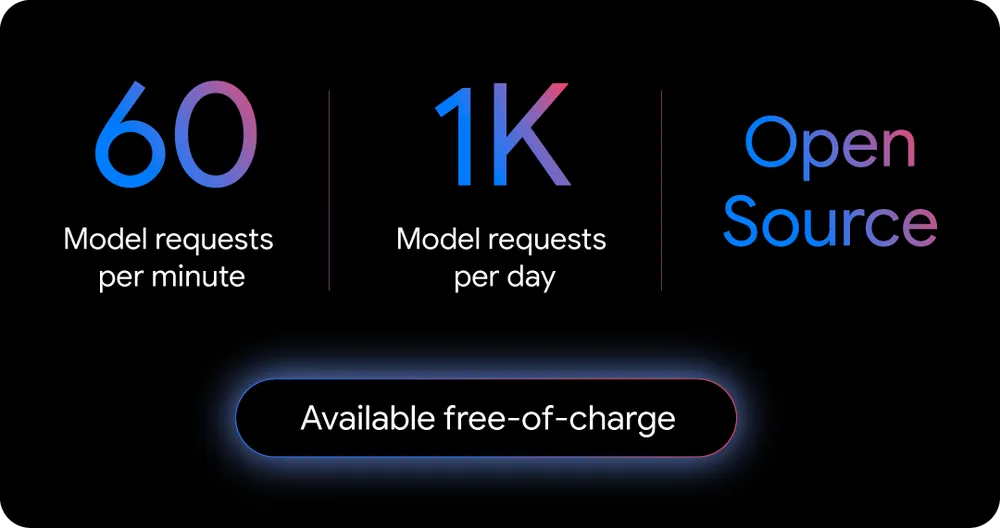
Google’s free Gemini Code Assist license gives you 60 model requests per minute and 1,000 requests per day—the largest free allowance in the industry. For most solo devs, that’s more than enough for daily work.
⚙️ Core Features and Capabilities
Let’s break down what you get with Gemini CLI:
| Feature | Details |
|---|---|
| Model | Gemini 2.5 Pro (1M tokens context) |
| Access | Free with Google account (Code Assist license), or via API key |
| Modes | Terminal CLI, VS Code agent mode, script integration |
| Coding Tasks | Explain, generate, refactor, debug, test coverage, code search |
| Workflow Automation | File ops, command execution, shell scripting, batch jobs |
| Multimodal Support | Text, code, images, audio, video (via Imagen, Veo, Lyria) |
| Web Integration | Google Search for real-time context, web fetch |
| Extensibility | Open source (Apache 2.0), MCP support, custom prompts, extensions |
| Usage Limits | 60 req/min, 1,000 req/day (free); higher via API key or paid plans |
| Security/Transparency | Fully inspectable code, local execution possible |
| Community | GitHub repo open for issues, PRs, and feature requests |
📁 How Gemini CLI Works: Under the Hood
Gemini CLI uses a ReAct loop—it reasons about your request, chooses tools or actions, and executes them step by step. Here’s what’s happening behind the scenes:
Example Use Cases
👾 Getting Started: Quick Setup Guide
- Prerequisites: Node.js v18+ installed.
- Run the CLI:
bash
npx https://github.com/google-gemini/gemini-cli- Or, install globally:
bash
npm install -g @google/gemini-cli
gemini- Authenticate: Log in with your Google account for free usage.
- Pick a Theme: Customise your terminal experience.
- Start Prompting: Use natural language to interact with your codebase, files, or shell.
For advanced users, set a Google AI Studio API key for higher limits or team workflows:
bash
export GEMINI_API_KEY="YOUR_API_KEY"🤖 How Gemini CLI Compares: Copilot, Claude Code, and Beyond
| Tool | Open Source | Context Window | Multimodal | Free Usage Limit | Extensible | Terminal Native |
|---|---|---|---|---|---|---|
| Gemini CLI | Yes | 1M tokens | Yes | 1,000 req/day (free) | Yes | Yes |
| GitHub Copilot | No | ~8K tokens | No | Paid only | No | No |
| Claude Code | No | 200K tokens | Yes | Paid/free (lower cap) | No | No |
| ChatGPT CLI | No | 128K tokens | Yes | Paid/free (lower cap) | No | No |
Gemini CLI stands out for:
💻 Advanced Features: For Power Users and Teams
🐞 Real-World Impact: Who’s Using Gemini CLI and Why?
Community and Ecosystem
Google is actively encouraging community contributions. The GitHub repo is open for issues, feature requests, and pull requests. Expect rapid evolution as devs worldwide add new tools, templates, and integrations.
🧮 How to Get the Most Out of Gemini CLI
AiMojo Recommends:
👨💻 Final Thoughts: The Future of AI-First Coding Workflows
Gemini CLI isn’t just another AI assistant—it’s a signal that open, agentic, and terminal-native tools are the future of developer productivity. With unmatched free usage, a massive context window, and a fully open architecture, it’s set to become the go-to for devs who want AI that’s powerful, transparent, and truly theirs.
If you’re ready to bring AI into your terminal and workflow—on your own terms—Gemini CLI is the tool to watch in 2025 and beyond.
Unique Perks & Stats:
Ready to try it?
Fire up your terminal, install Gemini CLI, and experience AI-first coding—no strings attached.


 BONUS: Get our $200 “AI Mastery Toolkit” FREE when you sign up!



