

Presentation professionals waste 4.2 hours weekly battling slide formatting nightmares – but smart marketers just cracked the 10-minute deck formula.
Gamma 3.0 eliminates traditional PowerPoint frustrations through intelligent slide generation, advanced editing commands, and professional templates that actually convert prospects into clients.
From prompt engineering strategies to API integration tactics, this complete playbook reveals how content creators, consultants, and enterprises maximize Gamma 3.0's advanced features for competitive presentation advantages.
What Makes Gamma 3.0
The Ultimate PPT Game-Changer
Gamma 3.0 represents a major upgrade to the original presentation builder, now equipped with Gamma Agent – a specialized presentation assistant that executes complex editing commands instantly. Unlike traditional tools requiring manual slide-by-slide construction, this platform generates complete presentation frameworks from simple text prompts.
Core Features That Separate Gamma 3.0 From Competitors
➤ Gamma Agent Integration

- Executes multi-step presentation modifications through conversational commands
- Reviews and suggests improvements before finalizing changes
- Handles complex restructuring requests without losing content quality
➤ Advanced API Functionality

- Automates bulk presentation creation for enterprise users
- Supports up to 50 generations daily for paid subscribers
- Enables custom integration with existing business workflows
➤ Multi-Model AI Architecture

- Leverages Claude Haiku, ChatGPT, and DALL-E for different presentation components
- Generates contextually relevant images and content simultaneously
- Maintains consistency across all generated presentation elements
Complete Gamma 3.0 Setup Guide:
From Registration to First PPT
Step 1: Account Creation and Credit Allocation
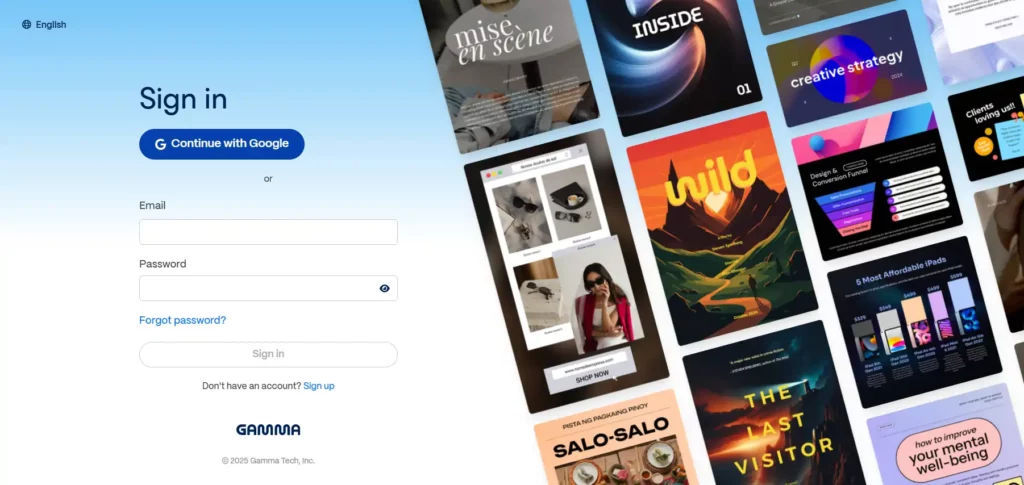
Navigate to Gamma's official platform and register using your preferred email or Google account. New users receive 400 free AI credits immediately upon signup – enough to generate approximately 10 complete presentations.
Step 2: Accessing Gamma 3.0 Interface
Via Chat Interface:

- Click “Generate” from the main dashboard

- Enter your presentation topic in the central prompt box
- Select desired slide count (up to 10 cards for free users, 50 for Pro subscribers)
- Choose presentation language and aspect ratio preferences
Via API Access (Pro Users Only):
text
python -m
pip install requests
import requests

url = "https://public-api.gamma.app/v0.2/generations"
headers = {
    "accept": "application/json",
    "Content-Type": "application/json"
}
response = requests.post(url, headers=headers)
Step 3: Prompt Optimization for Maximum Output Quality
Effective Prompt Structure:
Poor prompts generate generic content, while detailed prompts produce targeted, conversion-focused presentations.
Gamma 3.0 Pricing Breakdown: What Each Dollar Gets You
| Plan | Annually / Monthly Cost | AI Credits / Usage | Cards per Deck | Branding Removal | Best For |
|---|---|---|---|---|---|
| Free | $0 | 400 credits at signup, refresh monthly | 10 | No | Students, educators, first-time testers |
| Plus | $8 / $10 | Unlimited AI usage | 20 | Yes | Freelancers, consultants, small teams |
| Pro | $18 / $25 | Unlimited AI with premium models | 60 | Yes | Agencies, enterprises, high-volume creators |
Gamma Agent Mastery:
Advanced Editing Commands That Save Hours

Single-Command Presentation Restructuring
Instead of manually editing individual slides, Gamma Agent processes comprehensive modification requests through natural language commands. Example commands that produce professional results:
Content Optimization:
Visual Enhancement:
Structure Modification:
Advanced Agent Workflow for Complex Presentations

Phase 1: Content Generation
Input comprehensive topic prompt including audience, objectives, and required sections. Allow Gamma Agent to generate initial structure and content framework.
Phase 2: Iterative Refinement
Submit focused editing requests one at a time rather than complex multi-part commands. This prevents the Agent from missing specific requirements or making conflicting changes.
Phase 3: Final Polish
Request final review and optimization focusing on visual consistency, message clarity, and call-to-action placement.
Gamma 3.0 vs Top Competitors:
Where Your Money Goes Furthest
| Feature | Gamma 3.0 Pro | Beautiful.AI | Presentations.AI | Canva Pro |
|---|---|---|---|---|
| Monthly Cost | $25 | $12 | $198/year | $15 |
| AI Generation | Unlimited | Limited | 12 presentations | Basic |
| Max Slides | 60 cards | Unlimited | No limit | 100 pages |
| API Access | Yes | No | Yes | Yes |
| Custom Branding | Full | Partial | Limited | Full |
| Analytics | Advanced | Basic | None | Basic |
Gamma 3.0's Pro plan provides superior value for professionals requiring advanced AI capabilities and enterprise features.
Export and Sharing Options:
Getting Your PPTs Where They Need to Go
➤ Available Export Formats

➤ Collaboration Features for Team Workflows

Real-Time Editing
Multiple team members can edit presentations simultaneously with automatic conflict resolution and version history tracking.
Comment and Review System
Stakeholders can add comments and suggestions without editing permissions, streamlining the approval process for client presentations.
Brand Kit Integration
Upload company logos, color schemes, and font preferences once, then apply consistently across all team presentations.
Common Gamma 3.0 Pitfalls and How to Avoid Them
| ⚠️ Common Issue | 👎 Problem | ✅ Solution |
|---|---|---|
| Prompt Engineering Mistakes | Generic prompts produce mediocre presentations requiring extensive manual editing | Include specific audience details, desired outcomes, and content structure in initial prompts |
| Credit Management for Free Users | Running out of credits mid-project forces presentation abandonment | Plan presentation complexity based on available credits (40 credits per full generation, 10 credits per minor edit) |
| Export Compatibility Issues | PowerPoint exports may require font downloads or formatting adjustments | Preview exports before final delivery and keep backup PDF versions for critical presentations |
Advanced Gamma 3.0 Strategies for Maximum ROI
➤ Bulk Presentation Creation for Sales Teams

Use API access to generate multiple presentation variants for different market segments, reducing sales enablement time by 80% while maintaining message consistency.
➤ Template Standardization Across Organizations
Create master presentation structures that teams can populate with custom content, ensuring brand compliance while enabling rapid customization for specific client needs.
➤ Analytics-Driven Presentation Optimization

Track engagement metrics on shared presentations to identify highest-performing slide structures and content types, then incorporate these elements into future presentations.
AiMojo Recommends:
Final Verdict: Is Gamma 3.0 Worth Your Investment?
For Individual Professionals: The Plus plan at $96 annually provides exceptional value for consultants, freelancers, and business development professionals who create presentations regularly.
For Enterprise Teams: Pro plan features justify the $240 annual cost through time savings, advanced analytics, and API automation capabilities that scale presentation creation across large organizations.
For Occasional Users: The free plan offers sufficient functionality for students, educators, and professionals requiring occasional presentation support without ongoing subscription costs.
Gamma 3.0 eliminates the traditional presentation creation bottleneck, transforming hours of design work into minutes of strategic content development. The platform's combination of AI generation, intelligent editing, and professional output quality makes it an essential tool for anyone who regularly creates presentations for business purposes.


 BONUS: Get our $200 “AI Mastery Toolkit” FREE when you sign up!








