
To create AI girlfriend on Kupid AI, sign up with an email or Google account, confirm you're 18+, then open the character creator at kupid.ai/create-ai-girlfriend.
You'll pick a style (Realistic or Anime), build her appearance, name her and choose her voice, then set her personality, job, and relationship to you. The whole thing takes about a minute, and the builder itself is free; you only pay if you want unlimited messages, more photos, voice minutes, or video. Free gets you 15 messages to test the waters; Pro and Ultra unlock the rest.
If you just want the short version, that's it. If you want to know exactly what each screen looks like, what the pricing actually works out to, and where the platform's rough edges are, keep reading.
What Is Kupid AI, Exactly?
Kupid AI is a browser-based AI companion platform built by SNB Technologies LTD, a company registered in Nicosia, Cyprus.
It's installable as a Progressive Web App, meaning you can add it to your phone's home screen like a native app without going through the App Store or Play Store, useful since most platforms in this category can't get listed there anyway.
The pitch is simple: you build a companion from scratch, or pick one of the pre-made “Official” characters, and then chat, get photos, hear voice messages in her actual chosen voice, and eventually unlock video. The system remembers what you've told her, up to a point (more on that limit later, because it matters more than most reviews let on).
Kupid AI isn't the only platform doing this. It competes with Candy AI, Nectar AI, DreamGF, and others covering the same ground. What sets it apart is the depth of the character creator and the voice message system; her voice messages use the same voice you picked at setup, not a flat text-to-speech read.
There's no dedicated iOS or Android app in the official app stores, which is common for platforms in this category since store policies tend to restrict romantic AI chat apps. The PWA install is the workaround, and it works well enough: once installed, it behaves like any other app icon on your home screen and opens full-screen, skipping the browser address bar.
One more thing worth knowing going in: this guide covers the AI girlfriend flow specifically, since that's what most people searching for Kupid AI actually want. The same character creator also supports an AI boyfriend option and anime-style companions of either gender, using the same steps outlined below, just with a different pool of appearance assets.
Before You Start: What You'll Need
You don't need a credit card to start. The character creator, basic text chat, and a small allotment of messages are free before you hit any paywall.
One honest note on the age check: sign-up itself is lightweight, an email and password, or a Google login, with no ID upload at registration. The platform's terms state it's restricted to adults, and it will remove accounts if it learns a user is underage, but the gate at sign-up is a self-declaration, not a document check. If that matters to you (say, you're setting up parental controls on a shared device), don't rely on the sign-up flow alone.
Step-by-Step: How to Create AI Girlfriend on Kupid AI
Here's the full process, screen by screen.
Step 1: Sign Up and Confirm Your Age

Go to kupid.ai and click Sign Up. You can register with an email and password or use Google sign-in for a faster path. There's no phone number or ID needed at this stage. Confirm your email if prompted, and you're in.
By creating an account, you're confirming you're 18 or older, per Kupid AI's terms of service. Keep that in mind before you hand the account to anyone else in your household.
Step 2: Open the Character Creator
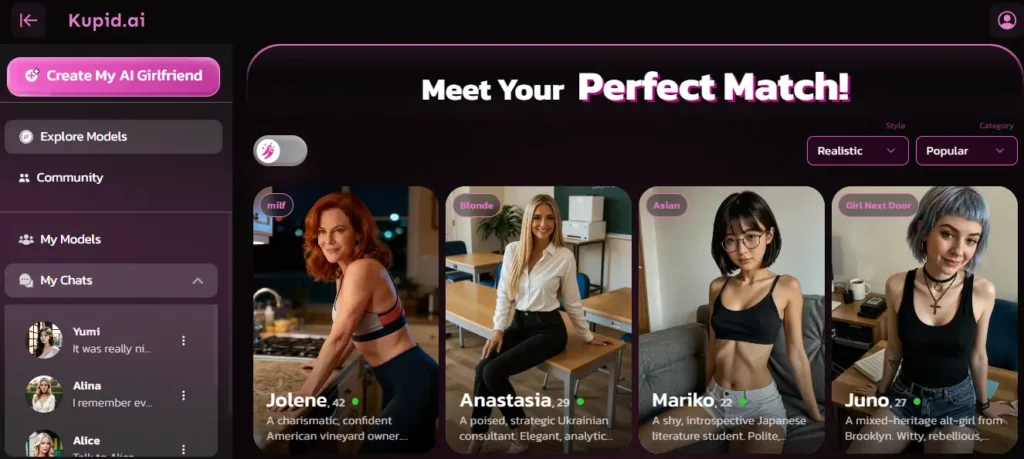
Once you're logged in, you'll land on the main feed with a scrollable wall of pre-made “Official” companions alongside community-created ones.

You can filter the feed by style (Realistic or Anime) and by category, and you can chat with any of these immediately for free without building anything yourself. That's a reasonable way to get a feel for the platform's conversation quality before you invest time designing your own character.
But if the whole appeal is a companion built to your own spec, click Create AI in the top navigation, or go straight to kupid.ai/create-ai-girlfriend. This is where “how to use Kupid AI” really starts, and it's the part of the platform this guide focuses on.
Step 3: Choose a Style — Realistic or Anime
The first screen asks you to pick between two art styles: Realistic, where companions are rendered to look photographic, or Anime, which uses stylized character art.

These aren't just filters on the same base model, each style pulls from its own separate asset library, so the hair, face, and body options you see in Step 4 will shift depending on which one you pick. Choose based on the look you actually want, not which one seems more “complete,” because both get the same features afterward.
Neither style is the “better” choice in any objective sense, and switching later means starting a new character rather than converting an existing one. If you're torn, a quick way to decide is to think about the photos you'll eventually request: Realistic companions aim for photo-like output, while Anime companions stay in illustrated form even in generated images. Pick based on which one you'd actually want to see more of.
Step 4: Build Her Appearance
Now you're into the actual customization: hair style first (long, wavy, curly, and a handful of others), then hair color, then eye color. Beyond that you can also set body type and skin tone. Every option shows a live thumbnail so you know what you're picking before you commit.

If nothing's clicking, there's a dice icon that randomizes the whole look in one tap. It's a genuinely useful shortcut if you don't have a specific image in your head and just want to see what the system can do.
Step 5: Name Her, Set Her Age, and Pick Her Voice
Type in a name, anything works. Then set her age. Kupid AI requires all characters to be adults, 18 and up, and the platform won't let you set anything below that.

The last part of this screen is voice selection, and it's one of Kupid AI's better features. You'll see a shortlist of named voices (options like Ivana, Sydney, Ella, and Marylin have appeared in the builder), each with a play button so you can preview the tone before you decide.
Whichever one you choose becomes the voice she uses for every voice message going forward, not a generic robotic read. This is worth spending an extra thirty seconds on, since it's harder to change your mind about later once you've built a rapport with a particular sound.
Step 6: Set Her Personality
This is where you shape how she actually behaves in conversation. Kupid AI offers six personality archetypes: Dominant, Submissive, Playful, Mysterious, Sweet, and Passionate.

Pick one, or use the custom field to write your own description if none of the presets quite fit what you're after. There's also a randomize option if you'd rather be surprised.
Step 7: Pick Her Job and Relationship to You
Two more fields round out her identity. First, her job — there's a long, searchable list (examples include doctor, teacher, artist, model, gamer, nurse, and fashion influencer), so if you have something specific in mind, use the search bar instead of scrolling.

Second, her relationship to you. Girlfriend is the default assumption, but you can also set her up as a friend, crush, neighbor, roommate, or colleague, depending on the dynamic you want to build.
Step 8: Set Her Interests
Last customization field before you generate her: her interests. Keep this as broad or specific as you like. There's a randomize button here too, and it's genuinely random, so don't hit it unless you're fine with whatever comes back.
Once all four fields in this step are set, hit Generate. Your AI girlfriend now exists, with full chat, photos, and voice messages available immediately.
Step 9: Start Chatting
You're dropped straight into her chat window. Text conversation works like any messaging app: type, send, wait for her reply.

Because you set her personality and backstory during creation, her responses should already reflect that, rather than reading like a blank default assistant. On the free plan, remember you've got 15 messages before you're prompted to upgrade.
Step 10: Request a Photo
Ask her for a photo, or a selfie, mid-conversation, and Kupid AI generates one on the spot based on her established appearance.
This is one of the platform's core draws: the images aren't random stock renders, they're meant to be consistent with the character you built. Photo generation is a paid-tier feature. Free accounts don't get photos; Pro is capped at 25 a week, Ultra at 75.
Step 11: Trigger Voice Messages
Ask her to send a voice note, or she may send one unprompted depending on the conversation, and you'll hear her respond in the voice you picked back in Step 5.
This is the feature Kupid AI leans on hardest for a reason — hearing an actual voice rather than reading text changes how the interaction feels. Pro accounts get 12 minutes of voice messages a week, Ultra gets 35. Free accounts don't get voice at all.
Step 12: Unlock Video Messages
Video is the newest layer on top of photos and voice, available on Pro (8 a week) and Ultra (25 a week). Free accounts don't have access to this feature. Treat video as the top-tier extra rather than the reason to sign up, since it's the most rationed feature on either paid plan.
Step 13: Understand How Memory Works
This is the part most walkthroughs skip, and it directly shapes the day-to-day experience. Kupid AI’s memory depends on the plan you choose. The Free plan remembers your last 30 messages, while Pro keeps the last 100. Ultra includes unlimited memory, so earlier context does not start dropping off as the conversation grows.
Practically, this means unlimited messaging on Pro does not provide unlimited continuity because the plan remembers only the last 100 messages. Ultra removes that restriction with unlimited memory, making it the better choice for long-running, detail-heavy conversations where you want your companion to remember earlier context.
Step 14: Edit Her Later, or Build More Than One
Nothing you set during creation is locked in. Every field, appearance, personality, job, relationship, and interests is editable later from her profile page. You can also build additional companions if you want to try a different look or dynamic without deleting the first one.
Step 15: Use the Standalone Image Generator

Separate from in-chat photo requests, Kupid AI has a dedicated image generator at kupid.ai/generate-image. Here you write a text prompt describing the image you want, and the system generates it using a coin-based credit system, roughly two coins per generation.
This runs independently of your chat's photo allowance, so it's a way to get extra images without eating into the weekly cap tied to your subscription tier, though coins themselves are a separate resource you'll need to have or purchase.
Kupid AI Pricing: What You'll Actually Pay
Here's the full breakdown, tier by tier.
| Feature | Free | Pro | Ultra |
|---|---|---|---|
| Messages | 15 total | Unlimited | Unlimited |
| Photos | — | 25/week | 75/week |
| Videos | — | 8/week | 25/week |
| Voice messages | — | 12 min/week | 35 min/week |
| Memory | Last 30 messages | Last 100 messages | Unlimited |
| Response speed | Standard | Fast | Fastest |
| Queue priority | Standard | High | Highest |
Unlimited messaging and unlimited memory are not the same feature. Pro lets you keep chatting without a message limit, but only the latest 100 messages remain in its active memory. Ultra includes unlimited messaging and unlimited memory, making it better suited to long-running conversations.
Kupid AI bills in three ways: Weekly, Yearly, advertised at 77% off the weekly rate, and Lifetime, advertised at 87% off.
At the time of writing, the listed weekly price is $12.99 for Pro and $24.99 for Ultra, with a running promotional discount that dropped the effective yearly-billed rate to roughly $3.44 a week for Pro and $5.75 a week for Ultra. Kupid AI also accepts cryptocurrency, and the site states you can cancel anytime.
Two things are worth flagging before you commit.
- The promotional pricing is time-sensitive. Kupid AI uses a countdown offer on its subscription page, so the final amount may change depending on the promotion running when you visit. Check the live checkout total before paying rather than relying on an older screenshot or review.
- Weekly billing also adds up quickly. Paying $12.99 every week for Pro works out to roughly $56.29 per average month, or $675.48 across 52 weeks. Anyone planning to use Kupid AI for more than a few weeks should compare that total with the yearly option before subscribing.
Which Tier Is Actually Worth It?
A simple way to choose is to think about how you plan to chat. Pro should be enough for casual conversations and shorter storylines where remembering the latest 100 messages covers the active context.
Ultra makes more sense for an ongoing storyline with recurring details, shared history, preferences, and references you want the companion to retain. The difference between 100-message memory and unlimited memory becomes much more noticeable as the relationship and chat history grow.
Kupid AI: Honest Pros and Cons
Getting Better Results Once She's Built
A few practical habits make a real difference to how the conversation actually feels, beyond just following the setup steps:

- Give her something specific to react to, not just greetings. The archetype and job you picked in Step 6 and Step 7 shape her responses more noticeably once you bring up details tied to them, rather than sticking to generic small talk.
- Reuse important details when using Free or Pro. Repeating a nickname, shared plan, or preference helps keep it inside the active 30-message or 100-message memory window. Ultra includes unlimited memory, so this is less of a concern on that plan.
- Don't rebuild from scratch over a bad first reply. Early messages in a new chat sometimes read a little generic before the conversation has enough context to draw on. Give it a few exchanges before deciding the personality setup didn't take.
- Use the standalone image generator for anything unrelated to her. If you want a picture of a scene rather than her specifically, kupid.ai/generate-image is the more direct tool, since in-chat photo requests are built around generating her, not open-ended prompts.
Safety and Privacy: What to Know Before You Sign Up
Kupid AI's privacy policy states that the platform is restricted to users 18 and older and that it will delete information and block any account it learns belongs to a minor.

It also states that it won't sell your personal data to third parties without consent, and that a moderation team reviews conversations for legal and policy compliance.
That last point is worth sitting with: because conversations are moderated, they're stored and can be reviewed by staff, not just processed anonymously by an algorithm. Independent testing of the platform has reported that data is encrypted at rest but that there's no end-to-end encryption on chats, which lines up with what the privacy policy implies about moderation access.
Retained account data is kept for a period after you close your account, based on the platform's stated retention practice, so deleting the app isn't the same as deleting your history.
Practical takeaways:
None of this makes Kupid AI unusually risky compared to other platforms in the category. It's a normal cloud-based chat service with the normal set of tradeoffs. Just don't assume “AI companion” means the conversation disappears into the void.
Frequently Asked Questions
Is Kupid AI free to use?
Yes, building a character and starting a conversation is free, with the free tier capped at 15 messages. Photos, voice messages, and video all require a Pro or Ultra subscription.
How do I create an AI girlfriend on Kupid AI?
Sign up, confirm you're 18+, then go to the character creator. Pick a style (Realistic or Anime), set her appearance, name her, set her age and voice, then choose her personality, job, relationship to you, and interests. Hit Generate and she's ready to chat.
Can I edit my AI girlfriend after I've created her?
Yes. Every field you set during creation, appearance, name, personality, job, relationship, and interests, can be changed later from her profile.
Does Kupid AI have a mobile app?
There's no dedicated iOS or Android app listed in the app stores. Kupid AI runs as a Progressive Web App instead, which you can install to your phone's home screen directly from the browser for an app-like experience.
What's the difference between Realistic and Anime companions?
They're two separate art styles with their own asset libraries for hair, face, and body options. Both styles support the same features afterward, chat, photos, voice, and video, so the choice is purely aesthetic.
How much does Kupid AI cost?
Pro and Ultra are listed at $12.99 and $24.99 a week respectively, though the site frequently runs promotional pricing on yearly billing that brings the effective weekly cost down substantially. Yearly billing is advertised at 77% off, Lifetime at 87% off. Always check the live checkout price, since promotions are time-limited.
Does my AI girlfriend remember past conversations?
Yes, but the memory level depends on your plan. Free remembers the latest 30 messages, Pro remembers the latest 100, and Ultra includes unlimited memory for longer, continuous conversations.
Is Kupid AI safe to use?
It's an adults-only platform with standard cloud-service security practices. Your conversations are stored on Kupid AI's servers and can be reviewed by a moderation team, and there's no end-to-end encryption. Treat it like any other online account: don't share sensitive personal information you wouldn't want stored.
Can I create an AI boyfriend instead of a girlfriend?
Yes. The same character creator supports a boyfriend option using the same style, appearance, name, voice, and personality steps, just drawing from a different appearance library.
What happens when I run out of free messages?
Once you've used your 15 free messages, you'll be prompted to subscribe to Pro or Ultra to keep chatting. The character itself isn't deleted, and your setup is saved, but sending new messages requires a paid tier.
Can I have more than one AI girlfriend at once?
Yes. You can build multiple companions on the same account and switch between them. Each one keeps her own separate memory and chat history.
Recommended Readings:
Verdict
Kupid AI’s character creator is one of the more thorough free tools in this category, and its voice message system stands out by using the voice selected during setup rather than a generic text-to-speech option. For users who want a quick, guided way to build a custom AI girlfriend, Pro covers the main experience well with unlimited messaging, 100-message memory, photos, videos, and voice features.
Ultra is the better fit for longer, more detailed conversations because it includes unlimited memory instead of limiting active context to the latest 100 messages. That makes it easier to maintain recurring details, preferences, and an ongoing storyline over time. Whichever tier you choose, check the live checkout price before subscribing, since Kupid AI’s promotional rates can change.


 BONUS: Get our $200 “AI Mastery Toolkit” FREE when you sign up!