

Thunderbit Key Insights
What is Thunderbit?

Thunderbit is an AI powered web scraper Chrome extension that turns any webpage into structured, exportable data in just two clicks. Built for non technical users in sales, marketing, operations, and e-commerce, it eliminates the need for CSS selectors, Python scripts, or manual copy and paste work.
Users describe the data they need in plain English, and the AI (powered by ChatGPT, Claude, and Gemini) automatically detects the relevant fields and structures the output. Scraped data can be exported directly to Google Sheets, Airtable, Notion, Excel, CSV, or JSON.
With over 200,000 users and a Product Hunt “Product of the Week” award, Thunderbit has become a go to productivity tool for teams that need fast, reliable web data extraction without a developer on call.
Thunderbit’s core strength is its AI field suggestion engine. Open any webpage, click “Run Now,” and the AI reads the page like a human. It identifies the most relevant data points, suggests column names, and structures everything into a clean table. There is no need to configure selectors or write a single line of code. This saves hours of manual setup per scrape job.
Most scrapers stop at the listing page. Thunderbit goes further. It automatically follows links into individual subpages and appends that data back to your main table. For sales teams pulling company profiles or e-commerce analysts gathering product specs, this means a complete dataset from a single run rather than dozens of manual clicks.
For high traffic sites like Amazon, eBay, LinkedIn, Zillow, TikTok, and Google Maps, Thunderbit offers one click templates that skip the AI entirely. You open the page, select the template, and export. It is the fastest route to structured data on platforms where thousands of users are already scraping daily.
Thunderbit lets you set automated scraping schedules to monitor price changes, inventory levels, or content updates. The Pro plan supports monitoring intervals as frequent as every five minutes. This is a strong fit for e-commerce teams running competitor price tracking or market research that demands fresh data without manual intervention.
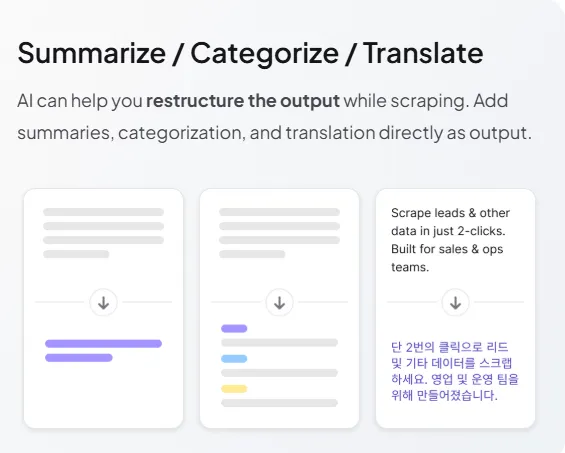
Rather than exporting raw data and reformatting later, Thunderbit’s AI processes output during extraction. It can summarise long text, categorise entries, translate content into different languages, and reformat fields on the fly. This removes an entire post processing step from your workflow.
Every Thunderbit account includes free email extraction, phone number extraction, and image downloading tools at no cost. These work on websites, PDFs, and images. For lead generation teams, this alone makes the free tier genuinely useful beyond a basic trial.
Thunderbit Pricing Plans
| Plan Name | Cost (Yearly) | Credits | Key Limits |
|---|---|---|---|
| Free | $0 | 6 pages/month | 5 scrapers, 1 scheduled scraper, 14 day data retention |
| Starter | $9/month | 5,000 credits/year | 30 scrapers, 5 scheduled scrapers, 2,000 URLs per bulk scrape, 60 day retention |
| Pro | $16.50/month | 30,000 credits/year | Unlimited scrapers, 25 scheduled scrapers, 5 min monitor frequency, 60 day retention |
| Business | Custom pricing | Custom credits | Custom limits, priority support, account management |
Thunderbit for Sales and Lead Generation
Thunderbit excels as a lead generation engine for sales teams. Users can scrape contact directories, LinkedIn profiles, and business listings, then enrich records automatically through subpage scraping.
The built in email and phone extractors pull verified contact details from any page, PDF, or image. Pre-built templates for Apollo, RocketReach, and TruePeopleSearch make prospecting even faster. For outbound sales teams building targeted lists, Thunderbit replaces multiple tools in the stack and cuts list building time from hours to minutes.
Thunderbit for E-commerce and Market Research
E-commerce professionals use Thunderbit to track competitor pricing, monitor product availability, and gather SKU data across marketplaces. One click templates for Amazon, eBay, Etsy, Shopify, and AliExpress eliminate setup entirely.
Scheduled scraping automates recurring price checks, and the AI’s ability to summarise and categorise product descriptions during extraction removes tedious post processing. For market research analysts, the platform’s PDF and image scraping capabilities extend data collection beyond traditional web pages into reports, catalogues, and scanned documents.
Pros and Cons
- Genuinely zero learning curve.
- AI field detection is remarkably accurate.
- Free email and phone extractors.
- Extensive pre-built template library.
- Direct export to Sheets, Notion, Airtable.
- Subpage scraping saves enormous time.
- Free tier is very limited.
- Credits deplete faster than expected.
- No built in proxy rotation.
- No standalone desktop application.
Thunderbit Performance and Reliability
In real world testing, Thunderbit consistently delivers clean, structured output from pages where competitors require manual configuration. The AI models handle non standard layouts, dynamically loaded content, and nested data structures with minimal user input.
Speed is impressive for a browser extension, with most single page scrapes completing in under 10 seconds. Pagination and bulk scraping work reliably up to the 2,000 URL cap on paid plans. The main reliability concern is credit consumption. Complex pages with many AI processed fields can burn through credits quickly, so users should monitor usage carefully on the Starter plan.
Best Thunderbit Alternatives
| Tool Name | Ease of Use | Scalability |
|---|---|---|
| Instant Data Scraper | Very easy but no AI field detection | Low (browser only, no scheduling) |
| Octoparse | Moderate (visual builder, steep learning curve) | High (desktop plus cloud, API access) |
| Browse AI | Easy (train bots by clicking) | Moderate (cloud based, limited free tier) |
| Apify | Moderate (requires platform navigation) | Very high (cloud, 20+ integrations, API) |



