

TestDriver Key Insights
What is TestDriver?
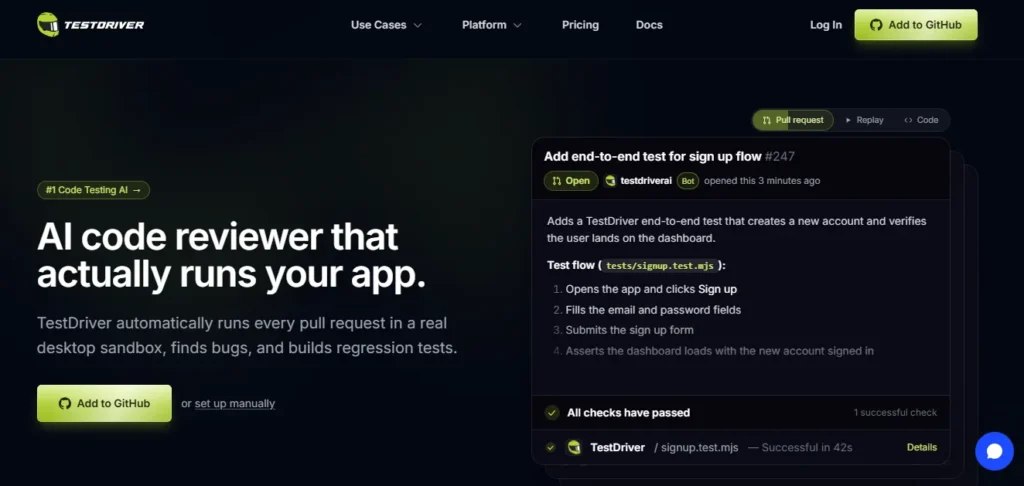
TestDriver is an AI QA engineer that tests every pull request by running your real application inside a cloud desktop sandbox. Built by Haxor Inc, it plugs into GitHub as an app. When a developer opens a pull request or mentions @testdriverai, the agent reads the code diff, clicks through the running interface like a real user and reports what it saw with a video replay.
It then writes regression tests as plain Vitest files and commits them in a fresh pull request. Instead of fragile CSS selectors, TestDriver uses computer vision to find buttons, fields and text. That makes it one of the few test automation tools that can cover web apps, Chrome extensions, VS Code extensions and native Windows software from one codebase. For engineering leaders, the business result is fewer escaped defects, less manual QA and faster, safer releases.
TestDriver Quick Verdict
| Question | Answer |
|---|---|
| Best For | Product teams on GitHub that ship desktop software, browser extensions or complex web apps |
| Not Ideal For | Mobile first apps, teams that write tests only in Python or Java, and teams off GitHub who want the PR bot |
| Standout Strength | Vision AI testing on real Windows and Linux machines, not just a browser |
| Biggest Watch Out | Per minute usage costs on busy repositories |
| Time to First Test | Minutes with the GitHub App |
| Our Score | 8.3 out of 1 |
How TestDriver Works Behind the Scenes
TestDriver runs a six stage quality loop around every code change. Understanding this loop helps you predict both the value and the bill.
- Setup. After you install the GitHub App, the bot opens a setup issue and a pull request. That pull request adds the testdriverai and vitest packages, a vitest.config.js file with the TestDriver reporter and long timeouts, a GitHub Actions workflow and a set of sample tests.
- Validate. When a new pull request lands, the vision agent reads the diff to learn what changed. It then boots a sandbox, opens the app and tests the new behaviour by clicking, typing and reading the screen.
- Contribute. Once a test passes, the agent opens a separate pull request that commits the test file. Your team reviews it like any other code.
- Run in CI. Committed tests run on every future pull request that changes something a user would see. They also run locally with npm test, because they are standard Vitest files.
- Self heal. If a cached element no longer matches after a redesign, the AI finds it again, updates the cache and carries on.
- Debug and prevent. Failed runs link straight to a video replay, network logs and resource graphs. The console then tracks pass rates and flaky tests so regressions show up the moment they land.
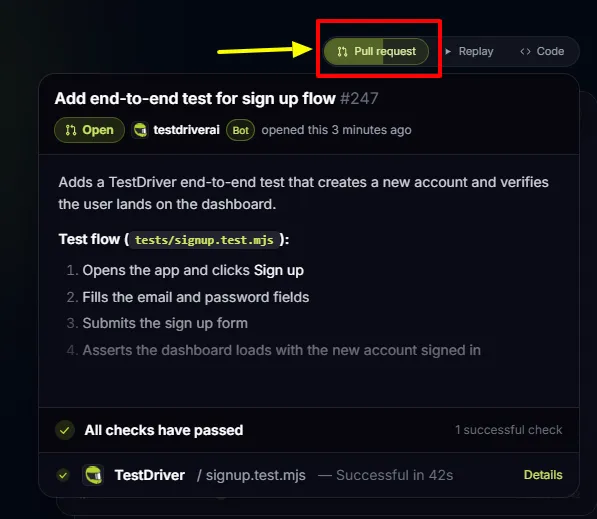
TestDriver installs as a GitHub App and watches the repositories you choose. Open a pull request or tag @testdriverai in a comment, and the agent starts a sandbox, reads the diff and tests the change in the running app. It then posts a review with a recording of what it observed. Once a test passes, it opens a second pull request with the new test file already committed.
Your team reviews the diff, merges it and gains regression coverage with zero boilerplate. You can also call the agent from GitHub Copilot chat, pull request reviews or the GitHub Mobile app. For release managers, this turns QA from a bottleneck at the end of a sprint into a quality gate that runs on every merge.
Most UI automation breaks because a developer renamed a class or moved a div. TestDriver avoids that trap entirely. You describe elements in plain English, such as “blue Sign In button in the header”, and the vision model finds them on screen.
There are no XPath queries, no data attributes and no DOM access needed. This works on canvas elements, video players, iFrames, OAuth popups and PDFs. Those are the exact places where selector based tools usually fall over. It also means you can test third party web apps where you have no access to the source code at all.
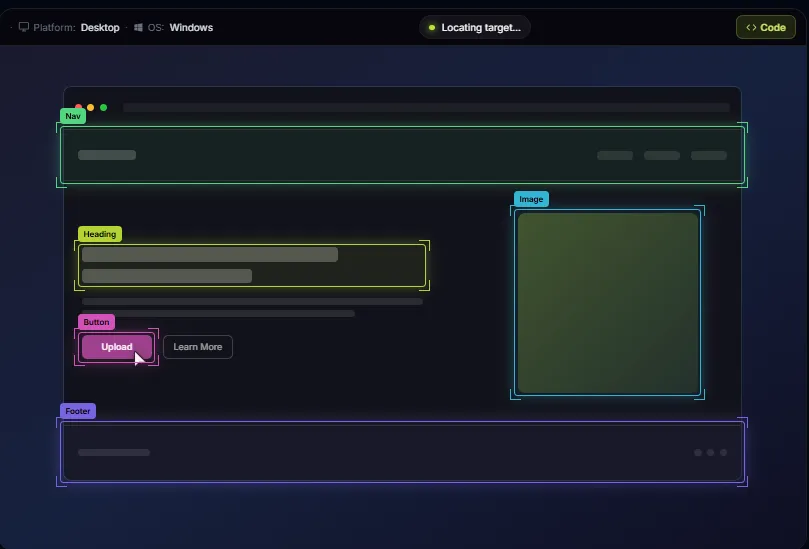
Checking results is just as simple as finding elements. The assert() command asks a yes or no question about the screen, such as “the dashboard is visible” or “there is an item in the cart”. The extract() command reads information from the screen and returns it as text, which is handy for grabbing an order number or a price to reuse later.
The parse() command detects every UI element on screen using OmniParser. Because these checks read the rendered screen, they also work for LLM chatbot replies, file uploads and even spelling and grammar checks. That is a real advantage for teams shipping AI features, where outputs change on every run.
AI vision costs time and money on every call, so TestDriver learns as it goes. Each element it finds is stored with a vision fingerprint, which is a perceptual hash of the screen around that element. On the next run, the SDK matches against the cache instead of calling the model again. The docs quote reruns up to 1.7 times faster, with one example lookup dropping from 2.1 seconds to 12 milliseconds.
The cache key blends the test file hash, your prompt text, the screen state and the platform, so editing a test clears stale entries automatically. When the UI shifts and the cached match fails, TestDriver calls the AI again, finds the element and updates the cache. You can view cached elements, prompts and hit rates in the console.
TestDriver does not just drive a headless browser. Every run boots a full virtual machine on Linux or Windows. That means it can install software, launch a desktop program, load a Chrome extension or open VS Code with your extension inside.
The exec() command runs shell or PowerShell scripts in the sandbox, so you can seed data, install a .deb package or create a test user before the UI steps begin. The focusApplication() command brings any window to the front, which makes flows across two apps possible. There is even a captcha() helper that connects to the 2captcha service. For companies that ship more than a web app, one environment replaces a patchwork of separate testing tools.
A red build is only useful if you can see why it failed. TestDriver records every run with its Dashcam feature. From a failed check, you jump straight to a video replay with every click, keystroke and assertion in order. Alongside the video you get full network logs with headers, payloads and timing.
There are also CPU and memory graphs to spot leaks and slow screens, plus an action log that shows exactly where a test drifted from the expected path. Each test also writes a JSON result file with metadata, versions and infrastructure details for deeper audits.
Engineering managers need trends, not just single results. The TestDriver console tracks pass rates, flaky tests and failure patterns across every run. That makes it easy to spot a test that fails one time in ten, which is often a sign of a real race condition in the product. Results export to JUnit XML, so they feed straight into the reporting tools and dashboards your team already uses. For QA leads reporting upwards, this turns test runs into release readiness data.
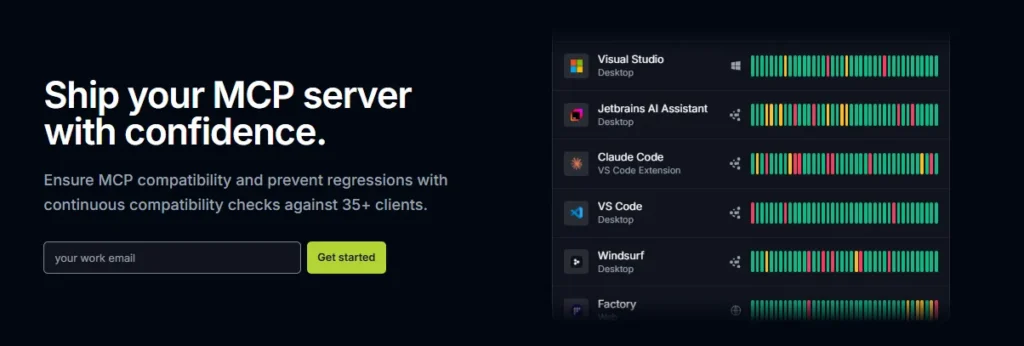
TestDriver fits neatly into agentic coding workflows. Running npx testdriverai init sets up three pieces. You get a test writing agent, over 100 skill files in the Anthropic SKILL.md format, and an MCP server that exposes tools such as find, click, type, assert and screenshot.
It configures Claude Code, Claude Desktop, Cursor, VS Code with Copilot, Windsurf, Codex and Zed automatically. Lovable and Replit get partial setup, and v0 needs manual configuration. Your developers can ask their coding assistant to write a test, then watch it drive a live sandbox, take screenshots and keep rerunning until the test passes.
Mature test suites need clean data handling. TestDriver lets you mark typed values as secret so passwords and tokens stay masked in logs and recordings. Variables let you inject changing data, and custom cache keys stop that changing data from filling the cache with junk entries.
The starter project even ships a reusable login snippet, which shows the pattern for sharing common steps across many tests. The result is a suite that stays tidy as it grows from ten tests to hundreds.
Supported Platforms and Test Targets
| Test Target | Pro Plan | Enterprise Plan |
|---|---|---|
| Web apps | ✅ | ✅ |
| Third party web apps | ✅ | ✅ |
| Chrome extensions | ✅ | ✅ |
| VS Code extensions | ✅ | ✅ |
| Windows desktop apps | ✅ | ✅ |
| macOS desktop apps | ❌ | Coming soon |
| Android apps | ❌ | Coming soon |
| iOS apps | ❌ | Coming soon |
| Linux sandbox | ✅ | ✅ |
| Windows sandbox | ✅ | ✅ |
| macOS sandbox | ❌ | Coming soon |
| Root access to test machines | ❌ | ✅ |
| Custom VM images | ❌ | ✅ |
The key takeaway is simple. TestDriver covers the full Windows and Linux desktop today, while Apple platforms and native mobile are still on the roadmap.
TestDriver SDK Command Reference
| Command | What It Does |
|---|---|
| provision.chrome() | Starts Chrome in the sandbox at a chosen URL |
| find() | Locates an element from a plain English description |
| click(), doubleClick, rightClick | Clicks an element or a screen position |
| hover() | Hovers over an element to reveal menus or tooltips |
| type() | Types text into the focused field, with an optional secret mode |
| pressKeys() | Sends keys and shortcuts such as Tab or Enter |
| scroll() | Scrolls pages and elements in any direction |
| assert() | Asks a yes or no question about the current screen |
| extract() | Reads information from the screen and returns it as text |
| parse() | Detects every visible UI element using OmniParser |
| exec() | Runs shell or PowerShell commands inside the sandbox |
| focusApplication() | Brings an application window to the front |
| screenshot() | Captures and saves a screenshot during a run |
| captcha() | Solves captchas through the 2captcha service |
| mouseDown, mouseUp | Presses and releases the mouse for drag actions |
Integrations and Ecosystem
| Category | Supported Tools |
|---|---|
| Pull Request Agent | GitHub web, GitHub Copilot chat, PR reviews, GitHub Mobile |
| AI Coding Clients With Auto Setup | Claude Code, Claude Desktop, Cursor, VS Code Copilot, Windsurf, Codex, Zed |
| AI App Builders | Lovable and Replit (partial setup), v0 (manual setup) |
| CI Pipelines | GitHub Actions workflow generated by default, plus any CI that runs Node.js |
| Reporting | JUnit XML, per test JSON results, TestDriver console |
| Test Runner | Vitest |
| Enterprise Infrastructure | AWS via CloudFormation, plus Azure, GCP and on premises for air gapped setups |
| Enterprise AI Providers | OpenAI, Anthropic and other providers using your own keys |
| Support Channels | Community support on Pro, Slack Connect on Enterprise and Expert Services |
TestDriver Pricing Plans
| Plan Name | Cost | Key Inclusions |
|---|---|---|
| Free Trial | $0 for 14 days or 120 testing minutes, whichever comes first | Full Pro access. Card needed at checkout but not charged during the trial |
| Pro | $20 per seat per month plus $0.14 per testing minute | Cloud hosting, unlimited console users, unlimited AI generation and test runs, Linux and Windows sandboxes, web apps, Chrome and VS Code extensions, Windows desktop apps, recordings, analytics, CPU, RAM and network profiles, community support |
| Expert Services (TestDriver for Business) | From $600 per month | A shared Slack channel with TestDriver Certified Experts, private support and guided setup, with optional test creation, test maintenance, failure investigation and bug reporting |
| Enterprise | Custom quote (flat licence per parallel test slot) | Self hosted or air gapped deployment, unlimited testing minutes, root access, custom VM images, VPN deployment, bring your own AI keys, full managed testing services, private Slack Connect support |
How TestDriver Billing Really Works
A seat is any GitHub user who gets a TestDriver review on a pull request or runs a test in the billing period. Inviting teammates to the web console is free and does not add seats. Testing minutes are billed for as long as the sandbox runs, including automatic PR reviews, and are metered by the second.
The 120 minutes are a one time trial allowance, not a monthly bundle. When the trial ends, Pro starts automatically and your card is charged. If a card is declined, new tests pause until you update it. Charges are non refundable, and seat changes are prorated. Each team gets one free trial only.
TestDriver Cost Scenarios
| Team Profile | Seats | Testing Minutes Per Month | Estimated Monthly Cost |
|---|---|---|---|
| Solo founder | 1 | 300 | $62 |
| Startup team | 5 | 1,000 | $240 |
| Scale up | 20 | 5,000 | $1,100 |
| High volume product org | 50 | 20,000 | $3,800 |
To estimate minutes, count your pull requests. If each automatic review keeps a sandbox busy for around five minutes, 200 pull requests a month adds up to 1,000 minutes. Once your monthly bill passes a few thousand dollars, the Enterprise flat licence model is worth a conversation.
Getting Started with TestDriver
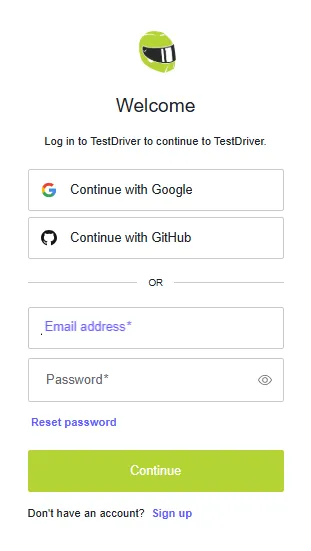
- Step 1: Start your free trial. Head to TestDriver and click Add to GitHub. Add a card at checkout. You will not be charged during the 14 day trial.
- Step 2: Install the GitHub App and merge the setup PR. Pick the repositories you want covered. The bot then opens a setup pull request with the packages, Vitest config, GitHub Actions workflow and sample tests. Add TD_API_KEY from the console as a repository secret and merge it.
- Step 3: Ask for your first test. Open a pull request and comment in plain English. For example, “@testdriverai Log in, add the first product to the cart and confirm the cart badge shows 1.” Describe what a user does and sees, not element IDs.
- Step 4: Review the recording and merge the test. TestDriver replies with a result and a replay link, then opens a pull request that adds the test file. Merge it, and the test runs on every future pull request that changes something a user would see.
- Step 5: Go local for more control. Developers can run npx testdriverai init inside a project with Node.js 20.19 or later. It sets up the agent, skills and MCP server for your AI coding tools, then lets you run the suite with npm test and watch a live preview of the sandbox.
The Mojo Factor That Sets TestDriver Apart
After two decades running QA teams, I judge tools on one question. Can it test what my customers actually use? Momentic, Octomind and QA Wolf are strong on web apps. None of them boots a full Windows machine and clicks through a native desktop program on every pull request. TestDriver does.
It covers Chrome extensions with popups and background pages, VS Code extensions inside a real editor, Windows desktop software and third party web apps where you have no source access. Because it reads the screen like a human, it also handles canvas charts, embedded video and LLM chatbot replies. For any product team that ships beyond a single browser tab, this is the reason to shortlist it.
Hype vs Reality in Our TestDriver Shakedown
The marketing promises no selectors, no DOM and no setup. The first two claims hold up well. The third needs context. You still get a test file in your repo that someone must own and review. First runs take a minute or two while the virtual machine boots, so this will never feel like a quick unit test.
Vision AI can also misread vague prompts, which is why “button” performs worse than “blue Sign In button in the header”. The cache fixes most speed and consistency worries once a suite warms up. The real hidden variable is cost. Minutes are billed the whole time a sandbox runs, including automatic PR reviews, so busy repos need a usage watch from day one.
Real World Use Cases for TestDriver
TestDriver vs Traditional Selenium and Playwright Testing
| Factor | TestDriver | Playwright or Selenium |
|---|---|---|
| Element targeting | Plain English descriptions read by vision AI | CSS selectors, XPath or test IDs |
| Maintenance after UI changes | Self heals by finding the element again | Tests often break and need manual fixes |
| Native desktop apps | ✅ Windows today | ❌ Needs separate tools |
| Chrome and VS Code extensions | ✅ Built in | Possible with extra setup |
| Canvas, video and PDFs | ✅ Reads the rendered screen | Hard or impossible |
| Test authoring | AI agent writes and commits tests | Engineers write every step |
| Execution speed | Slower, as each run boots a full VM | Very fast in headless mode |
| Cost | Seat fee plus per minute usage | Free open source, you pay for infrastructure |
| Language support | JavaScript with Vitest | Many languages |
| Debugging | Video replay, network, CPU and memory logs | Traces and screenshots with setup |
The honest read is that TestDriver does not replace every Playwright test. Fast unit level UI checks still belong in Playwright. TestDriver earns its place on the long, visual, cross app user journeys that break selector based suites every sprint.
Pro Tips for Better TestDriver Results
Pros and Cons
- Tests every pull request automatically.
- Covers desktop apps and extensions.
- No selectors to maintain.
- Tests stay as plain Vitest code.
- Excellent video replay debugging.
- Works with top AI coding tools.
- Self hosted option for enterprises.
- Low entry price per seat.
- Per minute costs can climb.
- macOS and mobile still pending.
- JavaScript only test authoring.
- Pro plan gets community support.
Enterprise Security and Self Hosted Deployment
Regulated buyers get serious options on the Enterprise tier. The standard setup runs test sandboxes inside your own AWS account through CloudFormation, while TestDriver hosts the dashboard and API. You bring your own OpenAI or Anthropic keys, so AI spend and data flow stay under your control.
For banks, healthcare, defence and government, a fully air gapped option runs the entire stack on AWS, Azure, GCP or on premises hardware with no outside connection. You also get RDP access to test machines, custom VM images built from a golden base image with Packer scripts, VPN deployment and a flat licence per parallel test slot. That last point matters most for finance teams. It swaps unpredictable per minute bills for a fixed budget line.
Limitations to Know Before You Buy
No tool is perfect, and these are the points I would raise in any vendor review meeting.
Who Should Use TestDriver and Who Should Skip It
✅ Buy it if you run a product team on GitHub, you ship more than a plain web app, and your selector based suite breaks every time design changes a screen.
It is also a strong pick for small teams with no dedicated QA engineer, since the agent writes and maintains tests for you. Companies building Chrome extensions, VS Code extensions or Windows software will struggle to find a better fit.
❌ Skip it for now if your product is mainly a native mobile app, your team lives on GitLab or Bitbucket and wants the PR bot experience, or you only need fast checks on a simple marketing site. In those cases a cheaper web only tool or plain Playwright will do the job.
FAQs
How does TestDriver find elements without CSS selectors?
TestDriver takes a screenshot of the sandbox and uses a vision AI model to locate the element you describe in plain English. Once found, it saves a perceptual hash of that screen area in its cache. Future runs match against the cache first, using exact, pixel difference or template strategies, and only call the AI again when the screen no longer matches. This is what makes tests both fast and resistant to layout changes.
Is TestDriver free to use?
TestDriver offers a 14 day free trial on the Pro plan, capped at 120 testing minutes. You add a card at checkout, but you are not charged during the trial. After that, Pro costs $20 per seat per month plus $0.14 per testing minute. There is no permanent free plan on the live pricing page, so treat the trial as your evaluation window.
How much does TestDriver cost for a small engineering team?
A seat is any GitHub user who triggers a PR review or runs a test, and minutes are metered by the second. Five developers using 1,000 minutes a month would pay about $240. Large teams with heavy usage should ask about Enterprise, which uses a flat licence per parallel test slot with unlimited minutes.
Can TestDriver test native Windows desktop applications?
Yes. Windows desktop apps are included on the Pro plan because every test runs on a full virtual machine rather than a browser only runner. You can install your app with exec() and PowerShell, launch it, then click, type and assert with natural language. macOS desktop apps, Android and iOS are listed as coming soon on the Enterprise plan.
How long does a TestDriver test take to run?
The first run takes a minute or two while the sandbox boots and the AI studies the screen. The homepage demo shows a full sign up test finishing in about 42 seconds. Later runs are quicker because the self learning cache skips repeat AI calls, with the docs quoting up to 1.7 times faster execution.
Does TestDriver work with Claude Code, Cursor and GitHub Copilot?
Yes. The npx testdriverai init command installs a TestDriver agent, over 100 skill files and a local MCP server. It auto configures Claude Code, Claude Desktop, Cursor, VS Code with Copilot, Windsurf, Codex and Zed. Your AI assistant can then start a sandbox, act on the live screen and write the test code step by step until it passes.
What happens to test data and passwords during a TestDriver run?
Values typed with the secret option are masked in logs and video recordings. On the hosted Pro plan, screenshots are processed by TestDriver's AI services. Teams with strict compliance needs can move to Enterprise, which keeps sandboxes and data in their own AWS account or a fully air gapped environment and lets them use their own AI provider keys.
Can TestDriver run in CI tools other than GitHub?
The pull request agent is built for GitHub, but the tests themselves are plain Vitest files. That means they run in any CI pipeline that can execute Node.js, as long as the TD_API_KEY variable is set. The init command generates a GitHub Actions workflow by default, and results can be exported as JUnit XML for other reporting tools.
Best TestDriver Alternatives
| Tool Name | Pricing Entry Point | Native Desktop App Testing |
|---|---|---|
| Momentic | Free tier with 2,000 credits, then $125 per month pay as you go | ❌ Web only |
| QA Wolf | Custom quote for a managed service | ❌ Web and mobile focus |
| Octomind | Low cost flat monthly tiers | ❌ Web only via Playwright |
| mabl | Custom enterprise quote | ❌ Web, mobile and API only |
When an Alternative Makes More Sense
- Momentic suits web only teams that prefer credit based billing with no seat fees and a low code editor.
- QA Wolf suits companies that want a fully managed QA service and have the budget for it.
- Octomind suits teams that want AI help at authoring time but standard Playwright code with no vendor lock in.
- mabl suits larger enterprises that need web, mobile and API testing under one contract.
Final Verdict on TestDriver
TestDriver is one of the most practical AI testing tools I have reviewed this year. It does not just read code like an AI reviewer. It runs your real product on a real machine and proves the change works. The GitHub agent removes most of the grunt work of writing tests, the cache keeps runs fast, and the debugging suite makes failures easy to understand.
The catches are clear. You pay by the minute, Apple and mobile platforms are still coming, and tests live in JavaScript only. For teams that ship desktop apps, browser extensions or complex web products on GitHub, those trade offs are easy to accept. Start with the free trial on one repo and measure minutes per pull request before you roll it out wider.



