

Fetra AI Key Insights
What is Fetra AI?
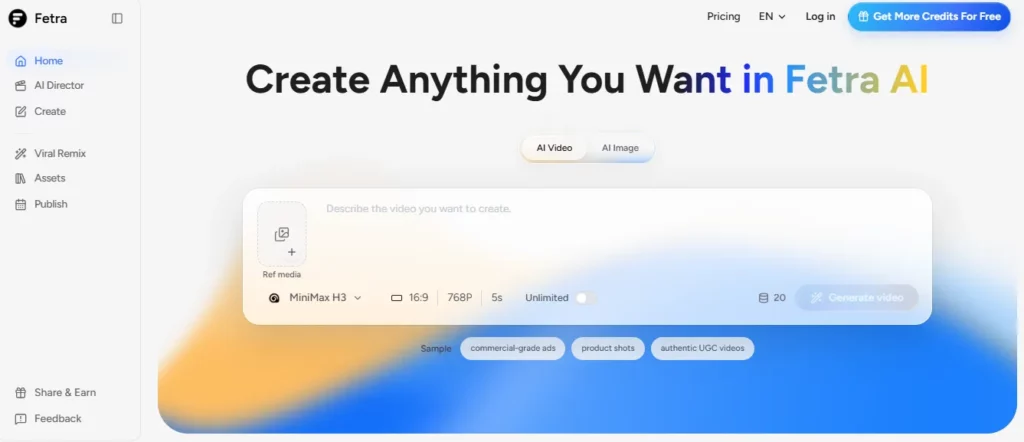
Fetra AI is an all in one AI video and image generation platform that gives creators, marketers and small business owners access to more than forty frontier generative models through a single credit balance. Rather than paying for separate subscriptions to Veo, Kling, Seedance, Sora and Nano Banana, you buy one pool of credits and spend it on whichever model suits the shot.
The platform pairs that model library with production tools built for social output, including AI Director for conversational video creation, Viral Remix for rebuilding proven formats, an AI Avatar system for character consistency, and a publishing calendar that pushes finished assets to connected accounts. The business benefit is speed and cost control. Ad creative, product photography and short form video that once needed a studio booking now ship in minutes from a browser tab.
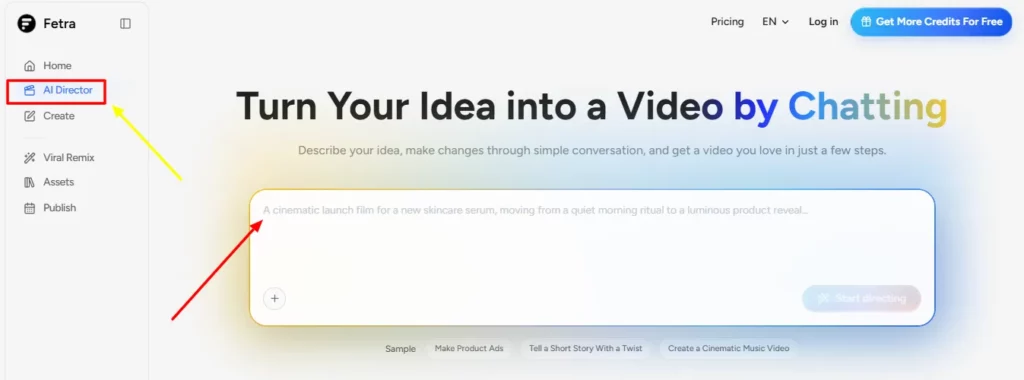
AI Director is the feature that separates Fetra from the crowd of model wrappers. You open a chat, describe the idea, and Fetra builds a first pass. From there you steer it in plain language.
Ask for a tighter crop, a slower push in, warmer grading, a different ending beat or a rewritten line of on screen copy, and it applies that single change without you touching a timeline. The three starter samples show the intended use cases, which are product ads, short stories with a twist and cinematic music videos.
Traditional prompt driven tools force a full regeneration for every tweak, which burns credits and breaks continuity between versions. Conversational refinement keeps the scene intact. A founder with no editing background can run four or five revision rounds in the time a freelancer takes to answer a brief.
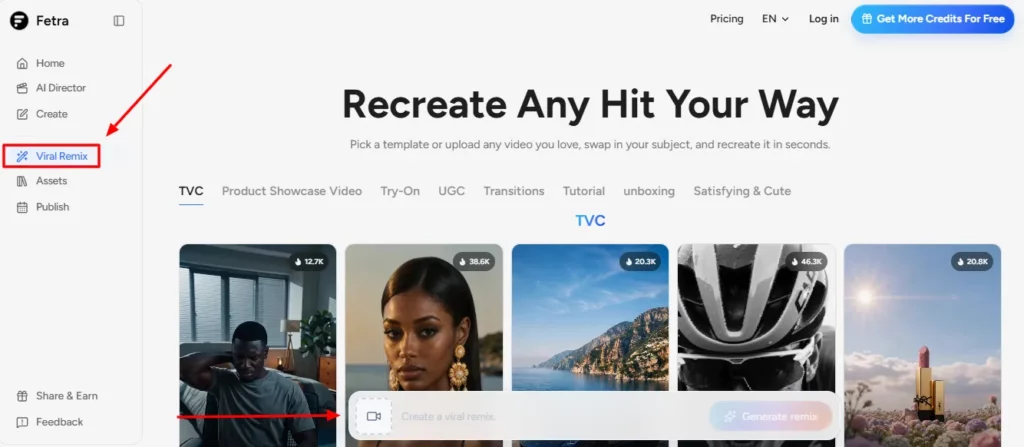
Viral Remix answers the question every content team asks on a Monday morning, which is what format should we copy this week. You pick from the preset shelf or upload any video you already admire, then swap in your own subject or product. Fetra reads the structure of that reference clip, its pacing, camera behaviour and beat pattern, and rebuilds it around your input.
The current preset library runs to twelve formats including Breakaway, Pop Beverage, Family Memory, Boardroom Rush, Paris Freefall, Streetwear Story, Edge of Space, Music in Motion, Puppy Chase and Ice Cream Break. This is format arbitrage rather than guesswork. You inherit a structure that already earned watch time instead of asking a model to invent engagement from nothing.
The catalogue is genuinely deep on both sides. Video covers Seedance 2.5, Kling 3 Turbo, Kling 2.1 Master, Hailuo 2.3 Pro, Veo 3.1, Wan 2.7, Gemini Omni Flash, Sora 2 and Grok Imagine Video 1.5. Images run from a 1 credit lightweight model up to Nano Banana Pro and Seedream 5 Pro. Because everything draws from one balance, you can block out a shot on a cheap model at 3 credits and only spend 313 on full Veo 3.1 once the composition is locked.
Model hopping has one classic failure, which is that your character changes face between shots. AI Avatar lets you build a single AI identity once, lock the look and personality, then carry it across every image and video you generate afterwards. For faceless brand channels, recurring spokesperson series and mascot led ecommerce accounts, this is the gap between a channel that looks intentional and one that looks stitched together.
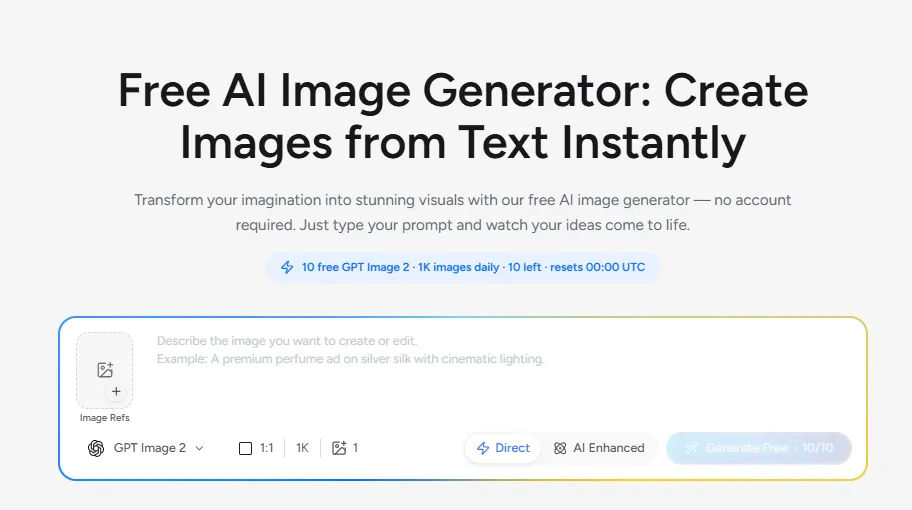
Fetra runs a public image tool that needs no account at all, handing out 10 free GPT Image 2 generations daily plus 1K image runs that reset at midnight UTC. A Direct mode sends your text through untouched, while AI Enhanced passes it to a built in prompt engineer that expands weak input into a structured brief covering subject, style, composition, lighting and colour palette. Output supports 4K rather than a downscaled preview, so results are usable for real blog headers and product mockups.
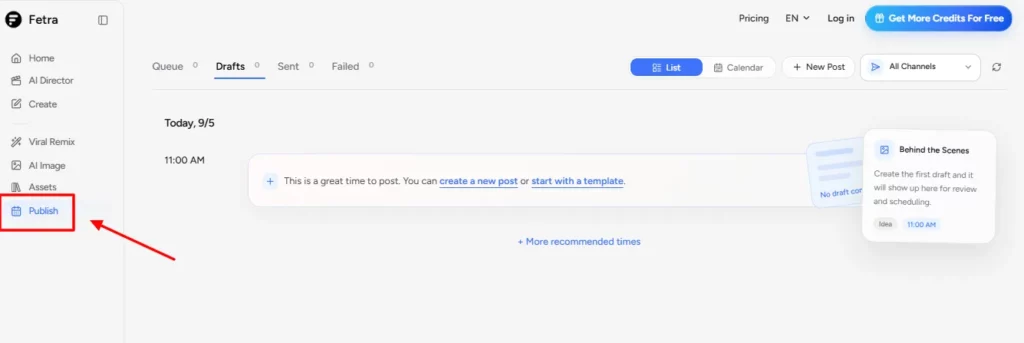
Finished assets land in a shared library, then move into Publish. That module offers a queue, drafts, sent and failed states, both list and calendar views, and recommended posting slots. Fetra supports connecting Instagram, Facebook, LinkedIn, X, TikTok, YouTube and Google Business Profile, which removes the download, transfer and reupload shuffle that eats an hour a week in most content workflows.
Inside the Fetra AI Create Workspace
Create is the unified canvas holding three tabs. AI Video, AI Image and Viral Remix share one credit balance and one output library, so nothing is lost when you switch tools.
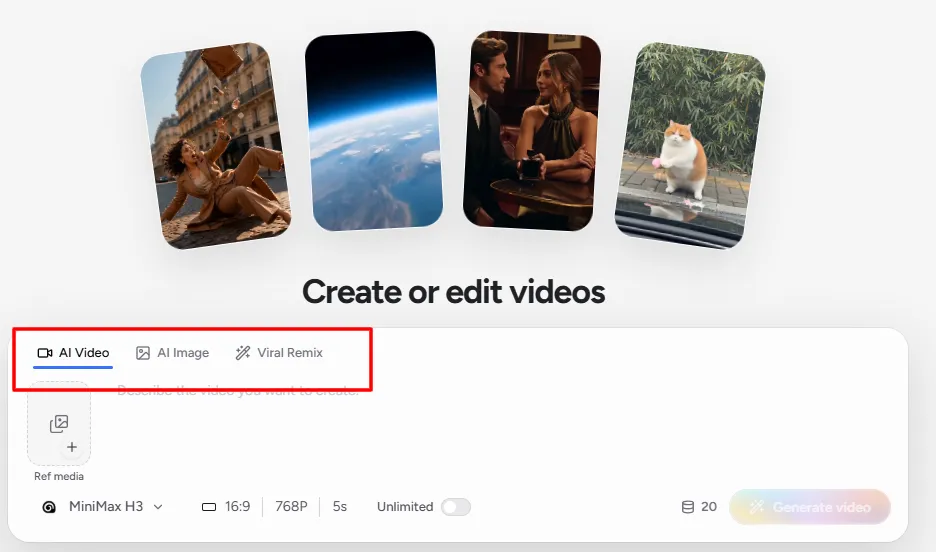
The video tab exposes model choice up front, with Seedance 2.5, Veo 3.1 Fast and Sora 2 surfaced as featured picks. The image tab gives you model selection, aspect ratio, resolution up to 4K, output count and a reference image slot. Viral Remix defaults to a vertical 9 by 16 frame at 720p and 5 seconds, mapping straight onto TikTok and Reels delivery specs, and it will not run without a reference video.
Everything renders in the background while you keep working, and your plan sets how many jobs run at once. Two on Basic, three on Standard, six on Pro. That concurrency figure is quietly one of the most important specs on the pricing page, because it decides whether you are batching a campaign or waiting in a queue.
The Fetra AI Model Library
| Model | Type | Credit Cost | Standout Capability |
|---|---|---|---|
| Grok Imagine Video 1.5 | Video | 3+ | Clips from 1 to 15 seconds with up to 7 references |
| Seedance 1.5 Pro | Video | 15+ | Dependable text to video and image to video |
| MiniMax H3 | Video | 16+ | 15 second 2K clips with native stereo audio |
| Veo 3.1 Lite | Video | 38+ | Low cost generation with frame control |
| Kling 2.5 | Video | 53+ | Everyday scenes at a sensible rate |
| Seedance 2.0 Fast | Video | 60+ | Faster runs with reference video control |
| Kling 2.6 | Video | 69+ | Realistic motion and product physics |
| Veo 3.1 Fast | Video | 75+ | Speed plus first frame and last frame control |
| Gemini Omni Flash | Video | 79+ | Fast multimodal video creation |
| Kling 3.0 | Video | 90+ | Character motion and multi image references |
| Seedance 2.5 | Video | 140+ | Up to 30 seconds with 50 references in one go |
| Kling 2.1 Master | Video | 200+ | Premium cinematic detail |
| Veo 3.1 | Video | 313+ | Top tier cinematic output with native audio |
| GPT Image 2 | Image | 3+ | Near flawless text rendering and precise edits |
| Nano Banana 2 Lite | Image | 5+ | High volume creation at speed |
| Seedream 5 Lite | Image | 7+ | Fast reference image edits |
| Seedream 5 Pro | Image | 9+ | Polished ads and complex reference work |
| Nano Banana 2 | Image | 10+ | Balanced everyday visuals in around four seconds |
| Nano Banana Pro | Image | 23+ | Premium detail and surgical editing |
Hailuo 2.3, Wan 2.2 through 2.7, Qwen Image 3.0 and Flux.2 Pro round out the catalogue, alongside a 1 credit lightweight image model for rough concepting.
Fetra AI Pricing Plans
| Plan Name | Cost | Credits and What You Actually Get |
|---|---|---|
| Free | $0 | 10 GPT Image 2 runs daily in the public tool, resets at midnight UTC, no account needed |
| Basic (Annual) | $10 per month | 1,000 credits, roughly 250 images or 20 videos, 2 concurrent tasks, commercial licence, private creations |
| Standard (Annual) | $14.50 per month | 2,500 credits, roughly 630 images or 40 videos, 3 concurrent tasks, 30 days of unlimited GPT Image 2, Nano Banana 2 and Seedream 5 Pro |
| Pro (Annual) | $59 per month | 12,000 credits, roughly 3,000 images or 200 videos, 6 concurrent tasks, 365 days unlimited on four image models plus 7 days unlimited on Veo 3.1 Fast, MiniMax H3, Gemini Omni Flash and Grok Imagine Video 1.5 |
| Basic (Monthly) | $15 per month | Same 1,000 credits but standard asset licence only and public creations by default |
| Standard (Monthly) | $29 per month | 2,500 credits, commercial licence, private creations, no unlimited model windows |
| Pro (Monthly) | $119 per month | 12,000 credits, 30 days of unlimited GPT Image 2 and Nano Banana 2 |
Getting Started with Fetra AI
- Step 1: Test the free image tool first. Open the AI image generator, type a prompt and generate without creating an account. This tells you if output quality suits your brand before any money moves.
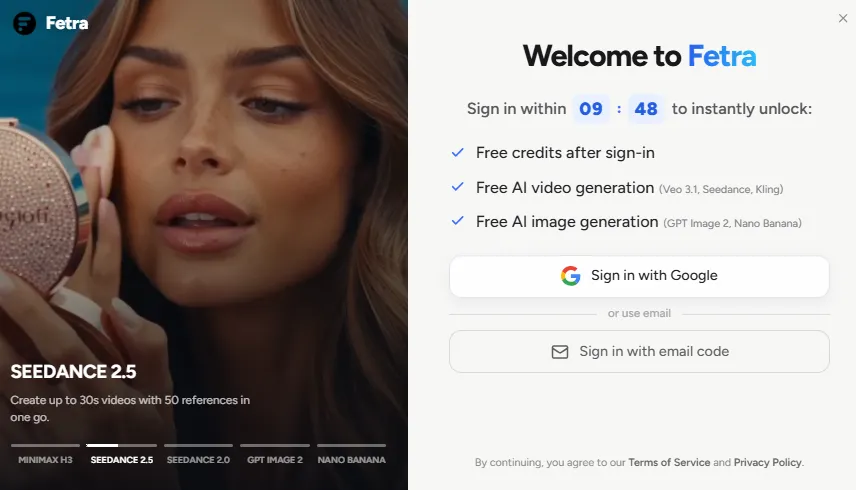
- Step 2: Create an account and open Create. This is the unified workspace holding AI Video, AI Image and Viral Remix in one panel.
- Step 3: Start with AI Director for video. Describe the scene, let it build a first pass, then refine framing, pacing and copy through chat until it lands.
- Step 4: Try Viral Remix on a proven format. Pick a preset or upload a reference clip, swap in your product, and compare the result against your Director cut.
- Step 5: Connect a social account and schedule. Send the finished asset to Publish, drop it into the calendar and use the recommended time slots.
Credit Economics and What 1,000 Credits Really Buys
Understanding Fetra AI credit costs matters as much as the headline price. Video pricing swings hard by model. Grok Imagine Video 1.5 starts at 3 credits, MiniMax H3 at 16, Kling 2.6 at 69, Seedance 2.5 at 140, Kling 2.1 Master at 200 and full Veo 3.1 at 313.
Images sit far lower, from 1 credit up to 23 for Nano Banana Pro. That spread means the Basic plan stretches to hundreds of stills but only a handful of premium clips. The smart workflow is to block out a shot on a cheap model, lock the composition, then spend once on the expensive render. Anyone producing daily video should treat Standard as the realistic floor and Pro as the working tier.
Unlimited Model Windows Explained
The most interesting part of Fetra AI pricing is the unlimited and free generation windows sitting on top of the credit pool. Standard buyers get 30 days of uncapped GPT Image 2, Nano Banana 2 and Seedream 5 Pro.
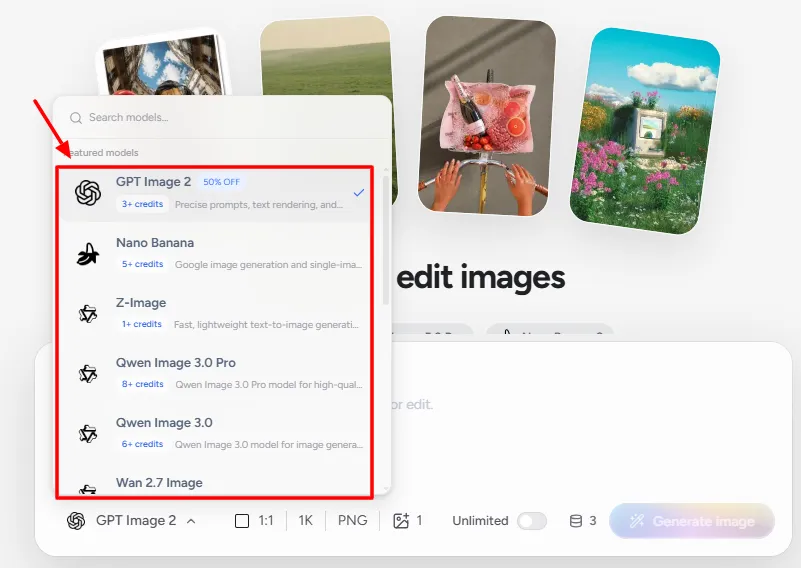
Pro buyers get 365 days of uncapped access to those models plus Nano Banana Pro, and a rolling 7 day window on Veo 3.1 Fast, MiniMax H3, Gemini Omni Flash and Grok Imagine Video 1.5. Twelve models in total carry some form of free access. For high volume image work such as ecommerce catalogues, thumbnail testing or ad variant runs, that effectively removes the meter on the models most teams reach for every day.
Fetra AI Director Walkthrough, Step by Step
AI Director is a directing chair rather than a prompt box, so it rewards being treated like one. Here is how a session actually runs.
| What You Can Change in Chat | Example Instruction |
|---|---|
| Framing and crop | Pull back and give the product more headroom |
| Camera behaviour | Slow the push in and hold on the last beat |
| Colour and mood | Warmer grade, softer morning light |
| Pacing and cut points | Trim the opening, land the logo half a second earlier |
| On screen copy | Rewrite the caption to be shorter and more direct |
| Ending beat | End on a still of the product rather than motion |
Where it falls short. Director gives you no frame accurate timeline, so you cannot nudge a cut by six frames or layer audio manually. It is a fast route to a good cut, not a replacement for a proper editing suite when a client wants surgical control.
Fetra AI Viral Remix Walkthrough, Step by Step
Viral Remix runs on a different logic to Director. Director invents, Remix inherits. You are handing the system a proven structure and asking it to refit that structure around your subject.
- Step one, source the reference. Either upload a clip you have already seen perform or pick from the twelve preset formats. The reference video field is mandatory, so this mode cannot be used cold.
- Step two, drop in your subject. Supply the product, person or brand asset that should replace the original subject. This is the swap that turns someone else's format into your content.
- Step three, set the delivery specs. The panel defaults to a vertical 9 by 16 frame at 720p and 5 seconds, which is exactly what TikTok, Reels and Shorts want. Change these only if you are cutting for a different placement.
- Step four, generate and compare. Run two or three variations against the same reference and judge them on the first second, because that is where retention is won or lost.
How to pick a reference that works. Choose clips where the structure carries the video rather than the personality. A format built on a camera move, a reveal or a beat drop transfers cleanly. A format built on one creator's face and delivery does not, and the remix will feel hollow.
The honest limitation. Remix inherits the good and the generic in equal measure. If the reference is already saturated across your niche, you get a competent clip that looks like everything else in the feed. Rotate references faster than your competitors do.
The Viral Preset Library Decoded
The preset shelf is not decoration. Each format maps to a different content job, and knowing which is which saves credits.
| Preset | Format Type | Best Suited To |
|---|---|---|
| Breakaway | High energy motion reveal | Sports, apparel and fitness brands |
| Pop Beverage | Product hero with liquid motion | Drinks, supplements and FMCG |
| Boardroom Rush | Corporate pace and status cues | B2B, fintech and consultancy |
| Streetwear Story | Fashion narrative with attitude | Clothing drops and lifestyle brands |
| Paris Freefall | Travel spectacle | Tourism, hospitality and aspirational content |
| Edge of Space | Cinematic scale and awe | Tech launches and concept teasers |
| Family Memory | Warm emotional beat | Home, health and service businesses |
| Puppy Chase | Light comedy motion | Pet brands and broad reach content |
| Ice Cream Break | Food texture and appetite appeal | Food, dessert and cafe accounts |
| Music in Motion | Beat synced visual rhythm | Artists, labels and audio led posts |
| A New Companion | Character introduction arc | Mascot and product personification |
| Fetra in Motion | Brand showcase | Agency reels and portfolio pieces |
Sitting behind these presets is a wider shelf that Fetra counts as 100 plus templates and tools, available on every paid tier including Basic.
The AI Image Generator Workflow in Detail
The image side of Fetra deserves attention on its own, because it is where the free tier and the unlimited windows do the heavy lifting.
You start with a prompt field that also accepts image references, then choose from a model list that includes GPT Image 2, Seedream 5.0 Pro, Seedream 5.0 Lite, Nano Banana 2, Nano Banana 2 Lite, Nano Banana Pro and Wan 2.7 Image. Aspect ratio, resolution up to 4K and output count sit alongside the model picker.
Two generation modes matter here. Direct sends your text through untouched, which is what you want once you have a prompt that already works and need repeatable output. AI Enhanced routes your text through a built in prompt engineer that rewrites thin input into a full brief before generation. For a beginner this is the single biggest quality jump available, and it costs nothing extra.
After generation, an Edit with Description panel lets you refine by typing the change rather than starting again. That keeps composition intact while you fix a colour, remove an object or adjust the text on a poster.
Prompt Anatomy That Gets Results in Fetra
Fetra publishes its own prompt structure, which is worth following because the AI Enhanced engine is built around the same five parts.
| Component | What to Write | Example |
|---|---|---|
| Subject | A clear noun with one qualifier | A confident female founder |
| Style or medium | The artistic approach | Editorial portrait photography |
| Composition | The framing | Medium close up, centred |
| Lighting | The mood driver | Soft directional window light |
| Colour palette | Two or three dominant tones | Muted teal and warm neutral |
Most weak results come from skipping lighting and palette, which are the two elements that separate a stock looking image from something that matches a brand kit.
Choosing the Right Model for the Job
Model choice is the biggest lever on both quality and spend. This is the shortlist worth memorising.
| Job to Be Done | Model to Use | Why |
|---|---|---|
| Poster or ad with readable text | GPT Image 2 | Best in class text rendering and instruction following |
| Ecommerce product photography | Seedream 5.0 Pro | Strong spatial layout and precise reference editing |
| Photoreal hero image | Flux.2 Pro | High detail preservation and consistent realism |
| Concept art and illustration | Nano Banana 2 | Creative, distinctive and fast to iterate |
| Logo or heavy typography | Ideogram v3 | Typography specialist |
| Rough concepting at volume | 1 credit lightweight model | Cheap enough to run dozens of variants |
| Talking character with sound | MiniMax H3 | Expressive characters and native audio |
| Long form single clip | Seedance 2.5 | Up to 30 seconds with 50 references |
| Final cinematic render | Veo 3.1 | Highest fidelity with synced native audio |
Assets, Projects and Everyday Workflow
Every generation drops into an assets library rather than a download folder, and the workspace supports discrete projects so a client campaign stays separate from personal tests. New project and open assets sit permanently in the navigation, which keeps switching cheap.
The practical benefit shows up on batch days. With six concurrent slots on Pro you can queue a set of product angles, keep writing captions while they render, then review the whole batch in one pass rather than babysitting each job. The weakness is that there is no version history or approval state on an asset, so agencies still need an external step for client sign off.
The Publish Scheduler in Practice
Publish is a genuine scheduler rather than a share button. The dashboard tracks four states across the top, which are queue, drafts, sent and failed, and you can work in either a list or a calendar view.
Fetra suggests posting times based on activity windows, so a draft can go from generation to a booked slot in two clicks. Supported connections cover Instagram, Facebook, LinkedIn, X, TikTok, YouTube and Google Business Profile through standard OAuth authorisation.
Surfacing a failed state matters more than it sounds. Social APIs throttle, tokens expire and permissions change without warning, and a scheduler that hides failures quietly costs you a posting day. Fetra puts that count on the main dashboard.
Data, Security and What the Terms Actually Say
The terms were last updated in May 2026 and are worth two minutes before you connect a client account.
You retain ownership of everything you upload and create. Fetra takes a non exclusive licence to host, process and display that content purely to run the service. Social connections use OAuth authorisation with publishing scopes, and you stay responsible for complying with each platform's own rules.
Accounts require you to be at least eighteen, disputes fall under California law, and Fetra makes no warranty that AI output is accurate, unique or non infringing. Review before you publish, particularly for regulated claims in health, finance or advertising.
What Fetra AI Still Needs
Three gaps are worth naming. There is no public API, so developers cannot wire generation into their own pipelines and agencies cannot automate bulk runs.
There is no seat based team billing or shared approval workflow, which caps how large a team can sensibly run on one account. And there is no mobile app, so a creator filming on a phone still has to return to a desktop browser to finish the job. None of these break the product for its target buyer, but each one draws a clear line around who it is for.
Pros and Cons
- Forty plus models, one credit balance.
- AI Director removes editing skill barriers.
- Viral Remix borrows proven social formats.
- Twelve preset formats plus 100+ templates.
- Unlimited windows on premium image models.
- AI Avatar keeps characters consistent.
- Free 4K image tool, no signup.
- Built in scheduler for seven platforms.
- Native audio video via MiniMax H3.
- Watermark free commercial exports.
- Aggressive 50% annual discount.
- No public API for developers.
- Premium video models drain credits fast.
- Monthly Basic makes creations public.
- Web only, no mobile app.
The Licence and Privacy Detail Buyers Miss
Read the plan features carefully before choosing monthly billing. On monthly Basic, Fetra AI grants only a standard asset licence and sets creations to public by default, meaning your work is submitted to the community feed. Every annual plan, and the higher monthly tiers, upgrade this to a full commercial asset licence with private creations.
For agencies handling client campaigns, ecommerce sellers building product libraries or anyone under a non disclosure agreement, that is not a footnote. The commercial licence is also non exclusive and stays subject to individual model provider rules, so verify the underlying terms before pushing output into paid media.
Who Fetra AI Suits Best
Short form creators get the strongest fit, because Viral Remix and the preset shelf solve the format problem that eats most of their planning time. Ecommerce sellers benefit from the unlimited image windows, generating lifestyle scenes and product mockups without watching a meter.
Small marketing teams gain from AI Director, since one person can now run the brief, the shoot and the revision loop. Agencies should size up to Pro for the six concurrent slots and the year long unlimited access. Developers and enterprise buyers are the poor fit, because there is no API, no seat based team billing and no shared approval workflow.
FAQs
How does AI Director differ from a normal prompt box?
A standard prompt box regenerates the whole clip on every change. AI Director holds the scene in context and applies only the adjustment you asked for through chat, so framing, pacing and grading can be revised across several rounds without losing continuity or restarting the shot.
What does Viral Remix actually need as input?
A reference video is mandatory. You upload a clip or select one of the twelve viral presets, then supply your own subject or product. Fetra rebuilds the structure of that reference around your input, defaulting to a vertical 9 by 16 frame at 720p and 5 seconds.
How many credits does a single Fetra AI video cost?
Costs start from 3 credits on Grok Imagine Video 1.5 and 15 credits on Seedance 1.5 Pro, rising to 140 for Seedance 2.5 and 313 for full Veo 3.1. Final spend also varies with clip duration, resolution and how many outputs you request per run.
Does Fetra AI generate video with sound?
Yes. MiniMax H3 produces 15 second 2K clips with native stereo audio and Veo 3.1 outputs cinematic video with synced audio. Most other models generate silent video that needs audio added afterwards.
What is the difference between Direct and AI Enhanced mode?
Direct sends your prompt to the model exactly as written, which suits repeatable output from a prompt you have already refined. AI Enhanced rewrites thin input into a full brief covering subject, style, composition, lighting and palette before generation, at no extra credit cost.
Can I use Fetra AI content commercially?
Annual plans and Standard upwards include a non exclusive commercial asset licence covering personal and commercial projects, with no watermark on exports. Monthly Basic provides a standard licence only.
Does Fetra AI offer an API or team workspaces?
The creative suite has no public API. Collaboration runs through concurrent task slots, capped at six on Pro, rather than seat based team accounts.
Best Fetra AI Alternatives
| AI Video Generator, AI Image Generator, Social Content Suite | Model Library Depth | Best Suited For |
|---|---|---|
| Higgsfield AI | Strong video coverage with curated camera and motion presets | Cinematic short form clips and VFX styled shots |
| Freepik AI Suite | Broad image and video access bundled with stock assets | Design teams needing stock and generation together |
| Pollo AI | Wide video model selection with simple switching | Quick single clip output without a workflow layer |
| Krea AI | Deep image tooling with realtime canvas and style training | Artists refining a signature visual style |



