

Dokie AI Key Insights
What Is Dokie AI?
Dokie AI is an AI presentation maker that turns raw ideas, documents, URLs, and notes into fully structured, business ready slide decks. Built as an AI presentation agent rather than a simple slide generator, it handles the entire workflow from outlining and content writing to layout design and post generation editing.
Users describe their topic, audience, and tone, and Dokie AI produces a polished deck with clear structure and professional formatting. It supports PPTX and PDF export, making it practical for boardroom presentations, client pitches, marketing reports, and classroom use. For teams and solo professionals who spend hours wrestling with blank slides, Dokie AI removes that bottleneck by automating content organisation and slide design in one unified platform.
Dokie AI accepts text prompts, Word documents, PDFs, URLs, and images as starting points. The AI parses your source material, identifies key arguments, and builds a logically sequenced deck. This means a 20 page report can become a 12 slide executive summary in under five minutes, saving hours of manual copy and paste work.
After generation, you are not locked into the first draft. Dokie AI lets you ask the AI to rewrite a slide in simpler language, change the tone from formal to conversational, shorten bullet points, or add supporting data. This back and forth editing loop is what separates it from one shot generators and makes it genuinely useful for iterative business workflows.
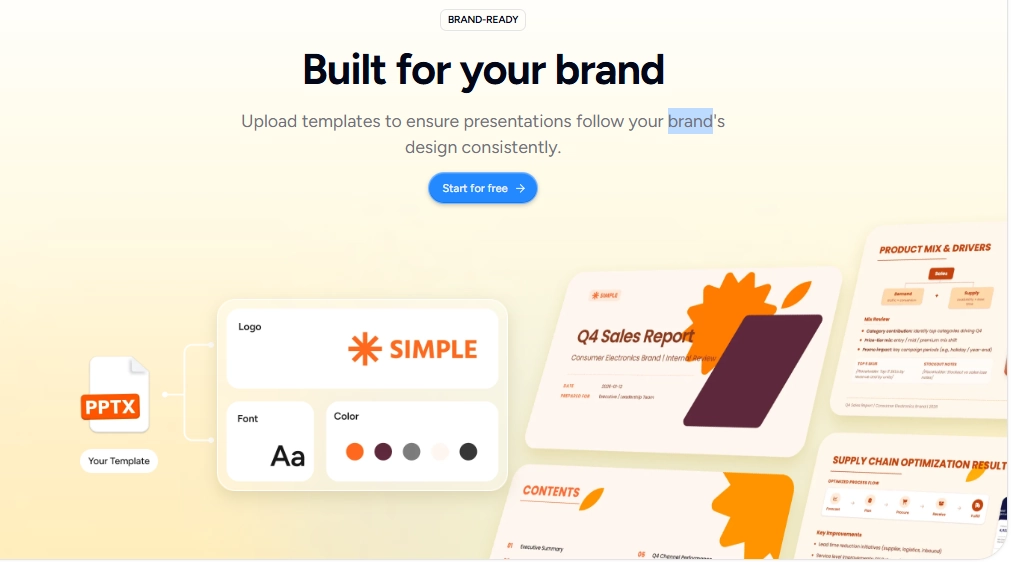
Paid plans unlock the ability to upload your own templates and brand assets. Dokie AI then generates every future deck using your fonts, colours, and layout rules. For consultancies and marketing agencies producing dozens of client decks monthly, this feature alone justifies the subscription cost.
Before generating any slides, Dokie AI produces a structural outline showing the flow of your deck. You can rearrange sections, merge topics, or remove slides at this stage. This outline first approach prevents the common problem of beautiful slides that tell no coherent story.
Finished decks can be exported as PPTX, PDF, PNG, or HTML. The PPTX output is fully editable in Microsoft PowerPoint or Google Slides, so Dokie AI fits into existing presentation ecosystems without forcing a platform switch.
Dokie AI supports animated transitions and element animations within slides. Combined with clean spacing, balanced layouts, and professional colour palettes, the output is presentation ready without manual design tweaks.
Dokie AI Pricing Plans
| Plan Name | Cost (Yearly) | Credits | Key Features |
|---|---|---|---|
| Free | $0 | 200/day + 300 welcome | PDF, PPTX, PNG export. Limited premium features |
| Go | $8/mo | 950/month + 700 bonus | Most powerful AI models, custom themes, personalised memory |
| Plus | $17/mo | 2,000/month + 1,500 bonus | Everything in Go plus more credits and early beta access |
| Pro | $51/mo | 6,000/month + 4,500 bonus | Everything in Plus plus more credits and priority support |
How Dokie AI Handles Document to Deck Conversion
One of Dokie AI’s strongest practical use cases is converting existing documents into presentation decks. Professionals frequently need to transform lengthy reports, research briefs, or strategy papers into concise slide formats for stakeholder meetings.
Dokie AI’s document parsing engine extracts key themes, data points, and arguments from uploaded files and maps them onto a logical slide structure. The AI preserves the narrative arc of your original content while condensing it into presentation friendly segments. This is particularly valuable for consultants, analysts, and educators who regularly repurpose written content into visual formats. The result is a structured, editable deck that saves considerable manual effort.
Pros and Cons
- Generates full decks from documents.
- Conversational editing saves time.
- Clean, professional slide layouts.
- Multi format export including PPTX.
- Outline first approach improves structure.
- Brand template upload on paid plans.
- Credits deplete quickly on free.
- No real time team collaboration.
- Limited design customisation options.
- No native PowerPoint plugin.
Best Dokie AI Alternatives
| AI Presentation Maker & Slides Generator | Content Generation Strength | Design Automation |
|---|---|---|
| Gamma | Strong AI generation with web page style output | Modern visual layouts with card based design |
| Beautiful.ai | Limited AI generation, content focused on manual input | Excellent Smart Slides and automated formatting |
| SlidesGPT | Basic prompt to slides generation | Minimal design control |
| Plus AI | Google Slides integrated AI generation | Template driven within Google ecosystem |



