

Devin Key Insights
What is Devin?

Devin is an autonomous AI software engineer developed by Cognition Labs that plans, writes, tests, and deploys production code within its own sandboxed cloud environment. Unlike traditional AI code assistants that offer line by line suggestions inside your editor, Devin operates as an independent agent.
It takes a task description, breaks it into sub-tasks, navigates your codebase, runs terminal commands, uses a browser for research, and opens pull requests on GitHub. Engineering teams use Devin to delegate high volume repetitive work such as code migrations, dependency upgrades, test generation, and bug fixes.
The tool integrates directly with existing developer workflows through Slack, GitHub, and its own desktop IDE. With over one million users and four thousand enterprise customers, Devin has become a go to productivity tool for organisations looking to multiply their engineering output without scaling headcount.
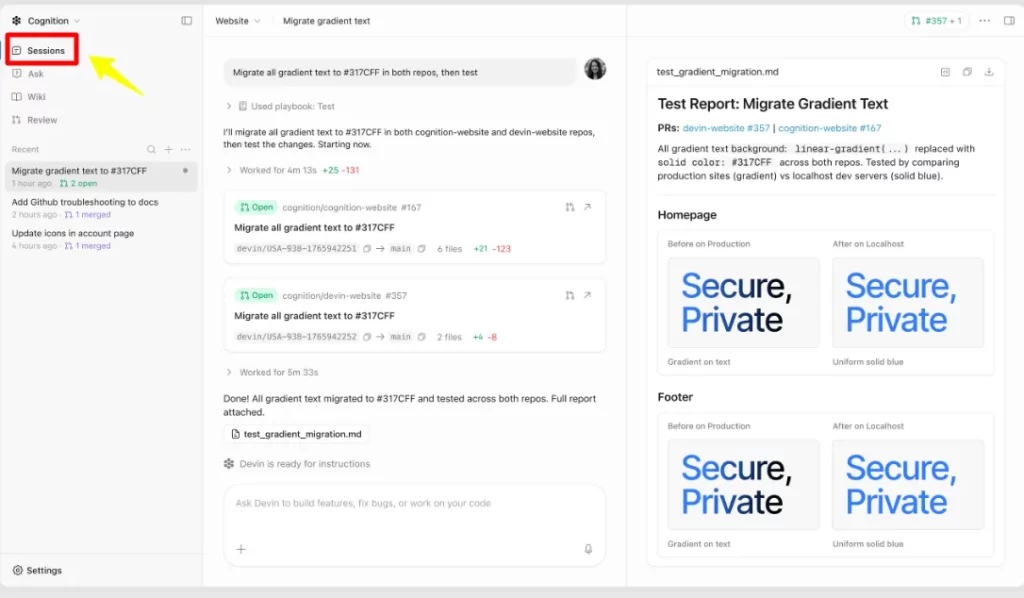
Devin runs entirely in a sandboxed cloud VM equipped with a terminal, browser, and VS Code instance. You assign a task through chat or Slack, and Devin plans its approach, writes code, runs tests, and opens a pull request. This means engineers can delegate tasks and close their laptops. The agent works asynchronously and notifies you when the work is ready for review.
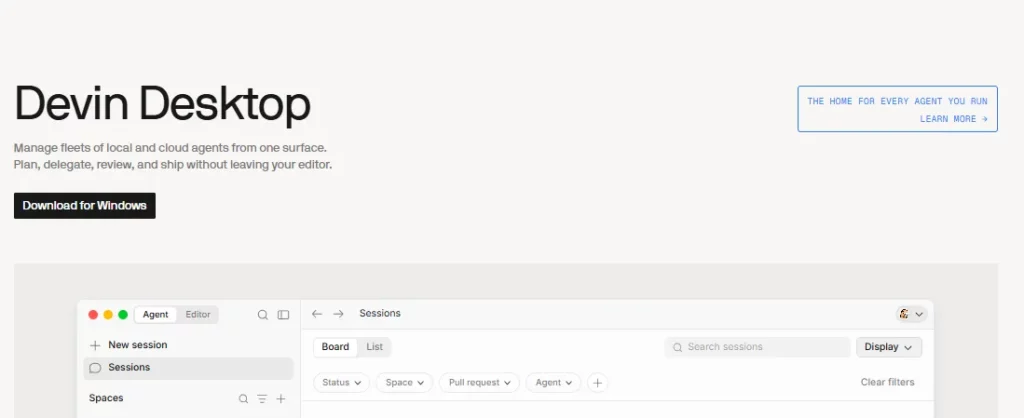
Devin Desktop is a full featured IDE that doubles as an Agent Command Centre. It provides syntax highlighting, autocomplete, debugging tools, and a Kanban style view for managing multiple local and cloud agents simultaneously. Spaces let you share context and Git worktrees across agents, while the Supercomplete feature predicts your next thought rather than just your next edit.
Teams can spin up multiple Devin instances to tackle sub-tasks concurrently. This is what enabled Nubank to migrate over six million lines of code across 100,000 data class implementations in weeks rather than the originally planned 18 months. For large scale refactors, dependency upgrades, or test coverage sprints, parallelism is the single biggest time saver.
DeepWiki auto-generates searchable documentation for your entire codebase, giving every team member instant context. Ask Devin lets you query your repository in natural language and get accurate, context aware answers. Together they eliminate the hours engineers spend reading through unfamiliar code before they can start contributing.
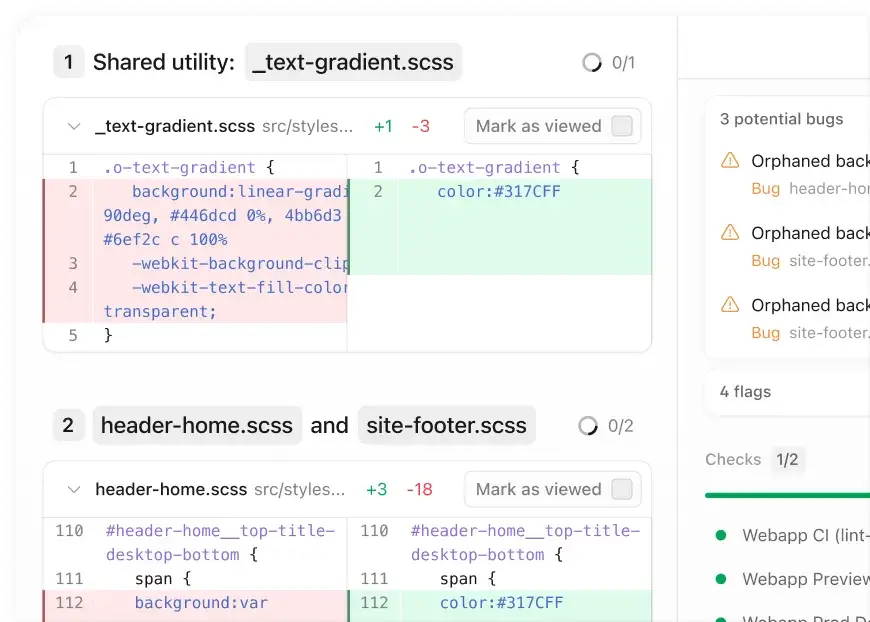
Devin Review automatically analyses pull requests and flags issues before human reviewers even look at the code. It catches bugs, style inconsistencies, and logic errors. Teams can configure it to run on every commit, only on PR creation, or manually, giving full control over review costs and frequency.
Through the Agent Client Protocol (ACP), Devin connects with tools your team already uses. Out of the box integrations include Slack, Linear, Notion, Figma, Sentry, Stripe, Datadog, Vercel, Jira, and Confluence. Language servers for Rust, Go, Python, C, and C++ are built in. This makes Devin fit naturally into existing engineering stacks rather than requiring teams to adopt new workflows.
Devin Pricing Plans
| Plan | Cost | Key Limits and Features |
|---|---|---|
| Free | $0 | Light quota, limited model access, unlimited inline edits and tab completions |
| Pro | $20/month | Full model access (OpenAI, Claude, Gemini), cloud agents, free SWE-1.7 usage, purchasable extra usage |
| Max | $200/month | Everything in Pro with significantly higher quotas |
| Teams | $80/month + $40/seat | Unlimited members, shared collaboration, admin dashboard, analytics, priority support |
| Enterprise | Custom | SAML/OIDC SSO, dedicated deployment, VPC hosting, dedicated account management |
How Devin Handles Large Scale Code Migrations
Devin’s strongest real world validation comes from large enterprise migration projects. Nubank used Devin to refactor a monolithic ETL repository containing over six million lines of code. By fine tuning the agent on examples of previous manual migrations, task completion scores doubled and per sub task execution time dropped from 40 minutes to 10.
Engineers shifted from writing migration code themselves to reviewing and approving Devin’s pull requests. The result was an 8 to 12x efficiency gain in engineering hours and over 20x cost savings on the delegated scope. This pattern works best for repetitive, well scoped tasks with high volume.
Devin Desktop vs Cloud Agent Workflows
Devin offers two distinct working modes. The cloud agent runs entirely on Cognition’s servers and is ideal for asynchronous task delegation. You describe the work and walk away. The terminal agent (Devin for Terminal) runs locally and gives you more direct, interactive control over the AI’s actions.
Devin Desktop bridges both modes through a single interface. Engineers who prefer pair programming style interaction use the terminal agent, while those delegating batches of tickets prefer cloud sessions. Teams often use both modes depending on task complexity and oversight requirements.
Pros and Cons
- Fully autonomous task execution.
- Parallel sessions save enormous time.
- Excellent GitHub and Slack integration.
- Free tier available for individuals.
- Desktop IDE is genuinely powerful.
- Over 15 MCP integrations built in.
- Performance degrades after 10 ACUs per session.
- No native JetBrains support yet.
- Complex tasks still need heavy guidance.
- Cloud only execution limits local control.
Is Devin Worth the Investment for Your Team?
The answer depends entirely on your workload mix. If your engineering backlog is heavy with migrations, test writing, documentation, dependency bumps, or repetitive refactors, Devin pays for itself quickly. Nubank’s 20x cost savings on delegated migration work proves the economics at scale.
For complex, ambiguous feature development in unfamiliar domains, expect to invest time in prompt crafting and code review. Treat Devin as a highly productive junior engineer who needs clear instructions and good code review practices. Teams that set up strong Knowledge Bases and well scoped Playbooks report the best results consistently.
Best Devin Alternatives
| AI Software Engineer / Autonomous Coding Agent | Autonomous Task Execution | IDE Integration Depth |
|---|---|---|
| GitHub Copilot | Limited (Copilot Workspace is emerging) | Excellent (VS Code, JetBrains, Neovim) |
| Cursor | Agent mode with parallel execution | Full standalone IDE |
| Claude Code | Strong terminal agent (1M token context) | Terminal based, no native IDE |
| Codeium | Cascade agent mode | Full standalone IDE |



