การรวมตัวของเมต้า's โมเดล Llama 4 กับ Microsoft's กรอบงาน AutoGen เปิดโอกาสใหม่ๆ ในการสร้างความชาญฉลาดและมีประสิทธิภาพ AI ตัวแทน เทคโนโลยีเหล่านี้เมื่อนำมาใช้รวมกันจะช่วยให้นักพัฒนาสามารถสร้างแอปพลิเคชันที่สามารถประมวลผลภาษาธรรมชาติ เข้าใจภาพ คิดเหตุผลผ่านปัญหาที่ซับซ้อน และทำงานร่วมกับตัวแทนอื่นเพื่อทำงานให้สำเร็จ
ลามะ 4 นำเสนอความสามารถแบบมัลติโหมดที่น่าประทับใจและหน้าต่างบริบทที่ครอบคลุม ในขณะที่ อัตโนมัติ ให้กรอบงานที่มีโครงสร้างสำหรับการประสานงานตัวแทนหลายตัวในเวิร์กโฟลว์แบบร่วมมือกัน เมื่อนำมารวมกันแล้ว พวกมันจะสร้างชุดเครื่องมืออันทรงพลังสำหรับเจเนอเรชันถัดไป AI การใช้งาน
คู่มือนี้จะแนะนำขั้นตอนต่างๆ อาคาร AI ตัวแทนที่ใช้เครื่องมือเหล่านี้พร้อมด้วยตัวอย่างโค้ดเชิงปฏิบัติและกลยุทธ์การใช้งานสำหรับนักพัฒนาทุกระดับทักษะ
อะไรที่ทำให้ ลามะ 4 และ อัตโนมัติ คู่ที่สมบูรณ์แบบ?
Meta's ครอบครัวลามะ 4 โดดเด่นใน AI โลกด้วย ความสามารถมัลติโหมดดั้งเดิม และแนวทางการผสานรวมในระยะเริ่มต้น เมื่อรวมกับ AutoGen—ไมโครซอฟท์'s กรอบการทำงานสำหรับการสร้างระบบตัวแทนหลายตัวที่สนทนาได้—นักพัฒนาสามารถสร้าง AI ตัวแทนที่ใช้เหตุผล ร่วมมือกัน และปรับตัวอย่างมีประสิทธิภาพ
รุ่น Llama 4 รวมถึงรุ่น Scout และ Maverick มีให้เลือก การประมวลผลแบบมัลติโหมดฟิวชั่นล่วงหน้า ซึ่งถือว่าข้อความ รูปภาพ และเฟรมวิดีโอเป็นลำดับโทเค็นเดียวตั้งแต่เริ่มต้น ความสามารถนี้เมื่อจับคู่กับ AutoGen's สถาปัตยกรรมตัวแทนที่ยืดหยุ่นช่วยให้สามารถสร้าง AI ระบบ ที่สามารถ:
ปล่อยให้'s สร้างระบบหลายตัวแทนที่ใช้งานได้จริงซึ่งแสดงให้เห็นความสามารถเหล่านี้โดยการสร้างเครื่องสร้างข้อเสนอโครงการที่จะวิเคราะห์ความต้องการของลูกค้าและสร้างข้อเสนองานที่กำหนดเอง
การสร้างการปฏิบัติจริง AI ระบบตัวแทน
ปล่อยให้'s สร้างระบบตัวแทนหลายรายที่ช่วยให้ฟรีแลนซ์สร้างข้อเสนองานที่เหมาะกับความต้องการได้ ระบบของเราจะ:
- รวบรวมความต้องการของลูกค้า
- รวบรวมคุณสมบัติของผู้ประกอบอาชีพอิสระ
- สร้างข้อเสนอแบบมืออาชีพด้วยราคาที่เหมาะสม
ขั้นตอนที่ 0: การตั้งค่าสภาพแวดล้อมของคุณ
ขั้นตอนแรก ติดตั้งแพ็คเกจที่จำเป็น:
หลาม
pip ติดตั้ง autogen-agentchat~=0.2
pip ติดตั้ง ipython
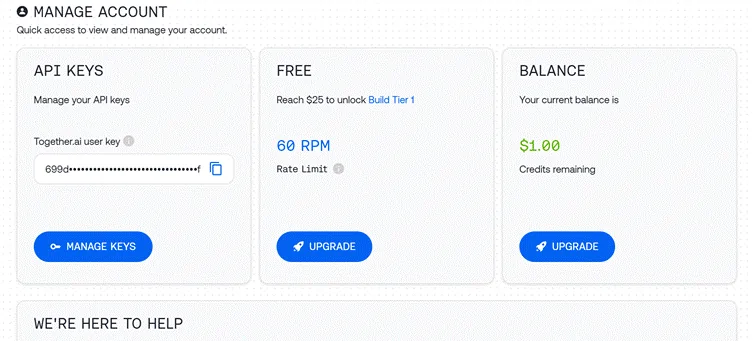
ขั้นตอนที่ 1: การกำหนดค่าการเข้าถึง API
เราจะใช้ Together API เพื่อเข้าถึง Llama 4:
python

import os

import autogen

from IPython.display import display, Markdown

# Load API key from file

with open("together_ai_api.txt") as file:

    LLAMA_API_KEY = file.read().strip()

os.environ["LLAMA_API_KEY"] = LLAMA_API_KEY

# Configure LLM settings

llm_config = {

    "config_list": [

        {

            "model": "meta-llama/Llama-4-Scout",  # Use Scout for efficiency

            "api_key": os.environ.get("LLAMA_API_KEY"),

            "base_url": "https://api.together.xyz/v1",

        }

    ],

    "temperature": 0.2,  # Lower for more consistent outputs

    "timeout": 180

}
ขั้นตอนที่ 2: การสร้างตัวแทนเฉพาะทาง
ระบบของเราต้องการตัวแทนที่แตกต่างกันสามรายที่มีบทบาทเฉพาะเจาะจง:
ตัวแทนรับข้อมูลลูกค้า
python

# Agent 1: Interfaces with the human user

client_agent = autogen.UserProxyAgent(

    name="Client_Input_Agent",

    human_input_mode="ALWAYS",  # Always gets input from human

    max_consecutive_auto_reply=1,

    is_termination_msg=lambda x: x.get("content", "").rstrip().endswith("TERMINATE"),

    system_message="""Act as the primary contact between the human user and other agents.

    First, collect initial project details (requirements, timeline, budget).

    When asked questions by the Scope Architect, relay user's answers about skills and experience.

    Type TERMINATE when the proposal is satisfactory or the user wants to stop."""

)
ตัวแทนนี้ทำหน้าที่เป็นสะพานเชื่อมระหว่างผู้ใช้มนุษย์และ AI ระบบ การรวบรวมข้อมูล และนำเสนอผลงานขั้นสุดท้าย
ตัวแทนสถาปนิกขอบเขต
python

# Agent 2: Analyzes requirements and asks qualifying questions

scope_architect_agent = autogen.AssistantAgent(

    name="Scope_Architect",

    llm_config=llm_config,

    max_consecutive_auto_reply=1,

    system_message="""You are a Scope Architect who analyzes project requirements.

    After receiving initial details from Client_Input_Agent, ask targeted questions about:

    - The freelancer's relevant past projects and experience

    - Their key skills and tools for this specific project

    - Estimated completion time for the described work

    Once you have sufficient information, create a concise summary of BOTH

    the project requirements AND freelancer qualifications for the Rate Recommender."""

)
สถาปนิกขอบเขตทำหน้าที่เป็นนักวิเคราะห์ข้อกำหนด รวบรวมข้อมูลสำคัญที่จำเป็นสำหรับข้อเสนอที่แม่นยำ
ตัวแทนผู้แนะนำอัตรา
python

# Agent 3: Creates structured proposal with pricing

rate_recommender_agent = autogen.AssistantAgent(

    name="Rate_Recommender",

    llm_config=llm_config,

    max_consecutive_auto_reply=1,

    system_message="""Generate professional project proposals based on gathered information.

    Wait for the Scope Architect's complete summary before proceeding.

    Include these sections in your proposal:

    1. Custom Introduction: Personalized greeting referencing client and project

    2. Project Scope & Timeline: Clear deliverables with timeline estimates

    3. Pricing Options: 2-3 tiers (hourly/fixed/retainer) with justification

    4. Next Steps: Brief suggestion for kickoff discussion

    Format using proper markdown. Avoid commentary - deliver only the final proposal."""

)
ตัวแทนนี้จะสร้างผลงานส่งมอบขั้นสุดท้ายโดยแปลงข้อมูลที่รวบรวมมาเป็นข้อเสนอที่มีโครงสร้าง
ขั้นตอนที่ 3: การสร้างตัวแทนช่วยเหลือ (ทางเลือก)
python

# Optional helper to initiate the conversation

user_proxy = autogen.UserProxyAgent(

    name="user_proxy",

    max_consecutive_auto_reply=1,

    llm_config=llm_config,

    system_message="Initiate the conversation between agents."

)
ขั้นตอนที่ 4: การตั้งค่าการแชทกลุ่ม
ตอนนี้เราจะสร้างสภาพแวดล้อมการสนทนาที่ตัวแทนสามารถทำงานร่วมกันได้:
python

# Group Chat Configuration

groupchat = autogen.GroupChat(

    agents=[client_agent, scope_architect_agent, rate_recommender_agent],

    messages=[],

    max_round=4,  # Prevent infinite loops

    speaker_selection_method="round_robin",  # Orderly participation

)

# Conversation Manager

manager = autogen.GroupChatManager(

    groupchat=groupchat,

    llm_config=llm_config,

    system_message="""Direct the conversation flow through these steps:

    1. Client_Input_Agent shares project details

    2. Scope_Architect asks qualifying questions

    3. Client_Input_Agent provides freelancer information

    4. Scope_Architect summarizes all information

    5. Rate_Recommender creates the final proposal

    End when the proposal is complete or Client_Input_Agent says TERMINATE."""

)การจัดวางแบบนี้ช่วยให้การสนทนาเป็นไปอย่างเป็นระเบียบ โดยมีบทบาทและความรับผิดชอบที่ชัดเจน
ขั้นตอนที่ 5: การเริ่มการสนทนา
ปล่อยให้'s เริ่มต้นเวิร์กโฟลว์ตัวแทนของเรา:
python

# Begin the proposal generation process

print("Starting the proposal generation process...")

print("Please provide project details when prompted.")

initial_message = """

Begin the proposal creation process:

1. First collect project details from the user

2. Then gather freelancer qualifications

3. Finally generate a professional proposal

"""

user_proxy.initiate_chat(

    manager,

    message=initial_message

)
ขั้นตอนที่ 6: การแยกข้อเสนอขั้นสุดท้าย
เมื่อการสนทนาเสร็จสิ้น เราจะแยกและแสดงข้อเสนอสุดท้าย:
python

# Find and display the proposal

chat_history = manager.chat_messages[client_agent]

final_proposal = None

for msg in reversed(chat_history):

    if msg.get("role") == "assistant" and msg.get("name") == rate_recommender_agent.name:

        if "Introduction" in msg.get("content", ""):

            final_proposal = msg

            break

if final_proposal:

    proposal_text = final_proposal.get("content", "Proposal not found.")

    try:

        display(Markdown(proposal_text))

    except NameError:

        print("\n--- FINAL PROPOSAL ---\n")

        print(proposal_text)

else:

    print("Could not find the final proposal in the conversation.")
เทคนิคขั้นสูงเพื่อสร้างสิ่งที่ดีกว่า AI ตัวแทน

แม้ว่าการใช้งานพื้นฐานของเราจะทำงานได้ดี แต่ต่อไปนี้คือแนวทางขั้นสูงบางประการที่จะช่วยให้คุณ AI ตัวแทนมีประสิทธิภาพมากขึ้น:
A.การรวมเครื่องมือภายนอก
จุดแข็งอย่างหนึ่งของ AutoGen คือความสามารถในการจัดหาเครื่องมือภายนอกให้กับตัวแทนประกันภัย ต่อไปนี้คือวิธีการเพิ่ม ความสามารถ ด้านการวิจัยตลาด ให้กับระบบแนะนำอัตราเบี้ยประกันภัยของคุณ :
python

# Define function for market research

def research_market_rates(job_type, experience_level):

    """Access external data for pricing information"""

    # This would typically connect to an API or database

    # Using simple dictionary for demonstration

    rate_data = {

        "web_development": {

            "beginner": "$30-50/hr",

            "intermediate": "$50-90/hr",

            "expert": "$90-200/hr"

        },

        "data_analysis": {

            "beginner": "$25-45/hr",

            "intermediate": "$45-85/hr",

            "expert": "$85-180/hr"

        }

    }

    # Retrieve appropriate rate range

    try:

        return rate_data[job_type][experience_level]

    except KeyError:

        return "Rate information not available for this combination"

# Configure LLM with function

rate_recommender_config = {

    **llm_config,

    "functions": [

        {

            "name": "research_market_rates",

            "description": "Find current market rates for specific job types and experience levels",

            "parameters": {

                "type": "object",

                "properties": {

                    "job_type": {

                        "type": "string",

                        "enum": ["web_development", "data_analysis", "content_writing", "graphic_design"]

                    },

                    "experience_level": {

                        "type": "string",

                        "enum": ["beginner", "intermediate", "expert"]

                    }

                },

                "required": ["job_type", "experience_level"]

            }

        }

    ]

}

# Update the Rate Recommender with function capabilities

rate_recommender_agent = autogen.AssistantAgent(

    name="Rate_Recommender",

    llm_config=rate_recommender_config,

    system_message="""Generate proposals with accurate market-based pricing.

    Use the research_market_rates function to get current pricing information."""

)

# Register the function with the agent

rate_recommender_agent.register_function(

    function_map={"research_market_rates": research_market_rates}

)
การปรับปรุงนี้ช่วยให้ผู้แนะนำอัตราสามารถเข้าถึงข้อมูลราคาภายนอก ทำให้ข้อเสนอแม่นยำและมีการแข่งขันมากขึ้น
B. การนำหน่วยความจำถาวรไปใช้
การเพิ่มความสามารถของหน่วยความจำช่วยให้ตัวแทนสามารถรักษาบริบทไว้ได้ระหว่างการโต้ตอบหลาย ๆ แบบ:
python

# Create a simple memory system for agents

class AgentMemory:

    def __init__(self):

        self.memories = {}

    def store(self, agent_name, key, value):

        """Save information to agent memory"""

        if agent_name not in self.memories:

            self.memories[agent_name] = {}

        self.memories[agent_name][key] = value

    def retrieve(self, agent_name, key=None):

        """Get information from agent memory"""

        if agent_name not in self.memories:

            return None

        if key:

            return self.memories[agent_name].get(key)

        else:

            return self.memories[agent_name]

# Initialize memory

memory = AgentMemory()

# Example of storing client information

def process_client_input(message):

    """Extract and store client information"""

    # This would typically use more sophisticated parsing

    if "budget:" in message.lower():

        budget = message.split("budget:")[1].strip().split("\n")[0]

        memory.store("client", "budget", budget)

    if "timeline:" in message.lower():

        timeline = message.split("timeline:")[1].strip().split("\n")[0]

        memory.store("client", "timeline", timeline)

    return message

# Add memory hook to client agent

def memory_hook(recipient, messages, sender, config):

    """Process and store incoming messages"""

    if sender.name == "Client_Input_Agent" and messages:

        process_client_input(messages[0].get("content", ""))

    return False, None  # Continue normal processing

# Register the hook

client_agent.register_hook("memory_hook", memory_hook)
ระบบหน่วยความจำนี้ช่วยให้ตัวแทนเรียกคืนข้อมูลที่สำคัญตลอดการสนทนา แม้ว่าจะไม่ได้ระบุไว้อย่างชัดเจนในข้อความล่าสุดก็ตาม
การประยุกต์ใช้งานจริงนอกเหนือจากการสร้างข้อเสนอ
สถาปัตยกรรมที่เราสร้างขึ้นสามารถปรับใช้กับสถานการณ์ทางธุรกิจอื่นๆ ได้มากมาย:
ก. กระบวนการสร้างเนื้อหา
ปรับเปลี่ยนตัวแทนของเราเพื่อจัดการเวิร์กโฟลว์การผลิตเนื้อหา:
ข. ระบบวิเคราะห์ SEO
สร้างเครื่องมือ SEO เฉพาะทางด้วยตัวแทนเหล่านี้:
C. การสนับสนุนลูกค้าแบบอัตโนมัติ
เปลี่ยนสถาปัตยกรรมให้กลายเป็นระบบรองรับ:
เคล็ดลับการเพิ่มประสิทธิภาพ
เพื่อความพร้อมในการผลิต AI ระบบตัวแทน:
- การเลือกโมเดลอัจฉริยะ: ใช้โมเดลน้ำหนักเบาสำหรับงานที่ง่ายกว่า (การรับ การกำหนดเส้นทาง) และสำรองโมเดลขนาดใหญ่ไว้สำหรับการใช้เหตุผลที่ซับซ้อน (การสร้างข้อเสนอ การกำหนดราคา)
- นำการแคชไปใช้: จัดเก็บการตอบกลับบ่อยครั้งเพื่อลดการเรียก API และปรับปรุงเวลาตอบสนอง:
python

# Simple cache implementation

response_cache = {}

def get_cached_response(query_key, generator_function, ttl=3600):

    """Get cached response or generate new one"""

    if query_key in response_cache:

        timestamp, response = response_cache[query_key]

        if time.time() - timestamp < ttl:

            return response

    # Generate fresh response

    new_response = generator_function()

    response_cache[query_key] = (time.time(), new_response)

return new_responseการประมวลผลแบบกลุ่ม:สำหรับงานที่ไม่ขึ้นต่อกัน ให้ประมวลผลแบบขนานแทนที่จะประมวลผลทีละงาน:
python

import asyncio

async def run_parallel_research():

    task1 = asyncio.create_task(research_agent.async_run("Research topic A"))

    task2 = asyncio.create_task(research_agent.async_run("Research topic B"))

    task3 = asyncio.create_task(research_agent.async_run("Research topic C"))

    results = await asyncio.gather(task1, task2, task3)

    return results
ขอบเทคนิคของ Llama 4 สำหรับ AI ตัวแทน
ลามะ 4's คุณลักษณะเฉพาะทำให้เหมาะอย่างยิ่งสำหรับการใช้งานตัวแทน:
- สถาปัตยกรรมมัลติโหมดฟิวชันในระยะเริ่มต้น ช่วยให้ตัวแทนสามารถประมวลผลข้อความและรูปภาพพร้อมกันได้อย่างเป็นธรรมชาติ ซึ่งแตกต่างจากวิธีการก่อนหน้านี้ที่เก็บโหมดต่างๆ แยกจากกัน
- การออกแบบแบบผสมผสานผู้เชี่ยวชาญ ช่วยให้โมเดลเปิดใช้งานเฉพาะพารามิเตอร์ที่เกี่ยวข้องสำหรับแต่ละงานเท่านั้น ทำให้ตอบสนองได้เร็วและแม่นยำยิ่งขึ้น
- การจัดการบริบทยาวที่ยอดเยี่ยม (สูงสุด 10 ล้านโทเค็นใน Scout) ช่วยให้ตัวแทนสามารถรักษาประวัติการสนทนาและอ้างอิงเอกสารยาวๆ โดยไม่สูญเสียความสอดคล้อง
- ความสามารถในหลายภาษา ครอบคลุม 12 ภาษาที่รองรับอย่างเป็นทางการ ทำให้ตัวแทนสามารถเข้าถึงผู้ใช้ทั่วโลกได้
เขาคุณสามารถสร้างได้ AI ตัวแทนที่ไม่เพียงแต่เข้าใจและตอบสนองต่อคำขอเท่านั้น แต่ยังทำงานร่วมกันอย่างแข็งขันเพื่อแก้ไขปัญหาที่ซับซ้อน ซึ่งเป็นตัวแทนของคนรุ่นต่อไปได้อย่างแท้จริง AI การใช้งาน.
คำถามที่พบบ่อยยอดนิยม
อะไรที่ทำให้ Llama 4 แตกต่างจากโมเดลภาษาอื่น?
Llama 4 ใช้แนวทางการรวมข้อมูลตั้งแต่เนิ่นๆ สำหรับการประมวลผลแบบหลายโหมดและสถาปัตยกรรมแบบผสมผสานผู้เชี่ยวชาญแบบเบาบางเพื่อประสิทธิภาพ โดยจะถือว่าข้อความ รูปภาพ และวิดีโอเป็นลำดับโทเค็นเดียว และเปิดใช้งานเฉพาะโมเดลย่อย "ผู้เชี่ยวชาญ" ที่เกี่ยวข้องสำหรับอินพุตแต่ละรายการเท่านั้น
AutoGen สามารถทำงานร่วมกับ LLM อื่นนอกเหนือจาก Llama 4 ได้หรือไม่?
ใช่ AutoGen ไม่ขึ้นอยู่กับโมเดลและสามารถทำงานร่วมกับ LLM ต่างๆ รวมถึง OpenAI โมเดล, โมเดลมนุษยชาติ และโมเดลโอเพนซอร์สอื่นๆ เช่น มิสทรัล AI หรือ DeepSeek
การก่อสร้างอาคาร AI ตัวแทนต้องมีทักษะการเขียนโปรแกรมขั้นสูงหรือไม่?
ไม่จำเป็น ด้วยความรู้พื้นฐานเกี่ยวกับ Python และความเข้าใจใน LLM คุณสามารถตั้งค่าและรันเวิร์กโฟลว์ของตัวแทนได้ AutoGen ช่วยลดความซับซ้อนของกระบวนการสร้างและประสานงานตัวแทนหลายตัว
พวกนี้ได้ไหม AI ตัวแทนทำงานบนฮาร์ดแวร์ภายในเครื่องหรือไม่?
ใช่ AutoGen รองรับการบูรณาการกับ LLM ในพื้นที่ผ่านเครื่องมือเช่น Ollama ช่วยให้คุณสามารถรันตัวแทนบนฮาร์ดแวร์ของคุณเองได้
ฉันจะจัดการคีย์ API อย่างปลอดภัยในการผลิตได้อย่างไร
จัดเก็บคีย์ API ในตัวแปรสภาพแวดล้อมหรือห้องนิรภัยแทนที่จะเก็บไว้ในโค้ด ใช้การตรวจสอบสิทธิ์และการเข้ารหัสที่เหมาะสมสำหรับการใช้งานจริง
ฉันสามารถขยายตัวแทนด้วยเครื่องมือและ API ที่กำหนดเองได้หรือไม่
แน่นอน AutoGen ช่วยให้คุณเชื่อมต่อตัวแทนกับ API ภายนอก ฐานข้อมูล และเครื่องมือที่กำหนดเอง ซึ่งช่วยให้สามารถโต้ตอบกับระบบและบริการต่างๆ ได้
การอ่านที่แนะนำ:
สรุป
การก่อสร้าง AI ตัวแทนที่มี Llama 4 และ AutoGen เปิดโอกาสให้สร้างระบบอัจฉริยะที่ทำงานร่วมกันได้ซึ่งสามารถรับมือกับงานที่ซับซ้อนได้ การผสมผสานของ ลามะ 4's ปัญญาประดิษฐ์แบบหลายโหมดและ AutoGen's กรอบงานตัวแทนที่ยืดหยุ่น ให้เครื่องมืออันทรงพลังแก่ผู้พัฒนาเพื่อสร้าง AI ตัวแทนที่สามารถใช้เหตุผล ร่วมมือกัน และปรับตัวเข้ากับสถานการณ์ต่างๆ ได้
โครงการตัวอย่างของเราซึ่งเป็นเครื่องสร้างข้อเสนอตัวแทนหลายรายนั้นแสดงให้เห็นการใช้งานจริงเพียงหนึ่งอย่างของเทคโนโลยีเหล่านี้ หลักการเดียวกันนี้สามารถนำไปใช้กับ สร้าง AI ตัวแทนสำหรับการสร้างเนื้อหา, การวิเคราะห์ข้อมูล, บริการลูกค้า, การวิจัย, การจัดการโครงการ และโดเมนอื่นๆ อีกมากมาย
ขณะที่คุณสร้างของคุณเอง AI ตัวแทนที่มี Llama 4 และ AutoGen โปรดจำหลักการสำคัญเหล่านี้:


 โบนัส: รับ $200 ของเรา”AI Mastery Toolkit” ฟรีเมื่อคุณสมัคร!