

ที่ไหนสักแห่งในคอมพิวเตอร์ของคุณ มี's ตารางข้อมูลขนาดใหญ่ที่คุณมองข้ามมาโดยตลอด คุณรู้ว่ามันมีคำตอบอยู่ — เกี่ยวกับลูกค้า รายได้ และแคมเปญของคุณ — แต่คุณไม่มีเวลา งบประมาณ หรือความอดทนที่จะจ้างใครสักคนที่มี "นักวิทยาศาสตร์ข้อมูล" ในประวัติ LinkedIn ของเขา
Here's ความเป็นจริง: AI เพื่อการวิเคราะห์ข้อมูล การจ้างผู้เชี่ยวชาญราคาแพงจึงไม่ใช่เรื่องจำเป็นอีกต่อไป คุณไม่จำเป็นต้องมีความรู้ด้าน Python, SQL หรือปริญญาด้านสถิติ คุณแค่ต้องการเครื่องมือที่เหมาะสม คำถามที่ถูกต้อง และกระบวนการที่ทำซ้ำได้โดยไม่กินเวลาวันอังคารของคุณทั้งหมด คู่มือนี้ครอบคลุมทุกอย่างตั้งแต่การเลือกเครื่องมือ คำถามที่ใช้จริง ไปจนถึงขั้นตอนการทำงานทีละขั้นตอนที่คุณสามารถนำไปใช้ได้ในวันนี้
อะไร AI การวิเคราะห์ข้อมูลหมายความว่าอย่างไร (อธิบายง่ายๆ)
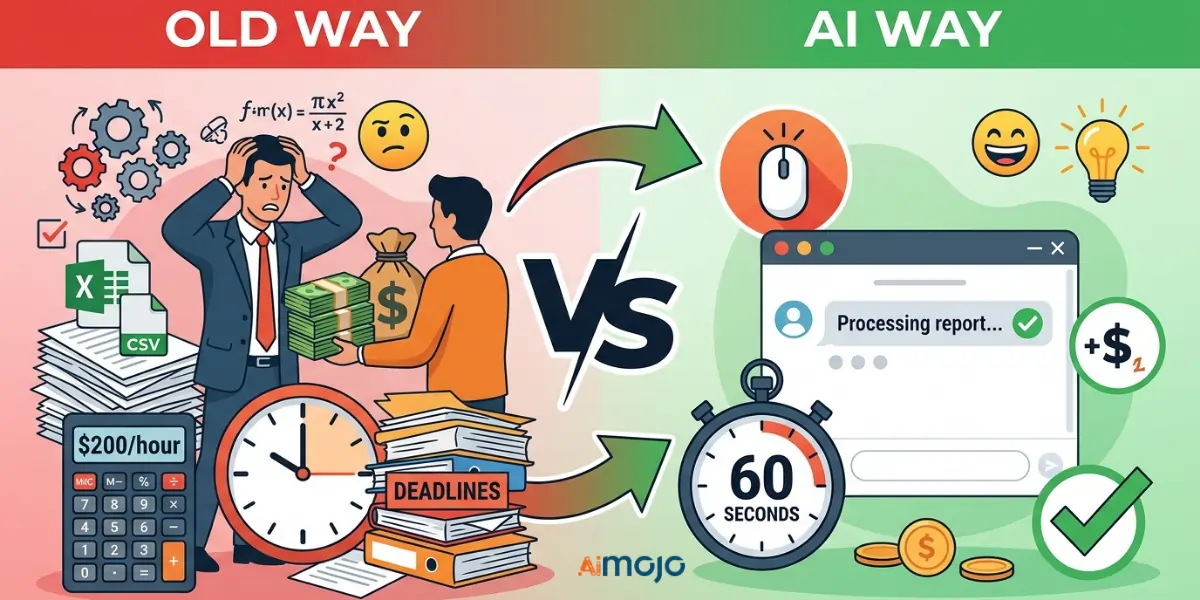
วิธีเก่าเทียบกับ AI เส้นทาง — อะไรเปลี่ยนแปลงไปบ้าง และอะไรยังคงเหมือนเดิม
วิธีเดิม: คุณส่งออกไฟล์ CSV เปิดใน Excel แล้วเพ่งมองข้อมูล 4,000 แถว ก่อนจะยอมแพ้หรือจ้างคนมาช่วยแปลให้เข้าใจได้ในราคา 200 ดอลลาร์ต่อชั่วโมง AI วิธี: คุณอัปโหลดแบบเดียวกันนั้น CSVเพียงพิมพ์คำถามด้วยภาษาอังกฤษธรรมดา แล้วคุณจะได้รับคำอธิบายโดยละเอียดภายในเวลาไม่ถึง 60 วินาที ข้อมูลไม่ได้เปลี่ยนแปลง แต่การเข้าถึงเปลี่ยนไป
อะไร's สิ่งที่เกิดขึ้นเบื้องหลังฉากเมื่อ AI อ่านข้อมูลของคุณ
AI เครื่องมือใช้ การประมวลผลภาษาธรรมชาติ เพื่ออ่านข้อมูลของคุณในแบบที่นักวิเคราะห์ข้อมูลที่เป็นมนุษย์จะทำ แต่เร็วกว่าและไม่ต้องเสียค่าใช้จ่าย พวกเขาจะระบุรูปแบบ ชี้จุดผิดปกติ และแสดงแนวโน้มตามสิ่งที่คุณถาม
เหตุผลที่ “ฉันไม่ถนัดเรื่องตัวเลข” จึงไม่ใช่ข้ออ้างที่ใช้ได้อีกต่อไป
เครื่องมือทุกชิ้นที่กล่าวถึงในที่นี้ทำงานโดยใช้คำสั่งค้นหาเป็นภาษาอังกฤษธรรมดา หากคุณสามารถเขียนอีเมลได้ คุณก็สามารถวิเคราะห์ข้อมูลได้ เช่นกัน
7 Best AI เครื่องมือวิเคราะห์ข้อมูลที่ไม่ต้องใช้ทักษะการเขียนโค้ด
| เครื่องมือ | ที่ดีที่สุดสำหรับ | แผนฟรี | จำเป็นต้องมีการเข้ารหัส | ระดับทักษะ |
|---|---|---|---|---|
| อูฐ AI | การสอบถามข้อมูลเชิงสนทนา | มี (ใบกำกับภาษีเต็มรูปแบบ) | ไม่ | Beginner |
| จูเลียส เอไอ | ซีเอสวี/การวิเคราะห์สเปรดชีต | ใช่ (จำกัด) | ไม่ | Beginner |
| Power BI Copilot | ทีม BI ระดับองค์กร | ไม่ | ไม่ | Intermediate |
| ฉากชีพจร | การส่งมอบข้อมูลเชิงลึกแบบอัตโนมัติ | ไม่ | ไม่ | Intermediate |
| ChatGPT / คล็อด | สรุปย่อและทำความสะอาด | มี (ใบกำกับภาษีเต็มรูปแบบ) | ไม่ | Beginner |
| Google Looker สตูดิโอ | การรายงานภาพแบบอิสระ | มี (ใบกำกับภาษีเต็มรูปแบบ) | ไม่ | Beginner |
| Zoho Analytics (Zia) | ธุรกิจขนาดเล็ก | มี (ใบกำกับภาษีเต็มรูปแบบ) | ไม่ | Beginner |
วิธีเริ่มใช้งาน AI สำหรับการวิเคราะห์ข้อมูล — ขั้นตอนการทำงานทีละขั้นตอน
ขั้นตอนที่ 1 — เตรียมข้อมูลของคุณ
ก่อนอื่นเลย ให้ทำความสะอาดไฟล์ของคุณ ลบแถวที่ซ้ำกัน กรอกเซลล์ว่างด้วย “N/A” และตรวจสอบให้แน่ใจว่าส่วนหัวของทุกคอลัมน์ชัดเจนและสอดคล้องกัน ไฟล์ CSV หรือ XLSX ใช้งานได้ดีที่สุดในระบบส่วนใหญ่ AI tools.
ขั้นตอนที่ 2 — เลือกเครื่องมือที่เหมาะสมตามเป้าหมายของคุณ
ต้องการสรุปข้อมูลอย่างรวดเร็ว? ใช้ ChatGPT ต้องการแดชบอร์ดที่สร้างเป็นประจำ? เลือก Power BI หรือ Looker Studio ต้องการวิเคราะห์ CSV อย่างละเอียดพร้อมการติดตามผลแบบสนทนา? เลือก Julius AI หรืออูฐAI
ขั้นตอนที่ 3 — เขียนคำถามหรือหัวข้อที่ให้คำตอบที่แท้จริง
พรอมต์ไม่ถูกต้อง: “วิเคราะห์ข้อมูลของฉัน”
พรอมต์ที่ดี: “ผลิตภัณฑ์ใดมีอัตราการคืนสินค้าสูงที่สุดในไตรมาสที่ 1 และอะไร”'s แนวโน้มรายเดือนในช่วง 6 เดือนที่ผ่านมาเป็นอย่างไร?”
ความเฉพาะเจาะจงเป็นสิ่งสำคัญที่สุด
ขั้นตอนที่ 4 — อ่านและตรวจสอบซ้ำ AI Outputs
AI มักทำผิดพลาด ตรวจสอบความถูกต้องของตัวเลขสำคัญกับข้อมูลดิบเสมอ โดยเฉพาะอย่างยิ่งก่อนที่จะแบ่งปันกับลูกค้าหรือผู้มีส่วนได้ส่วนเสีย
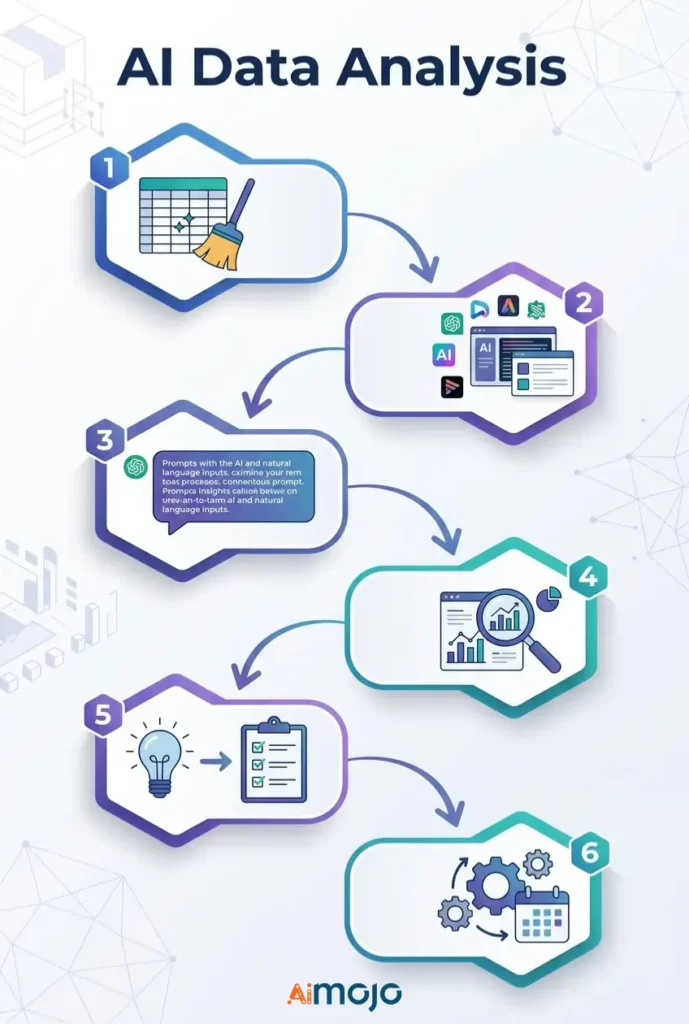
ขั้นตอนที่ 5 — เปลี่ยนจากข้อมูลเชิงลึกไปสู่การตัดสินใจ
ความเข้าใจที่ปราศจากการลงมือปฏิบัติก็เป็นเพียงเรื่องไร้สาระ สำหรับทุกๆ AI ในการค้นหา ให้ถามว่า: “ฉันควรทำอย่างไรกับสิ่งนี้ดีล่ะ?”
ขั้นตอนที่ 6 — ตั้งค่ารายงานที่เกิดขึ้นซ้ำโดยอัตโนมัติ
ตั้งค่าการรีเฟรชข้อมูลตามกำหนดเวลาภายใน Looker Studio, Power BI หรือ Zoho Analytics เพื่อให้การรายงานรายสัปดาห์ทำงานได้โดยอัตโนมัติโดยที่คุณไม่ต้องทำอะไรเลย
การคัดลอกและวาง AI พรอมต์ที่ผู้ใช้ที่ไม่เชี่ยวชาญด้านเทคนิคกำลังใช้งานอยู่ในขณะนี้
ใช้โค้ดเหล่านี้โดยตรงในJulius AI , camelAI หรือ ChatGPT โดยแนบชุดข้อมูลของคุณไปด้วย:
ข้อมูลการขาย
*"Show total revenue by product category for the last 90 days and flag any category with a decline over 20%."*ข้อมูลการตลาด
*"Which traffic source drove the most conversions last month? Break down average cost per conversion by channel."*ตารางคำนวณทางการเงิน
*"Identify the top 5 expense categories and highlight every month where spending exceeded budget by more than 15%."*ข้อมูลพฤติกรรมของลูกค้า
*"What's the average purchase frequency per customer segment? Flag segments with the highest churn risk."*ตัวชี้วัดด้านทรัพยากรบุคคลและทีมงาน
*"Compare headcount changes by department over the last 6 months and flag any team with attrition above 10%."*5 ข้อผิดพลาดที่ทำให้คุณ AI การวิเคราะห์ข้อมูลนั้นไร้ประโยชน์โดยสิ้นเชิง
- การป้อนข้อมูลที่ไม่เป็นระเบียบและไม่มีรูปแบบ - AI แก้ไขสเปรดชีตข้อมูลภัยพิบัติไม่ได้หรอก ข้อมูลที่ไม่ถูกต้องนำไปสู่ผลลัพธ์ที่ไม่ถูกต้องทุกครั้งไป
- การตั้งคำถามในวงกว้าง — การถามว่า “เล่าเรื่องยอดขายของฉันให้ฟังหน่อย” ไม่ได้ให้ข้อมูลที่เป็นประโยชน์อะไรเลย ควรระบุให้ชัดเจน เช่น ช่วงเวลา ตัวชี้วัด และเป้าหมายที่แท้จริง
- พิจารณาผลลัพธ์ทุกอย่างตามที่ปรากฏ - AI เครื่องมือเหล่านี้มักสร้างภาพลวงตา ตรวจสอบตัวเลขสำคัญให้ละเอียดก่อนตัดสินใจทางธุรกิจใดๆ
- การใช้เครื่องมืออเนกประสงค์สำหรับงานเฉพาะทาง — ChatGPT เหมาะสำหรับการสรุปข้อมูล ไม่เหมาะสำหรับการสร้างแบบจำลองทางการเงินที่ซับซ้อน ควรเลือกใช้เครื่องมือให้เหมาะสมกับงาน
- หยุดที่คำว่า “น่าสนใจ” — คนส่วนใหญ่ได้เห็นแผนภูมิที่ดูดีแล้วก็ไม่ได้ทำอะไรต่อ ข้อมูลเชิงลึกทางธุรกิจที่ขับเคลื่อนด้วย AI ทุกอย่างจำเป็นต้องมีขั้นตอนการดำเนินการที่ชัดเจนแนบมาด้วย
ใคร's ใช้งานจริง AI สำหรับการวิเคราะห์ข้อมูลในขณะนี้
นี่ไม่ใช่ทฤษฎี — มีคนจริงๆ กำลังทำการวิเคราะห์ข้อมูลโดยไม่ต้องเขียนโค้ดอยู่ทุกวัน:
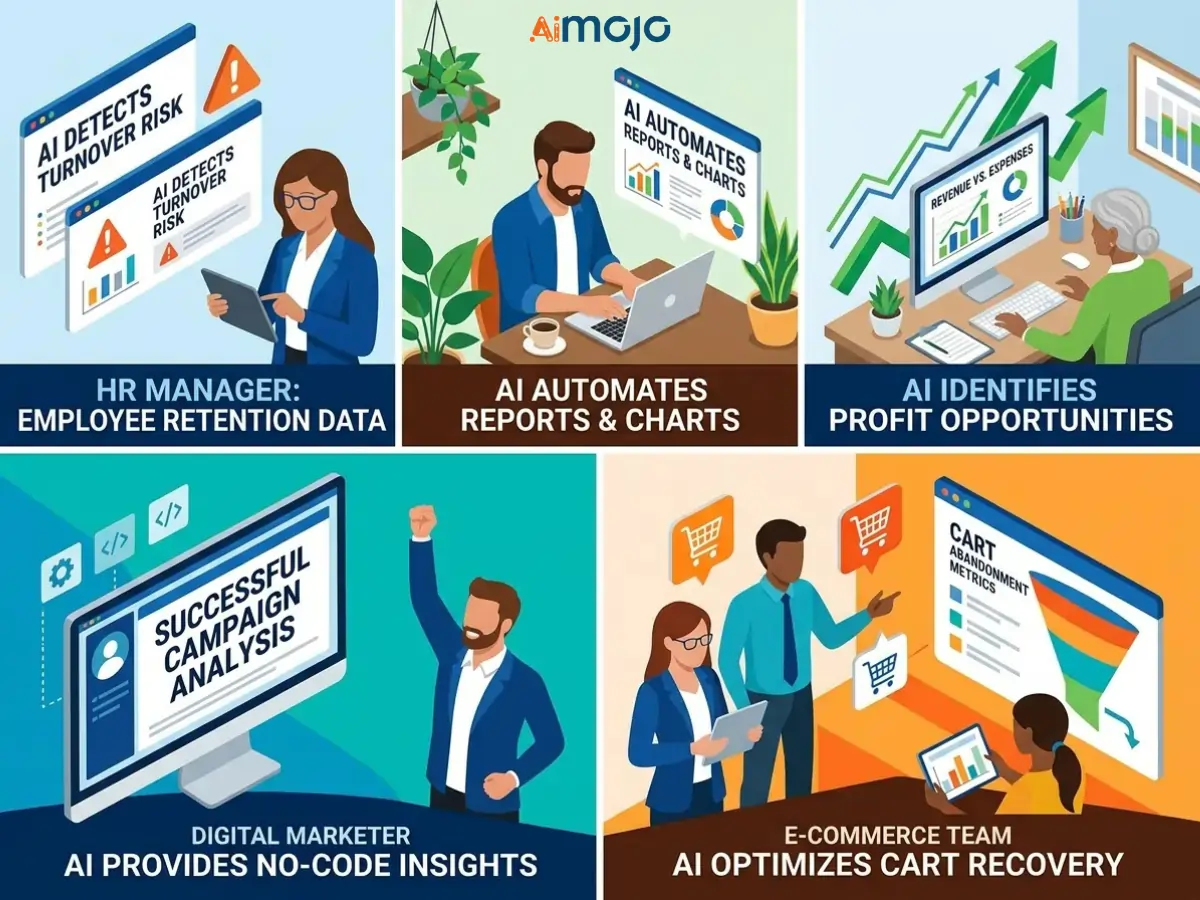
หากคู่แข่งของคุณทำสิ่งนี้ได้แล้ว ในขณะที่คุณยังคงรวบรวมรายงานด้วยตนเอง ช่องว่างนั้นเป็นสิ่งที่ควรปิดให้เร็วที่สุด
ฟรีกับจ่าย AI เครื่องมือวิเคราะห์ข้อมูล
สิ่งที่แพ็กเกจฟรีสามารถทำได้จริง ๆ
แพ็กเกจฟรีของ Google Looker Studio, camelAI และ Zoho Analytics สามารถรองรับการสร้างรายงานพื้นฐาน การติดตามแนวโน้มอย่างง่าย และการอัปโหลดไฟล์ในจำนวนจำกัดได้ดี สำหรับผู้ใช้คนเดียวและทีมขนาดเล็ก แพ็กเกจเหล่านี้ใช้งานได้จริง ไม่ใช่แค่เพียงการสาธิตเท่านั้น
คุณสมบัติที่คุ้มค่าแก่การจ่ายเงินเมื่อใช้งานในปริมาณมาก
แพ็กเกจแบบชำระเงินจะปลดล็อกการตั้งค่าการอัปเดตข้อมูลอัตโนมัติ ขีดจำกัดการอัปโหลดที่มากขึ้น และคุณสมบัติขั้นสูง AI รุ่น การรวม APIและการทำงานร่วมกันแบบหลายผู้ใช้ หากคุณกำลังใช้งานอยู่ AI ไม่ว่าจะเป็นการวิเคราะห์ธุรกิจในระดับใหญ่หรือการสร้างแดชบอร์ดสำหรับลูกค้า การอัปเกรดจะคุ้มค่าในเวลาอันรวดเร็ว
ค่าใช้จ่ายแอบแฝงที่ปรากฏขึ้นหลังการสมัครใช้งาน
โปรดระวังการคิดราคาต่อที่นั่ง ค่าธรรมเนียมเพิ่มเติมเมื่อจำนวนแถวเกินกำหนด และฟีเจอร์ "AI ระดับพรีเมียม" ที่ต้องเสียค่าใช้จ่ายเพิ่มเติม ซึ่งคุณจะพบได้ก็ต่อเมื่อสร้างเวิร์กโฟลว์ทั้งหมดภายในแพลตฟอร์มแล้วเท่านั้น
วิธีนำเสนอข้อมูลเชิงลึกที่สร้างโดย AI ให้ผู้คนตั้งใจฟัง
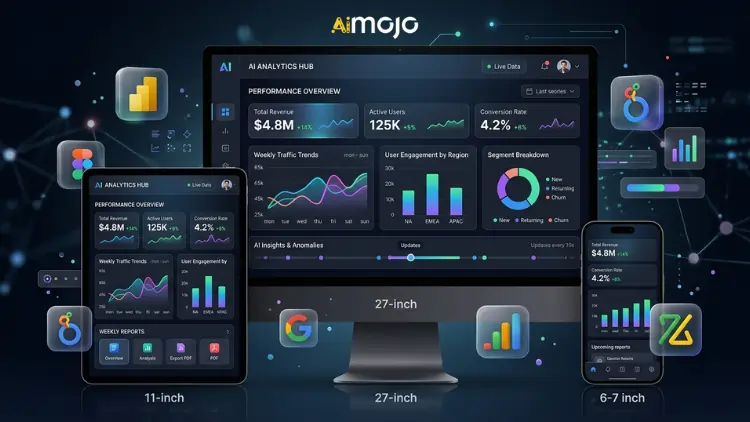
การหมุน AI แผนภูมิที่แปลงเป็นเรื่องราวที่เข้าถึงใจคนได้จริง ๆ
แผนภูมิแบบดิบๆ ไม่สามารถโน้มน้าวใจใครในที่ประชุมได้ ใช้... AI ใช้ผลลัพธ์เป็นจุดเริ่มต้น จากนั้นจึงให้บริบทประกอบ: เกิดอะไรขึ้น ทำไมจึงสำคัญ และอะไรจะเกิดขึ้นต่อไป's การเล่าเรื่องด้วยข้อมูล — และมัน's อะไรคือสิ่งที่กระตุ้นให้ผู้คนลงมือทำ
การสร้างแดชบอร์ดอัตโนมัติสำหรับการรายงานรายสัปดาห์
Power BI, Looker Studio และ Zoho Analytics ช่วยให้คุณสร้างระบบวิเคราะห์ข้อมูลแบบเรียลไทม์ได้ AI สร้างแดชบอร์ดเพียงครั้งเดียว เชื่อมต่อกับแหล่งข้อมูลของคุณ และไม่ต้องจัดทำรายงานรายสัปดาห์ด้วยตนเองอีกต่อไป สร้างครั้งเดียว แชร์ลิงก์ได้ตลอดไป
กรอบแนวคิด “แล้วอย่างไรล่ะ?” — ทำให้ทุกข้อมูลเชิงลึกพร้อมนำเสนอในห้องประชุม
ก่อนนำเสนอข้อมูลเชิงลึกที่สร้างโดย AI โปรดตอบคำถามสามข้อสั้นๆ นี้:
คำถามที่พบบ่อย (FAQs)
ฉันสามารถทำการวิเคราะห์ข้อมูลจริงได้ด้วยหรือไม่ AI ถ้าฉันไม่มีพื้นฐานด้านเทคนิคเลยล่ะ?
ใช่แล้ว เครื่องมืออย่าง camelAI, Julius AI และ Zoho Analytics (Zia) ถูกสร้างขึ้นมาโดยเฉพาะสำหรับผู้ใช้ที่ไม่เชี่ยวชาญด้านเทคนิค คุณเพียงแค่ถามคำถามด้วยภาษาอังกฤษธรรมดา แล้วเครื่องมือเหล่านั้นก็จะให้ข้อมูลเชิงลึกที่เป็นระบบกลับมา
ฟรีที่ดีที่สุดคืออะไร AI เครื่องมือสำหรับการวิเคราะห์ข้อมูลในปี 2026?
Google Looker Studio เป็นตัวเลือกฟรีที่ทรงพลังที่สุดสำหรับการสร้างรายงานด้วยภาพ camelAI และจูเลียส AI ทั้งสองบริษัทมีบริการฟรีที่ครอบคลุมสำหรับการวิเคราะห์ไฟล์ CSV และสเปรดชีต
ฉันจะวิเคราะห์ข้อมูลใน Excel หรือ Google Sheets โดยใช้ AI ได้อย่างไร?
อัปโหลดไฟล์ของคุณไปยังจูเลียสโดยตรง AI หรือใช้ camelAI หรือเชื่อมต่อ Google Sheet ของคุณกับ Looker Studio หรือ Zoho Analytics เพื่อการวิเคราะห์อัตโนมัติอย่างต่อเนื่อง
ChatGPT เชื่อถือได้จริงหรือไม่สำหรับการวิเคราะห์ข้อมูลทางธุรกิจ?
สำหรับการสรุป ทำความสะอาด และอธิบายข้อมูลนั้น ใช่ แต่สำหรับการคำนวณที่ซับซ้อนหรือชุดข้อมูลขนาดใหญ่ ควรใช้ร่วมกับเครื่องมือเฉพาะทาง เช่น Power BI Copilot หรือ Julius AI
อะไร's ความแตกต่างที่แท้จริงระหว่าง AI การวิเคราะห์ข้อมูลและเครื่องมือ BI แบบดั้งเดิม?
เครื่องมือ BI แบบดั้งเดิมนั้นต้องการให้คุณสร้างคำค้นหาและรู้ว่าต้องการค้นหาอะไรอย่างแน่ชัด แต่แพลตฟอร์มการวิเคราะห์ที่ขับเคลื่อนด้วย AI จะแสดงข้อมูลเชิงลึกออกมาอย่างรวดเร็วและตอบสนองต่อภาษาธรรมชาติ โดยไม่ต้องตั้งค่าใดๆ
ข้อมูลเชิงลึกที่สร้างโดย AI มีความแม่นยำแค่ไหน และฉันควรเชื่อถือมันอย่างเต็มที่หรือไม่?
ไม่ ควรตรวจสอบซ้ำเสมอ AI ตรวจสอบผลลัพธ์กับข้อมูลดิบของคุณก่อนนำไปใช้ในการตัดสินใจทางธุรกิจหรือการนำเสนอต่อลูกค้า
ฉันจำเป็นต้องมีความรู้ด้าน SQL หรือ Python เพื่อใช้เครื่องมือเหล่านี้หรือไม่?
ไม่มีเครื่องมือใดในรายการนี้ที่ไม่รองรับการค้นหาข้อมูลด้วยภาษาธรรมชาติโดยไม่ต้องเขียนโปรแกรมเลยแม้แต่น้อย
ไฟล์ข้อมูลประเภทใดที่ใช้งานได้ดีที่สุดกับ AI เครื่องมือวิเคราะห์?
ไฟล์ CSV และ XLSX สามารถใช้งานได้กับเครื่องมือเกือบทุกชนิดที่ระบุไว้ในที่นี้ นอกจากนี้ ไฟล์ JSON และ Google Sheets ที่เชื่อมต่ออยู่ก็ได้รับการสนับสนุนอย่างกว้างขวางในหลายแพลตฟอร์มเช่นกัน
ที่ไหน AI การวิเคราะห์ข้อมูลกำลังจะมาแรง (และนั่นหมายความว่าอย่างไรสำหรับคุณ)
คลื่นลูกต่อไปของ AI เครื่องมือวิเคราะห์จะไม่รอให้คุณถามคำถาม ตัวแทน AI ระบบตรวจสอบข้อมูล ตรวจสอบตัวชี้วัดของคุณตลอด 24 ชั่วโมง และแจ้งเตือนคุณทันทีที่พบสิ่งผิดปกติ ก่อนที่มันจะลุกลามกลายเป็นปัญหาใหญ่
การพยากรณ์ในอดีตต้องอาศัยนักวิเคราะห์เฉพาะทาง แต่ปัจจุบันเครื่องมืออย่าง Tableau Pulse และ Power BI Copilot กำลังผลักดันการวิเคราะห์เชิงพยากรณ์สำหรับผู้ใช้ทางธุรกิจให้ง่ายขึ้นจนเกือบจะทำได้ด้วยการคลิกเพียงครั้งเดียว
นักวิทยาศาสตร์ข้อมูลไม่ได้หายไปไหน แต่ช่องว่างระหว่างสิ่งที่พวกเขาสามารถทำได้กับสิ่งที่ผู้ใช้ที่ไม่เชี่ยวชาญด้านเทคนิคซึ่งใช้ AI สามารถทำได้นั้นแคบลงทุกไตรมาส ยิ่งคุณคุ้นเคยกับเครื่องมือเหล่านี้เร็วเท่าไหร่ คุณก็ยิ่งได้เปรียบมากขึ้นเท่านั้น
AiMojo ขอแนะนำ:


 โบนัส: รับ $200 ของเรา”AI Mastery Toolkit” ฟรีเมื่อคุณสมัคร!








