

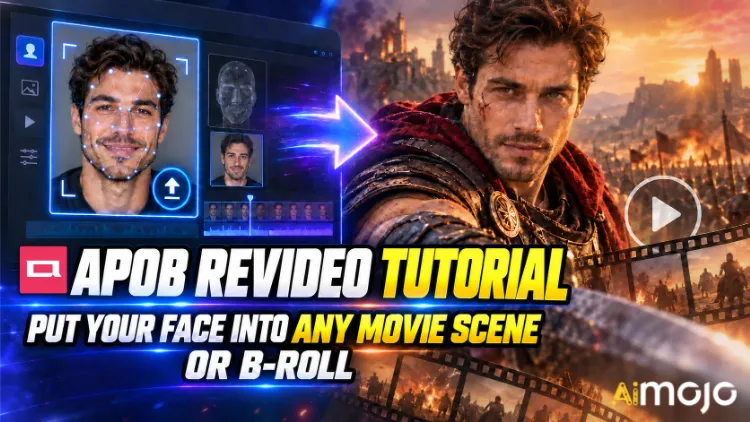
Je hebt die filmpjes gezien. Iemand's Een gezicht dat in slow motion door een gang loopt, zoals in een thriller. Een willekeurige maker die ineens de hoofdrol speelt in een autoreclame waarvan de opnames overduidelijk zes cijfers hebben gekost. Niemand huurde een RED-camera. Niemand boekte een locatie.
APOB ReVideo is de knop achter veel van die berichten. Upload een korte clip, upload een referentieafbeelding, klik op 'genereren' en de persoon in die video wordt vervangen door jouw personage — dezelfde loop, dezelfde handgebaren, dezelfde camera-inzoom, dezelfde achtergrond. De performance blijft hetzelfde. Het gezicht en het lichaam veranderen.
Dit is geen gezichtsfilter dat wiebelt elke keer dat je je hoofd draait. APOB AI's ReVideo werkt met Wan 2.2 Animate-achtige bewegingsoverdracht, wat betekent dat het de originele clip leest als een bewegingsskelet en daar bovenop een nieuwe performer opbouwt. Een groot verschil, en dat merk je meteen wanneer je een dansclip test.
Hieronder vind je de daadwerkelijke workflow, de berekening van de credits die niemand je van tevoren vertelt, de bronclips die problemen veroorzaken en de oplossingen die een wazige render omtoveren tot iets dat je kunt publiceren.
Kort samengevat: de versie van 30 seconden
| Vraag | Direct antwoord |
|---|---|
| Wat doet het? | Vervangt het personage in een bestaande video door jouw gezicht of AI model, beweging intact |
| De motor erachter | Wan 2.2 Animate (beweging + identiteitsoverdracht) |
| Wat je uploadt | Eén korte bronvideo + één referentieafbeelding |
| Kosten | Ongeveer 26 credits per seconde aan uitvoer. |
| Gratis toegang | 80 gratis credits per dag = ongeveer 3 seconden per dag, geen kaart nodig |
| Cliplengte | Korte filmpjes zijn geweldig. Controleer je uploader.'s Beperk de tijd voordat u een lang bestand vertrouwt. |
| Best voor | Montage van filmscènes, B-roll-fragmenten, UGC-advertenties, danstrends, anonieme kanalen |
| Vaardigheid vereist | Nul. Als je een bestand kunt uploaden, kom je in aanmerking. |
Wat is APOB ReVideo nu eigenlijk?
ReVideo bevindt zich binnen de APOB AI videowerkruimte naast Beeld naar Video, Camerabeweging, Sprekende Avatar en LipsynchronisatieZie het als de module "bewerk deze beelden met een andere cast".
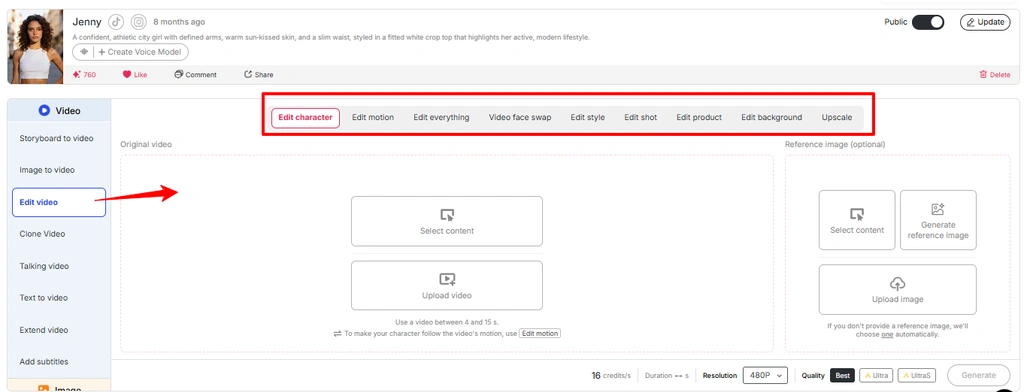
Het biedt een aantal diensten onder één dak:
Kort gezegd: APOB ReVideo bewerkt bestaande beelden opnieuw in plaats van een compleet nieuwe video te creëren op basis van een tekstprompt. Daardoor voelt het eindresultaat realistisch aan. Je gebruikt de natuurkundige principes van een echte video.
Let op: in de nieuwste interface van APOB zijn veel workflows voor videobewerking ondergebracht in 'Video bewerken' . Als 'ReVideo' niet als aparte optie wordt weergegeven, kunt u dezelfde workflow openen vanuit het gedeelte 'Video bewerken'.
Waarom bewegingsoverdracht beter is dan tekst-naar-video.
Tekst-naar-video is geweldig in het overbrengen van sfeer, maar verschrikkelijk in het creëren van precieze choreografie. Vraag een prompt-gebaseerde generator om "man draait rond, wijst naar de camera, grijnst op de derde tel" en je gooit twintig keer met de dobbelstenen. ReVideo slaat het dobbelen helemaal over — de grijns op de derde tel zit al in je bronbestand. Het model hoeft die alleen maar opnieuw te interpreteren.
Gebruik de afbeelding uit de media "Video Edit Feature APOB AI" en wijzig de alt-tekst in "Beweging bewerken in de APOB-videobewerkingsfunctie".
Voor makers die een succesvolle, pakkende insteek hebben gevonden, is dit de sleutel tot succes. Eén winnende clip leidt tot tien variaties met tien verschillende gezichten.

Voordat je op de knop 'Genereren' drukt: je voorbereidingschecklist
ZIJN's Geen tijdlijn, geen keyframes, geen maskering, geen rotoscoping.
Stap voor stap: De APOB ReVideo-tutorial

Stap — Log in en ontvang je gratis credits
Ga naar de APOB AI gebruiken en log in. Je 80 dagelijkse credits worden automatisch aan je account toegevoegd. Met ongeveer 26 credits per seconde, is dat's Ongeveer drie seconden gratis ReVideo-output per dag — genoeg voor één degelijke test, maar niet genoeg voor een hele batch. Houd hier rekening mee in je budget.
👉 Slimme zet: APOB heeft een actieve Discord-server. Tijdens periodes waarin nieuwe content werd uitgedeeld, gaven ze zo'n 1,000 bonuscredits aan creators die hun gemaakte clips met de community deelden. Als je van plan bent veel content te produceren, is dat een mooie bonus.
Stap — Maak of upload je personage
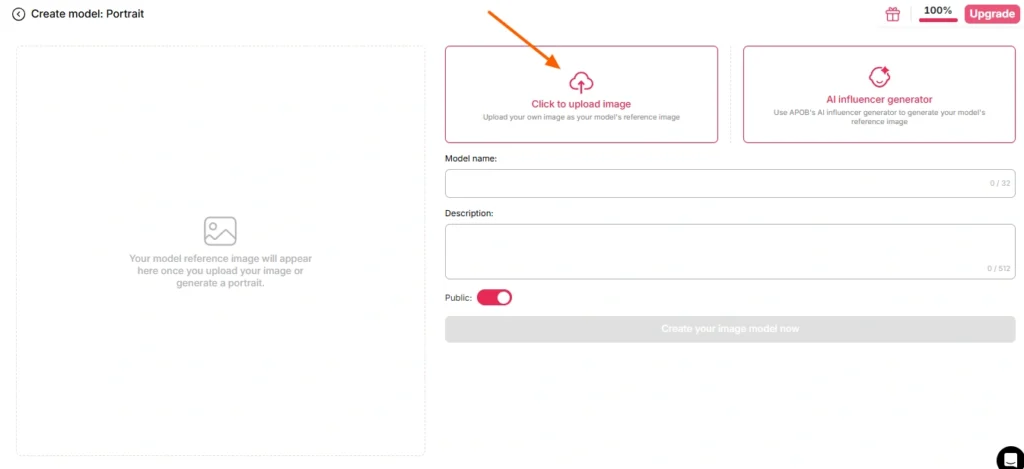
Hier zijn twee paden mogelijk:
Methode A — Gebruik je eigen gezicht. Upload een duidelijke, goed belichte foto van voren. Geen zonnebril, geen zware schaduwen, geen bewegingsonscherpte en geen groepsfoto waarbij het model moet raden wie je bedoelt.
Pad B — Bouw een AI model eerst. Ga naar het gedeelte 'portretmodel maken' en genereer een persona via de AI Influencer-generator. Stel geslacht, leeftijd, nationaliteit, haarkleur, oogkleur en outfit in. Dit is de slimste optie voor iedereen die een terugkerend kanaal beheert, omdat APOB's Facelock zorgt ervoor dat die identiteit consistent blijft in honderden toekomstige renders. Eén personage, oneindig veel clips, een herkenbaar merk.
Als je de referentieafbeelding helemaal overslaat, gebruikt APOB standaard je opgeslagen afbeelding. AI model Afbeelding. Handig, soms verrassend.
Stap — Kies je bronmateriaal
Deze stap bepaalt 80% van de kwaliteit van je uiteindelijke video. Niet het model. Niet de instellingen. Maar de bronclip.
| Bron Clip Kenmerk | Resultaat |
|---|---|
| Duidelijk enkel onderwerp, centraal in het kader. | ✅ Schone ruil |
| Stabiele verlichting overal | ✅ Een egale huidskleur |
| Zichtbare lichaamsbeweging | ✅ Beweging wordt correct afgelezen |
| Het onderwerp loopt achter objecten langs. | ⚠️ Occlusie-artefacten |
| Snelle camerabewegingen, sterke onscherpte | ❌ Identiteitsverschuivingen |
| Druk beeld, meerdere mensen | ❌ Model kiest het verkeerde doelwit |
| Lage resolutie, gecomprimeerd, 4 keer opnieuw geüpload | ❌ Paddenstoel |
Geen eigen beeldmateriaal? APOB's De ingebouwde generatoren — 'Bouw je eigen', 'Complete set', 'Expertmodus', 'Afbeelding naar video' — produceren een clip die je vervolgens direct in ReVideo kunt invoeren. Volledige functionaliteit, één platform.
Stap — Open ReVideo en laad beide bestanden.
Linkerzijbalk → tabblad Video → ReVideo.
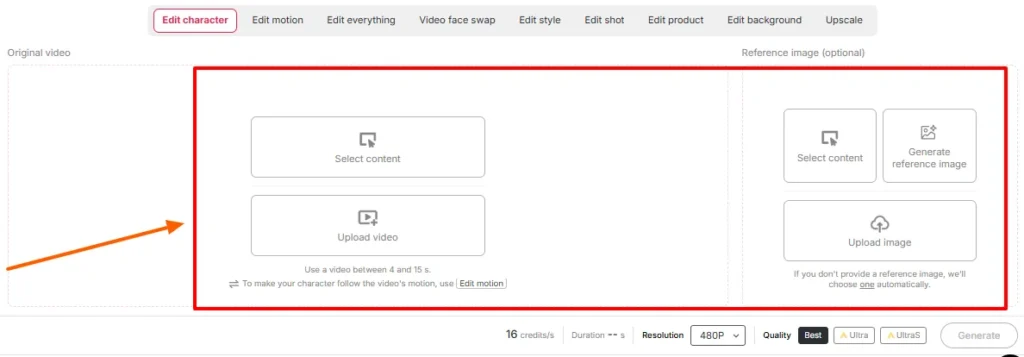
Kom gerust langs:
Bevestig de instellingen voor duur en kwaliteit op het scherm. Controleer de maximale lengte die uw werkruimte die dag weergeeft. — APOB's De oorspronkelijke ReVideo-uitrol beperkte clips tot ongeveer vijf seconden, terwijl nieuwere, door Wan aangedreven pagina's ondersteuning bieden voor aanzienlijk langere bestanden. De uploader spreekt de waarheid; de blogberichten lopen achter op de releases.
Stap — Genereren en wachten
Klik op 'Genereren'. Het model projecteert uw referentie op de bronprestaties, terwijl de achtergrond stabiel blijft.
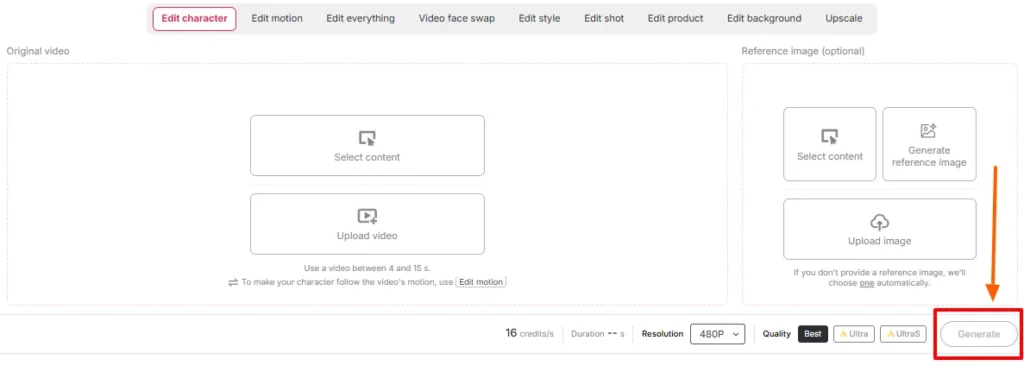
De rendertijd is afhankelijk van de lengte van de clip en het kwaliteitsniveau. Niet vernieuwen. Maak geen paniek door een tweede taak te starten met dezelfde credits.
Stap — Vergelijk de resultaten naast elkaar
Speel het origineel af naast de uitvoer. Controleer met name het volgende:
Als iets's Als de fout optreedt, ligt de oplossing bijna altijd aan de bron zelf: vervang de referentieafbeelding of knip het bronmateriaal bij naar een schoner gedeelte. Het opnieuw genereren van dezelfde invoerbestanden lost een slechte combinatie zelden op.
Stap — Maak het af met de rest van de stapel
Een onbewerkte ReVideo-output is een component, geen afgewerkte postproductie. Stapel het op:
Filmscène versus B-roll: twee totaal verschillende werkwijzen
Ze klinken vergelijkbaar, maar gedragen zich totaal anders.
Playbook A — De filmscène-invoeging
Filmbeelden worden bewerkt, dramatisch belicht en meestal opgenomen met telelenzen met een geringe scherptediepte.'s Een geschenk en een valstrik.
Doe dit:
Vermijd: snelle actiescènes, veel rook, extreme silhouetten en shots waarbij het onderwerp half buiten beeld is.
Playbook B — De B-roll-inval
B-roll is een onderschatte toepassing en eerlijk gezegd waar het meeste geld te verdienen valt. Stock-achtige beelden – iemand die door een kantoor loopt, een product uitpakt, koffie drinkt bij het raam, een telefoon voor de camera houdt – zijn helder, gelijkmatig belicht en tonen slechts één onderwerp. Ze zijn praktisch ontworpen om personages te vervangen.
Doe dit:
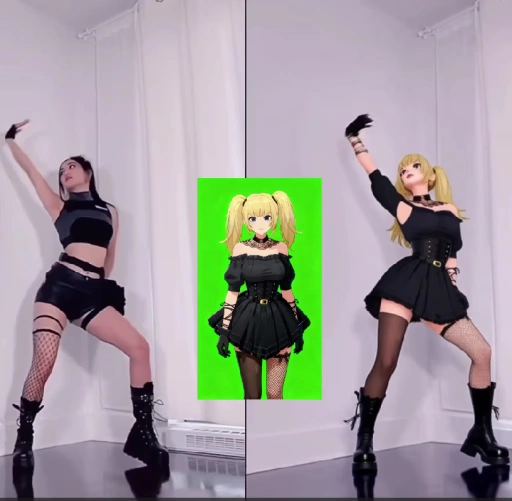
Dit is de workflow achter veel van AI Op dit moment draaien er influenceraccounts, anonieme kanalen en affiliateproductpagina's.
Credit Math: Wat dingen werkelijk kosten:
| Uitgangslengte: | Geschatte credits | Gratis realiteit |
|---|---|---|
| 1 tweede | ~ 26 | Comfortabel |
| 3 seconden | ~ 78 | Uw volledige dagelijkse hoeveelheid |
| 5 seconden | ~ 130 | Vereist 2 dagen gratis toegang of een betaald abonnement. |
| 10 seconden | ~ 260 | Betaald gebied |
| Set van 5 x 5 variaties | ~ 650 | Plan het abonnement |
Even terzijde: gratis credits zijn bedoeld voor het testen van input, niet voor het maken van een contentkalender. Test je referentieafbeeldingen met een afspeeltijd van één seconde. Zodra een combinatie er goed uitziet, kun je de credits gebruiken voor de volledige rendering.
Veelvoorkomende ReVideo-fouten en hoe je ze snel kunt oplossen.
| Wat ging er mis | Waarom | The Fix |
|---|---|---|
| Het gezicht verandert van identiteit midden in de clip. | Referentieafbeelding te klein of te schuin | Upload opnieuw een portretfoto van voren in hoge resolutie. |
| Vreemde halo rond het haar | Drukke achtergrond achter het onderwerp's hoofd | Kies een bronclip met een duidelijkere scheiding. |
| Handen worden abstract | Snelle gebaren + compressie | Knip het stuk in tot het langzamere gedeelte van de beweging. |
| Huidskleurverschil | Referentieverlichting versus scèneverlichting botsen | Genereer de referentie opnieuw onder vergelijkbare belichting. |
| Verkeerde persoon verwisseld. | Meerdere onderwerpen in beeld | Knip een fragment bij of selecteer een fragment met één onderwerp. |
| Het resultaat voelt aan als een plaksel. | De bron miste echte lichaamsbewegingen. | Gebruik beeldmateriaal waarop de volledige lichaamsbeweging zichtbaar is. |
| Uitvoer te kort om te plaatsen | Kredietplafond | Gebruik Video Extender of voeg twee renders samen. |
Waarin APOB ReVideo een standaard gezichtswissel overtreft
| Waarom ReVideo wint | Basic AI Face Swap | APOB ReVideo |
|---|---|---|
| Wat verandert | alleen gezichtsgebied | Gezicht, lichaam, kleding, algehele uitstraling |
| Bewegingsbron | Origineel, ongewijzigd | De originele uitvoering is behouden en opnieuw vormgegeven. |
| Identiteitsconsistentie | Per clip, varieert | Vergrendel je hele bibliotheek met gezichtsherkenning. |
| Achtergrondcontrole | Geen | ReBackground beschikbaar |
| Stijlcontrole | Geen | ReStyle beschikbaar |
| Gebouwd voor | Eenmalige grappen | Herhaalbare productieprocessen |
Een gezichtswissel levert je een grap op. ReVideo geeft je een castlid dat je steeds opnieuw kunt gebruiken.
Echte praktijkvoorbeelden die mensen momenteel gebruiken
Het onderdeel dat de meeste tutorials overslaan: toestemming, auteursrecht en hoe je een rechtszaak kunt voorkomen.
Je eigen gezicht in een filmscène laten verschijnen is leuk. Iemand anders erin laten verschijnen is nog leuker.'s Een confrontatie met een studio, of het herverdelen van studiobeelden, is een totaal andere situatie. Pak dit op de juiste manier aan:
Gelicenseerd stockmateriaal (B-roll) plus een AI Persona is de schone, schaalbare en commercieel veilige combinatie. Bouw daarop voort.
Zes professionele tips uit daadwerkelijke tests
- Test het één seconde voordat je de definitieve beslissing neemt. De meest voordelige manier om te controleren of een afbeelding en een videoclip bij elkaar passen.
- Maak het portretmodel één keer aan en hergebruik het voor altijd. Consistentie van gezichtsvergrendeling Dat is precies de reden waarom een virtueel alter ego volgers krijgt.
- Verticale ingang, verticale uitgang. Snijd een horizontale afbeelding niet bij en hoop niet dat het resultaat goed is.
- Heldere, gelijkmatige lichtbron is altijd de beste keuze. De Moody-beoordeling ziet er geweldig uit, maar de ruil ervan is waardeloos.
- Sla je beste bronclips op als sjablonen. Een goed presterende haak is een waardevolle aanwinst. Gebruik hem maandelijks opnieuw.
- Verwerk batches op dagen dat het tegoed wordt vernieuwd. Gratis credits worden dagelijks gereset. Voer tests uit over een week voordat een betaalde render wordt uitgebracht.
Veelgestelde vragen over APOB ReVideo
Waarvoor wordt APOB ReVideo gebruikt?
APOB ReVideo vervangt het personage in een bestaande video door jouw gezicht, een referentieafbeelding of een AI Het influencer-model, waarbij de oorspronkelijke beweging, gebaren, cameravoering en achtergrond intact blijven.'s gebruikt voor het bewerken van filmscènes, B-roll-inserts, UGC-advertenties, danstrends en AI inhoud van influencers.
Is APOB ReVideo gratis?
There's Een gratis versie met 80 credits die dagelijks worden geleverd en waarvoor geen kaart nodig is. Met ongeveer 26 credits per seconde is dat goed voor zo'n drie seconden aan output per dag – prima voor testen, maar weinig voor productie. Betaalde abonnementen bieden de mogelijkheid voor langere clips en batches.
Hoe lang mag een APOB ReVideo-clip zijn?
De oorspronkelijke uitrol werkte het beste met clips van een paar seconden, maar nieuwere, op WAN gebaseerde pagina's bieden ondersteuning voor langere uploads. Controleer de lengtelimiet die in uw werkruimte wordt weergegeven, aangezien deze met elke modelupdate verandert.
Moet ik een aanmaken? AI model eerst?
Nee. Je kunt direct een referentieafbeelding uploaden. Maar het maken van een portretmodel zorgt voor een consistente identiteit bij elke toekomstige weergave, wat erg belangrijk is voor iedereen die een terugkerend account beheert.
Welke AI Wordt APOB ReVideo door de motor aangedreven?
Het werkt met Wan 2.2 Animate-achtige bewegingsoverdracht, waarbij bewegingen uit je bronclip worden gelezen en een nieuw personage op basis van die bewegingsstructuur wordt opgebouwd, in plaats van de video helemaal opnieuw te genereren.
Kan APOB ReVideo ook de achtergrond wisselen?
Ja, ReBackground vervangt scènes wanneer de oorspronkelijke locatie niet geschikt is voor je montage. ReCharacter zorgt er daarentegen voor dat de achtergrond exact zo blijft als in de opname.
Werkt het met anime, 3D-renders en niet-menselijke personages?
Dat klopt. Geïllustreerde personages, 3D-modellen en zelfs referentieafbeeldingen van poppen of beeldjes kunnen als vervangend onderwerp dienen, wat de weg vrijmaakt voor gestileerde content en content met mascottes in de hoofdrol.
Waarom ziet mijn uitvoer er wazig of vervormd uit?
Vrijwel altijd ligt het aan het bronmateriaal. Gecomprimeerd beeldmateriaal, snelle camerabewegingen, gedeeltelijk afgeschermde onderwerpen of een referentiebeeld met lage resolutie kunnen het resultaat negatief beïnvloeden. Wissel de invoerbronnen voordat je opnieuw begint met opnemen.
Mag ik APOB ReVideo-video's commercieel gebruiken?
Over het algemeen wel, mits je de rechten bezit op het bronmateriaal en de afgebeelde personen. Door AI gegenereerde persona's op gelicentieerd of in eigen bezit zijnd beeldmateriaal vormen de veiligste commerciële oplossing.
Hoe verhoudt dit zich tot een normale situatie? AI Gezichtswisselaar?
Een face swapper bewerkt het gezichtsgebied. ReVideo vervangt het hele personage – gezicht, lichaam, kleding en stijl – met behoud van de originele acteerprestatie.'s Ontworpen voor het volledig vervangen van personages, niet voor grappen die slechts uit één frame bestaan.
Mag ik mezelf legaal in een filmscène laten opnemen?
Voor privé-experimenten is het over het algemeen prima. Het publiceren of te gelde maken van bewerkte studiobeelden is echter een auteursrechtkwestie, ongeacht de bewerking, en het invoegen van ander materiaal is ook een optie.'s Het zonder toestemming gebruiken van een gezicht is een apart juridisch probleem. Gelicentieerde stockbeelden en beelden uit het publieke domein bieden uitkomst.
Welke bronclips leveren de beste resultaten op?
Eén onderwerp, centraal in beeld, gelijkmatige belichting, zichtbare lichaamsbeweging, minimale obstructie en een behoorlijke resolutie. Productdemonstraties, loop- en praatscènes en dansfragmenten zijn consistent sterk.
Laatste opname
APOB ReVideo is een zeldzaamheid. AI Een videofunctie waarbij de kwaliteit van het eindresultaat grotendeels in jouw handen ligt, niet in die van het model. Voer een heldere clip van één persoon en een scherpe referentiefoto in en het produceert iets dat je kunt plaatsen. Voer een wazige groepsfoto en een selfie genomen om 2 uur 's nachts in en het produceert precies wat je ervan verwacht.
Het echte voordeel zit hem niet in die eenmalige montage van een filmscène die je een paar duizend views oplevert.'s de productiepipeline: één consistente AI persona, één bibliotheek met bewezen bronclips, en de mogelijkheid om een succesvol format zo vaak opnieuw te gebruiken als je credits toelaten.'s hoe anonieme kanalen, UGC-advertentieplatforms en AI Influenceraccounts zijn daadwerkelijk actief in 2026.
Begin met de gratis 80 credits. Test drie referentieafbeeldingen, elk met een opnameduur van één seconde. Zoek de combinatie die de identiteit behoudt bij een hoofdbeweging. Schaal deze vervolgens.
De beelden bestaan al. Je verandert alleen wie erin voorkomt.'s daarin.
AiMojo raadt aan:


 BONUS: Ontvang onze $200 “AI “Mastery Toolkit” GRATIS wanneer u zich aanmeldt!





![Top 10 Hentai AI Chatbots om virtueel verlangen te ervaren [2026]](https://aimojo.io/wp-content/uploads/2024/03/Top-Hentai-AI-Chatbot--100x100.webp)

![Top 13 AI Chatporno-spellen zonder grenzen [2026]](https://aimojo.io/wp-content/uploads/2024/03/Best-AI-Chat-Porn-Games-100x100.webp)


