
Open Notebook Key Insights
What is Open Notebook?
노트북 열기 is a self-hosted, open-source AI research and note-taking platform built as a privacy-first alternative to Google NotebookLM. It lets researchers, students, analysts, and knowledge workers ingest multi-format content including PDFs, web URLs, YouTube videos, audio files, and PowerPoint presentations into organised notebooks, then use AI to summarise, chat with, and extract insights from those sources. The key business function is knowledge automation without third-party data exposure.
You bring your own API key from over 16 supported AI providers, including OpenAI, Anthropic (Claude), Google Gemini, and Ollama for fully local models. Open Notebook features multi-speaker 팟캐스트 세대, full-text and vector search, AI-powered note generation, and a complete REST API for pipeline automation. It is the go-to productivity tool for professionals who need AI research automation without vendor lock-in.
Open Notebook supports over 16 AI providers simultaneously, including OpenAI, Anthropic, Ollama, LM Studio, Groq, and Google Gemini. You can assign different models to different tasks within the same workflow, for example using a cheaper Groq model for summarisation and Claude for deep analysis.
The ability to run fully local models via Ollama means your data never leaves your own machine, which is the primary reason many organisations and researchers choose this tool over cloud-locked competitors.
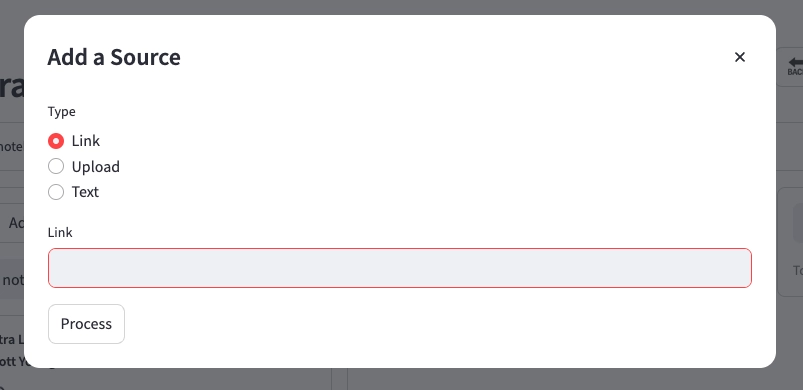
You can feed Open Notebook with PDFs, live web URLs, YouTube video transcripts, plain text, audio files, and PowerPoint presentations. All ingested content is indexed within organised notebooks and becomes immediately available for AI chat, summarisation, and transformation workflows. This removes the manual burden of copying content between tools and gives you a single workspace where your entire research corpus is queryable.
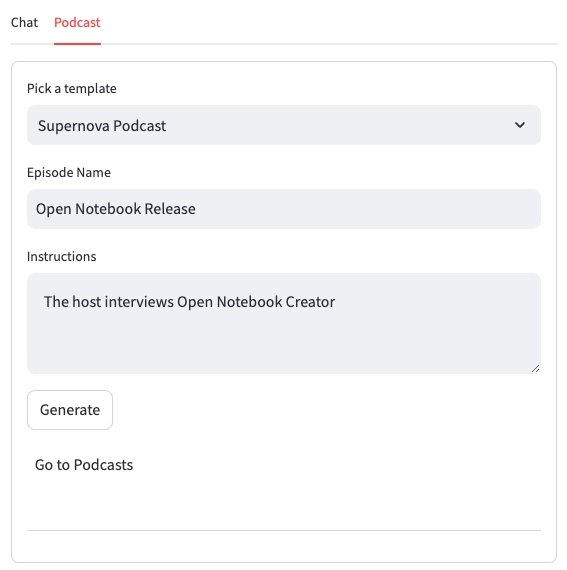
One of the clearest technical advantages Open Notebook holds over competitors is its podcast generator, which supports up to four distinct speakers compared to NotebookLM's two-speaker limit. You get full script control, configurable voices, and the ability to convert any notebook content into structured audio episodes.
This is particularly valuable for researchers who want to review material away from a screen, or content creators who need audio summaries of complex source material.
Open Notebook exposes a full REST API that provides programmatic access to notebooks, sources, notes, and transformations. This is a capability Google NotebookLM does not offer.
Developers and technical teams can use the API to build automated ingestion pipelines, connect Open Notebook to external tools like n8n or Zapier self-hosted equivalents, or push processed outputs to downstream publishing systems. For any team running document-heavy research workflows, this is a serious productivity multiplier.
The platform combines full-text search with vector-based semantic search so you can ask natural language questions and get answers grounded in your own research sources. The 채팅 도우미 uses your ingested content as its primary context, reducing AI hallucination risk and ensuring responses are traceable back to your documents. This is the RAG (Retrieval-Augmented Generation) implementation at the core of the product.
Open Notebook Pricing Plans
| 계획 | 비용 | 오시는 길 |
|---|---|---|
| 오픈 소스(자체 호스팅) | 무료 | Full features, Docker deployment, bring your own API keys |
| Local Model (Ollama/LM Studio) | 무료 | Zero API cost, fully offline, requires local hardware |
| Cloud API (e.g. OpenAI, Claude) | API usage cost only | Pay-as-you-go to your chosen provider, no platform fee |
Open Notebook vs Google NotebookLM: The Core Difference
The most important distinction between Open Notebook and Google NotebookLM is data sovereignty. With NotebookLM, your research documents are processed on Google's servers. With Open Notebook, every document, every query, and every AI interaction stays within your own infrastructure. For enterprises, legal teams, or researchers working with sensitive data, this is not a preference but a requirement. Open Notebook also removes the single-model restriction entirely.
장단점
- 완전한 데이터 개인정보 보호 및 주권 보장.
- 16+ 지원 AI 제공.
- Local LLM support via Ollama.
- Multi-speaker podcast generation.
- REST API for automation.
- Multi-format content ingestion.
- Requires Docker and self-hosting knowledge.
- No managed cloud version available.
- 별도의 모바일 앱은 없습니다.
- 팀 협업 도구가 내장되어 있지 않습니다.
Best Open Notebook Alternatives
| 오픈 소스 AI 연구 플랫폼 | 데이터 개인정보 보호 제어 | AI 모델 유연성 |
|---|---|---|
| Google 노트북LM | Cloud-only, data on Google servers | Locked to Google models only |
| 흑요석 | Local-first, strong privacy | Limited via third-party plugins |
| 멤.아이 | Cloud-hosted, limited control | Single provider |
| 노션 AI | Cloud-hosted, enterprise compliance | Limited model choice |


