Fixing a stray object or tweaking a background used to mean hours of tedious frame-by-frame masking. Now, the technology has finally caught up to everyday creators. The right program simply depends on your current workflow and hardware.
If you want pinpoint accuracy without a frustrating learning curve, reviewing the 6 best select-and-edit AI tools for precise video modifications 이는 실질적인 다음 단계입니다.
Grab a short clip from your latest project and test a couple of them out. It feels good to let the computer handle the busywork so you can focus on telling your story.
The Algorithmic Shift: Why We Need Dedicated Select-and-Edit AI 도구
Traditional video editors were built around timelines, cuts, and transitions. They handle global changes well, but struggle when you need to isolate and modify a single element inside a moving frame.
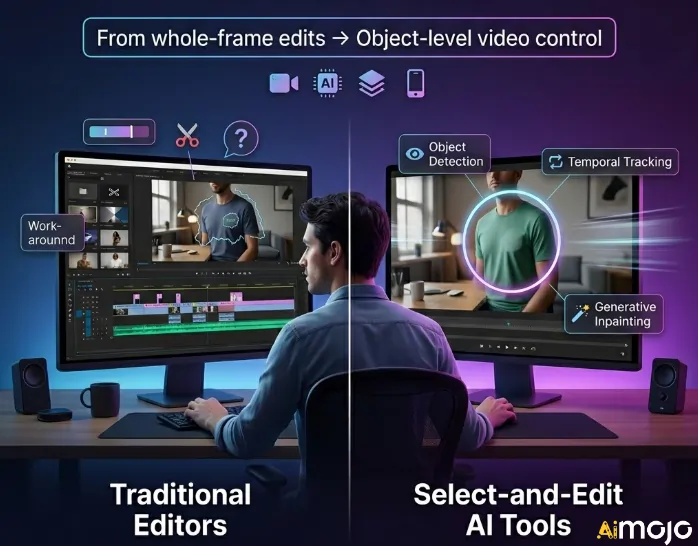
That gap created demand for a new category — select-and-edit AI tools designed specifically for precise video modifications. These tools use object detection, temporal tracking, and generative inpainting to let you target one area without disrupting the rest of your footage.
Generic editors force workarounds. Dedicated select-and-edit tools eliminate them by treating every object in a scene as an independent, editable layer.
As video content scales across platforms, pixel-level editing control is no longer optional — it is the baseline expectation for professional workflows.
Advnaced AI Select-and-Edit Tools for Professional Video Modifications
| Top Select-and-Edit AI 도구 | Primary Editing Focus | Top Workflow Task |
|---|---|---|
| 설명 | 텍스트 기반 편집 | 필러 단어 제거 |
| 아쿨 | Seamless object removal | 현실적인 얼굴 교환 |
| 클링 AI | Semantic video prompts | Targeted element swapping |
| 보다 | Browser based timelines | Quick social formatting |
| 힉스필드 AI | Custom digital avatars | Mobile video generation |
| 디진 AI | Targeted subject restyling | Artistic aesthetic changes |
1. 설명

Descript eliminates the wasted production time of manually hunting for specific retakes or filler words when dealing with dialogue-heavy footage. By turning your video timeline into an editable text document, it allows you to execute precise video modifications simply by altering the transcript.
Designed for podcasters, educators, and 콘텐츠 마케팅 담당자, this platform shines when you need to clean up narrative flow quickly. By using its smart select-and-edit AI capabilities, users can seamlessly remove awkward pauses, automatically correct eye contact, and even clone their natural voice to overdub mistakes without reshooting the entire scene.
Descript Key Feature:
최상의 : podcasters and educators needing a reliable, text-driven interface to edit dialogue-heavy video content efficiently.
2. 아쿨

Achieving high-end visual effects normally requires complex masking, but the demand for rapid marketing content has shifted that standard. Akool provides a streamlined solution for creators and agencies who need to make targeted adjustments, such as swapping faces or removing distracting elements from a moving shot.
As a highly capable select-and-edit AI tool for precise video modifications, it allows users to alter specific visual details while maintaining realistic lighting and motion. If replacing a product background or seamlessly erasing a stray object, the platform delivers professional-grade stability without requiring a background in advanced post-production techniques.
Akool의 주요 특징:
최상의 : marketing agencies and creative professionals requiring dependable visual effects like object removal and 얼굴 교환.
3. 클링 AI
클링 AI pushes past basic text-to-video generation to meet modern production's need to intelligently manipulate existing footage. It stands out by offering a unified multimodal engine that processes text, image, and video data simultaneously, enabling highly complex visual alterations through natural language prompts.
It serves as one of the most robust select-and-edit AI tools for precise video modifications, tailored for filmmakers and advanced creators. Instead of manually rotoscoping, users can simply highlight an area and instruct the model to change the weather, swap out a character, or seamlessly repaint specific pixels while preserving the original camera movement.
클링 AI 주요 특징:
최상의 : filmmakers and advanced creators wanting dependable generative editing to manipulate elements within moving footage.
4. 보다
VEED transforms how creators manage video content for social media, especially when rapid turnaround times make traditional software feel entirely too slow. Operating directly in your browser, it offers an intuitive timeline equipped with automated features that handle repetitive post-production tasks with incredible speed.
Beyond its popular auto-subtitling, it functions as a highly practical select-and-edit AI tool for precise video modifications. Content creators and social teams use it to automatically clear background noise, trim out silences, and correct eye contact, ensuring that the final output looks polished and engaging without spending hours adjusting manual keyframes.
VEED Key Features:
최상의 : social media managers and solo creators seeking a straightforward, reliable browser-based tool for rapid publishing.
5. 힉스필드 AI
Producing highly personalised marketing content at scale is a constant challenge for modern brands relying on social platforms. Higgsfield AI bridges this gap by offering a specialised video model that excels in generating and modifying human motion, making it exceptionally useful for character-driven campaigns.
By focusing on mobile-first formats, it serves as an accessible select-and-edit AI tool for precise video modifications. Marketers and social teams can generate custom avatars, blend their own products into existing templates, and seamlessly adjust character movements, ensuring that promotional content feels dynamic, realistic, and perfectly tailored to specific target audiences.
힉스필드 AI 주요 특징:
최상의 : mobile-first marketers and brand teams needing reliable, character-driven video content for vertical social media campaigns.
6. 디진 AI

지네 AI simplifies the process of repurposing standard footage into highly stylised, artistic content, which typically requires a deep understanding of animation and compositing software. It offers an accessible interface that allows users to completely reimagine the aesthetic of their existing clips without complex workflows.
Operating as an innovative select-and-edit AI tool for precise video modifications, it excels at video-to-video transformations. YouTubers and designers can apply intricate visual styles, animate static elements, or restyle specific subjects in a scene while keeping the original background untouched, maintaining the natural flow and emotional tone of the source material.
지네 AI 주요 특징:
최상의 : YouTubers and designers wanting a dependable platform to apply consistent artistic styles to existing footage.
Evaluating Select-and-Edit AI Tools for Precise Video Modifications
Picking the right software requires looking past marketing claims to see how it handles actual moving footage. You need a platform that manages complex tasks without interrupting your workflow.
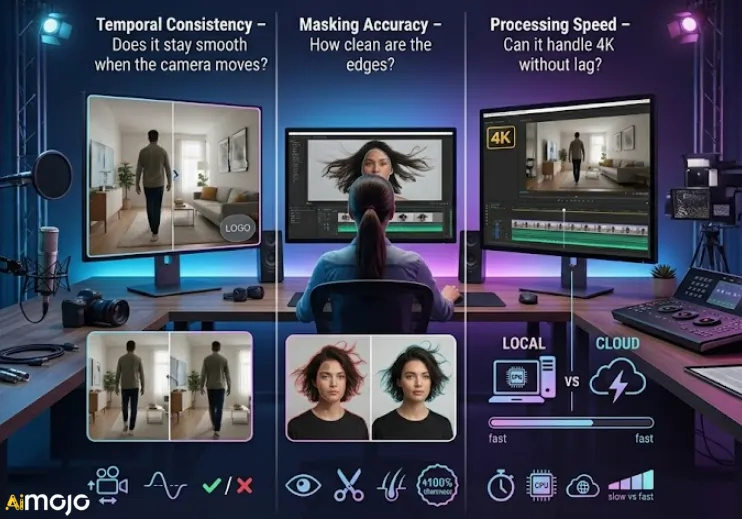
To find the most reliable select-and-edit AI tools for precise video modifications, prioritize these core technical benchmarks:
Platforms that balance these factors save hours of manual post-production work. Understanding these benchmarks makes it easier to compare the leading software options available today.
The Future of Select-and-Edit Video Editing with AI
Editing moving footage used to mean losing entire afternoons to manual masking and keyframes. Today, leaning on select-and-edit AI tools for precise video modifications simply removes that technical friction from your day.
You no longer need advanced visual effects training to clean up a messy background or adjust a single subject in a busy frame. The software quietly absorbs the tedious work, giving you back the time to focus on your actual story. It is a quiet shift in production that lets the editing process finally feel like art again instead of a chore.
AiMojo 추천:

 보너스: $200를 받으세요AI 가입하시면 "마스터리 툴킷"을 무료로 드립니다!