메타의 융합's Microsoft가 포함된 Llama 4 모델's AutoGen 프레임워크는 스마트하고 효율적인 제작을 위한 새로운 가능성을 열어줍니다. AI 에이전트. 이러한 기술을 결합하면 개발자는 자연어 처리, 이미지 이해, 복잡한 문제 추론, 다른 에이전트와의 협업을 통해 작업을 완료할 수 있는 애플리케이션을 구축할 수 있습니다.
라마 4 인상적인 멀티모달 기능과 광범위한 컨텍스트 창을 제공합니다. 자동 생성 협업 워크플로에서 여러 에이전트를 조율하기 위한 체계적인 프레임워크를 제공합니다. 이러한 프레임워크는 차세대를 위한 강력한 툴킷을 형성합니다. AI 분야의 다양한 어플리케이션에서 사용됩니다.
이 가이드는 다음 과정을 안내합니다. 건물 AI 이러한 도구를 사용하는 에이전트모든 기술 수준의 개발자를 위한 실용적인 코드 예제와 구현 전략을 제공합니다.
What Makes 라마 4 자동 생성 완벽한 조합?
메타's 라마 4 가족은 눈에 띄다 AI 세계와 함께 네이티브 멀티모달 기능 초기 융합 접근 방식입니다. AutoGen과 결합하면Microsoft's 대화형 다중 에이전트 시스템 구축을 위한 프레임워크—개발자는 다음을 생성할 수 있습니다. AI 효율적으로 추론하고, 협업하고, 적응하는 에이전트.
Scout 및 Maverick 변형을 포함한 Llama 4 모델은 다음을 제공합니다. 초기 융합 다중 모드 처리 텍스트, 이미지, 비디오 프레임을 처음부터 단일 토큰 시퀀스로 처리하는 기능입니다. 이 기능은 AutoGen과 함께 사용할 경우's 유연한 에이전트 아키텍처를 통해 다음을 생성할 수 있습니다. AI 시스템 할 수 있는 것:
하자's 클라이언트 요구 사항을 분석하고 맞춤형 작업 제안서를 생성하는 프로젝트 제안서 생성기를 만들어 이러한 역량을 보여주는 실용적인 다중 에이전트 시스템을 구축합니다.
실용적인 것을 구축하다 AI 에이전트 시스템
하자's 프리랜서가 맞춤형 작업 제안서를 작성할 수 있도록 지원하는 다중 에이전트 시스템을 구축합니다. 저희 시스템은 다음과 같은 기능을 제공합니다.
- 클라이언트 요구 사항 수집
- 프리랜서 자격을 수집하세요
- 적절한 가격으로 전문적인 제안을 작성하세요.
0단계: 환경 설정
먼저, 필요한 패키지를 설치합니다.
파이썬
pip install autogen-agentchat~=0.2
pip로 ipython 설치
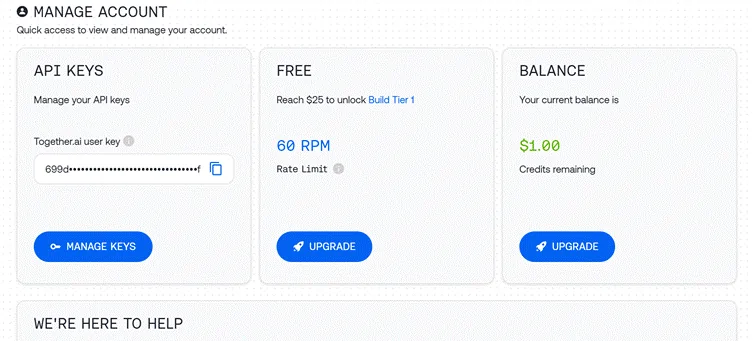
1단계: API 액세스 구성
Together API를 사용하여 Llama 4에 접근합니다.
python

import os

import autogen

from IPython.display import display, Markdown

# Load API key from file

with open("together_ai_api.txt") as file:

    LLAMA_API_KEY = file.read().strip()

os.environ["LLAMA_API_KEY"] = LLAMA_API_KEY

# Configure LLM settings

llm_config = {

    "config_list": [

        {

            "model": "meta-llama/Llama-4-Scout",  # Use Scout for efficiency

            "api_key": os.environ.get("LLAMA_API_KEY"),

            "base_url": "https://api.together.xyz/v1",

        }

    ],

    "temperature": 0.2,  # Lower for more consistent outputs

    "timeout": 180

}
2단계: 전문 에이전트 생성
우리 시스템에는 특정 역할을 하는 세 가지 에이전트가 필요합니다.
클라이언트 입력 에이전트
python

# Agent 1: Interfaces with the human user

client_agent = autogen.UserProxyAgent(

    name="Client_Input_Agent",

    human_input_mode="ALWAYS",  # Always gets input from human

    max_consecutive_auto_reply=1,

    is_termination_msg=lambda x: x.get("content", "").rstrip().endswith("TERMINATE"),

    system_message="""Act as the primary contact between the human user and other agents.

    First, collect initial project details (requirements, timeline, budget).

    When asked questions by the Scope Architect, relay user's answers about skills and experience.

    Type TERMINATE when the proposal is satisfactory or the user wants to stop."""

)
이 에이전트는 인간 사용자와 AI 시스템, 정보 수집 최종 결과물을 발표합니다.
범위 설계자 에이전트
python

# Agent 2: Analyzes requirements and asks qualifying questions

scope_architect_agent = autogen.AssistantAgent(

    name="Scope_Architect",

    llm_config=llm_config,

    max_consecutive_auto_reply=1,

    system_message="""You are a Scope Architect who analyzes project requirements.

    After receiving initial details from Client_Input_Agent, ask targeted questions about:

    - The freelancer's relevant past projects and experience

    - Their key skills and tools for this specific project

    - Estimated completion time for the described work

    Once you have sufficient information, create a concise summary of BOTH

    the project requirements AND freelancer qualifications for the Rate Recommender."""

)
범위 설계자는 요구 사항 분석가 역할을 하며 정확한 제안에 필요한 중요한 정보를 수집합니다.
요금 추천 에이전트
python

# Agent 3: Creates structured proposal with pricing

rate_recommender_agent = autogen.AssistantAgent(

    name="Rate_Recommender",

    llm_config=llm_config,

    max_consecutive_auto_reply=1,

    system_message="""Generate professional project proposals based on gathered information.

    Wait for the Scope Architect's complete summary before proceeding.

    Include these sections in your proposal:

    1. Custom Introduction: Personalized greeting referencing client and project

    2. Project Scope & Timeline: Clear deliverables with timeline estimates

    3. Pricing Options: 2-3 tiers (hourly/fixed/retainer) with justification

    4. Next Steps: Brief suggestion for kickoff discussion

    Format using proper markdown. Avoid commentary - deliver only the final proposal."""

)
이 에이전트는 수집된 정보를 구조화된 제안서로 변환하여 최종 결과물을 생성합니다.
3단계: 헬퍼 에이전트 만들기(선택 사항)
python

# Optional helper to initiate the conversation

user_proxy = autogen.UserProxyAgent(

    name="user_proxy",

    max_consecutive_auto_reply=1,

    llm_config=llm_config,

    system_message="Initiate the conversation between agents."

)
4단계: 그룹 채팅 설정
이제 에이전트가 협업할 수 있는 대화 환경을 만들어 보겠습니다.
python

# Group Chat Configuration

groupchat = autogen.GroupChat(

    agents=[client_agent, scope_architect_agent, rate_recommender_agent],

    messages=[],

    max_round=4,  # Prevent infinite loops

    speaker_selection_method="round_robin",  # Orderly participation

)

# Conversation Manager

manager = autogen.GroupChatManager(

    groupchat=groupchat,

    llm_config=llm_config,

    system_message="""Direct the conversation flow through these steps:

    1. Client_Input_Agent shares project details

    2. Scope_Architect asks qualifying questions

    3. Client_Input_Agent provides freelancer information

    4. Scope_Architect summarizes all information

    5. Rate_Recommender creates the final proposal

    End when the proposal is complete or Client_Input_Agent says TERMINATE."""

)
이러한 구성은 명확한 역할과 책임을 통해 체계적인 대화 흐름을 보장합니다.
5단계: 대화 시작하기
하자's 에이전트 워크플로우를 시작합니다.
python

# Begin the proposal generation process

print("Starting the proposal generation process...")

print("Please provide project details when prompted.")

initial_message = """

Begin the proposal creation process:

1. First collect project details from the user

2. Then gather freelancer qualifications

3. Finally generate a professional proposal

"""

user_proxy.initiate_chat(

    manager,

    message=initial_message

)
6단계: 최종 제안서 추출
대화가 완료되면 최종 제안을 추출하여 표시합니다.
python

# Find and display the proposal

chat_history = manager.chat_messages[client_agent]

final_proposal = None

for msg in reversed(chat_history):

    if msg.get("role") == "assistant" and msg.get("name") == rate_recommender_agent.name:

        if "Introduction" in msg.get("content", ""):

            final_proposal = msg

            break

if final_proposal:

    proposal_text = final_proposal.get("content", "Proposal not found.")

    try:

        display(Markdown(proposal_text))

    except NameError:

        print("\n--- FINAL PROPOSAL ---\n")

        print(proposal_text)

else:

    print("Could not find the final proposal in the conversation.")
더 나은 건물을 위한 향상된 기술 AI 중개인

기본 구현이 잘 작동하지만 여기에는 다음을 구현하기 위한 몇 가지 고급 접근 방식이 있습니다. AI 더욱 강력한 에이전트:
A.외부 도구 통합
AutoGen의 강점 중 하나는 상담원에게 외부 도구를 제공할 수 있다는 점입니다. 다음은 요금 추천 도구에 시장 조사 기능을 추가하는 방법입니다.
python

# Define function for market research

def research_market_rates(job_type, experience_level):

    """Access external data for pricing information"""

    # This would typically connect to an API or database

    # Using simple dictionary for demonstration

    rate_data = {

        "web_development": {

            "beginner": "$30-50/hr",

            "intermediate": "$50-90/hr",

            "expert": "$90-200/hr"

        },

        "data_analysis": {

            "beginner": "$25-45/hr",

            "intermediate": "$45-85/hr",

            "expert": "$85-180/hr"

        }

    }

    # Retrieve appropriate rate range

    try:

        return rate_data[job_type][experience_level]

    except KeyError:

        return "Rate information not available for this combination"

# Configure LLM with function

rate_recommender_config = {

    **llm_config,

    "functions": [

        {

            "name": "research_market_rates",

            "description": "Find current market rates for specific job types and experience levels",

            "parameters": {

                "type": "object",

                "properties": {

                    "job_type": {

                        "type": "string",

                        "enum": ["web_development", "data_analysis", "content_writing", "graphic_design"]

                    },

                    "experience_level": {

                        "type": "string",

                        "enum": ["beginner", "intermediate", "expert"]

                    }

                },

                "required": ["job_type", "experience_level"]

            }

        }

    ]

}

# Update the Rate Recommender with function capabilities

rate_recommender_agent = autogen.AssistantAgent(

    name="Rate_Recommender",

    llm_config=rate_recommender_config,

    system_message="""Generate proposals with accurate market-based pricing.

    Use the research_market_rates function to get current pricing information."""

)

# Register the function with the agent

rate_recommender_agent.register_function(

    function_map={"research_market_rates": research_market_rates}

)
이러한 개선을 통해 가격 추천자는 외부 가격 데이터에 접근하여 제안을 더욱 정확하고 경쟁력 있게 만들 수 있습니다.
B. 지속적 메모리 구현
메모리 기능을 추가하면 에이전트가 여러 상호 작용에서 컨텍스트를 유지하는 데 도움이 됩니다.
python

# Create a simple memory system for agents

class AgentMemory:

    def __init__(self):

        self.memories = {}

    def store(self, agent_name, key, value):

        """Save information to agent memory"""

        if agent_name not in self.memories:

            self.memories[agent_name] = {}

        self.memories[agent_name][key] = value

    def retrieve(self, agent_name, key=None):

        """Get information from agent memory"""

        if agent_name not in self.memories:

            return None

        if key:

            return self.memories[agent_name].get(key)

        else:

            return self.memories[agent_name]

# Initialize memory

memory = AgentMemory()

# Example of storing client information

def process_client_input(message):

    """Extract and store client information"""

    # This would typically use more sophisticated parsing

    if "budget:" in message.lower():

        budget = message.split("budget:")[1].strip().split("\n")[0]

        memory.store("client", "budget", budget)

    if "timeline:" in message.lower():

        timeline = message.split("timeline:")[1].strip().split("\n")[0]

        memory.store("client", "timeline", timeline)

    return message

# Add memory hook to client agent

def memory_hook(recipient, messages, sender, config):

    """Process and store incoming messages"""

    if sender.name == "Client_Input_Agent" and messages:

        process_client_input(messages[0].get("content", ""))

    return False, None  # Continue normal processing

# Register the hook

client_agent.register_hook("memory_hook", memory_hook)
이 메모리 시스템은 상담원이 최근 메시지에서 명확하게 언급되지 않은 경우에도 대화 전체에서 중요한 정보를 기억하는 데 도움이 됩니다.
제안 생성을 넘어서는 실용적 응용 프로그램
우리가 구축한 아키텍처는 다양한 다른 비즈니스 시나리오에도 적용될 수 있습니다.
A. 콘텐츠 제작 파이프라인
콘텐츠 제작 워크플로를 처리하도록 에이전트를 수정합니다.
B. SEO 분석 시스템
다음 에이전트와 함께 전문 SEO 도구를 만들어 보세요.
C. 고객 지원 자동화
아키텍처를 지원 시스템으로 변환:
성능 최적화 팁
생산 준비를 위해 AI 에이전트 시스템:
- 스마트 모델 선택: 간단한 작업(섭취, 라우팅)에는 가벼운 모델을 사용하고 복잡한 추론(제안 작성, 가격 책정)에는 더 큰 모델을 사용합니다.
- 캐싱 구현: API 호출을 줄이고 응답 시간을 개선하기 위해 자주 발생하는 응답을 저장합니다.
python

# Simple cache implementation

response_cache = {}

def get_cached_response(query_key, generator_function, ttl=3600):

    """Get cached response or generate new one"""

    if query_key in response_cache:

        timestamp, response = response_cache[query_key]

        if time.time() - timestamp < ttl:

            return response

    # Generate fresh response

    new_response = generator_function()

    response_cache[query_key] = (time.time(), new_response)

    return new_response
일괄 처리: 독립적인 작업의 경우 순차적으로 처리하는 대신 병렬로 처리합니다.
python

import asyncio

async def run_parallel_research():

    task1 = asyncio.create_task(research_agent.async_run("Research topic A"))

    task2 = asyncio.create_task(research_agent.async_run("Research topic B"))

    task3 = asyncio.create_task(research_agent.async_run("Research topic C"))

    results = await asyncio.gather(task1, task2, task3)

    return results
Llama 4의 기술적 우위 AI 중개인
라마 4's 특정 기능으로 인해 에이전트 애플리케이션에 특히 적합합니다.
- 초기 퓨전 멀티모달 아키텍처 이전에는 모달리티를 분리해서 다루었던 방식과 달리, 에이전트가 텍스트와 이미지를 자연스럽게 함께 처리할 수 있게 해줍니다.
- 전문가 혼합 디자인 모델이 각 작업에 대해 관련 매개변수만 활성화할 수 있으므로 응답이 더 빠르고 정확해집니다.
- 뛰어난 장문맥 처리 (스카우트에서 최대 10M 토큰)을 사용하면 에이전트가 일관성을 잃지 않고 대화 내역을 유지하고 긴 문서를 참조할 수 있습니다.
- 다국어 기능 공식적으로 지원되는 12개 언어로 에이전트를 전 세계 사용자가 사용할 수 있습니다.
hes, 당신은 만들 수 있습니다 AI 요청을 이해하고 응답할 뿐만 아니라 복잡한 문제를 해결하기 위해 적극적으로 협업하는 에이전트는 진정한 차세대를 대표합니다. AI 어플리케이션.
자주 묻는 질문
Llama 4는 다른 언어 모델과 무엇이 다릅니까?
Llama 4는 다중 모드 처리를 위한 초기 융합 접근법과 효율성을 위한 희소 혼합 전문가 아키텍처를 사용합니다. 텍스트, 이미지, 비디오를 단일 토큰 시퀀스로 처리하고 각 입력에 대해 관련 "전문가" 하위 모델만 활성화합니다.
AutoGen은 Llama 4 이외의 LLM에서도 작동할 수 있나요?
예, AutoGen은 모델에 구애받지 않으며 Open을 포함한 다양한 LLM과 함께 작동할 수 있습니다.AI 모델, Anthropic 모델 및 Mistral과 같은 기타 오픈 소스 모델 AI 또는 딥시크.
건물을 짓는다 AI 에이전트에게 고급 프로그래밍 기술이 필요한가요?
꼭 그럴 필요는 없습니다. 기본적인 Python 지식과 LLM에 대한 이해만 있으면 에이전트 워크플로를 설정하고 실행할 수 있습니다. AutoGen은 여러 에이전트를 생성하고 조정하는 과정을 간소화합니다.
이것들이 가능합니까? AI 에이전트가 로컬 하드웨어에서 실행되나요?
네, AutoGen은 Ollama와 같은 도구를 통해 로컬 LLM과의 통합을 지원하므로 사용자가 자신의 하드웨어에서 에이전트를 실행할 수 있습니다.
프로덕션 환경에서 API 키를 안전하게 처리하려면 어떻게 해야 하나요?
API 키를 코드 대신 환경 변수나 보안 저장소에 저장하세요. 프로덕션 배포에는 적절한 인증 및 암호화를 사용하세요.
사용자 정의 도구와 API를 사용하여 에이전트를 확장할 수 있나요?
물론입니다. AutoGen을 사용하면 상담원을 외부 API, 데이터베이스 및 맞춤형 도구에 연결하여 다양한 시스템 및 서비스와 상호 작용할 수 있습니다.
추천 자료 :
맺음말
건물 AI Llama 4와 AutoGen을 갖춘 에이전트는 복잡한 작업을 처리할 수 있는 지능형 협업 시스템을 구축할 수 있는 흥미로운 가능성을 열어줍니다. 라마 4's 다중 모달 인텔리전스 및 AutoGen's 유연한 에이전트 프레임워크 개발자에게 강력한 도구를 제공합니다. AI 추론하고, 협업하고, 다양한 시나리오에 적응할 수 있는 에이전트입니다.
다중 에이전트 제안 생성기 프로젝트는 이러한 기술의 실제 적용 사례 중 하나를 보여줍니다. 동일한 원리를 다음에도 적용할 수 있습니다. 빌드 AI 콘텐츠 제작 에이전트, 데이터 분석, 고객 서비스, 연구, 프로젝트 관리 등 다양한 분야에서 활동합니다.
당신이 당신 자신의 것을 구축하면서 AI Llama 4와 AutoGen을 사용하는 에이전트의 경우 다음의 핵심 원칙을 기억하세요.


 보너스: $200를 받으세요AI 가입하시면 "마스터리 툴킷"을 무료로 드립니다!