

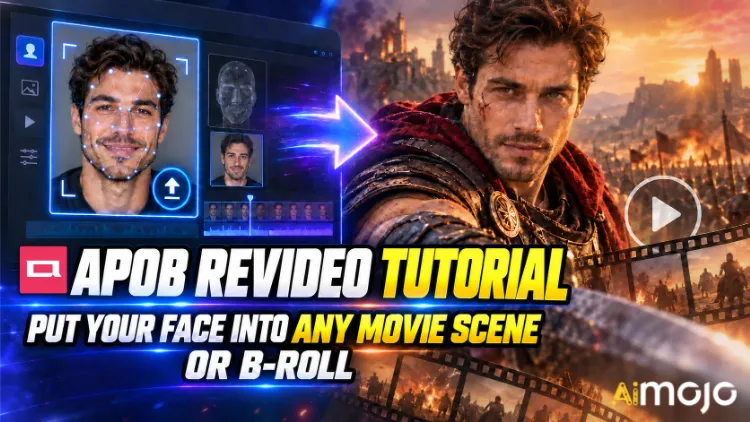
여러분도 그 영상들을 보셨을 거예요. 누군가's 마치 스릴러 영화 속 슬로우 모션 복도를 걷는 듯한 얼굴. 뜬금없이 등장한 정체불명의 크리에이터가 수십만 달러가 넘는 촬영비가 투입된 듯한 자동차 광고에 출연한다. 누구도 레드 카메라를 빌리지 않았고, 촬영 장소를 예약하지도 않았을 것이다.
APOB ReVideo는 그런 게시물들의 핵심 기능 중 하나입니다. 짧은 영상 클립과 참고 이미지 하나를 업로드하고 '생성' 버튼을 누르면 영상 속 인물이 여러분의 캐릭터로 대체됩니다. 걸음걸이, 손짓, 카메라 앵글, 배경까지 모두 그대로 유지됩니다. 연기도 그대로이고, 얼굴과 몸짓만 바뀝니다.
이것은 고개를 돌릴 때마다 흔들리는 얼굴 합성 필터가 아닙니다. APOB AI's ReVideo는 WAN 2.2 애니메이트 스타일 모션 전송 방식을 사용합니다. 즉, 원본 클립을 모션 골격으로 읽어 그 위에 새로운 연기자를 재구성합니다. 이는 큰 차이이며, 댄스 클립을 처음 테스트해 보면 바로 느낄 수 있을 것입니다.
아래는 실제 작업 과정, 아무도 미리 알려주지 않는 크레딧 계산 방식, 작업 오류를 일으키는 소스 클립, 그리고 흐릿한 렌더링 이미지를 편집 가능한 수준으로 끌어올리는 수정 과정입니다.
요약 — 30초 버전
| 문제 | 직접적인 답변 |
|---|---|
| 그것은 무엇을합니까? | 기존 영상의 등장인물을 본인의 얼굴로 바꿔줍니다. AI 모델, 동작은 그대로 |
| 그 뒤에 있는 엔진 | Wan 2.2 애니메이트(모션 + 아이덴티티 전송) |
| 업로드하는 내용 | 짧은 소스 영상 1개 + 참고 이미지 1개 |
| 비용 | 출력 1초당 약 26크레딧 |
| 무료 액세스 | 매일 80 크레딧 무료 제공 = 하루 약 3초 소요, 카드 필요 없음 |
| 클립 길이 | 짧은 영상이 대세입니다. 업로더를 확인하세요.'s 긴 파일을 신뢰하기 전에 제한 사항을 설정하세요. |
| 베스트 | 영화 장면 편집, B-롤 삽입, 사용자 제작 콘텐츠 광고, 댄스 트렌드, 익명 채널 |
| 필요한 기술 | 0점. 파일을 업로드할 수 있다면 자격이 충분합니다. |
APOB ReVideo는 실제로 무엇일까요?
ReVideo는 ~ 안에 있습니다. APOB AI 비디오 작업 공간 이미지-비디오 변환, 카메라 움직임, 말하는 아바타와 함께 립싱크이 기능을 "다른 출연진으로 이 영상을 다시 촬영하는" 모듈이라고 생각하시면 됩니다.
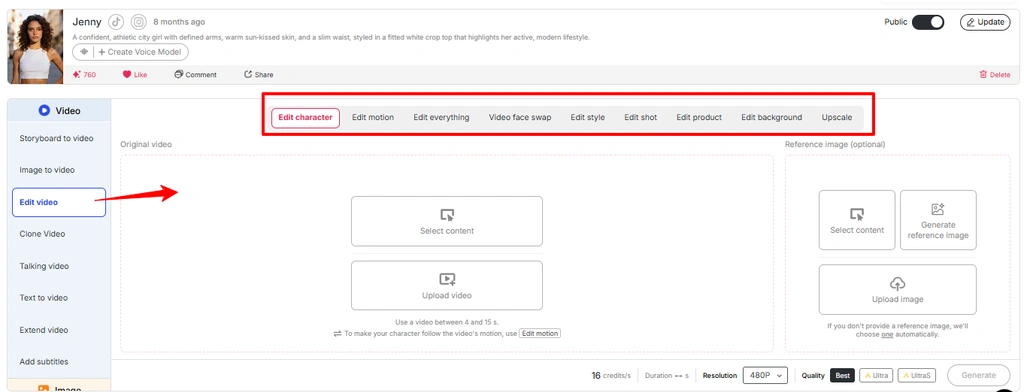
한 건물 안에서 여러 가지 업무를 처리할 수 있습니다.
간단히 말하자면, APOB ReVideo는 텍스트 입력만으로 완전히 새로운 영상을 만들어내는 것이 아니라, 이미 가지고 있는 영상을 재처리하는 프로그램입니다. 그래서 결과물이 더욱 현실적으로 느껴지는 것입니다. 실제 영상 클립에서 물리적인 효과를 빌려오는 것이죠.
참고: APOB의 최신 인터페이스에서는 많은 비디오 편집 워크플로가 '비디오 편집' 메뉴 안에 포함되어 있습니다 . 'ReVideo'가 별도의 옵션으로 표시되지 않으면 '비디오 편집' 섹션에서 동일한 워크플로를 이용하세요.
텍스트-비디오 변환보다 모션 전송이 더 나은 이유는 무엇일까요?
텍스트를 영상으로 변환하는 기능은 분위기 표현에는 탁월하지만, 구체적인 동작을 구현하는 데는 형편없습니다. 프롬프트 기반 생성기에 "남자가 빙글빙글 돌면서 카메라를 가리키고 3박자에 맞춰 씩 웃는다"라고 입력하면, 결과는 20번이나 무작위로 결정될 겁니다. 하지만 ReVideo는 이런 무작위 과정을 완전히 생략합니다. 3박자에 맞춰 짓는 씩 웃는 표정이 이미 소스 파일에 포함되어 있기 때문입니다. 모델은 그저 그 표정을 재현할 뿐입니다.
미디어 "APOB AI 비디오 편집 기능"의 이미지를 사용하고 대체 텍스트를 "APOB 비디오 편집 기능에서 모션 편집"으로 변경하세요.
효과적인 후크 구조 하나를 찾아낸 크리에이터들에게는 이것이 전부입니다. 성공적인 클립 하나가 10가지 다른 모습으로 10가지 변형으로 만들어지는 것이죠.

생성 버튼을 누르기 전에: 준비 사항 체크리스트
그's 타임라인도, 키프레임도, 마스킹도, 로토스코핑도 필요 없어요.
단계별 안내: APOB ReVideo 튜토리얼
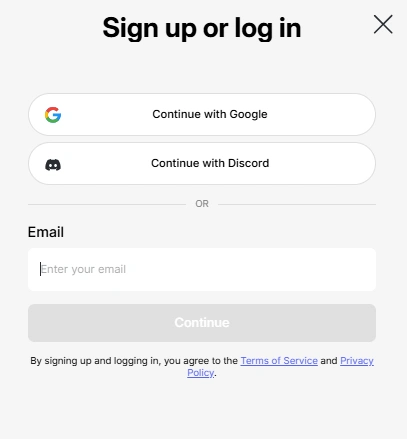
단계 — 로그인하고 무료 크레딧을 받으세요
머리로 APOB AI 앱 로그인하세요. 매일 지급되는 80 크레딧이 자동으로 계정에 적립됩니다. 초당 약 26 크레딧이 적립되므로,'s 하루에 약 3초 정도의 ReVideo 무료 출력 시간이 제공됩니다. 이는 한 번의 제대로 된 테스트에는 충분하지만, 여러 번 테스트하기에는 부족합니다. 예산을 적절히 조정하세요.
👉 꿀팁: APOB는 활발한 디스코드 서버를 운영하고 있습니다. 새로운 기능 출시 때마다 자신이 만든 클립을 커뮤니티에 공유하는 크리에이터들에게 약 1,000 보너스 크레딧을 지급합니다. 콘텐츠 제작을 계획하고 있다면, 이는 엄청난 기회가 될 수 있습니다.
단계 — 캐릭터 생성 또는 업로드
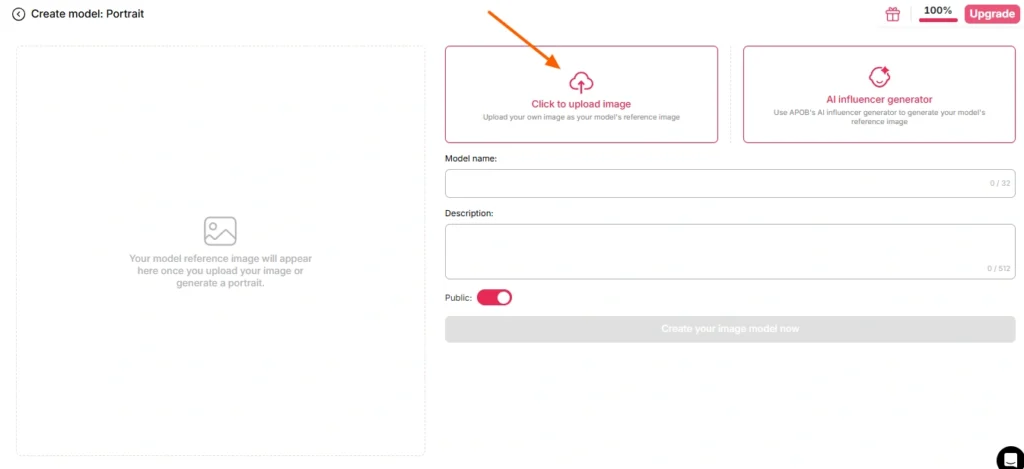
여기에는 두 가지 길이 있습니다:
방법 A — 본인의 얼굴을 사용하세요. 선명하고 정면으로 잘 나온 밝은 사진을 업로드하세요. 선글라스, 짙은 그림자, 움직임으로 인한 흐림 현상, 모델이 누구인지 추측해야 하는 단체 사진은 안 됩니다.
경로 B — 구축하기 AI 먼저 모델을 만드세요. 인물 모델 생성 섹션으로 이동하여 페르소나를 생성하세요. AI 인플루언서 생성기. 성별, 나이, 국적, 머리색, 눈 색깔, 의상을 설정하세요. 정기적인 채널을 운영하는 사람이라면 APOB 때문에 이 방법이 훨씬 더 스마트합니다.'s 페이스락 기능은 수백 개의 향후 렌더링 이미지 전반에 걸쳐 일관된 정체성을 유지합니다. 하나의 캐릭터, 무한한 클립, 알아보기 쉬운 브랜드.
참조 이미지를 아예 입력하지 않으면 APOB는 저장된 이미지를 기본값으로 사용합니다. AI 모델 이미지. 편리하고, 때로는 놀랍기도 합니다.
단계 — 소스 영상 선택
이 단계가 최종 결과물의 품질을 80% 결정합니다. 모델이나 설정이 아니라, 바로 원본 영상 클립 때문입니다.
| 소스 클립 특성 | 결과 |
|---|---|
| 선명한 단일 피사체, 중앙 프레임 | ✅ 깨끗한 교체 |
| 전 구역 안정적인 조명 | ✅ 균일한 피부톤 |
| 눈에 보이는 신체 움직임 | ✅ 동작이 제대로 인식됩니다 |
| 피사체가 사물 뒤를 따라 걷는다 | ⚠️ 폐색 아티팩트 |
| 빠른 패닝, 강한 흐림 효과 | ❌ 정체성의 변화 |
| 빽빽하게 들어찬 화면, 여러 사람 | ❌ 모델이 잘못된 목표를 선택했습니다 |
| 저해상도, 압축, 4배 재업로드 | ❌ 버섯 |
본인이 촬영한 영상이 없으신가요? APOB's 내장된 생성기(나만의 영상 만들기, 전체 세트, 전문가 모드, 이미지-비디오 변환)를 사용하여 ReVideo에 바로 입력할 수 있는 클립을 생성할 수 있습니다. 하나의 플랫폼에서 완벽한 루프 재생이 가능합니다.
단계 — ReVideo를 실행하고 두 파일을 모두 불러오세요.
왼쪽 사이드바 → 비디오 탭 → ReVideo.
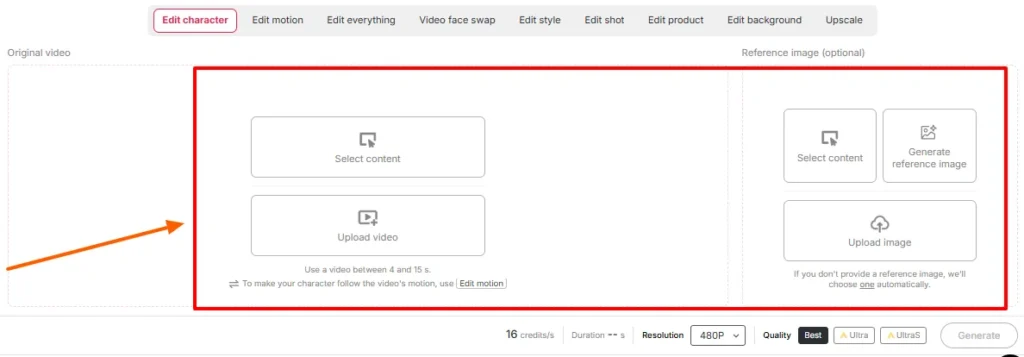
언제든 방문하세요:
화면의 재생 시간 및 화질 설정을 확인하세요. 작업 공간에 당일 표시되는 재생 시간 제한을 확인하세요. — APOB's 초기 ReVideo 출시 당시에는 클립 길이가 약 5초로 제한되었지만, WAN 기반의 최신 페이지들은 훨씬 더 긴 파일도 지원한다고 광고합니다. 업로더의 말은 사실입니다. 블로그 게시물은 출시보다 늦게 업데이트됩니다.
단계 — 생성 및 대기
생성 버튼을 누르세요. 모델은 배경을 고정한 상태로 유지하면서 참조 데이터를 소스 성능에 매핑합니다.
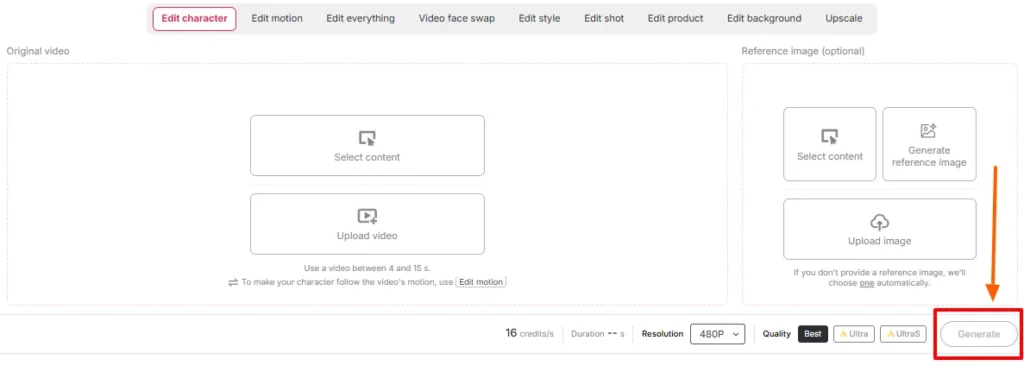
클립 길이와 화질 등급에 따라 렌더링 시간이 달라집니다. 새로 고침하지 마세요. 동일한 크레딧에 대해 두 번째 작업을 급하게 생성하지 마세요.
단계 — 나란히 놓고 검토하기
원본과 출력 결과를 나란히 재생해 보세요. 특히 다음 사항을 확인하세요.
뭔가 있다면's 문제가 발생하면 거의 항상 상위 단계, 즉 참조 이미지를 바꾸거나 소스에서 더 깨끗한 부분으로 잘라내는 방식으로 해결해야 합니다. 동일한 입력을 다시 촬영하는 것은 잘못된 조합을 해결하는 데 거의 도움이 되지 않습니다.
다음 단계 - 나머지 스택을 완성하세요
ReVideo의 원본 출력물은 구성 요소일 뿐, 완성된 후처리 결과물이 아닙니다. 스택하세요:
영화 장면과 B-Roll 영상: 완전히 다른 두 가지 접근 방식
이 둘은 비슷하게 들리지만, 작동 방식은 전혀 다릅니다.
플레이북 A — 영화 장면 삽입
영화 같은 영상은 색 보정, 극적인 조명 처리, 그리고 보통 얕은 심도를 가진 망원 렌즈를 사용하여 촬영됩니다.'s 선물인 동시에 함정이기도 하다.
이 작업을 수행:
피해야 할 것: 빠른 편집의 액션 장면, 과도한 연기 효과, 극단적인 실루엣, 피사체가 화면 밖으로 반쯤 나간 장면.
플레이북 B — B-롤 드롭인
B-roll은 숨겨진 활용 분야이며, 솔직히 말해서 대부분의 수익이 발생하는 부분입니다. 스톡 영상 스타일의 푸티지 , 예를 들어 사무실을 걷는 사람, 제품 개봉기, 창가에서 커피를 마시는 사람, 카메라를 향해 휴대폰을 들고 있는 사람 등은 깔끔하고 조명이 고르며 피사체가 한 명뿐입니다. 사실상 인물 대체용으로 설계된 영상이라고 할 수 있죠.
이 작업을 수행:
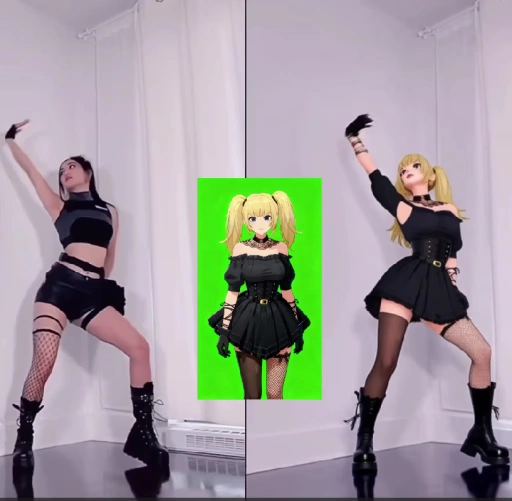
이것이 많은 작업의 기본 워크플로입니다. AI 현재 인플루언서 계정, 익명 채널, 제휴 제품 페이지를 운영하고 있습니다.
신용 계산: 실제 비용은 얼마일까요?
| 출력 길이 | 대략적인 크레딧 | 무료 티어의 현실 |
|---|---|---|
| 1 초 | ~ 26 | 안락한 |
| 3 초 | ~ 78 | 당신의 하루 허용량 전액 |
| 5 초 | ~ 130 | 2일 무료 이용 또는 유료 플랜이 필요합니다. |
| 10 초 | ~ 260 | 유료 지역 |
| 5 × 5s 변형 모음 | ~ 650 | 구독을 계획하세요 |
현실 점검: 무료 크레딧은 콘텐츠 캘린더 제작이 아닌 입력값 테스트용입니다. 참조 이미지 테스트를 각각 1초씩 실행해 보세요. 적절한 조합이 보이면 전체 길이 렌더링에 크레딧을 사용하세요.
ReVideo 사용 시 흔히 발생하는 오류와 빠른 해결 방법
| 무엇이 잘못 되었습니까 | 수정 | |
|---|---|---|
| 영상 중간에 얼굴이 정체를 바꿉니다. | 참고 이미지가 너무 작거나 각도가 기울어져 있습니다. | 정면에서 촬영한 고해상도 인물 사진을 다시 업로드하세요. |
| 머리카락 주변에 이상한 후광이 생겼어요 | 피사체 뒤의 복잡한 배경's 머리 | 분리도가 더 깔끔한 소스 클립을 선택하세요. |
| 손이 추상적으로 변한다 | 빠른 제스처 + 압축 | 동작의 느린 부분에 맞춰 다듬으세요 |
| 피부톤 불일치 | 기준 조명과 장면 조명의 충돌 | 유사한 조명 조건에서 참조 이미지를 재생성합니다. |
| 잘못된 사람이 바뀌었습니다 | 프레임 안에 여러 피사체가 있습니다. | 단일 피사체 클립을 자르거나 선택하세요. |
| 결과물이 마치 붙여넣기한 것처럼 느껴집니다. | 원본에는 실제 신체 움직임이 없었습니다. | 전신 움직임이 명확하게 보이는 영상을 사용하세요. |
| 출력 내용이 너무 짧아서 게시할 수 없습니다. | 신용 한도에 타격 | Video Extender를 사용하거나 두 개의 렌더링된 영상을 합치세요. |
APOB ReVideo가 일반적인 얼굴 바꾸기보다 나은 점은 무엇일까요?
| ReVideo가 승리하는 이유 | Basic AI 얼굴 스왑 | APOB 리비디오 |
|---|---|---|
| 변경 내용 | 얼굴 부위만 | 얼굴, 몸매, 옷차림, 전체적인 성격 |
| 모션 소스 | 원본 그대로, 손대지 않은 | 원본 연주를 보존하고 재현했습니다. |
| 신원 일관성 | 클립당, 변동 가능 | 라이브러리 전체에 걸쳐 페이스락 기능을 사용하세요 |
| 배경 제어 | 없음 | ReBackground 사용 가능 |
| 스타일 제어 | 없음 | ReStyle 사용 가능 |
| 내장 | 일회성 개그 | 반복 가능한 생산 파이프라인 |
얼굴 바꾸기는 웃긴 상황을 만들어주지만, ReVideo는 계속해서 활용할 수 있는 출연진을 제공합니다.
사람들이 지금 바로 실행하고 있는 실제 사용 사례
대부분의 튜토리얼에서 생략되는 부분: 동의, 저작권, 그리고 소송을 피하는 방법
영화 장면에 직접 얼굴을 넣는 건 재밌지만, 다른 사람을 출연시키는 건 재미없죠.'s 정면으로 맞서는 것과 스튜디오 영상을 재배포하는 것은 완전히 다른 상황입니다. 이 문제는 제대로 처리해야 합니다.
라이선스 스톡 B-roll 영상과 함께 AI 페르소나는 깔끔하고 확장 가능하며 상업적으로 안전한 조합입니다. 그곳에서 구축하세요.
실제 테스트를 통해 얻은 6가지 전문가 팁
- 확정하기 전에 1초 동안 테스트해 보세요. 이미지와 클립의 조합을 확인하는 가장 저렴한 방법.
- 인물 모델을 한 번만 만들면 영구적으로 재사용할 수 있습니다. 페이스락 일관성 이것이 바로 가상 인물이 팔로워를 얻는 가장 중요한 이유입니다.
- 수직 입력, 수직 출력. 가로 방향으로 렌더링한 이미지를 자르고 결과를 기대하지 마세요.
- 밝고 균일한 광원은 언제나 최고의 결과를 가져다줍니다. Moody의 등급은 보기에는 좋지만, 교환은 엉망입니다.
- 가장 마음에 드는 소스 클립을 템플릿으로 저장하세요. 매력적인 후크는 자산입니다. 매달 새롭게 다듬으세요.
- 크레딧 갱신일에 일괄 처리합니다. 무료 크레딧은 매일 초기화됩니다. 유료 렌더링을 실행하기 전에 일주일 동안 테스트를 진행하세요.
APOB ReVideo 관련 FAQ
APOB ReVideo는 무엇에 사용되나요?
APOB ReVideo는 기존 비디오의 등장인물을 사용자의 얼굴, 참고 이미지 또는 기타 이미지로 대체합니다. AI 인플루언서 모델의 원래 동작, 제스처, 카메라 흐름 및 배경을 그대로 유지하면서 촬영했습니다.'s 영화 장면 편집, B-roll 삽입, 사용자 제작 콘텐츠 광고, 댄스 트렌드 등에 사용됩니다. AI 인플루언서 콘텐츠.
APOB ReVideo는 무료인가요?
가's 무료 플랜은 매일 80크레딧이 지급되며 카드 정보는 필요하지 않습니다. 초당 약 26크레딧으로 계산하면 하루에 약 3초 분량의 영상을 제작할 수 있는데, 테스트용으로는 괜찮지만 프로덕션 용도로는 부족합니다. 유료 플랜을 이용하면 더 긴 영상이나 여러 영상을 한꺼번에 제작할 수 있습니다.
APOB ReVideo 클립의 최대 길이는 얼마입니까?
초기 버전에서는 몇 초 길이의 클립에 가장 적합했지만, 최신 WAN 기반 페이지에서는 더 긴 업로드도 지원합니다. 각 모델 업데이트에 따라 길이 제한이 변경되므로 작업 공간에 표시되는 길이 제한을 확인하세요.
제가 만들어야 하나요? AI 모델부터 먼저?
아니요. 참조 이미지를 직접 업로드할 수 있습니다. 하지만 인물 모델을 구축하면 향후 모든 렌더링에서 일관된 이미지를 유지할 수 있으며, 이는 정기 결제 계정을 운영하는 사용자에게 매우 중요합니다.
어느 AI 엔진이 APOB ReVideo에 동력을 공급하나요?
이 프로그램은 WAN 2.2 애니메이트 스타일 모션 전송을 기반으로 작동하며, 소스 클립의 움직임을 읽어와 처음부터 비디오를 생성하는 대신 해당 모션 구조를 기반으로 새로운 캐릭터를 재구성합니다.
APOB ReVideo는 배경도 바꿀 수 있나요?
네, ReBackground는 원본 위치가 편집 내용과 맞지 않을 때 장면을 교체하는 기능을 제공합니다. ReCharacter만 단독으로 사용하면 배경은 촬영 당시 그대로 유지됩니다.
애니메이션, 3D 렌더링, 그리고 인간이 아닌 캐릭터에도 적용 가능한가요?
그렇습니다. 일러스트 캐릭터, 3D 모델, 심지어 인형이나 피규어 참고 이미지까지도 대체 소재로 활용될 수 있어 스타일리시하고 마스코트 중심의 콘텐츠를 제작할 수 있습니다.
출력물이 흐릿하거나 왜곡되어 보이는 이유는 무엇인가요?
거의 대부분 원본 영상 문제입니다. 압축된 영상, 빠른 카메라 움직임, 가려진 피사체 또는 저해상도 참조 이미지가 결과물의 품질을 저하시킵니다. 다시 촬영하기 전에 입력 소스를 바꿔보세요.
APOB ReVideo 영상을 상업적으로 사용할 수 있나요?
일반적으로는 가능합니다. 단, 원본 영상 및 관련 인물에 대한 저작권을 보유하고 있어야 합니다. 라이선스를 취득했거나 소유한 영상을 기반으로 AI가 생성한 페르소나가 상업적으로 가장 안전한 방식입니다.
이것은 일반적인 것과 비교했을 때 어떤 차이가 있나요? AI 얼굴 바꾸기?
얼굴 바꾸기 프로그램은 얼굴 영역만 편집합니다. ReVideo는 원래 연기는 그대로 유지하면서 얼굴, 몸, 의상, 스타일 등 캐릭터 전체를 교체합니다.'s 전신 캐릭터 교체용으로 제작되었으며, 단일 프레임 개그용이 아닙니다.
제가 영화 장면에 출연하는 것이 합법적인가요?
개인적인 실험 목적이라면 일반적으로 괜찮습니다. 하지만 스튜디오에서 촬영한 영상을 수정하여 게시하거나 수익을 창출하는 것은 내용 교체 여부와 관계없이 저작권 문제가 되며, 다른 사람을 삽입하는 것 또한 마찬가지입니다.'s 동의 없이 얼굴을 사용하는 것은 별개의 법적 문제입니다. 라이선스가 있는 스톡 영상이나 공개 저작물 클립을 사용하면 이러한 문제를 피할 수 있습니다.
어떤 소스 클립이 가장 좋은 결과를 제공하나요?
단일 피사체, 중앙 프레임, 균일한 조명, 눈에 띄는 신체 움직임, 최소한의 가림, 그리고 적절한 해상도. 제품 시연, 워킹 앤 토크 장면, 댄스 클립은 일관되게 훌륭합니다.
최종 테이크
APOB ReVideo는 드문 경우입니다. AI 영상 품질은 모델보다는 사용자가 대부분 좌우하는 기능입니다. 깨끗한 단일 피사체 영상과 선명한 참고 이미지를 입력하면 바로 게시할 수 있는 결과물을 얻을 수 있습니다. 하지만 흐릿한 군중 영상과 새벽 2시에 찍은 셀카를 입력하면 예상대로 흐릿한 결과물이 나옵니다.
진정한 이점은 몇천 조회수를 얻게 해주는 일회성 영화 장면 편집 영상에 있는 것이 아닙니다.'s 생산 파이프라인: 하나의 일관된 AI 성격검증된 소스 클립 라이브러리 하나와, 크레딧이 허용하는 한 성공적인 포맷을 여러 번 재구성할 수 있는 기능.'s 얼굴 없는 채널, UGC 광고 대행사, 그리고 AI 인플루언서 계정은 실제로 2026년에도 활동할 것입니다.
무료 크레딧 80개로 시작하세요. 세 개의 참조 이미지를 각각 1초 간격으로 테스트해 보세요. 고개를 돌리는 동작에도 동일한 형태를 유지하는 이미지를 찾으세요. 그런 다음 해당 이미지의 크기를 조정하세요.
영상은 이미 존재합니다. 당신은 단지 등장인물만 바꾸는 것뿐입니다.'s 그것합니다.
AiMojo 추천:


 보너스: $200를 받으세요AI 가입하시면 "마스터리 툴킷"을 무료로 드립니다!




![상위 10개 헨트ai AI 가상 욕망을 경험하는 챗봇 [2026]](https://aimojo.io/wp-content/uploads/2024/03/Top-Hentai-AI-Chatbot--100x100.webp)

![최고 13 AI 제한 없는 채팅 포르노 게임 [2026]](https://aimojo.io/wp-content/uploads/2024/03/Best-AI-Chat-Porn-Games-100x100.webp)


