You're spending 3+ hours a day on tasks a machine could handle in 3 minutes. Copy-pasting data between apps. Manually sending follow-up emails. Formatting reports by hand. That's not a workflow — that's a grind.
This guide shows you exactly how to set up your first ノーコード AI ワークフロー from scratch — no developer, no script, no excuses. By the time you're done reading, you'll have a working automation you can run today.
What a No-Code AI Workflow Actually Does (It's Not What You Think)
Most people hear “AI ワークフロー” and picture something complex. It's ではありません。
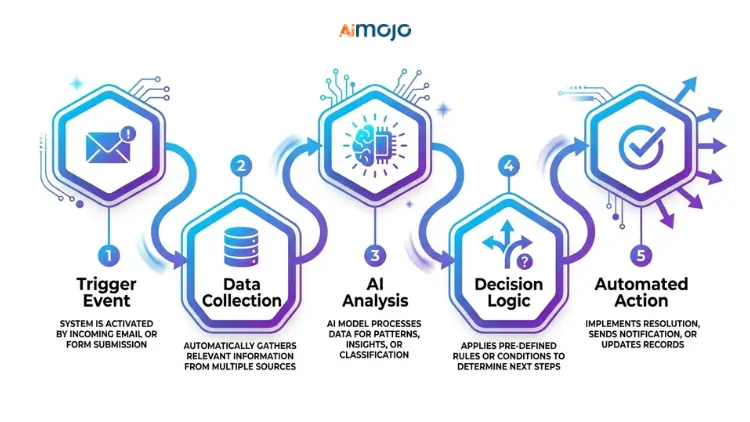
ノーコード AI workflow is a connected sequence of automated steps where an AI handles the thinking part — and a visual tool handles the plumbing. No terminal. No syntax errors. Just a drag-and-drop setup that connects your apps, fires an AI action, and routes the output wherever you need it.
The key difference between regular automation and AI オートメーション:
A trigger-action system in plain English looks like this: someone fills out your contact form → AI qualifies the lead → result gets dropped into your CRMは自動的に。 その's ノーコード AI workflow running silently in the background.
This Is for You If You're Still Doing These Tasks Manually
Before you pick a tool, check if you're in the right room:
If any of these hit, you're exactly who this guide is for. No coding background required.
The 5 Best No-Code AI Workflow Tools (Ranked for Beginners)
Picking the wrong tool here wastes hours. Here's 単純な比較:
| ツール | 以下のためにベスト | 無料プラン | AI 特長 |
|---|---|---|---|
| Zapier | App-to-app automation | ✅はい | Copilot (natural language setup) |
| メイクドットコム | Visual multi-step flows | ✅はい | AI modules + HTTP routing |
| n8n | Self-hosted advanced flows | ✅はい | LLM integrations, full flexibility |
| パブリーコネクト | Budget-friendly triggers | ✅はい | Basic AI 行動ステップ |
| バーディーン | ブラウザベース AI こすること | ✅はい | GPT-powered in-browser actions |
最初のものを作る AI Workflow in 6 Steps (Start to Finish)
This is the actual process — not a summary, a working system.
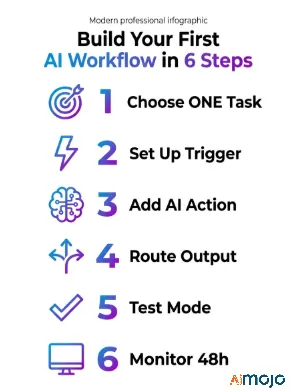
Step 1 — Choose ONE repetitive task to automate
Don't start with your entire business. Pick the single most annoying task you do daily. Something you could describe in one sentence: “Every time I get a new email inquiry, I manually copy the details into a spreadsheet.” それ's あなたのターゲット。
Step 2 — Set up your trigger
The trigger is what kicks the workflow off. It could be: a new form submission, an incoming email, a new row in Google Sheets, or a Slack message. In Zapier or Make.com, this is your first block.
Step 3 — Add your AI アクション
This is where the intelligence happens. Connect OpenAI (チャットGPT)、 Claude, or Gemini as an action step. Feed it the trigger data and write a clear prompt. Example: “Summarize this customer inquiry in 2 sentences and classify it as urgent, normal, or low-priority.”
Step 4 — Route the output
Tell your workflow where the AI's response should go — a Google Sheet column, a Slack channel, a draft email, or a ノーションのページ。 This is your final action block.
Step 5 — Test before going live
Every platform has a test mode. Run it. Check if the trigger fires, the AI response makes sense, and the output lands correctly. Fix prompt issues here, not after 200 live runs.
Step 6 — Monitor the first 48 hours
Turn it on and keep an eye on the execution logs. Most failures happen in the first two days — usually from APIの制限, formatting mismatches, or a vague prompt producing inconsistent outputs.
7 No-Code AI Workflows You Can Copy Right Now
Real use cases, not theory:
- Auto-summarize emails → send digest to Slack (great for busy inboxes)
- Google Form response → AI-written brief → saved to Notion
- New blog post published → AI generates 3 social captions → scheduled via Buffer
- Contact form submission → AI lead qualification → tagged in CRM
- Customer support ticket → AI categorization → routed to right team
- Weekly SEO data from Google Search Console → AI summary report → emailed every Monday
- Blog post → AI repurposing pipeline → LinkedIn article + Twitter thread + email newsletter draft
These are all buildable in Zapier or Make.com with free plans. Workflow #7 (the content repurposing pipeline) alone can save a content team 5+ hours per week.
5 Mistakes That Break Your First AI Workflow (And How to Fix Them)
Most beginners don't fail because the tool is hard — they fail because of these five things:
そこに's also a sixth mistake nobody talks about: treating the AI step like a magic box. The output quality is 100% tied to what goes in. If your trigger data is messy — inconsistent formatting, missing fields, mixed languages — the AI response will reflect that. Clean your input data first, then build the AI step around it. Garbage in, garbage out applies here harder than anywhere else.
Once Your First Workflow Runs — Here's What to Build Next
One working automation is proof of concept. Now you scale it.
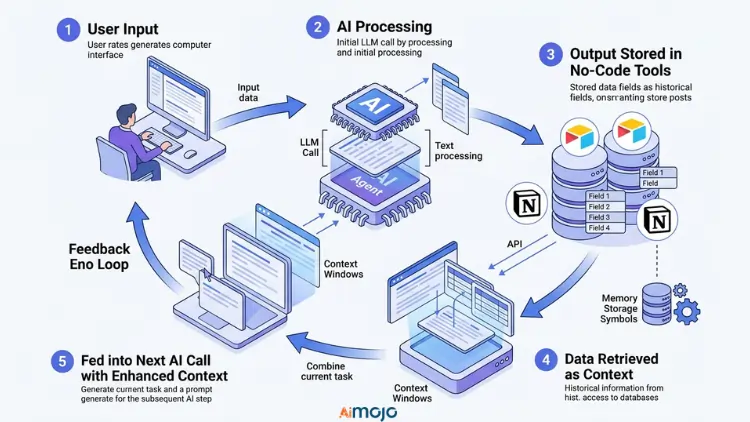
Connect multiple workflows into a full automation stack — where the output of one flow becomes the trigger for another. That's how you build real systems, not just single shortcuts.
When to upgrade from free to paid: once you hit consistent task limits or need multi-path conditional logic (Make.com's paid plans add significant branching power).
Adding memory and context to AI ステップ is the next level — instead of one-shot prompts, you store previous outputs in Airtable or Notion and feed them back into the next AI call. This is how you build a multi-step AI エージェント with no code that actually remembers context across runs.
The Full No-Code AI Toolkit (Everything You Need Bookmarked)
| カテゴリー | ツール |
|---|---|
| Workflow Builders | Zapier, Make.com, n8n, Pabbly Connect |
| AI コネクタ | 店は開いていますAI API, Claude API, Gemini API |
| データストレージ | Google Sheets, Airtable, Notion |
| Trigger Sources | Gmail, Typeform, Webhooks, Shopifyサービス |
| 監視 | Make.com Execution Logs, Zapier Task History |
People Also Ask: No-Code AI ワークフロー
Can I build an AI workflow with zero coding experience?
Yes. Tools like Zapier and Make.com are built specifically for non-technical users. If you can drag, drop, and fill out a form, you can build one.
Is Zapier good for AI オートメーション?
For beginners, absolutely. Zapier Copilot lets you describe your workflow in plain English and it builds the steps. It also has native ChatGPT and Claude integrations.
How much does it cost to run a no-code AI ワークフロー?
You can start free on both Zapier and Make.com. The main cost kicks in when you exceed free-tier limits or need premium app connections. Most small workflows run under $20/month.
この試験は's the difference between no-code automation and AI オートメーション?
Standard automation follows fixed rules. AI automation uses a language model to interpret, generate, or classify content — making it useful for tasks that aren't black-and-white.
Can no-code AI workflows replace a virtual assistant?
For structured, repeatable tasks — yes. For nuanced human judgment calls — not yet. They work best as a force multiplier alongside your team, not a full replacement.
Your First Workflow Should Be Running Before You Finish Reading This
Pick one task. Open Make.com or Zapier. Set a trigger, add a ChatGPT action step, route the output. Test it. That's ボーマンは
The biggest mistake isn't picking the wrong tool — it's waiting until everything feels “perfect” to start. Your first workflow will be rough. That's the point. Build it messy, test it, fix the prompt, and it'll work.
Copy the Email Summary + Slack Workflow Template


 ボーナス: 200ドルの「AI 登録すると「マスタリーツールキット」が無料になります!