

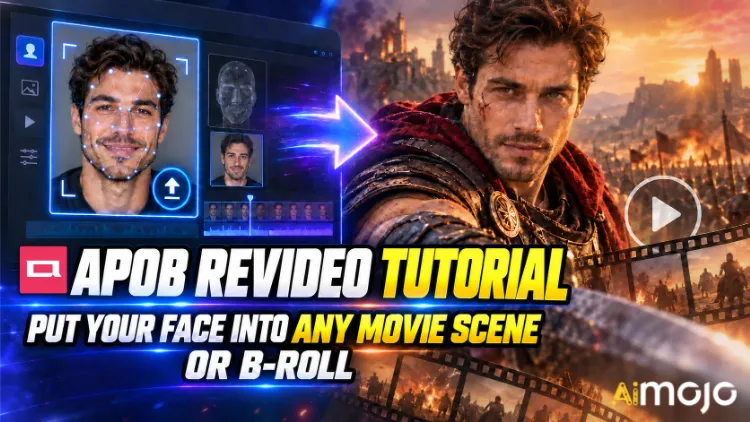
Hai visto quei video. Qualcuno's Un volto che cammina al rallentatore in un corridoio, come in un thriller. Un creatore di contenuti a caso che improvvisamente si ritrova protagonista di uno spot pubblicitario per auto, chiaramente costato centinaia di migliaia di euro. Nessuno ha noleggiato una telecamera RED. Nessuno ha prenotato una location.
APOB ReVideo è il pulsante che si cela dietro molti di quei post. Carica una breve clip, carica un'immagine di riferimento, clicca su "genera" e la persona nel filmato verrà sostituita dal tuo personaggio: stessa camminata, stessi gesti delle mani, stessa inquadratura, stesso sfondo. L'interpretazione rimane invariata. Cambiano solo il viso e il corpo.
Questo non è un filtro da incollare sul viso che trema ogni volta che si gira la testa. APOB AI's ReVideo utilizza il trasferimento di movimento in stile Animate di Wan 2.2, il che significa che legge la clip originale come uno scheletro di movimento e ricostruisce un nuovo performer sopra di esso. Una differenza sostanziale, che noterai fin dal primo utilizzo per testare una clip di ballo.
Qui di seguito è riportato il flusso di lavoro effettivo, i calcoli sui crediti che nessuno ti rivela in anticipo, le clip sorgente che lo compromettono e le correzioni che trasformano un rendering sgranato in qualcosa di pubblicabile.
In breve: la versione da 30 secondi
| La Domanda | Risposta breve |
|---|---|
| Che cosa fa? | Scambia il personaggio in un video esistente con il tuo viso o AI modello, movimento intatto |
| Il motore dietro di esso | Wan 2.2 Animate (movimento + trasferimento di identità) |
| Ciò che carichi | Un breve video di origine + un'immagine di riferimento |
| Costo | Circa 26 crediti al secondo di output |
| Accesso gratuito | 80 crediti gratuiti al giorno = circa 3 secondi al giorno, non è necessaria alcuna carta |
| Durata della clip | I video brevi sono fantastici. Controlla chi ha caricato il video.'s limite prima di fidarsi di un file lungo |
| Ideale per | Montaggio di scene di film, inserti di filmati di repertorio, pubblicità generate dagli utenti, tendenze di ballo, canali senza volto |
| Abilità necessaria | Zero. Se riesci a caricare un file, sei qualificato. |
Cos'è esattamente APOB ReVideo?
ReVideo si trova all'interno del APOB AI spazio di lavoro video insieme a Immagine in video, Movimento della telecamera, Avatar parlante e Sincronizzazione labialePensatelo come il modulo "rifate queste riprese con un cast diverso".
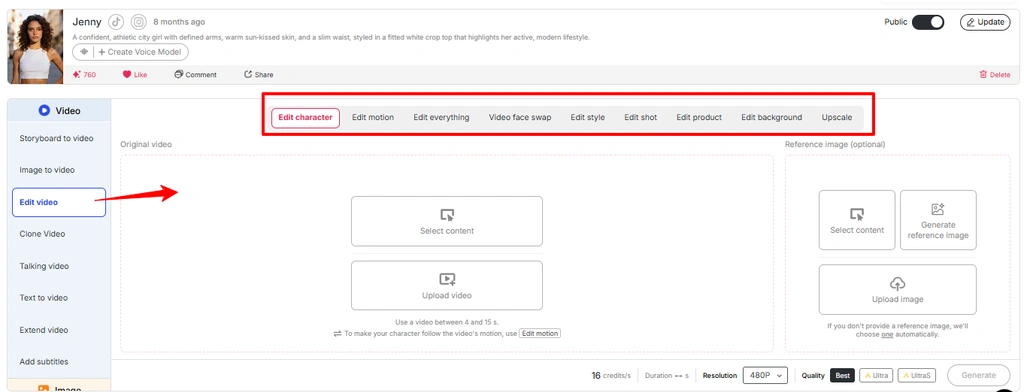
Offre una varietà di servizi sotto lo stesso tetto:
In breve: APOB ReVideo rielabora i filmati che già possiedi, invece di creare un video completamente nuovo a partire da un semplice input di testo. Ecco perché il risultato finale appare realistico. Stai applicando le leggi della fisica a una clip reale.
Nota: l'interfaccia più recente di APOB raggruppa molti flussi di lavoro di editing video all'interno di Modifica video . Se ReVideo non viene visualizzato come opzione separata, è possibile accedere allo stesso flusso di lavoro dalla sezione Modifica video.
Perché Motion Transfer è migliore di Text-to-Video (qui)
La conversione da testo a video è ottima per creare atmosfere, ma pessima per coreografie specifiche. Chiedete a un generatore basato su prompt "un uomo gira su se stesso, indica la telecamera, fa un sorrisetto sul terzo battito" e vi ritroverete a tirare i dadi venti volte. ReVideo salta completamente questo passaggio: il sorrisetto sul terzo battito è già presente nel file sorgente. Il modello si limita a riprodurlo.
Utilizza l'immagine dal media "Funzione di modifica video APOB AI" e cambia il testo alternativo in "Modifica il movimento nella funzione di modifica video di APOB".
Per i creatori che hanno trovato una struttura di aggancio vincente, questa è la soluzione definitiva. Un singolo video di successo si trasforma in dieci varianti con dieci volti diversi.

Prima di premere il pulsante Genera: la tua lista di controllo per la preparazione
Quel's Niente timeline, niente fotogrammi chiave, niente maschera, niente rotoscoping.
Passo dopo passo: il tutorial di APOB ReVideo

Passaggio: accedi e riscatta i tuoi crediti gratuiti
Vai al APOB AI App e accedi. I tuoi 80 crediti giornalieri vengono accreditati automaticamente sul conto. A circa 26 crediti al secondo, questo's Circa tre secondi di output ReVideo gratuito al giorno: sufficienti per un test completo, ma non per un'intera sessione di test. Pianificate di conseguenza.
👉 Mossa da professionisti: APOB gestisce un server Discord attivo. Durante i lanci di nuove funzionalità, hanno distribuito circa 1,000 crediti bonus ai creatori che hanno condiviso i loro video con la community. Se prevedi di pubblicare molti contenuti, questo è un vantaggio in più.
Passaggio — Crea o carica il tuo personaggio
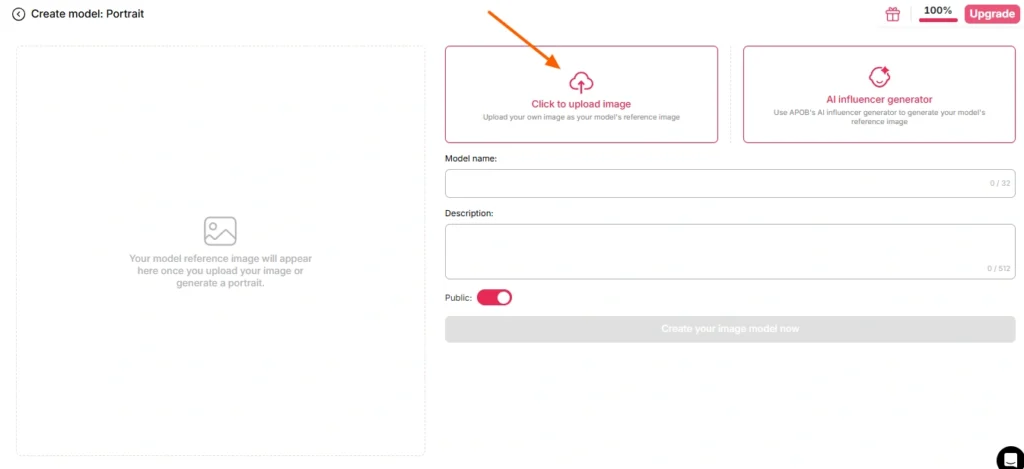
Ci sono due strade possibili:
Percorso A — Usa il tuo volto. Carica una foto nitida, frontale e ben illuminata. Niente occhiali da sole, niente ombre marcate, niente mosso, niente foto di gruppo in cui il soggetto deve indovinare chi stai fotografando.
Percorso B — Costruisci un AI modellare prima. Vai alla sezione crea modello ritratto e genera una persona attraverso il AI generatore di influencer. Imposta genere, età, nazionalità, capelli, colore degli occhi, abbigliamento. Questa è la strada più intelligente per chiunque gestisca un canale ricorrente, perché APOB's Il riconoscimento facciale mantiene l'identità del personaggio coerente in centinaia di rendering futuri. Un personaggio, infinite clip, un marchio riconoscibile.
Se si salta completamente l'immagine di riferimento, APOB utilizza per impostazione predefinita l'immagine salvata AI modello Immagine. Utile, a volte sorprendente.
Passaggio: scegli il filmato di origine
Questo passaggio determina l'80% della qualità del risultato finale. Non il modello. Non le impostazioni. Il clip sorgente.
| Tratto della clip sorgente | Risultato |
|---|---|
| Soggetto singolo e nitido, inquadratura centrale | ✅ Sostituzione pulita |
| Illuminazione stabile in tutto l'ambiente. | ✅ Tonalità della pelle uniforme |
| Movimento corporeo visibile | ✅ Il movimento viene letto correttamente |
| Il soggetto cammina dietro agli oggetti | ⚠️ Artefatti da occlusione |
| Panorami veloci e sfocati | ❌ Deriva dell'identità |
| Inquadratura affollata, più persone | ❌ Il modello sceglie il bersaglio sbagliato |
| Bassa risoluzione, compressa, ricaricata 4 volte | ❌ Funghi |
Nessun filmato tuo? APOB's I generatori integrati — Crea il tuo, Set completo, Modalità esperto, Da immagine a video — produrranno una clip che potrai poi importare direttamente in ReVideo. Ciclo completo, un'unica piattaforma.
Passaggio: Apri ReVideo e carica entrambi i file
Barra laterale sinistra → scheda Video → ReVideo.
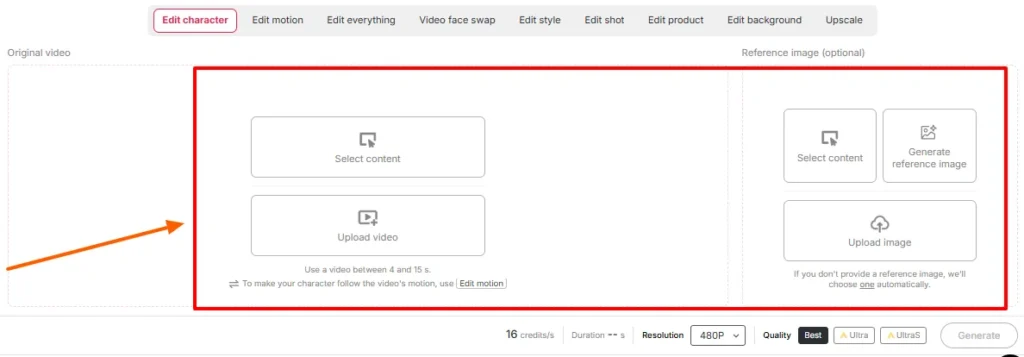
Passa a trovarci:
Conferma le impostazioni di durata e qualità sullo schermo. Controlla il limite di durata visualizzato nel tuo spazio di lavoro quel giorno — APOB's La versione originale di ReVideo limitava la durata dei video a circa cinque secondi, mentre le pagine più recenti, basate su WAN, pubblicizzano il supporto per file considerevolmente più lunghi. Chi carica i video dice la verità; i post del blog sono aggiornati con un certo ritardo rispetto alle pubblicazioni.
Passaggio — Genera e attendi
Fai clic su "Genera". Il modello mappa il tuo riferimento sulle prestazioni della sorgente mantenendo stabile lo sfondo.
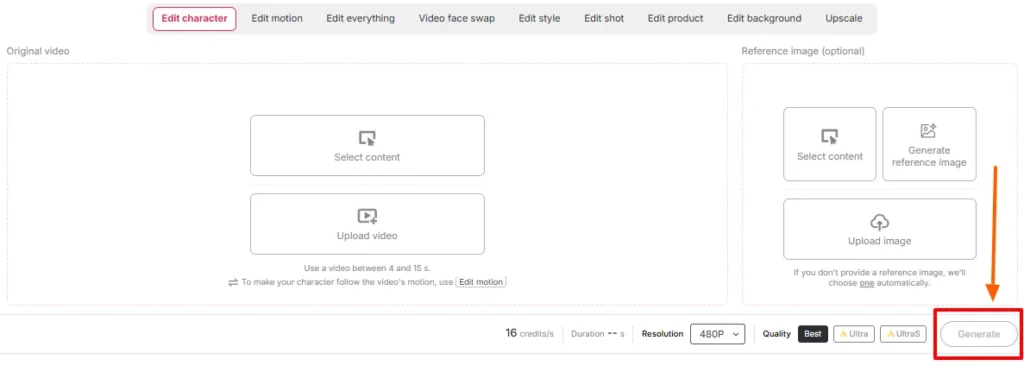
I tempi di rendering variano in base alla durata della clip e al livello di qualità. Non aggiornare. Non generare in preda al panico un secondo lavoro con gli stessi crediti.
Passaggio — Revisione affiancata
Riproduci l'originale accanto all'output. In particolare, verifica:
Se qualcosa's In genere, la soluzione si trova a monte: bisogna sostituire l'immagine di riferimento o ritagliare una sezione più pulita del file sorgente. Riprodurre gli stessi input raramente risolve un problema di accoppiamento.
Passaggio: completa il tutto con il resto della pila.
Un output ReVideo grezzo è un componente, non un post finito. Uniscilo:
Scena cinematografica vs. riprese di repertorio: due approcci completamente diversi.
Sembrano simili, ma si comportano in modo completamente diverso.
Manuale A - Inserimento della scena del film
Le riprese cinematografiche sono colorate, illuminate in modo drammatico e solitamente girate con obiettivi lunghi e una ridotta profondità di campo.'s un dono e una trappola.
Fai questo:
Da evitare: sequenze d'azione con montaggio rapido, fumo artificiale eccessivo, silhouette estreme, inquadrature in cui il soggetto è parzialmente fuori campo.
Manuale B — L'intervento di supporto per le riprese di supporto
Il B-roll è un caso d'uso sottovalutato e, onestamente, è lì che si concentra la maggior parte del denaro. Le riprese in stile stock – qualcuno che cammina in un ufficio, scarta un prodotto, sorseggia un caffè vicino a una finestra, tiene un telefono in mano – sono pulite, uniformemente illuminate e incentrate su un singolo soggetto. Sono praticamente progettate per sostituire un personaggio.
Fai questo:
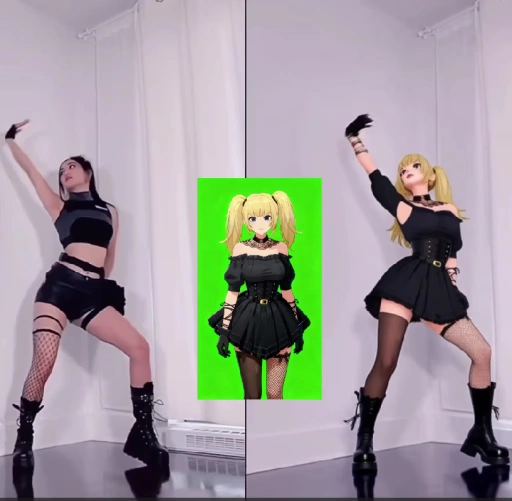
Questo è il flusso di lavoro alla base di molte cose AI Account di influencer, canali anonimi e pagine di prodotti affiliati attualmente attivi.
Calcolo del credito: quanto costano realmente le cose
| Lunghezza di uscita | Crediti approssimativi | Realtà del livello gratuito |
|---|---|---|
| 1 secondo | ~ 26 | Confortevole |
| 3 secondi | ~ 78 | La tua indennità giornaliera completa |
| 5 secondi | ~ 130 | Sono necessari 2 giorni gratuiti o un piano a pagamento. |
| 10 secondi | ~ 260 | Territorio a pagamento |
| Serie di 5 varianti da 5 secondi | ~ 650 | Pianifica l'abbonamento |
Un bagno di realtà: i crediti gratuiti servono per testare gli input, non per creare un calendario editoriale. Eseguite i test con le immagini di riferimento, ciascuno della durata di un secondo. Una volta trovato l'abbinamento perfetto, investite nel rendering a figura intera.
Errori comuni di ReVideo e come risolverli rapidamente
| Che cosa è andato storto | Perché | The Fix |
|---|---|---|
| Il volto cambia identità a metà del video | L'immagine di riferimento è troppo piccola o inclinata. | Carica nuovamente un ritratto frontale ad alta risoluzione |
| Strano alone intorno ai capelli | Sfondo caotico dietro il soggetto's capo | Scegli una clip sorgente con una separazione più netta |
| Le mani diventano astratte | Gesti veloci + compressione | Tagliare nella sezione più lenta del movimento |
| discrepanza di tonalità della pelle | Contrasto tra illuminazione di riferimento e illuminazione della scena | Rigenerare il riferimento in condizioni di illuminazione simili |
| È stata effettuata la sostituzione con la persona sbagliata. | Soggetti multipli nell'inquadratura | Ritaglia o seleziona una clip con un singolo soggetto |
| Il risultato sembra incollato | La fonte non presentava movimenti corporei realistici. | Utilizzare filmati che mostrino movimenti di tutto il corpo ben visibili. |
| Output troppo breve per essere pubblicato | Limite di credito raggiunto | Utilizza Video Extender oppure unisci due rendering |
Dove APOB ReVideo batte uno scambio di volti standard
| Perché ReVideo è vincente | Basic AI Cambia faccia | APOB ReVideo |
|---|---|---|
| Cosa cambia | Solo la regione del viso | Viso, corpo, abbigliamento, carattere generale |
| Fonte di movimento | Originale, intatto | Esecuzione originale preservata e riprodotta nuovamente. |
| coerenza dell'identità | Per ogni clip, varia | Sblocca il tuo browser con il riconoscimento facciale in tutta la tua libreria. |
| Controllo in background | Nona | Sfondo disponibile |
| Controllo dello stile | Nona | ReStyle disponibile |
| Costruito per | Scherzi occasionali | Pipeline di produzione ripetibili |
Uno scambio di volti ti dà una battuta. ReVideo ti dà un membro del cast che puoi continuare a usare.
Casi d'uso reali che le persone stanno utilizzando proprio ora
La parte che la maggior parte dei tutorial tralascia: consenso, diritto d'autore e come evitare cause legali.
Mettere la propria faccia in una scena di un film è divertente. Mettere qualcun altro's Inquadrare un volto in una scena, o ridistribuire le riprese in studio, è una situazione completamente diversa. Gestiscila nel modo giusto:
Filmato di repertorio con licenza più un AI La persona rappresenta la combinazione ideale, pulita, scalabile e commercialmente sicura. Parti da lì.
Sei consigli da professionisti basati su test reali
- Esegui il test per un secondo prima di confermare. Il modo più economico possibile per verificare l'abbinamento tra un'immagine e una clip.
- Crea il modello del ritratto una volta sola e riutilizzalo per sempre. coerenza del blocco facciale è il motivo principale per cui un personaggio virtuale si guadagna dei follower.
- Ingresso verticale, uscita verticale. Non ritagliare un rendering orizzontale e sperare nel risultato.
- Una luce brillante e uniforme è sempre la scelta migliore. La gradazione di colore Moody sembra ottima ma gli scambi sono pessimi.
- Salva i tuoi migliori clip sorgente come modelli. Un gancio efficace è una risorsa. Riproponetelo ogni mese.
- Elaborazione in batch nei giorni di rinnovo del credito. I crediti gratuiti vengono ripristinati giornalmente. Esegui i test nell'arco di una settimana prima di procedere con il rendering a pagamento.
Domande frequenti su APOB ReVideo
A cosa serve APOB ReVideo?
APOB ReVideo sostituisce il personaggio in un video esistente con il tuo viso, un'immagine di riferimento o un AI modello influencer, mantenendo intatti il movimento originale, i gesti, il flusso della telecamera e lo sfondo.'s utilizzato per il montaggio di scene di film, inserti di B-roll, annunci UGC, tendenze di ballo e AI contenuti di influencer.
APOB ReVideo è gratuito?
Ci's Un piano gratuito con 80 crediti giornalieri, senza necessità di carta di credito. Considerando circa 26 crediti al secondo, permette di realizzare circa tre secondi di video al giorno: sufficiente per i test, ma insufficiente per la produzione. I piani a pagamento supportano clip e lotti di video più lunghi.
Quanto può essere lungo un video APOB ReVideo?
La versione iniziale funzionava al meglio con clip di pochi secondi, mentre le pagine più recenti basate su WAN supportano caricamenti più lunghi. Verifica il limite di lunghezza visualizzato nella tua area di lavoro, poiché varia a ogni aggiornamento del modello.
Devo creare un AI Prima il modello?
No. Puoi caricare direttamente un'immagine di riferimento. Ma creare un modello per il ritratto ti garantisce un'identità coerente in ogni rendering futuro, il che è molto importante per chi gestisce un account ricorrente.
Quale AI Il motore alimenta APOB ReVideo?
Si basa sul trasferimento di movimento in stile Animate di Wan 2.2, che legge il movimento dalla clip sorgente e ricostruisce un nuovo personaggio su quella struttura di movimento, anziché generare il video da zero.
APOB ReVideo è in grado di cambiare anche lo sfondo?
Sì, ReBackground gestisce la sostituzione della scena quando la location originale non è adatta al montaggio. ReCharacter, invece, mantiene lo sfondo esattamente come è stato girato.
Funziona con anime, rendering 3D e personaggi non umani?
Sì, è possibile. Personaggi illustrati, modelli 3D e persino immagini di riferimento di bambole o statuette funzionano come soggetti sostitutivi, aprendo la strada a contenuti stilizzati e incentrati sulle mascotte.
Perché l'immagine risultante appare sfocata o distorta?
Quasi sempre il problema risiede nella sorgente. Filmati compressi, movimenti rapidi della telecamera, soggetti occlusi o un'immagine di riferimento a bassa risoluzione compromettono il risultato. Invertire le sorgenti prima di riavviare la ripresa.
Posso utilizzare i video di APOB ReVideo a scopo commerciale?
In generale sì, a condizione che tu detenga i diritti sul filmato originale e sull'immagine della persona coinvolta. L'utilizzo di personaggi generati dall'intelligenza artificiale su filmati di proprietà o con licenza rappresenta la soluzione commerciale più sicura.
Come si confronta questo con un normale AI Scambiatore di volti?
Un programma di scambio di volti modifica la regione del viso. ReVideo sostituisce l'intero personaggio – viso, corpo, abbigliamento e stile – preservando l'interpretazione originale.'s Progettato per la sostituzione completa del corpo del personaggio, non per gag a fotogramma singolo.
Posso inserirmi legalmente in una scena di un film?
Per esperimenti privati, generalmente va bene. Pubblicare o monetizzare filmati di studio modificati è una questione di copyright a prescindere dallo scambio, e inserire chiunque altro's L'utilizzo di immagini senza consenso costituisce un problema legale a sé stante. L'utilizzo di filmati con licenza e di pubblico dominio vi tutela da questo rischio.
Quali clip audio forniscono i risultati migliori?
Un solo soggetto, inquadratura centrale, illuminazione uniforme, movimenti del corpo visibili, occlusione minima e buona risoluzione. Le dimostrazioni di prodotto, le riprese in cui si cammina e si parla e i video di ballo sono sempre di ottima qualità.
Take finale
APOB ReVideo è raro AI Funzionalità video in cui la qualità del risultato dipende principalmente da te, non dalla modella. Fornisci un video pulito con un singolo soggetto e un'immagine di riferimento nitida e produrrà qualcosa che puoi pubblicare. Fornisci una foto sfocata di una folla e un selfie scattato alle 2 del mattino e produrrà esattamente ciò che ti aspetti.
Il vero vantaggio non è il montaggio di una singola scena del film che ti fa ottenere qualche migliaio di visualizzazioni.'s la pipeline di produzione: una costante AI personaggio, una libreria di clip di riferimento collaudate e la possibilità di riproporre un format vincente tutte le volte che i tuoi crediti ti consentono.'s come canali senza volto, negozi di annunci UGC e AI Gli account degli influencer sono effettivamente operativi nel 2026.
Inizia con gli 80 crediti gratuiti. Testa tre immagini di riferimento, ciascuna della durata di un secondo. Trova la coppia che mantiene l'identità anche con una rotazione della testa. Quindi ridimensionala.
Il filmato esiste già. Stai solo cambiando chi's in esso.
AiMojo consiglia:


 BONUS: Ottieni i nostri 200$ "AI "Mastery Toolkit" GRATIS se ti registri!




![I migliori 10 postiai AI Chatbot per sperimentare il desiderio virtuale [2026]](https://aimojo.io/wp-content/uploads/2024/03/Top-Hentai-AI-Chatbot--100x100.webp)

![Top 13 AI Giochi porno chat senza limiti [2026]](https://aimojo.io/wp-content/uploads/2024/03/Best-AI-Chat-Porn-Games-100x100.webp)


