
Da qualche parte sul tuo computer,'s Un foglio di calcolo pieno di dati che hai completamente ignorato. Sai che contiene risposte — sui tuoi clienti, sul tuo fatturato, sulle tue campagne — ma non hai il tempo, il budget o la pazienza di assumere qualcuno che abbia "data scientist" nel suo profilo LinkedIn.
Qui's la realtà: AI per l'analisi dei dati ha reso facoltativa quella costosa assunzione. Non hai bisogno di Python, SQL o di una laurea in statistica. Ti servono solo gli strumenti giusti, i giusti stimoli e un processo ripetibile che non ti porti via tutto il martedì. Questa guida copre proprio questo: dalla scelta degli strumenti ai stimoli concreti, fino a un flusso di lavoro passo passo che puoi avviare oggi stesso.
Che AI Analisi dei dati significa (in parole semplici)

Il vecchio modo contro il AI Way — Cosa è cambiato e cosa no
Vecchio metodo: esportare un file CSV, aprirlo in Excel, strizzare gli occhi per decifrare 4,000 righe e, a un certo punto, o si rinuncia o si paga qualcuno 200 dollari l'ora per renderlo comprensibile. AI modo: carichi quello stesso CSVDigita una domanda in linguaggio semplice e ricevi una risposta strutturata in meno di 60 secondi. I dati non sono cambiati. L'accesso sì.
Che's Accade dietro le quinte quando AI Legge i tuoi dati
AI strumenti utilizzare elaborazione del linguaggio naturale Analizzano i tuoi dati come farebbe un analista umano, ma più velocemente e senza fattura. Identificano modelli, segnalano anomalie e mettono in luce tendenze in base a qualsiasi richiesta tu faccia.
Perché "Non sono una persona portata per i numeri" non è più una scusa valida
Ogni strumento qui trattato funziona con query in linguaggio naturale. Se sai scrivere un'email, puoi eseguire un analisi dei dati.
Il migliore 7 AI Strumenti per l'analisi dei dati che non richiedono alcuna competenza di programmazione.
| Chiavetta | Ideale per | Piano gratuito | Codificazione richiesta | Livello di abilità |
|---|---|---|---|---|
| camelAI | Query sui dati conversazionali | Si | Non | BEGINNER |
| Giulio AI | CSV/analisi del foglio di calcolo | Sì (limitato) | Non | BEGINNER |
| Power BI Copilot | team di Business Intelligence aziendale | Non | Non | Intermedio |
| Impulso del tavolo | Fornitura automatizzata di informazioni | Non | Non | Intermedio |
| ChatGPT / Claude | Riepiloghi rapidi e pulizia | Si | Non | BEGINNER |
| Google Look Studio | Reportistica visiva gratuita | Si | Non | BEGINNER |
| Zoho Analytics (Zia) | Business Intelligence per piccole imprese | Si | Non | BEGINNER |
Come iniziare a usare AI Analisi dei dati: un flusso di lavoro passo passo
Passaggio 1: Prepara i tuoi dati
Prima di tutto, pulisci il file. Rimuovi le righe duplicate, riempi le celle vuote con "N/D" e assicurati che l'intestazione di ogni colonna sia chiara e coerente. I file CSV o XLSX funzionano meglio sulla maggior parte dei dispositivi. AI strumenti.
Passaggio 2: scegli lo strumento giusto in base al tuo obiettivo.
Hai bisogno di un riepilogo rapido? Usa ChatGPT. Hai bisogno di dashboard ricorrenti? Scegli Power BI o Looker Studio. Hai bisogno di un'analisi CSV approfondita con follow-up conversazionali? Julius AI o camelAI.
Passaggio 3: Scrivi domande che ottengano risposte reali
Suggerimento errato: “Analizza i miei dati.”
Buon suggerimento: “Quale prodotto ha avuto il tasso di reso più alto nel Q1 e quale's "L'andamento mensile degli ultimi 6 mesi?"
La specificità è tutto.
Passaggio 4: Leggere e confrontare AI Uscite
AI commette errori. Verifica sempre la coerenza dei dati chiave con i tuoi dati grezzi, soprattutto prima di condividerli con un cliente o una parte interessata.
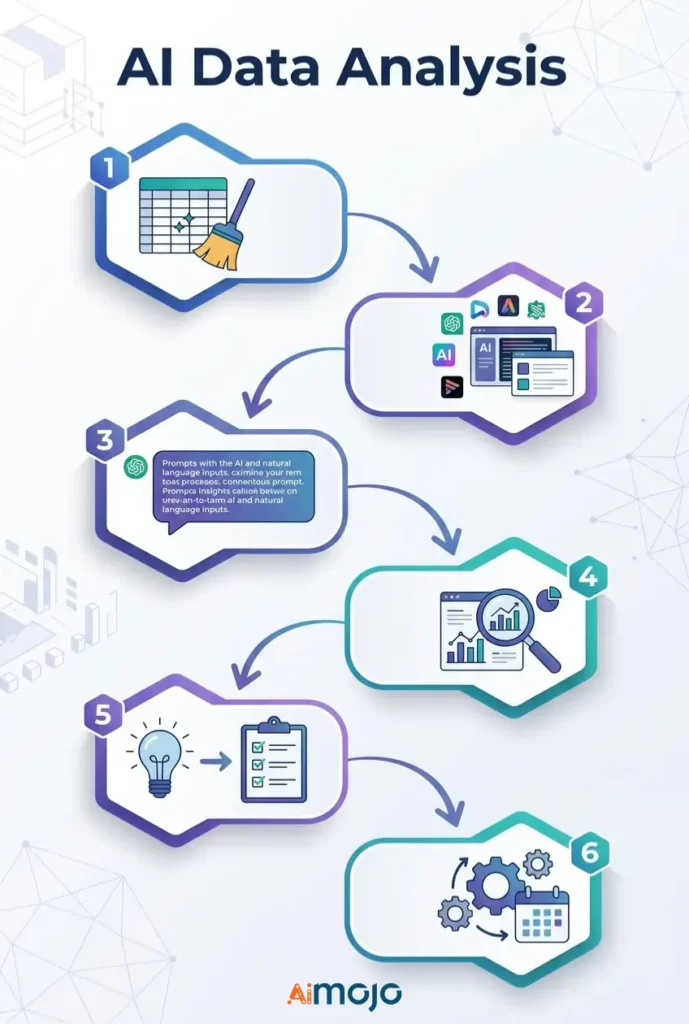
Fase 5: Passare dalle intuizioni alle decisioni
Un'intuizione senza azione collegata è solo una curiosità. Per ogni AI trovando, chiedi: "Cosa devo fare concretamente con questo?"
Passaggio 6: automatizzare i report ricorrenti
Imposta aggiornamenti automatici dei dati all'interno di Looker Studio, Power BI o Zoho Analytics, in modo che i report settimanali vengano generati automaticamente senza alcun intervento da parte tua.
Copia incolla AI Messaggi che gli utenti non esperti stanno eseguendo in questo momento
Utilizzali direttamente in Giulio AI, camelAI o ChatGPT con il tuo set di dati allegato:
dati vendite
*"Show total revenue by product category for the last 90 days and flag any category with a decline over 20%."*Dati di marketing
*"Which traffic source drove the most conversions last month? Break down average cost per conversion by channel."*Fogli di calcolo finanziari
*"Identify the top 5 expense categories and highlight every month where spending exceeded budget by more than 15%."*Dati sul comportamento del cliente
*"What's the average purchase frequency per customer segment? Flag segments with the highest churn risk."*Metriche relative alle risorse umane e al team
*"Compare headcount changes by department over the last 6 months and flag any team with attrition above 10%."*5 errori che rendono il tuo AI Analisi dei dati completamente inutile
- Inserimento di dati disordinati e non formattati - AI Non si può rimediare a un foglio di calcolo disastroso. Se inserisci dati spazzatura, otterrai risultati spazzatura, sempre.
- Porre domande ampie — La domanda "Parlami delle mie vendite" non fornisce alcuna informazione utile. Sii specifico riguardo al periodo di tempo, alla metrica e all'obiettivo preciso.
- Prendendo ogni risultato per quello che è - AI Gli strumenti hanno allucinazioni. Confronta i dati chiave prima di prendere qualsiasi decisione aziendale reale.
- Utilizzare uno strumento generico per un lavoro specializzato — ChatGPT è valido per i riepiloghi, ma non per la modellazione finanziaria complessa. Scegli lo strumento più adatto al compito.
- Fermarsi a "interessante" — La maggior parte delle persone vede un grafico interessante e poi non ne fa nulla. Ogni informazione aziendale derivante dall'intelligenza artificiale necessita di un'azione successiva ben definita.
Chi lavora 's In realtà utilizzando AI per l'analisi dei dati in questo momento
Non si tratta di teoria: ogni giorno, persone reali eseguono analisi dei dati senza codice.

Se i tuoi concorrenti lo stanno già facendo mentre tu compili ancora i report manualmente, vale la pena colmare rapidamente questo divario.
Vs. libero pagamento AI Strumenti di analisi dei dati
Cosa possono fare realisticamente i livelli gratuiti
I piani gratuiti di Google Looker Studio, camelAI e Zoho Analytics gestiscono bene la creazione di report di base, il monitoraggio semplice delle tendenze e il caricamento limitato di file. Per utenti singoli e piccoli team, sono strumenti realmente utilizzabili, non semplici versioni demo.
Le funzionalità per cui vale la pena pagare su larga scala
I livelli a pagamento sbloccano programmi di aggiornamento automatico dei dati, limiti di caricamento più elevati, funzionalità avanzate AI modelli, Integrazioni APIe la collaborazione multiutente. Se stai eseguendo AI Che si tratti di analisi aziendali su larga scala o di creazione di dashboard per i clienti, l'aggiornamento si ripaga rapidamente.
Costi nascosti che emergono dopo l'iscrizione
Fai attenzione ai prezzi per posto, ai costi aggiuntivi per il superamento del numero di file e alle funzionalità "premium AI" a pagamento, accessibili solo dopo aver configurato l'intero flusso di lavoro all'interno della piattaforma.
Come presentare le informazioni ricavate dai dati generati dall'IA in modo che le persone le ascoltino davvero

Svolta AI Trasformare i grafici in storie che colpiscono davvero
I grafici grezzi non convincono nessuno in una riunione. Usa il AI prendere l'output come punto di partenza, quindi inquadrarlo nel contesto: cosa è successo, perché è importante e cosa succederà dopo. Questo's la narrazione dei dati — e's Cosa spinge le persone ad agire?
Creazione di una dashboard automatizzata per la reportistica settimanale
Power BI, Looker Studio e Zoho Analytics ti permettono tutti di creare un'analisi in tempo reale AI Crea la dashboard una volta sola, collegala alla tua fonte dati e non dovrai più compilare manualmente un report settimanale. Creala una volta, condividi il link per sempre.
Il framework "E allora?" — Rendere ogni intuizione pronta per la sala riunioni.
Prima di presentare qualsiasi informazione generata dall'IA, rispondi a tre brevi domande:
Domande frequenti
Posso eseguire analisi di dati reali con AI E se non avessi alcuna competenza tecnica?
Sì. Strumenti come camelAI, Julius AI e Zoho Analytics (Zia) sono progettati specificamente per utenti non tecnici. Si pongono domande in un linguaggio semplice e si ottengono informazioni strutturate.
Qual è il migliore gratuito AI Uno strumento per l'analisi dei dati nel 2026?
Google Looker Studio è la migliore opzione gratuita per la creazione di report visivi. camelAI e Giulio AI Entrambi offrono solidi piani gratuiti per l'analisi di file CSV e fogli di calcolo.
Come posso analizzare i dati di Excel o Google Sheets utilizzando l'intelligenza artificiale?
Carica il tuo file direttamente su Julius AI oppure camelAI, o collega il tuo foglio Google a Looker Studio o Zoho Analytics per un'analisi automatizzata continua.
ChatGPT è davvero affidabile per l'analisi dei dati aziendali?
Per riassumere, pulire e spiegare i dati, sì. Per calcoli complessi o set di dati di grandi dimensioni, è consigliabile abbinarlo a uno strumento dedicato come Power BI Copilot o Julius AI.
Che's la vera differenza tra AI Analisi dei dati e strumenti tradizionali di Business Intelligence?
Gli strumenti di Business Intelligence tradizionali richiedono la creazione di query e la conoscenza precisa di cosa cercare. Le piattaforme di analisi basate sull'intelligenza artificiale, invece, forniscono informazioni utili in modo proattivo e rispondono al linguaggio naturale, senza bisogno di alcuna configurazione.
Quanto sono accurate le analisi generate dall'intelligenza artificiale? Dovrei fidarmi completamente?
No. Verifica sempre. AI Confronta i risultati con i dati grezzi prima di utilizzarli in qualsiasi decisione aziendale o presentazione ai clienti.
Devo conoscere SQL o Python per utilizzare qualcuno di questi strumenti?
Nessuno degli strumenti presenti in questo elenco supporta query di dati in linguaggio naturale senza richiedere alcuna programmazione.
Quali tipi di file di dati funzionano meglio con AI Strumenti di analisi?
I file CSV e XLSX sono compatibili con quasi tutti gli strumenti elencati qui. Anche i file JSON e i Fogli Google collegati sono ampiamente supportati su diverse piattaforme.
Dove AI L'analisi dei dati è il prossimo passo (e cosa significa questo per te)
La prossima ondata di AI Gli strumenti di analisi non aspetteranno che tu faccia delle domande. Agente AI sistemi di monitoraggio dei dati Monitora i tuoi parametri 24 ore su 24 e ricevi una notifica non appena qualcosa non va, prima che la situazione degeneri in un vero problema.
Un tempo, le previsioni richiedevano un analista dedicato. Ora, strumenti come Tableau Pulse e Power BI Copilot stanno rendendo l'analisi predittiva per gli utenti aziendali accessibile quasi con un solo clic.
Gli scienziati dei dati non stanno scomparendo, ma il divario tra ciò che possono fare e ciò che può fare un utente non tecnico dotato di intelligenza artificiale si riduce di trimestre in trimestre. Prima si acquisisce familiarità con questi strumenti, maggiore sarà il vantaggio competitivo.
AiMojo consiglia:


 BONUS: Ottieni i nostri 200$ "AI "Mastery Toolkit" GRATIS se ti registri!