For new creative workflows, assets need to be flexible and versatile throughout projects and across production phases. Designers can use the flexible 3D environments created by easily-editable design blocks to avoid the need for duplication of design models.
Such modular components support quicker revisions, greater customization flexibility, and asset reuse. With Tripo 3D, this process is automated, and structured 3D assets are generated from visual references and descriptions. Scalable components help support quality and consistency throughout development as project requirements evolve.
What Are Editable Design Blocks?
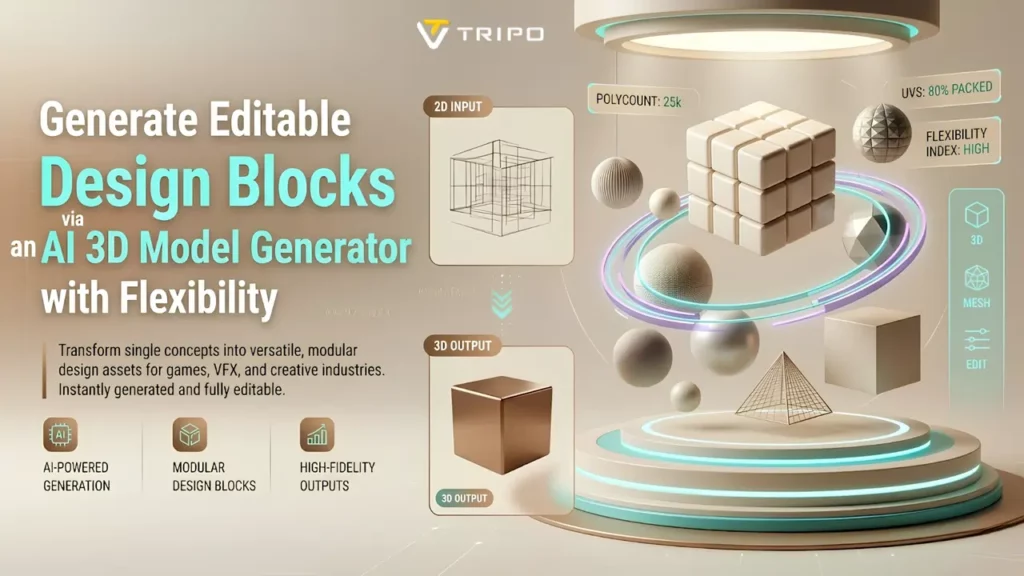
Editable design blocks are modular 3D elements that can be reused and modified. They function as building blocks that can be adapted to different scenes, products, and visual concepts. Flexibility is important because production requirements may change during development.
Reusable structures reduce rebuilding requirements and support efficient design iterations. Tripo 3D helps organize assets in a way that simplifies later modifications. These components can improve project scalability, allowing designers to add more scenes efficiently. They also improve creative flexibility by allowing individual parts to be changed without modifying the entire assembly.
Building Modular Asset Libraries with Tripo 3D
Tripo 3D's generation tools allow users to build collections of reusable assets efficiently. Designers can create components from prompts, sketches, or visual references and store them for reuse. The platform supports the efficient development of consistent modules for multiple projects.
An AI Generatore di modelli 3D helps in the development of structured assets with organized geometry. Another advantage of image-based generation is that it provides an additional method for asset creation across workflows. Centralized assets improve management efficiency and simplify design updates across multiple productions.
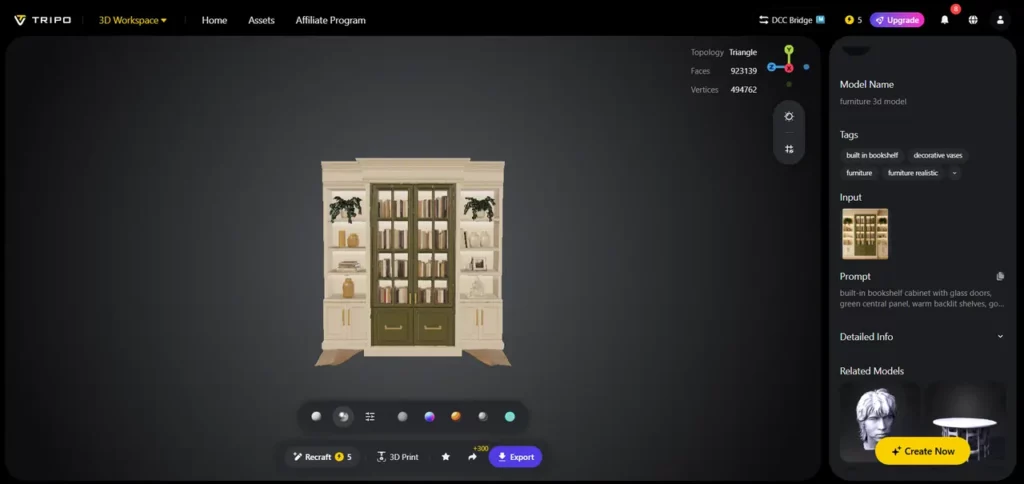
Advantages of AI-Generated Editable Components
AI-generated components can streamline content creation while supporting consistent quality standards. Automated generation reduces repetitive modeling tasks, enabling quicker modifications and more efficient customization through structured geometry.
Teams can create multiple designs without rebuilding assets from scratch. It supports efficient immagine in 3d conversion that can be used as reusable components. Consistent mesh quality can support downstream workflows, while expanded customization options help teams adapt to changing requirements and creative goals.

Steps to generate editable design blocks via an AI 3D model generator for flexibility
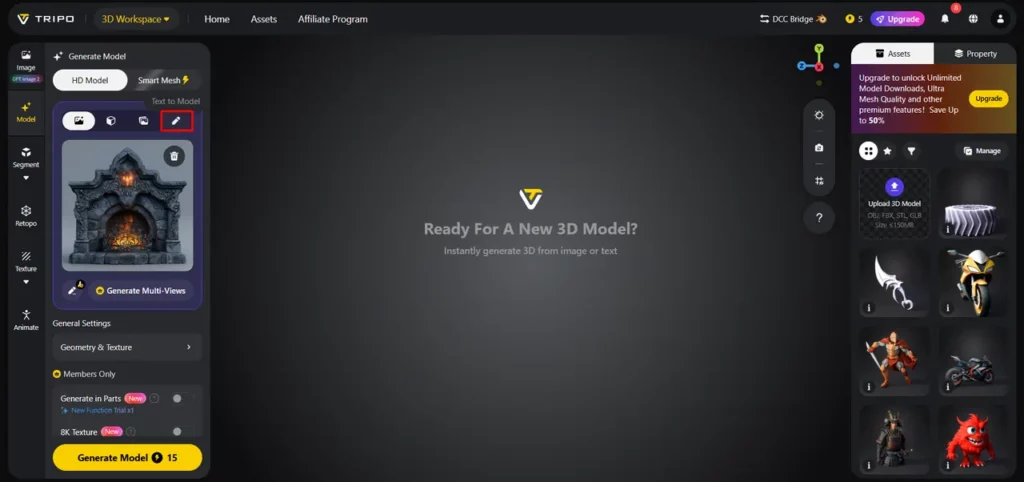
Step 1: Import References for Modular Designs
- Innanzitutto, devi accedere a Tripo 3D e registrarti. Successivamente, vai al "Modello" scheda presente nella barra dei menu verticale sinistra.
- Sotto il menu, fai clic su “Modello HD”. You can generate the model either using the text prompt or through image upload.
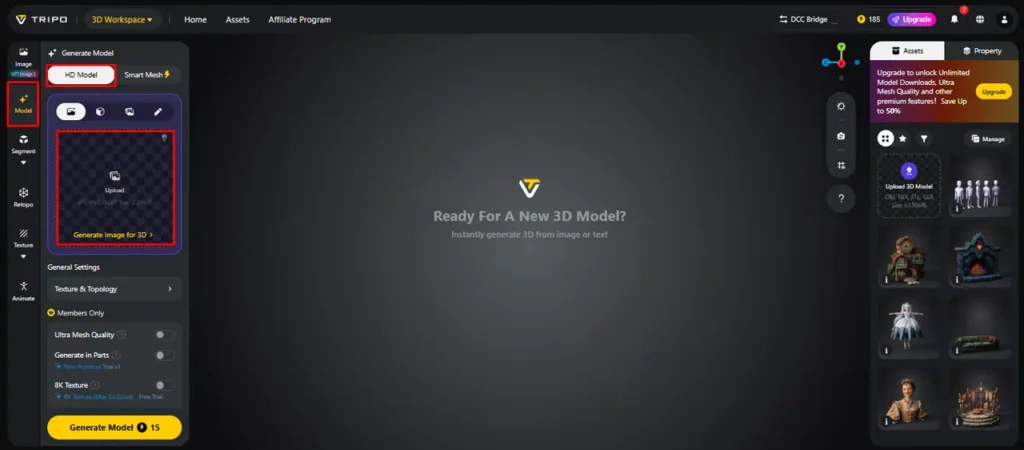
- Puoi trascinare e rilasciare per caricare l'immagine oppure puoi anche caricare l'immagine da una posizione specifica del tuo dispositivo utilizzando il “Caricamento” scheda.
- If you don't have an image, click on the “Text to model” tab to generate the model using a descriptive text prompt.
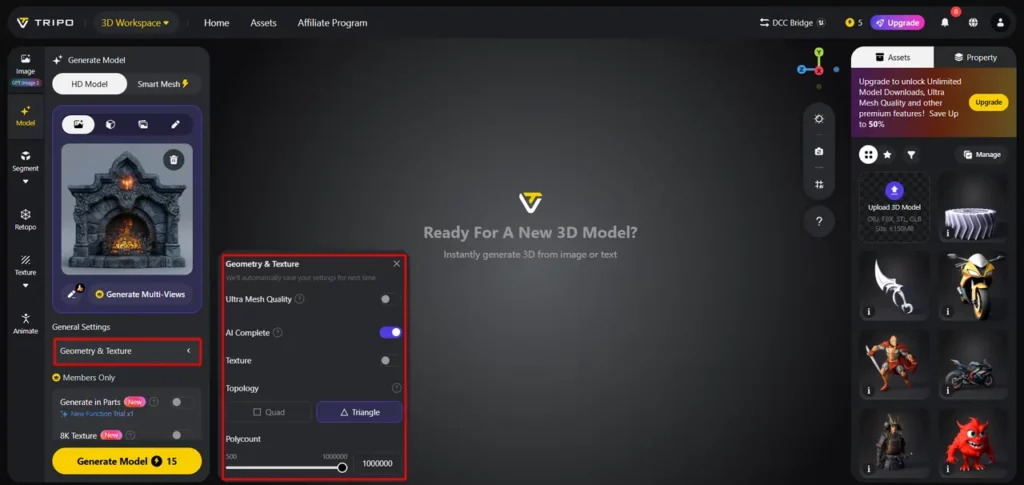
Step 2: Customize Structure for Easy Editing
- Sotto il "Impostazioni generali" tab, you can either allow the AI to completely generate on its own by switching "AI complete”Oppure puoi attivare la texture e selezionare quella personalizzata “Qualità della consistenza” come 2K, 4K o 8K.
- Puoi anche accenderlo “PBR” per proprietà di riflessione del materiale accurate.
- Per migliori caratteristiche topologiche, selezionare uno dei due “Quad” or "Triangolo" topologia.
- È inoltre possibile impostare un numero di poligoni personalizzato.
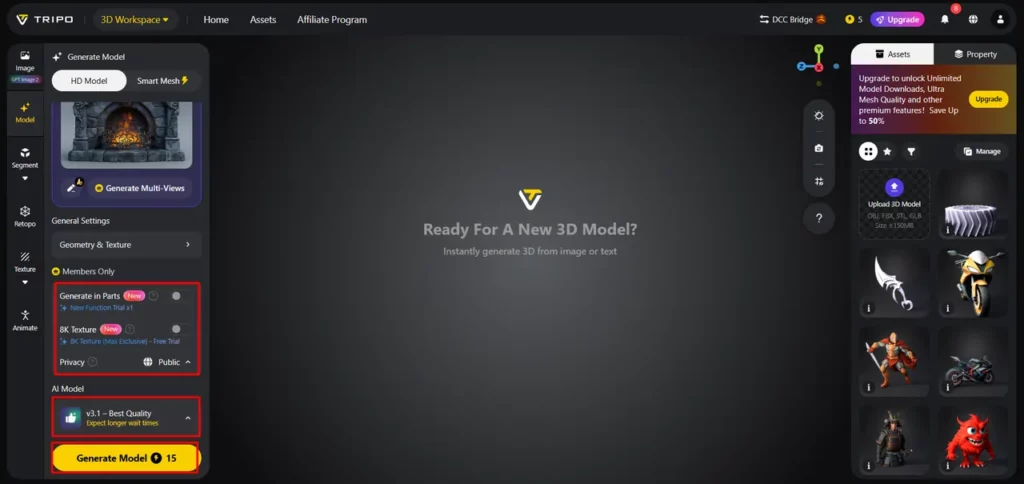
- Successivamente, scegli il modello dall'elenco, tra cui v3.1 di qualità ottimale, v3.0 veloce ed equilibrata o v2.5 legacy.
- Se sei un membro, puoi scegliere “Genera in parti”, "Texture 8K"e “Privacy” opzioni.
- Infine, fai clic su “Genera modello” per iniziare la generazione.
Step 3: Review and Export Editable Assets
- Tripo 3D allows complete viewing of the model in styles such as “Visione solida”, “Stile cartone animato”, “Stile schizzo”, “Stile olografico”e “Senza luce” modulo. Puoi anche “Perfeziona” the design right through the bottom menu.
- Puoi anche modificare il “Impostazioni ambiente” e impostazioni della fotocamera tramite “Ripristina la fotocamera”.
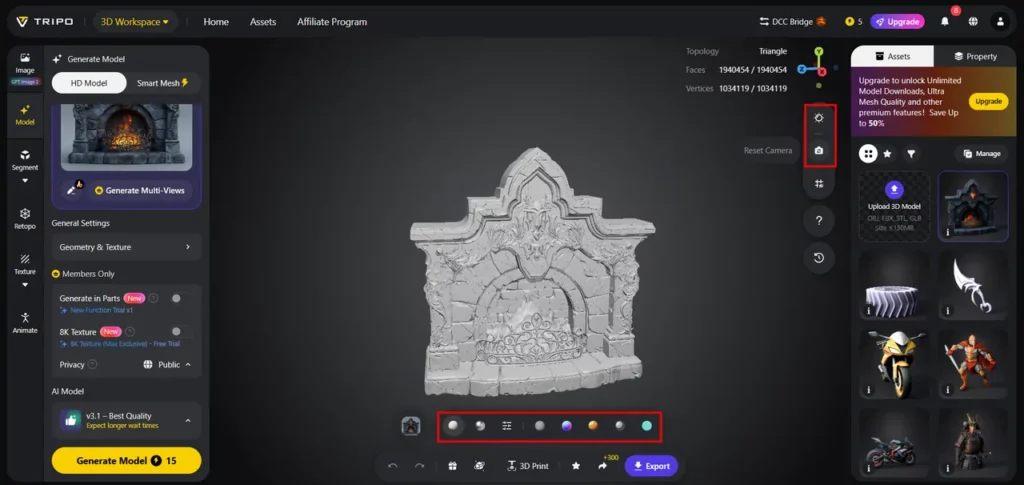
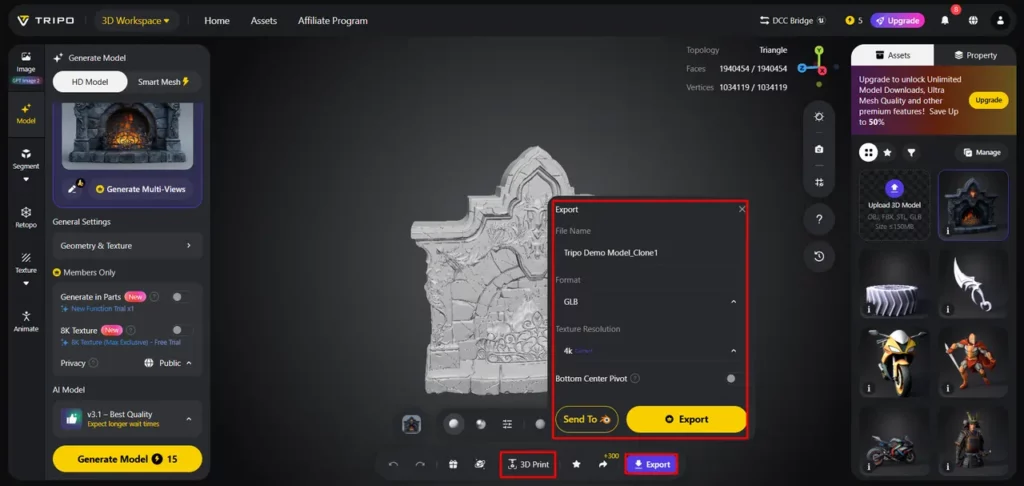
- If needed, you can 3D print the design or share it directly by clicking “Stampa 3D”.
- Alla fine, fai clic sul file "Esportare" tab from the bottom menu. Next, choose the resolution, format, and file name, and click again on "Esportare" to save the design to your local device.
Structuring Design Blocks for Maximum Reusability
Here are some good reusable asset libraries:
Maintaining Editability Through Clean Geometry
Maintaining clean geometry remains important for long-term asset flexibility and downstream workflows. Organized topology enables quicker changes and reduces issues during editing. Structured meshes help improve refinement processes and reduce technical issues during asset updates.
Models generated by Tripo 3D include structured geometry and topology for easier asset management. Well-organized asset structures can support animation and rigging workflows while improving compatibility with industry-standard software. Clean geometry helps keep assets reusable and adaptable across future project phases.
Sfruttando AI Texturing for Flexible Asset Adaptation
Quality texturing improves the reuse of design blocks across different applications. Tripo 3D includes an advanced texturing system for creating realistic materials and surface details. Flexible texture variations are especially useful when combined with a testo in modello 3D flusso di lavoro.
Different visual styles can be applied without rebuilding geometry. Multiple texture options simplify asset adaptation for different branding requirements, presentations, or artistic styles. This adaptability helps maintain consistency during development cycles and keeps projects relevant.
Integrating Editable Blocks into Production Pipelines
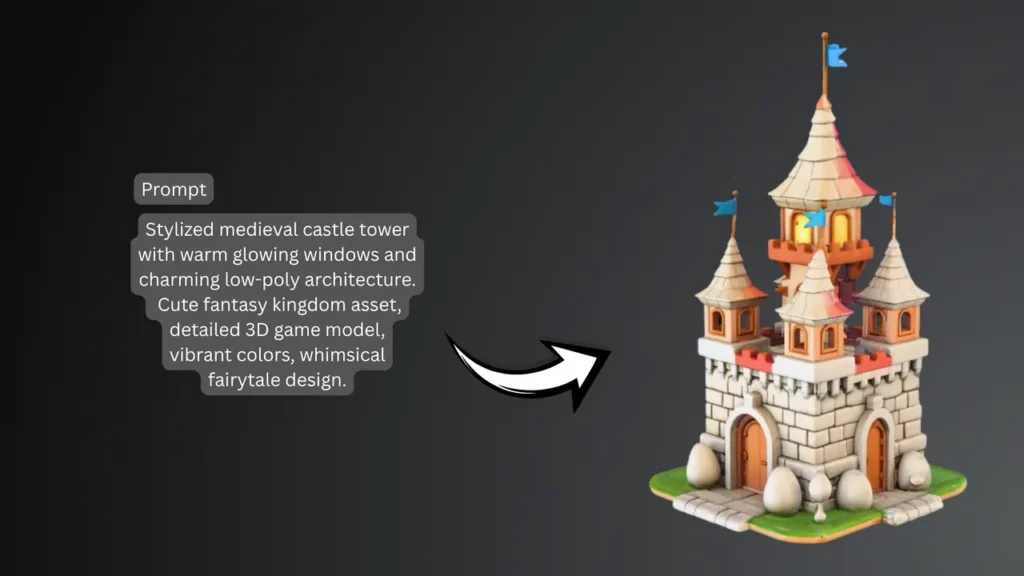
Editable design blocks are useful across many professional production environments. Reusable assets can accelerate level creation and environment development for gaming projects. This provides a flexible framework for product visualization workflows and simplifies concept presentation and iteration.
Architectural visualization projects often use modular elements to build layouts efficiently. By generating and adapting assets efficiently, creative professionals can maintain flexible workflows across different industries and applications.
Conclusione
Editable design blocks support scalable and adaptable 3D workflows. Reusable components can reduce repetitive tasks, support efficient revisions, and improve production consistency. Tripo 3D provides features such as intelligent generation, structured geometry, advanced texturing, and flexible export capabilities for creating modular assets.
These capabilities allow creators to develop assets for different projects and changing requirements. As AI technology evolves, flexible 3D content creation may become more efficient, accessible, and useful for modern digital production.



 BONUS: Ottieni i nostri 200$ "AI "Mastery Toolkit" GRATIS se ti registri!