6 款视频增强工具,可将模糊的视频片段变成清晰的 4K 视频

Top Video Enhancement Tools

If you’ve ever exported a video and realized the faces look soft, the text is smeared, or the whole clip turns blocky the moment it moves, you’re not alone. Most people waste hours tweaking random settings when the real fix is choosing the right enhancement approach first—upscaling, denoise, sharpening, stabilization, or color correction.

That’s the path we’ll follow here, then narrow it down to the Top 6 Video Enhancement Tools worth trying. This comparison is for creators, marketers, and editors who need cleaner footage fast—without guessing what each tool actually improves.

Why You Need Dedicated Video Enhancement Tools in 2026

As audience expectations shift toward flawless 4K playback, standard editing software often falls short. Basic sharpen filters usually highlight pixelation, while traditional noise reduction simply blurs important visual details.

Importance of Dedicated Video Enhancement Tools

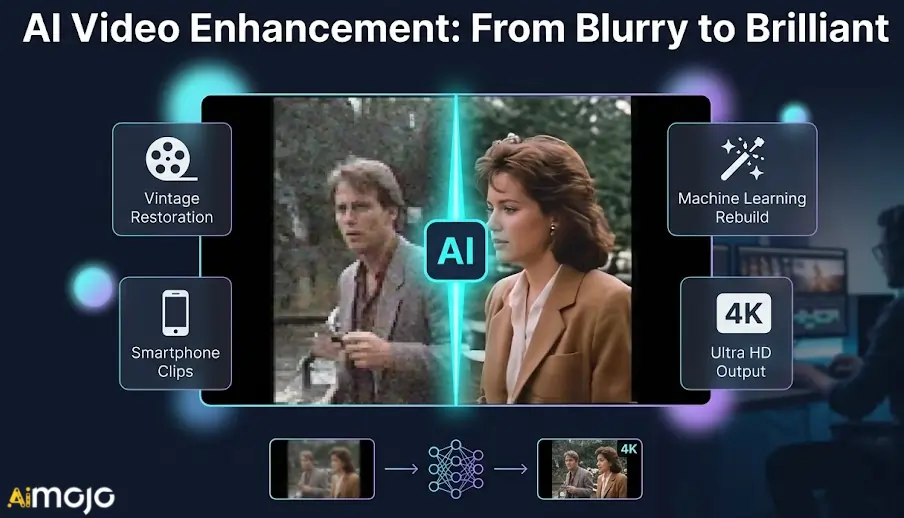
In 2026, dedicated video enhancement tools solve these exact limitations using machine learning. Instead of applying generic filters, they actively rebuild missing data through AI 倍增 and intelligently generate new frames for smoother motion.

Whether you are restoring vintage footage or rescuing poorly lit smartphone clips, you need software built specifically for heavy processing. Let’s explore the exact technical features that separate true enhancement engines from basic editors.

AI Video Enhancers That Instantly Upgrade Your Video Quality

Top Video Enhancement Tool主 AI 特性Main Enhancement Goal
希格斯菲尔德人工智能AI 视频升频Fixing Flickering Media
阿库尔Smart Face SwappingLocalising Global Campaigns
开放艺术人工智能图像到视频Animating Static Assets
Pykaso AIRealistic Texture Upscaling4K视频生成
Instant Audio CleanupBrowser Based Editing
黄玉视频 AINeural 8K UpscalingRestoring Archival Footage

1. 希格斯菲尔德人工智能

希格斯菲尔德人工智能

When struggling with low-resolution generations or flickering AI footage, finding reliable video enhancement tools becomes essential for maintaining 视觉一致性. Higgsfield AI 提供 a dedicated video upscaling and deflickering suite designed specifically to stabilise and improve synthetic media.

This platform caters to content creators and marketers who need to refine raw AI outputs before publishing. By smoothing out motion artifacts and boosting pixel density, users can confidently use this video enhancement software to prepare cinematic clips, social media shorts, and promotional materials for high-definition viewing.

希格斯菲尔德 AI 主要特征:

视频升频: Increases the base resolution for sharper, broadcast-ready digital media outputs.
AI Deflicker: Efficiently removes inconsistent lighting and flashing from generated video frames.
Cinema Studio: Provides highly precise camera movement controls during the enhancement process.
角色一致性: Maintains distinct facial features accurately across different upscaled video scenes.

使用案例: 

Upscaling low-resolution AI clips for professional commercial 营销活动.
Stabilising flickering motion in synthetic character generation video scenes.

定价方案: Subscriptions range from $9 to $199 monthly, offering varying credit allocations for standard and premium generations.​

最适合: 最适合 AI creators and marketers needing a dependable platform to refine and upscale synthetic video content.


2. 阿库尔

阿库尔

Akool integrates high-quality 面对交换 and avatar generation directly into the editing pipeline, standing out as one of the more specialised video enhancement tools. Marketing teams often face the challenge of adapting existing visual assets for different demographics without losing visual fidelity.

专用于 advertising agencies and commercial creators, this platform excels at personalising corporate media while maintaining natural expressions. By using advanced processing algorithms, users can seamlessly translate marketing videos or swap presenters while ensuring the final export retains a polished, high-resolution appearance suitable for professional campaigns.

Akool Key Festures:

Live Face Swap: Replaces faces dynamically while perfectly preserving original lighting and shadows.
4K Avatar Generation: Creates high-resolution talking avatars highly suitable for corporate commercial presentations.
Smart Video Translation: Accurately localises audio and intelligently adjusts lip movements for audiences.
Cloud Processing: Renders enhanced video content quickly without requiring expensive local hardware.

使用案例: 

Localising promotional videos with enhanced lip-sync 针对国际市场。
Generating high-resolution talking avatars for corporate internal training materials.

定价方案: Pricing features a free tier, with paid plans from $15 to $249 monthly based on credit usage.

最适合: Best for marketing agencies requiring reliable, high-resolution video personalisation and scalable face-swapping capabilities for global campaigns.


3. 开放艺术人工智能

开放艺术人工智能

Artists and developers frequently need to scale their visual concepts into motion formats without compromising the original style's crispness. While primarily known for image generation, OpenArt AI functions alongside modern video enhancement tools by offering high-fidelity image-to-video transformations.

This web-based suite is built for digital artists and social media managers looking to animate static assets cleanly. By utilising premium processing models, this platform ensures that generated animations maintain their intended resolution and structural integrity, making it highly practical for creating consistent, visually appealing short-form content.

开放艺术 AI 主要特征:

图像转视频: Transforms high-quality static images into fluid, beautifully stylised motion clips.
模型微调: Allows advanced users to train custom algorithms for consistent aesthetics.
Parallel Generation: Processes multiple high-resolution video or image outputs simultaneously for efficiency.
基于信用的系统: Offers highly scalable access to premium rendering and upscaling models.

使用案例: 

Animating custom illustrations into crisp social media video content.
Generating consistent, high-resolution visual stories for 数字营销活动.

定价方案: Plans range from $14 to $240 monthly, providing varying credit amounts for image and video generation.

最适合: Best for digital artists seeking a dependable environment to train models and generate consistent visual animations.

OpenArt 标志
使用代码 ALL15, 开锁 五折特价 and start turning your images into crisp, scroll-stopping videos that actually grab attention. Perfect for creators who want premium results without premium costs.

4. Pykaso AI

Pykaso AI

皮卡索 AI enters the conversation around video enhancement tools by offering pay-as-you-go access to advanced rendering engines like Kling and WAN. Achieving ultra-realistic media outputs often requires meticulous post-processing and access to enterprise-grade generation models.

Targeted at independent creators and boutique agencies, this platform provides sophisticated tools for refining visual textures and generating high-definition footage. With integrated skin upscalers and 4K output capabilities, users can elevate their media workflow, ensuring every generated clip meets the strict quality standards required for modern digital broadcasting.

皮卡索 AI 主要特征:

LoRa Training: Enables precise customisation for maintaining consistent character appearances and styles.
4K视频生成: Outputs stunning high-definition clips suitable for professional digital content publishing.
LoRa Training: Enables precise customisation for maintaining consistent character appearances and styles.
Pay-Per-Use System: Allows transparent credit spending without forcing a recurring monthly subscription.

使用案例: 

Upscaling facial textures in synthetic media for realistic advertisements.
Generating broadcast-quality 4K video clips using advanced AI 楷模。

定价方案: Uses a flexible pay-as-you-go system, with Gem packages ranging from $6 to $240 without monthly commitments.

最适合: Best for independent creators wanting cost-effective, high-quality video generation and realistic texture enhancement without subscription lock-ins.


5. 网易

网易

Veed.io modernises the editing workflow by embedding practical video enhancement tools directly into an accessible, cloud-based timeline. Browser-based editors historically struggled with rendering speeds and output clarity, leaving many users frustrated with pixelated exports.

This platform is ideal for podcasters, educators, and social media managers who need quick turnarounds without sacrificing quality. By offering one-click noise reduction, audio cleanup, and 4K exporting capabilities, this software ensures that standard webcam recordings and screen captures are systematically improved for clear, professional audience consumption.

Veed.io 主要特点:

Cloud-Based Timeline: Enables full-featured video editing directly within any modern web browser.
音频清理: Automatically removes distracting 背景噪音 to enhance voice recording clarity.
4K Exporting: Allows high-resolution rendering for impressively sharp, professional social media posts.
AI 字幕: Generates highly accurate, perfectly synced captions to boost viewer retention.

使用案例: 

Cleaning audio noise in standard remote podcast video recordings.
Exporting crisp 4K tutorial videos for professional YouTube channels.

定价方案: Paid subscriptions start at $12 monthly for basic features, with premium AI tools available at higher tiers.

最适合: Best for everyday content creators needing an intuitive, all-in-one web editor with built-in audio and visual enhancements.


6. 黄玉实验室

Topaz 实验室人工智能

黄玉视频 AI is widely recognised among premium video enhancement tools for its ability to rebuild missing pixels using deeply trained neural networks. Rescuing heavily compressed footage or upscaling archival media is a complex technical challenge that basic software cannot handle.

Engineered for professional videographers, archivists, and post-production studios, this desktop software focuses purely on measurable visual improvement. By intelligently reducing grain, interpolating frame rates, and upscaling resolution up to 8K, users can reliably restore degraded media to meet modern, high-definition broadcast standards.

Topaz Labs Key Features:

Neural Upscaling: Intelligently increases video resolution up to 8K using trained algorithms.
帧插值: Generates completely new frames to convert choppy videos into smooth motion.
Motion Deblur: Effectively sharpens moving subjects and reduces camera shake in dynamic clips.
Local Rendering: Processes heavy files securely on your personal hardware without cloud dependency.

使用案例: 

Upscaling vintage standard-definition archival footage to crisp 4K resolution.
Smoothing choppy slow-motion clips using AI-driven frame rate interpolation.

定价方案: 黄玉视频 AI is available as a subscription, typically priced around $37 monthly or $396 annually.

最适合: Best for dedicated post-production professionals requiring industry-leading, locally processed video restoration and high-fidelity upscaling capabilities.

How to Maximize Output Quality Using Video Enhancement Tools

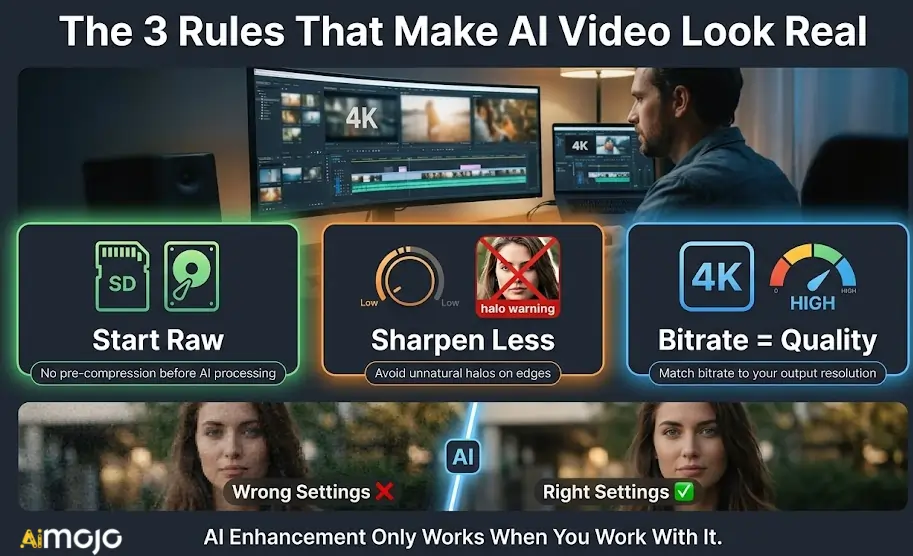
即使是最先进的 AI video enhancement tools require the right settings to produce natural, professional results without looking artificial. Relying purely on automatic presets can sometimes ruin a good clip.

创新中心 AI video enhancement improves quality

To get the cleanest renders, focus on these critical adjustments:

Start with clean source files: Avoid compressing your original footage before processing, as AI models need maximum raw data to upscale accurately.
Dial back the sharpening: Over-sharpening is a frequent mistake. Keep edge enhancement settings conservative to prevent unnatural halos around moving subjects.
Match your export bitrate: High-resolution upscales demand higher bitrates. Enhancing a clip to 4K but exporting at a low bitrate will introduce new compression artifacts.

By carefully managing these parameters, you ensure your final export looks genuinely restored rather than heavily over-processed.

Summing Up the Best Tools to Improve Video Quality

Not every video needs the same fix. Some clips need grain removed, others need frames smoothed out, and some simply need a resolution bump before they look presentable. The six platforms covered here each handle a specific part of that process better than the rest.

Start with what your footage actually needs, match it to the right tool, and test on a short clip before committing to a full render. Most of these 视频增强工具 offer trial access, so there is genuinely no pressure to commit blind.

The best edit is the one your audience never notices was fixed.

发表评论

您的电邮地址不会被公开。 必填项 *

本网站使用Akismet来减少垃圾邮件。 了解您的评论数据是如何被处理的。

即刻加入 Aimojo 部落!

每周加入 76,200 多名会员获取内幕消息! 
🎁 奖金: 获得我们的 200 美元“AI 注册即可免费获得“精通工具包”!

热门 AI 工具
AnyChat

将所有客户对话整合到一个强大的收件箱中 一体化在线聊天平台 AI 为成长型团队打造的代理和支持平台。

光标

借助人工智能,以思维速度编写代码 此 AI 专为专业工程团队打造的代码编辑器

Speechlab AI

一次配音,覆盖全球所有观众。 AI 为全球内容团队提供语音翻译和配音服务。

类似于AI

AI 具备军用级安全性的语音克隆技术 唯一能够生成、验证和检测生成式技术的平台 AI 音频

蒙奇工作室

您的所有社交媒体形象均由我们管理 AI 每周只需不到 10 分钟 面向小型企业和机构的AI驱动型社交媒体自动化

© 2023 - 2026 版权所有 | 成为 AI 专业版 | 用心打造