如何构建你的第一个 AI 无需代码即可实现工作流程(每周节省数小时)

How to Build Your First No-Code AI 工作流程

You're spending 3+ hours a day on tasks a machine could handle in 3 minutes. Copy-pasting data between apps. Manually sending follow-up emails. Formatting reports by hand. That's not a workflow — that's a grind.

This guide shows you exactly how to set up your first 无代码 AI 工作流程 from scratch — no developer, no script, no excuses. By the time you're done reading, you'll have a working automation you can run today.

What a No-Code AI Workflow Actually Does (It's Not What You Think)

Most people hear “AI 工作流程” and picture something complex. It's 不是。

无代码 AI 工作流程

无代码 AI workflow is a connected sequence of automated steps where an AI handles the thinking part — and a visual tool handles the plumbing. No terminal. No syntax errors. Just a drag-and-drop setup that connects your apps, fires an AI action, and routes the output wherever you need it.

The key difference between regular automation and AI 自动化:

Regular automation: If X happens → do Y (rigid, rule-based)
AI 自动化: If X happens → AI processes it → smart output goes to Y (flexible, context-aware)

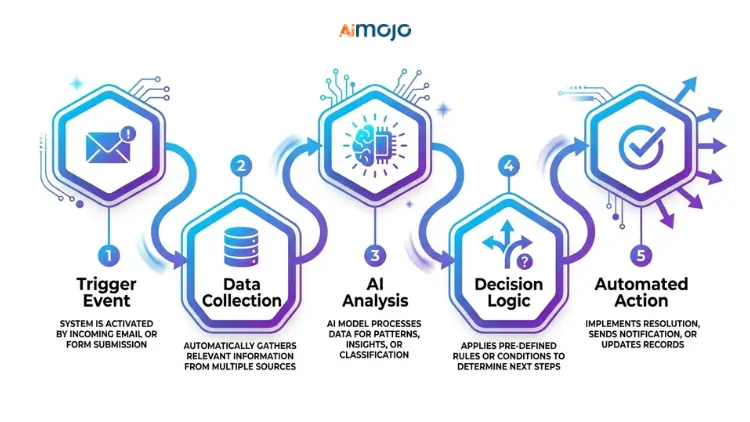
A trigger-action system in plain English looks like this: someone fills out your contact form → AI qualifies the lead → result gets dropped into your CRM 自动。 该's 无需代码 AI workflow running silently in the background.

This Is for You If You're Still Doing These Tasks Manually

Before you pick a tool, check if you're in the right room:

自由职业者和个体经营者 — buried in admin, client onboarding, invoices, and follow-ups
小型企业主 — copy-pasting between Google Sheets, email, and Slack all day
内容创作者 — manually scheduling posts, repurposing content one platform at a time
营销 — pulling data from five tools to build one report every Monday morning

If any of these hit, you're exactly who this guide is for. No coding background required.

The 5 Best No-Code AI Workflow Tools (Ranked for Beginners)

Picking the wrong tool here wastes hours. Here's 直接比较:

工具最适合Free PlanAI 产品特性
ZapierApp-to-app automation✅是Copilot (natural language setup)
创客网Visual multi-step flows✅是AI modules + HTTP routing
n8nSelf-hosted advanced flows✅是LLM integrations, full flexibility
连接Budget-friendly triggers✅是基础版 AI 行动步骤
巴丁基于浏览器 AI 刮✅是GPT-powered in-browser actions
Zapier vs Make.com for beginners: Zapier wins on simplicity. Make.com wins on power. If you've never touched automation before, start with Zapier. Once you want multi-step visual flows with conditional logic, switch to Make.com.
When to skip beginner tools and go straight to n8n: If you need self-hosted control, custom LLM connections, or you're building for clients — n8n is worth the slightly steeper setup curve.
One thing most beginners miss: Free plans have task/operation limits. Zapier's free tier caps at 100 tasks/month. Make.com gives you 1,000 operations. Know these limits before your workflow goes live.

打造你的第一个 AI Workflow in 6 Steps (Start to Finish)

This is the actual process — not a summary, a working system.

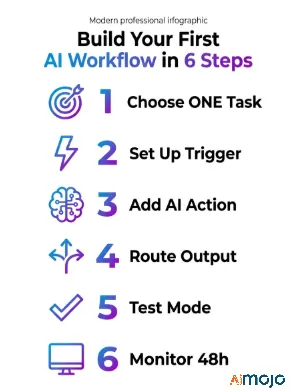
Step 1 — Choose ONE repetitive task to automate
Don't start with your entire business. Pick the single most annoying task you do daily. Something you could describe in one sentence: “Every time I get a new email inquiry, I manually copy the details into a spreadsheet.” 那个's 你的目标。

Step 2 — Set up your trigger
The trigger is what kicks the workflow off. It could be: a new form submission, an incoming email, a new row in Google Sheets, or a Slack message. In Zapier or Make.com, this is your first block.

Step 3 — Add your AI 行动
This is where the intelligence happens. Connect OpenAI (ChatGPT) Claude, or Gemini as an action step. Feed it the trigger data and write a clear prompt. Example: “Summarize this customer inquiry in 2 sentences and classify it as urgent, normal, or low-priority.”

Step 4 — Route the output
Tell your workflow where the AI's response should go — a Google Sheet column, a Slack channel, a draft email, or a 概念页。 This is your final action block.

Step 5 — Test before going live
Every platform has a test mode. Run it. Check if the trigger fires, the AI response makes sense, and the output lands correctly. Fix prompt issues here, not after 200 live runs.

Step 6 — Monitor the first 48 hours
Turn it on and keep an eye on the execution logs. Most failures happen in the first two days — usually from API限制, formatting mismatches, or a vague prompt producing inconsistent outputs.

值得注意的一点是: label every workflow clearly inside your tool. When you have five automations running, “Zap 1” and “Scenario 3” tell you nothing at 2am when something breaks. Name them by function — “Form → AI Lead Score → CRM” — and you'll thank yourself later.

7 No-Code AI Workflows You Can Copy Right Now

Real use cases, not theory:

  1. Auto-summarize emails → send digest to Slack (great for busy inboxes)
  2. Google Form response → AI-written brief → saved to Notion
  3. New blog post published → AI generates 3 social captions → scheduled via Buffer
  4. Contact form submission → AI lead qualification → tagged in CRM
  5. Customer support ticket → AI categorization → routed to right team
  6. Weekly SEO data from Google Search Console → AI summary report → emailed every Monday
  7. Blog post → AI repurposing pipeline → LinkedIn article + Twitter thread + email newsletter draft

These are all buildable in Zapier or Make.com with free plans. Workflow #7 (the content repurposing pipeline) alone can save a content team 5+ hours per week.

5 Mistakes That Break Your First AI Workflow (And How to Fix Them)

Most beginners don't fail because the tool is hard — they fail because of these five things:

Automating a process you don't fully understand yourself — If you can't describe each step manually, the workflow will break in weird places. Map it out first.
Using vague AI 提示 - “Write something about this email” produces garbage. Give the AI a role, context, format, and output length.
Skipping error handling — Without error steps, your workflow fails silently and you never know. Add a Slack or email alert for failed runs.
Overbuilding before testing — A 12-step workflow on day one is a debugging nightmare. Build step 1 → test → add step 2 → test again.
Ignoring rate limits on free-tier APIs — OpenAI's free API tier throttles fast. If your workflow runs frequently, you'll hit limits and get blank outputs with no warning.

那里's also a sixth mistake nobody talks about: treating the AI step like a magic box. The output quality is 100% tied to what goes in. If your trigger data is messy — inconsistent formatting, missing fields, mixed languages — the AI response will reflect that. Clean your input data first, then build the AI step around it. Garbage in, garbage out applies here harder than anywhere else.

Once Your First Workflow Runs — Here's What to Build Next

One working automation is proof of concept. Now you scale it.

工作流程 AI 自动化系统

Connect multiple workflows into a full automation stack — where the output of one flow becomes the trigger for another. That's how you build real systems, not just single shortcuts.

When to upgrade from free to paid: once you hit consistent task limits or need multi-path conditional logic (Make.com's paid plans add significant branching power).

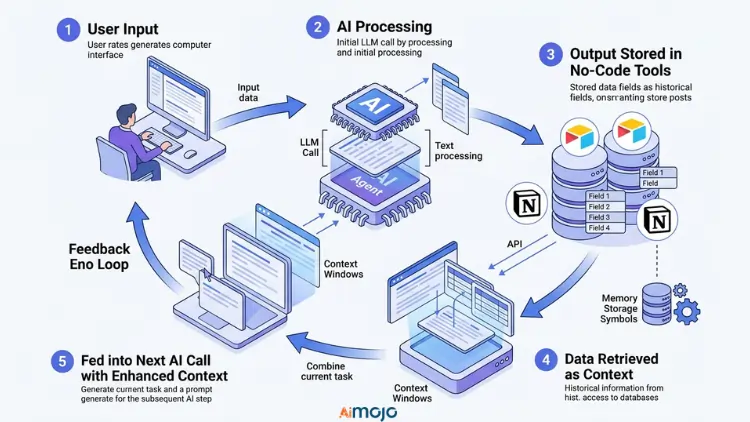
Adding memory and context to AI 步骤 is the next level — instead of one-shot prompts, you store previous outputs in Airtable or Notion and feed them back into the next AI call. This is how you build a multi-step AI 代理人 with no code that actually remembers context across runs.

The Full No-Code AI Toolkit (Everything You Need Bookmarked)

类别工具
Workflow BuildersZapier, Make.com, n8n, Pabbly Connect
AI 连接器 可选AI API, Claude API, Gemini API
数据存储Google Sheets, Airtable, Notion
Trigger SourcesGmail, Typeform, Webhooks, Shopify
监控Make.com Execution Logs, Zapier Task History

People Also Ask: No-Code AI 工作流程

Can I build an AI workflow with zero coding experience?

Yes. Tools like Zapier and Make.com are built specifically for non-technical users. If you can drag, drop, and fill out a form, you can build one.

Is Zapier good for AI 自动化?

For beginners, absolutely. Zapier Copilot lets you describe your workflow in plain English and it builds the steps. It also has native ChatGPT and Claude integrations.

How much does it cost to run a no-code AI 工作流程?

You can start free on both Zapier and Make.com. The main cost kicks in when you exceed free-tier limits or need premium app connections. Most small workflows run under $20/month.

什么是's the difference between no-code automation and AI 自动化?

Standard automation follows fixed rules. AI automation uses a language model to interpret, generate, or classify content — making it useful for tasks that aren't black-and-white.

Can no-code AI workflows replace a virtual assistant?

For structured, repeatable tasks — yes. For nuanced human judgment calls — not yet. They work best as a force multiplier alongside your team, not a full replacement.

Your First Workflow Should Be Running Before You Finish Reading This

Pick one task. Open Make.com or Zapier. Set a trigger, add a ChatGPT action step, route the output. Test it. That's 它。

The biggest mistake isn't picking the wrong tool — it's waiting until everything feels “perfect” to start. Your first workflow will be rough. That's the point. Build it messy, test it, fix the prompt, and it'll work.

Copy the Email Summary + Slack Workflow Template

发表评论

您的电邮地址不会被公开。 必填项 *

本网站使用Akismet来减少垃圾邮件。 了解您的评论数据是如何被处理的。

即刻加入 Aimojo 部落!

每周加入 76,200 多名会员获取内幕消息! 
🎁 奖金: 获得我们的 200 美元“AI 注册即可免费获得“精通工具包”!

热门 AI 工具
ChatJanitor 

转动你的 AI 将角色扮演的痴迷转化为真实的USDT奖励,同时与最稳定的角色聊天 AI 在网上。 清洁工 AI 焕然一新!认识一下聊天管理员吧!

Swapzy AI

几分钟内即可创建深度伪造风格的视频替换,无需任何编辑技巧。 AI 支持最高 4K 分辨率的视频内容换脸功能。

快乐穹顶人工智能

通往无审查世界的门户 AI 伴侣幻想 构建、聊天、尽情污秽。尽在一处。

CharaxAI 

一个平台,满足您的所有需求 AI 女友聊天、成人角色扮演和虚拟伴侣幻想 一体机 AI 性聊天和 AI 一款真正能带来体验的女友模拟器

快速Undress净

无需猜测。上传。点击。完成。 最快的 AI undress 目前游戏内还包含 NSFW 图片生成器。

© 2023 - 2026 版权所有 | 成为 AI 专业版 | 用心打造