Meta 的融合's 微软的 Llama 4 模型's AutoGen 框架为创建智能、高效的 AI 代理。这些技术结合起来,可以让开发人员构建能够处理自然语言、理解图像、推理复杂问题并与其他代理协作完成任务的应用程序。
骆驼4 带来令人印象深刻的多模式功能和广泛的上下文窗口,同时 自动生成 提供了一个结构化的框架,用于在协作工作流中协调多个代理。它们共同构成了下一代 AI 领域广泛应用,提供了卓越的解决方案。
本指南将介绍 建设 AI 使用这些工具的代理,为各个技能水平的开发人员提供实用的代码示例和实施策略。
是什么让 骆驼4 和 自动生成 完美匹配?
元's Llama 4 系列在 AI 世界及其 原生多模式功能 以及早期融合方法。与 AutoGen 结合使用时——Microsoft's 构建对话多代理系统的框架—开发人员可以创建 AI 能够有效推理、协作和适应的代理。
Llama 4 型号(包括 Scout 和 Maverick 型号)提供 早期融合多模态处理 从一开始就将文本、图像和视频帧视为单个标记序列。此功能与 AutoGen 配合使用's 灵活的代理架构,可以创建 AI 系统 可以:
让's 构建一个实用的多代理系统,通过创建一个项目提案生成器来展示这些功能,该生成器可以分析客户需求并生成定制的工作提案。
建立实用 AI 代理系统
让's 创建一个多代理系统,帮助自由职业者生成定制化的工作提案。我们的系统将:
- 收集客户需求
- 收集自由职业者资格
- 生成具有适当定价的专业提案。
第 0 步:设置您的环境
首先,安装必要的软件包:
蟒蛇
pip 安装 autogen-agentchat~=0.2
pip 安装 ipython
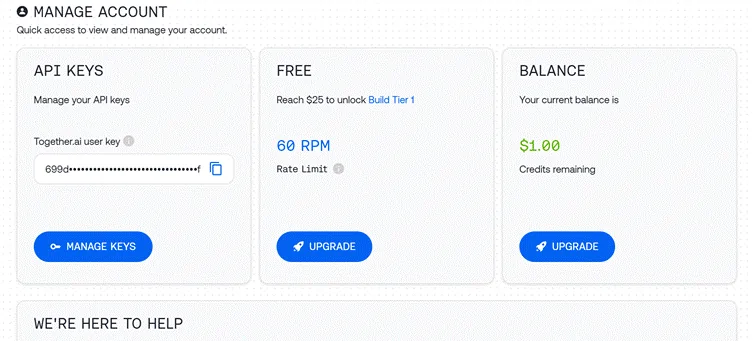
步骤 1:配置 API 访问
我们将使用 Together API 访问 Llama 4:
python

import os

import autogen

from IPython.display import display, Markdown

# Load API key from file

with open("together_ai_api.txt") as file:

    LLAMA_API_KEY = file.read().strip()

os.environ["LLAMA_API_KEY"] = LLAMA_API_KEY

# Configure LLM settings

llm_config = {

    "config_list": [

        {

            "model": "meta-llama/Llama-4-Scout",  # Use Scout for efficiency

            "api_key": os.environ.get("LLAMA_API_KEY"),

            "base_url": "https://api.together.xyz/v1",

        }

    ],

    "temperature": 0.2,  # Lower for more consistent outputs

    "timeout": 180

}
步骤 2:创建专门的代理
我们的系统需要三个具有特定角色的不同代理:
客户端输入代理
python

# Agent 1: Interfaces with the human user

client_agent = autogen.UserProxyAgent(

    name="Client_Input_Agent",

    human_input_mode="ALWAYS",  # Always gets input from human

    max_consecutive_auto_reply=1,

    is_termination_msg=lambda x: x.get("content", "").rstrip().endswith("TERMINATE"),

    system_message="""Act as the primary contact between the human user and other agents.

    First, collect initial project details (requirements, timeline, budget).

    When asked questions by the Scope Architect, relay user's answers about skills and experience.

    Type TERMINATE when the proposal is satisfactory or the user wants to stop."""

)
该代理充当人类用户和 AI 系统, 收集信息 并呈现最终输出。
范围架构师代理
python

# Agent 2: Analyzes requirements and asks qualifying questions

scope_architect_agent = autogen.AssistantAgent(

    name="Scope_Architect",

    llm_config=llm_config,

    max_consecutive_auto_reply=1,

    system_message="""You are a Scope Architect who analyzes project requirements.

    After receiving initial details from Client_Input_Agent, ask targeted questions about:

    - The freelancer's relevant past projects and experience

    - Their key skills and tools for this specific project

    - Estimated completion time for the described work

    Once you have sufficient information, create a concise summary of BOTH

    the project requirements AND freelancer qualifications for the Rate Recommender."""

)
范围架构师充当需求分析师,收集准确提案所需的关键信息。
评分推荐代理
python

# Agent 3: Creates structured proposal with pricing

rate_recommender_agent = autogen.AssistantAgent(

    name="Rate_Recommender",

    llm_config=llm_config,

    max_consecutive_auto_reply=1,

    system_message="""Generate professional project proposals based on gathered information.

    Wait for the Scope Architect's complete summary before proceeding.

    Include these sections in your proposal:

    1. Custom Introduction: Personalized greeting referencing client and project

    2. Project Scope & Timeline: Clear deliverables with timeline estimates

    3. Pricing Options: 2-3 tiers (hourly/fixed/retainer) with justification

    4. Next Steps: Brief suggestion for kickoff discussion

    Format using proper markdown. Avoid commentary - deliver only the final proposal."""

)
该代理生成最终交付成果,将收集到的信息转化为结构化的提案。
步骤 3:创建辅助代理(可选)
python

# Optional helper to initiate the conversation

user_proxy = autogen.UserProxyAgent(

    name="user_proxy",

    max_consecutive_auto_reply=1,

    llm_config=llm_config,

    system_message="Initiate the conversation between agents."

)
步骤4:设置群聊
现在我们将创建代理可以协作的对话环境:
python

# Group Chat Configuration

groupchat = autogen.GroupChat(

    agents=[client_agent, scope_architect_agent, rate_recommender_agent],

    messages=[],

    max_round=4,  # Prevent infinite loops

    speaker_selection_method="round_robin",  # Orderly participation

)

# Conversation Manager

manager = autogen.GroupChatManager(

    groupchat=groupchat,

    llm_config=llm_config,

    system_message="""Direct the conversation flow through these steps:

    1. Client_Input_Agent shares project details

    2. Scope_Architect asks qualifying questions

    3. Client_Input_Agent provides freelancer information

    4. Scope_Architect summarizes all information

    5. Rate_Recommender creates the final proposal

    End when the proposal is complete or Client_Input_Agent says TERMINATE."""

)这种设置确保了对话流程有序,角色和职责明确。
第五步:开始对话
让's 启动我们的代理工作流程:
python

# Begin the proposal generation process

print("Starting the proposal generation process...")

print("Please provide project details when prompted.")

initial_message = """

Begin the proposal creation process:

1. First collect project details from the user

2. Then gather freelancer qualifications

3. Finally generate a professional proposal

"""

user_proxy.initiate_chat(

    manager,

    message=initial_message

)
步骤6:提取最终提案
对话完成后,我们将提取并显示最终提案:
python

# Find and display the proposal

chat_history = manager.chat_messages[client_agent]

final_proposal = None

for msg in reversed(chat_history):

    if msg.get("role") == "assistant" and msg.get("name") == rate_recommender_agent.name:

        if "Introduction" in msg.get("content", ""):

            final_proposal = msg

            break

if final_proposal:

    proposal_text = final_proposal.get("content", "Proposal not found.")

    try:

        display(Markdown(proposal_text))

    except NameError:

        print("\n--- FINAL PROPOSAL ---\n")

        print(proposal_text)

else:

    print("Could not find the final proposal in the conversation.")
增强技术,打造更美好的未来 AI 经纪人

虽然我们的基本实现效果很好,但这里有一些高级方法可以使您的 AI 代理更强大:
A.外部工具集成
AutoGen的优势之一在于能够为代理商提供外部工具。以下是如何为您的费率推荐器添加市场调研功能:
python

# Define function for market research

def research_market_rates(job_type, experience_level):

    """Access external data for pricing information"""

    # This would typically connect to an API or database

    # Using simple dictionary for demonstration

    rate_data = {

        "web_development": {

            "beginner": "$30-50/hr",

            "intermediate": "$50-90/hr",

            "expert": "$90-200/hr"

        },

        "data_analysis": {

            "beginner": "$25-45/hr",

            "intermediate": "$45-85/hr",

            "expert": "$85-180/hr"

        }

    }

    # Retrieve appropriate rate range

    try:

        return rate_data[job_type][experience_level]

    except KeyError:

        return "Rate information not available for this combination"

# Configure LLM with function

rate_recommender_config = {

    **llm_config,

    "functions": [

        {

            "name": "research_market_rates",

            "description": "Find current market rates for specific job types and experience levels",

            "parameters": {

                "type": "object",

                "properties": {

                    "job_type": {

                        "type": "string",

                        "enum": ["web_development", "data_analysis", "content_writing", "graphic_design"]

                    },

                    "experience_level": {

                        "type": "string",

                        "enum": ["beginner", "intermediate", "expert"]

                    }

                },

                "required": ["job_type", "experience_level"]

            }

        }

    ]

}

# Update the Rate Recommender with function capabilities

rate_recommender_agent = autogen.AssistantAgent(

    name="Rate_Recommender",

    llm_config=rate_recommender_config,

    system_message="""Generate proposals with accurate market-based pricing.

    Use the research_market_rates function to get current pricing information."""

)

# Register the function with the agent

rate_recommender_agent.register_function(

    function_map={"research_market_rates": research_market_rates}

)
这一增强功能允许费率推荐器访问外部定价数据,从而使提案更加准确和具有竞争力。
B. 持久内存实现
添加记忆功能有助于代理在多个交互中保持上下文:
python

# Create a simple memory system for agents

class AgentMemory:

    def __init__(self):

        self.memories = {}

    def store(self, agent_name, key, value):

        """Save information to agent memory"""

        if agent_name not in self.memories:

            self.memories[agent_name] = {}

        self.memories[agent_name][key] = value

    def retrieve(self, agent_name, key=None):

        """Get information from agent memory"""

        if agent_name not in self.memories:

            return None

        if key:

            return self.memories[agent_name].get(key)

        else:

            return self.memories[agent_name]

# Initialize memory

memory = AgentMemory()

# Example of storing client information

def process_client_input(message):

    """Extract and store client information"""

    # This would typically use more sophisticated parsing

    if "budget:" in message.lower():

        budget = message.split("budget:")[1].strip().split("\n")[0]

        memory.store("client", "budget", budget)

    if "timeline:" in message.lower():

        timeline = message.split("timeline:")[1].strip().split("\n")[0]

        memory.store("client", "timeline", timeline)

    return message

# Add memory hook to client agent

def memory_hook(recipient, messages, sender, config):

    """Process and store incoming messages"""

    if sender.name == "Client_Input_Agent" and messages:

        process_client_input(messages[0].get("content", ""))

    return False, None  # Continue normal processing

# Register the hook

client_agent.register_hook("memory_hook", memory_hook)
该记忆系统可帮助代理在整个对话过程中回忆起重要信息,即使在最近的消息中没有明确提及。
超越提案生成的实际应用
我们构建的架构可以适应许多其他业务场景:
A. 内容创作流程
修改我们的代理来处理内容制作工作流程:
B.SEO分析系统
使用这些代理创建专门的 SEO 工具:
C.客户支持自动化
将架构转变为支持系统:
性能优化技巧
生产就绪 AI 代理系统:
- 智能模型选择: 对于简单的任务(摄入、路由)使用轻量级模型,而对于复杂的推理(提案创建、定价)则保留较大的模型。
- 实现缓存: 存储频繁响应以减少 API 调用并提高响应时间:
python

# Simple cache implementation

response_cache = {}

def get_cached_response(query_key, generator_function, ttl=3600):

    """Get cached response or generate new one"""

    if query_key in response_cache:

        timestamp, response = response_cache[query_key]

        if time.time() - timestamp < ttl:

            return response

    # Generate fresh response

    new_response = generator_function()

    response_cache[query_key] = (time.time(), new_response)

return new_response批量处理:对于独立的任务,并行处理而不是顺序处理:
python

import asyncio

async def run_parallel_research():

    task1 = asyncio.create_task(research_agent.async_run("Research topic A"))

    task2 = asyncio.create_task(research_agent.async_run("Research topic B"))

    task3 = asyncio.create_task(research_agent.async_run("Research topic C"))

    results = await asyncio.gather(task1, task2, task3)

    return results
Llama 4 的技术优势 AI 经纪人
骆驼4's 具体功能使其特别适合代理应用程序:
- 早期融合多模态架构 使代理能够自然地一起处理文本和图像,这与以前将模态分开的方法不同。
- 混合专家设计 允许模型仅激活与每个任务相关的参数,从而使响应更快、更精确。
- 卓越的长上下文处理 (Scout 中最多 10M 个令牌)让代理可以保留对话历史记录并参考长篇文档而不会失去连贯性。
- 多语言功能 超过 12 种官方支持的语言使全球用户能够访问代理。
是的,你可以创造 AI 智能代理不仅能理解和响应请求,还能积极协作解决复杂问题——真正代表了下一代 AI 应用.
常见问题
Llama 4 与其他语言模型有何不同?
Llama 4 采用早期融合方法进行多模态处理,并采用稀疏混合专家架构来提高效率。它将文本、图像和视频视为单个 token 序列,并针对每个输入仅激活相关的“专家”子模型。
AutoGen 可以与 Llama 4 以外的 LLM 一起使用吗?
是的,AutoGen 与模型无关,可以与各种 LLM 配合使用,包括 OpenAI 模型、人择模型和其他开源模型,如 Mistral AI 或 DeepSeek。
是否建筑 AI 代理需要高级编程技能吗?
不一定。只要具备基本的 Python 知识和对 LLM 的理解,您就可以设置和运行代理工作流。AutoGen 简化了创建和协调多个代理的过程。
这些可以吗 AI 代理在本地硬件上运行?
是的,AutoGen 支持通过 Ollama 等工具与本地 LLM 集成,允许您在自己的硬件上运行代理。
如何在生产中安全地处理 API 密钥?
将 API 密钥存储在环境变量或安全保管库中,而不是代码中。在生产部署中使用适当的身份验证和加密。
我可以使用自定义工具和 API 来扩展代理吗?
当然。AutoGen 允许您将代理连接到外部 API、数据库和自定义工具,从而使它们能够与各种系统和服务进行交互。
推荐读物:
结语
构建 AI Llama 4 和 AutoGen 的智能代理为创建能够处理复杂任务的智能协作系统开辟了令人兴奋的可能性。 骆驼4's 多模态智能和 AutoGen's 灵活的代理框架 为开发人员提供强大的工具来创建 AI 能够推理、协作并适应各种场景的代理。
我们的示例项目——一个多智能体提案生成器——仅展示了这些技术的一个实际应用。同样的原理可以应用于 我们按图纸规格 AI 内容创作代理, 数据分析、客户服务、研究、项目管理以及许多其他领域。
当你建立自己的 AI 使用 Llama 4 和 AutoGen 的代理,请记住以下关键原则:


 奖金: 获得我们的 200 美元“AI 注册即可免费获得“精通工具包”!