

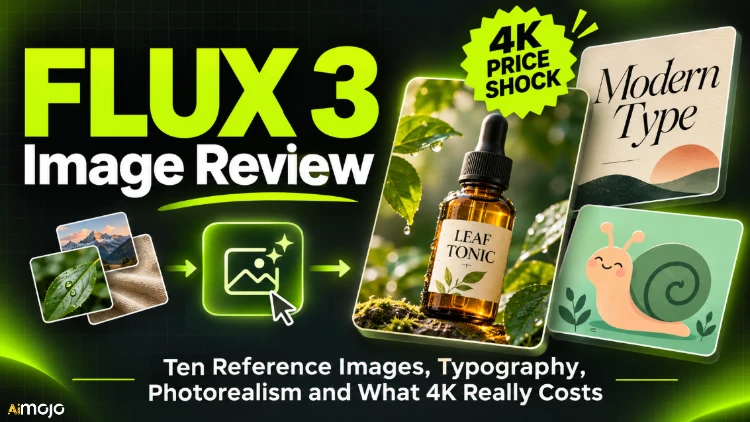
Three outputs from this review: a product scene assembled from three reference images, a mascot carried into a new scene, and a postcard made with search grounding switched on.
FLUX 3 Image from Black Forest Labs comes with a feature list that sounds useful on paper: up to ten reference images per request, five resolution tiers, fifteen aspect ratios and an optional web search step before generation. Feature lists do not tell you how a model behaves with a real brief, so we gave it one and measured what came back.
This review covers nine tests and 16 paid images. We checked every requested element against every output, read every generated word at full size, timed each request and recorded the price actually charged.
The whole review cost $0.97 in generation fees. A single 4k render accounts for 45 percent of that, which is the first lesson of this review.
Our Testing Method: Scoring Rules, Timing and Real Charges
Our brief comes from a fictional brand we invented for this test, Oddly Fern Plant Care Co. It sells one product, a liquid plant food called Leaf Tonic in an amber glass dropper bottle, and it has a mascot: Pip, a cartoon garden snail with a mint-green shell and a single leaf sprouting from the top.
A brand like this needs a set of images, not one picture: a product shot, a poster, a label close-up, the mascot in several styles and a campaign photo that puts product and mascot together.
Every image must show the same bottle with the same label and the same snail with the same leaf. That is exactly the job where reference images either save hours or create a mess.
Scoring was strict. For each prompt we listed the concrete elements it asked for and marked each output as met, missed or ambiguous. Every generated word was cropped and read at two to three times magnification. Times are the processing time each task reported, and costs are the charge recorded on each completed task.
FLUX 3 Image API Explained: Async Tasks, Parameters and Polling
FLUX 3 Image (model id flux-3-image) is asynchronous: you POST a prompt, get a task ID, and poll until the image is ready. Each request returns exactly one image.
The options are resolution (768sq, 1k, 1.5k, 2k or 4k, default 1k), aspect_ratio (auto or one of 15 ratios from 21:9 to 9:21), image_urls (up to ten references as URLs or base64), grounding (web retrieval before generation, on by default) and safety_tolerance (0 to 4, default 2). There is no seed, no width and height, no negative prompt and no batch size.
This is the helper we used for every test. Host and key come from environment variables, and task IDs are logged before polling, so an interrupted run can be resumed without paying twice.
import os, time, base64, requests
BASE = os.environ["IMAGE_API_BASE"]          # your provider's /v1 endpoint
HEADERS = {"Authorization": f"Bearer {os.environ['IMAGE_API_KEY']}"}
def as_data_uri(path):
    ext = "jpeg" if path.endswith((".jpg", ".jpeg")) else "png"
    return f"data:image/{ext};base64," + base64.b64encode(open(path, "rb").read()).decode()
def generate(prompt, refs=(), resolution="1k", aspect="auto", grounding=False):
    payload = {"model": "flux-3-image", "prompt": prompt,
              "resolution": resolution, "aspect_ratio": aspect,
              "grounding": grounding}
    if refs:
        payload["image_urls"] = [as_data_uri(p) for p in refs]   # max 10
    r = requests.post(f"{BASE}/images/generations", headers=HEADERS,
                      json=payload, timeout=120)
    r.raise_for_status()
    task_id = r.json()["data"][0]["task_id"]
    open("task_ids.log", "a").write(task_id + "\n")   # log before polling
    while True:
        time.sleep(4)
        try:
            d = requests.get(f"{BASE}/tasks/{task_id}", headers=HEADERS,
                            timeout=30).json()["data"]
        except requests.RequestException:
            continue                                    # network blip: poll again
        if d["status"] == "completed":
            return d["result"]["images"][0]["url"], d.get("cost"), d.get("actual_time")
        if d["status"] in ("failed", "cancelled"):
            raise RuntimeError(d.get("error"))
We set grounding to false everywhere except Test 8, because web retrieval changes results in ways that would muddy the other comparisons.
Test: Prompt Adherence with an 11-point Brief
The Leaf Tonic hero shot was written to contain eleven checkable requirements, including a deliberately fussy one: exactly three eucalyptus leaves.
{"model": "flux-3-image",
"prompt": "Product photo of an amber glass dropper bottle with a cream paper label that reads \"LEAF TONIC\" in black serif capitals, standing on a pale oak table. Next to it: a small fern in a terracotta pot, a folded linen cloth, and exactly three dried eucalyptus leaves. Soft morning window light from the left, shallow depth of field, plain white wall in the background.",
"resolution": "1k", "aspect_ratio": "4:5", "grounding": false}
The 1k result arrived in 18 seconds at 912×1152 pixels for $0.0346. Amber glass, dropper, cream label, correctly spelled “LEAF TONIC”, black serif capitals, oak table, fern in terracotta, linen cloth, three eucalyptus leaves and a white wall: all present. Light from the left was ambiguous, since the scene is evenly lit.
Ten clear passes out of eleven, with the eleventh unproven rather than wrong, is a strong result. The counting instruction held in all four renders of this prompt, and the bottle looks physically plausible, with the glass pipette visible through the amber.
One consequence for production work: without a seed, every request produces a new composition. You cannot hold a scene fixed and vary one setting. The tool for keeping things fixed is a reference image, which Tests 5 to 7 measure.
Test: Four Resolutions and a Pricing Cliff
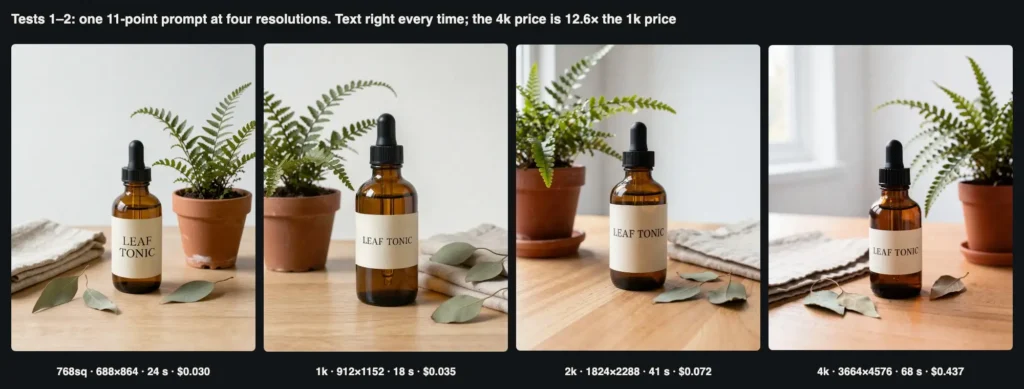
We sent the same prompt at 768sq, 1k, 2k and 4k. Each render has its own composition, so this compares sharpness, timing and price rather than pixels.
The 11-point prompt at four resolution tiers. Every render spelled the label correctly and showed exactly three eucalyptus leaves.
| çözüm | Delivered (4:5) | Zaman | Ücret | Cost per megapixel |
|---|---|---|---|---|
| 768sq | 688×864 (0.59 MP) | 24 s | $0.0295 | $0.050 |
| 1k | 912×1152 (1.05 MP) | 18 s | $0.0346 | $0.033 |
| 2k | 1824×2288 (4.17 MP) | 41 s | $0.0720 | $0.017 |
| 4k | 3664×4576 (16.8 MP) | 68 s | $0.4370 | $0.026 |
All four met the same checklist items, and the 2k and 4k renders added a window on the left, which settles the lighting requirement in their favour. At 768sq the label type turns soft when zoomed; at 2k and 4k you can see the paper texture and the grain of the oak.
The pricing deserves a second read. 768sq saves only 15 percent against 1k while delivering about half the pixels. 2k is the best value per megapixel: four times the pixels of 1k for about twice the price.
Then 4k jumps to $0.437, 12.6 times the 1k price and six times the 2k price, so per megapixel it costs more than 2k.
Draft at 1k, pick the winners, and reserve 4k for the few images that truly need it. Upscaling a 2k render will usually cost far less, and a fresh 4k request will not reproduce the draft you liked anyway.
Test: Typography, From Headline to Small Print
We tested two levels of difficulty: a poster with three lines of text in three sizes, and a back label with 31 words including an ingredient list in small type.
Poster (1k, 2:3): Minimal print poster for a houseplant care brand. Sage green background. Centered at the top, the headline "FEED YOUR FERNS" in large bold cream sans-serif capitals. Below it, an illustration of an amber dropper bottle beside a fern frond. Under the illustration, one line in smaller cream type: "Leaf Tonic - 2 drops a week, every week". At the very bottom, small footer text: "Oddly Fern Plant Care Co."

Back label (1k, 1:1): Close-up studio photo of the back label of an amber glass dropper bottle ... The label text, top to bottom: "LEAF TONIC" as a bold heading; "Liquid plant food for ferns and calatheas"; "Ingredients: seaweed extract, molasses, magnesium sulfate, humic acid, iron chelate, water"; "Use 2 drops per 250 ml of water"; "Net 30 ml".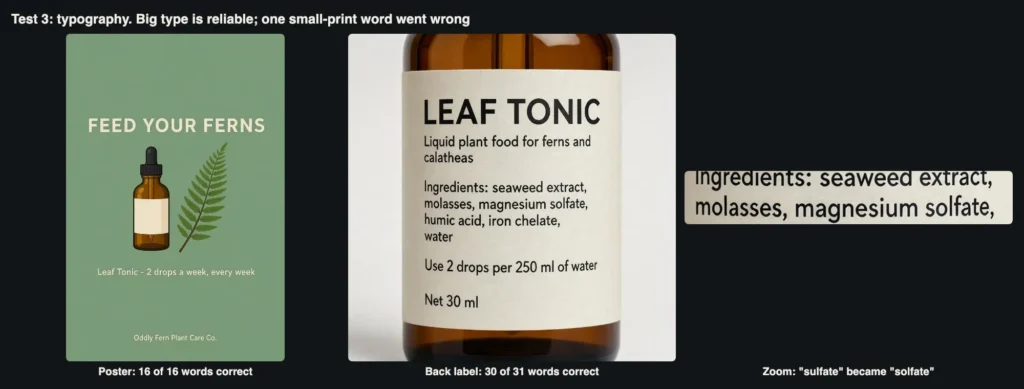
The poster rendered all 16 words correctly. The label rendered 30 of 31 words correctly; “sulfate” came out as “solfate”.
The poster took 25 seconds and every word was correct, including the hyphen, the comma and “Co.” in the footer. The layout followed the instructions closely, and the model left the illustrated bottle's label blank, which is right because we asked for no text there.
The label took 27 seconds and looks excellent at first glance: sensible hierarchy and line breaks, correct units. At full size, one word is wrong: “magnesium sulfate” became “magnesium solfate”. A single letter in a chemical name is exactly the error a quick review misses and a customer or regulator would catch.
Our tally is 46 of 47 words correct, with the one error in the smallest, most technical text. Headlines and short phrases are reliable; ingredient lists, dosages and warnings should be typeset separately and composited afterwards.
Test: Photorealism Versus Illustration
Next we described Pip in words only, in three styles: a photoreal macro shot, a flat vector mascot and a watercolor storybook page. Each prompt used the same description: “a small round garden snail mascot with a mint-green spiral shell, a soft peach body, big friendly black eyes, and one tiny green leaf sprout growing from the top of the shell”.
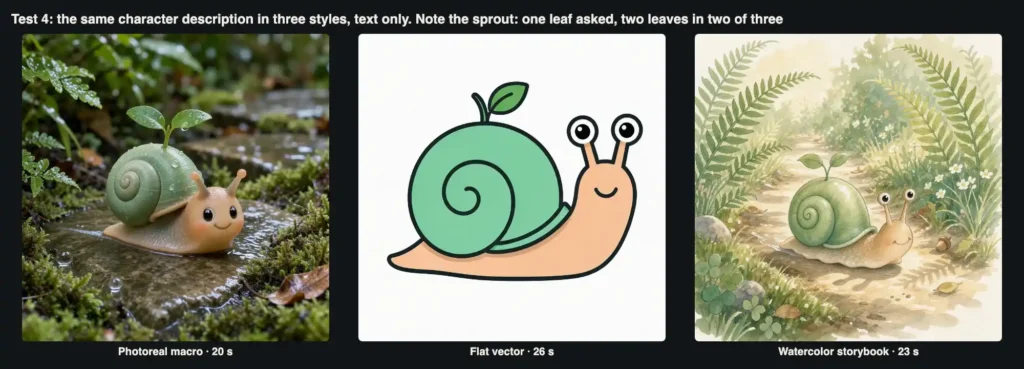
One description, three styles. The photoreal and watercolor versions each grew a two-leaf sprout instead of one leaf.
All three took 20 to 26 seconds and all three are usable. The photoreal version is the most striking, with wet stone, droplets on the shell and convincing depth of field; it reads like a photo of a handmade figurine.
The flat vector version is clean and production-ready, with consistent outlines and the eyes on stalks. The watercolor has believable kağıt dokusu and loose edges.
Side by side, though, they are three different snails. Two of the three have a two-leaf sprout instead of one, the photo version moved the eyes onto the face, and the body colour ranges from peach to tan.
A metin açıklaması is not a character sheet. This is the baseline that reference images should fix.
Test: Editing with a Single Reference
The most common real-world job is putting an approved product into a new scene. We sent the 1k hero from Test 1 as the only reference, with aspect_ratio set to auto and the cheapest tier, 768sq.
generate('Place this exact bottle on a white tiled bathroom shelf next to a rolled white towel and a small trailing pothos plant. Keep the bottle shape, the cream label and the words "LEAF TONIC" exactly as they are. Bright, even daylight.',
        refs=["hero.jpg"], resolution="768sq", aspect="auto")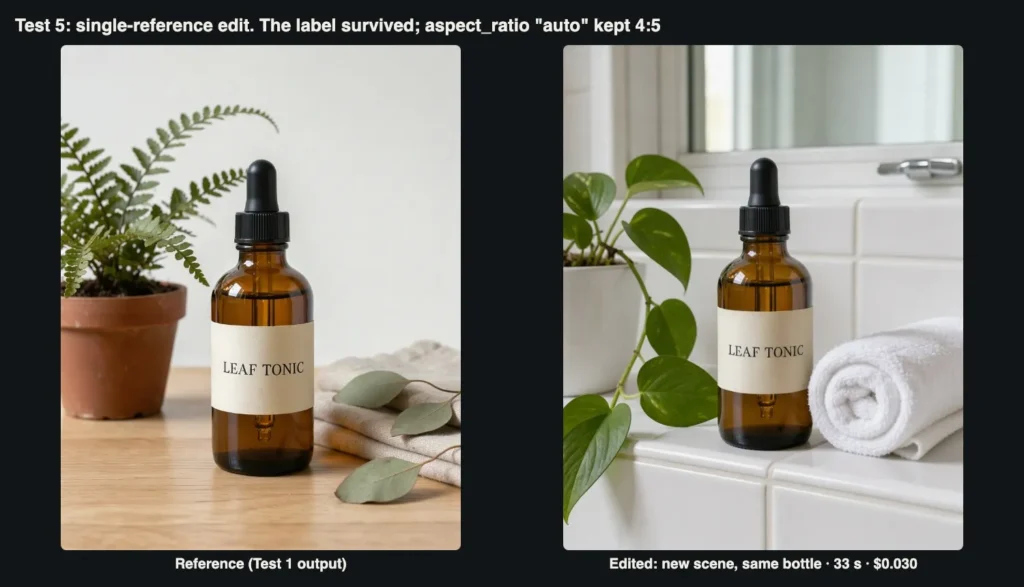
The reference and the edit. Bottle shape, dropper, label proportions and lettering carried over; everything else was replaced as asked.
The edit took 33 seconds and cost $0.0295, the same as a text-only image at that tier. The bottle is a faithful copy: same shoulders, dropper, pipette and serif lettering.
Towel and pothos are where we asked. With auto, the output followed the reference's 4:5 shape but came back at 672×848, slightly different from the 688×864 of a 4:5 text-only request, so read real dimensions from the file.
For a small catalogue this is the most practical capability in the model: one approved product photo becomes the source for any number of lifestyle scenes, and references add nothing to the price.
If you want to try this reference-based workflow yourself, the FLUX 3 Image API accepts the same parameters we used here, and the helper above runs against it unchanged.
Test: Keeping a Character Consistent
We used the flat vector Pip from Test 4 as the only reference for a new scene, restating the features to keep.
The snail character from the reference image is watering a small fern with a tiny copper watering can on a sunny windowsill. Keep the character exactly the same: same flat vector style, thick outlines, mint-green spiral shell, peach body, eyes on stalks and the single leaf on the shell.
(resolution 768sq, aspect_ratio 1:1, 1 reference)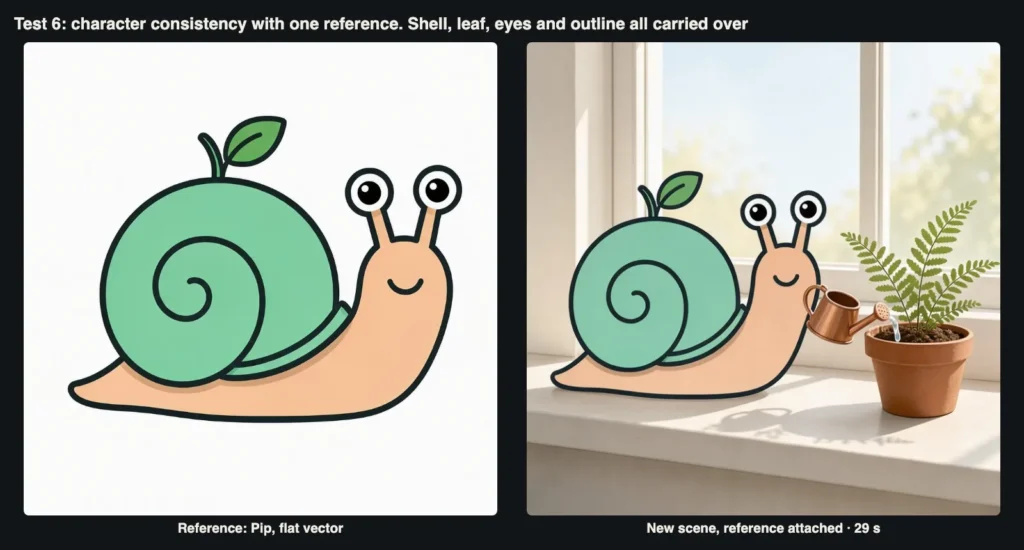
The reference and the new scene. All five character features we tracked carried over.
The result took 29 seconds. All five tracked features carried over: the shell with the same single curl, the peach body, eyes on stalks, one leaf and thick outlines.
Where three text prompts gave three snails, one reference locked the character. Two art-direction notes: the background came out soft and realistic, so ask for a flat background too if you need one; and since a snail has no hands, the watering can simply floats beside Pip's kafası.
Test: Three References Versus Ten
For the headline feature we built ten references: the product shot, the vector mascot, a logo card and a palette strip drawn locally, the poster and back label from Test 3, crops of the fern pot and linen cloth, the postcard from Test 8 and the watercolor from Test 4. The prompt addressed each by number.
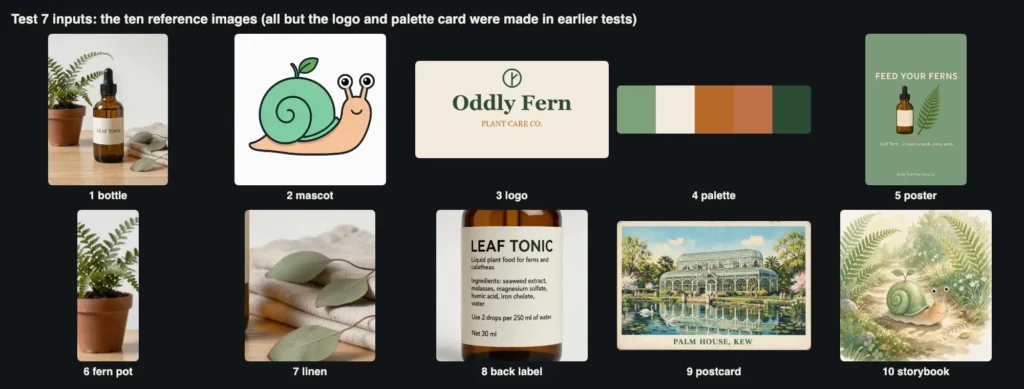
The ten inputs. Eight were outputs of earlier tests; the logo card and the palette strip were drawn locally.
Lifestyle product photo on a sunny wooden windowsill. Image 1: put this exact Leaf Tonic bottle in the centre, label facing the camera. Image 2: a small soft plush toy of this snail character sits to the right of the bottle. Image 3: this logo is printed on a small kraft paper tag tied to the bottle neck with twine. [3-reference version ends here.]
Image 4: use this colour palette for the props and background. Image 5: this poster hangs framed on the wall behind. Image 6: this fern in its terracotta pot stands on the left. Image 7: this linen cloth lies folded under the bottle. Image 8: a second bottle lies on its side in front, showing this back label. Image 9: this postcard leans against the window frame. Image 10: this storybook illustration is printed on a small card propped next to the plush snail. Natural morning light.
(resolution 768sq, aspect_ratio 4:5)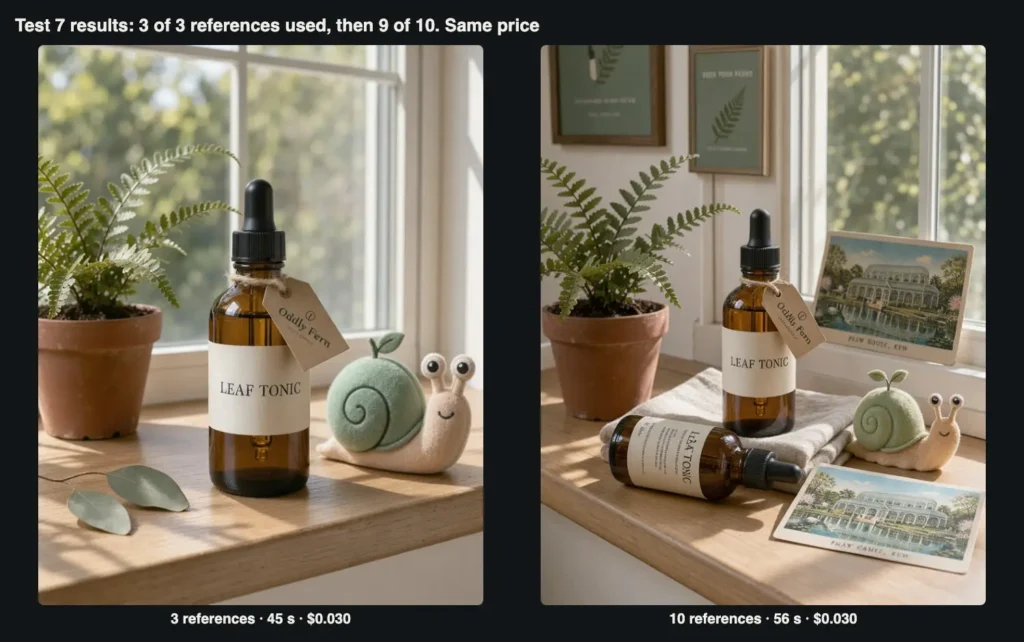
Left: three references, all three used. Right: ten references, nine used; the storybook card is missing and the postcard appears twice.
With three references (45 seconds), all three were used as instructed: the bottle centred with a correct label, a felt plush version of Pip on the right, and a kraft tag reading “Oddly Fern”.
Dönüyor flat vector character into a believable plush while keeping the shell curl, stalk eyes and single leaf is a useful trick for merchandise mock-ups.
One Side Effect: The fern pot and eucalyptus leaves from the background of reference 1 also appeared, unrequested. References bring their context with them.
With ten references (56 seconds, same $0.0295), we counted nine of ten in the scene: bottle, plush, tag, palette, poster, fern pot, linen, a second bottle on its side and the postcard against the window. The storybook card was missing; a second copy of the postcard took its place, and the poster appears twice.
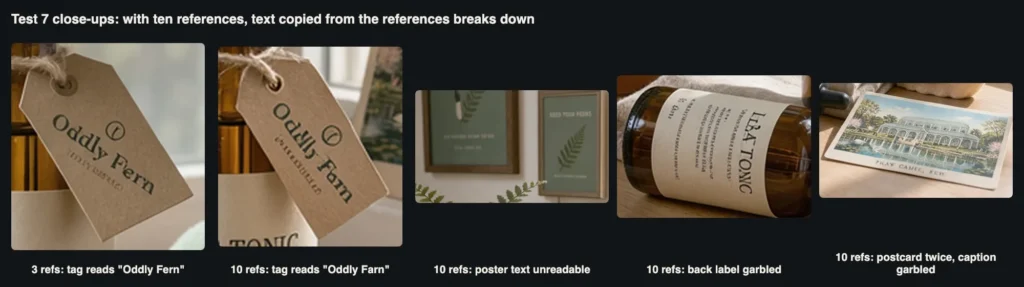
At ten references, every piece of text copied from a reference degraded, including the brand name on the tag.
The close-ups show the real cost. The tag that read “Oddly Fern” with three references reads “Oddly Farn” with ten. The poster text is unreadable, the second label is garbled and the postcard caption is nonsense; only the large “LEAF TONIC” on the main bottle stayed correct.
Part of this is the 768sq tier, which gives small objects few pixels, and we did not rerun at higher resolution, so treat the text result as open. The merging and duplication of inputs would not change with resolution.
Our Rule: Use as many references as the scene has objects that must be exact, and no more. Processing time grew by one to two seconds per extra reference (45 seconds with three, 56 with ten).
Test: Search Grounding On and Off
Grounding lets the model retrieve web or image context before drawing, and it is on by default. We tested it on a real landmark with a distinctive shape: the Palm House at Kew Gardens.
Vintage travel postcard illustration of the Palm House at Kew Gardens in London, seen from across the pond in spring. Caption at the bottom in bold serif type: "PALM HOUSE, KEW".
(resolution 1k, aspect_ratio 3:2, grounding true / false)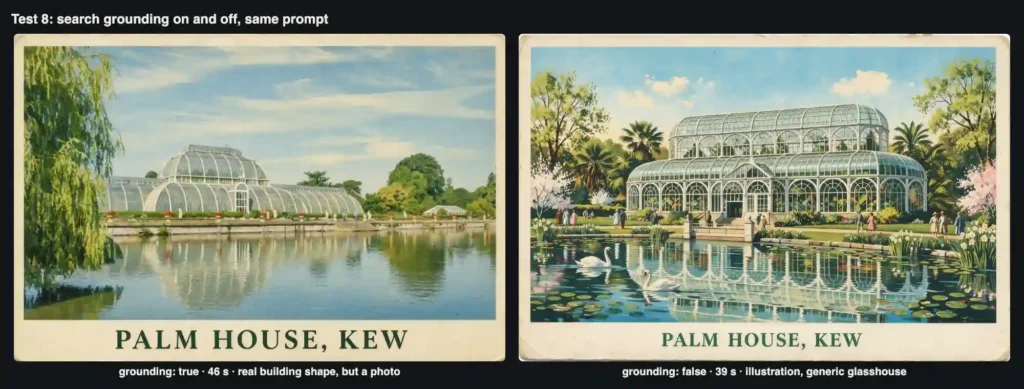
Grounding on (left) got the building right and the style wrong. Grounding off (right) got the style right and the building wrong.
The results split cleanly. With grounding on (46 seconds), the building has the right silhouette, long and low with a raised central section and curved wings, but the image is essentially a tinted photograph rather than an illustration, and it looks like midsummer, not spring.
With grounding off (39 seconds), we got a charming illustrated postcard with blossoms and swans, exactly the requested style, but a generic two-tier glasshouse that does not resemble the real one. Both captions were spelled correctly.
Because grounding is on by default, this affects you even if you never set it. It improved factual accuracy and reduced style adherence, and added seven seconds in our comparison.
Switch it off for invented products and characters, where there is nothing to look up; leave it on for real places and products, and push the style harder in the prompt.
Test: Counting, Numbering and a Slow Outlier
The last test combined two classic weaknesses: exact counts and sequential numbers. We asked for exactly seven identical bottles in a row, numbered 1 to 7 from left to right.
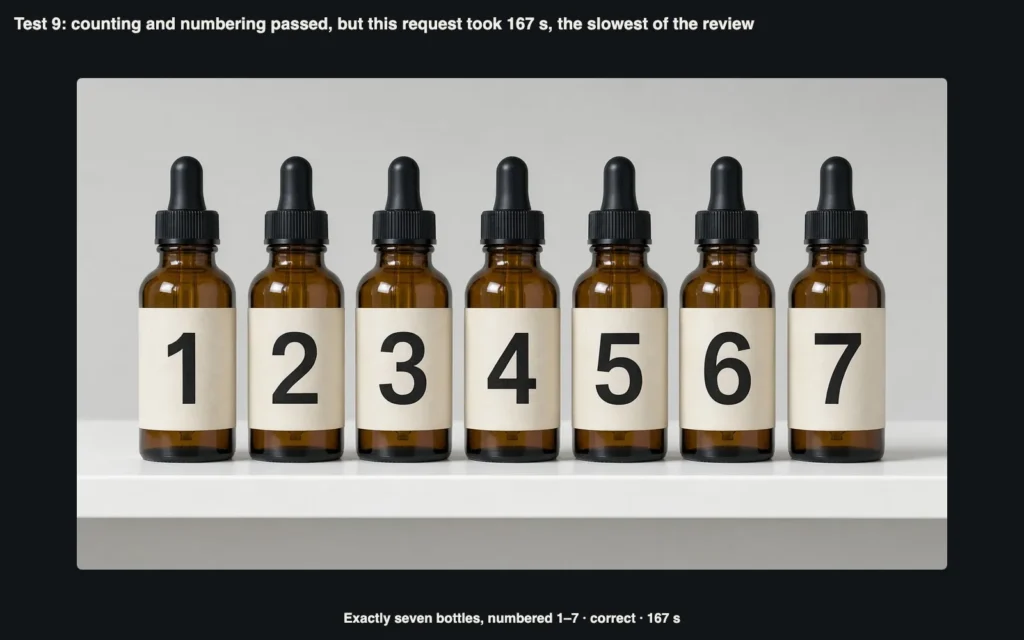
Seven bottles, numbered in order. Correct, but the request took 167 seconds.
The image is correct: seven evenly spaced bottles, numbers 1 to 7 in order. Together with the eucalyptus leaves, FLUX 3 Image got every explicit count right in this review.
The surprise was time: 167 seconds, against 18 to 46 seconds (median 26) for our other 1k text-only requests, with nothing in the prompt to explain it. A user-facing product needs a progress state, a generous timeout and a way to deliver results later.
Anyone migrating from older FLUX endpoints should also note what this API does not accept: width, height, pixel-size strings, seed, steps, guidance, negative_prompt, output_format or multiple images per request. Map sizes to a resolution tier plus an aspect ratio.
How Much Does FLUX 3 Image Cost?
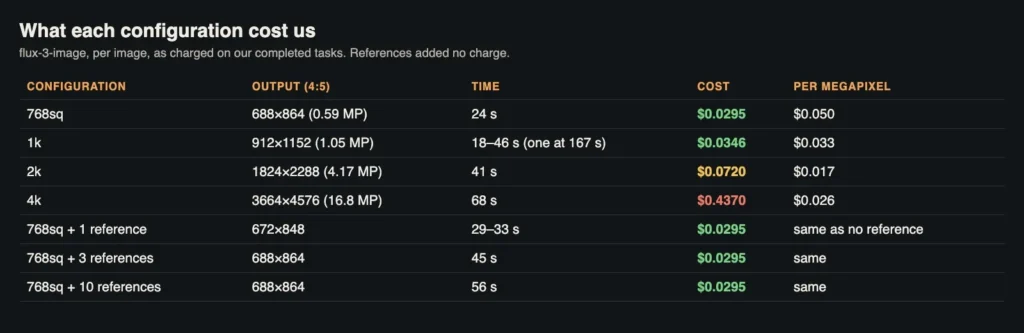
Measured cost and processing time for every configuration in this review.
| test | Fotoğraflar | Ayarlar | Ücret |
|---|---|---|---|
| 1–2. Adherence and resolution ladder | 4 | 768sq, 1k, 2k, 4k | $0.5731 |
| 3. matbaacılık | 2 | 1k | $0.0691 |
| 4. Three styles | 3 | 1k | $0.1037 |
| 5. Single-reference edit | 1 | 768sq, 1 ref | $0.0295 |
| 6. Character consistency | 1 | 768sq, 1 ref | $0.0295 |
| 7. Three and ten references | 2 | 768sq, 3 and 10 refs | $0.0590 |
| 8. Grounding on and off | 2 | 1k | $0.0691 |
| 9. Sayma | 1 | 1k | $0.0346 |
| Toplam | 16 | $0.9677 |
Without the single 4k image, the other 15 images cost $0.53, about 3.5 cents each, and because references are free, a ten-reference composite costs the same as a plain prompt.
A small brand producing 40 images a month at 1k would spend about $1.40; add two 4k finals and the bill more than doubles. Budget by resolution, not by image count.
Where FLUX 3 Image Falls Short
Checklist for Using FLUX 3 Image in a Brand Image Set
Final Verdict: Is FLUX 3 Image Worth Using for Brand Visuals?
FLUX 3 Image did more right than wrong. It followed an 11-point brief closely, got every count right, rendered short and medium text reliably, moved between photography and illustration convincingly, and kept a product and a character consistent from a single reference.
The multi-reference feature works and costs nothing extra per reference, which makes the model most interesting for anyone producing sets of related images.
The limits are just as clear: small technical text is not yet trustworthy, ten references is more than the model handles cleanly, default grounding can change your style, and 4k is priced in a different league.
For our fictional plant-care brand, the workflow we would actually run is 1k drafts, three to five references per scene, grounding off, text composited afterwards and 2k finals, with a person approving every image.
If you want to try that workflow, or compare FLUX 3 Image with other image, video and language models through one key, you can find them on APIMart.
AiMojo Öneriyor:


 BONUS: 200$'lık "AI Kaydolduğunuzda “Mastery Toolkit”i ÜCRETSİZ edinin!