

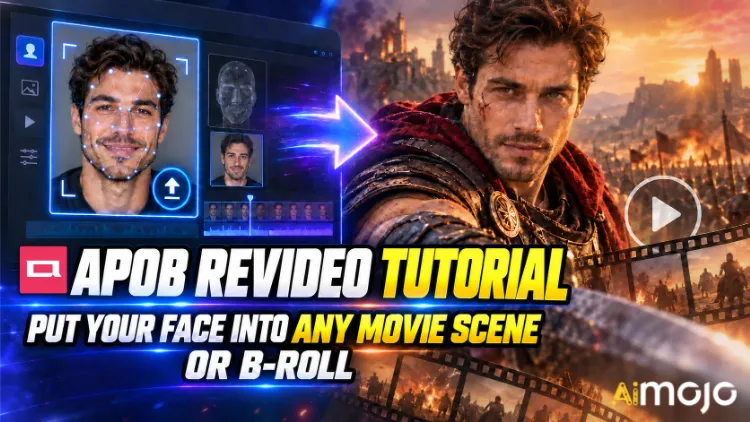
O videoları görmüşsünüzdür. Birileri...'s Bir gerilim filminden fırlamış gibi ağır çekim koridor yürüyüşü yapan bir yüz ifadesi. Rastgele bir içerik üreticisinin aniden altı haneli bir bütçeyle çekilmiş bir araba reklamında oynaması. Kimse RED kamera kiralamadı. Kimse mekan ayarlamadı.
APOB ReVideo , bu gönderilerin çoğunun arkasındaki düğme. Kısa bir klip yükleyin, bir referans görsel yükleyin, oluştur'a tıklayın ve o videodaki kişi karakterinizle değiştirilir - aynı yürüyüş, aynı el hareketleri, aynı kamera yakınlaştırması, aynı arka plan. Performans aynı kalır. Yüz ve vücut değişir.
Bu, kafa her döndüğünde sallanan bir yüz yapıştırma filtresi değil. APOB AI's ReVideo, Wan 2.2 Animate tarzı hareket aktarımıyla çalışır; yani orijinal klibi bir hareket iskeleti olarak okur ve bunun üzerine yeni bir performansçı inşa eder. Bu büyük bir fark ve bir dans klibini ilk denediğinizde bunu hissedeceksiniz.
Aşağıda gerçek iş akışı, kimsenin size önceden söylemediği kredi hesaplamaları, sorun çıkaran kaynak klipler ve bulanık bir görüntüyü yayınlanabilir hale getiren düzeltmeler yer almaktadır.
Özetle — 30 Saniyelik Versiyon
| Soru | Doğrudan Cevap |
|---|---|
| Ne işe yarar? | Mevcut bir videodaki karakteri kendi yüzünüzle değiştirir veya AI model, hareket bozulmamış |
| Arkasındaki motor | Wan 2.2 Animate (hareket + kimlik aktarımı) |
| Yüklediğiniz şey | Bir kısa kaynak video + bir referans görsel |
| Ücret | Saniyede yaklaşık 26 kredi çıktı |
| Serbest erişim | Günlük 80 ücretsiz kredi = yaklaşık günde 3 saniye, karta gerek yok. |
| Klip uzunluğu | Kısa videolar harika. Yükleyicinizi kontrol edin.'s Uzun bir dosyaya güvenmeden önce bir sınır belirleyin. |
| İçin en iyisi | Film sahnesi kurguları, B-roll eklemeleri, kullanıcı tarafından oluşturulan reklamlar, dans trendleri, kimliği belirsiz kanallar |
| Gerekli beceri | Sıfır. Dosya yükleyebiliyorsanız, yeterlisiniz. |
APOB ReVideo aslında nedir?
ReVideo içeride yer alıyor. APOB AI video çalışma alanı Görüntüden Videoya Dönüştürme, Kamera Hareketi, Konuşan Avatar ve diğer özelliklerin yanı sıra Dudak senkronizasyonuBunu, "bu görüntüleri farklı bir oyuncu kadrosuyla yeniden çek" modülü olarak düşünün.
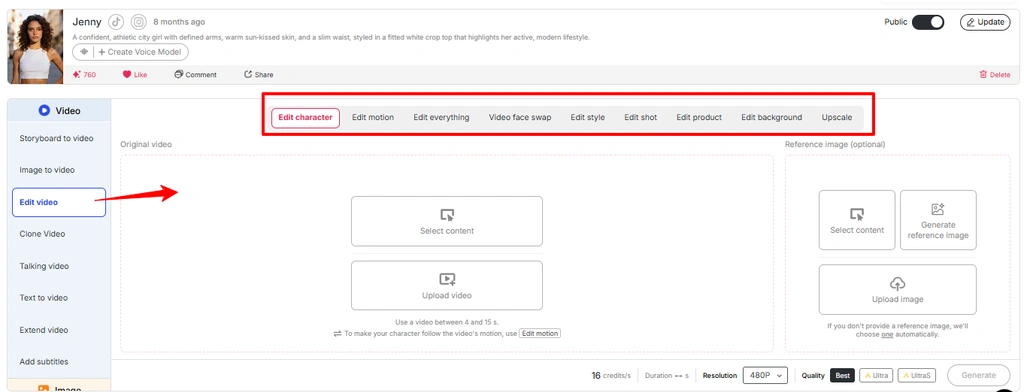
Birkaç farklı işi tek çatı altında topluyor:
Özetle: APOB ReVideo, metin komutundan yepyeni bir video oluşturmak yerine, zaten sahip olduğunuz görüntüleri yeniden işliyor. Bu yüzden çıktı gerçekçi hissettiriyor. Gerçek bir videodan gerçek fizik kurallarını ödünç alıyorsunuz.
Not: APOB'un en yeni arayüzü, birçok video düzenleme iş akışını "Videoyu Düzenle" bölümünün içine yerleştirmiştir . Eğer "ReVideo" ayrı bir seçenek olarak görünmüyorsa, aynı iş akışına "Videoyu Düzenle" bölümünden erişebilirsiniz.
Hareket Aktarımının Metin-Video Dönüştürmeye Neden Üstün Olduğu Burada
Metinden videoya dönüştürme, genel havayı yakalamada harika, ancak belirli koreografiyi yakalamada berbat. Bir komut tabanlı jeneratörden "adam döner, kameraya işaret eder, üçüncü vuruşta sırıtır" isteyin, yirmi kere zar atmanız gerekecek. ReVideo ise zar atmayı tamamen atlıyor; üçüncü vuruştaki sırıtma zaten kaynak dosyanızda mevcut. Model sadece onu yeniden oluşturuyor.
Medya dosyasındaki “Video Düzenleme Özelliği APOB AI” görselini kullanın ve alt metni “APOB Video düzenleme özelliğinde hareketi düzenle” olarak değiştirin.
Başarılı bir kanca yapısı bulan içerik üreticileri için bu, her şeyin başlangıcıdır. Başarılı bir klip, on farklı yüzle on farklı varyasyona dönüşebilir.

Oluştur düğmesine dokunmadan önce: Hazırlık Kontrol Listeniz
O's İşte bu kadar. Zaman çizelgesi yok, anahtar kareler yok, maskeleme yok, rotoskopi yok.
Adım Adım: APOB ReVideo Eğitim Videosu
Adım — Giriş Yapın ve Ücretsiz Kredilerinizi Alın
Başa APOB AI uygulamayı yükleyeceğiz ve giriş yapın. Günlük 80 krediniz otomatik olarak hesabınıza yüklenir. Saniyede yaklaşık 26 krediyle, bu's Günde yaklaşık üç saniye ücretsiz ReVideo çıktısı – tek bir düzgün test için yeterli, ancak toplu test için yeterli değil. Bütçenizi buna göre ayarlayın.
👉 Profesyonel hamle: APOB aktif bir Discord sunucusu işletiyor. Yeni içerik yayınlama süreçlerinde, oluşturdukları klipleri toplulukla paylaşan içerik üreticilerine yaklaşık 1,000 bonus kredi dağıttılar. Eğer yüksek miktarda içerik üretmeyi planlıyorsanız, bu size ücretsiz bir fırsat sunar.
Adım — Karakterinizi Oluşturun veya Yükleyin
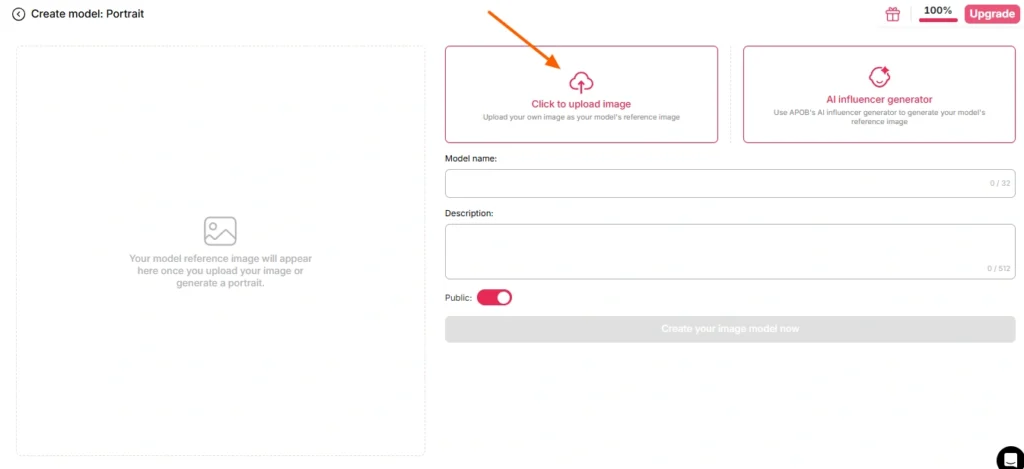
Burada iki yol var:
A Yolu — Kendi yüzünüzü kullanın. Net, önden çekilmiş, iyi aydınlatılmış bir fotoğraf yükleyin. Güneş gözlüğü, yoğun gölge, hareket bulanıklığı veya modelin hangi kişiyi kastettiğinizi tahmin etmesi gereken grup fotoğrafı olmasın.
B Yolu — Bir İnşa Edin AI Önce model. Portre modeli oluşturma bölümüne gidin ve aşağıdaki adımları izleyerek bir persona oluşturun. AI Influencer oluşturucu. Cinsiyet, yaş, uyruk, saç, göz rengi, kıyafet belirleyin. Bu, düzenli içerik üreten bir kanal işleten herkes için daha akıllıca bir yoldur, çünkü APOB's Face-lock, bu kimliğin gelecekteki yüzlerce renderda tutarlı kalmasını sağlar. Tek karakter, sonsuz sayıda klip, tanınabilir marka.
Referans görselini tamamen atlarsanız, APOB varsayılan olarak kaydettiğiniz görseli kullanır. AI model Resim. Kullanışlı, bazen de şaşırtıcı.
Adım — Kaynak Görüntülerinizi Seçin
Bu adım, çıktı kalitenizin %80'ini belirler. Model değil. Ayarlar değil. Kaynak video klibi.
| Kaynak Klip Özelliği | Sonuç |
|---|---|
| Net, tek özne, merkez çerçeve | ✅ Temiz değişim |
| Tüm aydınlatma sistemi sabittir. | ✅ Tutarlı cilt tonu |
| Görünür vücut hareketi | ✅ Hareket doğru okunuyor |
| Özne nesnelerin arkasından yürüyor. | ⚠️ Tıkanma artefaktları |
| Hızlı kamera hareketleri, yoğun bulanıklık | ❌ Kimlik kaymaları |
| Kalabalık kare, birden fazla kişi | ❌ Model yanlış hedefi seçti |
| Düşük çözünürlüklü, sıkıştırılmış, 4 kez yeniden yüklendi. | ❌ Mantar |
Kendi görüntüleriniz yok mu? APOB's Dahili jeneratörler — Kendi Videonuzu Oluşturun, Tam Set, Uzman Modu, Görüntüden Videoya — daha sonra doğrudan ReVideo'ya aktarabileceğiniz bir klip üretecektir. Tam döngü, tek platform.
Adım — ReVideo'yu Açın ve Her İki Dosyayı da Yükleyin
Sol kenar çubuğu → Video sekmesi → ReVideo.
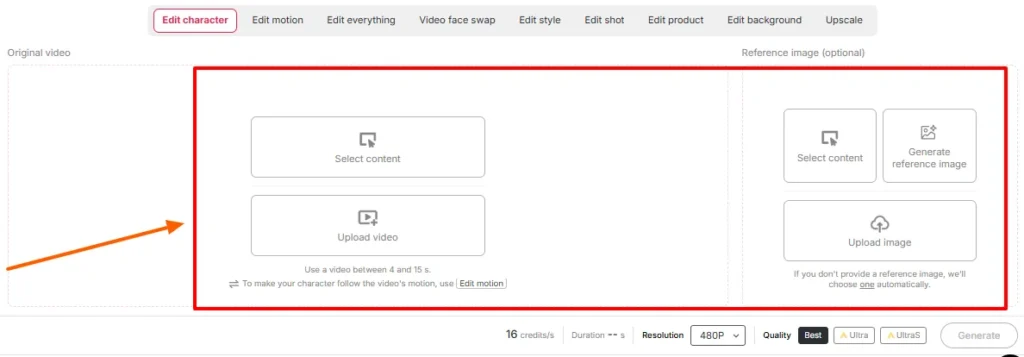
Uğrayın:
Ekrandaki süre ve kalite ayarlarını onaylayın. Çalışma alanınızın o gün gösterdiği süre sınırını kontrol edin — APOB's ReVideo'nun ilk sürümünde klipler yaklaşık beş saniye ile sınırlandırılmıştı ve Wan destekli yeni sayfalar çok daha uzun dosyaları desteklediğini duyuruyor. Yükleyici doğru söylüyor; blog yazıları yayınların gerisinde kalıyor.
Adım — Oluştur ve Bekle
Oluştur'a tıklayın. Model, arka planı sabit tutarken referansınızı kaynak performansına eşler.
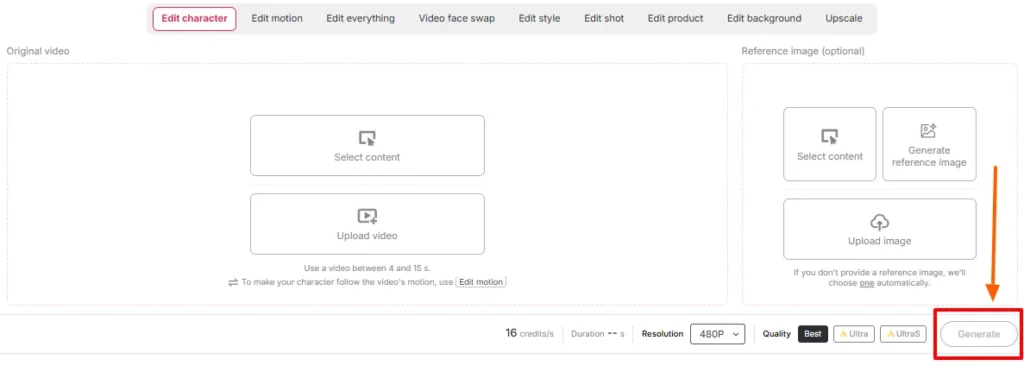
Render süresi, klip uzunluğu ve kalite seviyesiyle orantılıdır. Yenilemeyin. Aynı krediler için panik halinde ikinci bir iş oluşturmayın.
Adım — Yan Yana İnceleme
Orijinal dosyayı çıktının yanına oynatın. Özellikle şunları kontrol edin:
Eğer birşey's Sorun genellikle kaynak dosyanın üst kısmında çözülür; referans görüntüyü değiştirmek veya kaynak dosyanın daha temiz bir bölümünü kırpmak gerekir. Aynı girdileri yeniden oluşturmak, kötü bir eşleşmeyi nadiren kurtarır.
Adım — Kalan Malzemelerle İşlemi Tamamlayın
ReVideo'nun ham çıktısı, tamamlanmış bir post prodüksiyon değil, bir bileşendir. Şunları ekleyin:
Film Sahnesi ve Kamera Arkası Görüntüleri: İki Farklı Senaryo
Bunlar birbirine benziyor. Ama davranışları hiç benzemiyor.
Oyun Kitabı A — Film Sahnesi Ekleme
Sinematik görüntüler renk düzenlemesinden geçirilir, dramatik bir şekilde ışıklandırılır ve genellikle sığ alan derinliğine sahip uzun lenslerle çekilir.'s Hem bir hediye, hem de bir tuzak.
Bunu yap:
Kaçının: hızlı kurgulu aksiyon sahneleri, yoğun yapay duman, aşırı silüetler, öznenin yarısının kadraj dışında kaldığı çekimler.
Oyun Kitabı B — B-Roll Çekimleri
B-roll, gözden kaçan bir kullanım alanı ve dürüst olmak gerekirse paranın büyük kısmının döndüğü yer. Ofiste yürüyen, bir ürünü kutusundan çıkaran, pencere kenarında kahve yudumlayan, kameraya doğru telefon tutan biri gibi stok tarzı görüntüler temiz, eşit şekilde aydınlatılmış ve tek özneye odaklıdır. Adeta karakter değiştirme için tasarlanmıştır.
Bunu yap:
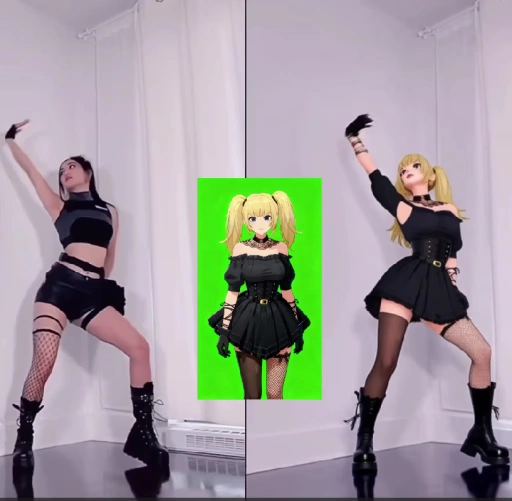
Bu, birçok şeyin arkasındaki iş akışıdır. AI Şu anda aktif olan influencer hesapları, anonim kanallar ve satış ortaklığı ürün sayfaları.
Kredi Matematiği: Şeylerin Gerçek Maliyeti Ne Kadar?
| Çıkış Uzunluğu | Yaklaşık Krediler | Ücretsiz Katman Gerçekliği |
|---|---|---|
| 1 ikinci | ~ 26 | Konforlu |
| 3 saniye | ~ 78 | Günlük tam ödeneğiniz |
| 5 saniye | ~ 130 | 2 gün ücretsiz veya ücretli bir plana ihtiyaç duyar. |
| 10 saniye | ~ 260 | Ücretli bölge |
| 5 × 5'lik varyasyonlardan oluşan parti | ~ 650 | Aboneliği planlayın |
Gerçekçi olalım: Ücretsiz krediler, içerik takvimi oluşturmak için değil, girdileri test etmek içindir. Referans görsel testlerinizi her biri bir saniye olacak şekilde çalıştırın. Bir eşleşme doğru göründüğünde, tam uzunluktaki render işlemine geçin.
ReVideo'da Sık Görülen Hatalar ve Bunları Hızlıca Düzeltmenin Yolları
| Ne yanlış gitti | Neden Şimdi | Fix |
|---|---|---|
| Videonun ortasında yüz kimliği değişiyor. | Referans görseli çok küçük veya açılı. | Önden çekilmiş, yüksek çözünürlüklü bir portre fotoğrafını yeniden yükleyin. |
| Saçın etrafında tuhaf bir hale | Konunun arkasındaki yoğun arka plan.'s baş | Daha temiz ayrım sağlayan bir kaynak klip seçin. |
| Eller soyutlaşıyor | Hızlı hareket + sıkıştırma | Hareketin daha yavaş olan bölümüne göre ayarlayın. |
| Cilt tonu uyumsuzluğu | Referans aydınlatması ve sahne aydınlatması arasındaki çatışma | Referansı benzer aydınlatma altında yeniden oluşturun. |
| Yanlış kişi yer değiştirdi | Çerçevede birden fazla kişi yer alıyor. | Videoyu kırpın veya tek bir konuya odaklanan bir klip seçin. |
| Çıktı sanki yapıştırılmış gibi duruyor. | Kaynakta gerçek vücut hareketi yoktu. | Vücudun tüm hareketlerinin görülebildiği görüntüler kullanın. |
| Çıktı çok kısa, yayınlanamıyor. | Kredi limiti aşımı | Video Extender kullanın veya iki render dosyasını birleştirin. |
APOB ReVideo'nun Standart Yüz Değiştirme İşleminden Üstün Olduğu Noktalar
| ReVideo Neden Kazanıyor? | Temel AI Yüz nakli | APOB Yeniden Videosu |
|---|---|---|
| Hangi değişiklikler | Sadece yüz bölgesi | Yüz, vücut, kıyafet, genel karakter |
| Hareket kaynağı | Orijinal, dokunulmamış | Orijinal performans korunmuş ve yeniden düzenlenmiştir. |
| Kimlik tutarlılığı | Klip başına, değişir. | Tüm kütüphanenizde FaceKnowledge özelliğini kullanın. |
| Arka plan kontrolü | Hayır | Arka plan bilgisi mevcut. |
| Stil kontrolü | Hayır | ReStyle mevcut |
| İçin oluşturuldu | Tek seferlik şakalar | Tekrarlanabilir üretim hatları |
Yüz değiştirme size bir espri sunar. ReVideo ise sürekli kullanabileceğiniz bir oyuncu sunar.
İnsanların Şu Anda Kullandığı Gerçek Kullanım Örnekleri
Çoğu eğitim videosunun atladığı bölüm: Onay, Telif Hakkı ve Dava Edilmemek
Bir film sahnesine kendi yüzünüzü koymak eğlenceli. Başka birinin yüzünü koymak ise...'s Yüz yüze gelmek veya stüdyo çekimlerini yeniden dağıtmak tamamen farklı bir durumdur. Bunu doğru şekilde ele alın:
Lisanslı stok B-roll görüntüleri artı bir AI Persona, temiz, ölçeklenebilir ve ticari açıdan güvenli bir kombinasyondur. Bunu temel alarak geliştirin.
Gerçek Testlerden Elde Edilen Altı Profesyonel İpucu
- Onaylamadan bir saniye önce test edin. Görüntü-video eşleşmesini kontrol etmenin en ucuz yolu.
- Portre modelini bir kez oluşturun, sonsuza kadar yeniden kullanın. Yüz kilitleme tutarlılığı Sanal bir kişiliğin takipçi kazanmasının tüm sebebi budur.
- Dikey giriş, dikey çıkış. Yatay bir görüntüyü kırpıp umut etmeyin.
- Parlak ve eşit ışık kaynağı her zaman en iyisidir. Moody'nin derecelendirme sistemi harika görünüyor ama takaslarda kötü sonuç veriyor.
- En iyi kaynak videolarınızı şablon olarak kaydedin. Etkileyici bir kanca, bir varlıktır. Bunu her ay yeniden oluşturun.
- Kredi yenileme günlerinde toplu işlem yapılır. Ücretsiz krediler günlük olarak sıfırlanır. Ücretli render işlemine geçmeden önce bir hafta boyunca testler yapılır.
APOB ReVideo Hakkında Sıkça Sorulan Sorular
APOB ReVideo ne için kullanılır?
APOB ReVideo, mevcut bir videodaki karakteri sizin yüzünüzle, referans bir görüntüyle veya başka bir görselle değiştirir. AI Influencer modelini, orijinal hareketleri, jestleri, kamera akışını ve arka planı olduğu gibi koruyarak yeniden oluşturmak.'s Film sahnesi kurguları, B-roll eklemeleri, kullanıcı tarafından oluşturulan reklamlar, dans trendleri ve benzeri amaçlarla kullanılır. AI etkileyici içerik.
APOB ReVideo ücretsiz mi?
Orada's Günlük 80 kredi sağlayan ve kart gerektirmeyen ücretsiz bir katman mevcut. Saniyede yaklaşık 26 kredi ile günde yaklaşık üç saniyelik çıktı sağlanıyor; test için yeterli, üretim için yetersiz. Ücretli planlar daha uzun klipleri ve toplu işlemleri destekliyor.
APOB ReVideo klipleri ne kadar uzun olabilir?
İlk sürüm birkaç saniyelik videolarla en iyi sonucu veriyordu ve daha yeni WAN destekli sayfalar daha uzun yüklemeleri destekliyor. Çalışma alanınızda görüntülenen uzunluk sınırını kontrol edin, çünkü bu sınır her model güncellemesinde değişiyor.
Bir tane oluşturmam gerekiyor mu? AI Önce model mi?
Hayır. Referans görselini doğrudan yükleyebilirsiniz. Ancak portre modeli oluşturmak, gelecekteki her render işleminde tutarlı bir kimlik sağlar; bu da düzenli ödeme hesabı kullanan herkes için çok önemlidir.
Hangi AI APOB ReVideo'nun motoru mu çalışıyor?
Wan 2.2 Animate tarzı hareket aktarımıyla çalışır; bu yöntem, kaynak klibinizdeki hareketi okur ve sıfırdan video oluşturmak yerine bu hareket yapısı üzerinde yeni bir karakter oluşturur.
APOB ReVideo arka planı da değiştirebilir mi?
Evet — ReBackground, orijinal konum düzenlemenize uymadığında sahne değiştirme işlemini gerçekleştirir. ReCharacter ise tek başına arka planı çekildiği gibi korur.
Anime, 3D render ve insan dışı karakterlerle de çalışıyor mu?
Evet, öyle. Çizilmiş karakterler, 3 boyutlu modeller ve hatta oyuncak bebek veya figür referans görselleri, stilize edilmiş ve maskot odaklı içeriklerin önünü açan alternatif konu olarak işlev görüyor.
Çıktım neden bulanık veya bozuk görünüyor?
Neredeyse her zaman kaynak sorunudur. Sıkıştırılmış görüntüler, hızlı kamera hareketleri, gizlenmiş nesneler veya düşük çözünürlüklü referans görüntü sonucu bozar. Yeniden çekim yapmadan önce girişleri değiştirin.
APOB ReVideo videolarını ticari amaçlarla kullanabilir miyim?
Genel olarak evet, kaynak görüntülerin ve ilgili görsellerin haklarına sahip olmanız koşuluyla. Lisanslı veya size ait görüntüler üzerinde yapay zeka tarafından oluşturulan karakterler, en güvenli ticari kurulumdur.
Bu, normal bir durumla nasıl karşılaştırılır? AI Yüz değiştirme uygulaması mı?
Yüz değiştirme programları sadece yüz bölgesini düzenler. ReVideo ise orijinal performansı koruyarak karakterin tamamını -yüzünü, vücudunu, kıyafetini ve tarzını- değiştirir.'s Tek karelik espriler için değil, tam vücut karakter değiştirme için tasarlandı.
Filmde kendimi yasal olarak bir sahneye dahil edebilir miyim?
Özel deneyler için genellikle sorun yok. Ancak, stüdyoda çekilmiş değiştirilmiş görüntüleri yayınlamak veya bunlardan para kazanmak, takas işleminden bağımsız olarak telif hakkı sorunudur ve başka herhangi birinin eklenmesi de yasaktır.'s Rıza olmadan yüz yüze görüntü paylaşmak ayrı bir hukuki sorundur. Lisanslı stok ve kamu malı videolar sizi bu sorundan korur.
En iyi sonuçları hangi kaynak klipler veriyor?
Tek özne, merkez kadraj, eşit aydınlatma, görünür vücut hareketi, minimum örtüşme ve iyi çözünürlük. Ürün tanıtımları, yürüyüş ve konuşma çekimleri ve dans klipleri sürekli olarak güçlü.
Son Alım
APOB ReVideo nadir bulunan bir örnektir. AI Video özelliğinde çıktı kalitesi büyük ölçüde sizin elinizde, modelin değil. Ona temiz, tek özne içeren bir klip ve net bir referans görüntüsü verin, paylaşabileceğiniz bir şey üretir. Ona bulanık bir kalabalık görüntüsü ve gece 2'de çekilmiş bir özçekim verin, tam olarak beklediğiniz şeyi üretir.
Asıl avantaj, size birkaç bin izlenme getiren tek seferlik film sahnesi kurgusu değil.'s üretim hattı: tutarlı bir hat AI kişiKanıtlanmış kaynak kliplerden oluşan bir kütüphane ve başarılı bir formatı, kredilerinizin izin verdiği kadar çok kez yeniden oluşturma yeteneği.'s nasıl kimliği belirsiz kanallar, kullanıcı tarafından oluşturulan içerik reklam mağazaları ve AI Influencer hesapları aslında 2026'da da aktif olacak.
80 kredilik ücretsiz deneme sürümüyle başlayın. Her biri bir saniye süren üç referans görüntüyü test edin. Başınızı çevirerek özdeşliği koruyan eşleştirmeyi bulun. Ardından ölçeklendirin.
Görüntüler zaten mevcut. Sadece kimin olduğunu değiştiriyorsunuz.'s içinde.
AiMojo Öneriyor:


 BONUS: 200$'lık "AI Kaydolduğunuzda “Mastery Toolkit”i ÜCRETSİZ edinin!




![En İyi 10 Hentai AI Sanal Arzuyu Deneyimlemek İçin Sohbet Robotları [2026]](https://aimojo.io/wp-content/uploads/2024/03/Top-Hentai-AI-Chatbot--100x100.webp)

![Üst 13 AI Sınırsız Sohbet Porno Oyunları [2026]](https://aimojo.io/wp-content/uploads/2024/03/Best-AI-Chat-Porn-Games-100x100.webp)


