

Superhuman Key Insights
What is Superhuman?
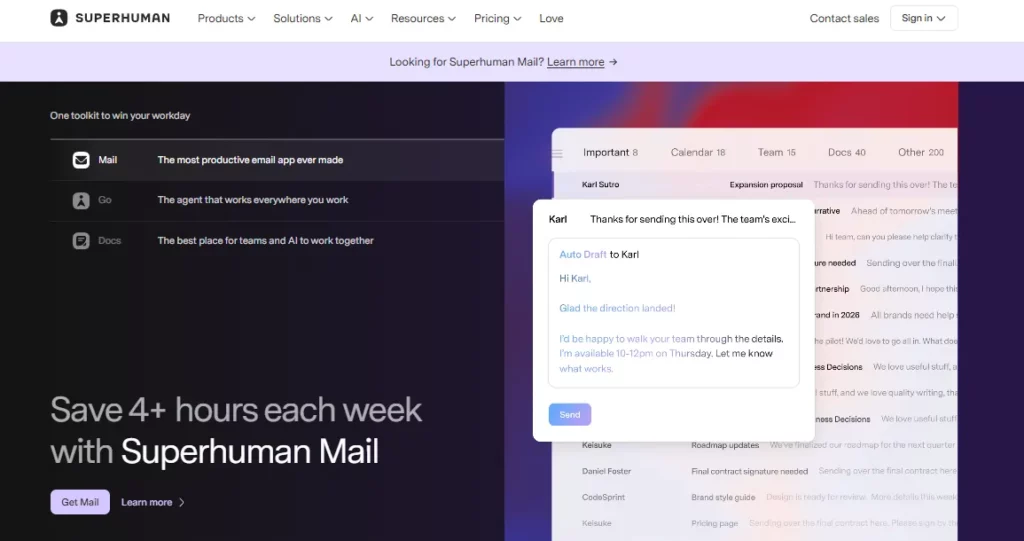
Superhuman is a premium AI email client and productivity suite designed to help professionals and teams move through their inboxes at speed. Built on top of Gmail and Outlook, Superhuman replaces the native email experience with a blazing fast interface driven entirely by keyboard shortcuts, an AI command bar, and automated workflows.
The platform now extends beyond email into Docs, Grammarly writing assistance, and an AI agent called Go that works across every browser tab and application. Its core promise is simple and measurable. Users report saving four or more hours each week by eliminating inbox clutter, automating follow ups, and drafting replies with AI that matches their personal writing voice.
For founders, executives, and revenue teams who process hundreds of emails daily, Superhuman turns email from a time sink into a productivity engine.
Superhuman generates draft replies for every email in your inbox before you even open them. The AI learns your writing style by analysing your sent messages, so each draft sounds like you wrote it. This alone cuts average email response time in half, according to their internal data.

The Split Inbox feature uses AI to automatically sort incoming mail into categories like VIP, newsletters, cold outreach, and job applications. You can also create custom labels using plain language prompts. This means you process emails by context rather than by chronological order, which is far more efficient.
If a sent email goes unanswered, Superhuman automatically flags it and even pre writes a follow up draft for you. No more lost deals or missed threads. The system ensures nothing slips through the cracks and every important conversation stays active.
Go is a proactive AI agent that works across your entire browser. It connects to Gmail, Google Drive, Jira, and over 100 other apps. It can schedule meetings, pull context from your tools, and suggest actions without you having to switch tabs or open a new window.

Superhuman includes a full calendar with one tap event creation pulled directly from email context. For teams, it finds mutual availability and books meetings without the usual back and forth. Integration with Zoom, Google Meet, and Microsoft Teams makes scheduling effortless.
Know exactly when someone opens your email. Read Statuses show you real time open tracking so you can time your follow ups with precision. This is particularly useful for sales teams and executives managing high stakes communication threads.
Superhuman Pricing Plans
| Plan | Cost (Annual) | Key Limits and Features |
|---|---|---|
| Free | $0 | Grammarly, Docs, Go with limited AI prompts |
| Pro | $12/member/month | Full Grammarly, Docs, Go with AI detection and unlimited rewrites |
| Business | $33/member/month | Everything in Pro plus Superhuman Mail, CRM integrations, and team collaboration |
| Enterprise | Custom pricing | SAML SSO, SCIM, BYOK encryption, dedicated support, advanced admin controls |
Superhuman AI and Voice Matching Explained
One thing that sets Superhuman apart from every other email client is how its AI writes. It does not produce generic, robotic text. Instead, it analyses patterns in your previously sent emails and replicates your actual voice, vocabulary, and sentence structure.
The result is AI generated drafts that genuinely sound like you wrote them. This is not just a gimmick. For senior leaders who send hundreds of messages per week, maintaining a consistent tone across every reply builds trust and saves mental energy. The voice matching also extends to the Write with Voice feature on mobile, which transcribes spoken words and converts them into polished, on brand email drafts.
Superhuman for Teams and Collaboration
Superhuman’s Business and Enterprise plans include a full suite of team collaboration tools. Shared Conversations let multiple team members view and contribute to the same email thread. Shared Drafts allow colleagues to co author replies before sending.
Team Read Statuses show who on your team has already seen a message, preventing duplicate replies. Team Scheduling finds mutual free time across calendars with one click. For revenue teams and customer success departments handling shared pipelines, these features remove friction from every handoff. The CRM sidebar pulls live contact data from HubSpot, Salesforce, and Pipedrive directly into your inbox, so you never need to switch context.
Pros and Cons
- Blazing fast keyboard driven interface.
- AI drafts that match your voice.
- Split Inbox eliminates inbox clutter.
- Auto follow ups prevent missed threads.
- Built in CRM and calendar integration.
- Strong privacy with zero data retention.
- No native IMAP provider support.
- Business plan required for email features.
- No shared or group mailbox option.
- Premium pricing versus competitors.
Who Should Use Superhuman?
Superhuman is purpose built for professionals who live inside their inbox. Founders, executives, sales leaders, and customer success managers who process over 100 emails per day will see the most immediate return on investment. Teams that rely on Gmail or Outlook and need faster response times, better organisation, and AI that actually understands their tone will find Superhuman hard to beat.
However, if your email volume is low or you need shared mailbox features for a support team, alternatives like Missive or Front may be a better fit. Superhuman excels at individual and small team speed rather than high volume support workflows.
Best Superhuman Alternatives
| AI Productivity Suite and Email Client | AI Email Features | Third Party Integrations |
|---|---|---|
| Spark Mail | AI compose, smart sorting, and priority inbox | HubSpot, Salesforce, Slack, Readdle Calendar |
| Missive | AI drafts, shared inbox, and team chat | HubSpot, Salesforce, Close CRM, Slack, 900+ via Integrately |
| Shortwave | AI search, smart bundles, and plain English filters | Basic BCC/forwarding CRM sync only |
| Notion Mail | AI triage and auto labelling (shutting down September 2026) | Notion workspace only, limited third party support |



