

SoftSync Key Insights
What is SoftSync?
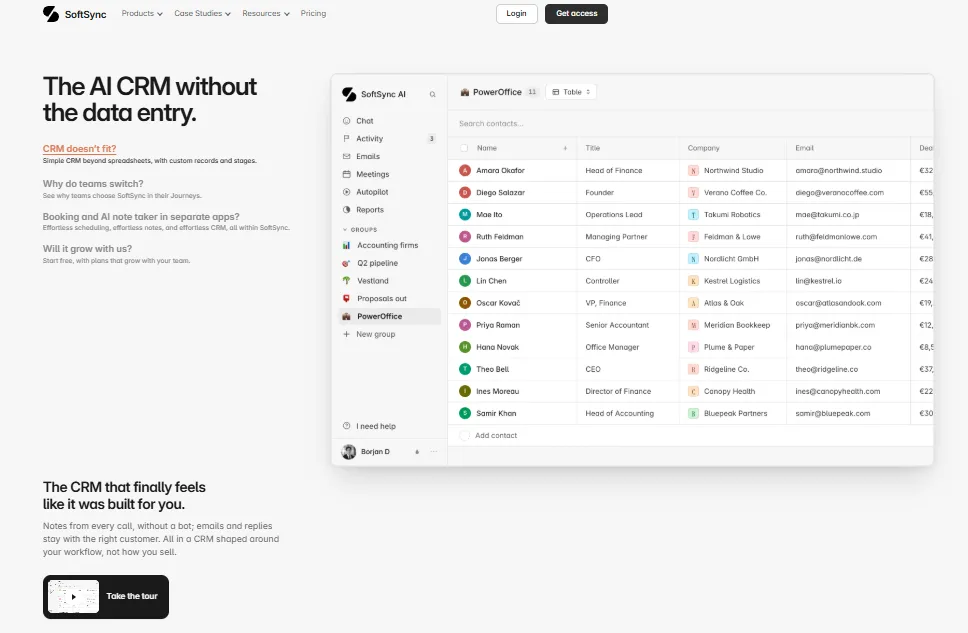
SoftSync is a Norwegian built AI CRM and sales workspace designed for startups and small commercial teams that have outgrown spreadsheets but find traditional CRM platforms too bloated to maintain. It automatically pulls customer data from email inboxes, calendars, company registers and accounting systems, which removes most manual data entry from the sales process.
The platform combines contact management, deal pipelines, email campaigns, meeting recording and AI powered automation into a single connected workspace. Its standout capability is an agentic architecture built around the Model Context Protocol (MCP), allowing external AI assistants like Claude or ChatGPT to read, write and act inside the CRM under controlled permissions. For small teams looking for a productivity tool that stays current without constant feeding, SoftSync offers a focused alternative to enterprise CRM software.
Autopilot is not a chatbot. It is an automation engine that lives inside SoftSync and runs in the background after you describe a task in plain English. Tell it to flag quiet deals every Monday or draft a follow up when a deal stage changes, and it builds the automation itself. There is no flowchart to draw or triggers to configure, which saves significant setup time for lean teams.
The desktop app for Mac and Windows captures calls and meetings directly from the user’s machine. No third party bot joins the call, which removes the awkwardness many prospects feel with visible meeting recorders. The editable summary and action items attach straight to the customer record, keeping context together without switching tools.
This is the feature that sets SoftSync apart from every other small business CRM on the market. Its MCP server lets an AI assistant such as Claude, ChatGPT or Gemini connect directly to a user’s SoftSync account via OAuth. The assistant can then create records, move deals, send emails and run campaigns, all governed by the permissions the account owner sets. This turns the CRM into an agent ready workspace rather than a passive database.
SoftSync sends personal outreach from the user’s own inbox and plans the next follow up email before the first one is sent. The sequence stops automatically when a prospect replies. Replies appear on the customer record, so reps immediately know who to prioritise for a call. This removes the need for a separate email sequencing tool.
While browsing LinkedIn or a company website, the Chrome extension lets a rep save a company and its people as CRM records in one click. Contact data flows into the workspace without copy and paste, which eliminates a routine friction point in prospecting workflows.
Teams can create their own record types beyond the standard contacts, companies and deals structure. Investors, candidates, properties and partners can each have custom fields, stages and views linked together. Table, pipeline and calendar views are all available, shaping the CRM around how a team actually works.
SoftSync Pricing Plans
| Plan Name | Cost (Yearly) | Key Limits & Features |
|---|---|---|
| Pro | $29/seat/month | Up to 5 team members, 250K records per table, 1 mailbox per user, 1,000 campaign emails/month, full CRM plus AI plus API plus MCP |
| Business | $58/seat/month | Up to 25 team members, 1M records per table, 5 mailboxes per user, 10,000 campaign emails/month, Priority Support, Workspace Consultant |
| Enterprise | Custom Pricing | Custom limits on all capacity, unlimited options available, custom integrations, Priority Support |
Why SoftSync Is Built for Founders and Small Teams
Most CRM platforms are designed for sales organisations of 50 or more, with admin overhead that small teams cannot absorb.
SoftSync was built specifically for teams of one to 25 who need a connected sales workspace without dedicated CRM administrators. The Pro plan caps at five team members, and the product is shaped so that a founder or solo operator can run outreach, booking, call notes and deal tracking from one place.
There is no setup fee for workspace consulting, and the onboarding process involves shaping the CRM around how the team already sells. This focused approach means less time configuring software and more time in front of customers.
Pros and Cons
- Zero data entry CRM updates.
- No bot joins your meetings.
- Agentic MCP server is unique.
- Genuinely simple to set up.
- EU hosted with GDPR alignment.
- AI and API on every plan.
- No free tier available.
- No native mobile app.
- Limited to smaller team sizes.
- No built-in phone dialler.
SoftSync Reports and Sales Dashboards
SoftSync Reports turns the contacts, companies and deals already inside the CRM into focused dashboards that answer everyday sales questions.
Teams can track open deals, pipeline value, win rates and revenue movement from one shared view without exporting data to a spreadsheet. Charts can be filtered by stage, owner, source or date, and every segment is clickable, so a rep can move from a number straight into the customer record that needs attention.
Pre-built templates such as Pipeline by Stage, Revenue by Source and Largest Customers offer a fast starting point, while custom fields and stages feed directly into any chart. For small teams running weekly sales reviews, this keeps the conversation grounded in live CRM data rather than stale screenshots.
Best SoftSync Alternatives
| AI CRM / Sales Workspace | Bot-Free Meeting Notes (Built-in) | Natural Language Autopilot (No Flowcharts) |
|---|---|---|
| Pipedrive | ❌ Requires third party add-ons like tl;dv | ❌ Automation uses trigger and flowchart builder |
| Attio | ❌ Bot joins the call via Call Intelligence | ❌ Automation uses structured workflow triggers |
| folk | ❌ Requires external tools like tl;dv | ❌ Automation uses pre-set rule templates |
| HubSpot Sales Hub | ❌ Notetaker bot joins as a visible participant | ❌ Workflows require manual trigger configuration |



