


Karamihan sa mga tao ay napupunta sa Hugging Face , nakatitig sa napakaraming pangalan ng mga modelo, at agad na nagki-click palayo sa loob ng 30 segundo. Malaking pagkakamali.
Habang ang lahat ay nagtatalo tungkol sa kung alin AI sulit bayaran ang tool, libu-libong tagapagtayo ang tahimik na gumagamit ng Hugging Face para tumakbo, mag-ayos, at barko AMga app na pinapagana ng I — ganap na libre. Ito's hindi lamang isang aklatan ng modelo. Ito's ang plataporma kung saan ang Google, Meta, Mistral, at mga solo developer ay nagtatrabaho sa iisang larangan.
Mahigit 1 milyong modelo, mahigit 500K na dataset, at libreng app hosting — sa ilalim ng iisang account. Narito ang kumpletong detalye kung ano ito at kung paano talaga ito gamitin.
Ano nga ba ang Hugging Face (Karamihan sa mga Tao ay Mali ang Pagkakaunawa Dito)
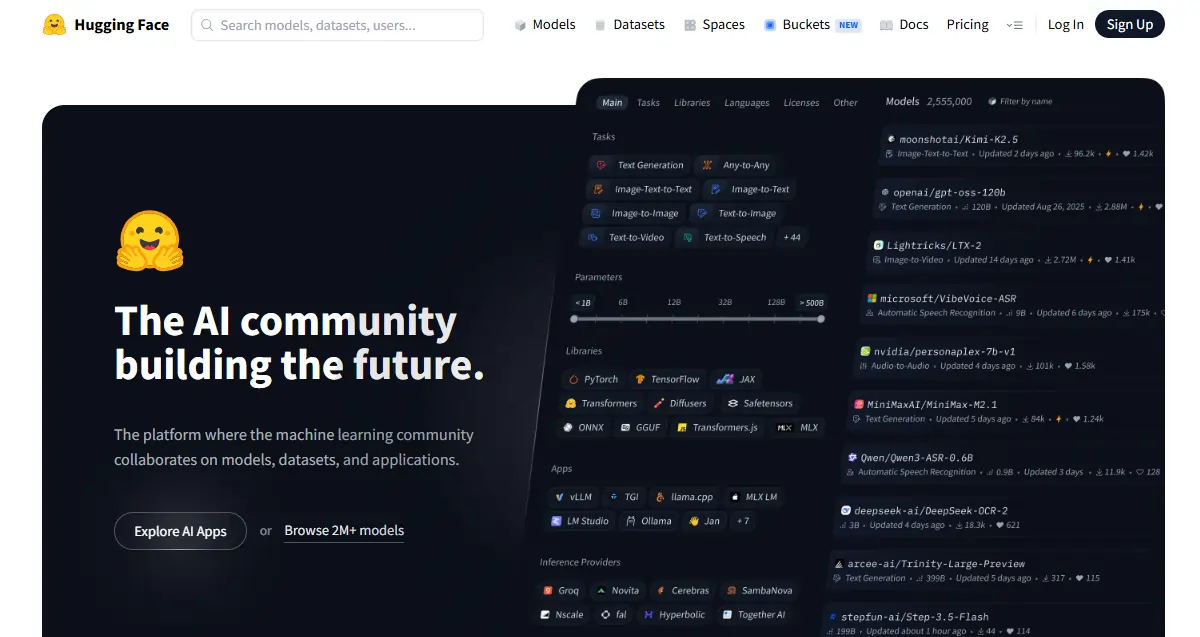
Ang label na " GitHub of Machine Learning " ay madalas na ginagamit. Iisa lang ang direksyon nito — mga pampublikong repo, kontrol sa bersyon, mga kontribusyon ng komunidad. Ngunit mabilis itong nasisira. Nagpapatakbo rin ang Hugging Face ng live na inference, nagho-host ng mga app na pinapagana ng AI, at nagbibigay ng kumpletong imprastraktura ng pagsasanay. Hindi ginagawa ng GitHub ang mga iyon.
Ang kumpanya mismo ay nagsimula bilang isang NLP chatbot startup, na naging open-source. AI paggamit ng mga kagamitan, at hindi na lumingon pa. Ang pampublikong plataporma is flibre at pinapagana ng komunidad; ang mga produkto ng negosyo ang siyang paraan ng kanilang pagkita ng pera. Para sa mga nagsisimula, sakop ng libreng antas ang lahat ng kailangan mo. Dito inilalathala ang mga modelo. bago Nagiging headline sila — kung may bagong lumabas sa AI, sa Hugging Face muna ito lumalabas.
Ang Tatlong Haligi — Alamin ang mga Ito Bago ang Anupaman
Ang lahat ng nasa Hugging Face ay nasa loob ng tatlong pangunahing seksyon:
| poste | Ano ba ito | Bakit mahalaga ito |
|---|---|---|
| Modellen | 1M+ na paunang sinanay AI modelo | Laktawan nang tuluyan ang pagsasanay mula sa simula |
| Mga Dataset | Raw na datos para sa pagsasanay at pagsubok | Istandardisado at handa nang i-load na datos |
| Puwang | Libreng naka-host AI app | Subukan ang mga modelo nang hindi hinahawakan ang deployment code |
Maging komportable sa lahat ng tatlo — palagi silang magkakaugnay habang ikaw ay bumubuo.
Ang Model Hub — Kung Saan Mo Gugugulin ang Karamihan ng Iyong Oras
Ang filter panel ang iyong matalik na kaibigan dito: uri ng gawain, framework (PyTorch, TensorFlow, JAX), wika, lisensya, at laki ng modelo. Ayusin ayon sa pinakana-download para sa mga napiling nasubukan na sa labanan; ayusin ayon sa kamakailang na-update kapag kailangan mo ng mga bagong opsyon.
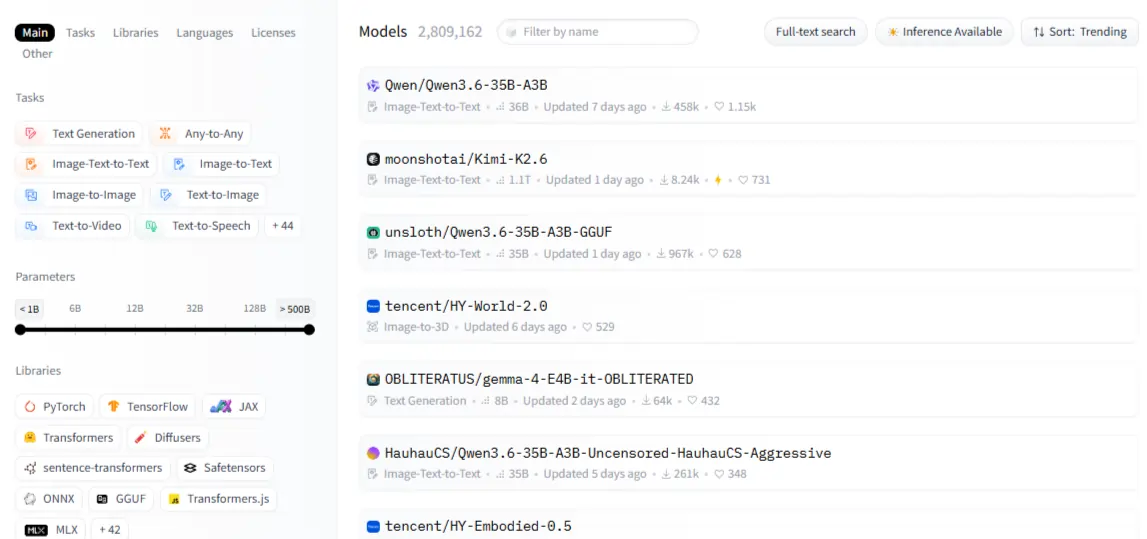
Ang bawat modelo ay may kard — basahin ito. Ang seksyon ng nilalayong paggamit ay nagsasabi sa iyo kung para saan binuo ang modelo; ang seksyon ng mga limitasyon ay nagsasabi sa iyo kung saan ito nasira. Ang pangalawang bahagi ay mas mahalaga kaysa sa anumang benchmark score. Ang mga kategorya ng modelo ay sumasaklaw sa NLP (pag-uuri ng teksto, pagbubuod, pagsasalin, pagsagot sa tanong), paningin (pag-uuri ng imahe, pagtuklas ng bagay, pagbuo), audio (ASR, TTS), at mga multimodal na gawain tulad ng visual na pagsagot sa tanong.
Isang bagay na hindi nakikita ng mga baguhan: hindi lahat ng modelo ay malayang nada-download. Ang mga gated model tulad ng Meta's Llama ay nangangailangan ng pag-apruba bago ma-access. Kapag naaprubahan na, kailangan mong mag-authenticate gamit ang isang access token. Palaging suriin ang lisensya bago bumuo — ang ilang modelo ay ganap na nagbabawal sa komersyal na paggamit.
Ang Aklatan ng mga Transformer — Ang Kodigo na Tumatakbo sa Kalahati ng AI mundo
Ang transformers aklatan ay isang pinag-isa Sawa pakete na nag-iistandardize kung paano mo nilo-load at pinapatakbo ang anumang modelo sa hub sa PyTorch, TensorFlow, at JAX gamit ang parehong API.

Ang pipeline() Ang function ay kung saan dapat magsimula ang karamihan sa mga nagsisimula — pinagsasama-sama nito ang tokenization, model loading, at post-processing sa isang tawag lamang. Pagsusuri sa damdamin, pagbuo ng teksto, pag-uuri ng imahe — lahat ay sumusunod sa eksaktong parehong padron. Sa sandaling kailangan mo ng pinong kontrol sa mga output, bumaba sa pagsulat ng custom na inference code. Hanggang sa panahong iyon, ang mga pipeline ang bahala sa lahat.
Huwag laktawan ang tokenization. Hindi maaaring direktang mapunta ang raw text sa isang modelo. AutoTokenizer humahawak sa conversion at palaging awtomatikong itinutugma ang tamang tokenizer sa tamang checkpoint. Ang mga hindi magkatugmang tokenizer ay nagdudulot ng mga pinakanakalilitong error na nararanasan ng mga nagsisimula — at 100% itong maiiwasan.
| Gawain | Pangalan ng Pipeline | Halimbawang Modelo |
|---|---|---|
| Pagtatasa ng sentimyento | text-classification | distilbert-base-unseled |
| Pagbuo ng Teksto | text-generation | Mistral-7B |
| Pagbubuod | summarization | facebook/bart-large-cnn |
| Pagkilala sa Pananalita | automatic-speech-recognition | openai/whisper-base |
| Pag-uuri ng Larawan | image-classification | google/vit-base-patch16 |
Mga Dataset at Espasyo — Ang Dalawang Tampok na Hindi Sapat na Ginagamit ng Sinuman
Ang datasets Naglo-load ang library ng data sa Apache Arrow format — mabilis, matipid sa memorya, at ginawa para pangasiwaan ang mga dataset na hindi kasya sa RAM. load_dataset("name", split="train") ay ang kailangan lang para makapagsimula. Bago ka mag-commit sa anumang dataset para sa isang training run, gamitin ang Data Studio sa browser para i-preview at i-filter ito nang hindi nagsusulat ng kahit isang linya ng code.
Ang mga espasyo ay kung saan AI Libre ang mga demo. Makakakuha ang iyong app ng maibabahaging URL sa loob ng ilang minuto nang walang DevOps work. Ang libreng CPU tier ay humahawak sa mga magaan na demo; ang bayad na GPU-backed Spaces ay humahawak sa mas mabibigat na modelo.
Gamitin ang Gradio para sa mabibilis na demo ng modelo na may kaunting code; gamitin ang Streamlit kapag ang iyong app ay nangangailangan ng mas maraming data-heavy na dashboard layout. Ang pag-clone ng isang trending na Space ang pinakamabilis na paraan para magsimula — pumili ng isa sa iyong kategorya, i-fork ito, at i-customize.
Pag-set up ng Iyong Account sa Tamang Paraan
Sakop ng libreng tier ang model browsing, CPU Spaces, rate-limited API calls, at ganap na community access. Nagdaragdag ang Pro ng priority GPU Spaces, pinalawak na inference, at mga pribadong repo. Para sa karamihan ng mga baguhan, sapat na ang libre.
Bumuo ng access token sa ilalim ng mga setting → Mga Token ng Pag-access. Ang mga read token ay gumagana para sa pag-download; ang mga write token ay kinakailangan para sa pag-push ng mga modelo o dataset. Mag-authenticate sa Python gamit ang huggingface_hub.login()Para sa iyong pag-install:

malakas na palo
pip install transformers datasets huggingface_hubIdagdag accelerate, peft, at trl kung ang pagpipino ay nasa plano. Ang Google Colab ang pinakamabilis na kapaligiran para sa mga baguhan — libre GPU, walang kailangang i-configure nang lokal.
Pagpapatakbo ng Iyong Unang Modelo, Pagkatapos ay Gawin Itong Sa Iyo
Para sa pagsusuri ng damdamin: tawag pipeline("text-classification"), magpasa ng isang string, basahin ang label at score pabalik. Para sa pagbuo ng teksto: gamitin max_new_tokens, temperature, at do_sample para kontrolin kung gaano ka-malikhain vs. pare-pareho ang output. Pareho pipeline() Gumagana ang pattern para sa pagsasalin, pagkilala sa pagsasalita, at pag-uuri ng imahe — hindi nagbabago ang API, tanging ang pangalan ng gawain lamang ang nagbabago.
Kapag nasira ang mga bagay-bagay:
Kapag naintindihan na ang mga pangunahing kaalaman, ang susunod na hakbang ay ang pagpipino. Ang mga paunang sinanay na modelo ay pangkalahatan; ang mga pinong-pino na modelo ay tumpak. Mas mahusay ang pagpipino kaysa sa mga prompt kapag nagtatrabaho ka gamit ang data na partikular sa domain, nangangailangan ng pare-parehong pag-uugali, o nais na bawasan ang mga gastos sa paghihinuha sa pamamagitan ng pagpapatakbo ng isang mas maliit na espesyalisadong modelo.
Pinapatigil ng PEFT ang halos buong modelo at sinasanay lamang ang mga magaan na adapter — hindi kinakailangan ng $10K GPU. Mas pinalalawak pa ito ng QLoRA sa pamamagitan ng quantization, na ginagawang posible ang fine-tuning ng 7B parameter model sa isang single consumer GPU.
Ang Trainer Pinamamahalaan ng API ang buong loop — batching, evaluation, checkpointing — at ang pag-push back sa hub ay tumatagal ng isang linya kapag tapos ka na.
Hinuha Nang Walang Sariling Server
Ang naka-host na Inference API ay nagbibigay sa iyo ng REST endpoint para sa anumang pampublikong modelo agad-agad. Ang libreng tier ay may limitasyon sa rate — ayos lang para sa pagsubok, hindi para sa produksyon. Para sa mga totoong aplikasyon, ang Inference Endpoints ay nagbibigay ng isang nakalaang at pribadong API na awtomatikong nag-i-scale sa zero kapag idle, na nagpapanatili sa mga gastos na mapapamahalaan para sa pabagu-bagong trapiko.
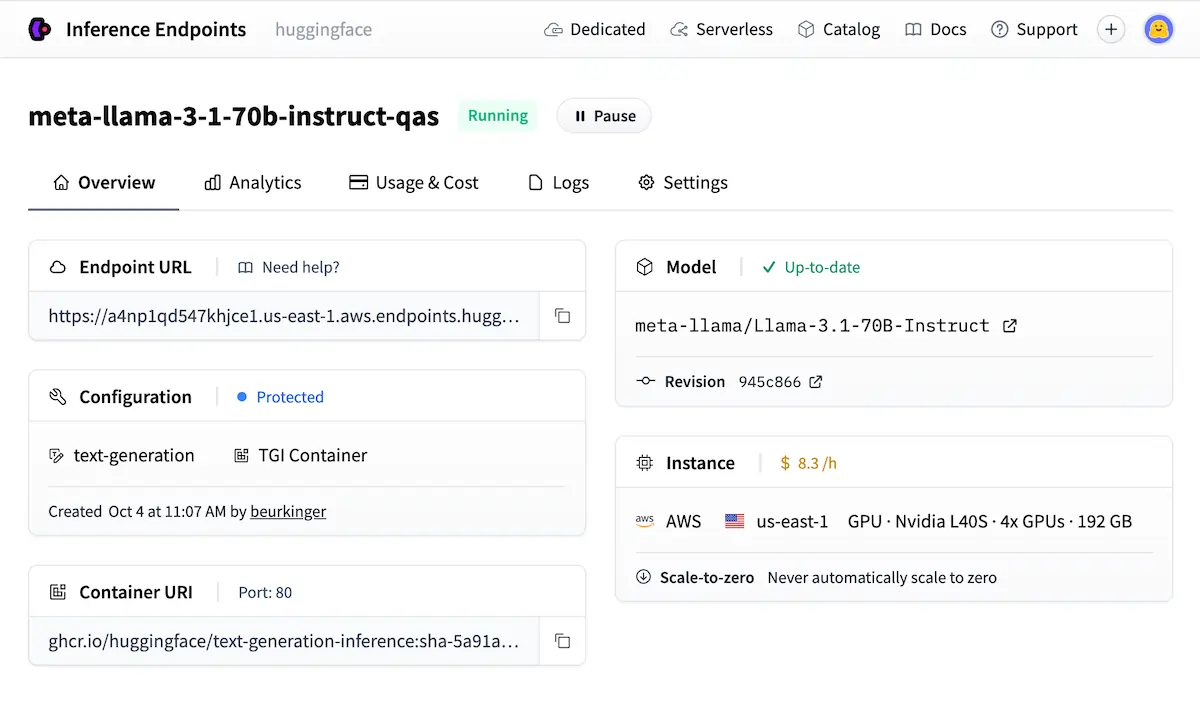
Kapag ang privacy o latency ng data ay hindi maaaring pag-usapan, ang self-hosting gamit ang TGI (Text Generation Inference) o vLLM ang pinakamainam na paraan para maging handa sa produksyon.
Ang Komunidad, ang mga Leaderboard, at Bakit Nito Natatalo ang Lahat ng Iba Pa
Ang Buksan ang LLM Leaderboard niraranggo ang mga modelo ayon sa benchmark — kapaki-pakinabang para sa shortlisting, ngunit palaging patunayan sa iyong aktwal na use case bago magtiwala sa mga score. Binibigyang-daan ng mga account ng organisasyon ang mga team na pamahalaan ang mga shared model collection na may kontroladong access; Meta AI, Google, at EleutherAI Lahat ng org account ay direktang pinapatakbo sa hub.
Ang pagsubaybay sa mga mananaliksik at organisasyon ay magbibigay sa iyo ng real-time na feed ng mga bagong modelo na inilabas nang hindi kinakailangang subaybayan ang social media.
| Platform | Open Source | Variety ng Modelo | Libreng Tier | Mga Kagamitan sa Pagpino |
|---|---|---|---|---|
| Nakayakap sa Mukha | ✅ Puno | ✅ 1M+ | ✅ Mapagbigay | ✅ Buong salansan |
| TensorFlow Hub | ✅ Oo | 🔶 Limitado | ✅ Oo | ❌ Basic |
| Hardin ng Modelo ng Google | ❌ Bahagyang | 🔶 Pinili | 🔶 GCP lamang | 🔶 GCP lamang |
| PagbubukasAI API | ❌ Hindi | ❌ Sarado | ❌ Bayad lang | 🔶 Limitado |
Mga Pagkakamali na Magdudulot sa Iyo ng Oras
- Kukunin ang pinakamalaking modelo kapag ang isang mas maliit, partikular sa gawain ay mas mabilis at mas mura ang pagpapatakbo
- Paglaktaw sa model card's seksyon ng mga limitasyon bago bumuo ng anumang bagay sa ibabaw nito
- Hindi pag-pin sa mga rebisyon ng modelo — tahimik na nag-a-update ang mga modelo at nagbabago ang mga output nang walang babala
- Paggamit ng libreng Inference API para sa anumang bagay na nangangailangan ng pare-parehong uptime ng produksyon
- Direktang pagpasa ng hilaw na teksto sa isang modelo nang hindi muna ito pinapatakbo sa isang tokenizer
Inirerekomenda ni AiMojo:
Kung saan Pumunta Mula Dito
Ang mga libreng kurso ng Hugging Face sa hf.co/learn ay sumasaklaw sa NLP, audio, at malalim na reinforcement learning sa mga structured path na partikular na ginawa para sa platform na ito. Ang pinakamahusay na unang proyekto: pinuhin ang isang text classifier sa isang custom dataset, i-wrap ito sa Gradio, at i-deploy ito bilang isang Space.
Ang iisang build na iyon ay nakakaapekto sa mga modelo, dataset, fine-tuning, at Spaces sa isang shot. Kapag ito ay's live, i-upload ang modelo at sumulat ng wastong model card — na sumasaklaw sa nilalayong paggamit, datos ng pagsasanay, at mga limitasyon.
Ganoon nagagawa ang mga kapaki-pakinabang na pampublikong kontribusyon, at ganito ka nagsisimulang bumuo ng isang tunay na presensya sa open-source na espasyo ng AI.


 BONUS: Kunin ang aming $200"AI Mastery Toolkit” LIBRE kapag nag-sign up ka!






