

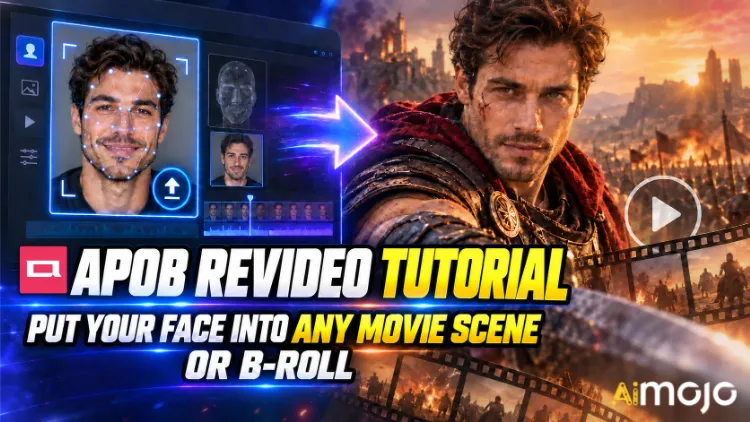
Napanood mo na ang mga clip na iyon. May isang tao's mukha na gumagawa ng slow-motion na paglalakad sa hallway mula sa isang thriller. Isang random na creator ang biglang nagbida sa isang patalastas ng kotse na malinaw na nagkakahalaga ng anim na digit para kunan. Walang nagrenta ng PULAANG kamera. Walang nag-book ng lokasyon.
Ang APOB ReVideo ang buton sa likod ng marami sa mga post na iyon. Mag-upload ng maikling clip, mag-upload ng isang reference na larawan, pindutin ang generate, at ang tao sa footage na iyon ay mapapalitan ng iyong karakter — parehong lakad, parehong kilos ng kamay, parehong push-in ng camera, parehong background. Mananatili ang performance. Magbabago ang mukha at katawan.
Hindi ito isang filter na i-paste sa mukha na umuugoy tuwing lumilingon. APOB AI's Ang ReVideo ay gumagamit ng Wan 2.2 Animate style na motion transfer, ibig sabihin ay binabasa nito ang orihinal na clip bilang isang motion skeleton at muling binubuo ang isang bagong performer sa ibabaw nito. Malaki ang pagkakaiba, at mararamdaman mo ito sa unang pagkakataon na susubukan mo ang isang dance clip.
Nasa ibaba ang aktwal na daloy ng trabaho, ang credit math na walang nagsasabi sa iyo nang diretso, ang mga source clip na sumira dito, at ang mga pag-aayos na nagpapabago sa isang malambot na render para maging isang bagay na maaaring i-post.
TL;DR — Ang Bersyong 30-Segundo
| Tanong | Tuwirang Sagot |
|---|---|
| Ano ang ibig gawin? | Pinapalitan ang karakter sa isang umiiral na video gamit ang iyong mukha o AI modelo, buo ang galaw |
| Makina sa likod nito | Wan 2.2 Pag-animate (paggalaw + paglilipat ng pagkakakilanlan) |
| Ang ina-upload mo | Isang maikling bidyo na pinagmulan + isang larawang reperensyal |
| gastos | ~26 na kredito kada segundo ng output |
| Libreng pag-access | 80 libreng kredito araw-araw = humigit-kumulang 3 segundo bawat araw, hindi kailangan ng card |
| Haba ng klip | Panuntunan sa mga maiikling clip. Suriin ang iyong uploader's limitasyon bago magtiwala sa isang mahabang file |
| Pinakamahusay para sa | Mga pag-edit sa eksena ng pelikula, mga pagsingit ng B-roll, mga ad ng UGC, mga uso sa sayaw, mga channel na walang mukha |
| Kailangan ng kasanayan | Zero. Kung kaya mong mag-upload ng file, kwalipikado ka na. |
Ano nga ba talaga ang APOB ReVideo?
Ang ReVideo ay nasa loob ng APOB AI lugar ng trabaho ng video kasama ang Larawan patungong Video, Paggalaw ng Kamera, Nagsasalitang Avatar, at lip syncIsipin ito bilang modyul na "gawin muli ang footage na ito gamit ang ibang cast".
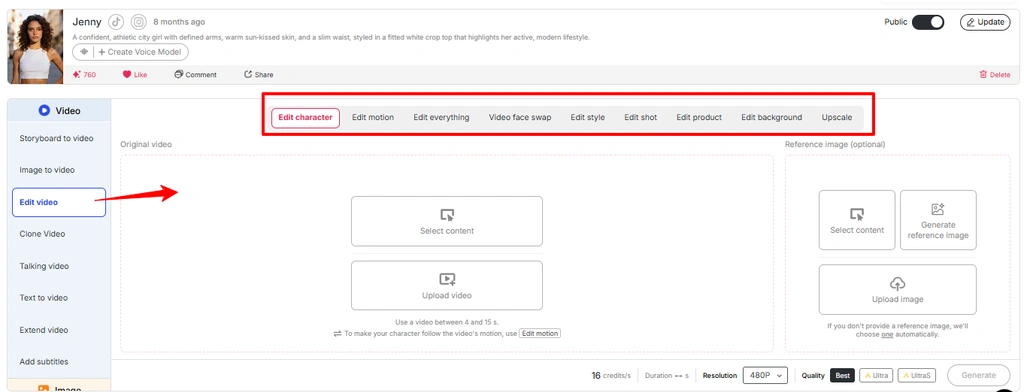
Saklaw nito ang ilang trabaho sa ilalim ng iisang bubong:
Ang maikling bersyon: Muling pinoproseso ng APOB ReVideo ang footage na mayroon ka na sa halip na mag-hallucinate ng isang bagong-bagong video mula sa isang text prompt. Kaya naman parang grounded ang output. Nanghihiram ka ng totoong physics mula sa isang totoong clip.
Paalala: Ang pinakabagong interface ng APOB ay naglalagay ng maraming workflow sa pag-edit ng video sa loob ng Edit Video . Kung ang ReVideo ay hindi ipinapakita bilang isang hiwalay na opsyon, i-access ang parehong workflow mula sa seksyong Edit Video.
Bakit Mas Natatalo ng Motion Transfer ang Text-to-Video Dito
Mahusay ang text-to-video sa vibes at hindi maganda sa partikular na koreograpiya. Magtanong sa isang prompt-based generator para sa “man spins, points at camera, smirks on beat three” at mapapagulong mo ang dice nang dalawampung beses. Hindi na kailangan ng ReVideo ang dice — nasa source file mo na ang beat-three smirk. Muling i-cast ito ng model.
Gamitin ang larawan mula sa media na “Video Edit Feature APOB AI” at baguhin ang alt text sa “Edit motion in APOB Video editing feature”
Para sa mga tagalikha na nakahanap ng isang istrukturang pang-hook na mahusay, ito na ang buong laro. Ang isang panalong clip ay magiging sampung baryasyon na may sampung magkakaibang mukha.

Bago Mo Pindutin ang Bumuo na Butones: Ang Iyong Checklist sa Paghahanda
Na's ito. Walang timeline, walang keyframe, walang masking, walang rotoscoping.
Hakbang-hakbang: Ang Tutorial sa APOB ReVideo
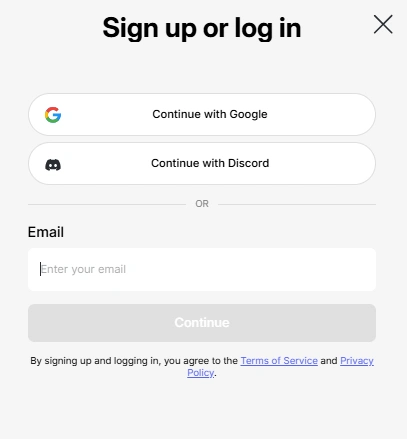
Hakbang — Mag-log In at Kunin ang Iyong Libreng Kredito
Tumungo sa APOB AI app at mag-sign in. Ang iyong 80 pang-araw-araw na kredito ay kusang napupunta sa account. Sa humigit-kumulang 26 na kredito kada segundo, iyan's mga tatlong segundo ng libreng ReVideo output kada araw — sapat para sa isang maayos na pagsubok, hindi sapat para sa isang batch. Magbadyet nang naaayon.
👉 Pro move: Ang APOB ay nagpapatakbo ng isang aktibong Discord. Sa mga feature pushes, namamahagi sila ng humigit-kumulang 1,000 bonus credits sa mga creator na nagbabahagi ng kanilang mga nabuong clip pabalik sa komunidad. Kung nagpaplano ka ng volume, libreng runway iyon.
Hakbang — Buuin o I-upload ang Iyong Karakter
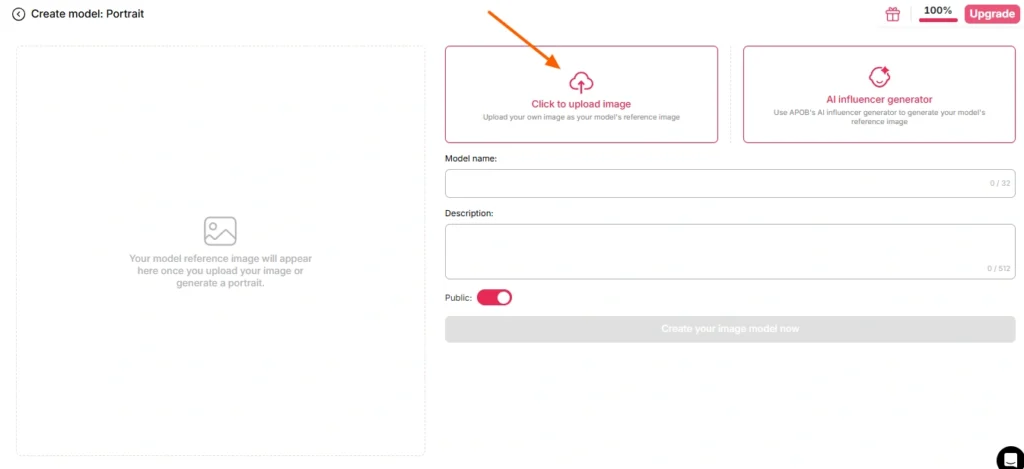
Dalawang landas dito:
Landas A — Gamitin ang sarili mong mukha. Mag-upload ng malinaw, nakaharap sa harap, at maliwanag na larawan. Walang salaming pang-araw, walang makapal na anino, walang motion blur, walang group shot kung saan kailangang hulaan ng modelo kung sino ang tinutukoy mo.
Landas B — Bumuo ng AI modelo muna. Pumunta sa seksyong lumikha ng portrait model at bumuo ng persona sa pamamagitan ng AI influencer generator. Itakda ang kasarian, edad, nasyonalidad, buhok, kulay ng mata, at kasuotan. Ito ang mas matalinong ruta para sa sinumang nagpapatakbo ng isang paulit-ulit na channel, dahil ang APOB's Pinapanatili ng face-lock ang pagkakapare-pareho ng pagkakakilanlang iyon sa daan-daang susunod na render. Isang karakter, walang katapusang mga clip, makikilalang brand.
Kung lalaktawan mo nang tuluyan ang reference na larawan, ang default na APOB ay ang iyong naka-save na AI modelo imahe. Madaling gamitin, paminsan-minsan ay nakakagulat.
Hakbang — Piliin ang Iyong Pinagmulan ng Footage
Ang hakbang na ito ang magpapasya sa 80% ng kalidad ng iyong output. Hindi ang modelo. Hindi ang mga setting. Ang source clip.
| Katangian ng Pinagmulan ng Clip | Resulta |
|---|---|
| Malinaw na iisang paksa, gitnang frame | ✅ Malinis na pagpapalit |
| Matatag na ilaw sa buong lugar | ✅ Pare-pareho ang kulay ng balat |
| Nakikitang paggalaw ng katawan | ✅ Nababasa nang maayos ang galaw |
| Ang paksa ay naglalakad sa likod ng mga bagay | ⚠️ Mga artifact ng bara |
| Mabilis na mga kawali ng panghagupit, makapal na malabo | ❌ Pag-aanod ng pagkakakilanlan |
| Masikip na frame, maraming tao | ❌ Maling target ang napili ng modelo |
| Mababang resolusyon, na-compress, muling na-upload nang 4 na beses | ❌ Mushroom |
Wala ka bang sariling footage? APOB's Ang mga built-in na generator — Gumawa ng Sarili Mo, Kumpletong Set, Expert mode, Image to Video — ay gagawa ng clip na maaari mong ipasok nang diretso sa ReVideo. Buong loop, isang platform.
Hakbang — Buksan ang ReVideo at I-load ang Parehong File
Kaliwang sidebar → tab na Video → ReVideo.
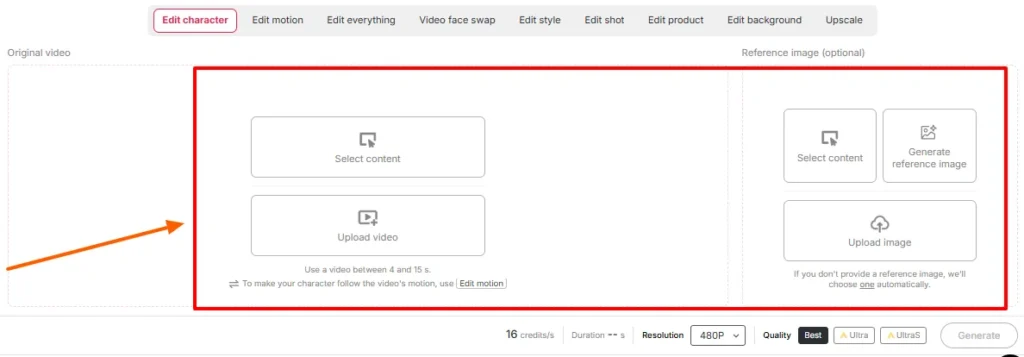
Dumaan:
Kumpirmahin ang mga setting ng tagal at kalidad sa screen. Suriin ang limitasyon ng haba na ipinapakita ng iyong workspace sa araw na iyon — APOB's Ang orihinal na paglulunsad ng ReVideo ay naglilimita sa mga clip sa humigit-kumulang limang segundo, at ang mga mas bagong pahinang pinapagana ng Wan ay nag-aanunsyo ng suporta para sa mas mahahabang file. Nagsasabi ng totoo ang nag-upload; ang mga post sa blog ay nahuhuli sa mga paglabas.
Hakbang — Bumuo at Maghintay
Pindutin ang "generate". Ima-map ng modelo ang iyong reperensya sa source performance habang pinapanatiling matatag ang background.
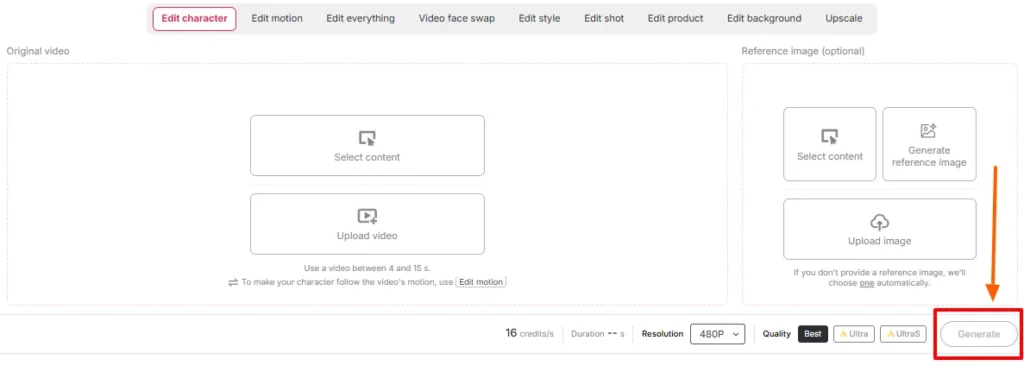
I-render ang mga takdang oras gamit ang haba ng clip at antas ng kalidad. Huwag mag-refresh. Huwag mag-panic—gumawa ng pangalawang trabaho sa parehong mga kredito.
Hakbang — Magkasunod na Pagsusuri
Patugtugin ang orihinal sa tabi ng output. Tiyaking tingnan:
Kung ang isang bagay's Kapag naka-off, halos palaging upstream ang pag-aayos — palitan ang reference image o i-trim sa mas malinis na seksyon ng source. Bihirang mailigtas ng muling pag-roll ng parehong input ang isang hindi magandang pairing.
Hakbang — Tapusin Ito Gamit ang Natitirang Bahagi ng Stack
Ang isang raw ReVideo output ay isang component, hindi isang tapos na post. I-stack ito:
Eksena ng Pelikula vs B-Roll: Dalawang Magkaibang Playbook
Magkamukha ang mga ito. Wala silang pagkakatulad sa kanilang kilos.
Playbook A — Ang Insert ng Eksena ng Pelikula
Ang mga kuha sa sine ay minamarkahan, iniilawan nang dramatiko, at karaniwang kinukuha sa mahahabang lente na may mababaw na depth of field.'s isang regalo at isang bitag.
Gawin ito:
Iwasan: mga mabibilis na aksyon, makapal na usok na parang usok, matinding silweta, mga kuha kung saan kalahati ang nasa labas ng frame.
Playbook B — Ang B-Roll Drop-In
Ang B-roll ang sleeper use case at sa totoo lang, kung saan napupunta ang halos lahat ng pera. Mga stock-style na footage — isang taong naglalakad sa opisina, nag-a-unbox ng produkto, humihigop ng kape sa tabi ng bintana, nakahawak ng telepono sa camera — ay malinis, pantay ang ilaw, at iisang subject lang. Praktikal itong ginawa para sa pagpapalit ng karakter.
Gawin ito:
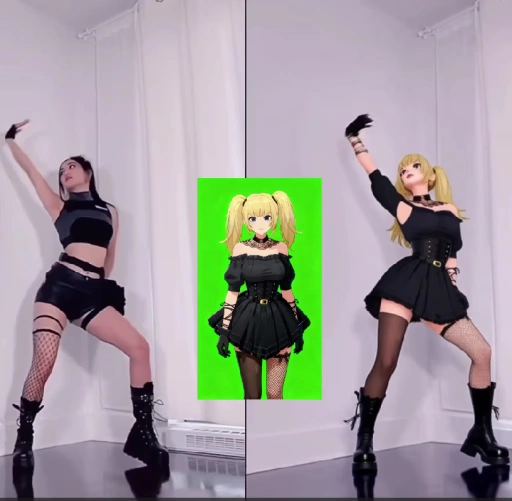
Ito ang daloy ng trabaho sa likod ng maraming AI mga influencer account, mga faceless channel, at mga affiliate product page na tumatakbo ngayon.
Credit Math: Ano nga ba ang Tunay na Halaga ng mga Bagay
| Haba ng Output | Tinatayang mga Kredito | Libreng-Antas na Realidad |
|---|---|---|
| 1 ikalawang | ~ 26 | Maginhawa |
| 3 segundo | ~ 78 | Ang iyong buong pang-araw-araw na allowance |
| 5 segundo | ~ 130 | Kailangan ng 2 araw na libre, o isang bayad na plano |
| 10 segundo | ~ 260 | Bayad na teritoryo |
| Batch ng 5 × 5s na mga baryasyon | ~ 650 | Planuhin ang suskrisyon |
Pagsusuri sa katotohanan: ang mga libreng kredito ay para sa pagsubok ng mga input, hindi para sa paggawa ng kalendaryo ng nilalaman. Patakbuhin ang iyong mga reference image test nang tig-iisang segundo bawat isa. Kapag mukhang tama na ang isang pares, gastusin ito sa full-length render.
Mga Karaniwang Pagkabigo ng ReVideo at Paano Ito Mabilis na Ayusin
| Ano ang Nagkamali | Bakit | Ang Fix |
|---|---|---|
| Pagbabago ng mukha at pagkakakilanlan sa kalagitnaan ng clip | Masyadong maliit o naka-anggulo ang reference na larawan | Mag-upload muli ng isang nakaharap na high-res na larawan |
| Kakaibang halo sa paligid ng buhok | Abalang background sa likod ng paksa's ulo | Pumili ng source clip na may mas malinis na paghihiwalay |
| Ang mga kamay ay nagiging abstract | Mabilis na kilos + compression | Gupitin sa mas mabagal na bahagi ng paggalaw |
| Hindi pagkakatugma ng tono ng balat | Pagsasalungatan ng sangguniang ilaw vs. Pagsasalungatan ng ilaw ng eksena | Muling buuin ang sanggunian sa ilalim ng katulad na liwanag |
| Maling tao ang napalitan | Maraming paksa sa frame | I-crop o pumili ng isang clip na may iisang paksa |
| Parang nakadikit lang ang output | Kulang sa totoong galaw ng katawan ang pinagmulan | Gumamit ng footage na may nakikitang paggalaw ng buong katawan |
| Masyadong maikli ang output para mai-post | Pagtama sa limitasyon ng kredito | Gumamit ng Video Extender, o magtahi ng dalawang render |
Kung saan Natalo ng APOB ReVideo ang isang Standard Face Swap
| Bakit Panalo ang ReVideo | Basic AI Pagpalit ng Face | APOB ReVideo |
|---|---|---|
| Ano ang nagbabago | Rehiyon ng mukha lamang | Mukha, katawan, kasuotan, pangkalahatang karakter |
| Pinagmumulan ng paggalaw | Orihinal, hindi nagagalaw | Orihinal na pagganap na napreserba at muling nai-render |
| Pagkakapare-pareho ng pagkakakilanlan | Bawat clip, nag-iiba-iba | Face-lock sa buong library mo |
| Kontrol sa background | Wala | Magagamit ang ReBackground |
| Kontrol ng istilo | Wala | Magagamit ang ReStyle |
| Itinayo para sa | Mga minsanang biro | Mga paulit-ulit na pipeline ng produksyon |
Ang pagpapalit ng mukha ay nagbibigay sa iyo ng biro. Ang ReVideo ay nagbibigay sa iyo ng miyembro ng cast na maaari mong patuloy na gamitin.
Mga Tunay na Gamit na Ginagamit ng mga Tao Ngayon
Ang Bahaging Karamihan sa mga Tutorial ay Hindi Nalalaktawan: Pahintulot, Karapatang-ari, at Hindi Pagkakasuhan
Masaya ang paglalagay ng mukha mo sa eksena ng pelikula. Paglalagay ng ibang tao's Ang pagharap sa isa, o ang muling pamamahagi ng mga kuha sa studio, ay ibang sitwasyon. Hawakan ito nang maayos:
Lisensyadong stock B-roll kasama ang isang AI Ang persona ay ang malinis, madaling i-scale, at ligtas sa komersyo na kombinasyon. Doon ka bumuo.
Anim na Propesyonal na Tip Mula sa Aktwal na Pagsubok
- Subukan nang isang segundo bago mag-commit. Pinakamurang paraan upang suriin ang pagpapares ng image-clip.
- Buuin ang portrait model nang isang beses, muling magagamit magpakailanman. Konsistente ng face-lock ang buong dahilan kung bakit nakakakuha ng mga tagasunod ang isang virtual na persona.
- Papasok ang patayong pinagmumulan, palabas ang patayong output. Huwag i-crop ang pahalang na render at umasa.
- Ang maliwanag at pantay na ilaw ay palaging panalo. Maganda ang hitsura ng Moody grading at hindi maganda ang mga swap.
- I-save ang iyong pinakamahusay na mga clip ng pinagmulan bilang mga template. Isang malaking bentahe ang isang mahusay na hook. Gawin itong muli buwan-buwan.
- Batch sa mga araw ng pag-refresh ng credit. Ang mga libreng kredito ay nire-reset araw-araw. Ang mga stack test ay isinasagawa isang linggo bago ang isang bayad na render push.
Mga Madalas Itanong Tungkol sa APOB ReVideo
Para saan ginagamit ang APOB ReVideo?
Pinapalitan ng APOB ReVideo ang karakter sa isang umiiral na video gamit ang iyong mukha, isang reperensyang imahe, o isang AI modelo ng influencer, habang pinapanatiling buo ang orihinal na galaw, mga kilos, daloy ng kamera, at background. Ito's ginagamit para sa mga pag-edit ng eksena sa pelikula, mga insert ng B-roll, mga ad ng UGC, mga uso sa sayaw, at AI nilalaman ng isang influencer.
Libre ba ang APOB ReVideo?
Doon's isang libreng tier na may 80 credits na inihahatid araw-araw at hindi kinakailangan ng card. Sa humigit-kumulang 26 credits kada segundo, pinopondohan nito ang humigit-kumulang tatlong segundo ng output kada araw — ayos lang para sa pagsubok, manipis para sa produksyon. Ang mga bayad na plano ay humahawak sa mas mahahabang clip at batch.
Gaano kahaba ang maaaring maging isang APOB ReVideo clip?
Pinakamahusay na gumana ang orihinal na paglulunsad gamit ang mga clip na ilang segundo lang ang tagal, at sinusuportahan ng mga mas bagong pahinang pinapagana ng Wan ang mas mahahabang pag-upload. Suriin ang limitasyon sa haba na ipinapakita sa iyong workspace, dahil nagbabago ito sa bawat pag-update ng modelo.
Kailangan ko bang lumikha ng isang AI modelo muna?
Hindi. Maaari kang direktang mag-upload ng reference na larawan. Ngunit ang pagbuo ng portrait model ay nagbibigay sa iyo ng pare-parehong pagkakakilanlan sa bawat susunod na render, na napakahalaga para sa sinumang nagpapatakbo ng isang recurring account.
Aling AI Pinapagana ng makina ang APOB ReVideo?
Gumagana ito sa Wan 2.2 Animate style motion transfer, na nagbabasa ng galaw mula sa iyong source clip at muling bumubuo ng bagong karakter sa istrukturang galaw na iyon sa halip na bumuo ng video mula sa simula.
Maaari bang palitan din ng APOB ReVideo ang background?
Oo — Ang ReBackground ang humahawak sa pagpapalit ng eksena kapag ang orihinal na lokasyon ay hindi angkop sa iyong pag-edit. Ang ReCharacter lamang ang nagpapanatili sa background nang eksakto tulad ng kinunan.
Gumagana ba ito sa anime, 3D renders, at mga karakter na hindi tao?
Okay lang. Ang mga ilustradong karakter, 3D model, at maging ang mga imahe ng manika o pigurin ay nagsisilbing pamalit na paksa, na nagbubukas ng mga nilalamang may istilo at pinangungunahan ng mga mascot.
Bakit mukhang malabo o distorted ang output ko?
Halos palaging problema sa pinagmulan. Ang naka-compress na footage, mabilis na galaw ng kamera, natatakpang mga paksa, o isang low-resolution na reference image ay nagpapababa sa resulta. Palitan ang mga input bago muling i-roll.
Maaari ko bang gamitin ang mga video ng APOB ReVideo sa komersyo?
Sa pangkalahatan oo, basta't mayroon kang mga karapatan sa pinagmulang footage at sa pagkakahawig na kasangkot. Ang mga AI-generated na persona sa lisensyado o pagmamay-ari na footage ang pinakaligtas na komersyal na setup.
Paano ito maihahambing sa isang regular na AI tagapalit ng mukha?
Isang face swapper ang nag-eedit sa bahagi ng mukha. Pinapalitan ng ReVideo ang buong karakter — mukha, katawan, kasuotan, at istilo — habang pinapanatili ang orihinal na pagganap.'s ginawa para sa pagpapalit ng buong karakter sa katawan, hindi para sa mga single-frame na biro.
Maaari ko bang legal na ilagay ang aking sarili sa isang eksena ng pelikula?
Para sa mga pribadong eksperimento, sa pangkalahatan ay ayos lang. Ang paglalathala o pagkita ng pera sa binagong footage ng studio ay isang isyu ng copyright anuman ang palitan, at ang paglalagay ng kahit sino pa.'s Ang pagharap nang walang pahintulot ay isang hiwalay na legal na problema. Ang mga lisensyadong stock at pampublikong-domain na clip ay nagpapanatili sa iyo na ligtas.
Aling mga source clip ang nagbibigay ng pinakamahusay na resulta?
Iisang paksa, gitnang frame, pantay na ilaw, nakikitang paggalaw ng katawan, kaunting bara, at disenteng resolusyon. Ang mga demo ng produkto, walk-and-talk shots, at dance clips ay palaging malakas.
Pangwakas na Kumuha
Ang APOB ReVideo ay ang bihira AI tampok na video kung saan ang kalidad ng output ay kadalasang nasa iyong mga kamay, hindi sa modelo. Kung bibigyan mo ito ng malinis na single-subject clip at isang matalas na reference image, makakagawa ito ng isang bagay na maaari mong i-post. Kung bibigyan mo ito ng malabong crowd shot at isang selfie na kinunan ng alas-2 ng madaling araw, makakagawa ito ng eksaktong inaasahan mo.
Ang tunay na bentahe ay hindi ang minsanang pag-edit ng eksena ng pelikula na magbibigay sa iyo ng ilang libong views. Ito's ang pipeline ng produksyon: isang pare-pareho AI tao, isang library ng mga napatunayang source clip, at ang kakayahang muling i-cast ang isang nanalong format nang maraming beses hangga't pinapayagan ng iyong mga kredito. Iyan's kung paano ang mga channel na walang mukha, mga tindahan ng ad sa UGC, at AI Ang mga influencer account ay aktwal na gumagana noong 2026.
Magsimula sa libreng 80 credits. Subukan ang tatlong reference na larawan sa bawat segundo. Hanapin ang pares na nagpapakita ng pagkakakilanlan sa pamamagitan ng pag-ikot ng ulo. Pagkatapos ay i-scale ito.
Mayroon nang footage. Binabago mo lang kung sino's sa loob.
Inirerekomenda ni AiMojo:


 BONUS: Kunin ang aming $200"AI Mastery Toolkit” LIBRE kapag nag-sign up ka!




![Top 10 Hentai AI Mga Chatbot para Makaranas ng Virtual Desire [2026]](https://aimojo.io/wp-content/uploads/2024/03/Top-Hentai-AI-Chatbot--100x100.webp)

![Nangungunang 13 AI Mga Larong Porno sa Chat na Walang Limitasyon [2026]](https://aimojo.io/wp-content/uploads/2024/03/Best-AI-Chat-Porn-Games-100x100.webp)


