

Важное обновление 2026 года
ОткрытоAI Поддержка веб-версии и мобильного приложения Sora была прекращена 26 апреля 2026 года. API Sora планируется прекратить 24 сентября 2026 года. В связи с этим данная статья больше не является руководством по созданию новых рабочих процессов на основе Sora. Она была переписана, чтобы помочь разработчикам сравнить альтернативы Sora, замены Sora и активные решения. AI Инструменты для организации рабочего процесса с видео.
Если вы использовали Сору для AI В сфере видеопроизводства безопасный шаг прост: экспортируйте существующий контент, прекратите создавать новые системы производства на основе Sora и выберите замену, исходя из того, что вы действительно создаете.
Некоторым создателям контента необходима кинематографическая трансформация текста в видео. Некоторым нужны видеоролики, преобразованные из изображений, для рекламы и публикаций в социальных сетях. А некоторым просто нужно... AI Аватары используются для обучения, продаж или создания контента для курсов. Для других требуются подписи, шаблоны, редактирование, локализация, раскадровка или маркетинговые стратегии, основанные на создании видеороликов.
Не существует единственной лучшей замены Sora для всех. Правильный инструмент зависит от того, какие задачи Sora выполняла в вашем контентном конвейере.
В этом руководстве сравниваются лучшие альтернативы Sora по типу рабочего процесса, с четкими параметрами для каждого инструмента, чтобы вы могли быстрее сделать выбор и избежать перестройки всего производственного процесса с нуля.
Краткий ответ: Лучшие замены Sora по вариантам использования
Если вам нужен кинематографический эффект AI создание видео, начните с Клинг ИИЕсли вам нужны раскадровки, персонажи, визуальные материалы и креативная предпроизводственная работа, загляните на сайт test. ОпенАртЕсли вам нужны говорящие аватары, многоязычные докладчики или обучающие видеоролики, ЭйГен Это лучший вариант. Если вам нужны подписи, редактирование для социальных сетей, возможность повторного использования и быстрая публикация, используйте... ВИДЕТЬЕсли вы хотите превратить подсказки или сценарии в полноценные маркетинговые видеоролики, сравните... ИнВидео ИИ.
| Старый рабочий процесс Sora | Лучшая замена Соре |
|---|---|
| Кинематографические видеоролики, преобразованные из текста в видео. | Клинг ИИ |
| Анимация от изображения к видео | Клинг AI или OpenArt |
| Многокадровая раскадровка | OpenArt или Kling AI |
| Разработка визуальной концепции | ОпенАрт |
| Видео с говорящими аватарами | ЭйГен |
| Обучение, адаптация и разъяснения по вопросам продаж. | HeyGen или VEED |
| Подписи и редактирование для социальных сетей. | ВИДЕТЬ |
| Короткие видеоролики на YouTube, рилсы, видео в TikTok | VEED или InVideo AI |
| Видеоролик, созданный по мотивам маркетинговой кампании. | ИнВидео ИИ |
| Рекламные видеоролики продукции | Kling AI, OpenArt, VEED или InVideo AI |
| Быстрое еженедельное производство контента | VEED или InVideo AI |
Ошибка заключается в погоне за самым раскрученным товаром. AI видеоинструмент. Лучше выбрать инструмент, который точно заменит ваш рабочий процесс.
Что случилось с Сорой?

Сора была одной из самых обсуждаемых персонажей. AI видеоинструменты, потому что они показали, насколько далеко может зайти генерация видео из текста. Создатели могли представьте себе кинематографические сценыСоздание движения, режиссуры камеры и визуального повествования на основе подсказок, а не с использованием готовой камеры, стоковых видеоматериалов или традиционного рабочего процесса анимации.
Но Sora больше не является стабильным центром рабочих процессов для создателей контента. OpenAI's На официальной странице, посвященной прекращению производства, подтверждаются две ключевые даты:
Это означает, что стандартный веб-интерфейс/приложение Sora уже закрыто, а рабочие процессы, зависящие от API, имеют ограниченный срок службы. Если вы использовали Sora через другую платформу, пользовательскую автоматизацию или внутренний видеопроцесс, следует рассматривать его как временное решение, если только платформа не перешла на другую модель работы.
OpenAI's На официальной странице справки объясняется хронология событий и порядок экспорта, но подробного публичного объяснения всех причин закрытия бизнеса не приводится. В сообщениях Axios говорилось об открытии.AI сужалась сфера внимания и сокращались человеческие/вычислительные ресурсы, при этом Sora потребляла значительные вычислительные мощности. Axios также сообщила, что OpenAI's Исследовательская группа Sora продолжит уделять основное внимание исследованиям в области моделирования окружающего мира для робототехники и решения задач, связанных с реальным физическим миром.
Для творческих людей практические выводы важнее политических аспектов приостановки работы правительства:
Как выбрать альтернативу Sora
Прежде чем зарегистрироваться на еще один AI Видеоплатформа, используйте эти параметры. Они важнее, чем ажиотаж.
1. Тип вывода
Спросите, что именно выдает инструмент. Некоторые инструменты генерируют оригинальные результаты. AI Видеоролики. Некоторые анимируют изображения. Некоторые создают видеоролики с аватарами. Некоторые создают маркетинговые видеоролики на основе шаблонов. Некоторые являются монтажерами. AI особенности.
Если вам нужен кинематографический эффект AI Для создания сцен выберите инструмент для генерации видео. Если вам нужны еженедельные... социальный контентВ этом случае редактор может оказаться более ценным специалистом.
2. Творческий контроль
Обратите внимание на такие параметры управления, как соотношение сторон, длительность, движение камеры, эталонные изображения, негативные подсказки, планирование раскадровки, согласованность персонажей, последовательность сцен и рабочие процессы редактирования перед созданием.
Чем серьёзнее ваша производственная работа, тем больше контроля вам требуется.
3. Соответствие рабочему процессу
Создатели контента часто переплачивают за качество генерации и недоплачивают за скорость рабочего процесса. Если ваше узкое место — это субтитры, изменение размера, шаблоны, проверка и публикация, то чистый подход... AI Видеогенератор не решит проблему полностью.
4. Коммерческие права
Перед использованием сгенерированных видеороликов в рекламе, работе с клиентами, платных курсах, монетизации YouTube или рекламных кампаниях, проверьте инструмент.'s Условия. Коммерческое использование может зависеть от плана, модели, ресурсов, видеоматериалов, голоса, аватара или региона.
5. Стоимость и кредиты
AI Видеоконтент может быстро расходовать кредиты. Инструмент, который кажется дешевым на странице с ценами, может стать дорогим, когда вы создаете множество вариантов, тестируете подсказки, масштабируете результат или вам нужны более длинные клипы.
6. Использование командой и клиентами
Если вы работаете с клиентами или в команде, обратите внимание на возможности для совместной работы, фирменные наборы, шаблоны, общие проекты, опции экспорта и предсказуемые процессы утверждения.
Лучшие альтернативы Sora по версии Workflow
| Инструмент | Лучше всего | Главная сила | Лучший покупатель |
|---|---|---|---|
| Клинг ИИ | кинематографический AI XNUMX году | Преобразование текста в видео, изображения в видео, движения, кинематографического вывода. | Создатели контента, рекламные команды, маркетологи продукции. |
| ОпенАрт | Раскадровка и креативные материалы | Визуальные концепции, персонажи, планирование съемок, предпроизводство. | Дизайнеры, кинематографисты, творческие группы |
| ЭйГен | Говорящие аватары | Видеоматериалы под руководством ведущего, сценарии, локализация, воспроизводимый бизнес-контент. | SaaS-команды, преподаватели, агентства, отделы продаж |
| ВИДЕТЬ | Социальное редактирование и субтитры | Субтитры, изменение размера, редактирование, переработка, доработка для публикации. | Социальные команды, создатели контента, преподаватели, маркетологи |
| ИнВидео ИИ | Видеоролик, созданный по мотивам маркетинговой кампании. | Сценарии, визуальные эффекты, озвучка, сцены, полные рабочие процессы для видеосъемки. | Ютуберы, агентства, малые предприятия |
1. Клинг ИИЛучшая замена Соре для кинематографического ролика AI Видео
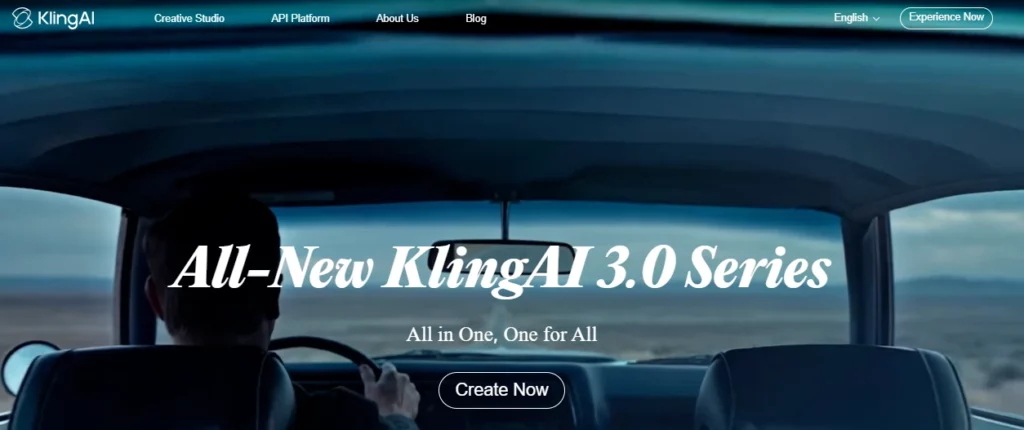
Клинг AI Это лучший выбор, если вы использовали Sora для создания кинематографических видеороликов с преобразованием текста в видео или изображения в видео. Он создан для генерации видео, обеспечения визуальной согласованности, управления движением камеры и создания коротких кинематографических роликов, а не для простого редактирования шаблонов.
Kuaishou's В анонсе Kling 3.0 были отмечены следующие возможности: преобразование текста в видео, изображения в видео, ссылки на видео, редактирование видео непосредственно в видео, многомодальный ввод/вывод, улучшенная согласованность, встроенное аудио, многокадровое повествование и генерация видео продолжительностью до 15 секунд. Это делает Kling серьезной заменой Sora для создателей контента, которые по-прежнему хотят наслаждаться волшебством видео, основанного на подсказках.
Используйте Клинг AI для:
Клинг AI Параметры оценки
| Параметр | Что проверить |
|---|---|
| Оптимальный рабочий процесс | Создание кинематографических видеороликов на основе текста и изображений. |
| Типы ввода | Текстовые подсказки, изображения, ссылки, а в зависимости от модели доступа — мультимодальные входные данные. |
| Стиль вывода | Короткие кинематографические ролики, реалистичные сцены, стилизованная анимация, визуализация продукции. |
| Уровень контроля | Более строгий контроль при использовании эталонных изображений, указаний ракурса камеры, описаний объектов и подсказок в стиле раскадровки. |
| Скорость | Подходит для коротких видеороликов, но для получения качественного результата потребуется время на доработку. |
| Творческая сила | Визуальный реализм, движение, кинематографическая композиция кадра, анимация изображений. |
| Использование преобразования | Отлично подходит для рекламы, привлечения внимания, визуального оформления целевых страниц, рассказа о продукте и тестирования коротких креативных материалов. |
| Осторожно | Стоимость кредита, лимиты генерации, условия коммерческого использования, правила водяных знаков/экспорта и различия в тарифных планах. |
Лучший Клинг AI Стиль подсказки
Kling работает лучше, если вы используете подсказки, как режиссер, а не просто как автор ключевых слов. Укажите тему, сцену, движение, ракурс камеры, освещение, настроение, соотношение сторон и то, что не должно появляться.
Пример структуры запроса:
A close-up cinematic shot of a premium smartwatch on a dark glass table, soft studio lighting, slow push-in camera movement, reflections visible, modern luxury ad style, shallow depth of field, no text, no distorted hands, no extra objects.Для создания видеоролика на основе изображения начните с яркого изображения продукта или персонажа. Затем четко опишите движение:
Animate this product image with a slow clockwise camera orbit, subtle background light movement, realistic reflections, no change to product shape, no logo distortion.Когда Клинг AI Лучший выбор
Выберите Kling, если ваш прежний рабочий процесс в Sora был ориентирован на создание оригинальных сцен. Он особенно полезен, когда вам нужны яркие визуальные эффекты, но не требуется полноценный набор инструментов для редактирования видео в одном инструменте.
Например, маркетолог может сгенерировать ролик длительностью от 5 до 15 секунд. AI Продукт снят в Kling, затем переместите клип в ВИДЕТЬ для добавления подписей, изменения размера, размещения логотипа и окончательного форматирования для социальных сетей.
2. ОпенАртЛучшая альтернатива Sora для раскадровки и творческой подготовки.
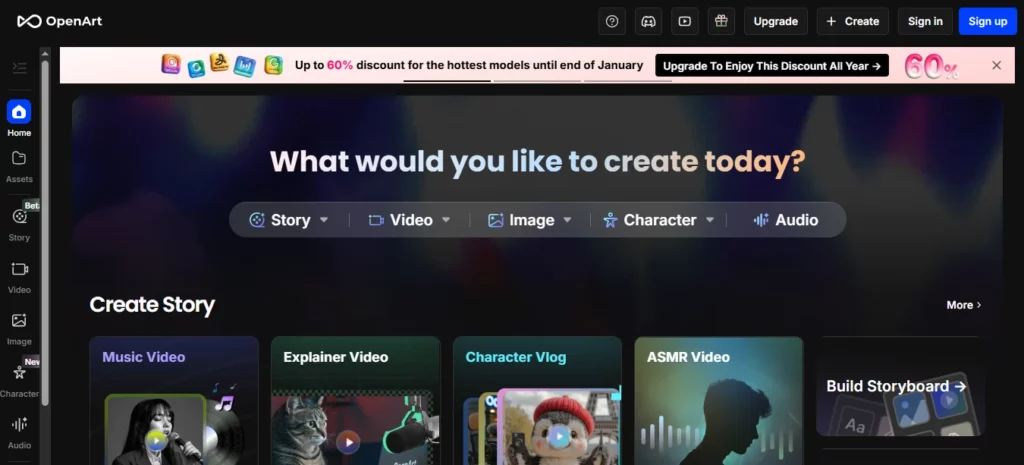
OpenArt — это достойная альтернатива Sora, когда вам нужно визуальное планирование перед созданием видео. Речь идёт не просто о замене Sora клипами. Он помогает создателям разрабатывать концепции, персонажей, стили, сцены и ресурсы, которые впоследствии могут стать основой для видеороликов.
ОпенАрт's Функция Smart Shot особенно актуальна для рабочих процессов замены Sora, поскольку она фокусируется на планировании кадров, многокадровом выводе, работе с камерой и т. д. визуальная последовательностьи возможность редактирования перед созданием. OpenArt описывает Smart Shot как создание плана кадра с раскадровками и движениями камеры, а затем создание 3-5 различных кадров. Это делает его полезным для создателей, которым нужна более структурированная схема, чем один случайный кадр. AI клип.
Используйте OpenArt для:
Параметры оценки OpenArt
| Параметр | Что проверить |
|---|---|
| Оптимальный рабочий процесс | Раскадровка, разработка визуальных идей, обеспечение согласованности персонажей и творческая подготовка. |
| Типы ввода | Текстовые подсказки, изображения, описания персонажей, сохраненные визуальные материалы. |
| Стиль вывода | Изображения, кадры раскадровки, видеоролики с несколькими монтажными склейками, визуальные образы персонажей, концепции сцен. |
| Уровень контроля | Успешное развитие достигается, когда вы создаете исходные данные до начала анимации. |
| Скорость | Отлично подходит для изучения множества визуальных направлений, прежде чем тратить видеокредиты. |
| Творческая сила | Визуальная разработка концепции, создание персонажей, планирование раскадровки, создание графических элементов. |
| Использование преобразования | Полезен для планирования рекламы, создания эскизов, фотографий продукции, предпроизводства и визуализации для презентаций клиентам. |
| Осторожно | Это не всегда последний этап редактирования; для создания подписей и публикации вам может понадобиться VEED или другой редактор. |
Как OpenArt заменяет часть Sora
Многие создатели использовали Sora как двигатель воображения. Они набирали идею и представляли, как может выглядеть сцена. OpenArt может заменить эту функцию на начальном этапе творчества, помогая сначала разработать визуальный мир.
Это важно, потому что создание видеороликов обходится дорого, если тратить ресурсы впустую. Если ваша идея слабая, немедленное создание видео может привести к потере кредитов на ненужные клипы. Более эффективный рабочий процесс:
- Создайте визуальный стиль в OpenArt.
- Создайте описания персонажей или товаров.
- Выбирайте самые прочные рамы.
- Анимируйте эти отсылки в Kling. AI или видеоинструменты OpenArt.
- Отредактируйте окончательный вариант в программе VEED.
Лучший рабочий процесс OpenArt для создателей контента
Для рекламного объявления товара сначала создайте 5-10 визуальных ориентиров:
Затем выберите наиболее яркое изображение и превратите его в движение. Это более контролируемый процесс, чем если бы вы попросили кого-то одного. AI Видеомодель, позволяющая реализовать всю идею за один раз.
3. ЭйГенЛучшая замена Соре для говорящих аватаров и видеороликов ведущего.

HeyGen — лучшая альтернатива Sora, если ваша цель — не кинематографические сцены, а видео, созданное ведущим.
Многим компаниям сюрреалистический подход не нужен. AI Им нужен человек с профессиональным внешним видом, который сможет объяснить особенности продукта, провести вводное обучение для клиентов, провести обучающий курс, адаптировать сообщение для местного рынка или превратить сценарий в качественный видеоролик.
ЭйГен's В документации описаны рабочие процессы для фотоаватаров, публичных аватаров и мгновенных аватаров/цифровых двойников, при этом механизмы создания аватаров зависят от желаемого качества или функций. Также поддерживаются рабочие процессы для создания аватаров и голосовых файлов, которые гораздо ближе к созданию бизнес-видео, чем к другим методам. кинематографический AI поколение.
Используйте HeyGen для:
Параметры оценки HeyGen
| Параметр | Что проверить |
|---|---|
| Оптимальный рабочий процесс | Деловые видеоролики с участием ведущего и контент для аватаров. |
| Типы ввода | Сценарии, аватары, голоса, фотоаватары, публичные аватары, пользовательские аватары |
| Стиль вывода | Видеоролики с говорящей головой, пояснительные ролики, обучающие видео, многоязычные видеоролики с аватарами. |
| Уровень контроля | Отлично подходит для сценариев, озвучивания, выбора аватара и повторяющихся форматов презентаций. |
| Скорость | Отлично подходит для серийного производства бизнес-видео. |
| Творческая сила | Последовательность в выступлении докладчика, локализация, заранее подготовленный текст. |
| Использование преобразования | Отлично подходит для пояснительных презентаций SaaS-продуктов. видео на целевой странице, работа с клиентами, обучение и содержание курсов |
| Осторожно | Согласие на использование аватара, согласие на использование голоса, права на использование изображения, качество произношения и соответствие бренду. |
Когда HeyGen превосходит кинематографическую замену Соры
Выбирайте HeyGen, когда человеческий фактор важнее, чем сама ситуация.
Например:
В таких случаях Kling или OpenArt могут оказаться слишком наглядными и недостаточно практичными. HeyGen же предлагает повторяемый рабочий процесс в студийном стиле.
Лучший формат скрипта HeyGen
Сценарии должны быть прямыми и естественными:
Пример:
«Если ваша команда тратит часы на запись одних и тех же обучающих видеороликов, вы можете заменить этот процесс на…» AI Рабочий процесс создания аватара. Напишите сценарий один раз, сгенерируйте видео, переведите его для разных рынков и обновляйте контент при изменении вашего продукта.
4. ВИДЕТЬЛучшая альтернатива Sora для редактирования видео и добавления субтитров в социальных сетях.
VEED — это практичная замена Sora для создателей контента, которым не так важен исходный код. AI о том, как превратить клипы в видеоролики, готовые к публикации.
VEED — это онлайн-видеоредактор, который AI инструменты для создания субтитровОн поддерживает создание субтитлов, перевод, преобразование текста в видео, аватары, озвучивание, запись экрана, форматирование и редактирование. Инструменты для создания субтитлов поддерживают автоматическое создание субтитлов и перевод на многие языки. AI Видеоредактор может помочь в создании видеороликов с клипами, музыкой, озвучкой, субтитрами и анимацией.
Используйте VEED для:
Параметры оценки VEED
| Параметр | Что проверить |
|---|---|
| Оптимальный рабочий процесс | Редактирование, создание подписей, переработка и публикация в социальных сетях. |
| Типы ввода | Загруженные видеоролики, записи экрана, видеоролики, сгенерированные ИИ, сценарии, озвучка. |
| Стиль вывода | Видеоролики, готовые для публикации в социальных сетях, клипы с субтитрами, обучающие видео, рекламные ролики, пояснительные видео. |
| Уровень контроля | Отлично подходит для редактирования, создания субтитлов, шаблонов, форматирования и оформления фирменного стиля. |
| Скорость | Отлично подходит для авторов, часто публикующих свои работы. |
| Творческая сила | Подписи, редактирование временной шкалы, изменение размера, улучшение для социальных сетей, повторное использование. |
| Использование преобразования | Отлично подходит для коротких зацепок, видеорекламы, видеороликов от авторов и распространения контента. |
| Осторожно | Это не в первую очередь высококачественный генератор кинематографических эффектов; используйте его с Kling или OpenArt для получения более эффектных визуальных эффектов. |
Как VEED впишется в компанию после Соры
Sora может создавать впечатляющие видеоролики, но готовый контент все равно нуждается в редактировании. Большинству высокоэффективных видеороликов для социальных сетей необходимо:
VEED создан для заключительного этапа производства. Эффективный рабочий процесс после Sora может выглядеть следующим образом:
- Создать AI Визуализация в Kling AI.
- Создавайте вспомогательные изображения или кадры раскадровки в OpenArt.
- Записывайте или создавайте сегменты выступления докладчика в HeyGen.
- Сборка, добавление подписей, изменение размера и экспорт в формате VEED.
Это более эффективный рабочий процесс, чем ожидать его заранее. AI Видеогенератор, который умеет всё.
5. ИнВидео ИИЛучшая замена Sora для видеороликов, создающих маркетинговые кампании.
InVideo AI Это достойная альтернатива, если вам нужны готовые маркетинговые видеоролики, созданные на основе подсказок, сценариев или идей для контента.
InVideo AI речь идет не столько о демонстрации чего-то необработанного. AI Модель и многое другое о переходе от идеи к видеоролику, готовому к публикации. AI Видеогенератор может писать сценарии по подсказкам, добавлять визуальные эффекты. озвучиваниесубтитры, музыка и другие элементы производства. Он также включает в себя рабочие процессы для AI Создание видеороликов, аватары, субтитры, реклама в стиле пользовательского контента, видеоролики о товарах, короткие видео на YouTube и многое другое.
Используйте InVideo AI для:
InVideo AI Параметры оценки
| Параметр | Что проверить |
|---|---|
| Оптимальный рабочий процесс | Производство видеороликов по заказу и от сценария до маркетинговых видео. |
| Типы ввода | Задания, сценарии, идеи для тем, описания продуктов, информация об целевой аудитории. |
| Стиль вывода | Структурированные маркетинговые видеоролики, реклама в социальных сетях, пояснительные ролики, списки, видеоролики без участия лица. |
| Уровень контроля | Отлично подходит для скриптов, стоковых изображений/AI визуальные эффекты, озвучка, сцены и команды монтажа. |
| Скорость | Отлично подходит для быстрого приготовления. производство контента и тестирование кампаний |
| Творческая сила | Быстрое превращение черновых идей в готовые видеоролики. |
| Использование преобразования | Отлично подходит для рекламы, контента на YouTube, продвижения товаров и маркетинга малого бизнеса. |
| Осторожно | Возможно, это покажется менее оригинальным, чем чисто генеративное видео, если вам нужны уникальные кинематографические кадры. |
Когда в видео AI Лучше, чем Kling или OpenArt.
Выберите InVideo AI когда результат для бизнеса важнее, чем сама визуальная модель.
Например:
InVideo AI Это полезно, потому что система мыслит в рамках целостных форматов контента. Это упрощает работу маркетологам, малым предприятиям, агентствам и создателям контента, которым нужен быстрый результат.
Оптимальный набор сменных блоков Sora для разных пользователей
Ютуберам
Используйте OpenArt для эскизов и визуальных концепций, Клинг. AI для коротких кинематографических вставок, InVideo AI для создания структурированных черновых вариантов видео, а для создания субтитров и окончательного монтажа — с помощью VEED.
Лучший набор:
Для менеджеров социальных сетей
Используйте Клинг AI для создания привлекательных видеороликов, VEED для создания субтитров и изменения размера, а также InVideo. AI для быстрого внесения изменений в рекламную кампанию.
Лучший набор:
Для агентств
Используйте OpenArt для разработки концепций для клиентов, Клинг. AI Для визуальных тестов используется HeyGen для пояснительных роликов, а для финальной брендированной презентации — VEED.
Лучший набор:
Для создателей курсов и преподавателей
Используйте HeyGen для уроков с участием ведущего, а VEED — для редактирования, добавления субтитров и перевода. Используйте OpenArt только в том случае, если вам нужны собственные визуальные материалы для урока.
Лучший набор:
Как восстановить свой AI Рабочий процесс видео после Sora
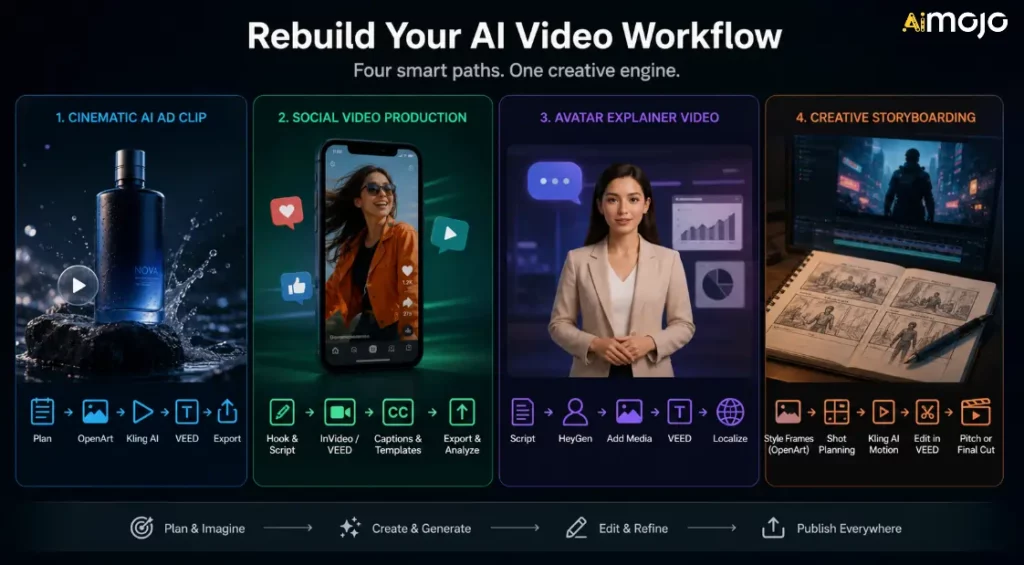
Не стоит ограничиваться одним вариантом замены и надеяться, что это решит все проблемы. Необходимо выстроить рабочий процесс в соответствии с типом публикуемого контента.
Рабочий процесс 1: Кинематографический AI Рекламный ролик
Используйте это, когда вам нужны короткие рекламные ролики, фотографии товаров или AI Дополнительные кадры.
- Спланируйте сцену и определите желаемую эмоцию.
- Создавайте визуальные материалы-образцы в OpenArt.
- Анимируйте самый мощный кадр в Kling AI.
- Добавляйте подписи, призывы к действию и изменяйте размер в VEED.
- Версии для экспорта в TikTok, Reels, YouTube Shorts и для рекламы.
Рабочий процесс 2: Создание видеороликов для социальных сетей
Используйте это, если ваша цель — объём и стабильность.
- Напишите зачин и короткий сценарий.
- Создайте черновик в InVideo. AI или VEED.
- Добавьте подписи и фирменные шаблоны.
- Экспорт с различными соотношениями сторон.
- Отслеживайте, какие крючки показывают наилучшие результаты.
Рабочий процесс 3: Видеоролик-объяснение к фильму «Аватар»
Используйте это, когда вам нужны обучающие, рекламные или образовательные видеоролики.
- Напишите понятный сценарий.
- Сгенерируйте докладчика в HeyGen.
- Добавьте скриншоты продукта, слайды или дополнительные видеоматериалы.
- Редактирование и добавление подписей в VEED.
- Локализуйте только после утверждения основной версии.
Рабочий процесс 4: Создание креативной раскадровки
Используйте это при разработке рекламного ролика, концепции фильма, музыкального видео или рекламной кампании бренда.
- Создавайте стили фреймов в OpenArt.
- Используйте функцию Smart Shot или планирование раскадровки там, где это необходимо.
- Создавайте видеоролики с помощью Kling AI.
- Соберите черновой вариант в программе VEED.
- Используйте результат в качестве презентации, для определения креативных направлений или в качестве финального короткометражного ролика.
Что делать, если вы использовали Sora?
Если у вас ещё остались активы, связанные с Сорой, сделайте это сейчас:
Цель состоит не в том, чтобы в точности воссоздать Sora. Цель состоит в том, чтобы продолжать производство, не завися от снятого с производства продукта.
Распространенные ошибки, которых следует избегать
Ошибка 1: Замена Sora на другой ненадежный рабочий процесс.
Сора's Функция завершения работы напоминает о необходимости поддерживать порядок в экспортируемых файлах, подсказках, исходных изображениях, подписях и итоговых файлах. Не позволяйте всей вашей системе управления контентом находиться в рамках одной закрытой платформы.
Ошибка 2: Игнорирование лицензирования
AI Лицензирование видеоконтента может быть сложным процессом. Всегда проверяйте условия коммерческого использования перед его применением. AI клипы в рекламе, клиентских кампаниях, платных продуктах, монетизации YouTube или работе над публичным брендом.
Ошибка 3: Забыли о слое редактирования.
AI Создание видеоролика — это лишь одна часть процесса производства. Заголовки, темп, монтаж, зацепки, изменение размера, миниатюры и призывы к действию по-прежнему определяют, будет ли видео эффективным.
Ошибка 4: Выбор инструмента с лучшей демонстрационной версией.
Демонстрационные ролики не соответствуют вашему рабочему процессу. Тестируйте инструменты с реальными задачами, продуктом, целевой аудиторией, соотношением сторон и графиком публикации.
Ошибка 5: Не сохранять введенные данные.
Сохраняйте подсказки, ссылки, финальные фрагменты, подписи, миниатюры и настройки экспорта. Это упростит переход между инструментами, если другая платформа изменит цены или доступность.
Часто задаваемые вопросы об альтернативах Sora
Сора еще доступна?
ОткрытоAI Веб-версия и мобильное приложение Sora были прекращены 26 апреля 2026 года. API Sora планируется прекратить 24 сентября 2026 года.
Почему Сора закрылась?
OpenAI's На официальной странице справки подтверждаются даты закрытия, но подробного публичного объяснения каждой внутренней причины не приводится. В сообщениях Axios говорилось, что закрытие открыто.AI Сужение фокуса внимания и сокращение человеческих/вычислительных ресурсов привело к тому, что Sora стала потреблять значительные вычислительные мощности. Для создателей контента важно то, что Sora больше не является безопасным инструментом для новых производственных процессов.
Как лучше всего заменить Сору?
Клинг AI это лучший первый выбор для кинематографического фильма. AI Создание видео. OpenArt лучше подходит для раскадровок и визуальных концепций. HeyGen лучше подходит для AI аватары. VEED лучше подходит для субтитров и редактирования в социальных сетях. InVideo AI Лучше подходит для рабочих процессов, связанных с созданием маркетинговых видеороликов по запросу.
Какая лучшая альтернатива Sora для преобразования текста в видео?
Для создания кинематографических видеороликов с помощью текста начните с Kling AI. Если же вам нужно преобразовать текст в видео для маркетинговых роликов, рекламы в социальных сетях или для создания полноценной видеоструктуры, воспользуйтесь InVideo. AI Или же VEED может оказаться более полезным.
Какая лучшая альтернатива Sora для преобразования изображения в видео?
Клинг AI OpenArt — отличный вариант для создания анимации из изображений. Он также полезен, когда нужно создать или подготовить визуальные элементы перед их анимацией.
Какая лучшая замена Sora для бизнеса?
Для бизнес-видео HeyGen отлично подходит для пояснительных роликов с аватарами и обучающих материалов. VEED хорош для монтажа и создания субтитров. InVideo AI Отлично подходит для продвижения продукции и создания маркетинговых видеороликов.
Стоит ли мне по-прежнему разрабатывать инструменты на основе API Sora?
Нет. Поскольку поддержка API Sora планируется прекратить, создателям и разработчикам следует избегать создания новых долгосрочных производственных систем на его основе.
Могу ли я использовать AI Видеоальтернативы для коммерческой работы?
Часто да, но проверяйте каждую платформу отдельно.'s План, лицензия и правила использования. Коммерческие права могут зависеть от модели, типа вывода, уровня плана, имеющихся активов, голоса, аватара или страны.
Что мне делать со старым контентом про Сору?
Экспортируйте его, архивируйте подсказки и справочные материалы, организуйте финальные клипы и перенесите активное производство в инструменты, которые по-прежнему доступны.
AiMojo рекомендует:
Вердикт
Для кинематографа AI видео, начните с Клинг ИИДля раскадровок, персонажей и творческой подготовки используйте ОпенАртДля пояснительных видеороликов с аватарами и многоязычных видеопрезентаций используйте ЭйГенДля создания субтитлов, редактирования для социальных сетей и повторного использования контента используйте VEED. Для рабочих процессов создания видеороликов по запросу и маркетинговых материалов используйте InVideo AI.
Сора толкнула AI Видеоконтент развивается, но создателям нужны инструменты, которые они могут использовать уже сегодня. Постройте свой следующий рабочий процесс, ориентируясь на доступность, лицензирование, качество выходного результата, соответствие рабочему процессу и скорость публикации.


 БОНУС: Получите наши 200 долларов “AI «Мастерский набор инструментов» БЕСПЛАТНО при регистрации!



