

Ważna aktualizacja 2026
OtwarteAI wycofał obsługę aplikacji i stron internetowych Sora 26 kwietnia 2026 r. API Sora ma zostać wycofane 24 września 2026 r. Z tego powodu niniejszy artykuł nie stanowi już przewodnika po tworzeniu nowych przepływów pracy w oparciu o Sora. Został on przepisany, aby ułatwić twórcom porównanie alternatyw dla Sora, zamienników Sora i aktywnych AI narzędzia do obsługi przepływu pracy z wideo.
Jeśli użyłeś Sora do AI Jeśli chodzi o generowanie materiałów wideo, bezpieczny ruch jest prosty: wyeksportuj istniejące treści, przestań budować nowe systemy produkcyjne wokół Sora i wybierz zamiennik na podstawie tego, co faktycznie stworzysz.
Niektórzy twórcy potrzebują filmowego tekstu na wideo. Inni potrzebują klipów wideo na obrazy do reklam i postów w mediach społecznościowych. Jeszcze inni potrzebują AI Awatary do szkoleń, sprzedaży lub materiałów kursowych. Inne wymagają napisów, szablonów, edycji, lokalizacji, tworzenia scenorysów lub procesów marketingowych z instrukcjami wideo.
Nie ma jednego, najlepszego zamiennika Sora dla wszystkich. Właściwe narzędzie zależy od zadania, jakie Sora wykonywała w Twoim kanale treści.
W tym przewodniku porównano najlepsze alternatywy dla Sora pod kątem przepływu pracy, podając jasne parametry dla każdego narzędzia. Dzięki temu możesz szybciej dokonać wyboru i uniknąć konieczności ponownego tworzenia całego procesu produkcyjnego od zera.
Szybka odpowiedź: Najlepsze zamienniki Sora według przypadku użycia
Jeśli potrzebujesz kinowego AI generowanie wideo, zacznij od Kling AIJeśli potrzebujesz storyboardów, postaci, odniesień wizualnych i kreatywnej preprodukcji, przetestuj OpenArtJeśli potrzebujesz mówiących awatarów, wielojęzycznych prezenterów lub filmów szkoleniowych, Hej Gen jest lepszym rozwiązaniem. Jeśli potrzebujesz napisów, edycji społecznościowej, ponownego wykorzystania i szybkości publikacji, użyj WIDZIEĆJeśli chcesz przekształcić podpowiedzi lub skrypty w pełne filmy marketingowe, porównaj Sztuczna inteligencja InVideo.
| Stary przepływ pracy Sora | Najlepszy zamiennik Sora |
|---|---|
| Filmowe klipy tekstowe do wideo | Kling AI |
| Animacja obrazu do wideo | Kling AI lub OpenArt |
| Scenorys wieloujęciowy | OpenArt lub Kling AI |
| Rozwój koncepcji wizualnej | OpenArt |
| Filmy z awatarami mówiącymi | Hej Gen |
| Szkolenia, wdrażanie i wyjaśnienia dotyczące sprzedaży | HeyGen lub VEED |
| Napisy i edycje społecznościowe | WIDZIEĆ |
| Krótkie filmy na YouTube, rolki, TikToki | VEED lub InVideo AI |
| Wideo z zachętą do marketingu | Sztuczna inteligencja InVideo |
| Filmy promocyjne produktów | Kling AI, OpenArt, VEED lub InVideo AI |
| Szybka cotygodniowa produkcja treści | VEED lub InVideo AI |
Błąd polega na gonieniu za najbardziej rozreklamowanym AI narzędzie wideo. Lepiej wybrać narzędzie, które idealnie wpasuje się w Twój proces pracy.
Co się stało z Sorą?

Sora była jedną z najczęściej omawianych postaci AI narzędzia wideo, ponieważ pokazały, jak daleko można się posunąć, przekształcając tekst w wideo. Twórcy mogli wyobraź sobie sceny filmowe, ruchu, reżyserii kamery i wizualnej narracji na podstawie podpowiedzi, zamiast zaczynać od kamery, materiału filmowego lub tradycyjnego procesu animacji.
Ale Sora nie jest już stabilnym centrum przepływu pracy dla twórców. OpenAI's oficjalna strona informująca o wycofaniu produktu potwierdza dwie kluczowe daty:
Oznacza to, że standardowa obsługa aplikacji/webu Sora jest już zamknięta, podczas gdy przepływy pracy zależne od API mają ograniczony zakres działania. Jeśli korzystałeś z Sora za pośrednictwem innej platformy, niestandardowej automatyzacji lub wewnętrznego przepływu pracy wideo, powinieneś traktować to jako tymczasowe, chyba że platforma przeszła na inny model.
OpenAI's Oficjalna strona pomocy wyjaśnia harmonogram i ścieżkę eksportu, ale nie zawiera obszernego publicznego wyjaśnienia każdego powodu biznesowego zamknięcia. Publiczne raporty Axios mówią, że OpenAI zawężało zakres i zasoby ludzkie/obliczeniowe, a Sora zużywała znaczną ilość mocy obliczeniowej. Axios poinformował również, że OpenAI's Zespół badawczy Sora będzie nadal skupiał się na badaniach nad symulacją świata w robotyce i zadaniach związanych ze światem fizycznym.
Dla twórców praktyczne wnioski są ważniejsze niż polityczne aspekty zamknięcia:
Jak wybrać alternatywę dla Sora
Zanim zapiszesz się na kolejny AI Platforma wideo, użyj tych parametrów. Są ważniejsze niż szum medialny.
1. Typ wyjścia
Zapytaj, co tak naprawdę produkuje dane narzędzie. Niektóre narzędzia generują oryginalne AI klipy wideo. Niektórzy animują obrazy. Niektórzy tworzą filmy awatarowe. Niektórzy budują filmy marketingowe oparte na szablonach. Niektórzy są edytorami AI funkcje.
Jeśli potrzebujesz kinowego AI Sceny, wybierz narzędzie do generowania wideo. Jeśli potrzebujesz cotygodniowych treści społecznościowe, redaktor może być bardziej cenny.
2. Kontrola kreatywna
Zwróć uwagę na takie elementy sterujące, jak proporcje obrazu, czas trwania, ruch kamery, obrazy referencyjne, negatywne podpowiedzi, planowanie scenorysu, spójność postaci, kolejność scen i edycję przed wygenerowaniem przepływów pracy.
Im poważniejsza jest Twoja praca produkcyjna, tym większej kontroli potrzebujesz.
3. Dopasowanie przepływu pracy
Twórcy często przeceniają jakość generowania, a zaniedbują szybkość przepływu pracy. Jeśli wąskim gardłem są napisy, zmiana rozmiaru, szablony, recenzja i publikacja, to… AI Generator wideo nie rozwiąże całego problemu.
4. Prawa komercyjne
Przed użyciem wygenerowanych klipów w reklamach, pracach dla klientów, płatnych kursach, monetyzacji YouTube lub kampaniach marki sprawdź narzędzie's Warunki. Użytek komercyjny może zależeć od planu, modelu, zasobów, materiału filmowego, głosu, awatara lub regionu.
5. Koszt i kredyty
AI Wideo może szybko zużywać kredyty. Narzędzie, które wygląda tanio na stronie z cennikiem, może stać się drogie, gdy generujesz wiele wariantów, testujesz podpowiedzi, potrzebujesz wyższej jakości materiału wyjściowego lub dłuższych klipów.
6. Użytkowanie przez zespół i klienta
Jeśli pracujesz z klientami lub zespołem, poszukaj możliwości współpracy, zestawów marek, szablonów, współdzielonych projektów, opcji eksportu i przewidywalnych przepływów pracy związanych z zatwierdzaniem.
Najlepsze alternatywy dla Sora według Workflow
| Narzędzie | Najlepszy dla | Główna siła | Najlepszy kupujący |
|---|---|---|---|
| Kling AI | Cinematic AI wideo | Tekst na wideo, obraz na wideo, ruch, wyjście kinowe | Twórcy, zespoły reklamowe, marketingowcy produktów |
| OpenArt | Scenorysy i zasoby kreatywne | Koncepcje wizualne, postacie, planowanie ujęć, preprodukcja | Projektanci, filmowcy, zespoły kreatywne |
| Hej Gen | Mówiące awatary | Filmy prowadzone przez prezentera, skrypty, lokalizacja, powtarzalna treść biznesowa | Zespoły SaaS, edukatorzy, agencje, zespoły sprzedaży |
| WIDZIEĆ | Edycja społecznościowa i napisy | Napisy, zmiana rozmiaru, edycja, ponowne wykorzystanie, publikacja polerowana | Zespoły społecznościowe, twórcy, edukatorzy, marketerzy |
| Sztuczna inteligencja InVideo | Wideo z zachętą do marketingu | Skrypty, materiały wizualne, narracja, sceny, kompletne przepływy pracy wideo | YouTuberzy, agencje, małe firmy |
1. Kling AI:Najlepszy zamiennik Sory dla Cinematic AI Wideo
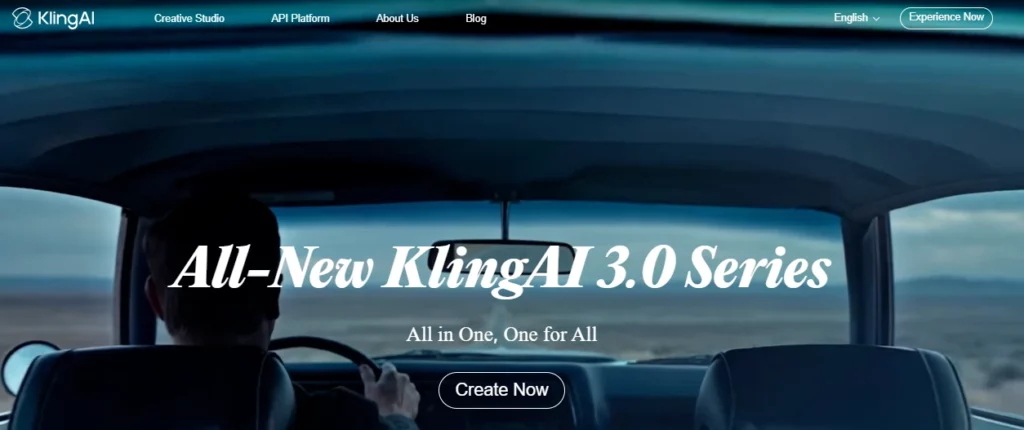
Kling AI To najlepszy wybór, jeśli używasz Sora do tworzenia klipów wideo z tekstem lub obrazem. Został stworzony z myślą o generatywnym wideo, spójności wizualnej, ruchu kamery i krótkich formach filmowych, a nie prostej edycji szablonów.
Kuaishou's Zapowiedź Kling 3.0 podkreślała funkcje konwersji tekstu na wideo, obrazu na wideo, odniesienia na wideo, edycji w wideo, multimodalnego wejścia/wyjścia, lepszej spójności, natywnego dźwięku, opowiadania historii w wielu ujęciach oraz generowania wideo o długości do 15 sekund. To sprawia, że Kling jest poważnym zamiennikiem Sora dla twórców, którzy nadal chcą korzystać z magii wideo opartego na podpowiedziach.
Użyj Klinga AI do:
Kling AI Parametry oceny
| Parametr | Co sprawdzić |
|---|---|
| Najlepszy przepływ pracy | Generowanie tekstu filmowego na wideo i obrazu na wideo |
| Rodzaje wejść | Podpowiedzi tekstowe, obrazy, odniesienia i, w zależności od dostępu do modelu, dane wejściowe multimodalne |
| Styl wyjściowy | Krótkie klipy filmowe, realistyczne sceny, stylizowany ruch, wizualizacje produktów |
| Poziom kontroli | Większa kontrola podczas korzystania z obrazów referencyjnych, wskazówek dotyczących kamery, opisów obiektów i wskazówek w stylu storyboardu |
| Prędkość | Nadaje się do krótkich klipów, ale jeśli chcesz uzyskać dopracowane rezultaty, spodziewaj się czasu na iterację |
| Siła twórcza | Realizm wizualny, ruch, kadrowanie filmowe, animacja obrazu |
| Wykorzystanie konwersji | Świetnie nadaje się do reklam, haczyków, materiałów wizualnych na stronach docelowych, opowiadania historii produktów i testowania krótkich form kreatywnych |
| Uwaga | Koszt kredytu, limity generacji, warunki użytkowania komercyjnego, zasady dotyczące znaku wodnego/eksportu i różnice w planach |
Najlepszy Kling AI Styl podpowiedzi
Kling działa lepiej, gdy podpowiadasz jak reżyser, a nie tylko autor słów kluczowych. Uwzględnij temat, scenę, ruch, kąt kamery, oświetlenie, nastrój, proporcje obrazu i to, czego nie powinno się pojawiać.
Przykładowa struktura monitu:
A close-up cinematic shot of a premium smartwatch on a dark glass table, soft studio lighting, slow push-in camera movement, reflections visible, modern luxury ad style, shallow depth of field, no text, no distorted hands, no extra objects.W przypadku konwersji obrazu na wideo zacznij od mocnego obrazu produktu lub postaci. Następnie jasno opisz ruch:
Animate this product image with a slow clockwise camera orbit, subtle background light movement, realistic reflections, no change to product shape, no logo distortion.Kiedy Kling AI To najlepszy wybór
Wybierz Kling, jeśli Twój stary proces pracy w Sora opierał się na tworzeniu oryginalnych scen. Jest to szczególnie przydatne, gdy potrzebujesz efektownych wizualizacji, ale nie potrzebujesz pełnego pakietu do edycji treści społecznościowych w tym samym narzędziu.
Na przykład marketer może wygenerować reklamę trwającą od 5 do 15 sekund AI zdjęcie produktu w programie Kling, a następnie przenieś klip do WIDZIEĆ do napisów, zmiany rozmiaru, umieszczenia logo i ostatecznego formatowania w mediach społecznościowych.
2. OpenArt:Najlepsza alternatywa dla Sora do tworzenia storyboardów i kreatywnej preprodukcji
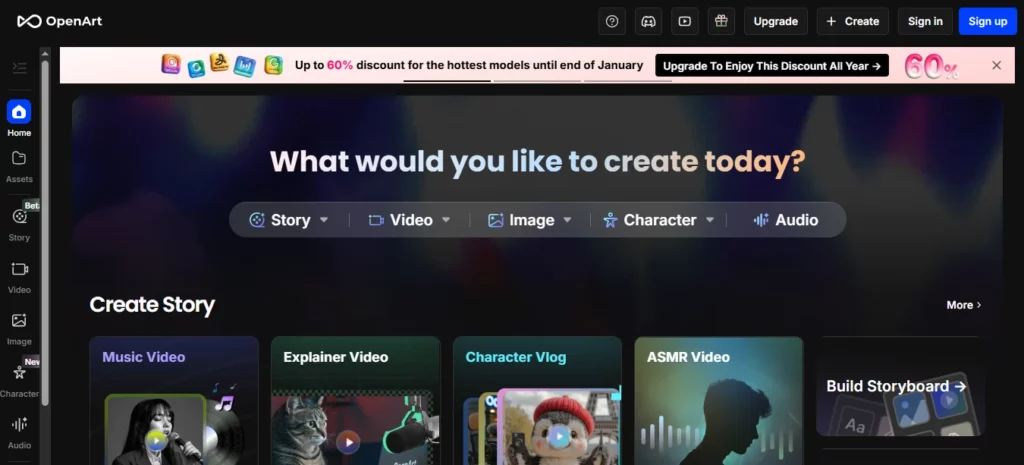
OpenArt to solidna alternatywa dla Sora, gdy potrzebujesz wizualnego planowania przed generowaniem wideo. Nie chodzi tylko o zastąpienie Sora klip po klipie. Pomaga twórcom rozwijać koncepcje, postacie, style, sceny i zasoby, które później mogą stać się filmami.
OpenArt's Funkcja Smart Shot jest szczególnie istotna w przypadku zastępczych przepływów pracy Sora, ponieważ koncentruje się na planowaniu ujęć, wyjściu z wielu cięć, pracy z kamerą, spójność wizualnai kontroli edycji przed wygenerowaniem. OpenArt opisuje Smart Shot jako tworzenie planu ujęć ze scenorysami i ruchami kamery, a następnie generowanie 3-5 odrębnych ujęć. To sprawia, że jest to przydatne dla twórców, którzy potrzebują więcej struktury niż jedno losowe AI spinacz.
Użyj OpenArt do:
Parametry oceny OpenArt
| Parametr | Co sprawdzić |
|---|---|
| Najlepszy przepływ pracy | Tworzenie scenorysów, tworzenie koncepcji wizualnych, spójność postaci i kreatywna preprodukcja |
| Rodzaje wejść | Podpowiedzi tekstowe, obrazy, odniesienia do postaci, zapisane zasoby wizualne |
| Styl wyjściowy | Obrazy, klatki storyboardów, filmy wieloczęściowe, wizualizacje postaci, koncepcje scen |
| Poziom kontroli | Mocne, gdy budujesz odniesienia przed wygenerowaniem ruchu |
| Prędkość | Dobre do eksplorowania wielu kierunków wizualnych przed poświęceniem czasu na obejrzenie filmu |
| Siła twórcza | Koncepcja wizualna, tworzenie postaci, planowanie scenorysów, generowanie zasobów |
| Wykorzystanie konwersji | Przydatne przy planowaniu reklam, tworzeniu miniatur, zdjęć produktów, przygotowywaniu produkcji i wizualizacji dla klientów |
| Uwaga | Nie zawsze jest to ostateczna warstwa edycji; nadal może być potrzebny VEED lub inny edytor do napisów i publikacji |
Jak OpenArt zastępuje część Sora
Wielu twórców używało Sory jako silnika wyobraźni. Wpisywali pomysł i widzieli, jak scena mogłaby wyglądać. OpenArt może zastąpić tę wczesną funkcję twórczą, pomagając w pierwszym rzędzie rozwijać świat wizualny.
Ma to znaczenie, ponieważ marnotrawstwo generowanych materiałów wideo jest kosztowne. Jeśli Twój pomysł jest słaby, natychmiastowe generowanie materiału wideo może zmarnować czas na bezużyteczne klipy. Lepszy przepływ pracy to:
- Zbuduj styl wizualny w OpenArt.
- Utwórz odniesienia do postaci lub produktów.
- Wybierz najmocniejsze ramy.
- Ożywiaj te odniesienia w języku Kling AI lub narzędzi wideo OpenArt.
- Edytuj ostateczną wersję w VEED.
Najlepszy przepływ pracy OpenArt dla twórców
W przypadku reklamy produktu najpierw wygeneruj 5–10 wskazówek wizualnych:
Następnie wybierz najsilniejszy obraz i wpraw go w ruch. To bardziej kontrolowane niż proszenie o jeden. AI model wideo pozwalający na rozwiązanie całego pomysłu na raz.
3. Hej Gen:Najlepszy zamiennik Sora dla awatarów mówiących i filmów prezenterów

HeyGen jest najlepszą alternatywą dla Sora, jeśli Twoim rzeczywistym celem nie są sceny filmowe, a materiały wideo prowadzone przez prezentera.
Wiele firm nie potrzebuje surrealistycznego AI scena wideo. Potrzebują osoby wyglądającej profesjonalnie, która wyjaśni produkt, wdroży klientów, poprowadzi kurs, zlokalizuje przekaz lub przekształci scenariusze w dopracowane filmy.
Hej Gen's Dokumenty opisują przepływy pracy dla awatarów fotograficznych, awatarów publicznych oraz awatarów natychmiastowych/cyfrowych bliźniaków, z silnikami awatarów w zależności od pożądanej jakości lub funkcji. Obsługuje również przepływy pracy z awatarami i głosami, które są znacznie bliższe produkcji wideo biznesowego niż filmowy AI generacja.
Użyj HeyGen do:
Parametry oceny HeyGen
| Parametr | Co sprawdzić |
|---|---|
| Najlepszy przepływ pracy | Filmy biznesowe i treści awatarów prowadzone przez prezenterów |
| Rodzaje wejść | Skrypty, awatary, głosy, awatary ze zdjęciami, awatary publiczne, awatary niestandardowe |
| Styl wyjściowy | Filmy z udziałem ekspertów, filmy wyjaśniające, filmy szkoleniowe, wielojęzyczne filmy z awatarami |
| Poziom kontroli | Mocne strony dla scenariusza, głosu, wyboru awatara i powtarzalnych formatów prezenterów |
| Prędkość | Bardzo mocny do powtarzalnej produkcji filmów biznesowych |
| Siła twórcza | Spójność prezentera, lokalizacja, komunikacja oparta na scenariuszu |
| Wykorzystanie konwersji | Świetne dla osób wyjaśniających SaaS, filmy na stronie docelowej, zasięg sprzedaży, szkolenia i treści kursów |
| Uwaga | Zgoda na awatar, zgoda na głos, prawa do wizerunku, jakość wymowy i dopasowanie do marki |
Kiedy HeyGen pokonuje kinowego zastępcę Sory
Wybierz HeyGen, jeśli ludzki przekaz jest ważniejszy niż scena.
Na przykład:
W takich przypadkach Kling lub OpenArt mogą być zbyt wizualne i niepraktyczne. HeyGen oferuje powtarzalny proces pracy w stylu studyjnym.
Najlepszy format skryptu HeyGen
Utrzymuj skrypty bezpośrednie i naturalne:
Przykład:
„Jeśli Twój zespół spędza godziny na nagrywaniu tych samych filmów szkoleniowych, możesz zastąpić ten proces AI Przepływ pracy z awatarem. Napisz scenariusz raz, wygeneruj wideo, przetłumacz je na różne rynki i aktualizuj treść, gdy Twój produkt ulegnie zmianie.
4. WIDZIEĆ:Najlepsza alternatywa dla Sora do edycji filmów społecznościowych i napisów
VEED to praktyczny zamiennik Sory dla twórców, którym mniej zależy na surowej żywności AI pokolenia i więcej na temat przekształcania klipów w filmy gotowe do publikacji.
VEED to internetowy edytor wideo z AI narzędzia do napisów, napisy, tłumaczenie, zamiana tekstu na wideo, awatary, podkłady głosowe, nagrywanie ekranu, formatowanie i edycja. Narzędzia do tworzenia napisów obsługują automatyczne napisy i tłumaczenia w wielu językach, a AI Program Video Maker umożliwia tworzenie filmów z klipami, muzyką, narracją, napisami i animacjami.
Użyj VEED do:
Parametry oceny VEED
| Parametr | Co sprawdzić |
|---|---|
| Najlepszy przepływ pracy | Edycja, napisy, ponowne wykorzystanie i publikowanie w mediach społecznościowych |
| Rodzaje wejść | Przesłane klipy, nagrania ekranu, klipy generowane przez sztuczną inteligencję, skrypty, nagrania głosowe |
| Styl wyjściowy | Filmy gotowe do użycia w mediach społecznościowych, klipy z napisami, filmy szkoleniowe, reklamy, materiały wyjaśniające |
| Poziom kontroli | Mocne narzędzie do edycji, napisów, szablonów, formatowania i stylizacji marki |
| Prędkość | Doskonałe dla twórców często publikujących |
| Siła twórcza | Napisy, edycja osi czasu, zmiana rozmiaru, dopracowanie w mediach społecznościowych, ponowne wykorzystanie |
| Wykorzystanie konwersji | Świetnie nadaje się do krótkich materiałów promocyjnych, reklam wideo, klipów twórców i dystrybucji treści |
| Uwaga | Nie jest to przede wszystkim generator filmów wysokiej klasy; można go używać z Klingiem lub OpenArtem, aby uzyskać mocniejsze efekty wizualne |
Jak VEED pasuje do Sory
Sora potrafiła tworzyć imponujące klipy, ale gotowe treści wciąż wymagają edycji. Większość filmów społecznościowych o wysokiej wydajności wymaga:
VEED został stworzony z myślą o tej ostatniej warstwie produkcyjnej. Solidny przepływ pracy po Sora mógłby wyglądać tak:
- Wygeneruj AI wizualizacje w Kling AI.
- Utwórz obrazy pomocnicze lub ramki storyboardu w OpenArt.
- Nagrywaj lub generuj segmenty prezenterów w HeyGen.
- Składaj, dodawaj podpisy, zmieniaj rozmiar i eksportuj w VEED.
To lepszy przepływ pracy niż się spodziewano AI generator wideo do wszystkiego.
5. Sztuczna inteligencja InVideo:Najlepszy zamiennik Sora dla filmów promujących marketing
Wideo AI jest dobrą alternatywą, jeśli chcesz uzyskać gotowe filmy marketingowe na podstawie podpowiedzi, scenariuszy lub pomysłów na treści.
Wideo AI chodzi mniej o pokazanie surowego AI model i więcej o przejściu od pomysłu do gotowego do publikacji filmu. AI Generator wideo może tworzyć skrypty na podstawie komunikatów, dodawać elementy wizualne, głos lektora, napisy, muzykę i inne elementy produkcyjne. Zawiera również przepływy pracy dla AI generowanie filmów, awatarów, napisów, reklam w stylu UGC, filmów o produktach, filmów krótkometrażowych na YouTube i wiele więcej.
Użyj InVideo AI do:
Wideo AI Parametry oceny
| Parametr | Co sprawdzić |
|---|---|
| Najlepszy przepływ pracy | Produkcja filmów wideo od promptera do scenariusza i filmów marketingowych |
| Rodzaje wejść | Podpowiedzi, skrypty, pomysły na tematy, opisy produktów, szczegóły dotyczące odbiorców |
| Styl wyjściowy | Ustrukturyzowane filmy marketingowe, reklamy w mediach społecznościowych, materiały wyjaśniające, listy, filmy bez twarzy |
| Poziom kontroli | Mocne dla skryptów, stock/AI wizualizacje, narracja, sceny i polecenia edycyjne |
| Prędkość | Doskonały do szybkiego produkcja treści i testowanie kampanii |
| Siła twórcza | Szybka zamiana wstępnych pomysłów w kompletne filmy |
| Wykorzystanie konwersji | Doskonałe do reklam, treści na YouTube, promocji produktów i marketingu małych firm |
| Uwaga | Może wydawać się mniej oryginalny niż czysty film generatywny, jeśli potrzebujesz wyjątkowo unikalnych ujęć kinowych |
Kiedy InVideo AI Czy jest lepszy niż Kling lub OpenArt
Wybierz InVideo AI gdy wynik biznesowy ma większe znaczenie niż surowy model wizualny.
Na przykład:
Wideo AI jest przydatny, ponieważ myśli w kategoriach kompletnych formatów treści. To ułatwia pracę marketerom, małym firmom, agencjom i twórcom, którzy potrzebują szybkich rezultatów.
Najlepszy stos zamienny Sora dla różnych użytkowników
Dla YouTuberów
Użyj OpenArt do miniatur i koncepcji wizualnych, Kling AI do krótkich wstawek filmowych, InVideo AI do tworzenia wersji roboczych wideo oraz VEED do napisów i ostatecznych edycji.
Najlepszy stos:
Dla menedżerów mediów społecznościowych
Użyj Klinga AI do przyciągających uwagę klipów, VEED do napisów i zmiany rozmiaru oraz InVideo AI do szybkich zmian w kampaniach.
Najlepszy stos:
Dla agencji
Użyj OpenArt do koncepcji klienta, Kling AI do testów wizualnych, HeyGen do wyjaśnień i VEED do ostatecznej prezentacji marki.
Najlepszy stos:
Dla twórców kursów i edukatorów
Używaj HeyGen do lekcji prowadzonych przez prowadzącego, a VEED do edycji, napisów i tłumaczeń. Używaj OpenArt tylko wtedy, gdy potrzebujesz niestandardowych materiałów wizualnych do lekcji.
Najlepszy stos:
Jak odbudować swoje AI Przepływ pracy wideo po Sora
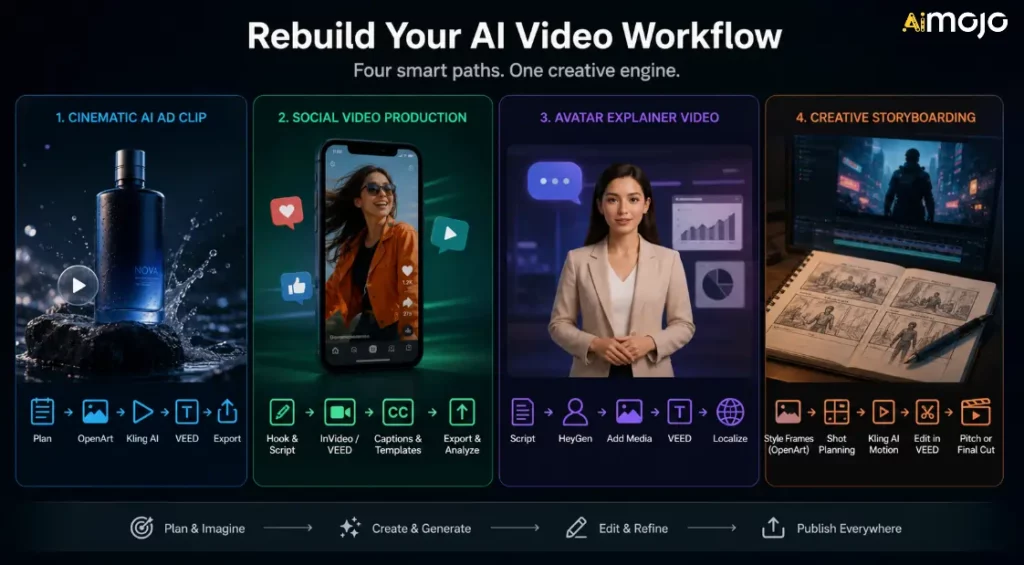
Nie wybieraj tylko jednego rozwiązania i nie licz na to, że rozwiąże ono wszystkie problemy. Stwórz przepływ pracy dostosowany do rodzaju publikowanych treści.
Przepływ pracy 1: Kinowy AI Klip reklamowy
Użyj tego, gdy potrzebujesz krótkich reklam wizualnych, zdjęć produktów lub AI Materiał B-roll.
- Zaplanuj scenę i określ emocje.
- Generuj wizualizacje referencyjne w OpenArt.
- Stwórz animację najsilniejszej klatki w Kling AI.
- Dodawaj podpisy, wezwania do działania i zmieniaj rozmiar w VEED.
- Wersje eksportowe dla TikToka, Reels, YouTube Shorts i reklam.
Przepływ pracy 2: Produkcja filmów społecznościowych
Użyj tego, jeśli zależy Ci na objętości i spójności.
- Napisz wstęp i krótki scenariusz.
- Utwórz wersję roboczą w InVideo AI lub VEED.
- Dodaj podpisy i szablony firmowe.
- Eksportuj wiele współczynników proporcji.
- Śledź, które haki działają najlepiej.
Przepływ pracy 3: Film objaśniający awatar
Użyj tego, jeśli potrzebujesz szkoleń, ofert sprzedaży lub filmów edukacyjnych.
- Napisz przejrzysty scenariusz.
- Wygeneruj prezentera w HeyGen.
- Dodaj zrzuty ekranu, slajdy lub materiały B-roll przedstawiające produkty.
- Edytuj i dodaj napisy w VEED.
- Lokalizuj dopiero po zatwierdzeniu wersji głównej.
Przepływ pracy 4: Kreatywne tworzenie scenorysu
Skorzystaj z tej opcji przy opracowywaniu reklamy, koncepcji filmu, teledysku lub kampanii marki.
- Utwórz ramki stylów w OpenArt.
- W razie potrzeby stosuj planowanie scenorysu lub Smart Shot.
- Generuj klipy ruchome za pomocą Kling AI.
- Zmontuj wersję roboczą w programie VEED.
- Wykorzystaj wyniki jako propozycję, wskazówki kreatywne lub ostateczny, krótki materiał.
Co zrobić, jeśli zażyłeś Sorę
Jeśli nadal posiadasz aktywa Sora, zrób to teraz:
Celem nie jest dokładne odtworzenie Sory. Celem jest kontynuacja produkcji bez polegania na wycofanym produkcie.
Typowe błędy, których należy unikać
Błąd 1: Zastąpienie Sora innym, kruchym procesem pracy
Sora's Funkcja shutdown przypomina o konieczności uporządkowania eksportów, komunikatów, obrazów źródłowych, podpisów i plików końcowych. Nie pozwól, aby cały system treści znajdował się na jednej zamkniętej platformie.
Błąd 2: Ignorowanie licencji
AI Licencjonowanie wideo może być skomplikowane. Zawsze sprawdzaj warunki użytkowania komercyjnego przed użyciem. AI klipy w reklamach, kampaniach klientów, płatnych produktach, monetyzacji YouTube lub pracach na rzecz marki publicznej.
Błąd 3: Zapomnienie o warstwie edycyjnej
AI Generowanie to tylko jeden z elementów produkcji wideo. Napisy, tempo, cięcia, haczyki, zmiana rozmiaru, miniatury i wezwania do działania nadal decydują o tym, czy film się sprawdzi.
Błąd 4: Wybór narzędzia z najlepszą wersją demonstracyjną
Klipy demonstracyjne nie są Twoim procesem pracy. Przetestuj narzędzia z rzeczywistym tematem, produktem, odbiorcami, proporcjami obrazu i harmonogramem publikacji.
Błąd 5: Niezapisywanie danych wejściowych
Zapisz monity, odniesienia, klipy końcowe, podpisy, miniatury i ustawienia eksportu. Ułatwia to przechodzenie między narzędziami, jeśli inna platforma zmieni cenę lub dostępność.
Najczęściej zadawane pytania dotyczące alternatyw dla leku Sora
Czy Sora jest nadal dostępna?
OtwarteAI wycofano obsługę witryny i aplikacji Sora 26 kwietnia 2026 r. Wycofanie interfejsu API Sora planowane jest na 24 września 2026 r.
Dlaczego Sora została zamknięta?
OpenAI's Oficjalna strona pomocy potwierdza daty zamknięcia, ale nie podaje szczegółowych, publicznych wyjaśnień dla każdego wewnętrznego powodu. Publiczne raporty Axios mówią, że OpenAI Zawężało to zakres i zasoby ludzkie/obliczeniowe, a Sora pochłaniała znaczną część mocy obliczeniowej. Dla twórców istotne jest to, że Sora nie jest już bezpiecznym narzędziem dla nowych przepływów pracy w produkcji.
Jaki jest najlepszy zamiennik Sora?
Kling AI jest najlepszym pierwszym wyborem dla kinematografii AI generowanie wideo. OpenArt jest lepszy do storyboardów i koncepcji wizualnych. HeyGen jest lepszy do AI Awatary. VEED jest lepszy do napisów i edycji treści społecznościowych. InVideo AI lepiej sprawdza się w przypadku przepływów pracy od natychmiastowego udostępnienia materiałów wideo w celach marketingowych.
Jaka jest najlepsza alternatywa dla Sora do konwersji tekstu na wideo?
Jeśli chodzi o filmową konwersję tekstu na wideo, zacznij od Kling AI. Jeśli Twoje potrzeby w zakresie konwersji tekstu na wideo dotyczą filmów marketingowych, reklam w mediach społecznościowych lub pełnej struktury wideo, wybierz InVideo. AI lub VEED może być bardziej przydatny.
Jaka jest najlepsza alternatywa dla Sora do konwersji obrazu na wideo?
Kling AI to solidna opcja do animacji obrazu i wideo. OpenArt jest również przydatny, gdy chcesz utworzyć lub przygotować elementy wizualne przed ich animacją.
Jaki jest najlepszy zamiennik Sora dla firm?
W przypadku filmów biznesowych HeyGen sprawdza się doskonale w zakresie objaśnień awatarów i szkoleń. VEED sprawdza się w zakresie edycji i napisów. InVideo AI sprawdza się w przypadku promocji produktów i filmów marketingowych.
Czy nadal powinienem tworzyć narzędzia wokół API Sora?
Nie. Ponieważ API Sora ma zostać wycofane, twórcy i deweloperzy powinni unikać tworzenia w oparciu o nie nowych, długoterminowych systemów produkcyjnych.
Mogę uzyć AI alternatywy wideo dla prac komercyjnych?
Często tak, ale sprawdź każdą platformę's Plan, licencja i zasady użytkowania. Prawa komercyjne mogą zależeć od modelu, typu wyjściowego, poziomu planu, zasobów magazynowych, głosu, awatara lub kraju.
Co powinienem zrobić ze starą zawartością Sora?
Eksportuj je, archiwizuj monity i zasoby referencyjne, porządkuj klipy końcowe i przenoś aktywną produkcję do narzędzi, które są nadal dostępne.
AiMojo poleca:
Werdykt
Do kina AI wideo, zacznij od Kling AIDo tworzenia scenorysów, postaci i kreatywnej preprodukcji użyj OpenArtW przypadku objaśnień awatarów i wielojęzycznych filmów prezenterów użyj Hej GenDo napisów, edycji mediów społecznościowych i ponownego wykorzystania użyj VEED. W przypadku procesów od szybkiego do marketingowego wideo użyj InVideo AI.
Sora pchnął AI Wideo idzie naprzód, ale twórcy potrzebują narzędzi, z których mogą korzystać już dziś. Zbuduj swój nowy przepływ pracy, uwzględniając dostępność, licencje, jakość wyjściową, dopasowanie do przepływu pracy i szybkość publikacji.


 BONUS: Odbierz nasze 200 dolarówAI „Zestaw narzędzi Mastery Toolkit” GRATIS po rejestracji!



