

Littlebird AI 핵심 통찰력
What is Littlebird AI?
리틀버드 AI is a context aware AI assistant for macOS and Windows that builds a private memory of your working day. Rather than waiting for prompts, it observes your active screen, transcribes your meetings, and connects to the business apps your work already lives in, then turns all of that into a searchable memory layer. The practical business function is simple. It removes the copy and paste overhead of briefing a generic chatbot before every request.
Ask what was agreed on a client call in March and you get an answer, not a request for more context. For knowledge workers, founders, consultants, and product teams, Littlebird functions as an automation and productivity layer that recalls decisions, drafts documents in your voice, prepares you for meetings, and runs scheduled reports without manual input.
The core chat surface answers questions using everything Littlebird has observed, which means your documents, browser tabs, transcripts, and connected accounts. No prompt engineering, no pasting. The workflow benefit is measurable. You stop spending the first two minutes of every AI interaction explaining who you are and what you are working on.
Littlebird detects Zoom, Teams, and Meet calls, records them, and writes structured summaries with action items. Automatic prep briefs arrive 30 minutes before a call, built from your calendar, your connected integrations, and web research. A Send to Attendees option rewrites the summary for an external audience, strips your private notes, and opens a ready draft in Gmail.
Routines are recurring prompts that run on a schedule and deliver a report to the app and your inbox. A weekday morning brief at 8.30am, a Friday pipeline summary, a weekly client update. You can create one by describing it in plain language, reply directly to the report email to continue the conversation, and now run or edit Routines from your phone.
Hover is a floating window that opens over whatever application you are in. It reads the window in front of you without any attachment step, supports several parallel conversations through a side rail, and takes an @ mention to pull in a specific tab or file. For anyone working across a browser, an editor, and a spreadsheet at once, this is the fastest route to an answer.
Littlebird now builds real deliverables. Ask for a PDF, CSV, Markdown document, or a publishable web page and it produces the file, stored on a searchable Artifacts page. Teams can share entire projects, so every chat and note inside a workstream stays visible to the right people with Member or Admin access.
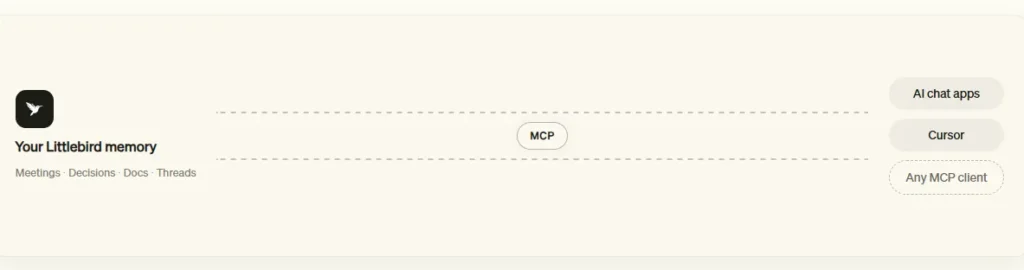
On the Power plan and above, Littlebird exposes your work memory through MCP. That lets Claude, Cursor, or any MCP capable client query your meetings, decisions, and past work. For engineering and product teams already living inside AI 코딩 도구, this turns Littlebird into shared infrastructure rather than another isolated app.
Littlebird AI 가격 책정 계획
| 계획 이름 | 비용 | 최적의 |
|---|---|---|
| Basic | 영원히 $0 | Testing full context capture with daily usage credits and limited meeting notes |
| 참고자료 | $17/mo annually ($204 upfront) or $20 monthly | Individuals wanting unlimited meeting notes, advanced intelligence, and image generation |
| 출력 | $42/mo annually ($510 upfront) or $50 monthly | Heavy users needing 2.5x credits, MCP access, and priority support |
| 찬성 | $ 100 / 월부터 | Power users needing 5x or 12x credits, auto language detection, and early feature access |
| 의료진 소개 | 시트당 $17/월부터 | Teams wanting shared projects, seat management, and admin analytics |
| 기업 | 맞춤 견적 | Organisations needing SSO, self hosted deployment, and custom data controls |
| 학생 | $ 15 / 월 | Verified .edu holders, first two months free |
Getting Started With Littlebird AI
- 1 단계 : Download the desktop app. Head to try.littlebird.ai and install the macOS build (Apple Silicon, macOS 13 or later) or the Windows build.
- 2 단계 : Grant accessibility and screen permissions. Littlebird uses these to read your active window. Setup previews exactly what each permission does before you enable it.
- 3 단계 : Connect your calendar and email. Gmail, Outlook, Google Calendar, and Apple Calendar take under a minute each and immediately improve meeting prep quality.
- 4 단계 : Work normally for a day. Memory quality depends on captured context, so give it one full working day before judging the answers.
- 5 단계 : Create your first Routine. Type “help me create a routine” into chat and Littlebird will suggest automations drawn from patterns in your actual work.
Privacy, Security, and Data Controls
For any tool that reads your screen, security posture is the buying decision. Littlebird holds SOC 2 certification with independent third party audits, plus GDPR, CCPA, and HIPAA alignment. Data is protected with AES 256 encryption at rest, TLS 1.3 in transit, and AWS KMS key management. The company states plainly that it does not sell user data or train models on it, and the revenue model backs that up since users are the customers rather than advertisers.
Privacy Controls let you exclude specific applications from capture, pause collection instantly, or delete the last hour, the last day, or everything. One honest limitation stands out. Processing happens in the cloud on AWS, not locally, so organisations with strict local only mandates should evaluate carefully.
Integrations and the MCP Ecosystem
Littlebird works with every application automatically through screen observation, which means zero setup is genuinely zero setup. Integrations are optional depth rather than a requirement. The catalogue runs to hundreds of connections across project management (개념, Linear, ClickUp, monday.com, Jira), CRM and sales (Intercom, Outreach, Close, 조호 (Zoho) CRM), finance (Stripe, Ramp, Mercury, PayPal), analytics (Mixpanel, PostHog), and meetings (Granola, Fireflies, Circleback).
Multi account support means your work Gmail and personal Gmail stay separate, and you can name each connection so requests route correctly. Add the MCP 서버 and your Littlebird memory becomes queryable from Claude, Cursor, and other MCP clients, which is a genuine differentiator in this category.
장단점
- Zero setup context, no integrations required.
- Memory persists across every application.
- Unlimited meeting notes on paid plans.
- Routines automate recurring reports properly.
- Generates real PDF, CSV, and HTML files.
- MCP exposes memory to other tools.
- SOC 2, HIPAA, GDPR, and CCPA covered.
- Granular app exclusions and instant deletion.
- 무료 티어는 실제로 사용할 만합니다.
- Mobile apps sync desktop context.
- No local only processing option.
- Windows build still in beta.
- 신용 시스템은 빠르게 고갈될 수 있습니다.
- No Linux support.
Who Should Actually Buy Littlebird AI
The return on investment is clearest for people carrying high context loads across many threads. Consultants and account managers juggling multiple clients, founders switching between fundraising and product, product managers tracking decisions across Slack, Linear, and calls.
Reported usage data suggests around 84% of surveyed users save at least half a working day per week, which at any professional billing rate covers the $17 monthly outlay several times over. Teams get more value again through shared projects and admin analytics. If your work is single threaded, mostly offline, or governed by local only data rules, a standard chatbot or a dedicated notetaker will serve you better and cost less.
자주 묻는 질문
Does Littlebird AI record my screen continuously, and can I stop it?
Littlebird reads the active window rather than capturing continuous video. You can exclude named applications in Privacy Controls, pause context collection from the menu bar at any moment, and delete captured data by range, meaning the last hour, the last day, or the full history.
What happens when I run out of usage credits?
The composer tells you directly instead of blocking you with an upgrade wall. Plus subscribers can buy usage packs that never expire. Warnings appear at 70% and 90% of your monthly allowance, with each Routine's share of the cycle shown on its configure panel.
Can Littlebird AI take actions, or does it only retrieve information?
It acts. Littlebird drafts and sends email through connected Gmail, creates calendar events, builds PDF and CSV artifacts, publishes HTML pages, and triggers scheduled Routines. Nothing sends automatically, since every outbound action requires your approval first.
How does Littlebird MCP differ from standard app integrations?
Integrations pull data into Littlebird. MCP pushes Littlebird's memory outward, letting external clients such as Claude and Cursor query your meetings and past decisions directly. It sits on the Power plan and above.
Is Littlebird AI suitable for regulated industries like healthcare?
Littlebird holds HIPAA, SOC 2, GDPR, and CCPA compliance, and Enterprise plans add SSO, self hosted deployment, and custom data controls. Clinicians and therapists are listed as a supported use case, though compliance sign off remains your organisation's 책임.
Which platforms does Littlebird AI 지원하다?
Full capture runs on macOS 13 or later with Apple Silicon, and on Windows in beta. The iOS and Android apps are companions that surface desktop context and run Routines, but they do not capture new context themselves.
Best Littlebird AI 대체
| AI Personal Assistant / Work Memory Layer | Context Source | Cross App Memory and Automation |
|---|---|---|
| 그래 놀라 | Meeting audio only | ❌ Notes only, no persistent work memory |
| Otter.ai | Meeting audio and calendar | ❌ Transcript search only, no screen context |
| Screenpipe | Continuous screen and audio capture, local | ⚠️ Open source and local, but needs technical setup |
| 클루리 | Live screen during calls | ❌ Real time prompting, no long term memory |



