
დღეში 3+ საათს ხარჯავთ ისეთ დავალებებზე, რომელთა შესრულებაც მანქანას 3 წუთში შეუძლია. მონაცემების კოპირება-ჩასმა აპლიკაციებს შორის. შემდგომი ელფოსტის ხელით გაგზავნა. ანგარიშების ხელით ფორმატირება. ეს's არა სამუშაო პროცესი — ეს's დაფქვა.
ეს სახელმძღვანელო ზუსტად გაჩვენებთ, თუ როგორ დააყენოთ თქვენი პირველი არაკოდი AI workflow ნულიდან — დეველოპერის, სკრიპტის და საბაბების გარეშე. როდესაც კითხვას დაასრულებთ, გექნებათ მოქმედი ავტომატიზაცია, რომლის გამოყენებაც დღესვე შეგიძლიათ.
რა უკოდოა AI სამუშაო პროცესი რეალურად აკეთებს ამას (ეს's არა ის, რაც შენ გგონია)
ადამიანების უმეტესობა ისმენს „AI workflow„და წარმოიდგინეთ რაიმე რთული. ეს's არა.

კოდის გარეშე AI სამუშაო პროცესი არის ავტომატური ნაბიჯების დაკავშირებული თანმიმდევრობა, სადაც AI აზროვნების ნაწილს ამუშავებს — ხოლო ვიზუალური ინსტრუმენტი - სანტექნიკურ საკითხებს. არანაირი ტერმინალი. არანაირი სინტაქსური შეცდომები. მხოლოდ გადათრევა-ჩაშვების ფუნქცია, რომელიც თქვენს აპლიკაციებს აკავშირებს და ააქტიურებს AI მოქმედება და გამომავალს გადამისამართებს იქ, სადაც გჭირდებათ.
ძირითადი განსხვავება ჩვეულებრივ ავტომატიზაციასა და AI ავტომატიზაცია:
მარტივად რომ ვთქვათ, ტრიგერ-მოქმედების სისტემა ასე გამოიყურება: ვიღაც ავსებს თქვენს საკონტაქტო ფორმას → AI კვალიფიცირდება ლიდერი → შედეგი თქვენს ანგარიშზე ეცემა CRM ავტომატურად. რომ's კოდის გარეშე AI სამუშაო პროცესი ფონზე ჩუმად მიმდინარეობს.
ეს თქვენთვისაა, თუ ამ ამოცანებს ჯერ კიდევ ხელით ასრულებთ
ხელსაწყოს არჩევამდე შეამოწმეთ, სწორ ოთახში ხართ თუ არა:
თუ ამ ორიდან რომელიმე გამოგადგებათ, ეს სახელმძღვანელო ზუსტად თქვენთვისაა განკუთვნილი. პროგრამირების ცოდნა არ არის საჭირო.
5 საუკეთესო უკოდო AI სამუშაო პროცესის ინსტრუმენტები (რეიტინგული დამწყებთათვის)
არასწორი ხელსაწყოს არჩევა საათების კარგვაა. აქ's პირდაპირი შედარება:
| Tool | საუკეთესო | უფასო გეგმა | AI მისი მახასიათებლებია; |
|---|---|---|---|
| Zapier | აპლიკაციიდან აპლიკაციამდე ავტომატიზაცია | დიახ | Copilot (ბუნებრივი ენის დაყენება) |
| Make.com | ვიზუალური მრავალსაფეხურიანი ნაკადები | დიახ | AI მოდულები + HTTP მარშრუტიზაცია |
| n8n | თვითორგანიზებული გაფართოებული ნაკადები | დიახ | LLM ინტეგრაციები, სრული მოქნილობა |
| Pabbly Connect | ბიუჯეტისთვის ხელსაყრელი ტრიგერები | დიახ | ძირითადი AI მოქმედების ნაბიჯები |
| ბარდინი | ბრაუზერის დაფუძნებული AI scraping | დიახ | GPT-ით მხარდაჭერილი ბრაუზერში ჩაშენებული მოქმედებები |
შექმენით თქვენი პირველი AI სამუშაო პროცესი 6 ნაბიჯში (დაწყებიდან დასრულებამდე)
ეს არის რეალური პროცესი — არა შეჯამება, არამედ მოქმედი სისტემა.
ნაბიჯი 1 — აირჩიეთ ერთი განმეორებადი დავალება ავტომატიზაციისთვის
ნუ დაიწყებთ მთელი თქვენი საქმით. აირჩიეთ ყველაზე შემაწუხებელი საქმე, რომელსაც ყოველდღიურად ასრულებთ. ისეთი რამ, რისი აღწერაც ერთი წინადადებით შეგიძლიათ: „ყოველ ჯერზე, როდესაც ახალ მოთხოვნას ვიღებ ელექტრონული ფოსტით, დეტალებს ხელით ვაკოპირებ ცხრილში.“ რომ's თქვენი სამიზნე.
ნაბიჯი 2 — დააყენეთ თქვენი ტრიგერი
ტრიგერი არის ის, რაც სამუშაო პროცესს იწყებს. ეს შეიძლება იყოს: ახალი ფორმის გაგზავნა, შემომავალი ელფოსტა, Google Sheets-ში ახალი რიგი ან Slack-ის შეტყობინება. Zapier-ში ან Make.com-ში ეს თქვენი პირველი ბლოკია.
ნაბიჯი 3 - დაამატეთ თქვენი AI აქცია
სწორედ აქ ხდება ინტელექტი. Connect OpenAI (ChatGPT), კლოდი, ანუ ტყუპები როგორც სამოქმედო ნაბიჯი. მიაწოდეთ მას ტრიგერის მონაცემები და დაწერეთ მკაფიო მოთხოვნა. მაგალითი: „შეაჯამეთ ეს მომხმარებლის მოთხოვნა 2 წინადადებით და კლასიფიცირეთ, როგორც სასწრაფო, ნორმალური ან დაბალი პრიორიტეტის მქონე.“
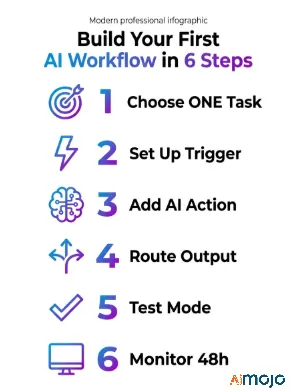
ნაბიჯი 4 — გამომავალი მონაცემების მარშრუტიზაცია
უთხარით თქვენს სამუშაო პროცესს, სად არის ხელოვნური ინტელექტი.'s პასუხი უნდა იყოს — Google Sheet-ის სვეტი, Slack-ის არხი, ელფოსტის პროექტი ან იდეის გვერდი. ეს თქვენი საბოლოო მოქმედების ბლოკია.
ნაბიჯი 5 — ტესტირება ონლაინ რეჟიმში გასვლამდე
ყველა პლატფორმას აქვს სატესტო რეჟიმი. გაუშვით. შეამოწმეთ, გააქტიურებულია თუ არა ტრიგერი, AI პასუხი ლოგიკურია და გამომავალი სწორად ჩანს. მოთხოვნის პრობლემები აქ გამოასწორეთ და არა 200 პირდაპირი გაშვების შემდეგ.
ნაბიჯი 6 — პირველი 48 საათის მონიტორინგი
ჩართეთ და თვალი ადევნეთ შესრულების ჟურნალებს. ჩავარდნების უმეტესობა პირველი ორი დღის განმავლობაში ხდება — ჩვეულებრივ, API-ს ლიმიტები, ფორმატირების შეუსაბამობები ან ბუნდოვანი მოთხოვნა, რომელიც არათანმიმდევრულ შედეგებს იძლევა.
7 კოდის გარეშე AI სამუშაო პროცესები, რომელთა კოპირებაც ახლავე შეგიძლიათ
რეალური გამოყენების შემთხვევები, არა თეორია:
- ელფოსტის ავტომატური შეჯამება → გააგზავნეთ დაიჯესტი Slack-ში (შესანიშნავია დატვირთული შემოსულებისთვის)
- Google Form-ის პასუხი → ხელოვნური ინტელექტით დაწერილი მოკლე ინფორმაცია → შენახულია Notion-ში
- ახალი ბლოგპოსტი გამოქვეყნდა → AI ქმნის 3 სოციალურ წარწერას → დაგეგმილია Buffer-ის მეშვეობით
- საკონტაქტო ფორმის გაგზავნა → AI ლიდის კვალიფიკაცია → მონიშნულია CRM-ში
- მომხმარებელთა მხარდაჭერის ბილეთი → AI კატეგორიზაცია → გადამისამართებულია სწორ გუნდში
- Google Search Console-ის ყოველკვირეული SEO მონაცემები → AI შემაჯამებელი ანგარიში → იგზავნება ელექტრონული ფოსტით ყოველ ორშაბათს
- ბლოგ პოსტი → AI მილსადენის რედაქცია → LinkedIn-ის სტატია + Twitter-ის თემა + ელექტრონული ფოსტის საინფორმაციო ბიულეტენის პროექტი
ყველა მათგანის აწყობა შესაძლებელია Zapier-ში ან Make.com-ში უფასო გეგმებით. მხოლოდ მე-7 სამუშაო პროცესს (კონტენტის ხელახლა გამოყენების პროცესი) შეუძლია კონტენტის გუნდს კვირაში 5+ საათი დაუზოგოს.
5 შეცდომა, რომელიც თქვენს პირველ გაკვეთილს არღვევს AI სამუშაო პროცესი (და როგორ გამოვასწოროთ ისინი)
დამწყებთა უმეტესობა არ უშვებს წარუმატებლობას იმიტომ, რომ ინსტრუმენტი რთულია — ისინი უშვებენ წარუმატებლობას ამ ხუთი რამის გამო:
არსებობს's ასევე მეექვსე შეცდომა, რომელზეც არავინ საუბრობს: მკურნალობა AI ჯადოსნური ყუთივით იმოქმედეთ. გამომავალი მონაცემების ხარისხი 100%-ით დამოკიდებულია იმაზე, თუ რა შედის. თუ თქვენი ტრიგერის მონაცემები არეულია — არათანმიმდევრული ფორმატირება, დაკარგული ველები, შერეული ენები — AI პასუხი ამას ასახავს. ჯერ შეყვანილი მონაცემები გაასუფთავეთ და შემდეგ შექმენით AI გვერდი აუარეთ. ნაგვის შეტანა-გატანა აქ უფრო რთულია, ვიდრე სხვაგან.
როგორც კი თქვენი პირველი სამუშაო პროცესი დაიწყება — აქ's რა უნდა ავაშენოთ შემდეგ
ერთი მომუშავე ავტომატიზაცია კონცეფციის დასტურია. ახლა თქვენ შეგიძლიათ მისი მასშტაბირება.

დააკავშირეთ მრავალი სამუშაო პროცესი სრულ ავტომატიზაციაში — სადაც ერთი ნაკადის გამომავალი ხდება მეორის გამშვები. ასე ქმნით რეალურ სისტემებს და არა მხოლოდ ცალკეულ მალსახმობებს.
როდის უნდა განახლდეს უფასოდან ფასიანზე: როგორც კი მიაღწევთ თანმიმდევრულ დავალებების ლიმიტს ან დაგჭირდებათ მრავალმხრივი პირობითი ლოგიკა (Make.com)'s ფასიანი გეგმები მნიშვნელოვან განშტოების ძალას მატებს).
მეხსიერებისა და კონტექსტის დამატება AI ნაბიჯები შემდეგი დონეა — ერთჯერადი მოთხოვნების ნაცვლად, თქვენ ინახავთ წინა შედეგებს Airtable-ში ან Notion-ში და ხელახლა აბრუნებთ მათ შემდეგში. AI დარეკეთ. ასე ააგებთ მრავალსაფეხურიან AI აგენტი კოდის გარეშე, რომელიც რეალურად იმახსოვრებს კონტექსტს სხვადასხვა გაშვებაში.
სრული კოდის გარეშე AI ინსტრუმენტების ნაკრები (ყველაფერი, რაც გჭირდებათ, დამატებულია სანიშნეებში)
| კატეგორია | ინსტრუმენტები |
|---|---|
| სამუშაო პროცესის შემქმნელები | Zapier, Make.com, n8n, Pabbly Connect |
| AI კავშირი | ღიააAI API, კლოდის API, ჯემინი API |
| მონაცემთა შენახვის | Google Sheets, Airtable, Notion |
| ტრიგერის წყაროები | Gmail, Typeform, Webhooks, Shopify |
| მონიტორინგი | Make.com-ის შესრულების ჟურნალები, Zapier-ის დავალებების ისტორია |
ასევე კითხულობენ: კოდის გარეშე AI Workflows
შემიძლია ავაშენო? AI სამუშაო პროცესი ნულოვანი კოდირების გამოცდილებით?
დიახ. ისეთი ინსტრუმენტები, როგორიცაა Zapier და Make.com, სპეციალურად არატექნიკური მომხმარებლებისთვისაა შექმნილი. თუ ფორმის გადათრევა, ჩაშვება და შევსება შეგიძლიათ, მისი შექმნაც შეგიძლიათ.
კარგია ზაპიერი? AI ავტომატიზაცია?
დამწყებთათვის, რა თქმა უნდა. Zapier Copilot საშუალებას გაძლევთ აღწეროთ თქვენი სამუშაო პროცესი მარტივ ინგლისურ ენაზე და აგებს ნაბიჯებს. მას ასევე აქვს ChatGPT-ისა და Claude-ის ინტეგრაციები.
რა ღირს კოდის გარეშე მუშაობის დაწყება? AI სამუშაო პროცესი?
შეგიძლიათ უფასოდ დაიწყოთ როგორც Zapier-ზე, ასევე Make.com-ზე. ძირითადი ღირებულება მაშინ ირიცხება, როდესაც უფასო დონის ლიმიტს გადააჭარბებთ ან პრემიუმ აპლიკაციის დაკავშირება დაგჭირდებათ. მცირე სამუშაო პროცესების უმეტესობა თვეში 20 დოლარზე ნაკლები ღირს.
რა's განსხვავება კოდის გარეშე ავტომატიზაციასა და AI ავტომატიზაცია?
სტანდარტული ავტომატიზაცია მიჰყვება ფიქსირებულ წესებს. AI ავტომატიზაცია იყენებს ენობრივ მოდელს კონტენტის ინტერპრეტაციის, გენერირების ან კლასიფიკაციისთვის, რაც მას სასარგებლოს ხდის ისეთი ამოცანებისთვის, რომლებიც შავ-თეთრი არ არის.
კოდის გარეშე? AI სამუშაო პროცესები ვირტუალურ ასისტენტს ცვლის?
სტრუქტურირებული, განმეორებადი ამოცანებისთვის — დიახ. ნიუანსირებული ადამიანური განსჯისთვის — ჯერ არა. ისინი საუკეთესოდ მუშაობენ თქვენი გუნდის ძალის გამრავლებლად და არა სრული შემცვლელად.
თქვენი პირველი სამუშაო პროცესი უნდა იყოს გაშვებული, სანამ ამას დაასრულებთ
აირჩიეთ ერთი დავალება. გახსენით Make.com ან Zapier. დააყენეთ ტრიგერი, დაამატეთ ChatGPT მოქმედების ნაბიჯი, გადაამისამართეთ გამომავალი. გამოსცადეთ. ეს's იგი.
ყველაზე დიდი შეცდომა არასწორი ინსტრუმენტის არჩევა არ არის — ის's დასაწყებად დაელოდეთ, სანამ ყველაფერი „იდეალურად“ არ იგრძნობა. თქვენი პირველი სამუშაო პროცესი რთული იქნება. ეს's მთავარი. არეულად ააწყვე, გამოსცადე, შეასწორე მოთხოვნა და იმუშავებს.
დააკოპირეთ ელფოსტის შეჯამება + Slack-ის სამუშაო პროცესის შაბლონი


 BONUS: მიიღეთ ჩვენი 200 დოლარიAI „ოსტატობის ინსტრუმენტების ნაკრები“ უფასოა რეგისტრაციის შემდეგ!