თქვენი AI agent has a problem. It knows everything about the world, up to the day its training ended. Ask it about a competitor's pricing page, a fresh news story, or the docs of a library that shipped last week, and it either guesses or apologizes.
The fix is real-time web data. And in 2026, the fastest way to pipe it into any AI system is Firecrawl.
We use Firecrawl across our own network. It powers scraping in our production apps, feeds our research agents, and runs inside our WordPress workflows.
This tutorial is everything we wish someone had handed us on day one: the no-code one-click setup, the Python and Node code, structured extraction, a working RAG pipeline, and the cost tricks that keep the bill tiny.
Zero fluff. Let's ააშენე. 🚀
What We'll Build in This Firecrawl Guide
By the end of this tutorial you will know how to:
- Connect Firecrawl to Claude, ChatGPT, or Cursor in one click (no code at all)
- Scrape any URL into clean, LLM-ready markdown with Python or Node
- Crawl an entire website into a dataset
- Extract structured JSON from messy pages using a schema
- Wire live web data into a RAG pipeline with LangChain or LlamaIndex
- Keep your credit usage lean
The only prerequisite is a Firecrawl API key. That part is free.
Step 1: Get Your API Key (1,000 Free Credits, No Card) 🔑
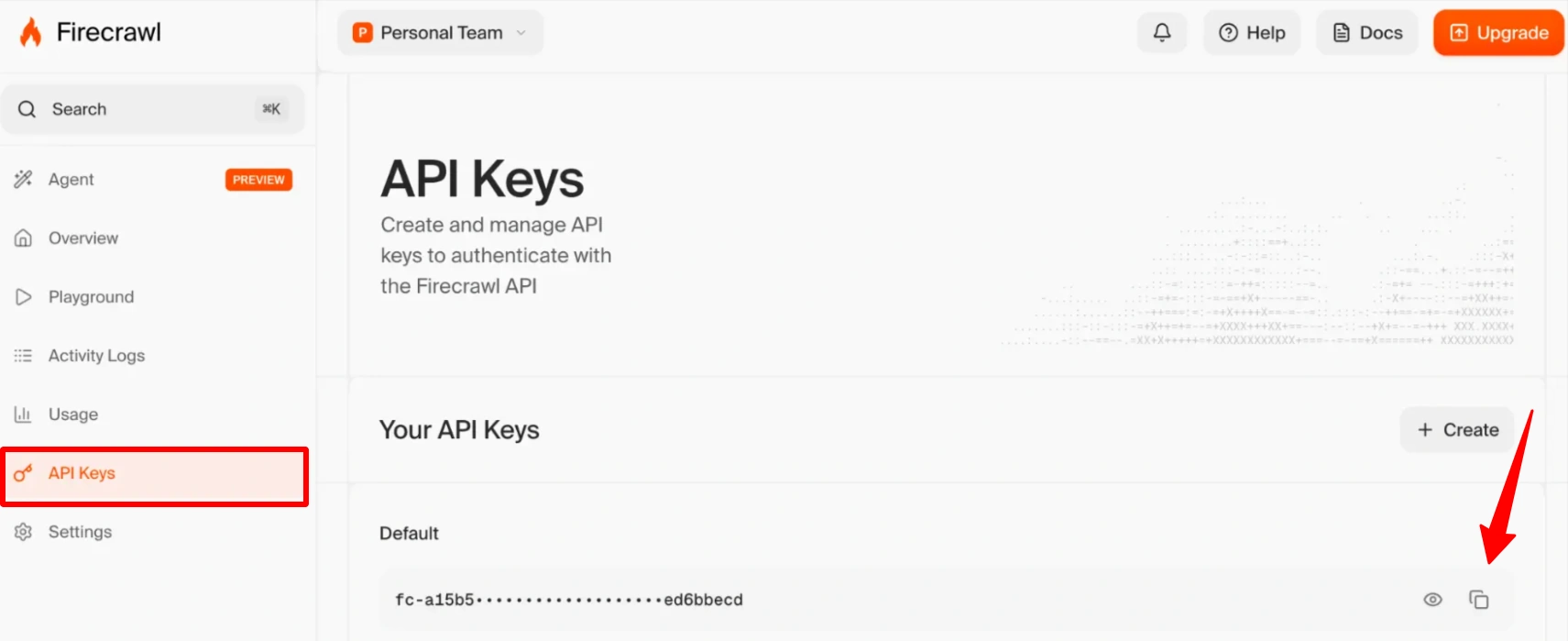
Firecrawl's უფასო გეგმა გაძლევთ 1,000 credits every month. One credit equals one scraped page, so that is 1,000 pages monthly, renewing forever, with no credit card required. It is more than enough to complete this entire tutorial many times over.
|
Once you are in the dashboard, copy your API key. It starts with fc-. That string is your ticket to everything below.
Step 2: The One-Click Route (No Code Required) ⚡
Before we write a single line of code, know this: you might not need any.
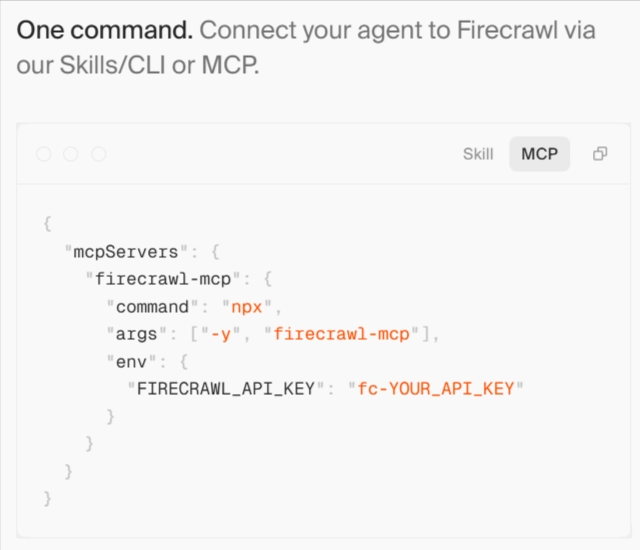
Firecrawl runs an official MCP (Model Context Protocol) server, and it connects to your favorite AI tools the same way you would connect a Gmail account. The hosted server lives at:
https://mcp.firecrawl.dev/v2/mcpAdd your API key into the URL and any MCP-compatible tool can use it:
https://mcp.firecrawl.dev/fc-YOUR_API_KEY/v2/mcpIn Claude (web or desktop): add Firecrawl as a connector, or drop this into claude_desktop_config.json:
{
  "mcpServers": {
    "firecrawl": {
      "command": "npx",
      "args": ["-y", "firecrawl-mcp"],
      "env": {
        "FIRECRAWL_API_KEY": "fc-YOUR_API_KEY"
      }
    }
  }
}დაკავშირების შემდეგ, თქვენი AI თანაშემწე gets ten new abilities: scrape, search, crawl, map, extract, interact, monitor, parse, research, and a full autonomous agent. And you drive all of it in plain English.
Try prompts like these:
- Scrape https://competitor.com/pricing and summarize every plan in a table.
- Crawl the docs at docs.example.com, max 50 pages, and explain how their auth works.
- Search the web for “best AI video generators 2026” and compare the top 5 results.
This is the setup our non-technical team members use daily. No terminal, no code, real live web data inside every conversation. If that is all you needed, you can honestly stop here. But if you are building apps, the API is where Firecrawl gets fun.
Step 3: Scrape Your First Page with the API 🐍
Time for code. Install the SDK:
# Python
pip install firecrawl
# Node.js
npm install firecrawl
Scraping a URL takes three lines. Here is Python:
from firecrawl import Firecrawl
firecrawl = Firecrawl(api_key="fc-YOUR_API_KEY")
doc = firecrawl.scrape("https://firecrawl.dev", formats=["markdown"])
print(doc.markdown)
And Node:
import { Firecrawl } from 'firecrawl';
const firecrawl = new Firecrawl({ apiKey: 'fc-YOUR_API_KEY' });
const doc = await firecrawl.scrape('https://firecrawl.dev', { formats: ['markdown'] });
console.log(doc.markdown);
Run it and look at the output. That is the entire trick that makes Firecrawl special: what comes back is not raw HTML soup. It is clean markdown with proper headings, lists, and links, with the nav bars, cookie banners, scripts, and footer junk already stripped out.
Why does that matter so much? Two reasons. Tokens and accuracy. Raw HTML from a typical page can be 10x the size of its actual content, and every junk token costs money and dilutes your model's attention. Clean markdown means smaller prompts, lower LLM bills, and answers grounded in content instead of clutter.
You can also request other formats in the same call: html, screenshot, links, or structured json. Stack them as needed:
doc = firecrawl.scrape(
    "https://example.com/blog/post",
    formats=["markdown", "links"]
)
Firecrawl renders JavaScript by default, so React sites, dynamic pages, and client-rendered content come back complete. No headless browser babysitting on your side.
Step 4: Crawl a Whole Website 🕸️
One page is a demo. A whole site is a dataset.
The crawl endpoint follows links from a starting URL and scrapes everything it finds, with controls for depth, page limits, and path filters:
from firecrawl import Firecrawl
from firecrawl.types import ScrapeOptions
firecrawl = Firecrawl(api_key="fc-YOUR_API_KEY")
crawl_status = firecrawl.crawl(
    'https://docs.example.com',
    limit=100,
    scrape_options=ScrapeOptions(formats=['markdown']),
    poll_interval=30
)
for page in crawl_status.data:
    print(page.metadata.url)
Node version:
const crawlResponse = await firecrawl.crawl('https://docs.example.com', {
  limit: 100,
  scrapeOptions: { formats: ['markdown'] }
});
console.log(`Crawled ${crawlResponse.data.length} pages`);
The SDK handles job polling and pagination for you and returns every page as clean markdown. Three parameters worth memorizing:
- ზღუდავს caps total pages. Always set it. This is your credit seatbelt.
- includePaths / excludePaths filter URLs with regex patterns. Crawling a docs site? Exclude /blog/.* and /careers/.* and stop paying for pages you will never use.
- maxDiscoveryDepth controls how many link-hops from the start URL the crawler follows.
პროფესიონალური მოძრაობა: before any big crawl, hit the რუკა endpoint first. It returns every URL on a site in a couple of seconds for almost no credits. Scope the job, count the pages, then crawl exactly what you need.
result = firecrawl.map("https://docs.example.com")
print(f"{len(result.links)} URLs found")
Step 5: Extract Structured Data with a Schema 📊
Markdown is perfect for RAG. But sometimes you need fields, not prose: product names, prices, ratings. That is the Extract endpoint's job. You describe the shape of the data, Firecrawl's AI pulls it out of the page:
schema = {
    "type": "object",
    "properties": {
        "product_name": {"type": "string"},
        "price": {"type": "string"},
        "rating": {"type": "number"},
        "in_stock": {"type": "boolean"}
    },
    "required": ["product_name", "price"]
}
result = firecrawl.extract(
    urls=["https://example-store.com/product/xyz"],
    prompt="Extract the product details from this page",
    schema=schema
)
print(result.data)
No CSS selectors. No XPath. No parser that shatters the moment the site changes its layout. You define what you want, and the extraction survives redesigns because it understands content, not markup.
This exact pattern runs in production on our network: one of our apps uses Extract to turn messy provider pages into a uniform pricing database, automatically, on a schedule. The same schema works across dozens of differently-designed sites. Try building that with regex and report back. 😅
Step 6: Give Your Agent Web Search 🔎
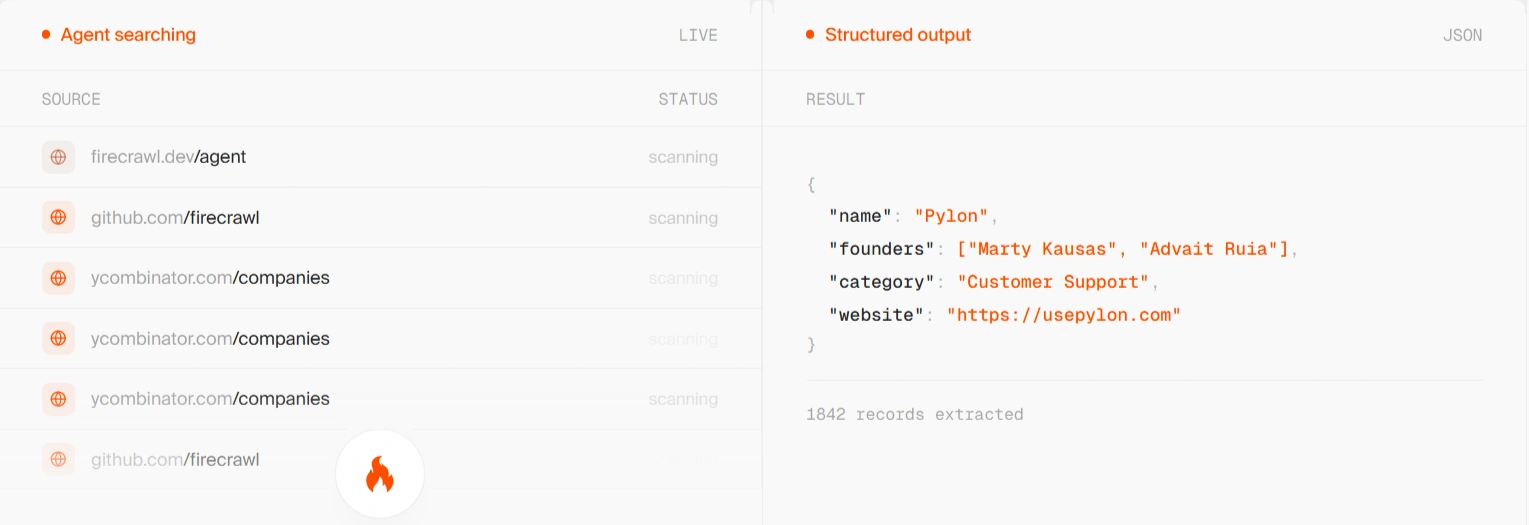
Scraping handles URLs you already know. Search handles the ones you do not.
Firecrawl's Search endpoint is the sleeper feature of the whole platform. Most search APIs return links and a snippet, then leave you to fetch and clean every result yourself. Firecrawl returns the results with the full scraped content included, in one call:
results = firecrawl.search(
    query="best open source LLMs 2026",
    limit=5
)
for item in results.web:
print(item.title, item.url)Node, with content scraping enabled per result:
const results = await firecrawl.search('best open source LLMs 2026', {
  limit: 5,
  scrapeOptions: { formats: ['markdown'] }
});
This is the building block for კვლევითი აგენტები. The loop is simple: your agent forms a query, Firecrawl returns readable content from the top results, your LLM synthesizes an answer with sources. That is deep research, and you just built it in a dozen lines.
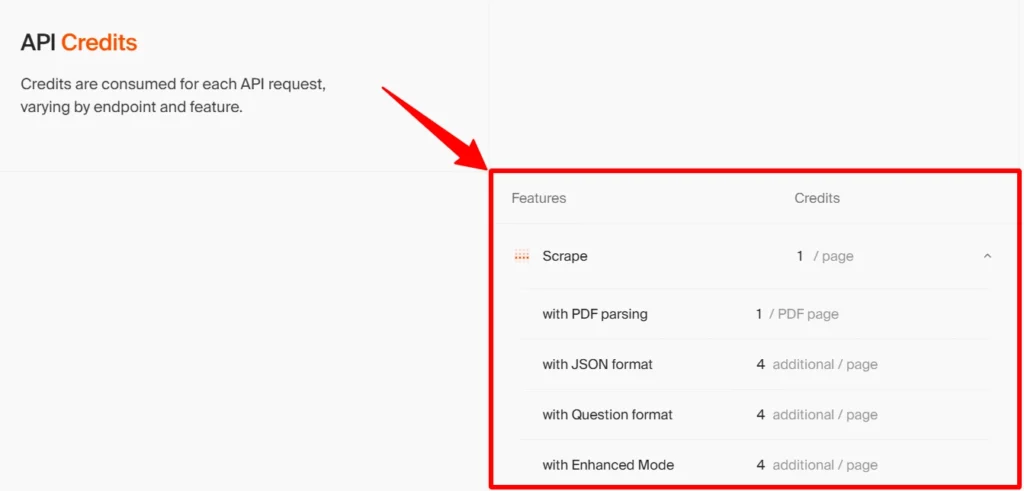
ღირებულების შენიშვნა: Search runs 2 credits per 10 results, plus normal scrape credits when you pull full content. Still dramatically cheaper than any dedicated answer API we have tested.
Step 7: Wire It into a RAG Pipeline 🧠
Now the main event: feeding an AI agent live web knowledge. Both major frameworks ship first-class Firecrawl loaders.
LangChain:
- from langchain_community.document_loaders import FireCrawlLoader
- from langchain_text_splitters import RecursiveCharacterTextSplitter
- from langchain_openai import OpenAIEmbeddings
- from langchain_community.vectorstores import FAISS
# 1. Load a whole site as clean documents
loader = FireCrawlLoader(
    api_key="fc-YOUR_API_KEY",
    url="https://docs.example.com",
    mode="crawl"
)
docs = loader.load()
# 2. Chunk them
splitter = RecursiveCharacterTextSplitter(chunk_size=1000, chunk_overlap=100)
chunks = splitter.split_documents(docs)
# 3. Embed and index
vectorstore = FAISS.from_documents(chunks, OpenAIEmbeddings())# 4. Ask questions against live web data
retriever = vectorstore.as_retriever()
relevant = retriever.invoke("How do I authenticate API requests?")
ლამას ინდექსი:
- from llama_index.readers.web import FireCrawlWebReader
- from llama_index.core import VectorStoreIndex
reader = FireCrawlWebReader(
    api_key="fc-YOUR_API_KEY",
    mode="crawl",
    url="https://docs.example.com"
)
documents = reader.load_data()
index = VectorStoreIndex.from_documents(documents)
response = index.as_query_engine().query("How does their pricing work?")
print(response)
That is a complete “chat with any website” pipeline in under 25 lines. Because Firecrawl hands the loader clean markdown instead of HTML, your chunks are coherent, your embeddings are meaningful, and your retrieval quality jumps compared to naive scraping. This is the single biggest reason RAG builders pick Firecrawl.
The same loaders work with CrewAI, Dify, Flowise, and n8n if visual workflows are more your speed.
Bonus: The Cost-Saving Architecture Nobody Talks About 💡
Here is the pattern that saves our apps real money every month.
When your app needs web-aware answers, the obvious route is an LLM with built-in web search. But providers bill web search as a premium add-on, and dedicated answer APIs get expensive fast at scale.
The smarter split:
Firecrawl (fetch, ~$0.001/page) → cheap LLM (reason, no web access needed)
Firecrawl searches and scrapes for a credit or two per request. Then any inexpensive model, DeepSeek, a small GPT or Claude tier, or whatever open model you run on your own VPS, does the summarizing and writing over that clean content. Same quality of answer. A fraction of the cost.
This also works beautifully for self-hosted setups. Running Open WebUI or another open source chat UI on a VPS? Connect Firecrawl as its web search and crawling layer, and your self-hosted AI suddenly does live deep research like the big commercial products.
Cost Tips: Make 1,000 Free Credits Go Far 🪙
Quick reference for keeping usage lean:
| აქცია | კრედიტის ღირებულება |
|---|---|
| Scrape / Crawl / Map / Monitor | 1 credit per page |
| ძებნა | 2 credits per 10 results |
| Interact (browser actions) | 2 credits per minute |
| Stealth mode (protected sites) | 5 credits per page |
Five habits that matter:
- Map before you crawl. Know the page count before you pay it.
- ყოველთვის მითითებული ზღუდავს on crawls. Default is 10,000 pages. Your free tier is 1,000. Do the math once, not after.
- გამოყენება excludePaths aggressively. Blog archives, tag pages, and career pages are credit landfills.
- Cache what you scrape. Docs sites change weekly, not hourly. Store results and re-crawl on a schedule instead of per-request.
- კრედიტები არ გადაირიცხება, so if you upgrade, size the plan to your real monthly volume. Paid plans start at $16/month for 5,000 credits, and the $83 Standard tier gives you 100,000 pages.
Common Mistakes (and Quick Fixes) 🛠️
Five issues that account for basically every “Firecrawl isn't working” message we get:
And one non-mistake worth knowing: if a request fails on Firecrawl's side, you are not charged for it.
სწრაფი პასუხები 🎯
How does Firecrawl work?
You send a URL (or search query) to its API, and it returns the content as clean markdown, JSON, or screenshots, with JavaScript rendering and junk removal handled automatically. One credit per page.
Is Firecrawl good for RAG?
It is the default choice in 2026. Clean markdown output means better chunks, better embeddings, and better retrieval, with official loaders for LangChain and LlamaIndex.
Can I use Firecrawl without coding?
Yes. The one-click MCP connector puts scrape, crawl, search, and extract inside Claude, ChatGPT, Perplexity, and Cursor, driven by plain English prompts.
Is there a free tier?
1,000 credits every month, renewing, no card required. Grab it here with 10% off your first upgrade.
Wrapping Up: Your Agent, Now With Eyes 👀
Recap of what you just learned:
The gap between an AI agent that guesses and an AI agent that knows is one API key. Firecrawl gives you 1,000 free credits a month to close it, and every example in this guide runs comfortably inside that allowance.
Got a build powered by Firecrawl?
Tell us in the comments. The best reader projects end up featured in our newsletter. ✌️


 BONUS: მიიღეთ ჩვენი 200 დოლარიAI „ოსტატობის ინსტრუმენტების ნაკრები“ უფასოა რეგისტრაციის შემდეგ!