

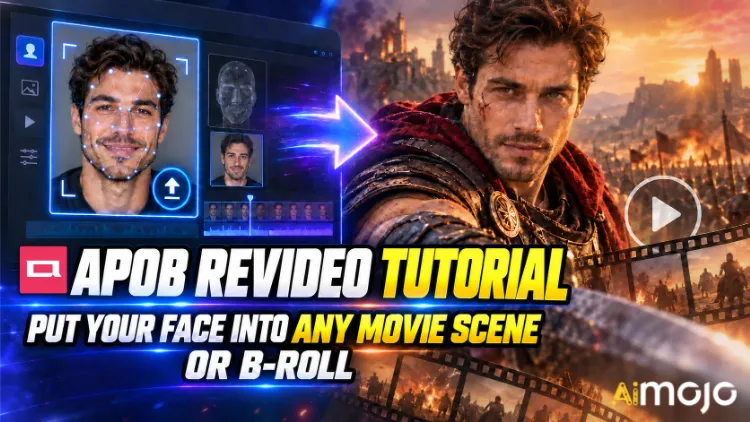
ეს კლიპები ნანახი გაქვს. ვიღაცამ's სახე, რომელიც თრილერის შენელებული კადრებით დერეფანში სეირნობს. შემთხვევითი შემქმნელი მოულოდნელად თამაშობს მანქანის რეკლამაში, რომლის გადაღებაც აშკარად ექვსნიშნა ფასდაკლებით დაჯდა. არავის დაუქირავებია RED კამერა. არავის დაუჯავშნია ლოკაცია.
APOB ReVideo არის ღილაკი, რომელიც ამ პოსტების უმეტესობას უდევს საფუძვლად. ატვირთეთ მოკლე კლიპი, ატვირთეთ ერთი საცნობარო სურათი, დააჭირეთ ღილაკს „გენერაცია“ და ამ კადრში გამოსახული ადამიანი თქვენი პერსონაჟით ჩანაცვლდება — იგივე სიარული, იგივე ხელის ჟესტები, იგივე კამერის ჩაჭერა, იგივე ფონი. შესრულება უცვლელი რჩება. სახე და სხეული იცვლება.
ეს არ არის სახის პასტის ფილტრი, რომელიც ყოველ ჯერზე ირყევა, როცა თავს აბრუნებთ. APOB AI's ReVideo მუშაობს Wan 2.2 Animate სტილის მოძრაობის გადაცემის ტექნოლოგიაზე, რაც იმას ნიშნავს, რომ ის ორიგინალურ კლიპს მოძრაობის ჩონჩხად კითხულობს და მასზე ახალ შემსრულებელს ქმნის. დიდი განსხვავებაა და ამას საცეკვაო კლიპის პირველივე ტესტირებისას იგრძნობთ.
ქვემოთ მოცემულია ფაქტობრივი სამუშაო პროცესი, საკრედიტო მათემატიკა, რომელსაც წინასწარ არავინ გეუბნებათ, წყაროს კლიპები, რომლებიც მას არღვევს და შესწორებები, რომლებიც უხარისხო რენდერს გამოსაქვეყნებელ რამედ აქცევს.
TL;DR — 30-წამიანი ვერსია
| კითხვა | პირდაპირი პასუხი |
|---|---|
| რას გააკეთებს? | არსებულ ვიდეოში პერსონაჟს თქვენი სახით ცვლის ან AI მოდელი, მოძრაობა უცვლელი |
| ძრავა მის უკან | Wan 2.2 Animate (მოძრაობა + იდენტობის გადაცემა) |
| რასაც ატვირთავთ | ერთი მოკლე წყაროს ვიდეო + ერთი საცნობარო სურათი |
| ღირებულება | ~26 კრედიტი წამში გამომავალი |
| უფასო წვდომა | 80 უფასო კრედიტი დღეში = დაახლოებით 3 წამი დღეში, ბარათი არ არის საჭირო |
| კლიპის სიგრძე | მოკლე კლიპების წესი. შეამოწმეთ თქვენი ამტვირთავი.'s ლიმიტი გრძელი ფაილის ნდობამდე |
| საუკეთესო | ფილმის სცენების მონტაჟი, B-roll ჩანართები, UGC რეკლამები, საცეკვაო ტენდენციები, უსახო არხები |
| საჭირო უნარი | ნული. თუ ფაილის ატვირთვა შეგიძლიათ, ესე იგი, კვალიფიციური ხართ. |
რა არის სინამდვილეში APOB ReVideo?
ReVideo შიგნით მდებარეობს APOB AI ვიდეო სამუშაო სივრცე გამოსახულება ვიდეოში გადასვლის, კამერის მოძრაობის, მოლაპარაკე ავატარის და სხვა ფუნქციების გარდა ტუჩის სინქრონიზაციაწარმოიდგინეთ ეს, როგორც „ამ კადრის ხელახლა გადაღების“ მოდული.
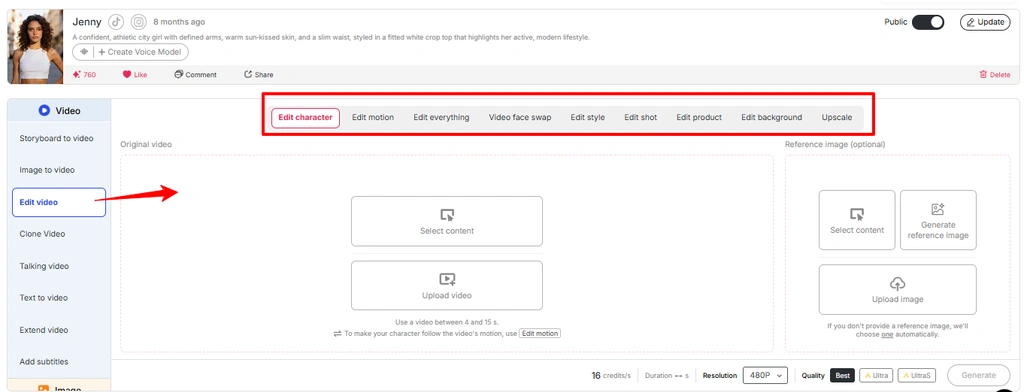
ის ერთი სახურავის ქვეშ რამდენიმე სამუშაოს მოიცავს:
მოკლე ვერსია: APOB ReVideo ხელახლა ამუშავებს უკვე არსებულ კადრებს ტექსტური მოთხოვნიდან სრულიად ახალი ვიდეოს ჰალუცინაციის ნაცვლად. სწორედ ამიტომ, გამომავალი კადრები საკმაოდ დამაჯერებლად გამოიყურება. თქვენ რეალური კლიპიდან ნამდვილ ფიზიკას ისესხებთ.
შენიშვნა: APOB-ის უახლესი ინტერფეისი ვიდეო რედაქტირების მრავალ სამუშაო პროცესს Edit Video-ს ფარგლებში ათავსებს . თუ ReVideo ცალკე ვარიანტად არ არის ნაჩვენები, იმავე სამუშაო პროცესს Edit Video სექციიდან გადადით.
რატომ ჯობნის მოძრაობის გადაცემას ტექსტიდან ვიდეოში აქ
ტექსტიდან ვიდეოში გარდაქმნა შესანიშნავია ვიბრაციების მხრივ და საშინელია კონკრეტული ქორეოგრაფიისთვის. თუ სტრიქონზე დაფუძნებულ გენერატორს ჰკითხავთ „კაცი ტრიალებს, კამერას მიუთითებს, მესამე დარტყმაზე იღიმის“ და თქვენ კამათელს ოციჯერ გააგორებთ. ReVideo მთლიანად გამოტოვებს კამათელს — მესამე დარტყმის ღიმილი უკვე თქვენს საწყის ფაილშია. მოდელი უბრალოდ ხელახლა აგდებს მას.
გამოიყენეთ სურათი მედიიდან „ვიდეოს რედაქტირების ფუნქცია APOB AI“ და შეცვალეთ alt ტექსტი „მოძრაობის რედაქტირება APOB ვიდეო რედაქტირების ფუნქციაში“-თი.
იმ შემქმნელებისთვის, რომლებმაც იპოვეს ერთი ეფექტური ჰუკის სტრუქტურა, ეს არის მთელი თამაში. ერთი გამარჯვებული კლიპი ათ ვარიანტად იქცევა ათი განსხვავებული სახით.

გენერირების ღილაკზე დაჭერამდე: თქვენი მომზადების საკონტროლო სია
რომ's ეს. არც დროის სქემი, არც საკვანძო კადრები, არც შენიღბვა, არც როტოსკოპია.
ეტაპობრივად: APOB ReVideo სახელმძღვანელო
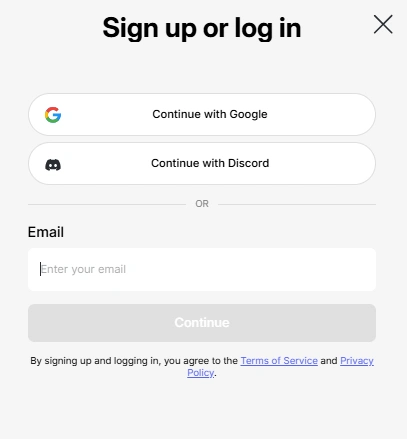
ნაბიჯი — შედით სისტემაში და მიიღეთ უფასო კრედიტები
ხელმძღვანელი APOB AI app და შედით სისტემაში. თქვენი 80 დღიური კრედიტი თავისით ჩაირიცხება ანგარიშზე. დაახლოებით 26 კრედიტი წამში, ეს's დღეში დაახლოებით სამი წამი უფასო ReVideo გამომავალი — საკმარისია ერთი სათანადო ტესტირებისთვის, არა პარტიისთვის. ბიუჯეტი შესაბამისად გამოყავით.
👉 პროფესიონალური ნაბიჯი: APOB აქტიურ Discord-ს მართავს. ფუნქციების გამოშვების დროს მათ დაახლოებით 1,000 ბონუს კრედიტი გადასცეს იმ შემქმნელებს, რომლებიც თავიანთ მიერ გენერირებულ კლიპებს საზოგადოებას უზიარებენ. თუ მოცულობის გაზრდას გეგმავთ, ეს უფასო პოდიუმია.
ნაბიჯი — შექმენით ან ატვირთეთ თქვენი პერსონაჟი
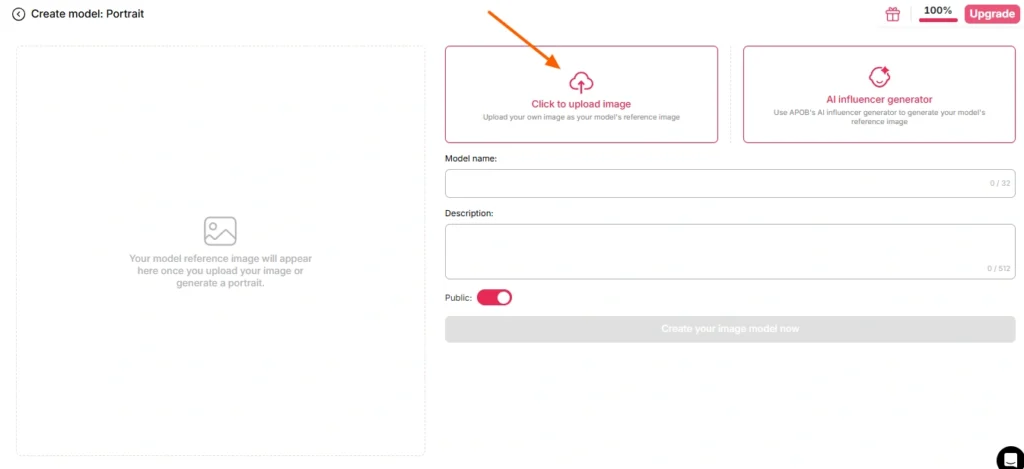
ორი გზა აქ:
გზა A — გამოიყენეთ თქვენი სახე. ატვირთეთ მკაფიო, წინა მხარეს მიმართული, კარგად განათებული ფოტო. არანაირი მზის სათვალე, არანაირი მძიმე ჩრდილები, არანაირი მოძრაობის დაბინდვა, არანაირი ჯგუფური ფოტო, სადაც მოდელს მოუწევს გამოიცნოს, რომელ ადამიანს გულისხმობთ.
გზა B — შექმენით AI მოდელი პირველი. გადადით პორტრეტული მოდელის შექმნის განყოფილებაში და შექმენით პერსონა შემდეგი გზით: AI ინფლუენსერების გენერატორი. დააყენეთ სქესი, ასაკი, ეროვნება, თმა, თვალის ფერი, ჩაცმულობა. ეს არის ყველაზე ჭკვიანი გზა ყველასთვის, ვინც მართავს განმეორებად არხს, რადგან APOB's სახის დაბლოკვა ამ იდენტობას თანმიმდევრულს ინარჩუნებს ასობით მომავალ რენდერში. ერთი პერსონაჟი, უსასრულო კლიპები, ამოსაცნობი ბრენდი.
თუ საცნობარო სურათს მთლიანად გამოტოვებთ, APOB ნაგულისხმევად თქვენს მიერ შენახულ სურათს დაუბრუნდება. AI მოდელი სურათი. მოსახერხებელი, ზოგჯერ გასაკვირი.
ნაბიჯი — აირჩიეთ თქვენი წყაროს ვიდეომასალა
ეს ნაბიჯი განსაზღვრავს თქვენი გამომავალი ვიდეოს ხარისხის 80%-ს. არა მოდელი. არა პარამეტრები. წყაროს კლიპი.
| წყაროს კლიპის მახასიათებელი | შედეგი |
|---|---|
| მკაფიო ერთი ობიექტი, ცენტრალური კადრი | ✅ სუფთა ჩანაცვლება |
| სტაბილური განათება მთელ სივრცეში | ✅ კანის ერთგვაროვანი ტონი |
| ხილული სხეულის მოძრაობა | ✅ მოძრაობა სწორად იკითხება |
| სუბიექტი ობიექტების უკან დადის | ⚠️ ოკლუზიის არტეფაქტები |
| სწრაფი ტრიალი, ძლიერი ბუნდოვანება | ❌ იდენტობის რყევები |
| გადატვირთული ჩარჩო, რამდენიმე ადამიანი | ❌ მოდელი არასწორ სამიზნეს ირჩევს |
| დაბალი გარჩევადობის, შეკუმშული, ხელახლა ატვირთული 4x | ❌ სოკო |
საკუთარი კადრები არ გაქვთ? APOB's ჩაშენებული გენერატორები — შექმენით თქვენი საკუთარი, სრული კომპლექტი, ექსპერტის რეჟიმი, სურათიდან ვიდეოში — შექმნის კლიპს, რომლის პირდაპირ ReVideo-ში გადატანა შეგიძლიათ. სრული ციკლი, ერთი პლატფორმა.
ნაბიჯი — გახსენით ReVideo და ჩატვირთეთ ორივე ფაილი
მარცხენა გვერდითი ზოლი → ვიდეო ჩანართი → ხელახალი ვიდეო.
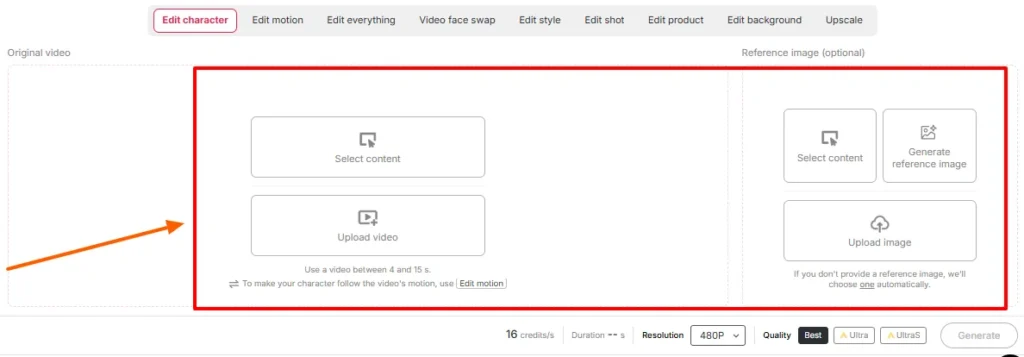
შემობრძანდით:
დაადასტურეთ ხანგრძლივობისა და ხარისხის პარამეტრები ეკრანზე. შეამოწმეთ ხანგრძლივობის ლიმიტი, რომელიც თქვენს სამუშაო სივრცეში გამოჩნდება იმ დღეს — APOB's ReVideo-ს თავდაპირველი გამოშვება კლიპებს დაახლოებით ხუთ წამზე ზღუდავდა, ხოლო Wan-ზე მომუშავე ახალი გვერდები გაცილებით გრძელი ფაილების მხარდაჭერას უწევდა. ატვირთვა სიმართლეს ამბობს; ბლოგის პოსტები გამოშვებულ ვერსიებს ჩამორჩება.
ნაბიჯი — გენერირება და დაელოდეთ
დააჭირეთ გენერირებას. მოდელი თქვენს მითითებას წყაროს მუშაობაზე აკავშირებს, ფონი კი სტაბილურად ინარჩუნებს.
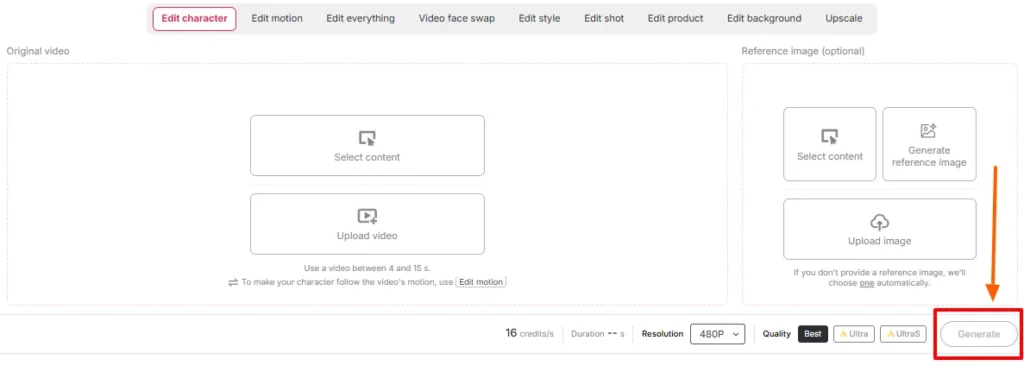
რენდერის დროის შკალები კლიპის ხანგრძლივობითა და ხარისხის დონით. არ განაახლოთ. ნუ ჩავარდებით პანიკაში - შექმენით მეორე დავალება იმავე კრედიტებზე.
ნაბიჯი — გვერდიგვერდ გადახედვა
ორიგინალი გამომავალი ფაილის გვერდით დაუკარით. კონკრეტულად შეამოწმეთ:
თუ რამე's გამორთვის შემთხვევაში, გამოსწორება თითქმის ყოველთვის ზემოთაა — შეცვალეთ საცნობარო სურათი ან შეამცირეთ წყაროს უფრო სუფთა მონაკვეთზე. იგივე შეყვანის ხელახლა გამოყენება იშვიათად შველის არასწორ დაწყვილებას.
ნაბიჯი — დაასრულეთ დასტის დანარჩენი ნაწილით
ნედლი ReVideo გამომავალი კომპონენტია და არა დასრულებული პოსტი. დააწყვეთ იგი:
ფილმის სცენა სუბტიტრების წინააღმდეგ: ორი განსხვავებული სახელმძღვანელო
ესენი ერთმანეთს ჰგავს. ისინი არანაირად არ იქცევიან.
სახელმძღვანელო A — ფილმის სცენის ჩანართი
კინემატოგრაფიული კადრები გრადირებულია, დრამატულად განათებულია და, როგორც წესი, გადაღებულია გრძელი ლინზებით, ველის მცირე სიღრმით.'s საჩუქარი და ხაფანგი.
გააკეთე ეს:
მოერიდეთ: სწრაფი კადრების მოქმედებით გადაღებულ სცენებს, ძლიერ პრაქტიკულ კვამლს, ექსტრემალურ სილუეტებს, კადრებს, სადაც ობიექტი ნახევრად კადრის მიღმაა.
Playbook B — B-Roll Drop-In
B-roll-ი ძილისთვის განკუთვნილი შემთხვევაა და, სიმართლე გითხრათ, სწორედ აქ იხარჯება ყველაზე მეტი თანხა. კადრები , რომლებიც ოფისში დადის, პროდუქტის ყუთს ხსნის, ფანჯარასთან ყავას სვამს, ტელეფონის კამერასთან მიტანას გულისხმობს, სუფთაა, თანაბრად განათებული და ერთი ობიექტისგან შედგება. ის პრაქტიკულად პერსონაჟების ჩასანაცვლებლადაა შექმნილი.
გააკეთე ეს:
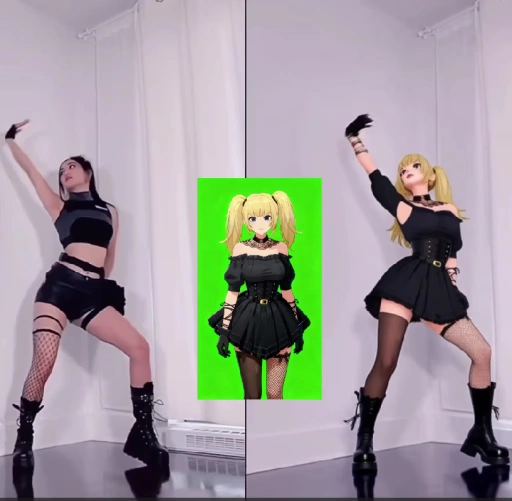
ეს არის სამუშაო პროცესი, რომელიც ბევრის უკან დგას AI ინფლუენსერ ანგარიშები, სახის გარეშე არხები და შვილობილი პროდუქტის გვერდები, რომლებიც ამჟამად მუშაობს.
საკრედიტო მათემატიკა: რა ღირს ნივთები სინამდვილეში
| გამომავალი სიგრძე | დაახლოებითი კრედიტები | თავისუფალი დონის რეალობა |
|---|---|---|
| 1 მეორე | ~ 26 | კომფორტული |
| 3 წამში | ~ 78 | თქვენი სრული დღიური შემწეობა |
| 5 წამში | ~ 130 | საჭიროა 2 დღე უფასო ან ფასიანი გეგმა |
| 10 წამში | ~ 260 | ფასიანი ტერიტორია |
| 5 × 5s ვარიაციების პარტია | ~ 650 | დაგეგმეთ გამოწერა |
რეალობის შემოწმება: უფასო კრედიტები განკუთვნილია შეყვანის ტესტირებისთვის და არა კონტენტის კალენდრის შესაქმნელად. ჩაატარეთ თქვენი საცნობარო სურათების ტესტები თითო წამში. როგორც კი წყვილი სწორად გამოიყურება, დახარჯეთ თანხა სრულმეტრაჟიან რენდერზე.
ReVideo-ს ხშირი წარუმატებლობები და მათი სწრაფად გამოსწორების გზები
| Რა მოხდა | რატომ | სარემონტო |
|---|---|---|
| სახე კლიპის შუაში იდენტობას იცვლის | საცნობარო სურათი ძალიან პატარაა ან დახრილია | ხელახლა ატვირთეთ წინა მხარეს გადაღებული, მაღალი გარჩევადობის პორტრეტი |
| უცნაური ჰალო თმის გარშემო | ობიექტის უკან დატვირთული ფონი's უფროსი | აირჩიეთ წყაროს კლიპი უფრო სუფთა გამოყოფით |
| ხელები აბსტრაქტულად იქცევიან | სწრაფი ჟესტი + შეკუმშვა | მოძრაობის უფრო ნელ მონაკვეთზე გადართვა |
| კანის ტონის შეუსაბამობა | საცნობარო განათებისა და სცენის განათების დაპირისპირება | რეგენერაცია მოახდინეთ მსგავსი განათების პირობებში |
| არასწორი ადამიანი შეიცვალა | კადრში რამდენიმე ობიექტი | ერთი ობიექტის კლიპის ამოჭრა ან არჩევა |
| გამომავალი ჩასმულია | წყაროს აკლდა სხეულის რეალური მოძრაობა | გამოიყენეთ კადრები, სადაც ჩანს მთელი სხეულის მოძრაობა |
| გამომავალი ძალიან მოკლეა გამოსაქვეყნებლად | საკრედიტო ლიმიტის მიღწევის | გამოიყენეთ ვიდეოს გამაფართოებელი ან შეკერეთ ორი რენდერი |
სად APOB ReVideo სტანდარტულ სახის შეცვლას ჯობნის
| რატომ იმარჯვებს ReVideo | ძირითადი AI სახე შეცვალეთ | APOB-ის ვიდეოს რევიდეო |
|---|---|---|
| რა იცვლება | მხოლოდ სახის არე | სახე, სხეული, ჩაცმულობა, საერთო ხასიათი |
| მოძრაობის წყარო | ორიგინალი, ხელუხლებელი | ორიგინალური შესრულება შენარჩუნებული და ხელახლა რენდერირებულია |
| იდენტობის თანმიმდევრულობა | თითო კლიპზე, მერყეობს | სახის დაბლოკვა მთელ თქვენს ბიბლიოთეკაში |
| ფონის კონტროლი | არა | ReBackground ხელმისაწვდომია |
| სტილის კონტროლი | არა | ReStyle ხელმისაწვდომია |
| აშენდა ამისთვის | ერთჯერადი ხუმრობები | განმეორებითი წარმოების მილსადენები |
სახის გაცვლა ხუმრობას გაძლევთ. ReVideo კი გთავაზობს მსახიობს, რომლის გამოყენებაც შეგიძლია.
რეალური გამოყენების შემთხვევები, რომლებსაც ადამიანები ახლა იყენებენ
ნაწილი, რომელსაც უმეტესი სახელმძღვანელო გამოტოვებს: თანხმობა, საავტორო უფლებები და სასამართლოში უჩივლების თავიდან აცილება
ფილმის სცენაში საკუთარი სახის ჩასმა სახალისოა. სხვისი სახის ჩასმა კი - სახალისო.'s პირისპირ ერთში გადატანა ან სტუდიური კადრების გადანაწილება სრულიად განსხვავებული სიტუაციაა. სწორად მოეპყარით ამას:
ლიცენზირებული საფონდო B-roll პლუს AI პერსონა სუფთა, მასშტაბირებადი და კომერციულად უსაფრთხო კომბინაციაა. იქ ააშენეთ.
ექვსი პროფესიონალური რჩევა რეალური ტესტირებიდან
- დატენვამდე ერთი წამით შეამოწმეთ. სურათისა და კლიპის დაწყვილების შემოწმების ყველაზე იაფი გზა.
- პორტრეტის მოდელი ერთხელ ააწყვეთ, გამოიყენეთ სამუდამოდ. სახის ფიქსაციის კონსისტენცია ეს არის მთელი მიზეზი, რის გამოც ვირტუალური პერსონა მიმდევრებს იძენს.
- ვერტიკალური წყარო შემავალი, ვერტიკალური გამომავალი გამომავალი. ჰორიზონტალური რენდერი ნუ მოჭრით და იმედი არ გქონდეთ.
- კაშკაშა, თანაბარი წყაროს განათება ყოველთვის იმარჯვებს. მუდის შეფასება მშვენივრად გამოიყურება და ცუდად ცვლის.
- შეინახეთ თქვენი საუკეთესო წყაროს კლიპები შაბლონების სახით. წარმატებული ჰუკი აქტივია. ყოველთვიურად გაიმეორეთ ის.
- კრედიტის განახლების დღეებში პარტიული შეკვეთები. უფასო კრედიტები ყოველდღიურად ნულდება. ტესტების დაგროვება ფასიან რენდერის პუშტამდე ერთი კვირის განმავლობაში.
ხშირად დასმული კითხვები APOB ReVideo-ს შესახებ
რისთვის გამოიყენება APOB ReVideo?
APOB ReVideo არსებულ ვიდეოში პერსონაჟს თქვენი სახით, საცნობარო სურათით ან სხვათი ცვლის. AI ინფლუენსერის მოდელი, ორიგინალური მოძრაობის, ჟესტების, კამერის ნაკადის და ფონის უცვლელი შენარჩუნებით.'s გამოიყენება ფილმის სცენების მონტაჟისთვის, B-roll ჩანართებისთვის, UGC რეკლამებისთვის, საცეკვაო ტენდენციებისთვის და AI ინფლუენსერის კონტენტი.
APOB ReVideo უფასოა?
არსებობს's უფასო დონე, რომელიც ყოველდღიურად 80 კრედიტს აწვდის და ბარათი არ არის საჭირო. წამში დაახლოებით 26 კრედიტით, ეს დღეში დაახლოებით სამი წამის გამომუშავებას აფინანსებს - ტესტირებისთვის საკმარისია, წარმოებისთვის კი - მცირე. ფასიანი გეგმები უფრო ხანგრძლივ კლიპებსა და პარტიულ ვიდეოებს ამუშავებს.
რამდენ ხანს შეიძლება გაგრძელდეს APOB ReVideo კლიპი?
თავდაპირველი გამოშვება საუკეთესოდ მუშაობდა რამდენიმე წამიანი კლიპებით და უფრო ხანგრძლივი ატვირთვისთვის Wan-ზე მომუშავე გვერდების სიის მხარდაჭერა. შეამოწმეთ თქვენს სამუშაო სივრცეში ნაჩვენები სიგრძის ლიმიტი, რადგან ის იცვლება თითოეული მოდელის განახლებისას.
მჭირდება თუ არა შექმნა? AI მოდელი პირველი?
არა. შეგიძლიათ პირდაპირ ატვირთოთ საცნობარო სურათი. თუმცა, პორტრეტული მოდელის შექმნა გაძლევთ თანმიმდევრულ იდენტობას ყველა მომავალ რენდერში, რაც ძალიან მნიშვნელოვანია ნებისმიერი ადამიანისთვის, ვისაც აქვს განმეორებადი ანგარიში.
რომელი AI ძრავი კვებავს APOB ReVideo-ს?
ის მუშაობს Wan 2.2 Animate სტილის მოძრაობის გადაცემის ტექნოლოგიაზე, რომელიც კითხულობს მოძრაობას თქვენი საწყისი კლიპიდან და ამ მოძრაობის სტრუქტურაზე ახალ პერსონაჟს ქმნის, ვიდეოს ნულიდან გენერირების ნაცვლად.
APOB ReVideo-ს ფონის შეცვლაც შეუძლია?
დიახ — ReBackground ახერხებს სცენის ჩანაცვლებას, როდესაც ორიგინალი ადგილმდებარეობა არ შეესაბამება თქვენს მონტაჟს. მხოლოდ ReCharacter ინარჩუნებს ფონს ზუსტად ისე, როგორც გადაღებულია.
მუშაობს ანიმეებთან, 3D რენდერებთან და არაადამიანურ პერსონაჟებთან?
ასეც არის. ილუსტრირებული პერსონაჟები, 3D მოდელები და თოჯინების ან ფიგურების საცნობარო სურათებიც კი შემცვლელი საგნების როლს ასრულებს, რაც სტილიზებულ და თილისმებით მართულ კონტენტს ქმნის.
რატომ გამოიყურება ჩემი გამომავალი სურათი ბუნდოვანი ან დამახინჯებული?
თითქმის ყოველთვის წყაროს პრობლემაა. შეკუმშული კადრები, კამერის სწრაფი მოძრაობა, დაჩრდილული ობიექტები ან დაბალი გარჩევადობის საცნობარო გამოსახულება შედეგს აუარესებს. ხელახლა გადაღებამდე შეცვალეთ შემავალი სიგნალები.
შემიძლია APOB ReVideo ვიდეოების კომერციულად გამოყენება?
ზოგადად, კი, იმ პირობით, რომ თქვენ გაქვთ უფლება წყაროს კადრებზე და მათ მსგავსებაზე. ლიცენზირებულ ან საკუთრებაში არსებულ კადრებზე ხელოვნური ინტელექტის მიერ გენერირებული პერსონაჟები ყველაზე უსაფრთხო კომერციული სისტემაა.
როგორ შეედრება ეს ჩვეულებრივს AI სახის შემცვლელი?
სახის შემცვლელი სახის არეს არედაქტირებს. ReVideo ცვლის მთელ პერსონაჟს - სახეს, სხეულს, ჩაცმულობას და სტილს - ორიგინალური შესრულების შენარჩუნებით.'s შექმნილია პერსონაჟის სრული სხეულის ჩასანაცვლებლად და არა ერთკადრული ხუმრობებისთვის.
კანონიერად შემიძლია ფილმის სცენაში მონაწილეობა?
კერძო ექსპერიმენტებისთვის, როგორც წესი, კარგია. შეცვლილი სტუდიური კადრების გამოქვეყნება ან მონეტიზაცია საავტორო უფლებების საკითხია, ჩანაცვლებისა და სხვა ნებისმიერი პირის ჩასმის მიუხედავად.'s თანხმობის გარეშე სახის დამალვა ცალკე სამართლებრივი პრობლემაა. ლიცენზირებული საფონდო და საჯარო დომენის კლიპები საშუალებას გაძლევთ, თვალი აარიდოთ.
რომელი წყაროს კლიპები იძლევა საუკეთესო შედეგებს?
ერთი ობიექტი, ცენტრალური კადრი, თანაბარი განათება, სხეულის ხილული მოძრაობა, მინიმალური ოკლუზია და კარგი გარჩევადობა. პროდუქტის დემო ვერსიები, სიარულისა და საუბრის კადრები და ცეკვის კლიპები მუდმივად ძლიერია.
საბოლოო Take
APOB ReVideo იშვიათია AI ვიდეო ფუნქცია, სადაც გამომავალი ხარისხი ძირითადად თქვენს ხელშია და არა მოდელის. თუ მას მიაწვდით სუფთა ერთობიექტივი კლიპს და მკვეთრ საცნობარო სურათს, ის მიიღებთ ისეთ რამეს, რისი გამოქვეყნებაც შეგიძლიათ. თუ მას მიაწვდით ბუნდოვან კადრს ხალხისგან და ღამის 2 საათზე გადაღებულ სელფს, ის მიიღებს ზუსტად იმას, რასაც ელოდებით.
რეალური უპირატესობა არ არის ფილმის სცენის ერთჯერადი მონტაჟი, რომელიც რამდენიმე ათას ნახვას მოგიტანთ.'s წარმოების მილსადენი: ერთი თანმიმდევრული AI პერსონა, დადასტურებული წყაროს კლიპების ერთი ბიბლიოთეკა და გამარჯვებული ფორმატის ხელახლა კასტრირების შესაძლებლობა იმდენჯერ, რამდენჯერაც თქვენი კრედიტები საშუალებას იძლევა. ეს's როგორ უსახო არხები, მომხმარებლის მიერ გენერირებული გენერატორების რეკლამის მაღაზიები და AI ინფლუენსერ ანგარიშები რეალურად 2026 წელს ფუნქციონირებს.
დაიწყეთ უფასო 80 კრედიტით. გამოსცადეთ სამი საცნობარო სურათი თითო წამში. თავის მობრუნებით იპოვეთ წყვილი, რომელიც იდენტურობას აფიქსირებს. შემდეგ კი მასშტაბირება მოახდინეთ.
კადრები უკვე არსებობს. თქვენ უბრალოდ ცვლით ვინ's მასში.
AiMojo გირჩევთ:


 BONUS: მიიღეთ ჩვენი 200 დოლარიAI „ოსტატობის ინსტრუმენტების ნაკრები“ უფასოა რეგისტრაციის შემდეგ!




![ტოპ 10 ჰენტიai AI ჩატბოტები ვირტუალური სურვილების განსახორციელებლად [2026]](https://aimojo.io/wp-content/uploads/2024/03/Top-Hentai-AI-Chatbot--100x100.webp)

![ყველაზე 13 AI ჩატის პორნო თამაშები ლიმიტების გარეშე [2026]](https://aimojo.io/wp-content/uploads/2024/03/Best-AI-Chat-Porn-Games-100x100.webp)


