

Humata Key Insights
What is Humata?
かすかな あります AI powered document analysis platform that turns static files into interactive, searchable knowledge bases. Built on GPT-4 architecture, it allows users to upload PDFs, Word documents, PowerPoint presentations, and Excel sheets, then ask natural language questions and receive instant answers backed by direct citations from the source material.
Designed for researchers, legal professionals, ビジネスアナリスト, and students, Humata eliminates the need to manually read through hundreds of pages. The platform uses 256 bit encryption and role based access controls, making it suitable for enterprise teams handling sensitive data. As a productivity tool, Humata excels at document summarisation, semantic search, and collaborative file management, helping organisations extract insights faster and make better informed decisions.
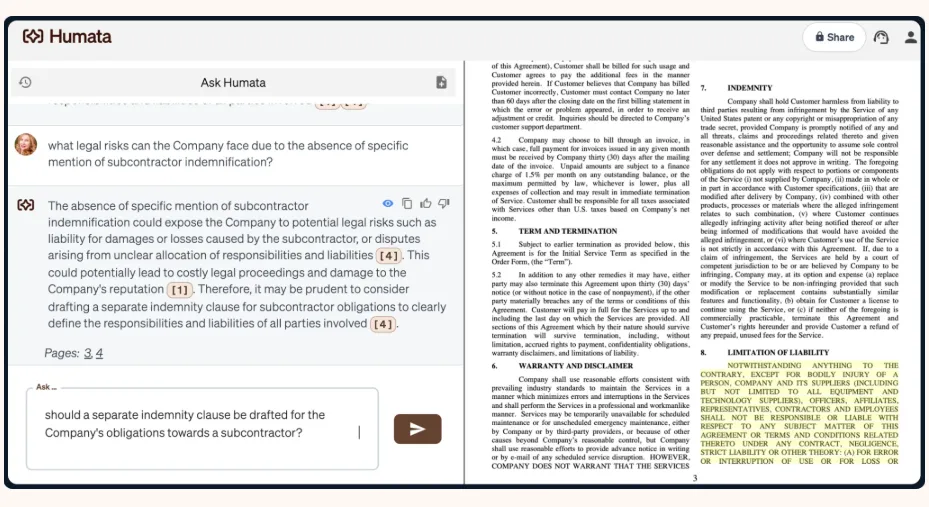
Humata’s core function lets you ask questions about any uploaded document in plain English. The AI processes the query, scans the file, and returns a precise answer with footnote style citations pointing to the exact passage. This removes the guesswork from document review and gives professionals a reliable way to find specific data points within seconds.
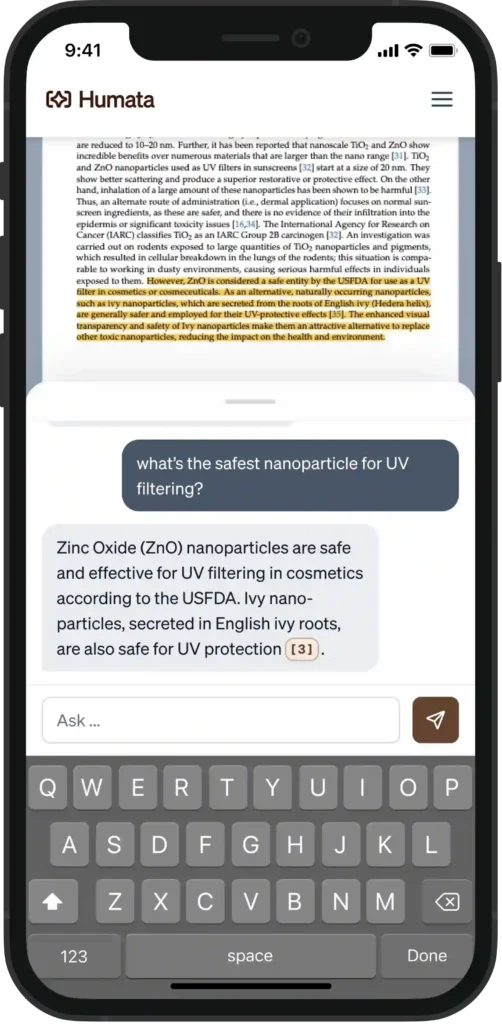
Upload a 200 page 研究論文 or financial report and Humata will distil it into a concise summary. You can refine the output by asking for shorter or more detailed versions. This feature is invaluable for teams that need to process large volumes of documents quickly and share key findings without forcing every team member to read the full text.
Humata goes beyond basic PDF analysis. The platform supports DOCX, PPTX, and XLSX file formats, giving users flexibility across different business document types. This means a single platform can handle everything from quarterly earnings spreadsheets to legal contracts to academic dissertations.
With 256 bit SHA encryption at rest, role based permissions, and department level folder structures, Humata is built for teams that handle confidential information. Administrators can control exactly who sees which documents, making it suitable for legal firms, financial institutions, and healthcare organisations that must comply with strict data governance standards.
Humata allows you to embed its document AI directly into any webpage. This is a standout feature for customer facing businesses that want to let visitors query technical documentation, product manuals, or policy documents without leaving the site. It turns your static help centre into an interactive support tool.
Rather than querying one file at a time, Humata lets you ask a single question across your entire uploaded library. The AI 検索 all documents simultaneously and returns the most relevant answers with citations. For researchers juggling multiple papers or analysts comparing several reports, this is a significant time saver.
Humata Pricing Plans
| 計画 | 費用 | ユーザー | Free Pages (Monthly) | 追加ページ | チャットサポート |
|---|---|---|---|---|---|
| Free | $0 | 1 | 60 | - | - |
| 上級 | $ 9.99 /月 | 3 | 500 | 0.02ドル/ページ | ✅ |
| チーム | $ 49 /ユーザー/月 | 10 | 5,000 | 0.01ドル/ページ | ✅ |
| Enterprise | カスタム額装 | 無制限 | カスタム額装 | カスタム額装 | ✅ |
How Humata Handles Document Accuracy
Accuracy is the make or break factor for any document AI tool. Humata performs well with standard business documents, academic papers, and clearly formatted reports. Every answer includes citation links that trace back to the original text, allowing users to verify claims instantly. However, performance can dip with heavily technical jargon, handwritten notes, or poorly scanned files.
その OCR機能 on the Team plan and above helps with scanned documents but is not infallible. For mission critical use cases in legal or medical fields, always cross reference the AI output against the source material. The citation model makes this verification fast and practical rather than burdensome.
Humata vs ChatGPT for Document Work
A common question is why not just paste text into ChatGPT instead of using Humata. The answer comes down to workflow and trust. ChatGPT requires you to manually copy and paste content, has token limits that chop long documents, and generates answers without citing the exact paragraph. Humata is purpose built for file based analysis.
You upload the entire document and the AI reads every page, then returns answers tied to specific passages you can verify with one click. For professionals handling contracts, research papers, or compliance reports, that citation trail is not a nice extra. It is a requirement. ChatGPT remains stronger for open ended conversation and creative tasks, but for grounded, file specific Q&A with verifiable sources, Humata is the more practical choice.
長所と短所
- Instant answers with source citations.
- Strong enterprise grade encryption.
- Supports PDF, DOCX, PPTX, XLSX.
- Cross document search capability.
- 試用できる無料プランが充実しています。
- Embeddable widget for websites.
- OCR limited to paid plans.
- Accuracy drops on technical jargon.
- オフラインアクセスは利用できません。
- Creative content generation absent.
Best Humata Alternatives
| AI Document Analysis and Q&A Tool | 引用の正確さ | チームコラボレーション |
|---|---|---|
| チャットPDF | Page level references only | Minimal, single user focused |
| アフォーライ | Good with annotation support | Strong with shared workspaces |
| pdf.ai | Basic source linking | 限定されたチーム機能 |
| AskYourPDF | Inline references | Moderate, growing feature set |



