メタの融合's Llama 4モデルとMicrosoft's AutoGenフレームワークは、スマートで効率的な作成のための新しい可能性を開きます AI エージェント。これらのテクノロジーを組み合わせることで、開発者は自然言語を処理し、画像を理解し、複雑な問題を推論し、他のエージェントと連携してタスクを達成できるアプリケーションを構築できます。
ラマ4 印象的なマルチモーダル機能と広範なコンテキストウィンドウを提供し、 自動生成 複数のエージェントを協調ワークフローでオーケストレーションするための構造化されたフレームワークを提供します。これらを組み合わせることで、次世代の強力なツールキットが実現します。 AI 分野の様々なアプリケーションで使用されています。
このガイドでは、 建物 AI これらのツールを使用するエージェントあらゆるスキルレベルの開発者向けに、実用的なコード例と実装戦略を紹介します。
ByteBridgeが ラマ4 and 自動生成 完璧なマッチ?
Meta's ラマ4ファミリーは AI 世界とその ネイティブマルチモーダル機能 早期核融合アプローチ。AutoGenと組み合わせると、Microsoft's 会話型マルチエージェントシステムを構築するためのフレームワーク—開発者は作成できる AI 効率的に推論、連携、適応するエージェント。
スカウトとマベリックの派生型を含むラマ4モデルは、 早期融合マルチモーダル処理 テキスト、画像、ビデオフレームを最初から単一のトークンシーケンスとして扱う機能です。この機能はAutoGenと組み合わせることで's 柔軟なエージェントアーキテクチャにより、 AI システム それは次のことができます:
しましょう's クライアントの要件を分析し、カスタムのジョブ提案を生成するプロジェクト提案ジェネレーターを作成することで、これらの機能を実証する実用的なマルチエージェント システムを構築します。
実践的な構築 AI エージェントシステム
しましょう's フリーランサーが自分に合った仕事の提案を作成できるよう支援するマルチエージェントシステムを構築します。このシステムは以下のことを実現します。
- クライアントの要件を収集する
- フリーランサーの資格を集める
- 適切な価格設定でプロフェッショナルな提案を作成します。
ステップ0: 環境の設定
まず、必要なパッケージをインストールします。
パイソン
autogen-agentchat~=0.2 を pip でインストールします
pipでipythonをインストールする
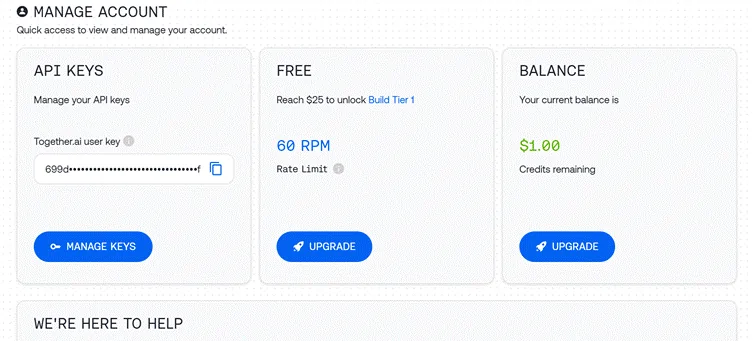
ステップ1: APIアクセスの設定
Llama 4 にアクセスするには、Together API を使用します。
python

import os

import autogen

from IPython.display import display, Markdown

# Load API key from file

with open("together_ai_api.txt") as file:

    LLAMA_API_KEY = file.read().strip()

os.environ["LLAMA_API_KEY"] = LLAMA_API_KEY

# Configure LLM settings

llm_config = {

    "config_list": [

        {

            "model": "meta-llama/Llama-4-Scout",  # Use Scout for efficiency

            "api_key": os.environ.get("LLAMA_API_KEY"),

            "base_url": "https://api.together.xyz/v1",

        }

    ],

    "temperature": 0.2,  # Lower for more consistent outputs

    "timeout": 180

}
ステップ2: 専門エージェントの作成
私たちのシステムには、特定の役割を持つ 3 つの異なるエージェントが必要です。
クライアント入力エージェント
python

# Agent 1: Interfaces with the human user

client_agent = autogen.UserProxyAgent(

    name="Client_Input_Agent",

    human_input_mode="ALWAYS",  # Always gets input from human

    max_consecutive_auto_reply=1,

    is_termination_msg=lambda x: x.get("content", "").rstrip().endswith("TERMINATE"),

    system_message="""Act as the primary contact between the human user and other agents.

    First, collect initial project details (requirements, timeline, budget).

    When asked questions by the Scope Architect, relay user's answers about skills and experience.

    Type TERMINATE when the proposal is satisfactory or the user wants to stop."""

)
このエージェントは、人間のユーザーと AI システム、 情報を収集する そして最終出力を発表します。
スコープアーキテクトエージェント
python

# Agent 2: Analyzes requirements and asks qualifying questions

scope_architect_agent = autogen.AssistantAgent(

    name="Scope_Architect",

    llm_config=llm_config,

    max_consecutive_auto_reply=1,

    system_message="""You are a Scope Architect who analyzes project requirements.

    After receiving initial details from Client_Input_Agent, ask targeted questions about:

    - The freelancer's relevant past projects and experience

    - Their key skills and tools for this specific project

    - Estimated completion time for the described work

    Once you have sufficient information, create a concise summary of BOTH

    the project requirements AND freelancer qualifications for the Rate Recommender."""

)
スコープ アーキテクトは要件アナリストとして機能し、正確な提案に必要な重要な情報を収集します。
レートレコメンデーションエージェント
python

# Agent 3: Creates structured proposal with pricing

rate_recommender_agent = autogen.AssistantAgent(

    name="Rate_Recommender",

    llm_config=llm_config,

    max_consecutive_auto_reply=1,

    system_message="""Generate professional project proposals based on gathered information.

    Wait for the Scope Architect's complete summary before proceeding.

    Include these sections in your proposal:

    1. Custom Introduction: Personalized greeting referencing client and project

    2. Project Scope & Timeline: Clear deliverables with timeline estimates

    3. Pricing Options: 2-3 tiers (hourly/fixed/retainer) with justification

    4. Next Steps: Brief suggestion for kickoff discussion

    Format using proper markdown. Avoid commentary - deliver only the final proposal."""

)
このエージェントは、収集した情報を構造化された提案に変換し、最終的な成果物を作成します。
ステップ3: ヘルパーエージェントの作成 (オプション)
python

# Optional helper to initiate the conversation

user_proxy = autogen.UserProxyAgent(

    name="user_proxy",

    max_consecutive_auto_reply=1,

    llm_config=llm_config,

    system_message="Initiate the conversation between agents."

)
ステップ4:グループチャットの設定
次に、エージェントが共同作業できる会話環境を作成します。
python

# Group Chat Configuration

groupchat = autogen.GroupChat(

    agents=[client_agent, scope_architect_agent, rate_recommender_agent],

    messages=[],

    max_round=4,  # Prevent infinite loops

    speaker_selection_method="round_robin",  # Orderly participation

)

# Conversation Manager

manager = autogen.GroupChatManager(

    groupchat=groupchat,

    llm_config=llm_config,

    system_message="""Direct the conversation flow through these steps:

    1. Client_Input_Agent shares project details

    2. Scope_Architect asks qualifying questions

    3. Client_Input_Agent provides freelancer information

    4. Scope_Architect summarizes all information

    5. Rate_Recommender creates the final proposal

    End when the proposal is complete or Client_Input_Agent says TERMINATE."""

)
この設定により、 組織化された会話 明確な役割と責任を伴うフロー。
ステップ5:会話を始める
しましょう's エージェントワークフローを開始します。
python

# Begin the proposal generation process

print("Starting the proposal generation process...")

print("Please provide project details when prompted.")

initial_message = """

Begin the proposal creation process:

1. First collect project details from the user

2. Then gather freelancer qualifications

3. Finally generate a professional proposal

"""

user_proxy.initiate_chat(

    manager,

    message=initial_message

)
ステップ6:最終提案の抽出
会話が完了したら、最終的な提案を抽出して表示します。
python

# Find and display the proposal

chat_history = manager.chat_messages[client_agent]

final_proposal = None

for msg in reversed(chat_history):

    if msg.get("role") == "assistant" and msg.get("name") == rate_recommender_agent.name:

        if "Introduction" in msg.get("content", ""):

            final_proposal = msg

            break

if final_proposal:

    proposal_text = final_proposal.get("content", "Proposal not found.")

    try:

        display(Markdown(proposal_text))

    except NameError:

        print("\n--- FINAL PROPOSAL ---\n")

        print(proposal_text)

else:

    print("Could not find the final proposal in the conversation.")
より良いものを構築するための強化された技術 AI 仲介業者

基本的な実装はうまくいきますが、ここでは、 AI エージェントがより強力になります:
A.外部ツールの統合
AutoGenの1つ's 強みは、エージェントに外部ツールを装備できることです。's レート推薦者への伝え方 市場調査 機能:
python

# Define function for market research

def research_market_rates(job_type, experience_level):

    """Access external data for pricing information"""

    # This would typically connect to an API or database

    # Using simple dictionary for demonstration

    rate_data = {

        "web_development": {

            "beginner": "$30-50/hr",

            "intermediate": "$50-90/hr",

            "expert": "$90-200/hr"

        },

        "data_analysis": {

            "beginner": "$25-45/hr",

            "intermediate": "$45-85/hr",

            "expert": "$85-180/hr"

        }

    }

    # Retrieve appropriate rate range

    try:

        return rate_data[job_type][experience_level]

    except KeyError:

        return "Rate information not available for this combination"

# Configure LLM with function

rate_recommender_config = {

    **llm_config,

    "functions": [

        {

            "name": "research_market_rates",

            "description": "Find current market rates for specific job types and experience levels",

            "parameters": {

                "type": "object",

                "properties": {

                    "job_type": {

                        "type": "string",

                        "enum": ["web_development", "data_analysis", "content_writing", "graphic_design"]

                    },

                    "experience_level": {

                        "type": "string",

                        "enum": ["beginner", "intermediate", "expert"]

                    }

                },

                "required": ["job_type", "experience_level"]

            }

        }

    ]

}

# Update the Rate Recommender with function capabilities

rate_recommender_agent = autogen.AssistantAgent(

    name="Rate_Recommender",

    llm_config=rate_recommender_config,

    system_message="""Generate proposals with accurate market-based pricing.

    Use the research_market_rates function to get current pricing information."""

)

# Register the function with the agent

rate_recommender_agent.register_function(

    function_map={"research_market_rates": research_market_rates}

)
この機能強化により、Rate Recommender は外部の価格データにアクセスできるようになり、提案の精度と競争力が高まります。
B. 永続メモリの実装
メモリ機能を追加すると、エージェントは複数のインタラクションにわたってコンテキストを維持するのに役立ちます。
python

# Create a simple memory system for agents

class AgentMemory:

    def __init__(self):

        self.memories = {}

    def store(self, agent_name, key, value):

        """Save information to agent memory"""

        if agent_name not in self.memories:

            self.memories[agent_name] = {}

        self.memories[agent_name][key] = value

    def retrieve(self, agent_name, key=None):

        """Get information from agent memory"""

        if agent_name not in self.memories:

            return None

        if key:

            return self.memories[agent_name].get(key)

        else:

            return self.memories[agent_name]

# Initialize memory

memory = AgentMemory()

# Example of storing client information

def process_client_input(message):

    """Extract and store client information"""

    # This would typically use more sophisticated parsing

    if "budget:" in message.lower():

        budget = message.split("budget:")[1].strip().split("\n")[0]

        memory.store("client", "budget", budget)

    if "timeline:" in message.lower():

        timeline = message.split("timeline:")[1].strip().split("\n")[0]

        memory.store("client", "timeline", timeline)

    return message

# Add memory hook to client agent

def memory_hook(recipient, messages, sender, config):

    """Process and store incoming messages"""

    if sender.name == "Client_Input_Agent" and messages:

        process_client_input(messages[0].get("content", ""))

    return False, None  # Continue normal processing

# Register the hook

client_agent.register_hook("memory_hook", memory_hook)
このメモリ システムは、最近のメッセージで明示的に言及されていない場合でも、エージェントが会話全体を通じて重要な情報を思い出すのに役立ちます。
提案作成を超えた実践的なアプリケーション
私たちが構築したアーキテクチャは、他の多くのビジネス シナリオにも適応できます。
A. コンテンツ作成パイプライン
コンテンツ制作ワークフローを処理できるようにエージェントを変更します。
B. SEO分析システム
以下のエージェントを使用して、専用の SEO ツールを作成します。
C. カスタマーサポートの自動化
アーキテクチャをサポート システムに変換する:
パフォーマンス最適化のヒント
生産準備完了 AI エージェントシステム:
- スマートなモデル選択: より単純なタスク (取り込み、ルーティング) には軽量モデルを使用し、複雑な推論 (提案作成、価格設定) には大規模なモデルを予約します。
- キャッシュを実装する: 頻繁に応答を保存して API 呼び出しを減らし、応答時間を改善します。
python

# Simple cache implementation

response_cache = {}

def get_cached_response(query_key, generator_function, ttl=3600):

    """Get cached response or generate new one"""

    if query_key in response_cache:

        timestamp, response = response_cache[query_key]

        if time.time() - timestamp < ttl:

            return response

    # Generate fresh response

    new_response = generator_function()

    response_cache[query_key] = (time.time(), new_response)

    return new_response
バッチ処理: 独立したタスクの場合は、順番にではなく並行して処理します。
python

import asyncio

async def run_parallel_research():

    task1 = asyncio.create_task(research_agent.async_run("Research topic A"))

    task2 = asyncio.create_task(research_agent.async_run("Research topic B"))

    task3 = asyncio.create_task(research_agent.async_run("Research topic C"))

    results = await asyncio.gather(task1, task2, task3)

    return results
ラマ4の技術的優位性 AI 仲介業者
ラマ4's 特定の機能により、エージェント アプリケーションに特に適しています。
- 初期の融合マルチモーダルアーキテクチャ 従来のモダリティを分離していたアプローチとは異なり、エージェントがテキストと画像を自然に一緒に処理できるようになります。
- 専門家混合設計 これにより、モデルは各タスクに関連するパラメータのみをアクティブ化できるため、応答がより高速かつ正確になります。
- 優れたロングコンテキスト処理 (Scout では最大 10 万トークン) により、エージェントは会話履歴を維持し、一貫性を失うことなく長いドキュメントを参照できます。
- 多言語機能 12 の公式サポート言語により、世界中のユーザーがエージェントにアクセスできるようになります。
彼なら作れる AI リクエストを理解して応答するだけでなく、複雑な問題を解決するために積極的に協力するエージェントは、まさに次世代を代表する AI .
よくある質問
Llama 4 は他の言語モデルと何が違うのでしょうか?
Llama 4は、マルチモーダル処理のための早期融合アプローチと、効率性を高めるためのスパースMixture of Expertsアーキテクチャを採用しています。テキスト、画像、動画を単一のトークンシーケンスとして扱い、各入力に対して関連する「エキスパート」サブモデルのみをアクティブ化します。
AutoGen は Llama 4 以外の LLM でも動作しますか?
はい、AutoGenはモデルに依存せず、Openを含むさまざまなLLMで動作します。AI モデル、人類学的モデル、およびミストラルのような他のオープンソースモデル AI またはDeepSeek。
建物は AI エージェントには高度なプログラミング スキルが必要ですか?
必ずしもそうではありません。基本的なPythonの知識とLLMの理解があれば、エージェントワークフローを設定して実行できます。AutoGenは、複数のエージェントの作成と調整のプロセスを簡素化します。
これらは AI エージェントはローカルハードウェア上で実行されますか?
はい、AutoGen は Ollama などのツールを通じてローカル LLM との統合をサポートしており、独自のハードウェア上でエージェントを実行できます。
本番環境で API キーを安全に処理するにはどうすればよいですか?
APIキーはコードではなく、環境変数または安全な保管庫に保存してください。本番環境でのデプロイメントでは、適切な認証と暗号化を使用してください。
カスタム ツールや API を使用してエージェントを拡張できますか?
はい、その通りです。AutoGen を使用すると、エージェントを外部 API、データベース、カスタム ツールに接続して、さまざまなシステムやサービスと対話できるようになります。
推奨読書:
結論
建物 AI Llama 4とAutoGenを組み合わせたエージェントは、複雑なタスクに対応できるインテリジェントな協調システムを構築する可能性を広げます。 ラマ4's マルチモーダルインテリジェンスとAutoGen's 柔軟なエージェントフレームワーク 開発者に強力なツールを提供し、 AI 推論し、協力し、さまざまなシナリオに適応できるエージェント。
私たちのサンプルプロジェクトであるマルチエージェント提案生成器は、これらの技術の実用的な応用例の1つにすぎません。同じ原理は、 ビルド AI コンテンツ作成エージェント, データ分析、顧客サービス、調査、プロジェクト管理、その他多くの分野にわたります。
自分で構築すると AI Llama 4 と AutoGen を使用するエージェントは、次の重要な原則を覚えておいてください。



 ボーナス: 200ドルの「AI 登録すると「マスタリーツールキット」が無料になります!