

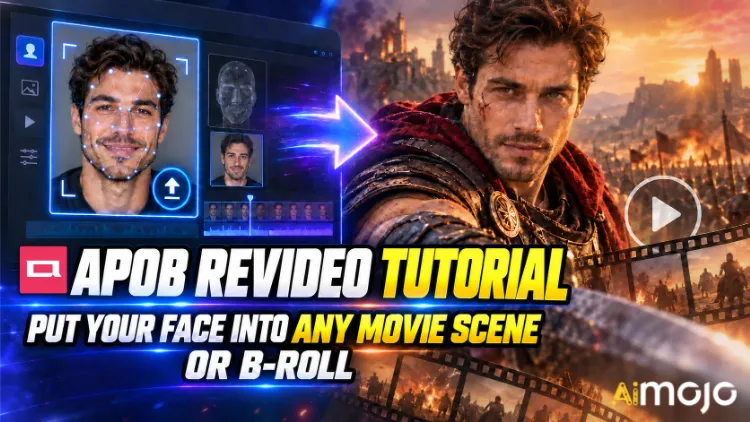
You've seen those clips. Somebody's face doing the slow-motion hallway walk from a thriller. A random creator suddenly starring in a car commercial that clearly cost six figures to shoot. Nobody rented a RED camera. Nobody booked a location.
APOB ReVideo is the button behind a lot of those posts. Upload a short clip, upload one reference image, hit generate, and the person in that footage gets replaced by your character — same walk, same hand gestures, same camera push-in, same background. The performance stays. The face and body change.
This is not a face-paste filter that wobbles every time the head turns. APOB AI's ReVideo runs on Wan 2.2 Animate style motion transfer, meaning it reads the original clip as a motion skeleton and rebuilds a new performer on top of it. Big difference, and you'll feel it the first time you test a dance clip.
Below is the actual workflow, the credit math nobody tells you upfront, the source clips that break it, and the fixes that take a mushy render to something postable.
TL;DR — The 30-Second Version
| メッセージ | 率直な答え |
|---|---|
| それは何をしますか? | Swaps the character in an existing video with your face or AI model, motion intact |
| Engine behind it | Wan 2.2 Animate (motion + identity transfer) |
| What you upload | One short source video + one reference image |
| 費用 | ~26 credits per second of output |
| 出入り自由 | 80 free credits daily = roughly 3 seconds per day, no card needed |
| クリップの長さ | Short clips rule. Check your uploader's limit before trusting a long file |
| ベスト | Movie-scene edits, B-roll inserts, UGC ads, dance trends, faceless channels |
| 必要なスキル | Zero. If you can upload a file, you're qualified |
What Is APOB ReVideo, Actually?
ReVideo sits inside the APOB AI video workspace alongside Image to Video, Camera Movement, Talking Avatar, and リップシンク. Think of it as the “re-do this footage with a different cast” module.
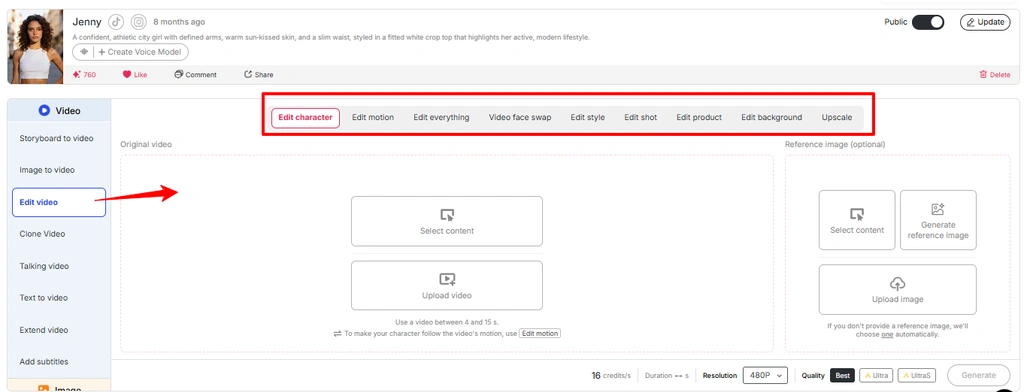
It covers a few jobs under one roof:
ショートバージョン: APOB ReVideo re-processes footage you already have instead of hallucinating a brand-new video from a text prompt. That's why the output feels grounded. You're borrowing real physics from a real clip.
注意: APOB’s latest interface places many video editing workflows inside 編集ビデオ. If ReVideo is not shown as a separate option, access the same workflow from the Edit Video section.
Why Motion Transfer Beats Text-to-Video Here
Text-to-video is great at vibes and terrible at specific choreography. Ask a prompt-based generator for “man spins, points at camera, smirks on beat three” and you'll roll the dice twenty times. ReVideo skips the dice entirely — the beat-three smirk is already in your source file. The model just re-casts it.
Use image from media “Video Edit Feature APOB AI” and change the alt text to “Edit motion in APOB Video editing feature”
For creators who've found one hook structure that performs, this is the whole ballgame. One winning clip becomes ten variations with ten different faces.

Before You Touch the Generate Button: Your Prep Checklist
それ's it. No timeline, no keyframes, no masking, no rotoscoping.
Step-by-Step: The APOB ReVideo Tutorial

Step — Log In and Grab Your Free Credits
頭に APOB AI アプリ and sign in. Your 80 daily credits drop into the account on their own. At roughly 26 credits per second, that's about three seconds of free ReVideo output per day — enough for one proper test, not enough for a batch. Budget accordingly.
👉 プロの動き: APOB runs an active Discord. During feature pushes they've handed out around 1,000 bonus credits to creators who share their generated clips back with the community. If you're planning volume, that's free runway.
Step — Build or Upload Your Character
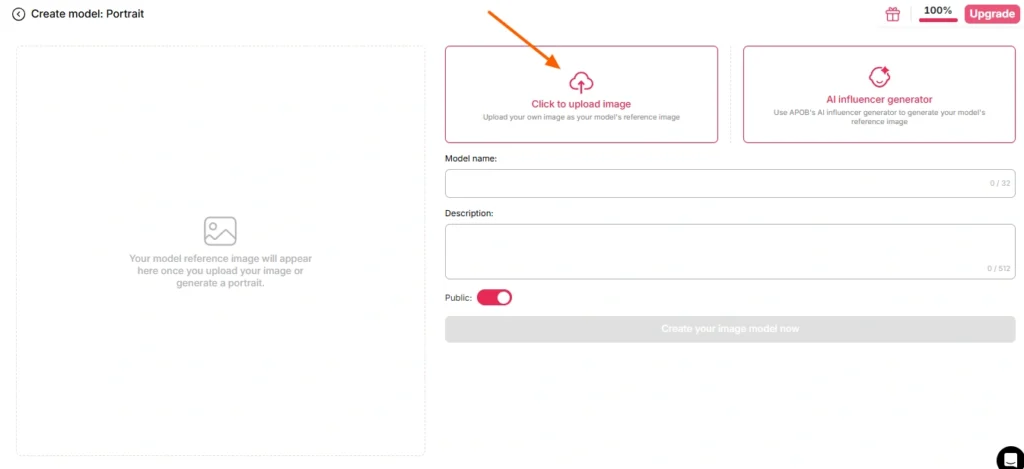
Two paths here:
Path A — Use your own face. Upload a clear, front-facing, well-lit photo. No sunglasses, no heavy shadows, no motion blur, no group shot where the model has to guess which person you mean.
Path B — Build an AI model first. Go to the create portrait model section and generate a persona through the AI influencer generator. Set gender, age, nationality, hair, eye colour, outfit. This is the smarter route for anyone running a recurring channel, because APOB's face-lock keeps that identity consistent across hundreds of future renders. One character, infinite clips, recognisable brand.
If you skip the reference image entirely, APOB defaults to your saved AI image. Handy, occasionally surprising.
Step — Pick Your Source Footage
This step decides 80% of your output quality. Not the model. Not the settings. The source clip.
| Source Clip Trait | 結果 |
|---|---|
| Clear single subject, centre frame | ✅ Clean swap |
| Stable lighting throughout | ✅ Consistent skin tone |
| Visible body movement | ✅ Motion reads properly |
| Subject walks behind objects | ⚠️ Occlusion artefacts |
| Fast whip pans, heavy blur | ❌ Identity drifts |
| Crowded frame, multiple people | ❌ Model picks the wrong target |
| Low-res, compressed, re-uploaded 4x | ❌ Mush |
No footage of your own? APOB's built-in generators — Build Your Own, Complete Set, Expert mode, Image to Video — will produce a clip you can then feed straight into ReVideo. Full loop, one platform.
Step — Open ReVideo and Load Both Files
Left sidebar → Video tab → ReVideo.
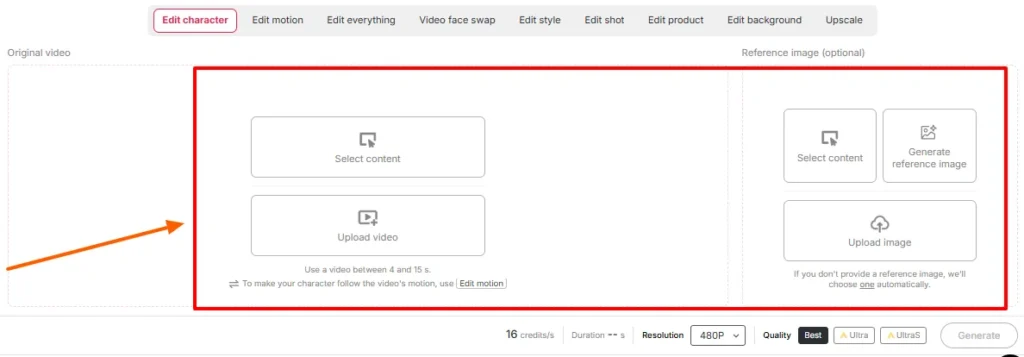
Drop in:
Confirm the duration and quality settings on screen. Check the length limit your workspace displays that day — APOB's original ReVideo rollout capped clips at around five seconds, and newer Wan-powered pages advertise support for considerably longer files. The uploader tells the truth; the blog posts lag behind releases.
Step — Generate and Wait
Hit generate. The model maps your reference onto the source performance while holding the background steady.
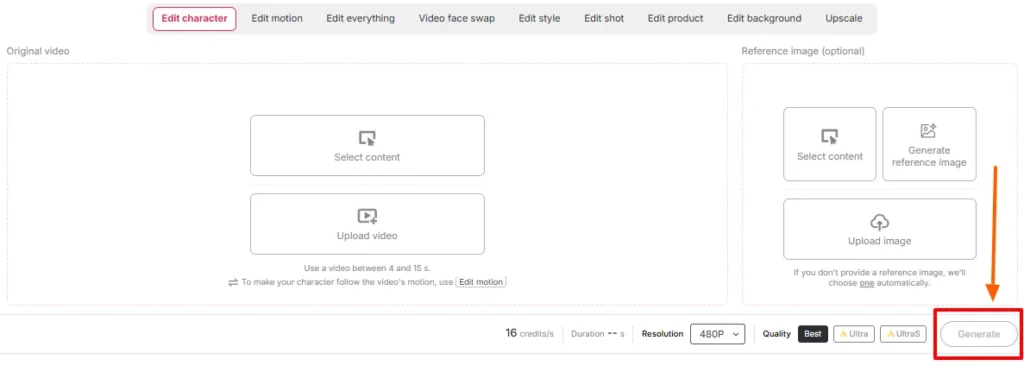
Render time scales with clip length and quality tier. Don't refresh. Don't panic-generate a second job on the same credits.
Step — Review Side by Side
Play the original next to the output. Specifically check:
もし何か's off, the fix is almost always upstream — swap the reference image or trim to a cleaner section of the source. Re-rolling the same inputs rarely rescues a bad pairing.
Step — Finish It Off With the Rest of the Stack
A raw ReVideo output is a component, not a finished post. Stack it:
Movie Scene vs B-Roll: Two Different Playbooks
These sound similar. They behave nothing alike.
Playbook A — The Movie Scene Insert
Cinematic footage is graded, lit dramatically, and usually shot on long lenses with shallow depth of field. That's a gift and a trap.
これを行う:
避ける: rapid-cut action sequences, heavy practical smoke, extreme silhouettes, shots where the subject is half out of frame.
Playbook B — The B-Roll Drop-In
B-roll is the sleeper use case and honestly where most of the money is. Stock-style footage — someone walking through an office, unboxing a product, sipping coffee by a window, holding a phone toward camera — is clean, evenly lit, and single-subject. It's practically engineered for character replacement.
これを行う:
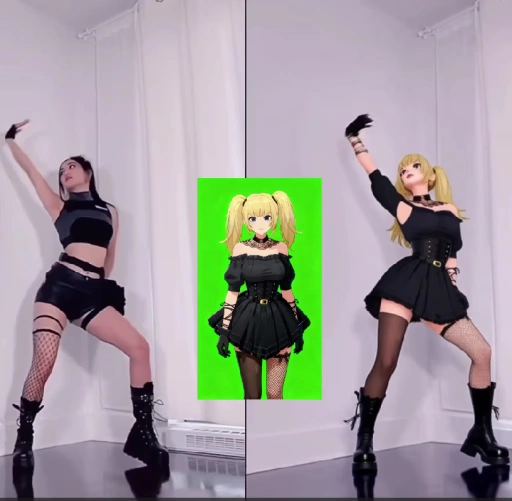
This is the workflow behind a lot of AI influencer accounts, faceless channels, and affiliate product pages running right now.
Credit Math: What Things Actually Cost
| 出力長 | Approx. Credits | Free-Tier Reality |
|---|---|---|
| 1第二 | 〜26 | 快適 |
| 3 seconds | 〜78 | Your full daily allowance |
| 5 seconds | 〜130 | Needs 2 days free, or a paid plan |
| 10 seconds | 〜260 | Paid territory |
| Batch of 5 × 5s variations | 〜650 | Plan the subscription |
リアリティチェック: free credits are for testing inputs, not producing a content calendar. Run your reference image tests at one second each. Once a pairing looks right, spend on the full-length render.
Common ReVideo Fails and How to Fix Them Fast
| 何が悪かったのか | Why | 修正 |
|---|---|---|
| Face shifts identity mid-clip | Reference image too small or angled | Re-upload a front-facing, high-res portrait |
| Weird halo around hair | Busy background behind subject's | Choose a source clip with cleaner separation |
| Hands go abstract | Fast gesture + compression | Trim to the slower section of the movement |
| Skin tone mismatch | Reference lighting vs scene lighting clash | Regenerate the reference under similar lighting |
| Wrong person swapped | Multiple subjects in frame | Crop or pick a single-subject clip |
| Output feels pasted-on | Source lacked real body motion | Use footage with visible full-body movement |
| Output too short to post | Credit cap hit | Use Video Extender, or stitch two renders |
Where APOB ReVideo Beats a Standard Face Swap
| Why ReVideo Wins | Basic AI フェイススワップ | APOB ReVideo |
|---|---|---|
| 何が変わるか | Face region only | Face, body, outfit, overall character |
| Motion source | Original, untouched | Original performance preserved and re-rendered |
| 同一性の一貫性 | Per-clip, varies | Face-lock across your entire library |
| Background control | なし | ReBackground available |
| スタイルコントロール | なし | ReStyle available |
| クライアントの使いやすさを | One-off gags | Repeatable production pipelines |
A face swap gives you a joke. ReVideo gives you a cast member you can keep using.
Real Use Cases People Are Running Right Now
The Part Most Tutorials Skip: Consent, Copyright, and Not Getting Sued
Putting your face into a movie scene is fun. Putting someone else's face into one, or redistributing studio footage, is a different situation entirely. Handle this properly:
Licensed stock B-roll plus an AI persona is the clean, scalable, commercially safe combination. Build there.
Six Pro Tips From Actual Testing
- Test at one second before committing. Cheapest possible way to check an image-clip pairing.
- Build the portrait model once, reuse forever. Face-lock consistency is the entire reason a virtual persona earns followers.
- Vertical source in, vertical output out. Don't crop a horizontal render and hope.
- Bright, even source lighting wins every time. Moody grading looks great and swaps badly.
- Save your best source clips as templates. A performing hook is an asset. Re-cast it monthly.
- Batch on credit-refresh days. Free credits reset daily. Stack tests across a week before a paid render push.
FAQs About APOB ReVideo
What is APOB ReVideo used for?
APOB ReVideo replaces the character in an existing video with your face, a reference image, or an AI influencer model, while keeping the original motion, gestures, camera flow, and background intact. It's used for movie-scene edits, B-roll inserts, UGC ads, dance trends, and AI インフルエンサーコンテンツ。
Is APOB ReVideo free?
そこに's a free tier with 80 credits delivered daily and no card required. At roughly 26 credits per second, that funds about three seconds of output per day — fine for testing, thin for production. Paid plans handle longer clips and batches.
How long can an APOB ReVideo clip be?
The original rollout worked best with clips of a few seconds, and newer Wan-powered pages list support for longer uploads. Check the length limit displayed in your workspace, since it moves with each model update.
Do I need to create an AI model first?
No. You can upload a reference image directly. But building a portrait model gives you consistent identity across every future render, which matters a lot for anyone running a recurring account.
どの AI engine powers APOB ReVideo?
It runs on Wan 2.2 Animate style motion transfer, which reads movement from your source clip and rebuilds a new character on that motion structure rather than generating video from scratch.
Can APOB ReVideo swap the background too?
Yes — ReBackground handles scene replacement when the original location doesn't suit your edit. ReCharacter alone keeps the background exactly as shot.
Does it work with anime, 3D renders, and non-human characters?
It does. Illustrated characters, 3D models, and even doll or figurine reference images work as the replacement subject, which opens up stylised and mascot-led content.
Why does my output look blurry or distorted?
Almost always a source problem. Compressed footage, fast camera motion, occluded subjects, or a low-resolution reference image degrade the result. Swap the inputs before re-rolling.
Can I use APOB ReVideo videos commercially?
Generally yes, provided you hold rights to the source footage and the likeness involved. AI-generated personas on licensed or owned footage is the safest commercial setup.
How does this compare to a regular AI face swapper?
A face swapper edits the face region. ReVideo replaces the whole character — face, body, outfit, and style — while preserving the original performance. It's built for full-body character replacement, not single-frame gags.
Can I put myself into a movie scene legally?
For private experiments, generally fine. Publishing or monetising modified studio footage is a copyright issue regardless of the swap, and inserting anyone else's face without consent is a separate legal problem. Licensed stock and public-domain clips keep you clear.
What source clips give the best results?
Single subject, centre frame, even lighting, visible body movement, minimal occlusion, and decent resolution. Product demos, walk-and-talk shots, and dance clips are consistently strong.
ファイナルテイク
APOB ReVideo is the rare AI video feature where the output quality is mostly in your hands, not the model's. Feed it a clean single-subject clip and a sharp reference image and it produces something you can post. Feed it a blurry crowd shot and a selfie taken at 2am and it produces exactly what you'd expect.
The real advantage isn't the one-off movie-scene edit that gets you a few thousand views. It's the production pipeline: one consistent AI ペルソナ, one library of proven source clips, and the ability to re-cast a winning format as many times as your credits allow. That's how faceless channels, UGC ad shops, and AI influencer accounts are actually operating in 2026.
Start on the free 80 credits. Test three reference images at one second each. Find the pairing that holds identity through a head turn. Then scale it.
The footage already exists. You're just changing who's それである。
AiMojoのおすすめ:


 ボーナス: 200ドルの「AI 登録すると「マスタリーツールキット」が無料になります!



