Untuk alur kerja kreatif yang baru, aset perlu fleksibel dan serbaguna di seluruh proyek dan di berbagai fase produksi. Desainer dapat menggunakan lingkungan 3D fleksibel yang dibuat oleh blok desain yang mudah diedit untuk menghindari perlunya duplikasi model desain.
Komponen modular semacam ini mendukung revisi yang lebih cepat, fleksibilitas kustomisasi yang lebih besar, dan penggunaan kembali aset. Dengan Tripo 3D, proses ini diotomatiskan, dan aset 3D terstruktur dihasilkan dari referensi visual dan deskripsi. Komponen yang dapat diskalakan membantu mendukung kualitas dan konsistensi sepanjang pengembangan seiring dengan berkembangnya persyaratan proyek.
Apa Itu Blok Desain yang Dapat Diedit?
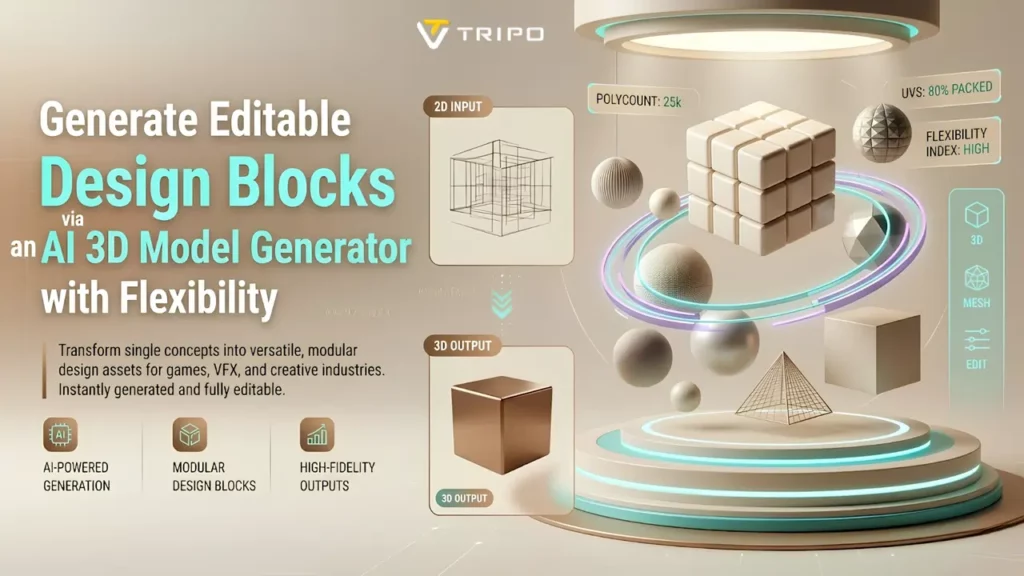
Blok desain yang dapat diedit adalah elemen 3D modular yang dapat digunakan kembali dan dimodifikasi. Blok ini berfungsi sebagai blok bangunan yang dapat disesuaikan dengan berbagai adegan, produk, dan konsep visual. Fleksibilitas sangat penting karena persyaratan produksi dapat berubah selama pengembangan.
Struktur yang dapat digunakan kembali mengurangi kebutuhan pembangunan ulang dan mendukung iterasi desain yang efisien. Tripo 3D membantu mengatur aset dengan cara yang menyederhanakan modifikasi selanjutnya. Komponen-komponen ini dapat meningkatkan skalabilitas proyek, memungkinkan desainer untuk menambahkan lebih banyak adegan secara efisien. Mereka juga meningkatkan fleksibilitas kreatif dengan memungkinkan bagian-bagian individual diubah tanpa memodifikasi seluruh rakitan.
Membangun Pustaka Aset Modular dengan Tripo 3D
Tripo 3D's Alat pembuatan memungkinkan pengguna untuk membangun koleksi aset yang dapat digunakan kembali secara efisien. Desainer dapat membuat komponen dari petunjuk, sketsa, atau referensi visual dan menyimpannya untuk digunakan kembali. Platform ini mendukung pengembangan modul yang konsisten secara efisien untuk berbagai proyek.
An AI Pembuat model 3D Hal ini membantu dalam pengembangan aset terstruktur dengan geometri yang terorganisir. Keuntungan lain dari pembuatan berbasis gambar adalah menyediakan metode tambahan untuk pembuatan aset di berbagai alur kerja. Aset terpusat meningkatkan efisiensi manajemen dan menyederhanakan pembaruan desain di berbagai produksi.
Keunggulan Komponen yang Dapat Diedit yang Dihasilkan oleh AI
Komponen yang dihasilkan AI dapat menyederhanakan pembuatan konten sekaligus mendukung standar kualitas yang konsisten. Pembuatan otomatis mengurangi tugas pemodelan yang berulang, memungkinkan modifikasi yang lebih cepat dan kustomisasi yang lebih efisien melalui geometri terstruktur.
Tim dapat membuat banyak desain tanpa harus membangun ulang aset dari awal. Perangkat lunak ini mendukung konversi gambar ke 3D yang efisien dan dapat digunakan sebagai komponen yang dapat digunakan kembali. Kualitas mesh yang konsisten dapat mendukung alur kerja selanjutnya, sementara opsi kustomisasi yang diperluas membantu tim beradaptasi dengan perubahan persyaratan dan tujuan kreatif.

Langkah-langkah untuk menghasilkan blok desain yang dapat diedit melalui sebuah AI Generator model 3D untuk fleksibilitas.
Langkah 1: Impor Referensi untuk Desain Modular
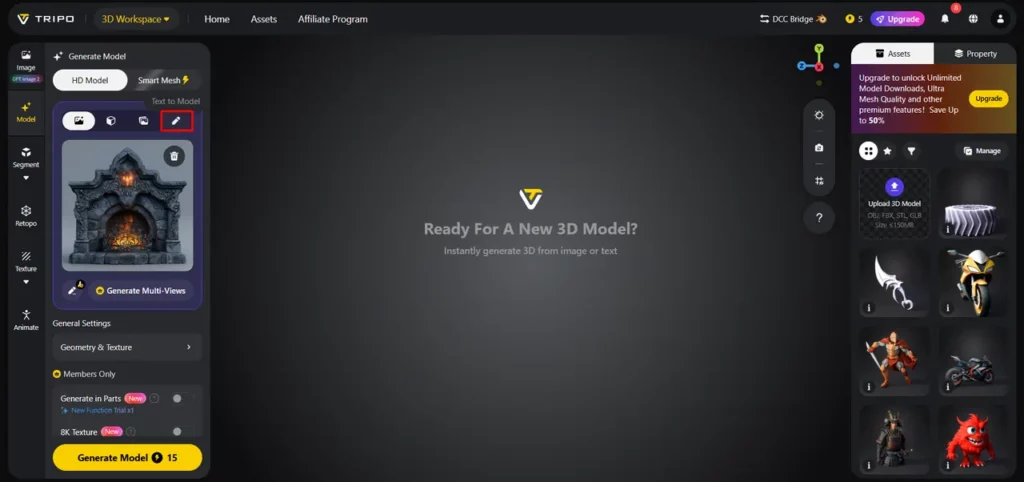
- Pertama, Anda perlu mengakses Tripo 3D dan mendaftar. Selanjutnya, buka "Model" tab yang terdapat pada bilah menu vertikal sebelah kiri.
- Di bawah menu, klik pada “Model HD”Anda dapat membuat model tersebut baik menggunakan perintah teks atau melalui unggahan gambar.
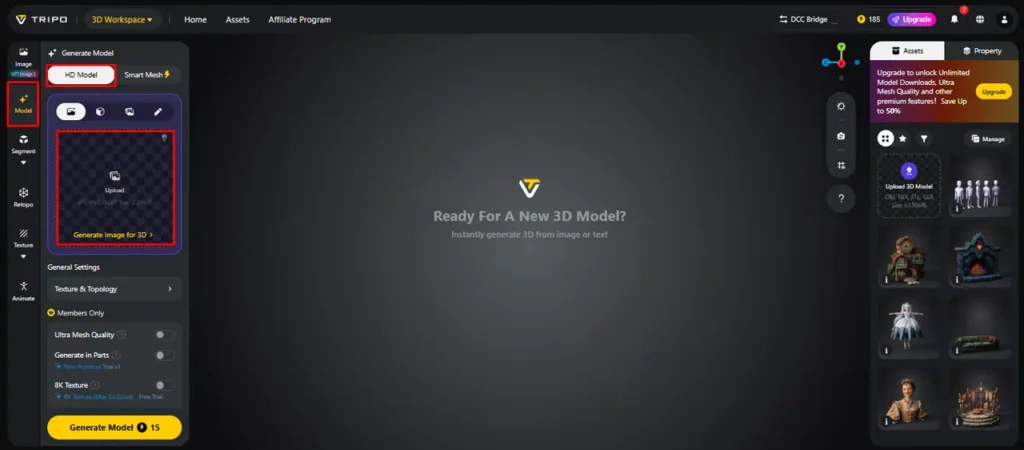
- Anda dapat menyeret dan melepas untuk mengunggah gambar, atau Anda juga dapat mengunggah gambar dari lokasi tertentu di perangkat Anda menggunakan “Unggah” Tab.
- Jika Anda tidak memiliki gambar, klik pada “Teks ke model” Gunakan tab untuk menghasilkan model menggunakan petunjuk teks deskriptif.
Langkah 2: Sesuaikan Struktur untuk Pengeditan yang Mudah
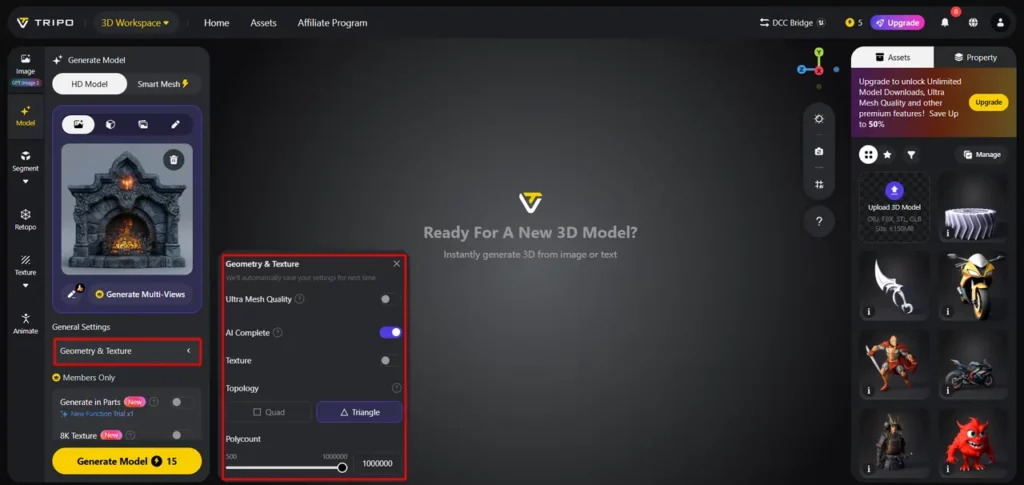
- Di bawah "Pengaturan Umum" Pada tab tersebut, Anda dapat mengizinkan atau tidak mengizinkannya. AI untuk menghasilkan sepenuhnya secara mandiri dengan beralih "AI menyelesaikan"Atau Anda dapat mengaktifkan tekstur dan memilih kustom. “Kualitas Tekstur” seperti 2K, 4K, atau 8K.
- Anda juga bisa menyalakan “PBR” untuk sifat reflektif material yang akurat.
- Untuk karakteristik topologi yang lebih baik, pilih salah satu “Keempat” or "Segi tiga" topologi.
- Anda juga dapat mengatur jumlah poligon kustom.
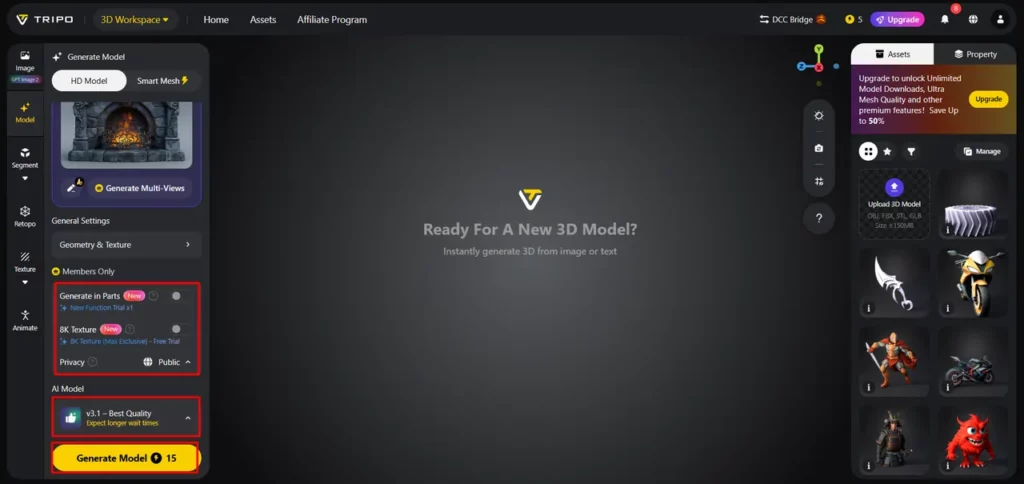
- Kemudian pilih model dari daftar, termasuk v3.1 kualitas terbaik, v3.0 cepat dan seimbang, atau v2.5 versi lama.
- Jika Anda adalah anggota, maka Anda dapat memilih “Hasilkan Secara Bertahap”, “Tekstur 8K”, dan "Pribadi" Pilihan.
- Akhirnya, klik pada “Hasilkan Model” untuk memulai generasi.
Langkah 3: Tinjau dan Ekspor Aset yang Dapat Diedit
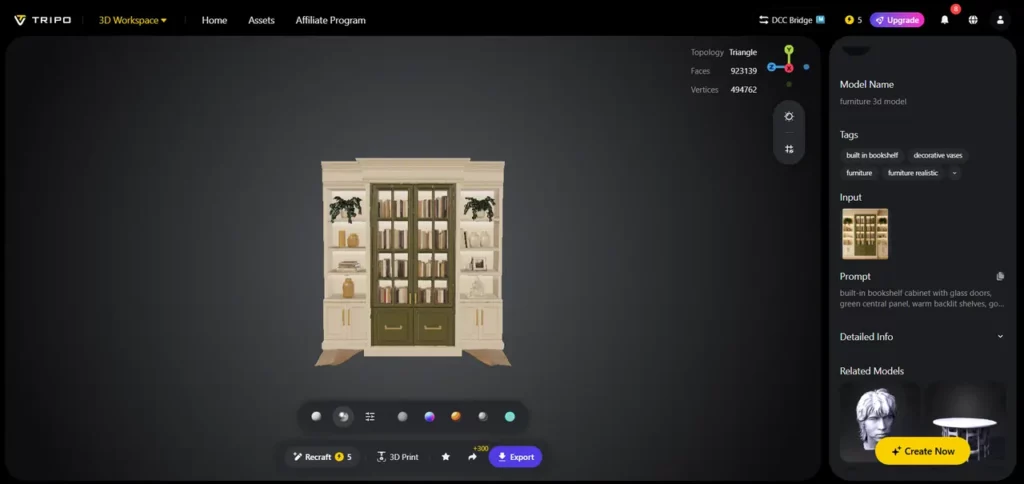
- Tripo 3D memungkinkan tampilan model secara lengkap dalam berbagai gaya seperti “Pandangan yang Solid”, “Gaya Kartun”, “Gaya Sketsa”, “Gaya Hologram”, dan “Tidak menyala” formulir. Anda juga bisa "Menyaring" Desainnya terlihat jelas hingga ke menu bagian bawah.
- Anda juga dapat mengeditnya “Pengaturan Lingkungan” dan pengaturan kamera melalui “Reset Kamera”.
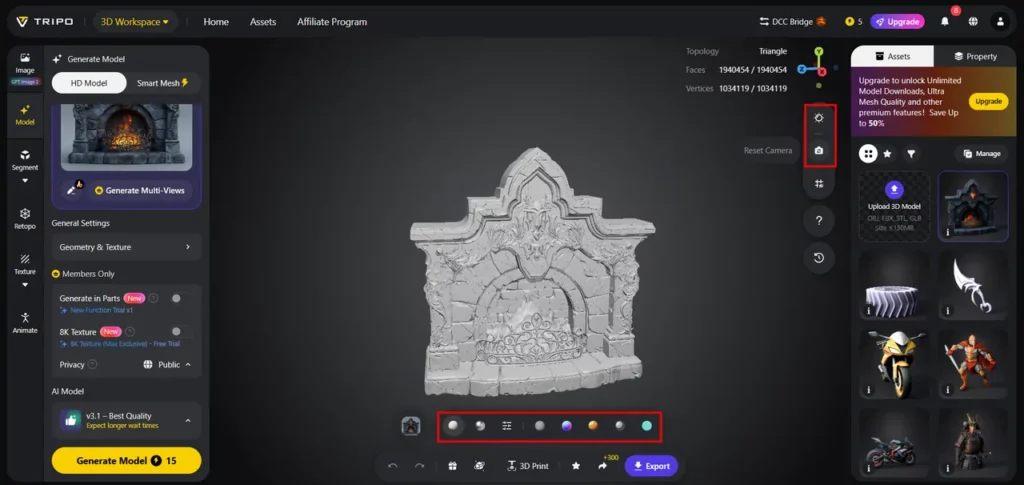
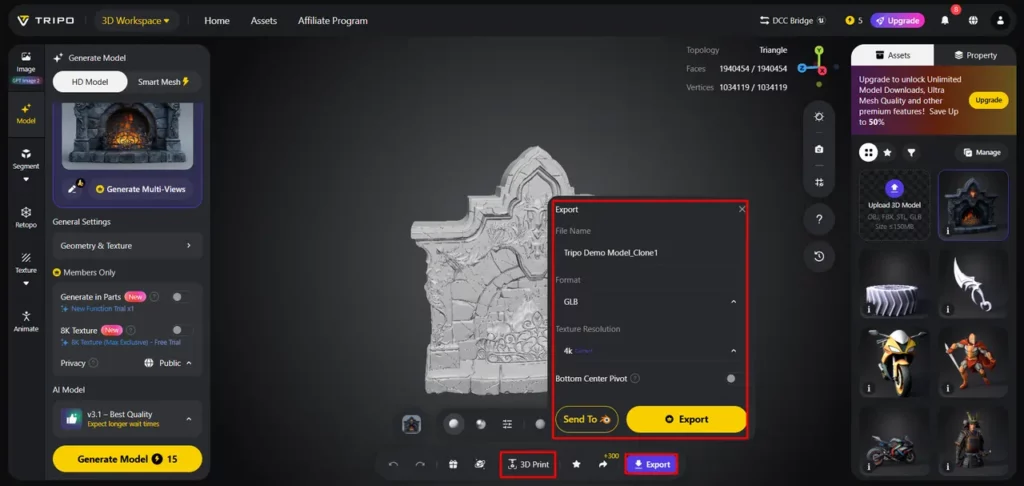
- Jika diperlukan, Anda dapat mencetak desain tersebut menggunakan printer 3D atau membagikannya langsung dengan mengklik “Cetak 3D”.
- Pada akhirnya, klik pada "Ekspor" Pilih tab dari menu bawah. Selanjutnya, pilih resolusi, format, dan nama file, lalu klik lagi pada "Ekspor" untuk menyimpan desain ke perangkat lokal Anda.
Penataan Blok Desain untuk Kegunaan Ulang Maksimal
Berikut beberapa pustaka aset yang dapat digunakan kembali:
Mempertahankan Kemudahan Pengeditan Melalui Geometri yang Bersih
Mempertahankan geometri yang bersih tetap penting untuk fleksibilitas aset jangka panjang dan alur kerja selanjutnya. Topologi yang terorganisir memungkinkan perubahan yang lebih cepat dan mengurangi masalah selama pengeditan. Mesh terstruktur membantu meningkatkan proses penyempurnaan dan mengurangi masalah teknis selama pembaruan aset.
Model yang dihasilkan oleh Tripo 3D mencakup geometri dan topologi terstruktur untuk memudahkan pengelolaan aset. Struktur aset yang terorganisir dengan baik dapat mendukung alur kerja animasi dan rigging sekaligus meningkatkan kompatibilitas dengan perangkat lunak standar industri. Geometri yang rapi membantu menjaga agar aset dapat digunakan kembali dan diadaptasi di berbagai fase proyek di masa mendatang.
Leveraging AI Pembuatan Tekstur untuk Adaptasi Aset yang Fleksibel
Tekstur berkualitas meningkatkan penggunaan kembali blok desain di berbagai aplikasi. Tripo 3D menyertakan sistem tekstur canggih untuk menciptakan material dan detail permukaan yang realistis. Variasi tekstur yang fleksibel sangat berguna bila dikombinasikan dengan alur kerja teks ke model 3D.
Berbagai gaya visual dapat diterapkan tanpa perlu membangun ulang geometri. Berbagai pilihan tekstur menyederhanakan adaptasi aset untuk berbagai kebutuhan branding, presentasi, atau gaya artistik. Kemampuan adaptasi ini membantu menjaga konsistensi selama siklus pengembangan dan membuat proyek tetap relevan.
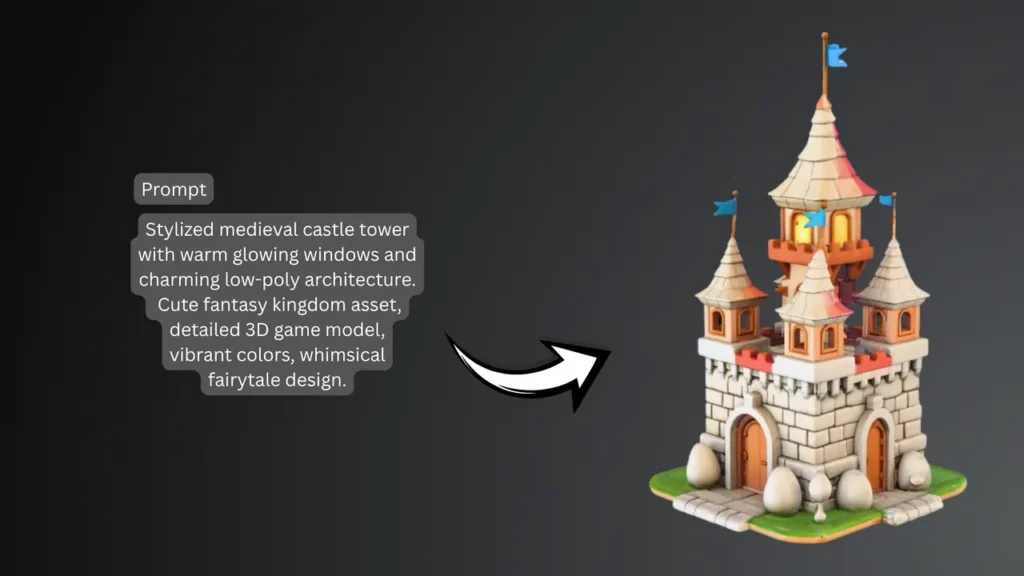
Mengintegrasikan Blok yang Dapat Diedit ke dalam Alur Produksi
Blok desain yang dapat diedit berguna di banyak lingkungan produksi profesional. Aset yang dapat digunakan kembali dapat mempercepat pembuatan level dan pengembangan lingkungan untuk proyek game. Ini menyediakan kerangka kerja yang fleksibel untuk alur kerja visualisasi produk dan menyederhanakan presentasi dan iterasi konsep.
Proyek visualisasi arsitektur sering menggunakan elemen modular untuk membangun tata letak secara efisien. Dengan menghasilkan dan mengadaptasi aset secara efisien, para profesional kreatif dapat mempertahankan alur kerja yang fleksibel di berbagai industri dan aplikasi.
Kesimpulan
Blok desain yang dapat diedit mendukung alur kerja 3D yang terukur dan mudah beradaptasi. Komponen yang dapat digunakan kembali dapat mengurangi tugas berulang, mendukung revisi yang efisien, dan meningkatkan konsistensi produksi. Tripo 3D menyediakan fitur-fitur seperti pembuatan cerdas, geometri terstruktur, tekstur tingkat lanjut, dan kemampuan ekspor yang fleksibel untuk membuat aset modular.
Kemampuan ini memungkinkan para kreator untuk mengembangkan aset untuk berbagai proyek dan kebutuhan yang berubah-ubah. Sebagai AI Seiring perkembangan teknologi, pembuatan konten 3D yang fleksibel dapat menjadi lebih efisien, mudah diakses, dan bermanfaat untuk produksi digital modern.


 BONUS: Dapatkan $200 kami “AI “Mastery Toolkit” GRATIS jika Anda mendaftar!