

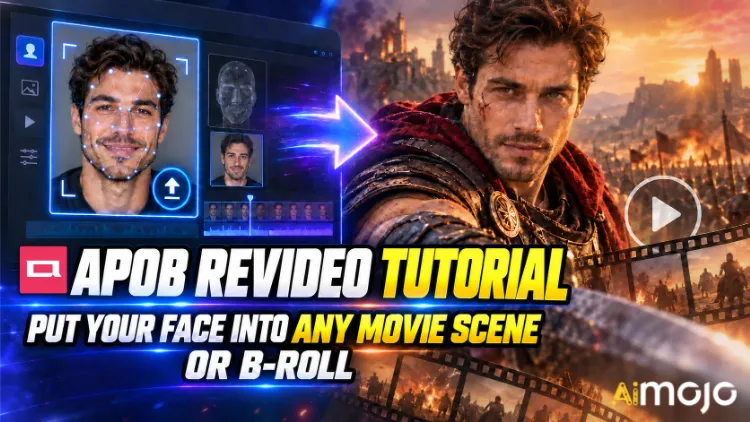
Kamu sudah melihat cuplikan-cuplikan itu. Seseorang's Wajahnya seperti sedang berjalan di lorong dengan gerakan lambat dalam film thriller. Seorang kreator acak tiba-tiba membintangi iklan mobil yang jelas-jelas menghabiskan biaya ratusan ribu dolar untuk pembuatannya. Tidak ada yang menyewa kamera RED. Tidak ada yang memesan lokasi.
APOB ReVideo adalah tombol di balik banyak postingan tersebut. Unggah klip pendek, unggah satu gambar referensi, tekan generate, dan orang dalam rekaman itu akan digantikan oleh karakter Anda — gaya berjalan yang sama, gerakan tangan yang sama, pengambilan gambar yang sama, latar belakang yang sama. Aktingnya tetap sama. Wajah dan tubuhnya berubah.
Ini bukan filter tempel wajah yang bergoyang setiap kali kepala menoleh. APOB AI's ReVideo berjalan menggunakan transfer gerak gaya Wan 2.2 Animate, yang berarti ia membaca klip asli sebagai kerangka gerak dan membangun penampil baru di atasnya. Perbedaan besar, dan Anda akan merasakannya saat pertama kali menguji klip tari.
Berikut adalah alur kerja sebenarnya, perhitungan kredit yang tidak pernah diberitahukan di awal, klip sumber yang menyebabkan masalah, dan perbaikan yang mengubah hasil render yang buram menjadi sesuatu yang layak diposting.
TL;DR — Versi 30 Detik
| Pertanyaan | Jawaban Langsung |
|---|---|
| Apa yang dilakukannya? | Mengganti karakter dalam video yang sudah ada dengan wajah Anda atau AI model, gerakan utuh |
| Mesin di belakangnya | Wan 2.2 Animate (gerakan + transfer identitas) |
| Apa yang Anda unggah | Satu video sumber pendek + satu gambar referensi |
| Biaya | ~26 kredit per detik output |
| Akses gratis | 80 kredit gratis setiap hari = kira-kira 3 detik per hari, tidak perlu kartu. |
| Panjang klip | Klip pendek memang keren. Periksa pengunggah Anda.'s batasi sebelum mempercayai file yang panjang |
| Terbaik untuk | Suntingan adegan film, sisipan B-roll, iklan UGC, tren tari, saluran tanpa wajah. |
| Keterampilan yang dibutuhkan | Nol. Jika Anda dapat mengunggah file, Anda memenuhi syarat. |
Sebenarnya APOB ReVideo itu apa?
ReVideo berada di dalam APOB AI ruang kerja video bersamaan dengan Konversi Gambar ke Video, Pergerakan Kamera, Avatar Berbicara, dan Sinkronisasi bibirAnggap saja ini sebagai modul "rekam ulang cuplikan ini dengan pemeran yang berbeda".
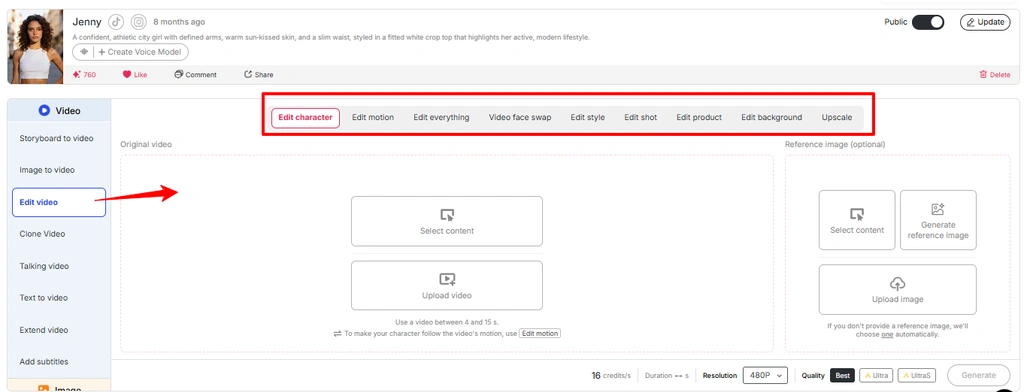
Layanan ini mencakup beberapa pekerjaan di bawah satu atap:
Singkatnya: APOB ReVideo memproses ulang rekaman yang sudah Anda miliki, alih-alih membuat video baru dari perintah teks. Itulah mengapa hasilnya terasa realistis. Anda menggunakan fisika nyata dari klip nyata.
Catatan: Antarmuka terbaru APOB menempatkan banyak alur kerja pengeditan video di dalam Edit Video . Jika ReVideo tidak ditampilkan sebagai opsi terpisah, akses alur kerja yang sama dari bagian Edit Video.
Mengapa Transfer Gerak Lebih Unggul daripada Konversi Teks ke Video di Sini?
Konversi teks ke video sangat bagus dalam menciptakan suasana, tetapi buruk dalam koreografi spesifik. Minta generator berbasis perintah untuk "pria berputar, menunjuk ke kamera, menyeringai pada ketukan ketiga" dan Anda akan melempar dadu dua puluh kali. ReVideo sepenuhnya menghilangkan proses melempar dadu — seringai pada ketukan ketiga sudah ada dalam file sumber Anda. Modelnya hanya mengubahnya.
Gunakan gambar dari media “Fitur Pengeditan Video APOB AI” dan ubah teks alt menjadi “Edit gerakan di fitur pengeditan video APOB”
Bagi para kreator yang telah menemukan satu struktur pengait yang efektif, ini adalah titik puncak kesuksesan. Satu klip yang sukses bisa menjadi sepuluh variasi dengan sepuluh tampilan berbeda.

Sebelum Anda Menekan Tombol Hasilkan: Daftar Periksa Persiapan Anda
Bahwa's Itu saja. Tanpa garis waktu, tanpa keyframe, tanpa masking, tanpa rotoscoping.
Langkah demi Langkah: Tutorial APOB ReVideo
Langkah — Masuk dan Dapatkan Kredit Gratis Anda
Kepala ke APOB AI aplikasi lalu masuk. 80 kredit harian Anda akan masuk ke akun secara otomatis. Dengan perkiraan 26 kredit per detik, itu's Sekitar tiga detik output ReVideo gratis per hari — cukup untuk satu pengujian yang layak, tetapi tidak cukup untuk serangkaian pengujian. Anggarkan sesuai kebutuhan.
👉 Trik jitu: APOB memiliki Discord yang aktif. Selama peluncuran fitur baru, mereka memberikan sekitar 1,000 kredit bonus kepada kreator yang membagikan klip yang mereka buat kembali ke komunitas. Jika Anda berencana membuat banyak konten, itu adalah kesempatan emas.
Langkah — Buat atau Unggah Karakter Anda
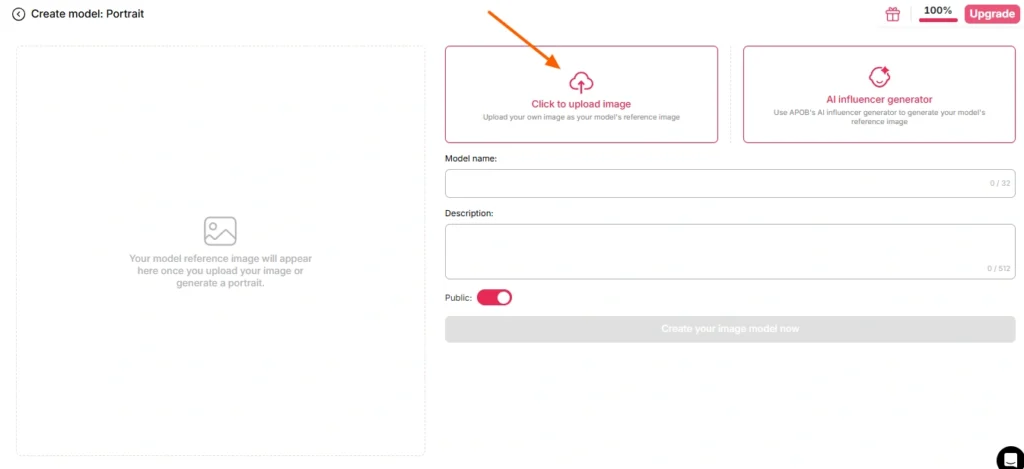
Ada dua jalur di sini:
Jalur A — Gunakan wajah Anda sendiri. Unggah foto yang jelas, menghadap ke depan, dan pencahayaannya bagus. Tanpa kacamata hitam, tanpa bayangan gelap, tanpa efek buram akibat gerakan, dan tanpa foto grup di mana model harus menebak orang mana yang Anda maksud.
Jalur B — Membangun sebuah AI Model pertama. Buka bagian pembuatan model potret dan buat persona melalui AI Generator influencer. Atur jenis kelamin, usia, kewarganegaraan, warna rambut, warna mata, dan pakaian. Ini adalah cara yang lebih cerdas bagi siapa pun yang menjalankan saluran berulang, karena APOB's Face-lock menjaga identitas tersebut tetap konsisten di ratusan render mendatang. Satu karakter, klip tak terbatas, merek yang mudah dikenali.
Jika Anda melewatkan gambar referensi sepenuhnya, APOB akan menggunakan gambar yang telah Anda simpan secara default. AI model Gambar. Praktis, terkadang mengejutkan.
Langkah — Pilih Cuplikan Sumber Anda
Langkah ini menentukan 80% kualitas output Anda. Bukan modelnya. Bukan pengaturannya. Melainkan klip sumbernya.
| Ciri Klip Sumber | Hasil |
|---|---|
| Subjek tunggal yang jelas, di tengah bingkai. | ✅ Penggantian bersih |
| Pencahayaan stabil di seluruh area | ✅ Warna kulit yang konsisten |
| Gerakan tubuh yang terlihat | ✅ Gerakan terbaca dengan benar |
| Subjek berjalan di belakang objek. | ⚠️ Artefak oklusi |
| Gerakan panning cepat, blur yang kuat. | ❌ Pergeseran identitas |
| Gambar penuh sesak, banyak orang | ❌ Model memilih target yang salah |
| Resolusi rendah, terkompresi, diunggah ulang 4x | ❌ Bubur |
Tidak punya rekaman sendiri? APOB's Generator bawaan — Buat Sendiri, Set Lengkap, Mode Pakar, Gambar ke Video — akan menghasilkan klip yang kemudian dapat Anda masukkan langsung ke ReVideo. Putaran penuh, satu platform.
Langkah — Buka ReVideo dan Muat Kedua File
Bilah sisi kiri → tab Video → ReVideo.
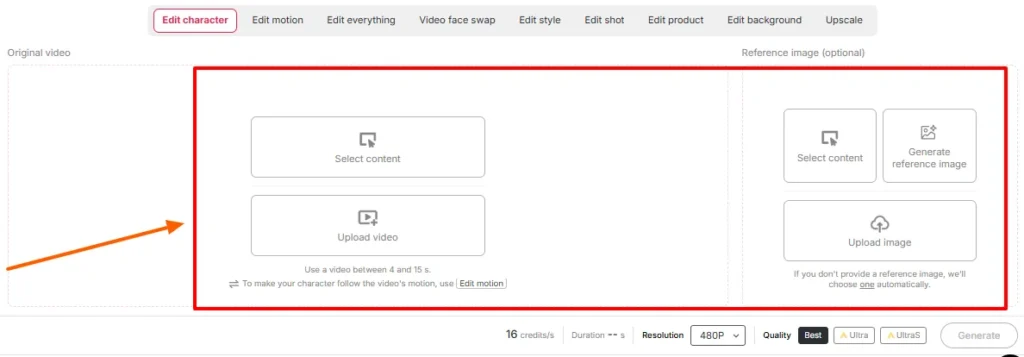
Mampir:
Konfirmasikan pengaturan durasi dan kualitas di layar. Periksa batas panjang yang ditampilkan ruang kerja Anda pada hari itu — APOB's Peluncuran ReVideo awal membatasi klip sekitar lima detik, dan halaman-halaman baru yang didukung WAN mengiklankan dukungan untuk file yang jauh lebih panjang. Pengunggah mengatakan yang sebenarnya; postingan blog tertinggal dari rilis.
Langkah — Hasilkan dan Tunggu
Klik "Generate". Model akan memetakan referensi Anda ke kinerja sumber sambil menjaga latar belakang tetap stabil.
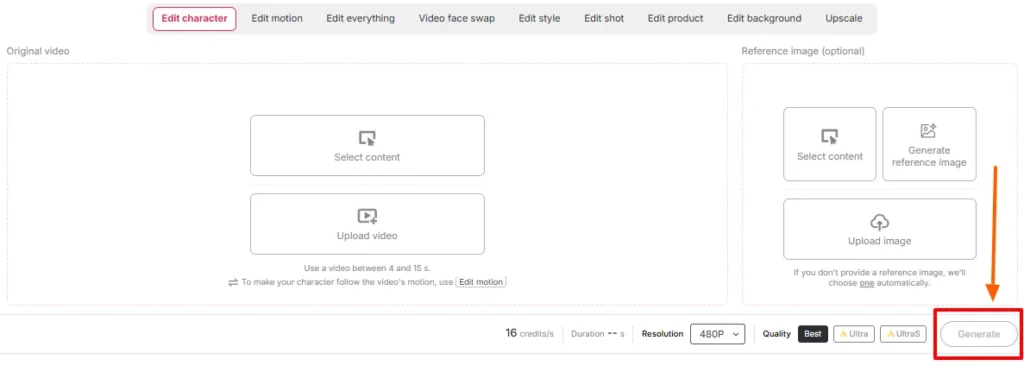
Skala waktu rendering disesuaikan dengan panjang klip dan tingkat kualitas. Jangan di-refresh. Jangan panik dan membuat pekerjaan kedua pada kredit yang sama.
Langkah — Tinjau Berdampingan
Putar rekaman aslinya di samping output. Secara khusus, periksa hal-hal berikut:
Jika sesuatu's Jika masalahnya bukan itu, perbaikannya hampir selalu ada di hulu — ganti gambar referensi atau pangkas ke bagian sumber yang lebih bersih. Menggunakan input yang sama berulang kali jarang memperbaiki masalah pemasangan yang buruk.
Langkah — Selesaikan dengan Sisa Tumpukan
Output mentah ReVideo adalah sebuah komponen, bukan hasil akhir. Susunlah:
Adegan Film vs Cuplikan di Balik Layar: Dua Strategi yang Berbeda
Kedengarannya mirip. Tapi perilakunya sama sekali berbeda.
Buku Panduan A — Sisipan Adegan Film
Rekaman sinematik diberi sentuhan warna, pencahayaan dramatis, dan biasanya diambil menggunakan lensa tele dengan kedalaman bidang yang dangkal. Itu's sebuah hadiah dan sebuah jebakan.
Melakukan hal ini:
Hindari: adegan aksi dengan potongan cepat, asap buatan yang berlebihan, siluet yang ekstrem, dan pengambilan gambar di mana subjek sebagian berada di luar bingkai.
Playbook B — Sesi Tambahan Cuplikan Video Tambahan
B-roll adalah penggunaan yang kurang diperhatikan dan jujur saja, di sinilah sebagian besar uang berada. Cuplikan bergaya stok — seseorang berjalan melalui kantor, membuka kemasan produk, menyeruput kopi di dekat jendela, memegang ponsel ke arah kamera — bersih, pencahayaannya merata, dan subjeknya tunggal. Ini praktis dirancang untuk penggantian karakter.
Melakukan hal ini:
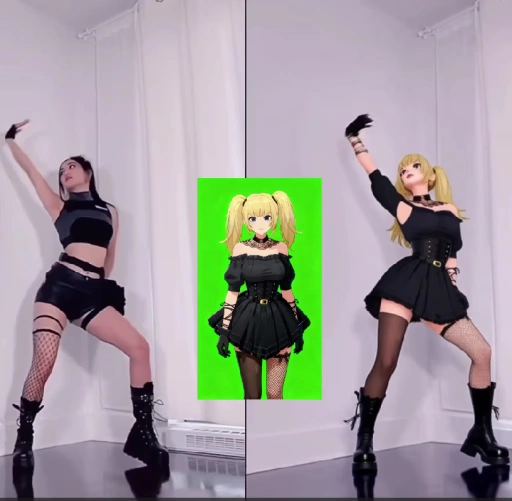
Inilah alur kerja di balik banyak hal AI Akun influencer, saluran anonim, dan halaman produk afiliasi yang sedang berjalan saat ini.
Matematika Kredit: Berapa Sebenarnya Biaya Suatu Barang?
| Panjang Output | Perkiraan Kredit | Realita Tingkat Gratis |
|---|---|---|
| 1 kedua | ~ 26 | Nyaman |
| 3 detik | ~ 78 | Jatah harian Anda sepenuhnya |
| 5 detik | ~ 130 | Membutuhkan uji coba gratis 2 hari, atau paket berbayar. |
| 10 detik | ~ 260 | Wilayah berbayar |
| Kumpulan variasi 5 × 5 | ~ 650 | Rencanakan langganan |
Penting untuk diingat: kredit gratis digunakan untuk menguji input, bukan untuk membuat kalender konten. Jalankan pengujian gambar referensi Anda selama satu detik untuk setiap gambar. Setelah pasangan gambar terlihat tepat, baru gunakan kredit untuk rendering penuh.
Kesalahan Umum Saat Menggunakan ReVideo dan Cara Memperbaikinya dengan Cepat
| Apa yang salah | Mengapa | Fix |
|---|---|---|
| Wajah berubah identitas di tengah klip. | Gambar referensi terlalu kecil atau miring. | Unggah ulang foto potret tampak depan beresolusi tinggi. |
| Lingkaran cahaya aneh di sekitar rambut | Latar belakang yang ramai di belakang subjek's kepala | Pilih klip sumber dengan pemisahan yang lebih bersih. |
| Tangan menjadi abstrak | Gerakan cepat + kompresi | Pangkas ke bagian gerakan yang lebih lambat. |
| Ketidaksesuaian warna kulit | Bentrok antara pencahayaan referensi dan pencahayaan adegan. | Regenerasikan referensi di bawah pencahayaan serupa. |
| Orang yang salah tertukar | Beberapa subjek dalam bingkai | Pangkas atau pilih klip yang berfokus pada satu subjek. |
| Hasil akhirnya terasa seperti ditempelkan begitu saja. | Sumber tersebut tidak memiliki gerakan tubuh yang nyata. | Gunakan rekaman yang menampilkan gerakan seluruh tubuh yang terlihat jelas. |
| Output terlalu pendek untuk diposting. | Dampak pada batas kredit | Gunakan Video Extender, atau gabungkan dua hasil render. |
Di mana APOB ReVideo Mengungguli Pertukaran Wajah Standar
| Mengapa ReVideo Menang | Dasar AI Swap Wajah | Video Ulang APOB |
|---|---|---|
| Perubahan apa? | Hanya area wajah | Wajah, tubuh, pakaian, karakter secara keseluruhan |
| Sumber gerakan | Asli, tidak tersentuh | Pertunjukan asli dipertahankan dan dipentaskan ulang. |
| Konsistensi identitas | Per klip, bervariasi | Kunci wajah di seluruh perpustakaan Anda |
| Kontrol latar belakang | None | Latar belakang tersedia |
| Kontrol gaya | None | ReStyle tersedia |
| Dibangun untuk | Lelucon sekali tayang | Saluran produksi yang dapat diulang |
Fitur pertukaran wajah memberi Anda lelucon. ReVideo memberi Anda anggota pemeran yang dapat terus Anda gunakan.
Contoh Kasus Penggunaan Nyata yang Sedang Dijalankan Orang Saat Ini
Bagian yang Sering Dilewati dalam Sebagian Besar Tutorial: Persetujuan, Hak Cipta, dan Menghindari Gugatan Hukum
Menempatkan wajahmu dalam sebuah adegan film itu menyenangkan. Menempatkan wajah orang lain itu tidak menyenangkan.'s Menghadirkan satu wajah sekaligus, atau mendistribusikan ulang rekaman studio, adalah situasi yang sama sekali berbeda. Tangani ini dengan benar:
Cuplikan B-roll berlisensi ditambah AI Persona adalah kombinasi yang bersih, terukur, dan aman secara komersial. Bangunlah di sana.
Enam Tips Profesional Berdasarkan Pengujian Nyata
- Lakukan pengujian satu detik sebelum berkomitmen. Cara termurah untuk memeriksa pasangan gambar-klip.
- Buat model potret sekali, gunakan kembali selamanya. Konsistensi penguncian wajah Inilah alasan utama mengapa sebuah persona virtual mendapatkan pengikut.
- Sumber input vertikal, output output vertikal. Jangan memotong gambar horizontal dan berharap berhasil.
- Pencahayaan sumber yang terang dan merata selalu menjadi pilihan terbaik. Penilaian Moody terlihat bagus tetapi pertukarannya buruk.
- Simpan klip sumber terbaik Anda sebagai templat. Sebuah hook yang menarik adalah aset. Perbarui setiap bulannya.
- Pemrosesan batch pada hari pengisian ulang kredit. Kredit gratis direset setiap hari. Lakukan pengujian bertahap selama seminggu sebelum peluncuran rendering berbayar.
Pertanyaan yang Sering Diajukan (FAQ) Tentang APOB ReVideo
APOB ReVideo digunakan untuk apa?
APOB ReVideo mengganti karakter dalam video yang sudah ada dengan wajah Anda, gambar referensi, atau AI Model influencer, sambil tetap mempertahankan gerakan, gestur, alur kamera, dan latar belakang aslinya.'s digunakan untuk pengeditan adegan film, sisipan B-roll, iklan UGC, tren tari, dan AI Konten influencer.
Apakah APOB ReVideo gratis?
Sana's Tersedia paket gratis dengan 80 kredit yang diberikan setiap hari dan tanpa perlu kartu. Dengan perkiraan 26 kredit per detik, itu cukup untuk membiayai sekitar tiga detik output per hari — baik untuk pengujian, tetapi kurang memadai untuk produksi. Paket berbayar menangani klip dan batch yang lebih panjang.
Berapa lama durasi klip APOB ReVideo?
Peluncuran awal paling efektif dengan klip berdurasi beberapa detik, dan halaman berbasis WAN yang lebih baru mendukung unggahan yang lebih panjang. Periksa batas panjang yang ditampilkan di ruang kerja Anda, karena batas tersebut berubah setiap kali model diperbarui.
Apakah saya perlu membuat sebuah AI Model dulu?
Tidak. Anda dapat mengunggah gambar referensi secara langsung. Tetapi membuat model potret memberi Anda identitas yang konsisten di setiap render di masa mendatang, yang sangat penting bagi siapa pun yang menjalankan akun berulang.
Yang AI Apakah mesin tersebut memberi daya pada APOB ReVideo?
Perangkat lunak ini menggunakan transfer gerakan ala Wan 2.2 Animate, yang membaca gerakan dari klip sumber Anda dan membangun karakter baru berdasarkan struktur gerakan tersebut, alih-alih menghasilkan video dari awal.
Apakah APOB ReVideo juga dapat mengganti latar belakangnya?
Ya — ReBackground menangani penggantian adegan ketika lokasi asli tidak sesuai dengan hasil edit Anda. Hanya ReCharacter yang mempertahankan latar belakang persis seperti yang direkam.
Apakah ini berfungsi dengan anime, render 3D, dan karakter non-manusia?
Ya, memang bisa. Karakter ilustrasi, model 3D, dan bahkan gambar referensi boneka atau figurin dapat berfungsi sebagai subjek pengganti, yang membuka peluang untuk konten yang bergaya dan berpusat pada maskot.
Mengapa hasil output saya terlihat buram atau terdistorsi?
Hampir selalu masalahnya ada pada sumber rekaman. Rekaman yang terkompresi, gerakan kamera yang cepat, subjek yang terhalang, atau gambar referensi beresolusi rendah akan menurunkan kualitas hasilnya. Tukar input sebelum merekam ulang.
Bisakah saya menggunakan video APOB ReVideo untuk tujuan komersial?
Secara umum ya, asalkan Anda memegang hak atas rekaman sumber dan kemiripan yang terlibat. Persona yang dihasilkan AI pada rekaman berlisensi atau milik sendiri adalah pengaturan komersial yang paling aman.
Bagaimana perbandingannya dengan yang biasa? AI Penukar wajah?
Program pengubah wajah mengedit area wajah. ReVideo mengganti seluruh karakter — wajah, tubuh, pakaian, dan gaya — sambil mempertahankan performa aslinya.'s Dibuat untuk penggantian karakter seluruh tubuh, bukan lelucon satu bingkai.
Apakah saya bisa ikut serta dalam adegan film secara legal?
Untuk eksperimen pribadi, umumnya tidak masalah. Menerbitkan atau memonetisasi rekaman studio yang dimodifikasi merupakan masalah hak cipta terlepas dari pertukaran data yang dilakukan, dan memasukkan orang lain sebagai pihak ketiga juga melanggar hak cipta.'s Mengunggah foto tanpa persetujuan adalah masalah hukum yang terpisah. Klip stok berlisensi dan klip domain publik akan melindungi Anda.
Klip sumber mana yang memberikan hasil terbaik?
Subjek tunggal, bingkai tengah, pencahayaan merata, gerakan tubuh terlihat, oklusi minimal, dan resolusi yang layak. Demo produk, pengambilan gambar sambil berjalan, dan klip tari secara konsisten bagus.
Pengambilan Terakhir
APOB ReVideo adalah yang langka. AI Fitur video di mana kualitas output sebagian besar berada di tangan Anda, bukan model. Berikan klip subjek tunggal yang bersih dan gambar referensi yang tajam, dan aplikasi ini akan menghasilkan sesuatu yang dapat Anda unggah. Berikan gambar keramaian yang buram dan swafoto yang diambil pukul 2 pagi, dan aplikasi ini akan menghasilkan apa yang Anda harapkan.
Keuntungan sebenarnya bukanlah suntingan adegan film sekali tayang yang menghasilkan beberapa ribu penayangan. Keuntungannya adalah...'s alur produksi: satu yang konsisten AI persona, satu perpustakaan klip sumber yang terbukti berhasil, dan kemampuan untuk menggunakan kembali format yang sukses sebanyak yang diizinkan oleh kredit Anda. Itu's bagaimana saluran tanpa identitas, toko iklan UGC, dan AI Akun influencer sebenarnya beroperasi di tahun 2026.
Mulailah dengan 80 kredit gratis. Uji tiga gambar referensi masing-masing selama satu detik. Temukan pasangan yang memiliki kesamaan melalui gerakan kepala. Kemudian, skalakan.
Rekamannya sudah ada. Anda hanya mengubah siapa yang terlibat.'s di dalamnya.
AiMojo Merekomendasikan:


 BONUS: Dapatkan $200 kami “AI “Mastery Toolkit” GRATIS jika Anda mendaftar!




![10 Hent Teratasai AI Chatbots untuk Mengalami Hasrat Virtual [2026]](https://aimojo.io/wp-content/uploads/2024/03/Top-Hentai-AI-Chatbot--100x100.webp)

![Top 13 AI Game Obrolan Porno Tanpa Batas [2026]](https://aimojo.io/wp-content/uploads/2024/03/Best-AI-Chat-Porn-Games-100x100.webp)


